In Angular, the root module often named AppModule is the starting point of the application. It bootstraps the Angular application by specifying the root component usually AppComponent that Angular should use as the entry point of the application.
The root module is important because it tells Angular how to assemble the application load dependencies and manage the life cycle of the components and services. In this article, we have explained possible approaches to launch the app with the Angular root module with related examples and outputs for your reference.
Prerequisites
Table of Content
Understanding @NgModule Decorator in Angular
The @NgModule decorator is a fundamental building block in Angular and is used to define an angular module. Angular modules contain a cohesive block of code dedicated to an application domain a workflow or a close set of capabilities. The @NgModule decorator takes a metadata object and describes how to compile a component's template and how to create an injector at runtime.
declarations Array
The declarations array contains all the components, directives and pipes that belong to this module. Anything declared in this array can be used in the templates of the components within the module.
Example
Here in the declaration array, we declare AppComponent, HeaderComponent and FooterComponent are declared in the declarations array. These components can now be in the templates of the AppComponent or any other component that is declared within the same module.
Syntax:
import { NgModule } from '@angular/core';
import { BrowserModule } from '@angular/platform-browser';
import { AppComponent } from './app.component';
import { HeaderComponent } from './header.component';
import { FooterComponent } from './footer.component';

@NgModule({
    declarations: [
        AppComponent,
        HeaderComponent,
        FooterComponent
    ],
    imports: [
        BrowserModule
    ],
    providers: [],
    bootstrap: [AppComponent]
})
export class AppModule { }
imports Array
The imports array is used to import Angular modules into the current module this follows you to use component, directives, pipes from other modules in our modules components.
Example
The FormModule is imported into the AppModule. Now we can use forms-related directives like ngModel in the templates of the AppComponent or any other declared component within the AppModule.
Syntax:
import { NgModule } from '@angular/core';
import { BrowserModule } from '@angular/platform-browser';
import { FormsModule } from '@angular/forms';
import { AppComponent } from './app.component';

@NgModule({
    declarations: [
        AppComponent
    ],
    imports: [
        BrowserModule,
        FormsModule
    ],
    providers: [],
    bootstrap: [AppComponent]
})
export class AppModule { }
providers Array
The providers array is used to define the services that the module contributes to the dependency injection system. These services can be injected into components, directives and other services within the module.
Example
DataService is provided in the providers array. This service can now be injected into the components, directives, and other services within the AppModule.
import { NgModule } from '@angular/core';
import { BrowserModule } from '@angular/platform-browser';
import { AppComponent } from './app.component';
import { DataService } from './data.service';

@NgModule({
    declarations: [
        AppComponent
    ],
    imports: [
        BrowserModule
    ],
    providers: [DataService],
    bootstrap: [AppComponent]
})
export class AppModule { }
bootstrap Array
In this approach the root module typically AppModule is configured to bootstrap the root component and this is done by specifying the bootstrap property in the @NgModule decorator.
Syntax
import { NgModule } from '@angular/core';
import { BrowserModule } from '@angular/platform-browser';
import { AppComponent } from './app.component';

@NgModule({
    declarations: [AppComponent],
    imports: [BrowserModule],
    bootstrap: [AppComponent]
})
export class AppModule { }
Example
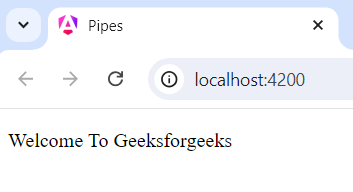
Here we provide an example for Launch app with Angular root module by using the bootstrap approach and we provide source code of app.module file for your reference.
import { NgModule } from '@angular/core';
import { BrowserModule } from '@angular/platform-browser';
import { AppComponent } from './app.component';

@NgModule({
    declarations: [AppComponent],
    imports: [BrowserModule],
    bootstrap: [AppComponent]
})
export class AppModule { }
Using Angular CLI Commands
The Angular CLI provides commands that automatically generate the root module and component and set up the bootstrap process.
Syntax
ng new emailValidatorApp --no-standalone
cd emailValidatorApp
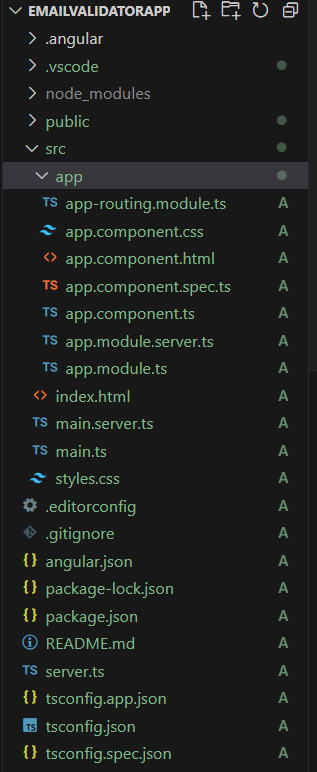
Folder Structure
Dependencies
"dependencies": {
    "@angular/animations": "^18.0.0",
    "@angular/common": "^18.0.0",
    "@angular/compiler": "^18.0.0",
    "@angular/core": "^18.0.0",
    "@angular/forms": "^18.0.0",
    "@angular/platform-browser": "^18.0.0",
    "@angular/platform-browser-dynamic": "^18.0.0",
    "@angular/platform-server": "^18.0.0",
    "@angular/router": "^18.0.0",
    "@angular/ssr": "^18.0.0",
    "express": "^4.18.2",
    "rxjs": "~7.8.0",
    "tslib": "^2.3.0",
    "zone.js": "~0.14.3"
}
Run the below mentioned command, to run the application
ng serveOutput