

REST APIs are commonly used for communication between microservices. As applications evolve, APIs often require new features or behavioral changes without breaking existing client applications. API versioning solves this problem by allowing multiple versions of the same API to coexist, ensuring backward compatibility while enabling continuous development.
- Maintains backward compatibility for existing clients.
- Allows new features to be introduced without breaking older APIs.
- Makes API evolution easier in large microservice architectures.
Versioning of API
API versioning is the process of creating multiple versions of the same API so that existing clients continue working while new clients can use enhanced functionality.
But when implementing new functionality we should not revoke the old endpoints because it might be used at some place where it plays a major role. Thus keeping them both in an application is only the solution, and thus we will give the version number so that the user or other developer gets to know that for a new application, they have to use a new Versioned API.
Example:
Suppose an application initially provides an endpoint that returns all books.
GET /get-books
Instead of modifying the existing endpoint, a new version can introduce pagination.
GET /v2/get-books?page=0&size=10
Need of Versioning
Most important need is to keep running the old method for old customers while introduce new functionality for new customers. Here is the list of important points for which the versioning of API is must.
- Maintaining Compatibility: Versioning allows us to keep existing customers to continue using the API without disruption, even as new features are added.
- Isolating Changes: By introducing versioning, changes made to one version of the API won't affect other versions, ensuring stability.
- Granular Control: With versioning, we as developer have granular control over which features are available to different clients.
- Clear Communication: With Versioning we can give clear description of APIs to our customer that whether the APIs is obsolete or it is in experiment.
Methods of Versioning APIs
There are different ways in which we can create versions in APIs. Widely used methods are explained below
1. URL Versioning
In this approach the version number is included directly in the URL.
- If the normal URL looks like http://localhost:8080/get-books,
- Then it will become http://localhost:8080/v1/get-books and http://localhost:8080/v2/get-books.
Note: Problem with this approach is that it will clutter the URL and thus this is not good for long term maintainability.
2. Query Parameter Versioning
In this approch the version is passed as a query parameter.
Example:
Before: http://localhost:8080/get-books
After: http://localhost:8080/get-books?version=1.0 and http://localhost:8080/get-books?version=2.0
This will keep the main URL but it will add the bottleneck of parameter and thus sometimes it may be less intuitive for clients.
3. Header Versioning
In this approch the version is specified in the request header.
GET /get-books HTTP/1.1
Host: localhost:8080
Accept: application/json
X-API-Version: 1
Here the URL is not tempered but the only problem is that client may require additional effort to manage the version header.
Implementation of REST API Versioning in Java Microservices
In this section, we will build a Spring Boot-based Library Management System that demonstrates three API versioning techniques:
Step 1: Create Spring Boot Project
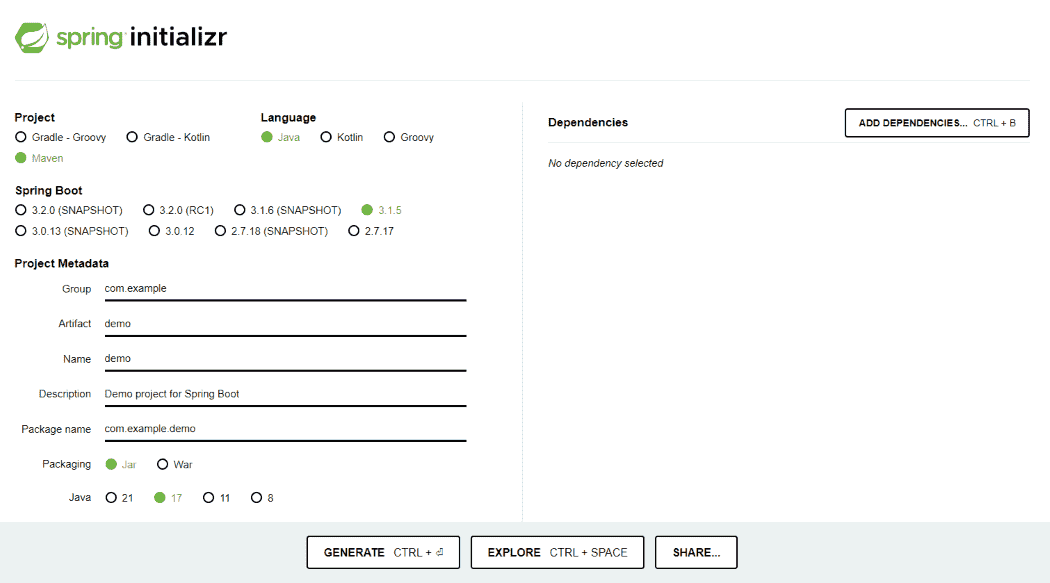
Create a Spring Boot project using Spring Initializr.
Select the following dependencies:
- Spring Web
- Spring Data JPA
- Database Driver
- Spring Boot DevTools
- Spring Boot Test
Step 2: Create Database and Table
Create a Table in Database with below query:
CREATE TABLE IF NOT EXISTS public.books
(
bookid integer NOT NULL PRIMARY KEY,
title character varying(255),
author character varying(255) ,
category character varying(255),
quantity integer, availablequantity integer,
)
Step 3: Review The pom.xml file
Review the Pom.xml file and verified with below dependency.
<?xml version="1.0" encoding="UTF-8"?>
<project xmlns="https://maven.apache.org/POM/4.0.0"
    xmlns:xsi="https://www.w3.org/2001/XMLSchema-instance"
    xsi:schemaLocation="https://maven.apache.org/POM/4.0.0 https://maven.apache.org/xsd/maven-4.0.0.xsd">
    <modelVersion>4.0.0</modelVersion>
    <parent>
        <groupId>org.springframework.boot</groupId>
        <artifactId>spring-boot-starter-parent</artifactId>
        <version>3.2.5</version>
        <relativePath /> <!-- lookup parent from repository -->
    </parent>
    <groupId>com.lms</groupId>
    <artifactId>LibraryManagementSystem</artifactId>
    <version>0.0.1-SNAPSHOT</version>
    <name>LibraryManagementSystem</name>
    <description>Demo project for Spring Boot</description>
    <properties>
        <java.version>17</java.version>
    </properties>
    <dependencies>
        <dependency>
            <groupId>org.springdoc</groupId>
            <artifactId>springdoc-openapi-starter-webmvc-ui</artifactId>
            <version>2.5.0</version>
        </dependency>

        <dependency>
            <groupId>org.springframework.boot</groupId>
            <artifactId>spring-boot-starter-web</artifactId>
        </dependency>

        <dependency>
            <groupId>org.springframework.boot</groupId>
            <artifactId>spring-boot-starter-data-jpa</artifactId>
        </dependency>

        <dependency>
            <groupId>org.springframework.boot</groupId>
            <artifactId>spring-boot-starter-test</artifactId>
            <scope>test</scope>
        </dependency>

        <!--Package of the Database you are using-->

        <dependency>
            <groupId>org.springframework.boot</groupId>
            <artifactId>spring-boot-devtools</artifactId>
        </dependency>
        <dependency>
            <groupId>org.jetbrains</groupId>
            <artifactId>annotations</artifactId>
            <version>RELEASE</version>
            <scope>compile</scope>
        </dependency>


    </dependencies>


    <build>
        <plugins>
            <plugin>
                <groupId>org.springframework.boot</groupId>
                <artifactId>spring-boot-maven-plugin</artifactId>
            </plugin>
        </plugins>
    </build>

</project>
Step 4: Configure application.properties
Configure the following properties in application.properties file.
spring.application.name=LibraryManagementSystem
spring.datasource.url= YOUR CONNECTION STRING
spring.datasource.username= USERNAME
spring.datasource.password= PASSWORD
Step 5: Create the Main Application Class
Create the main Spring Boot application class. This class serves as the application's entry point and also configures Swagger groups for different API versions.
import io.swagger.v3.oas.models.info.Info;
import org.springdoc.core.customizers.OpenApiCustomizer;
import org.springdoc.core.customizers.OperationCustomizer;
import org.springdoc.core.models.GroupedOpenApi;
import org.springframework.boot.SpringApplication;
import org.springframework.boot.autoconfigure.SpringBootApplication;
import org.springframework.context.annotation.Bean;


@SpringBootApplication()
public class LibraryManagementSystemApplication {

    public static void main(String[] args) {
        SpringApplication.run(LibraryManagementSystemApplication.class, args);
    }

    //It will create a version in Swagger if you are not going with
    //swagger then remove all this beans
    @Bean
    public GroupedOpenApi version1() {
        return GroupedOpenApi.builder()
                .group("LMS-api-1.0")
                .pathsToMatch("/v1/**")
                .addOpenApiCustomizer(setDocumentation("1.0"))
                .build();
    }

    @Bean
    public GroupedOpenApi version2() {
        return GroupedOpenApi.builder()
                .group("LMS-api-2.0")
                .pathsToMatch("/v2/**")
                .addOpenApiCustomizer(setDocumentation("2.0"))
                .build();
    }


    @Bean
    public GroupedOpenApi headerVersionedApi() {
        return GroupedOpenApi.builder()
                .group("Header-Versioned-API")
                .pathsToMatch("/**")
                .addOperationCustomizer(getHeadersVersionedApi())
                .addOpenApiCustomizer(setDocumentation(""))
                .build();
    }


    private OpenApiCustomizer setDocumentation(String version)
    {
        return  (openApi -> {
            openApi.info(new Info().title("Library Management System").version(version).description("This is the another version of LMS"));
        });
    }

    //This will return only those methods which have required header "X-API-VERSION"
    private OperationCustomizer getHeadersVersionedApi() {
        return (operation, handlerMethod) -> {
            var parameters = operation.getParameters();
            if(parameters!=null && parameters.stream().anyMatch(parameter -> {
                return (parameter.getName().equals("X-API-VERSION")||(parameter.getName().equals("version")));
            }))
            {
                return operation;
            }

            return null;
        };
    }
}
Step 6: Create the Controller Class
Create the BookController class to expose REST endpoints for URL versioning, header versioning, and query parameter versioning. These endpoints handle incoming client requests and delegate processing to the service layer.
import com.lms.LibraryManagementSystem.Models.Books;
import com.lms.LibraryManagementSystem.Services.BookServices;
import com.lms.LibraryManagementSystem.ViewModels.BookViewModel;
import org.springdoc.core.annotations.ParameterObject;
import org.springframework.beans.factory.annotation.Autowired;
import org.springframework.data.domain.Page;
import org.springframework.http.ResponseEntity;
import org.springframework.web.bind.annotation.*;
import org.springframework.data.domain.Pageable;

import java.util.List;


@RestController
public class BookController {

    @Autowired
    BookServices bookServices;

    //It will return all the books. Also, this is v1 API
    @GetMapping(value="/v1/get-all-books")
    public ResponseEntity<List<Books>> getAllBook() {
        List<Books> list = bookServices.GetAllBooks();
        return ResponseEntity.ok(list);
    }

    //API for Adding book in Database
    @PostMapping("/v1/addBook")
    public ResponseEntity<String> addBook(@RequestBody BookViewModel model)
    {
        bookServices.addBook(model);
        return  ResponseEntity.ok("Book Added Successfully");
    }

    //API for Deleting Book
    @DeleteMapping("/v1/delete-book/{id}")
    public ResponseEntity<String> deleteBook(@PathVariable("id") Integer id) {

        bookServices.deleteBook(id);
        return  ResponseEntity.ok("Book Deleted Successfully");
    }

    //API for Editing book
    @PutMapping("/v1/editBook")
    public ResponseEntity<Object> editBook(@RequestBody Books model)
    {
        var result = bookServices.editBook(model);
        return result.<ResponseEntity<Object>>map(ResponseEntity::ok).orElseGet(() -> ResponseEntity.badRequest().body("Book not Found"));

    }

    //This will return only book whose id is passed as parameter
    @GetMapping("/v2/get-book/{id}")
    public ResponseEntity<Object> getBook(@PathVariable("id") Integer id) {
        var book = bookServices.GetBook(id);
        return book.<ResponseEntity<Object>>map(ResponseEntity::ok).orElseGet(() -> ResponseEntity.badRequest().body("Book Not Found"));

    }

    //Return all the Books with page number and page size
    @GetMapping("/v2/get-all-books")
    public ResponseEntity<List<Books>> getBooks(@ParameterObject Pageable pageSize)
    {
        Page<Books> list = bookServices.GetBooks(pageSize);
        return ResponseEntity.ok(list.toList());
    }

    //Header Versioned API
    //This v1 API which returns all books
    @GetMapping(value = "/get-all-books", headers = "X-API-VERSION=1.0")
    public ResponseEntity<List<Books>> getBooksByHeaders()
    {
        List<Books> list = bookServices.GetAllBooks();
        return ResponseEntity.ok(list);
    }

    //This v2 API which returns books based on Page no. and Page size
    @GetMapping(value = "/get-all-books", headers = "X-API-VERSION=2.0")
    public ResponseEntity<List<Books>> getBooksByHeaders(@ParameterObject Pageable pageSize)
    {
        Page<Books> list = bookServices.GetBooks(pageSize);
        return ResponseEntity.ok(list.toList());
    }


    //These are all Parameter versioned API
    //This v1 API which returns all books
    @GetMapping(value = "/get-all-booksPara", params = "version=1.0")
    public ResponseEntity<List<Books>> getBooksByParam()
    {
        List<Books> list = bookServices.GetAllBooks();
        return ResponseEntity.ok(list);
    }

    //This v2 API which returns only book which is on given Page
    @GetMapping(value = "/get-all-booksPara", params = "version=2.0")
    public ResponseEntity<List<Books>> getBooksByParam(@ParameterObject Pageable pageSize)
    {
        Page<Books> list = bookServices.GetBooks(pageSize);
        return ResponseEntity.ok(list.toList());
    }
}
Step 7: Create the Service Class
Create the BookServices class to implement the application's business logic. It performs CRUD operations, pagination, and communicates with the repository layer.
import org.springframework.data.domain.Page;
import org.springframework.data.domain.Pageable;
import java.util.List;
import java.util.Optional;

import com.lms.LibraryManagementSystem.Repository.Implementations.BookRepository;
import com.lms.LibraryManagementSystem.ViewModels.BookViewModel;
import org.springframework.beans.factory.annotation.Autowired;
import org.springframework.stereotype.Service;

import com.lms.LibraryManagementSystem.Models.Books;

@Service
public class BookServices {
    @Autowired
    BookRepository bookRepository;

    //Returns all the books present in the database
    public List<Books> GetAllBooks()
    {
        return bookRepository.findAll();
    }

    public Optional<Books> GetBook(Integer id)
    {
        //Find the book and return the Optional Book object
        return bookRepository.findById(id);
    }

    public void addBook(@org.jetbrains.annotations.NotNull BookViewModel model)
    {
        //Create an object of Books from BookViewModel
        Books book = new Books();
        book.setAuthor(model.authorName);
        book.setCategory(model.category);
        book.setQuantity(model.quantity);
        book.setAvailableQuantity(model.availableQuantity);
        book.setTitle(model.bookName);

        bookRepository.addBook(book);
        return;
    }

    public Optional<Books>  editBook(@org.jetbrains.annotations.NotNull Books model)
    {
        Optional<Books> result = bookRepository.findById(model.getBookId());

        //Checks whether books is Present and if it is present than update them or return the result.
        if(result.isPresent())
        {

            Books book = result.get();

            book.setAuthor(model.getAuthor());
            book.setCategory(model.getCategory());
            book.setQuantity(model.getQuantity());
            book.setAvailableQuantity(model.getAvailableQuantity());
            book.setTitle(model.getTitle());

            bookRepository.editBook(book);
            return result;
        }
        return result;
    }

    public void deleteBook(int id)
    {
        Optional<Books> book = bookRepository.findById(id);

        //Delete the book if Present else do nothing
        book.ifPresent(books -> bookRepository.delete(books));

        return;
    }

    public Page<Books> GetBooks(Pageable pageSize) {
        //Find the books based on Pageable object
        return bookRepository.findAll(pageSize);
    }
}
Step 8: Create the Repository Class
Create the BookRepository class to interact with the database. This class uses Spring Data JPA to perform CRUD and pagination operations on the books table.
import com.lms.LibraryManagementSystem.Models.Books;
import com.lms.LibraryManagementSystem.Repository.Contracts.IBookRepository;
import org.springframework.beans.factory.annotation.Autowired;
import org.springframework.data.domain.Page;
import org.springframework.stereotype.Repository;

import org.springframework.data.domain.Pageable;
import java.util.List;
import java.util.Optional;

@Repository
public class BookRepository {
    @Autowired
    IBookRepository bookRepository;


    public List<Books> findAll() {
        return bookRepository.findAll();
    }

    public Optional<Books> findById(Integer id) {
        return  bookRepository.findById(id);
    }

    public Page<Books> findAll(Pageable pageSize) {
        return bookRepository.findAll((org.springframework.data.domain.Pageable) pageSize);
    }

    public void addBook(Books model)
    {
        bookRepository.save(model);
        return;
    }

    public void delete(Books book) {
        bookRepository.delete(book);
    }

    public void editBook(Books book) {
        bookRepository.save(book);
    }


}
Step 9: Create the Entity Class
Create the Books entity class that maps the Java object to the books database table. Each field in the class corresponds to a column in the database.
import jakarta.persistence.*;

@Entity
public class Books {
    @Id
    @GeneratedValue(strategy = GenerationType.IDENTITY)
    @Column(name = "bookid")
    private int bookId;

    @Column(name = "title")
    private String title;

    @Column(name = "author")
    private String author;

    @Column(name = "category")
    private String category;

    @Column(name = "quantity")
    private int quantity;

    @Column(name = "availablequantity")
    private int availableQuantity;

    // Constructor
    public Books() {}

    // Getters and setters
    public int getBookId() {
        return bookId;
    }

    public void setBookId(int bookId) {
        this.bookId = bookId;
    }

    public String getTitle() {
        return title;
    }

    public void setTitle(String title) {
        this.title = title;
    }

    public String getAuthor() {
        return author;
    }

    public void setAuthor(String author) {
        this.author = author;
    }

    public String getCategory() {
        return category;
    }

    public void setCategory(String category) {
        this.category = category;
    }

    public int getQuantity() {
        return quantity;
    }

    public void setQuantity(int quantity) {
        this.quantity = quantity;
    }

    public int getAvailableQuantity() {
        return availableQuantity;
    }

    public void setAvailableQuantity(int availableQuantity) {
        this.availableQuantity = availableQuantity;
    }
}
Step 10: Create the ViewModel Class
Create the BookViewModel class to receive book details from client requests. Using a ViewModel helps separate API request data from the database entity.
public class BookViewModel {
    public  String bookName;

    public String authorName;

    public String category;

    public int quantity;

    public  int availableQuantity;
}
Step 11: Run the Application
Run the Spring Boot application and open the Swagger UI to verify all API versioning strategies. Test the URL-based, header-based, and query parameter-based versioned endpoints.
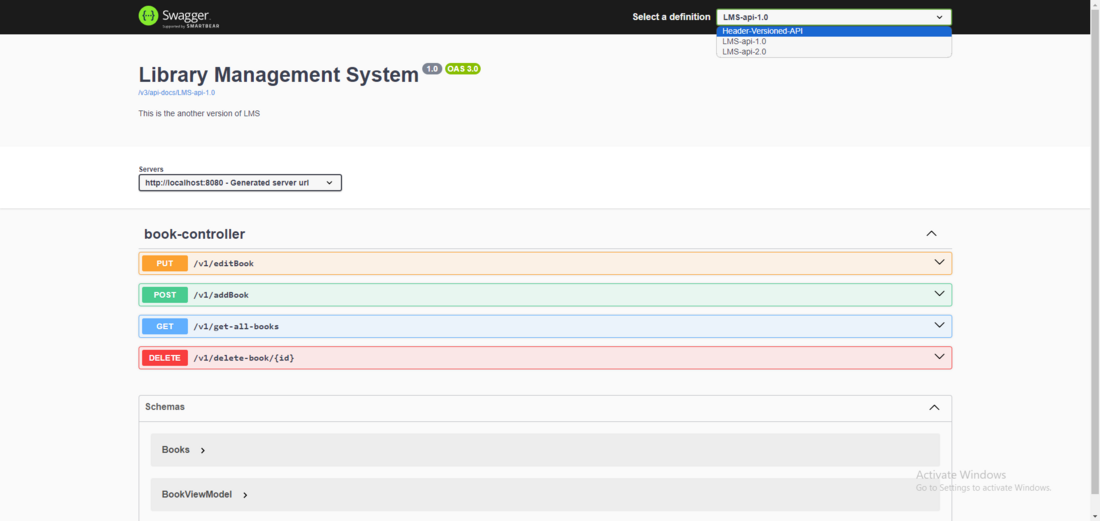
Similar to this, we have more 2 dropdown option of Version 2 APIs and another one is Headers versioned APIs.
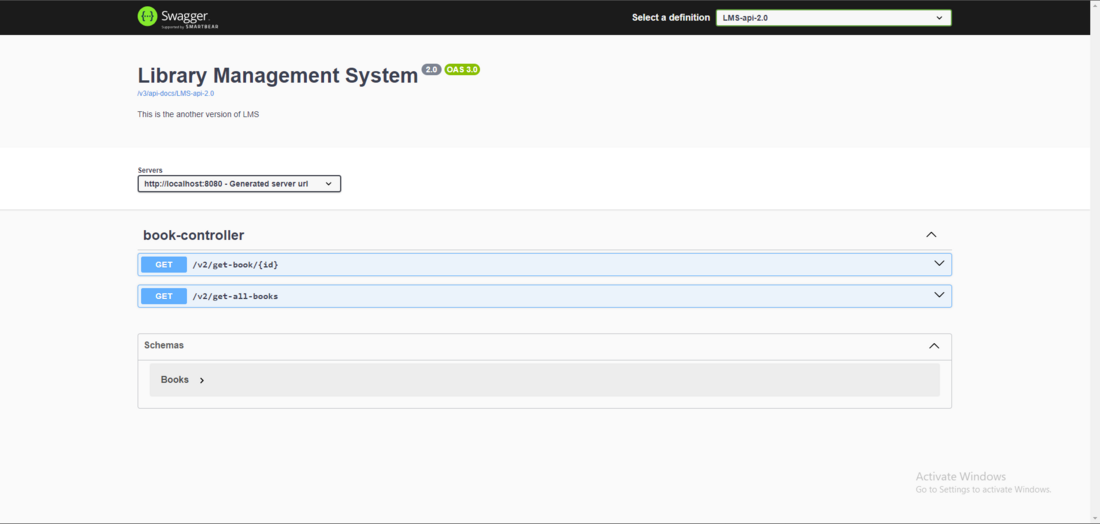
So by this we can separate the versions clearly with good documentation. Now let's explore get-all-books api for better understanding.
Version 1 of get-all-books:
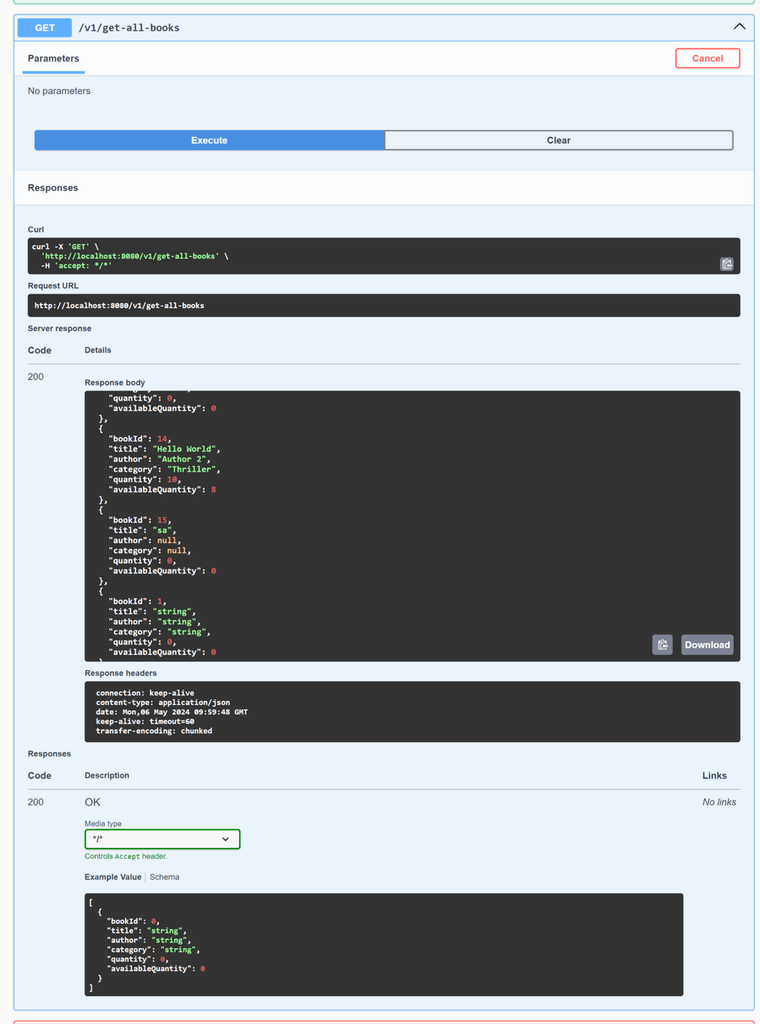
So there is not parameter as expected and it will return all the books from the database. Which will take the time and resources and thus we can implement another API for paginated books.
Version 2 of get-all-books:
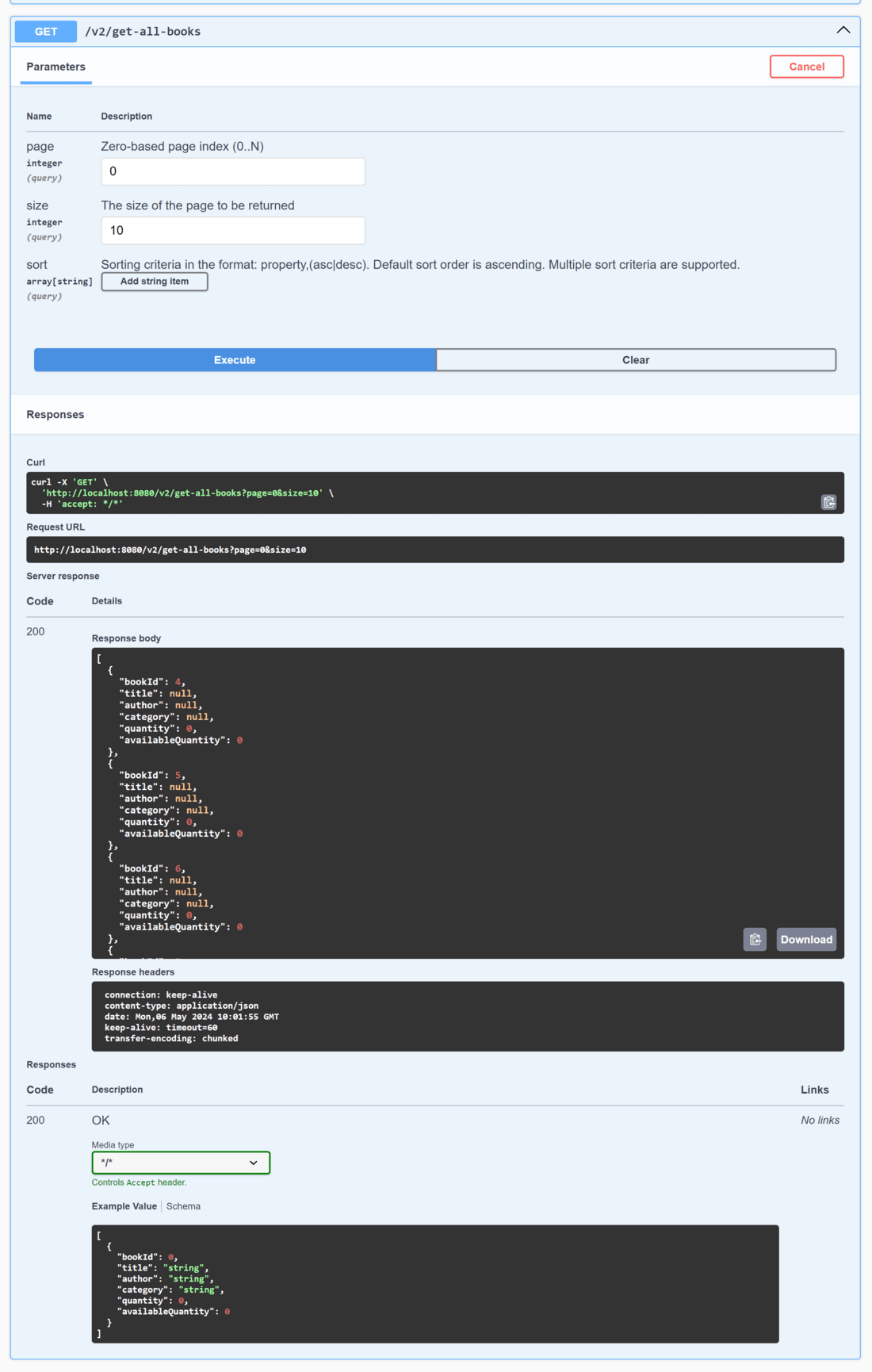
So as parameter was Pageable we have three parameter: page, size and sort. Which will return only the books which satisfy this conditions. Now with this our old endpoints are still there in place and by adding this won't disrupt that.
Header Versioned API
Now let's look at Header versioned API.
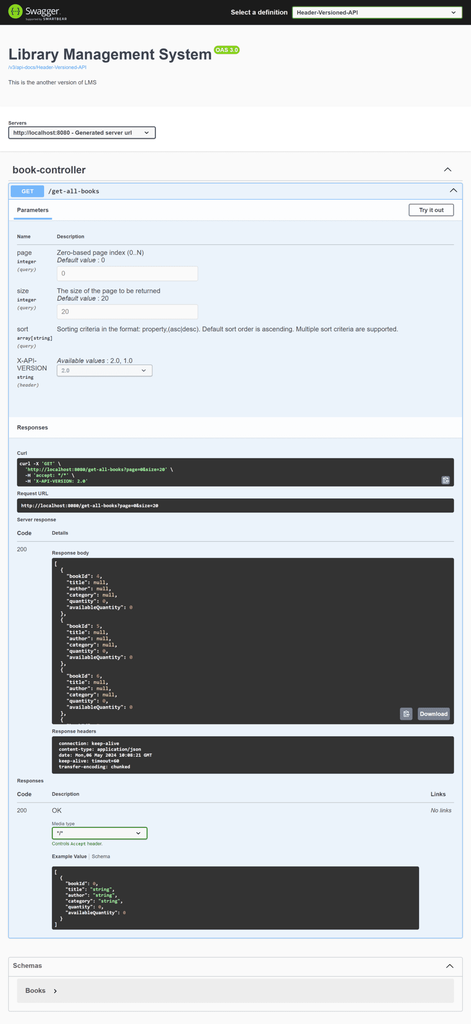
So there is one parameter X-API-VERSION which ensures keeping the versioning of API properly the other parameters are for meeting condition of different version it will take the parameter only if that version is going to receive it.
Parameter based Versioning
Let's see how parameter based versioning works.
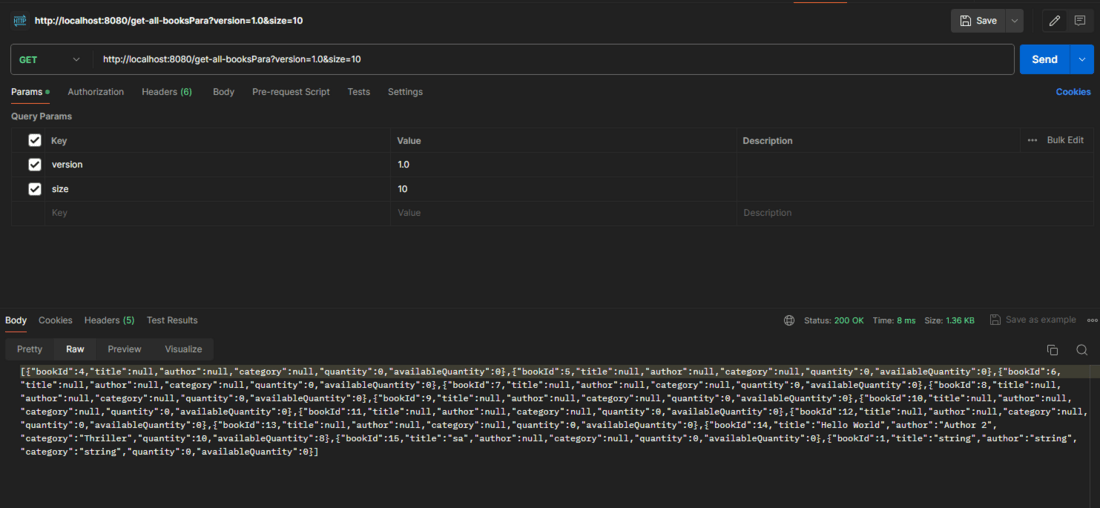
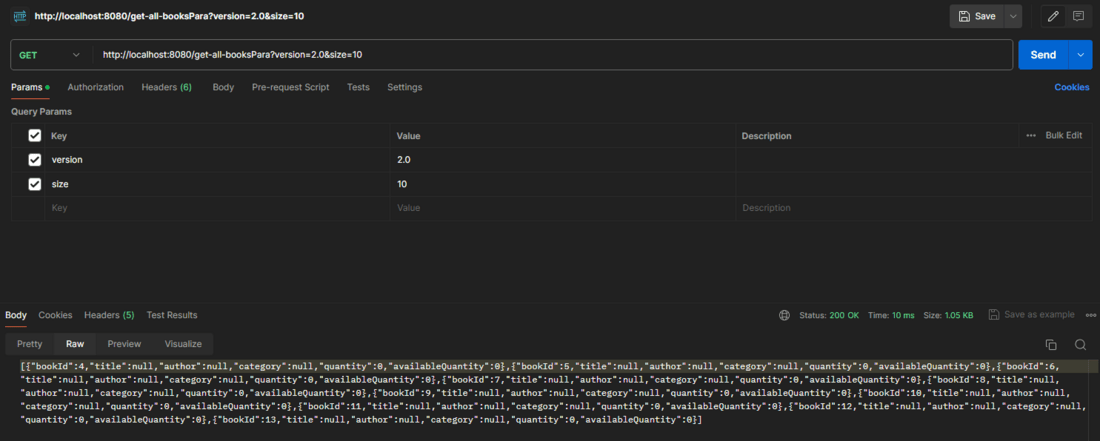
So we have given the version with the query string and for demonstration. We have also given the size parameter but it won't affect it anyhow.
But if we give the size with Version 10 it will retrieve only 10 entries from the database.
Advance Versioning Technique
Content Negotiation:
In this method, we will version the APIs based on the type produced by endpoint. Which means based on the Accept type in the request the Method will be called.
GET /resource HTTP/1.1
Host: api.example.com
Accept: application/vnd.example.v1+json
If the above request is made then the Method producing will be called.
