

JUnit testing interview questions are commonly asked to check your understanding of Java unit testing concepts and how to write reliable and maintainable test cases. These questions mainly cover both JUnit 4 and JUnit 5 features used in real-world testing.
- Focuses on annotations, assertions, lifecycle methods, parameterized tests, and exception testing
- Includes mocking basics, test suites, and best practices for clean unit testing
1. What is JUnit?
JUnit is a popular Java testing framework used to write and run unit test cases. It helps developers verify that each method or module works correctly and ensures code quality by catching bugs early in the development process.
- Used to test Java classes and methods automatically
- Supports annotations like @Test, @BeforeEach, and @AfterEach
- Commonly used with Maven/Gradle and Spring Boot projects
2. Why is unit testing important?
Unit testing is important because it helps ensure that each small part of the application (like a method or class) works correctly before integrating it with other parts. It reduces bugs, improves code quality, and makes future changes safer.
- Detects bugs early in development
- Makes code easier to maintain and refactor
- Improves confidence before deployment
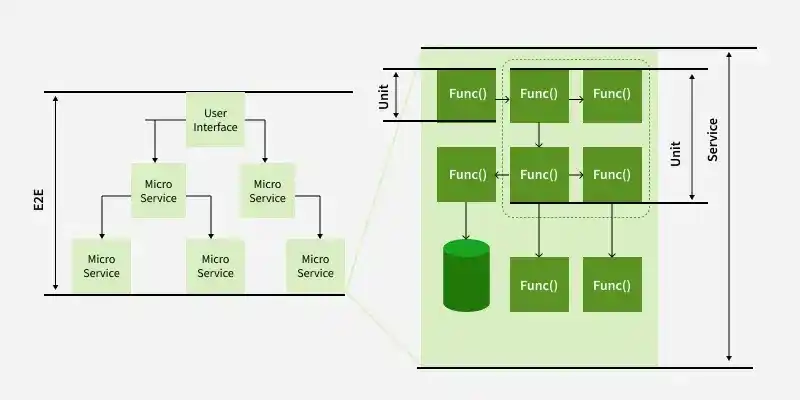
3. What is the difference between JUnit 4 and JUnit 5?
JUnit 5 is the modern version of JUnit with better modular architecture and more advanced features compared to JUnit 4.
| Feature | JUnit 4 | JUnit 5 |
|---|---|---|
| Version Type | Older testing framework | Newer and modern framework |
| Main Package | org.junit.* | org.junit.jupiter.* |
| Lifecycle Annotations | @Before, @After | @BeforeEach, @AfterEach |
| Advanced Features | Limited features | Supports nested, dynamic, parameterized tests |
4. What are the main modules of JUnit 5?
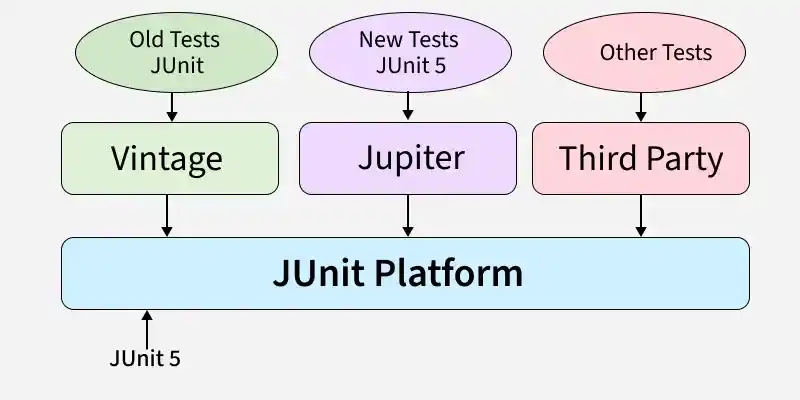
JUnit 5 is designed in a modular way, which makes it more flexible and powerful than older versions. It is mainly divided into three core modules that work together to run and manage test cases.
- JUnit Platform: Provides the foundation to launch testing frameworks on the JVM
- JUnit Jupiter: Contains new annotations and APIs to write and run tests in JUnit 5
- JUnit Vintage: Supports running older JUnit 3 and JUnit 4 tests in JUnit 5
5. What is the use of @Test annotation?
The @Test annotation is used to mark a method as a test case in JUnit. When the test suite runs, JUnit automatically detects and executes all methods annotated with @Test to verify the expected behavior of the code.
- Identifies a method as a unit test
- JUnit executes it automatically during test runs
- Helps validate output using assertions like assertEquals()
6. What are assertions in JUnit?
Assertions in JUnit are used to check whether the actual output matches the expected output in a test case. If an assertion fails, JUnit marks the test as failed, helping developers identify issues quickly.
- Used to validate expected results in unit tests
- If an assertion fails, the test case is marked as FAILED
- Common methods: assertEquals(), assertTrue(), assertFalse()
- Also supports checks like assertNotNull() and assertThrows()
7. What is the use of @BeforeEach in JUnit 5?
@BeforeEach in JUnit 5 is used to run a method before every test case in a test class. It is mainly used for setting up common test data or initializing objects so that each test runs with a fresh setup.
- Executes before each @Test method
- Used for initializing objects and test data
- Helps avoid repeated setup code inside every test method
- Ensures test cases run independently with a clean state
8. What is the use of @AfterEach in JUnit 5?
@AfterEach in JUnit 5 is used to run a method after every test case in a test class. It is mainly used for cleanup tasks like closing resources, resetting values, or releasing memory after each test execution.
- Executes after each @Test method
- Used for cleanup operations (closing files, DB connections, etc.)
- Helps keep test environment clean for the next test
- Ensures resources are properly released after every test run
9. What is @BeforeAll and @AfterAll in JUnit?
@BeforeAll and @AfterAll in JUnit are used to run methods only once for the entire test class. @BeforeAll runs before all test methods, and @AfterAll runs after all test methods, mainly for global setup and cleanup.
- @BeforeAll runs once before any test method executes
- @AfterAll runs once after all test methods finish
- Methods must be static by default unless the test class uses @TestInstance(Lifecycle.PER_CLASS).
- Used for one-time setup/cleanup like DB connection, server start/stop
10. What is a Test Suite in JUnit?
A Test Suite in JUnit is a collection of multiple test classes that are executed together as a single group. It is useful when you want to run all related test cases at once, such as running all tests for a module or feature.
- Groups multiple test classes into one execution
- Helps run complete module or project testing together
- Improves test organization and management
- Can be created using suite annotations in JUnit
11. What is the difference between @BeforeEach and @BeforeAll?
BeforeEach and @BeforeAll are both setup annotations in JUnit 5, but they run at different times. @BeforeEach runs before every test method, while @BeforeAll runs only once before all test methods in the class.
| Feature | @BeforeEach | @BeforeAll |
|---|---|---|
| Execution Time | Runs before each test method | Runs once before all test methods |
| Frequency | Multiple times (for every test) | Only one time |
| Use Case | Common setup for each test | One-time setup (DB/server init) |
| Method Type | Can be normal method | Must be static (by default) |
12. What is @Disabled annotation in JUnit 5?
@Disabled in JUnit 5 is used to temporarily skip a test method or an entire test class during execution. It is helpful when a test is under development, failing due to a known issue, or not ready to run.
- Skips the test method or test class during test execution
- Useful for temporarily disabling failing or incomplete tests
- Can include a reason like @Disabled("Feature not ready")
- Helps avoid test suite failures without deleting code
Example:
@Disabled("Not implemented yet")
@Test
void testFeature() {
}
13. How do you test exceptions in JUnit 5?
In JUnit 5, exceptions are tested using the assertThrows() method. It checks whether a specific exception is thrown when executing a piece of code, and the test passes only if the expected exception occurs.
- Test passes only when the expected exception is thrown
- Helps validate error handling logic in code
- You can also verify the exception message if needed
Example:
assertThrows(ArithmeticException.class, () -> {
int result = 10 / 0;
});
14. What is Parameterized Test in JUnit 5?
A Parameterized Test in JUnit 5 is a type of test that runs the same test method multiple times with different input values. It helps reduce duplicate test code and improves test coverage by testing multiple scenarios in one method.
- Written using @ParameterizedTest instead of @Test
- Accepts multiple inputs using sources like @ValueSource, @CsvSource
- Runs the same test logic for each input value
- Useful for validating multiple test cases efficiently
15. What is @ValueSource in parameterized tests?
@ValueSource in JUnit 5 is used to provide a single list of values as input to a parameterized test. It allows the same test method to run multiple times, once for each value given in the annotation.
- Used with
@ParameterizedTest - Supports types like
int,long,double,String, etc. - Runs the test method for each value provided
Example:
@ParameterizedTest
@ValueSource(ints = {1, 2, 3})
void testPositiveNumbers(int num) {
assertTrue(num > 0);
}
16. What is @CsvSource in JUnit?
@CsvSource in JUnit 5 is used in parameterized tests to provide multiple sets of input values in CSV (comma-separated) format. It allows you to pass more than one argument to a test method and run the test multiple times with different data.
- Used with @ParameterizedTest for multiple inputs
- Each line represents one test case with multiple parameters
- Useful for testing method outputs with different combinations
Example:
@ParameterizedTest
@CsvSource({"1,2,3", "5,5,10"})
void testAdd(int a, int b, int sum) {
assertEquals(sum, a + b);
}
17. What is the use of @RepeatedTest?
@RepeatedTest in JUnit 5 is used to run the same test method multiple times. It is helpful when you want to verify consistency, test flaky behavior, or run a test repeatedly under the same conditions.
- Executes the same test case multiple times
- Useful for testing stability and repeated execution scenarios
- Can specify count like
@RepeatedTest(5) - Provides repetition info using
RepetitionInfoif needed
Example:
@RepeatedTest(5)
void testMultipleTimes() {
}
18. What is the use of @DisplayName?
@DisplayName in JUnit 5 is used to give a custom readable name to a test class or test method. It makes test reports more meaningful and easy to understand instead of showing method names.
- Improves readability of test output and reports
- Can be used on both test methods and test classes
- Supports spaces and special characters in names
Example:
@DisplayName("Check if sum works correctly")
@Test
void testSum() {
}
19. What is the use of @Nested in JUnit 5?
@Nested in JUnit 5 is used to create inner test classes inside a test class to organize test cases in a structured way. It is helpful when you want to group related tests together, such as testing different scenarios of the same feature.
- Helps group test cases logically inside one class
- Improves readability and structure of test code
- Nested classes can have their own setup methods like @BeforeEach
- Useful for scenario-based testing (valid/invalid cases)
20. What is the difference between unit testing and integration testing?
Unit testing and integration testing are both important in software testing, but they focus on different levels. Unit testing checks individual methods or classes, while integration testing verifies how multiple components work together (like service + database).
| Feature | Unit Testing | Integration Testing |
|---|---|---|
| Focus | Tests individual method/class | Tests combined modules/components |
| Dependencies | Uses mocks/stubs, no real external systems | Uses real DB, APIs, services, etc. |
| Speed | Very fast | Slower than unit tests |
| Goal | Validate small logic correctness | Validate end-to-end component interaction |
21. What is mocking in testing?
Mocking in testing means creating a fake object that behaves like a real dependency. It is mainly used in unit testing to isolate the code being tested, without calling real database, API, or external services.
- Helps test a class independently without real dependencies
- Used to simulate method responses and behaviors
- Commonly done using Mockito framework
- Makes unit tests faster and more reliable
22. What is the use of assertAll() in JUnit 5?
assertAll() in JUnit 5 is used to execute multiple assertions together in a single test. It ensures that all assertions are checked, and even if one fails, the remaining assertions still run, showing all failures at once.
- Runs multiple assertions in one test method
- Reports all assertion failures together
- Useful for validating multiple fields/conditions
- Helps avoid stopping the test at the first failure
Example:
assertAll(
() -> assertEquals(10, result),
() -> assertTrue(result > 0)
);
23. What is test-driven development (TDD)?
Test-Driven Development (TDD) is a software development approach where you write test cases before writing the actual code. The goal is to develop code in small steps by first failing a test, then writing code to pass it, and finally improving the code.
- Follow the cycle: Red -> Green -> Refactor
- Ensures better code quality and fewer bugs
- Helps in designing clean and testable code
- Makes development more structured and reliable
24. What is the purpose of @TestInstance in JUnit 5?
@TestInstance in JUnit 5 is used to control the lifecycle of the test class instance. By default, JUnit creates a new instance for each test method, but using @TestInstance you can make JUnit use a single instance for all tests.
- Controls whether JUnit creates new instance per test or single instance
- Supports Lifecycle.PER_METHOD (default) and Lifecycle.PER_CLASS
- Useful when you want to use non-static @BeforeAll and @AfterAll
- Helps maintain shared state across tests (when needed)
25. What is the difference between assertThrows() and assertDoesNotThrow()?
assertThrows() verifies that a specific exception is thrown, while assertDoesNotThrow() ensures that a block of code executes without throwing any exception. Both methods help validate exception handling behavior.
- assertThrows() expects an exception
- assertDoesNotThrow() expects successful execution
- Improves reliability of exception-related test cases
26. What is assertTimeout() in JUnit 5?
assertTimeout() verifies that a block of code completes within a specified time limit. If the execution exceeds the timeout, the test fails.
- Checks execution time of code
- Helps detect slow-running methods
- Useful for performance-sensitive unit tests
Example:
assertTimeout(Duration.ofSeconds(2), () -> {
service.process();
});
27. What is the difference between assertEquals() and assertSame()?
assertEquals() compares the values of two objects, whereas assertSame() checks whether both references point to the exact same object in memory.
| assertEquals() | assertSame() |
|---|---|
| Compares values | Compares object references |
| Uses equals() method | Uses == operator |
| Most commonly used | Used when checking object identity |
28. What is assertArrayEquals()?
assertArrayEquals() verifies that two arrays contain the same elements in the same order.
- Used for comparing arrays
- Checks both length and element values
- Fails if any element differs
29. What is assertIterableEquals()?
assertIterableEquals() compares two iterable collections such as List or Set and verifies that they contain the same elements in the same order.
- Used for List, Queue, and other iterable collections
- Compares elements one by one
- Useful for collection testing
30. What is @Tag annotation in JUnit 5?
@Tag is used to categorize test cases into groups, allowing specific tests to be included or excluded during execution.
- Groups related test cases
- Useful for Smoke, Regression, Integration testing
- Can run selected test categories
Example:
@Tag("Regression")
@Test
void testLogin() {
}
31. What is @Order annotation?
@Order in JUnit 5 is used with @TestMethodOrder(MethodOrderer.OrderAnnotation.class) to specify the execution order of test methods. A lower order value indicates a higher priority.
- Used to control the execution order of Beans, Filters, Interceptors, and Aspects.
- Lower value = Higher priority (e.g., @Order(1) executes before @Order(2)).
- Commonly used with Spring AOP, Event Listeners, and Collection Injection where execution order matters.
32. What is @TestMethodOrder?
The @TestMethodOrder annotation in JUnit 5 is used to define the order in which test methods are executed. It allows you to specify a test execution strategy using a MethodOrderer.
- Controls the execution order of test methods in a test class.
- Supports ordering by method name, display name, or @Order annotation.
- Commonly used when tests have dependencies or need to run in a specific sequence.
33. What is @MethodSource?
The @MethodSource annotation in JUnit 5 is used to supply test data from a method for parameterized tests. It allows the same test method to run with multiple sets of input values.
- Used with @ParameterizedTest to provide test arguments from a method.
- The source method returns Stream, List, Collection, Iterator, or an array of arguments.
- Useful for testing multiple input combinations without writing separate test methods.
34. What is @CsvFileSource?
The @CsvFileSource annotation in JUnit 5 is used to read test data from a CSV file for parameterized tests. Each row in the CSV file is treated as a separate set of input values.
- Used with @ParameterizedTest to load test data from an external CSV file.
- Supports multiple rows of input, making test data easier to manage.
- Ideal for data-driven testing without hardcoding test values in the code.
35. What are @NullSource, @EmptySource, and @NullAndEmptySource?
These JUnit 5 annotations are used with @ParameterizedTest to test how a method behaves with null and empty input values.
- @NullSource provides a single null value as the test input.
- @EmptySource provides an empty value (e.g., empty String, Collection, or array).
- @NullAndEmptySource combines both @NullSource and @EmptySource to test null and empty inputs together.
36. What are the best practices for writing JUnit test cases?
Writing clean and maintainable test cases improves code quality and makes debugging easier.
- Keep each test focused on one scenario
- Use meaningful test method names
- Avoid dependencies between tests
- Follow the Arrange-Act-Assert (AAA) pattern
- Use mocks instead of real external services
- Keep tests independent and repeatable
37. What is the Arrange-Act-Assert (AAA) pattern in JUnit?
The Arrange-Act-Assert (AAA) pattern is a widely used approach for writing clean and readable unit tests. It divides a test case into three clear sections: setting up the test data, executing the method, and verifying the result.
- Arrange: Prepare test data and required objects
- Act: Execute the method being tested
- Assert: Verify the expected result using assertions
38. What is the difference between fail() and assertions in JUnit?
The fail() method is used to explicitly mark a test as failed, while assertions automatically determine whether a test passes or fails based on the expected and actual values.
| fail() | Assertions |
|---|---|
| Explicitly fails the test | Validates expected results |
| Used when unexpected code executes | Used to compare expected and actual values |
| Commonly used in exception handling | Used in almost every unit test |
39. What is the difference between @Mock and @InjectMocks?
@Mock is used to create a mock (fake) object of a dependency, while @InjectMocks creates an instance of the class being tested and automatically injects the mock dependencies into it. These annotations are commonly used with Mockito for unit testing
| @Mock | @InjectMocks |
|---|---|
| Creates a mock object | Creates the object under test |
| Used for dependencies | Used for the class being tested |
| Does not inject dependencies | Automatically injects @Mock objects |
| Simulates external behavior | Tests the actual business logic |
