

JDBC Interview Questions and Answers are among the most frequently asked topics in Advanced Java interviews for both freshers and experienced developers. A strong understanding of JDBC concepts helps candidates answer database-related questions confidently and demonstrates their ability to build data-driven Java applications.
- Covers beginner to advanced JDBC interview questions with detailed answers.
- Includes topics such as architecture, drivers, database connectivity, SQL operations, transactions, PreparedStatement, ResultSet, batch processing, and exception handling.
1. What does JDBC stand for, and why is it used?
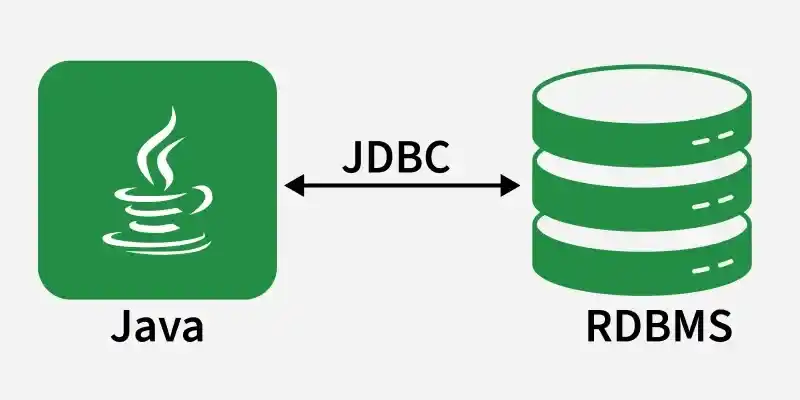
JDBC (Java Database Connectivity) is a Java API that helps Java applications connect with relational databases. It allows executing SQL queries and handling database data in Java programs.
- Used for CRUD operations
- Works with SQL databases like MySQL/Oracle
- Uses JDBC drivers for connection
2. Why do we use JDBC?
We use JDBC to perform database operations directly from Java code. It helps Java applications store, retrieve, update, and delete data from relational databases.
- Connect Java with the database
- Execute SQL queries
- Perform CRUD operations
3. What are the steps to connect JDBC?
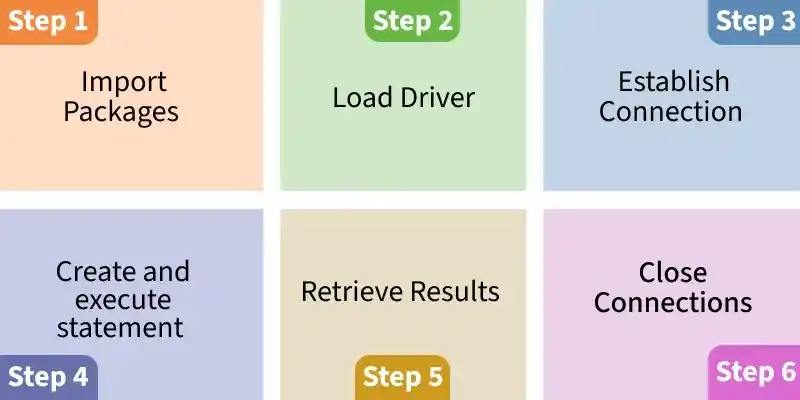
JDBC follows a standard workflow for connecting and executing queries. These steps are common in almost every JDBC program.
- import package
- Load and register drivers
- Establish connection
- Create and Execute statement
- Retrieve the results
- Close the connection
4. What are the 4 JDBC driver types?
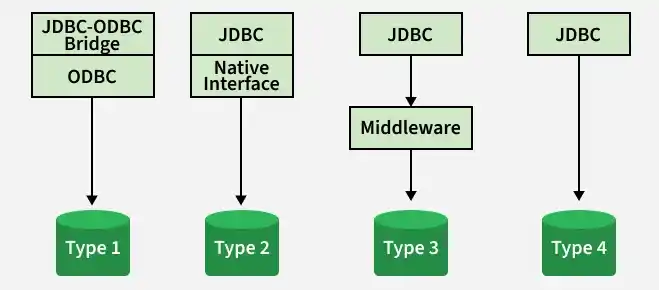
JDBC drivers are classified into four types based on implementation. Type 4 is widely used because it is pure Java and efficient.
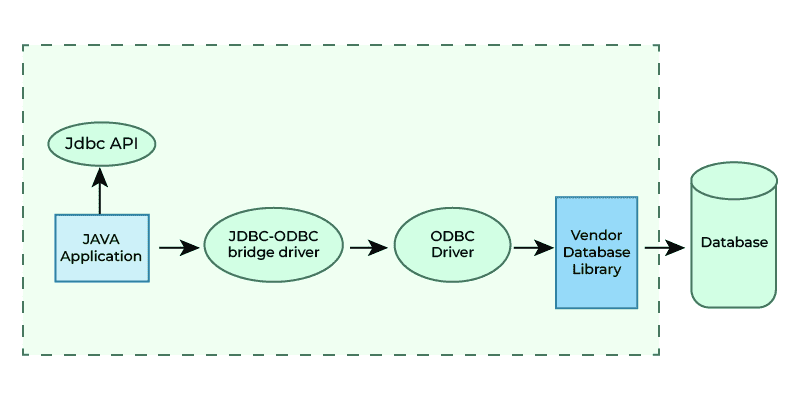
- Type 1 -> JDBC-ODBC bridge
- Type 2 -> native API driver
- Type 3 -> middleware driver
- Type 4 -> thin driver
5. What is the role of a JDBC Driver?
A JDBC Driver is a library that enables communication between Java applications and a database. It converts JDBC method calls into database-specific protocol instructions.
- Required to connect Java with DB
- Different DB -> different driver
- Provided by database vendors
6. What is DriverManager in JDBC?
DriverManager is a class that manages available JDBC drivers and helps in creating database connections. It selects the correct driver based on the JDBC URL.
- Registers and loads drivers
- Provides getConnection() method
- Works with JDBC URLs
7. What is the difference between JDBC and ODBC?
ODBC is a general database API mostly built for native languages, while JDBC is designed specifically for Java. JDBC is platform-independent and performs better for Java applications.
- JDBC is pure Java
- ODBC depends on native drivers
- JDBC is recommended for Java apps
8. What is a ResultSet in JDBC?
ResultSet represents the table-like data returned after executing a SELECT query. It maintains a cursor to move through the rows of the result.
- Cursor starts before first row
- next() is used for iteration
- Data fetched using getXXX()
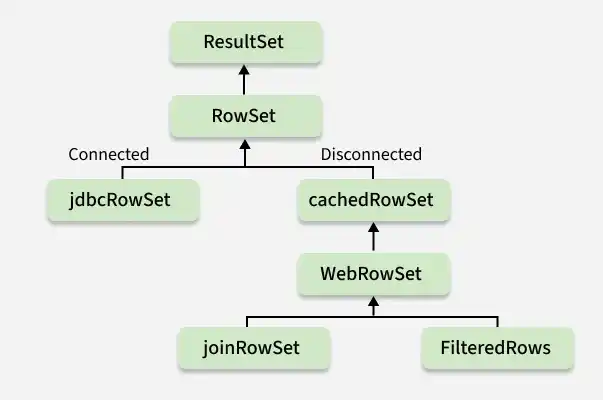
9. What is the difference between ResultSet and RowSet?
ResultSet stays connected to the database, while RowSet can be disconnected and serialized. RowSet is easier to transfer between classes.
- ResultSet is connected
- RowSet is disconnected
- RowSet supports JavaBeans
10. What are stored procedure parameter types?
Stored procedures support different parameter types to pass values into the procedure and return values to the caller. The three parameter modes are:
- IN -> Used to pass input values to the stored procedure.
- OUT -> Used to return values from the stored procedure to the caller.
- INOUT -> Used to both pass input values and return modified output values.
11. How can stored procedures be executed using JDBC?
Stored procedures are executed using CallableStatement. It supports IN, OUT, and INOUT parameters for passing and returning values.
- Uses prepareCall()
- Supports parameter binding
- OUT params require registration
12. What are the main JDBC components?
JDBC works using a few important classes and interfaces. These components help establish connection, execute queries, and process results.
- DriverManager
- Connection
- Statement / PreparedStatement
- ResultSet
13. Which JDBC driver is mostly used in real projects?
The Type 4 (Thin Driver) is the most commonly used JDBC driver in real-world applications because it is written entirely in Java and communicates directly with the database.
- Platform independent and does not require native libraries.
- Provides better performance through direct database communication.
- Most widely used in enterprise applications and modern frameworks like Spring Boot.
14. What is Connection in JDBC?
The Connection is a JDBC interface that represents an active session between a Java application and a database. It is used to execute SQL statements and manage database transactions.
- Represents an active connection (session) with the database.
- Creates Statement, PreparedStatement, and CallableStatement objects to execute SQL queries.
- Manages transactions using methods such as commit(), rollback(), and setAutoCommit().
15. What is Statement in JDBC?
Statement is an interface used to execute simple SQL queries without parameters. It is mainly used when query is fixed and does not require dynamic input.
- Executes normal SQL queries
- Not secure for user input
- Slower than PreparedStatement
16. What are common JDBC exceptions?
DBC provides exceptions and warnings to handle errors that occur during database operations, helping identify issues such as connection failures, SQL errors, and batch execution problems.
- SQLException: The base exception for database access and SQL execution errors.
- BatchUpdateException: Thrown when an error occurs during batch update operations.
- SQLWarning: Represents database warnings that do not stop the execution of SQL statements.
17. What are the two main JDBC architectures?
JDBC supports two-tier and three-tier architecture models. Two-tier connects directly, while three-tier uses an application server in between.
- Two-tier -> direct DB connection
- Three-tier -> app server as middle layer
- Three-tier used in enterprise apps
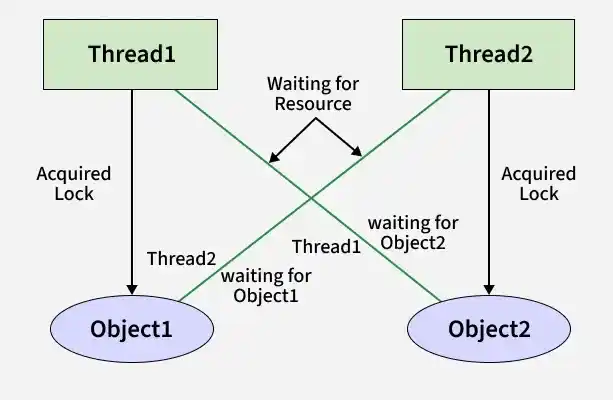
18. What is locking in JDBC?
Locking is a mechanism used to control concurrent access to database records, preventing multiple users from modifying the same data simultaneously and ensuring data consistency.
- Optimistic Locking: Checks whether the data has been modified by another transaction before updating it.
- Pessimistic Locking: Locks the data immediately, preventing other transactions from modifying it until the lock is released.
- Prevents lost updates and maintains data integrity in multi-user applications.
19. What is JDBC Transaction Management?
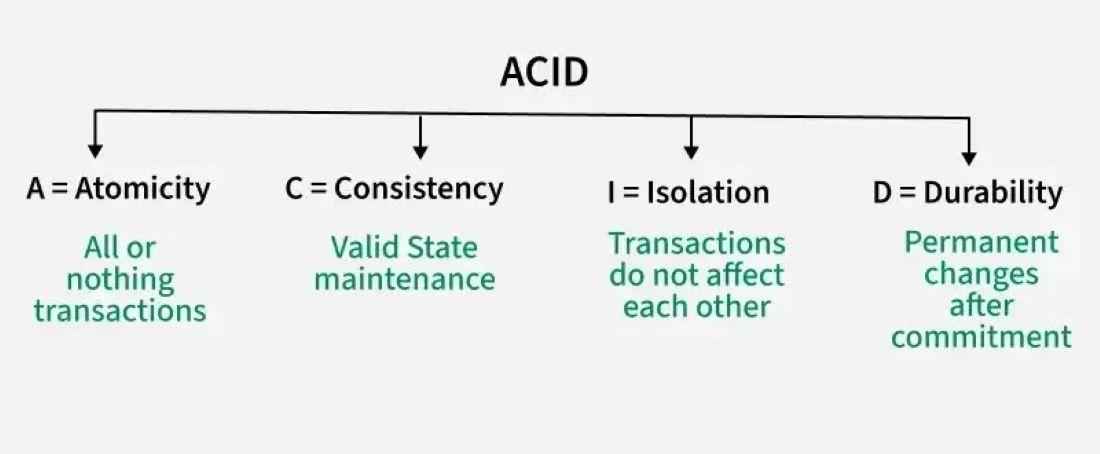
JDBC Transaction Management ensures that a group of SQL statements is executed as a single unit of work. It helps maintain data consistency by either committing all changes or rolling them back if an error occurs.
- Supports ACID properties to ensure reliable and consistent database transactions.
- commit() permanently saves all changes made during the transaction.
- rollback() undoes all changes if the transaction fails or an error occurs.
20. What methods are used for handling transactions in JDBC?
JDBC provides built-in methods to manage transactions, allowing developers to control when changes are committed or rolled back to maintain data consistency.
- setAutoCommit(false): Disables auto-commit mode so multiple SQL statements can be executed as a single transaction.
- commit() and rollback(): commit() permanently saves changes, while rollback() reverts all changes made during the transaction.
- setSavepoint(): Creates a savepoint within a transaction, allowing a partial rollback to a specific point instead of rolling back the entire transaction.
21. What are transaction isolation levels in JDBC?
Transaction isolation levels define how one transaction is isolated from other concurrent transactions. They control data visibility during transaction execution, balancing data consistency and application performance.
- Prevent issues such as dirty reads, non-repeatable reads, and phantom reads.
- Control the level of data isolation between concurrent transactions.
- Higher isolation levels provide better data consistency but may reduce concurrency and performance.
22. How can a table be created dynamically in JDBC?
A table can be created dynamically in JDBC by executing a CREATE TABLE SQL statement using the executeUpdate() method. This is commonly used in database administration tools and applications that generate database objects at runtime.
- Uses a Statement or PreparedStatement object to execute the SQL query.
- Executes the CREATE TABLE statement using the executeUpdate() method.
- Table name and schema can be generated dynamically based on user input or application requirements.
23. What is executeQuery()?
The executeQuery() method is used to execute SELECT SQL statements in JDBC. It retrieves data from the database and returns the results as a ResultSet object.
24. What is Class.forName() in JDBC?
Class.forName() is used to load and register the JDBC driver class with the JVM. It was required in older JDBC versions, but from JDBC 4.0 onward, drivers are automatically loaded if they are available in the classpath.
- Loads the JDBC driver class into memory.
- Required in older JDBC versions to register the database driver manually.
- Optional in JDBC 4.0 and later, as drivers are loaded automatically.
25. What is SQL Injection?
SQL Injection is a security issue where attackers inject SQL code through user input. This can allow them to access or modify database data illegally.
- Security vulnerability
- Happens in Statement
- Prevented using PreparedStatement
26. What is batch processing in JDBC?
Batch processing means executing multiple SQL statements together in one batch. It improves performance because it reduces database calls.
- Faster for multiple inserts
- Reduces network calls
- Used in bulk operations
27. What is Connection Pooling?
Connection pooling is a technique where database connections are reused instead of creating new ones repeatedly. It improves performance and reduces server load.
- Reuses existing connections
- Faster than creating new connection
- Used in Spring Boot with HikariCP
28. What is auto-commit mode?
Auto-commit mode is the default transaction mode in JDBC where each SQL statement is automatically committed immediately after it is executed. To manage transactions manually, auto-commit must be disabled.
- Enabled by default (autoCommit = true) in JDBC.
- Automatically commits each SQL statement after successful execution.
- Can be disabled using setAutoCommit(false) to manually control transactions with commit() and rollback().
29. Which SQL types store images and large files?
Databases use BLOB and CLOB data types to store large objects. BLOB is used for binary data such as images and videos, while CLOB is used for storing large text content.
- BLOB (Binary Large Object): Stores binary data such as images, audio, videos, and PDF files.
- CLOB (Character Large Object): Stores large text data, such as documents, XML, or JSON content.
- Used for storing large objects that exceed the size limits of standard SQL data types.
30. What is the difference between DriverManager and DataSource?
DriverManager creates a new connection every time, which is slower in large applications.DataSource is preferred because it supports connection pooling and is used in enterprise applications.
- DriverManager = basic connection
- DataSource = pooled connection
- DataSource is faster and scalable
