How to Monitor a Website (or the Entire Web) for Changes with Firecrawl
 Richard Oliver Bray
Keeping up with a fast-moving page, like a changelog, a pricing page, or the news cycle around a specific AI model, usually means refreshing a tab every few minutes. Firecrawl's monitor endpoint replaces that: it scrapes a page (or runs a search) on a schedule you set, diffs the result against the last snapshot, and only pings you when something actually changed.
How do I get only the changes on a website with Firecrawl instead of re-scraping everything?
Firecrawl's /monitor endpoint keeps a snapshot of every page it checks, compares each new check against that snapshot, and sends you only what was added, removed, or changed. Pages that stayed the same come back marked as same, so your code and your agent can skip them.
The three ways to get changes out of Firecrawl differ in who runs the schedule and what lands in your code:
| Approach | Who runs the schedule | What you get back | Credits per page, per check |
|---|---|---|---|
| Plain re-scrape | Your cron job | Full Markdown for every page, changed or not | 1, plus your own diff code |
changeTracking format on /scrape, crawl, or batch scrape | Your cron job | changeStatus (new, same, changed, removed) plus a git-style diff, or a per-field diff in JSON mode | 1 (JSON mode: 5) |
| /monitor | Firecrawl | A webhook, email, or Slack event with the diff and an optional AI judgment of whether it matters | 1, plus 1 per changed page the AI judge validates |
Credit figures come from the Firecrawl monitoring and change tracking docs, read on October 21, 2026. The walkthrough below uses /monitor, because it removes both the cron job and the diff code. Change tracking on its own is covered in the change tracking docs.
Let's go through how to set one up.
Getting an API key
Unlike scrape, search, interact, and parse, which all work keyless on a rate-limited free tier (see the rate limits docs), the monitor endpoint always requires an API key. Sign up at firecrawl.dev to get one, along with free credits and a higher rate limit than the keyless tier offers.
First usage
This walkthrough uses the Node SDK, but monitors can also be created from the Python SDK, the CLI, the MCP server, or directly in the Firecrawl dashboard.
Install the SDK with npm:
npm install firecrawlThen set up the client and create a monitor. The example below watches the GitHub releases page for CamKit, an open-source project, so it fires whenever a new version is published:
import { Firecrawl } from "firecrawl";

const fc = new Firecrawl({ apiKey: process.env.FIRECRAWL_API_KEY });

const monitor = await fc.createMonitor({
  name: "Camkit releases",
  schedule: { text: "every 5 minutes", timezone: "UTC" },
  targets: [
    {
      type: "scrape",
      urls: ["https://github.com/Orva-Studio/camkit/releases"],
      scrapeOptions: {},
    },
  ],
  goal: "Notify me when a new camkit release is published",
  webhook: { url: process.env.WEBHOOK_URL as string },
});

console.log(monitor.id);
But I'll break it down so it's easy to understand.
There are three required inputs:
- name is a label for the monitor so you can identify it later.
- schedule accepts either cron syntax or natural-language text like
"every 5 minutes","hourly", or"daily at 9am", the minimum interval is 5 minutes. - targets is what gets watched; a monitor accepts 1 to 50 targets and can mix types, but it's best to keep one monitor per concern rather than bundling unrelated URLs together.
Here the target has type: "scrape" and a urls array, meaning it watches known pages. scrapeOptions passes straight through to the underlying scrape, so the usual formats (markdown, html, summary, or a json format with its own schema) all apply, scrapeOptions: {} here just means the defaults are used.
Two fields are optional but do most of the work:
- goal tells Firecrawl's AI judge exactly what counts as a meaningful change, so it can ignore everything else.
- webhook is where Firecrawl posts a notification whenever a meaningful change is detected. Email notifications work the same way and can be configured instead of or alongside a webhook.
Viewing monitors from the CLI
Running the file above returns the new monitor's ID. If the Firecrawl CLI is installed, you can list monitors and pipe the output through jq (if you have it installed) for a readable view:
firecrawl monitor list | jq .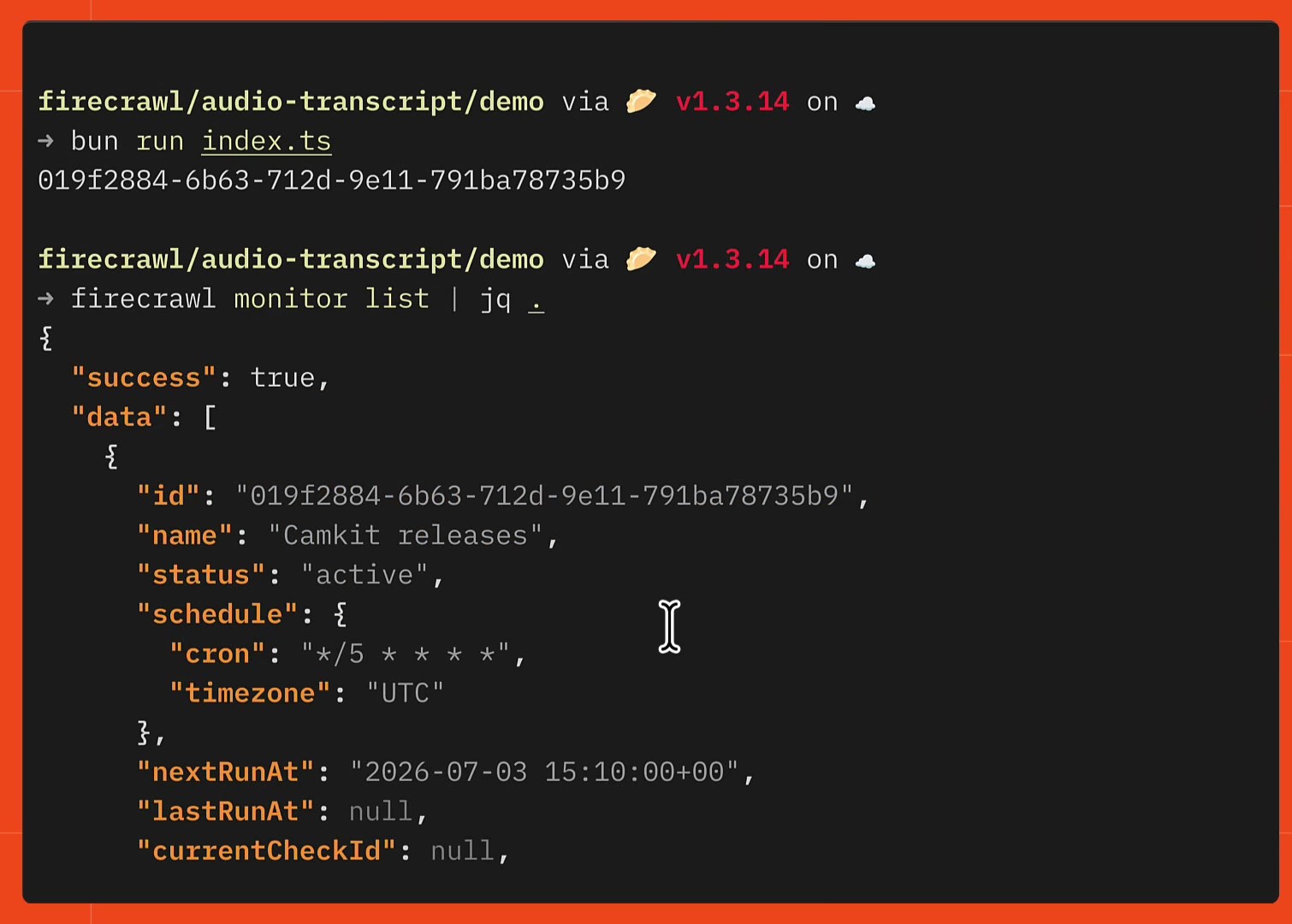
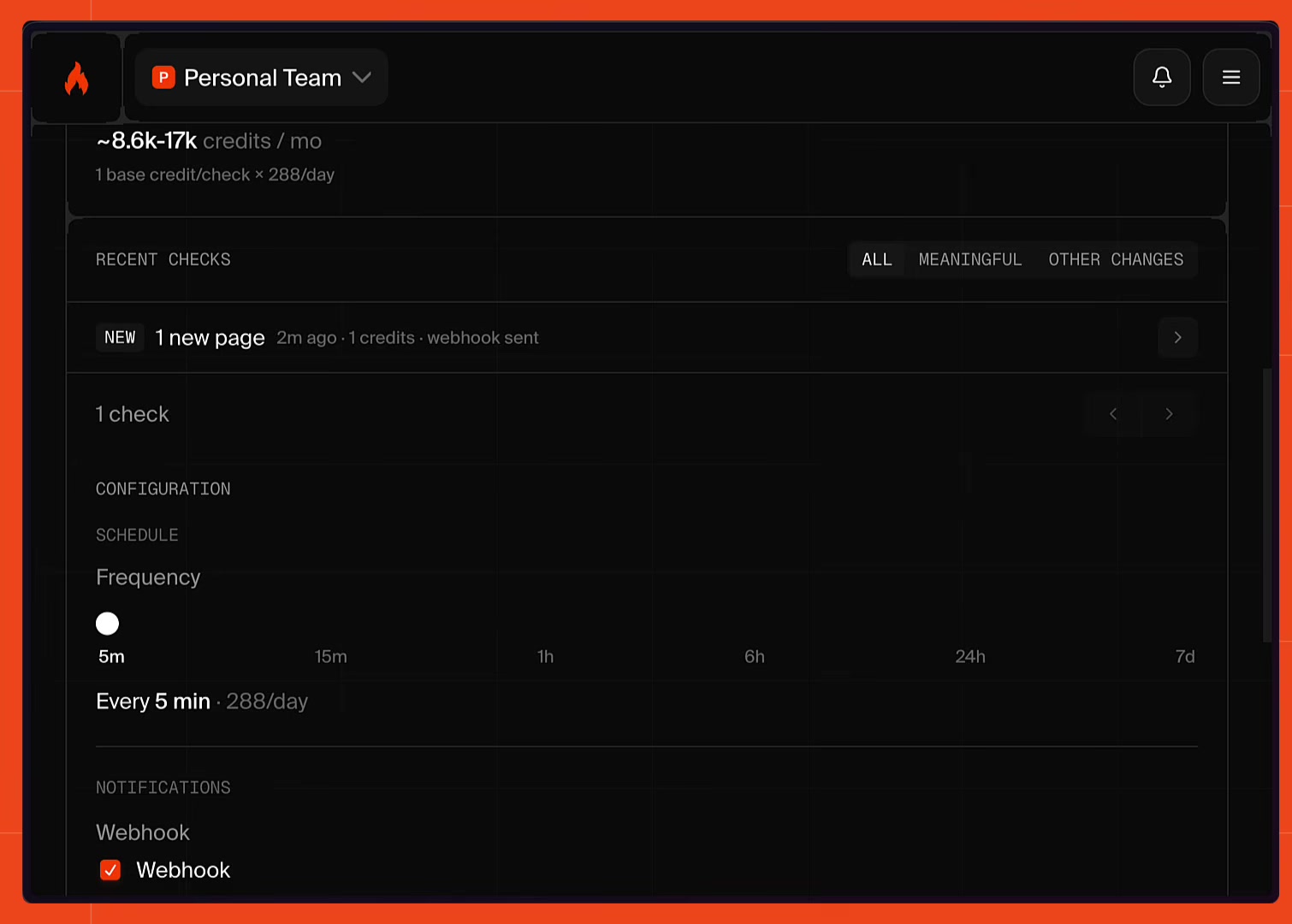
The output includes the normalized cron ("every 5 minutes" became */5 * * * *), status, and nextRunAt, everything needed to confirm the monitor is set up the way you expect without opening the dashboard. If you've signed up for Firecrawl, the same monitor also shows up in the Firecrawl dashboard, with its schedule, estimated monthly credit cost, and recent checks.
Testing the webhook
To see the monitor in action, point its webhook at a small local server (the demo here uses a Bun server running on port 3000, tunneled out with a Tailscale funnel so it doesn't need a public deploy) and send it a test request:
curl -s -X POST https://richards-macbook-pro.tail45f396.ts.net/ \
  -H 'content-type: application/json' \
  -d '{"test":"hello from funnel"}'
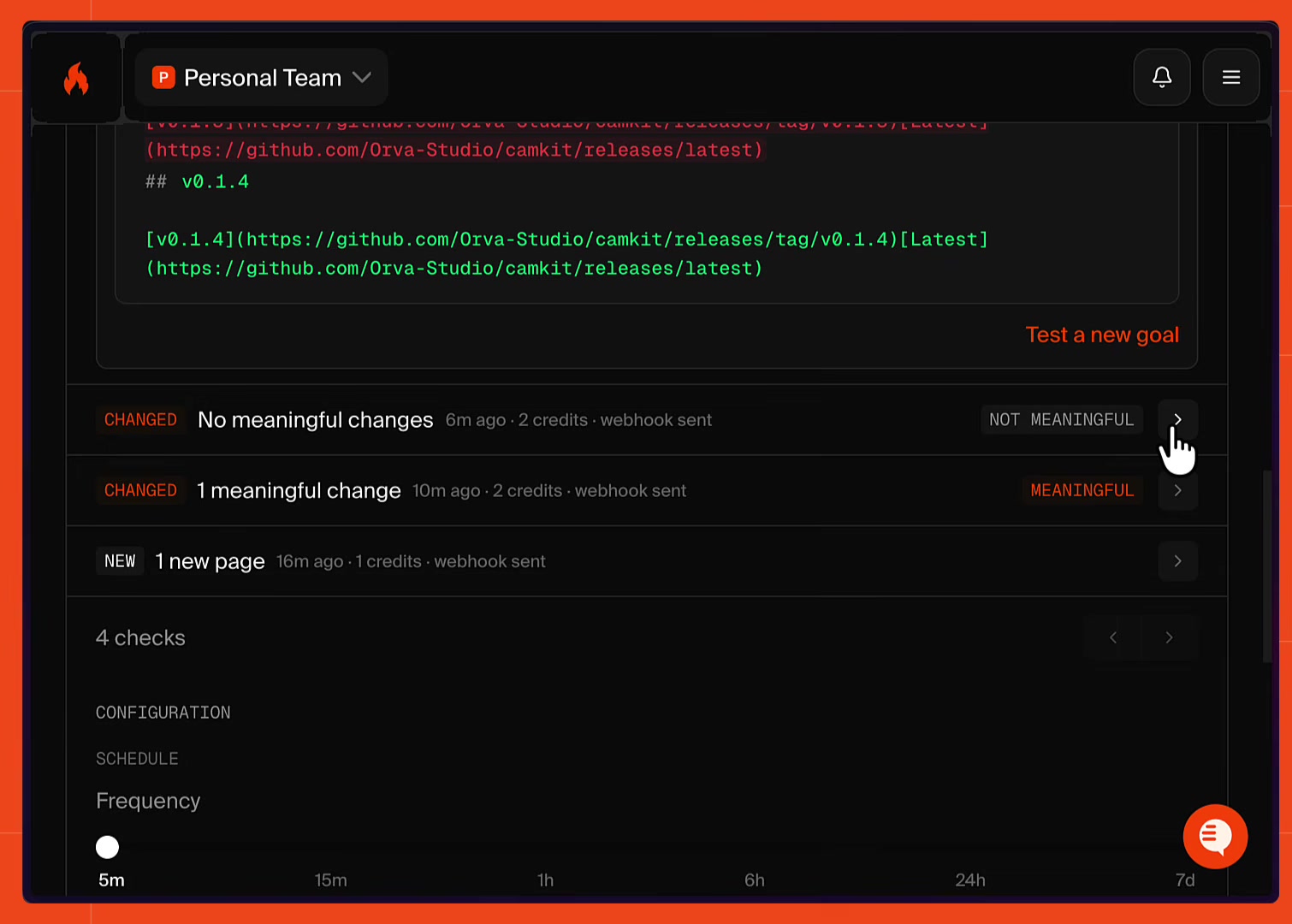
The first real check on the target repo comes back showing no meaningful differences, since nothing has changed yet, and the Firecrawl dashboard reflects the same result.
Seeing a meaningful change get flagged
When a new version is published to the watched repo, the monitor has something real to catch. The next check marks the page as changed, flags it as meaningful, and includes the actual diff, the old version string next to the new one:
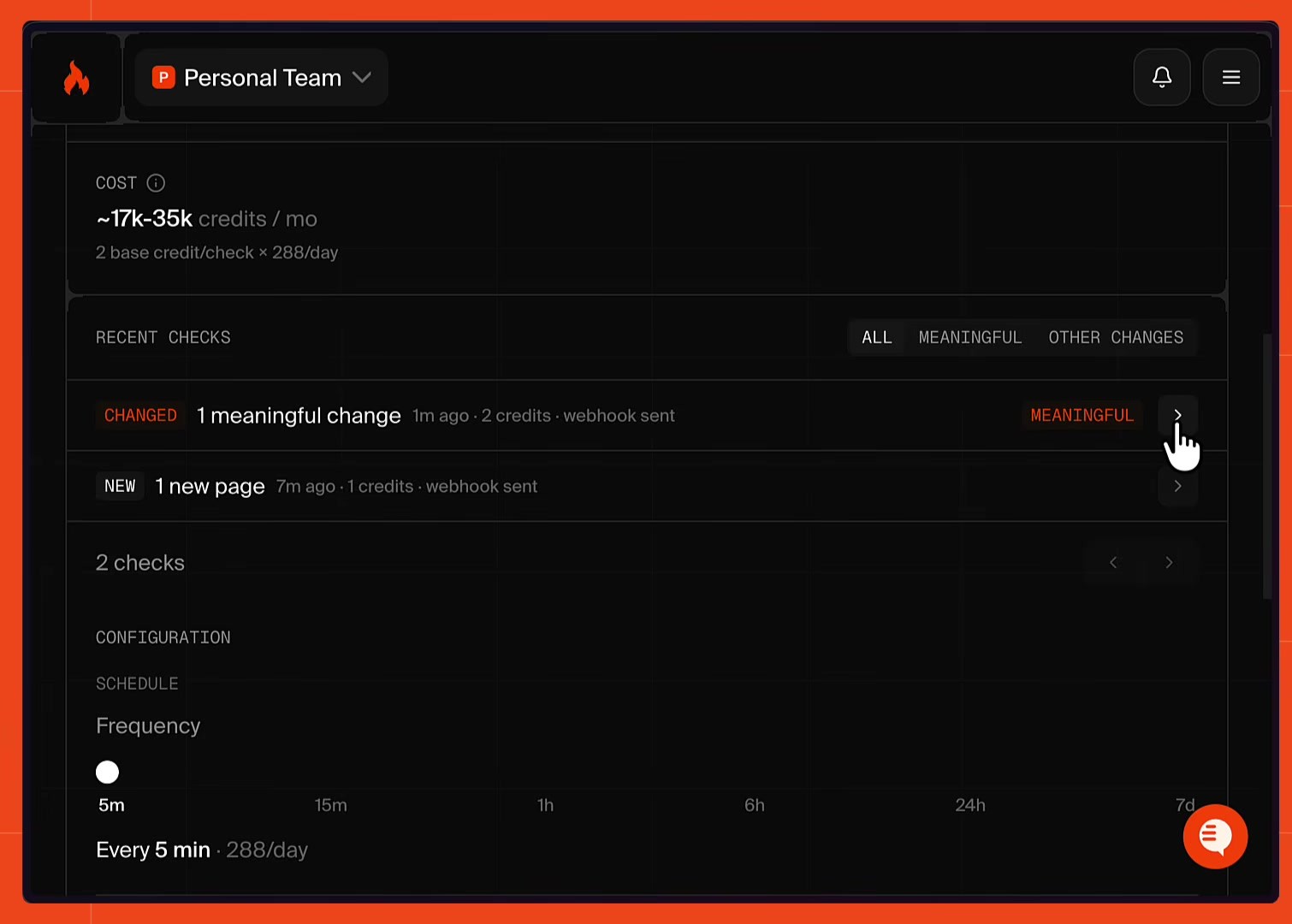
This is the AI judge doing its job: it only marked this check as meaningful because the change matched the goal ("a new release is published"). A run that doesn't match the goal still happens and still costs a scrape credit, but it won't trigger a notification or add a judge credit.
Using it for something real
A monitor's output isn't just a notification, it's structured data your own code can act on. In the demo, a fake course site for a CLI tool called CamKit displays the tool's latest version number, and manually updating that number every release is exactly the kind of busywork a monitor removes:
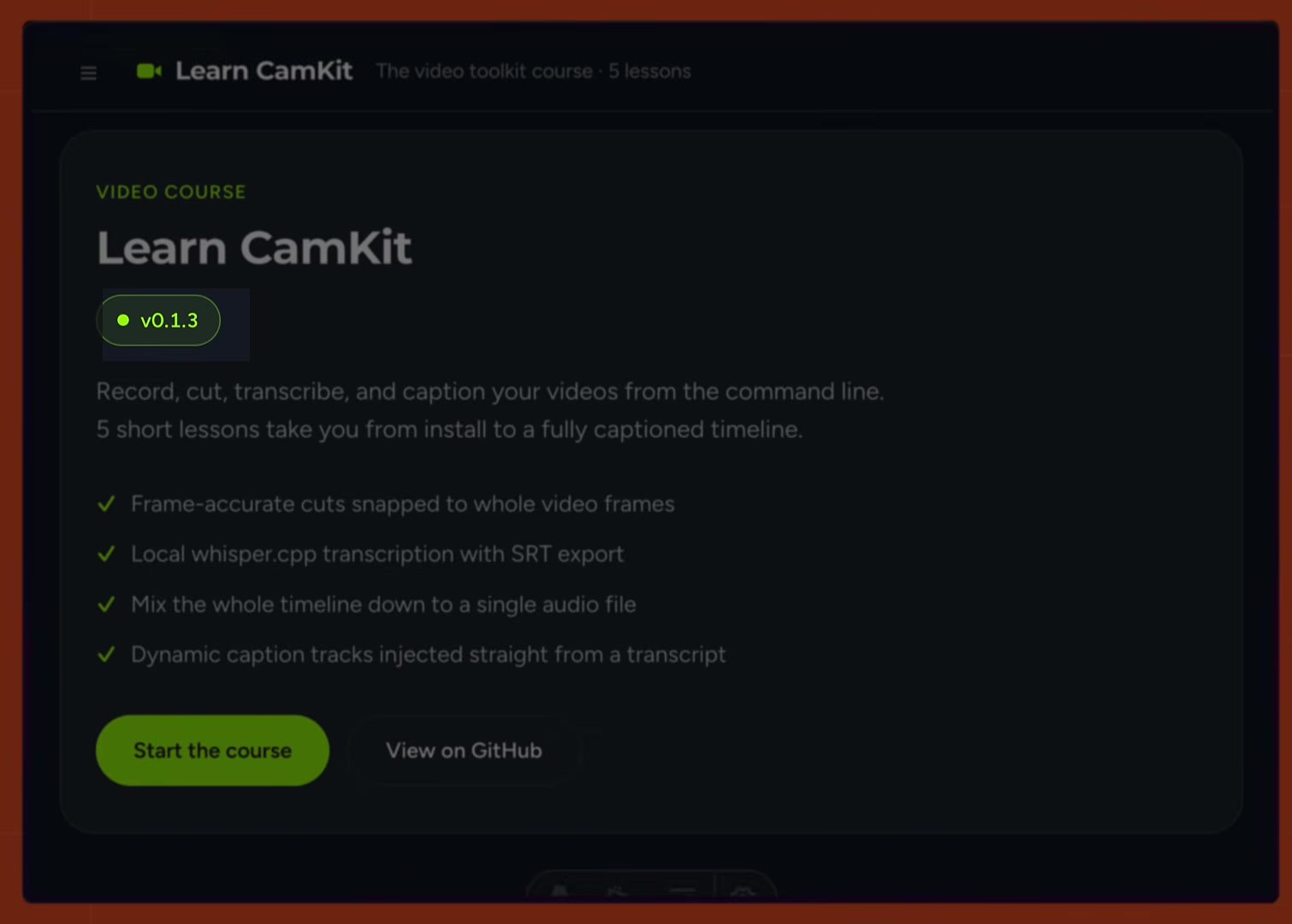
The webhook server keeps that version in sync with plain string matching, no extra Firecrawl calls needed. For each monitor.page payload, it skips pages where isMeaningful is false, then scans the added lines in diff.text for a GitHub release-tag pattern (releases/tag/v1.2.3), collects every version it finds, and keeps the highest one by semver:
function extractNewVersion(payload) {
  if (payload?.type !== "monitor.page") return null;

  const versions = [];
  // Each Firecrawl monitor check carries an isMeaningful flag and a diff to read
  for (const check of payload.data ?? []) {
    if (!check.isMeaningful) continue;

    // Look at added lines in the diff for a new release tag
    for (const line of (check.diff?.text ?? "").split("\n")) {
      if (!line.startsWith("+")) continue;
      const match = line.match(/releases\/tag\/(v\d+\.\d+\.\d+)/);
      if (match) versions.push(match[1]);
    }
  }
  if (versions.length === 0) return null;

  // Pick the highest version found
  versions.sort((a, b) => Bun.semver.order(a.slice(1), b.slice(1)));
  return versions[versions.length - 1];
}
A small updateCamkit function then writes that version straight into the course site's local data file, replacing the old version string, so the number updates itself the moment the monitor's next check runs, without a page refresh or manual edit. The full webhook server, including the file-writing step, is in this gist.
Monitoring the entire web, not just one page
Page monitoring only works when you already know the URL. For something like AI model news, there's no single page that has everything. Swapping the target's type from "scrape" to "search" turns the monitor into an always-on web search instead of a page diff.
For example, the code below sets up a monitor that keeps an eye on the whole web for Claude Fable 5 news, checking every few hours and pinging you only when something genuinely new turns up:
const monitor = await fc.createMonitor({
  name: "Claude Fable 5 news",
  schedule: { text: "every 6 hours", timezone: "UTC" },
  targets: [
    {
      type: "search",
      queries: ["Claude Fable 5 update", "Claude Fable 5 release"],
      searchWindow: "24h",
      maxResults: 10,
    },
  ],
  goal: `Notify me about news, updates,
    or changes to Anthropic's Claude Fable 5 model`,
  webhook: {
    url: "https://fable-5-news.pages.dev/api/webhook",
    events: ["monitor.page"],
  },
  notification: {
    email: {
      enabled: true,
      recipients: ["you@example.com"],
      includeDiffs: true,
    },
  },
});
A search target swaps the page-level urls for two search-specific fields:
- queries is a list of 1 to 12 search terms the monitor runs on every check.
- searchWindow is a recency filter like
"24h"or"7d"that scopes results to what's actually new.
Every check runs those queries, dedupes the results by canonical URL, and the AI judge scores each new result against the goal.
Notifications behave just like the page monitor, with two things worth calling out:
- webhook.events scopes which event types get posted (
monitor.pagefires per matched result,monitor.check.completedfires once per full check). - email adds a second channel alongside the webhook, since a monitor can send both at once.
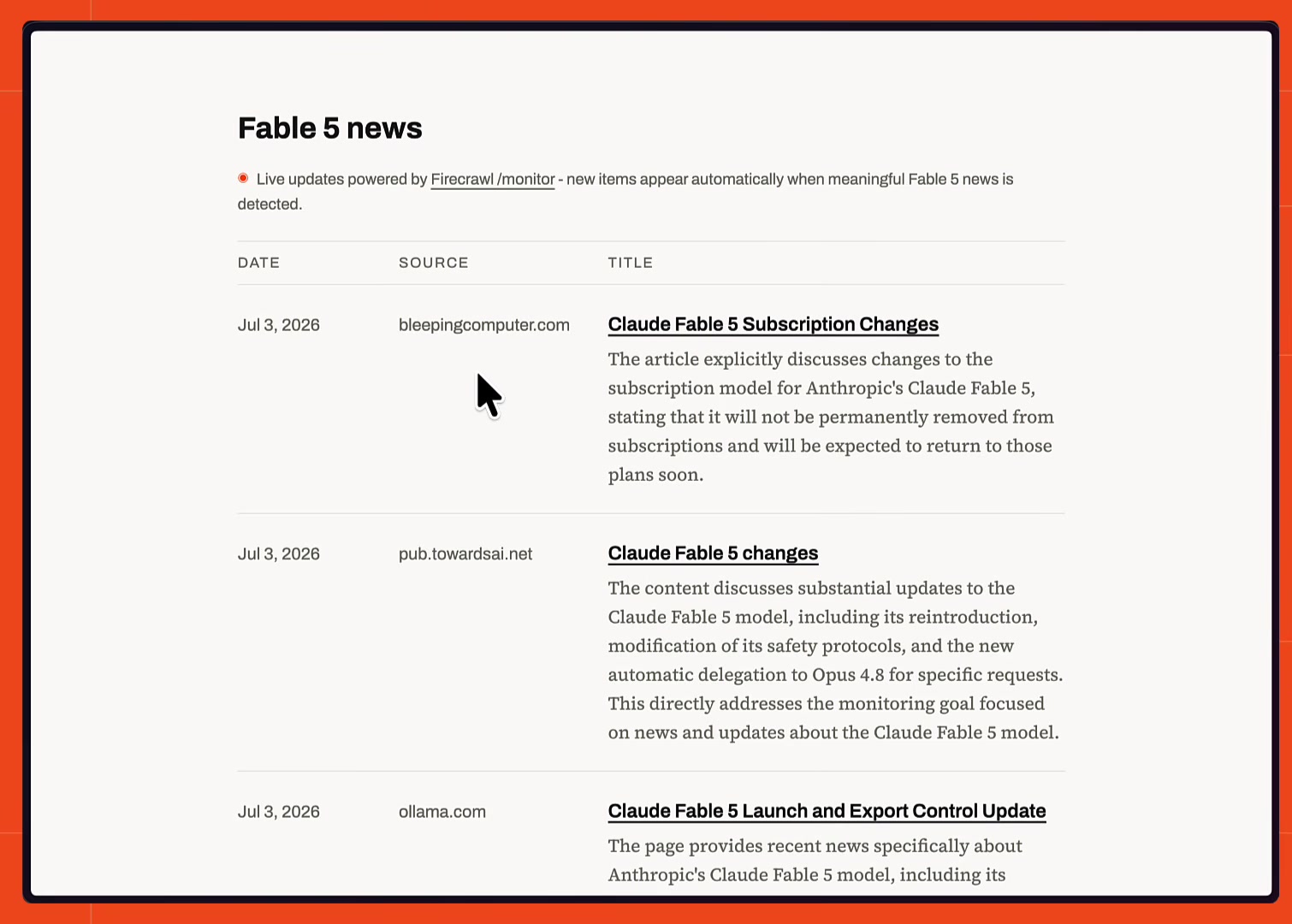
Only new, on-topic results trigger a notification, and that output can feed a site's news section just like the CamKit version number did earlier.
This exact monitor populates a live Fable 5 news page, where each entry was added automatically as the monitor caught it.
One endpoint covers a single known page, a whole website crawled on a schedule, or the entire web, all with the same scheduling, judging, and notification model underneath.
How do I ignore header and footer noise when monitoring a page with Firecrawl?
Firecrawl removes headers, navigation, and footers before it diffs a page, because every monitor check runs a normal Firecrawl scrape and main-content extraction is on by default. Noise that sits inside the main content, such as cookie banners, visitor counters, or rotating testimonials, can be excluded with CSS selectors or discarded by the AI judge against your goal.
Three settings handle noise:
- Main-content extraction.
onlyMainContentdefaults totrueand drops nav, header, and footer markup before the Markdown is compared, so leave it on. - Tag filters.
excludeTagstakes CSS selectors (tags, classes, IDs, or attributes) for blocks to remove, andincludeTagskeeps only the blocks you name. Both run against the original page DOM, so write selectors as they appear in the source HTML. - Goal and AI judge. A plain-language goal tells the judge what counts. A new copyright year or a reshuffled testimonial doesn't match a pricing goal, so it never sends a notification.
scrapeOptions on a monitor target passes straight through to the scrape, so the filters go there:
const monitor = await fc.createMonitor({
  name: "Pricing page, main content only",
  schedule: { text: "daily at 9am", timezone: "UTC" },
  targets: [
    {
      type: "scrape",
      urls: ["https://example.com/pricing"],
      scrapeOptions: {
        onlyMainContent: true,
        excludeTags: [".cookie-banner", "#visitor-count", ".testimonials"],
      },
    },
  ],
  goal: "Alert when a plan name, price, or usage limit changes. Ignore testimonials and dates.",
  webhook: { url: process.env.WEBHOOK_URL as string },
});
If you only care about a handful of fields, use JSON mode. Give the target a changeTracking format with modes: ["json"] and a schema, and the diff reports value changes per field instead of text changes. JSON mode costs 5 credits per page instead of 1.
How do I send website change diffs to a webhook with Firecrawl /monitor?
Firecrawl /monitor posts a monitor.page event to your webhook URL as each page check finishes, with the page status, a unified text diff, and the AI judge's verdict and reason when the monitor has a goal. A second event, monitor.check.completed, arrives once per check with counts of same, changed, new, removed, and errored pages.
Pick the events, and add any custom headers your endpoint expects. Every Firecrawl webhook request also carries an X-Firecrawl-Signature header, an HMAC-SHA256 of the raw body signed with your account's webhook secret, so verify it before trusting the payload:
{
  "webhook": {
    "url": "https://example.com/webhooks/firecrawl",
    "headers": { "Authorization": "Bearer your-secret" },
    "events": ["monitor.page", "monitor.check.completed"]
  }
}
A trimmed monitor.page payload for a changed pricing page:
{
  "type": "monitor.page",
  "data": [
    {
      "url": "https://example.com/pricing",
      "status": "changed",
      "isMeaningful": true,
      "judgment": {
        "meaningful": true,
        "confidence": "high",
        "reason": "The Pro plan price increased."
      },
      "diff": {
        "text": "--- previous\n+++ current\n@@ -3,1 +3,1 @@\n-Pro plan $20/mo\n+Pro plan $25/mo\n"
      }
    }
  ]
}
Your endpoint must return a 2xx status within 10 seconds, and failed deliveries are retried three times, after 1, 5, and 15 minutes, according to the webhook docs (October 2026). Acknowledge first and run slow work, like a model call, after the response. Email (up to 25 recipients, with the diff inline) and Slack (set up in the monitoring dashboard) can run alongside the webhook on the same monitor.
How do I monitor city permit and zoning pages for new filings with Firecrawl?
To monitor city permit and zoning pages with Firecrawl, point a /monitor scrape target at the page that lists recent applications, such as a planning department's filings table or a saved search URL with your filters in it. Add a goal like "alert on new filings", and each check reports only the rows that appeared since the last one.
Most municipal permit portals publish recent applications as a list or table at a stable URL. Saved search URLs with a district, date, or permit type in the query string work too, as long as the URL loads results without a form submission. JSON mode turns each row into fields, so a new filing shows up as a new item in the diff:
const monitor = await fc.createMonitor({
  name: "Permits and rezoning, District 5",
  schedule: { text: "daily at 7am", timezone: "UTC" },
  targets: [
    {
      type: "scrape",
      urls: ["https://planning.example.gov/permits/recent?district=5"],
      scrapeOptions: {
        formats: [
          {
            type: "changeTracking",
            modes: ["json"],
            prompt: "Extract every permit or zoning application listed on the page.",
            schema: {
              type: "object",
              properties: {
                filings: {
                  type: "array",
                  items: {
                    type: "object",
                    properties: {
                      caseNumber: { type: "string" },
                      address: { type: "string" },
                      applicationType: { type: "string" },
                      filedDate: { type: "string" },
                      status: { type: "string" },
                    },
                  },
                },
              },
            },
          },
        ],
      },
    },
  ],
  goal: "Alert when a new building permit or rezoning application is filed. Ignore status updates on existing cases.",
  notification: {
    email: { enabled: true, recipients: ["you@example.com"], includeDiffs: true },
  },
});
Some cities give every case its own page instead of a list. For those, a crawl target with includePaths (for example ["/permits/"]) watches the whole section and reports each new case page with the status new. Crawl monitors cost 1 credit per discovered page per check, so cap them with crawlOptions.limit.
How do I re-crawl thousands of websites every week with Firecrawl?
To re-crawl thousands of websites every week with Firecrawl, give each site a crawl target with a page limit and a weekly schedule, and let /monitor report which pages are new, changed, or removed. One monitor holds up to 50 targets, so 2,000 sites fit in 40 monitors created from a script, and your pipeline only processes the pages whose status changed.
import { readFileSync } from "node:fs";

const sites: string[] = JSON.parse(readFileSync("sites.json", "utf8"));

for (let i = 0; i < sites.length; i += 50) {
  const monitor = await fc.createMonitor({
    name: `Weekly recrawl ${i / 50 + 1}`,
    schedule: { text: "weekly", timezone: "UTC" },
    targets: sites.slice(i, i + 50).map((url) => ({
      type: "crawl",
      url,
      crawlOptions: { limit: 50, maxDiscoveryDepth: 2 },
    })),
    webhook: {
      url: process.env.WEBHOOK_URL as string,
      events: ["monitor.page", "monitor.check.completed"],
    },
  });

  console.log(monitor.id, monitor.estimatedCreditsPerMonth);
}
Every create call returns estimatedCreditsPerMonth, so you see the cost of a configuration before its first check runs. In the webhook handler, skip monitor.page events whose status is same. Text schedules are spread by monitor ID, so 40 weekly monitors don't all start at the same instant.
What each part of a check costs, per the monitoring docs (October 2026):
| Check type | Credits |
|---|---|
| Scrape target | 1 per URL per check |
| Crawl target | 1 per discovered page per check |
| Search target (entire web) | 2 per 10 results per check |
| AI judge | 1 more per changed page it validates |
| JSON mode change tracking | 5 per page |
If you already run your own scheduler and keep a fixed URL list, a weekly batch scrape with the changeTracking format gives the same per-page status in one job:
const job = await fc.batchScrape(urls, {
  options: { formats: ["markdown", "changeTracking"] },
});

const changed = job.data.filter(
  (doc) => doc.changeTracking?.changeStatus !== "same",
);
How do I build an agent with Firecrawl that watches a topic and sends a weekly summary?
To build a topic-watching agent with Firecrawl, create a /monitor search target with your queries, a 7-day search window, a weekly schedule, and a goal that says what counts as news. Each week Firecrawl searches the web, drops results it already sent, judges the rest against the goal, and delivers the new matches by email or to a webhook your agent summarizes.
const monitor = await fc.createMonitor({
  name: "Weekly: open-source AI coding assistants",
  schedule: { text: "weekly", timezone: "UTC" },
  targets: [
    {
      type: "search",
      queries: [
        "open source AI coding assistant launch",
        "open source coding agent release",
      ],
      searchWindow: "7d",
      maxResults: 25,
    },
  ],
  goal: "New open-source AI coding assistants or major releases. Ignore funding news and listicles.",
  webhook: {
    url: process.env.WEBHOOK_URL as string,
    events: ["monitor.page", "monitor.check.completed"],
  },
  notification: {
    email: { enabled: true, recipients: ["you@example.com"], includeDiffs: true },
  },
});
Email on its own works as a weekly digest of new, on-goal results, and Firecrawl sends no email in a week where nothing new matched. For a written summary, collect the week's monitor.page events in your webhook handler and pass them to a model when monitor.check.completed arrives, without making the webhook response wait for it. Search results that matched the goal for the first time carry the status new:
const items: { url: string; reason?: string }[] = [];

export async function handleWebhook(event) {
  if (event.type === "monitor.page") {
    for (const result of event.data) {
      if (result.status === "new") {
        items.push({ url: result.url, reason: result.judgment?.reason });
      }
    }
  }

  if (event.type === "monitor.check.completed") {
    const batch = items.splice(0);
    sendDigest(batch).catch((error) => {
      items.unshift(...batch);
      console.error("Digest failed, items kept for the next run", error);
    });
  }
}

async function sendDigest(batch: { url: string; reason?: string }[]) {
  const summary = await summarizeWithLLM(batch);
  await sendEmail("This week's topic digest", summary);
}
summarizeWithLLM and sendEmail stand in for your model call and mail client. In production, put the batch on a queue so a restart doesn't lose it. To pull the full text of a result into the summary, pass its URL to /scrape first.
Check out the Firecrawl monitoring docs to go deeper, or see how to apply monitoring to competitor tracking and feature alerts.
Frequently Asked Questions
How do I get notified when a webpage changes?
Create a Firecrawl monitor with a scrape target pointing at the URL and a schedule (cron or plain text like "every 30 minutes"). Each run scrapes the page, diffs it against the previous scrape, and sends a webhook or email when the content changes.
Can Firecrawl monitor the entire web instead of one page?
Yes. Use a search target instead of a scrape target and give the monitor one or more search queries plus a searchWindow. Firecrawl runs those queries on every check and alerts you when a new, on-topic result appears anywhere on the web.
Does Firecrawl monitor notify me on every tiny change?
Only if you want it to. Add a plain-language goal and Firecrawl's AI judge scores each detected change against it, only firing a notification when the change is actually meaningful, not on whitespace, ad rotation, or timestamp noise.
What is the minimum schedule interval for a Firecrawl monitor?
5 minutes. Schedules can be set with cron syntax or natural language text such as "every 5 minutes", "hourly", or "daily at 9am".
Is the Firecrawl monitor endpoint free to use without an API key?
No. Unlike scrape, search, interact, and parse, which all work keyless on a rate-limited free tier, monitor endpoints always require a Firecrawl API key.
How do I only get alerted when a specific field changes, like a price?
Add a changeTracking format with modes set to ["json"] and a JSON schema (or prompt) describing the fields you care about. Firecrawl then reports a per-field diff instead of diffing the whole page's markdown.
How does Firecrawl send monitor notifications?
Three ways: a webhook URL, email (with up to 25 recipients), or a Slack channel connected through the monitoring dashboard. You can combine all three on the same monitor.
Can one monitor watch multiple URLs at once?
A single monitor accepts 1 to 50 targets and can mix target types, but it's best practice to keep one monitor per concern so each has its own clear goal and notification routing.
How many credits does an hourly page monitor use?
A scrape monitor costs 1 credit per URL per check, so one page checked every hour uses about 720 credits in a 30-day month, plus 1 credit for each changed page the AI judge validates. The create call returns estimatedCreditsPerMonth, so you can confirm the figure before the first check runs.
Does a Firecrawl monitor tell me when a page drops off a site?
A website monitor reports removed when a page found on the previous check is not discovered again, and new for a page it finds for the first time. Removed means the page left the crawl results, for example because it was unlinked or deleted, so confirm before treating it as a deletion.
What happens to my monitors if my account runs out of credits?
Scheduled checks that cannot run because the account is out of credits are skipped and not charged. The monitor keeps its schedule and its history, and checks start running again as soon as credits are available, with nothing to reset.