Claude Web Fetch vs Firecrawl: Which One Actually Works for Web Extraction?
 Ninad Pathak
TL;DR: Should you use Claude web fetch or Firecrawl?
- Use Claude web fetch for static pages and PDFs when you already have the URL. It's built in and costs nothing beyond tokens.
- Its gaps: no JavaScript rendering, it only fetches URLs already in the conversation, every fetch runs inside a Claude request (no batch, crawl, or webhook), and it isn't available on Amazon Bedrock or Google Cloud.
- Watch the name. The API's
web_fetchputs the page's full text into context. Claude Code'sWebFetchhands Claude a smaller model's summary instead, a documented source of hallucinated citations. - Use Firecrawl when pages need a real browser, results need to be stored or shared with other models, or you need to crawl, interact, or extract JSON. It runs anywhere and can be self-hosted.
- The numbers: Firecrawl's Developer Index scores
63.1%Recall@10 on DevDex versus45.4%for Claude web search, and agents using Firecrawl Alexandria's 100+ official data providers scored 21% higher on answer quality than agents using built-in web tools. - Or use both: web fetch first, Firecrawl as the fallback. Code below.
Claude can already read a web page. Paste a URL into a chat, or add web_fetch to an API request, and Claude pulls the page into context with no extra API, key, or bill beyond tokens. So why add Firecrawl?
For a lot of work, you shouldn't. If the page is static, you have the URL, and the text only matters for one conversation, web fetch is the simpler tool.
Things change once fetching becomes part of a product. Pages built with JavaScript come back empty. Every fetch costs a Claude call, and nothing about it is built for storing or reusing what came back. Your agent can't crawl a site, click through a page, or pull data that was never published as a page. And if you deploy on Bedrock or Vertex AI, web fetch isn't available at all.
This comparison of Claude web fetch vs Firecrawl looks at what changes at that point: rendering, output, cost, availability, and the data each one can reach, with code for running the two together.
Claude web fetch vs. Firecrawl: What is the difference?
Use this feature breakdown to decide which tool fits your specific agentic use case:
| Capability | Claude web fetch | Firecrawl |
|---|---|---|
| Official data providers (filings, economic data, news, people) | ❌ (web pages only) | ✅ Firecrawl Alexandria: 100+ providers plus Firecrawl's own indexes |
| JavaScript rendering (SPAs, lazy load) | ❌ (static HTML only) | ✅ Real headless Chromium |
| Structured JSON extraction | ❌ (freeform text + prompt) | ✅ Schema-based, typed output |
| Prompt injection guard on extraction | Domain and URL controls only | ✅ checkPromptInjection classifier + 403 |
| Interactive browsing (click, fill, login) | ❌ | ✅ /interact sessions with state |
| Developer index (repos, PRs, docs) | ❌ | ✅ Developer Index, 63.1% Recall@10 on DevDex |
| Research index (arXiv, GitHub, papers) | ❌ | ✅ Research Index |
| Tokens per page | Plain text, ~2.5K for an average page | ~2.8K median; ~93% fewer than raw HTML from DIY fetchers |
| Trim content before it enters context | ✅ Dynamic filtering (Claude writes code to filter the fetch) | ✅ Main-content extraction, JSON schema, summary format |
| Static HTML pages | ✅ | ✅ |
| PDF extraction | ✅ | ✅ |
| PDF and DOCX parsing | PDF only | ✅ PDF, DOCX, HTTP or local |
| Full-site crawling | ❌ | ✅ /crawl with depth, regex, sitemap-first |
| URL discovery / mapping | ❌ | ✅ /map returns every URL on a domain |
| Search with content hydration | ❌ | ✅ /search returns results + full markdown |
| Batch scraping (parallel URLs) | ❌ (one URL at a time) | ✅ /batch/scrape |
| Change tracking (diff across scrapes) | ❌ | ✅ changeTracking format |
| Output formats | Plain text (PDFs as documents) | markdown, html, rawHtml, links, screenshot, json, changeTracking, summary |
| Proxy rotation | ❌ | ✅ Managed infra |
| Auth handling | ❌ | ✅ Browser Sandbox holds session state |
| Async jobs and webhooks | ❌ (synchronous per call) | ✅ Crawl and batch webhooks |
| SDKs and MCP | Claude tool only | TypeScript, Python, Go, Rust + MCP server |
| Fetch without a model call | ❌ (every fetch is a Claude turn) | ✅ /scrape, /batch/scrape, /crawl run on their own |
| Platforms | Claude API, Claude Platform on AWS, Microsoft Foundry (not Bedrock or Google Cloud) | ✅ Any cloud, any model, self-hostable |
| Cost model | Input tokens only | Credits plus input tokens (worked example) |
I ran a small benchmark
To see how the two compare in practice, I ran a small benchmark: 35 questions about real pages, including docs, JavaScript-rendered web apps, PDFs, and long specs and filings, each with an answer I checked by hand. Claude Opus 5.5 answered every question three times with each tool, with the same prompt and settings, so the only difference was the tool reading the page.
- Overall: with Firecrawl, Claude answered 94% of the questions correctly. With web fetch, it answered 66%.
- JavaScript-rendered pages: Firecrawl got 90% right and web fetch got 10%. Because web fetch missed so often, each correct answer cost $0.84 with web fetch and $0.10 with Firecrawl.
- Stack Overflow and npm: web fetch couldn't open either site and returned a
url_not_allowederror. Firecrawl read both.
What is the Claude web fetch tool?
The Claude web fetch tool is a server tool on the Claude API that retrieves the full content of specified URLs and PDFs during a conversation. Anthropic first shipped it in September 2025 (web_fetch_20250910), and the current docs no longer require a beta header.
You include the tool in your API request, and Claude fetches pages whose URLs already appear in the conversation. The API returns HTML pages as extracted plain text (text/plain) and PDFs as document blocks. Newer versions add features on top of the basic fetch:
web_fetch_20260209adds dynamic filtering: Claude writes and runs code to filter fetched content before it enters the context window, keeping only the relevant parts. It's available on Claude 4.6 and later models and Claude Mythos Preview.web_fetch_20260309addsuse_cache: falseto bypass the cache and fetch fresh content.web_fetch_20260318, the latest, addsresponse_inclusionto drop fetch results consumed by code execution from the API response.
See the tool reference for current model support.
One naming trap catches people: Claude Code has its own client-side WebFetch tool, and it isn't the same thing. The API's web_fetch puts the page's full text into context. Claude Code's WebFetch converts the page to markdown, passes it to a smaller, faster model along with a prompt, and returns that model's answer to the main model. That difference matters for accuracy, as the limitations below show.
What are the limitations of the Claude web fetch tool?
While convenient, the native fetch tool has several hard limits that frequently break production agent workflows:
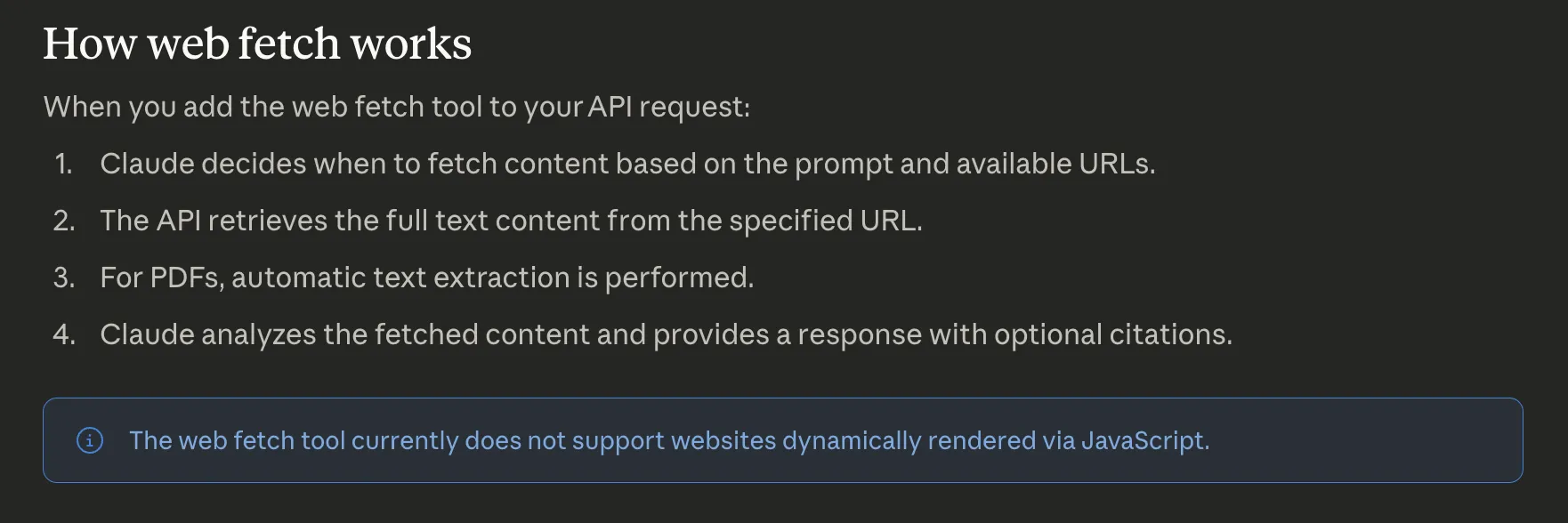
- No JavaScript rendering: The tool only fetches the initial HTML. Pages built on React or Vue return an empty shell.
- No dynamic URL construction: Claude can't generate and fetch a new URL. It only accesses links already present in the conversation history.
- Prompt injection risks: Injected content in a user message can trigger unintended fetches. Web fetch's controls govern where it fetches:
allowed_domainsorblocked_domainslists, plus Anthropic-side refusal of private addresses, URLs disallowed byrobots.txt, and URLs that appear to contain a credential you didn't provide. None of them inspect what an allowed page says. Firecrawl handles the same problem at the extraction layer with an opt-incheckPromptInjectionguard on JSON extraction: a classifier inspects the scraped page before extraction runs and blocks the request with HTTP403and error codeSCRAPE_PROMPT_INJECTION_DETECTEDif a hidden instruction is detected. See what is prompt injection for a deeper look at the attack surface. - Zero handling for complex sites: The tool can't handle JavaScript-heavy pages, login walls, or navigate multi-page structures.
This is what Anthropic's official documentation says about the Claude web fetch tool's limitations:
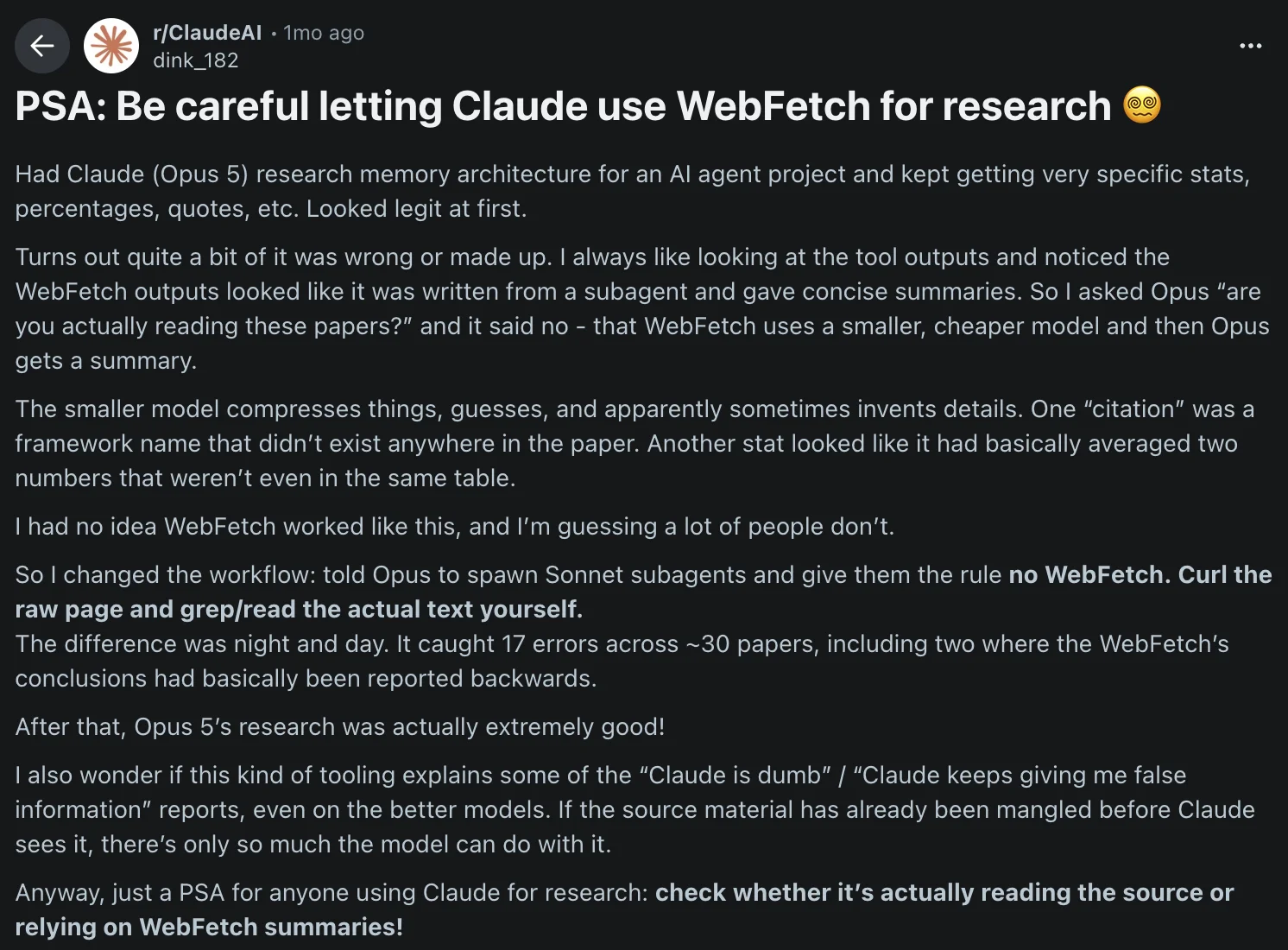
There's also a subtler failure mode, specific to Claude Code's client-side WebFetch tool rather than the API's web_fetch. A recent r/ClaudeAI post reports that WebFetch outputs are summarized by a smaller, cheaper model before Opus ever sees them, and the summarizer compresses, guesses, and sometimes invents details. The author caught 17 errors across ~30 papers, including two where the conclusion was reported backwards. Fabricated framework names, averaged-across-tables stats, the kind of hallucination that looks authoritative because Opus is faithfully repeating whatever the pre-summarizer handed it.
How does web fetch work in Claude models?
In a typical research pipeline, the harness uses a "search-then-fetch" pattern. First, web_search finds relevant URLs. Then, web_fetch pulls the full content from specific results. This works well for static documentation and PDF analysis.
The official documentation defines these parameters for the tool:
max_uses: Limits fetches per request.allowed_domains: Only fetch from these domains.blocked_domains: Never fetch from these domains (can't be combined withallowed_domains).max_content_tokens: Caps how much text enters the context window.citations: Enables source attribution in the model's response.use_cache: Set tofalseto bypass the cache (web_fetch_20260309or later).response_inclusion: Drops fetch results consumed by code execution from the response (web_fetch_20260318or later).
How can you use the Claude web fetch tool in your workflows?
The simplest option requires no setup at all. Web fetch is enabled by default in the Claude web app, Claude desktop app, and Claude Code CLI: just paste a URL into your prompt and Claude will fetch it automatically. No API keys, no tool configuration, no code.
For programmatic control, you can implement a basic fetch loop using the Python SDK. This approach works for simple research tasks where site structure is predictable.
import anthropic
from dotenv import load_dotenv

load_dotenv()
client = anthropic.Anthropic()

response = client.messages.create(
    model="claude-opus-5-5",
    max_tokens=4096,
    messages=[
        {
            "role": "user",
            "content": "Summarize the content at https://docs.firecrawl.dev/introduction"
        }
    ],
    tools=[
        {
            "type": "web_fetch_20260318",
            "name": "web_fetch",
            "max_uses": 5,
            "citations": {"enabled": True}
        }
    ]
)

for block in response.content:
    if getattr(block, 'text', None):
        print(block.text)
You can see Claude fetches the page as plain text and provides you with a response.
Here's a summary of the Firecrawl introduction/quickstart page:
***
## 🔥 What is Firecrawl?
Firecrawl allows you to turn entire websites into LLM-ready markdown.
It provides a powerful API for web scraping, searching, and browser automation.
***
## 🚀 Getting Started
You can get started by calling the API directly without a key to try it, then add one for higher rate limits. You can also try it instantly in the Playground without writing any code, or sign up for a key when you scale.
The Firecrawl skill is the fastest way for agents to discover and use Firecrawl, and can be installed via a simple CLI command.
You can also use the MCP Server to connect Firecrawl directly to Claude, Cursor, Windsurf, VS Code, and other AI tools.
***
## ✅ Why Firecrawl?
Key benefits include:
- LLM-ready output: Clean markdown, structured JSON, screenshots, and more
- Handles the hard stuff: Proxies, JavaScript rendering, and dynamic content
- Reliable: Built for production with high uptime and consistent results
- Fast: Results in seconds, optimized for high-throughput
- Browser Sandbox: Fully managed browser environments for agents, zero config, scales to any size
- MCP Server: Connect Firecrawl to any AI tool via the Model Context Protocol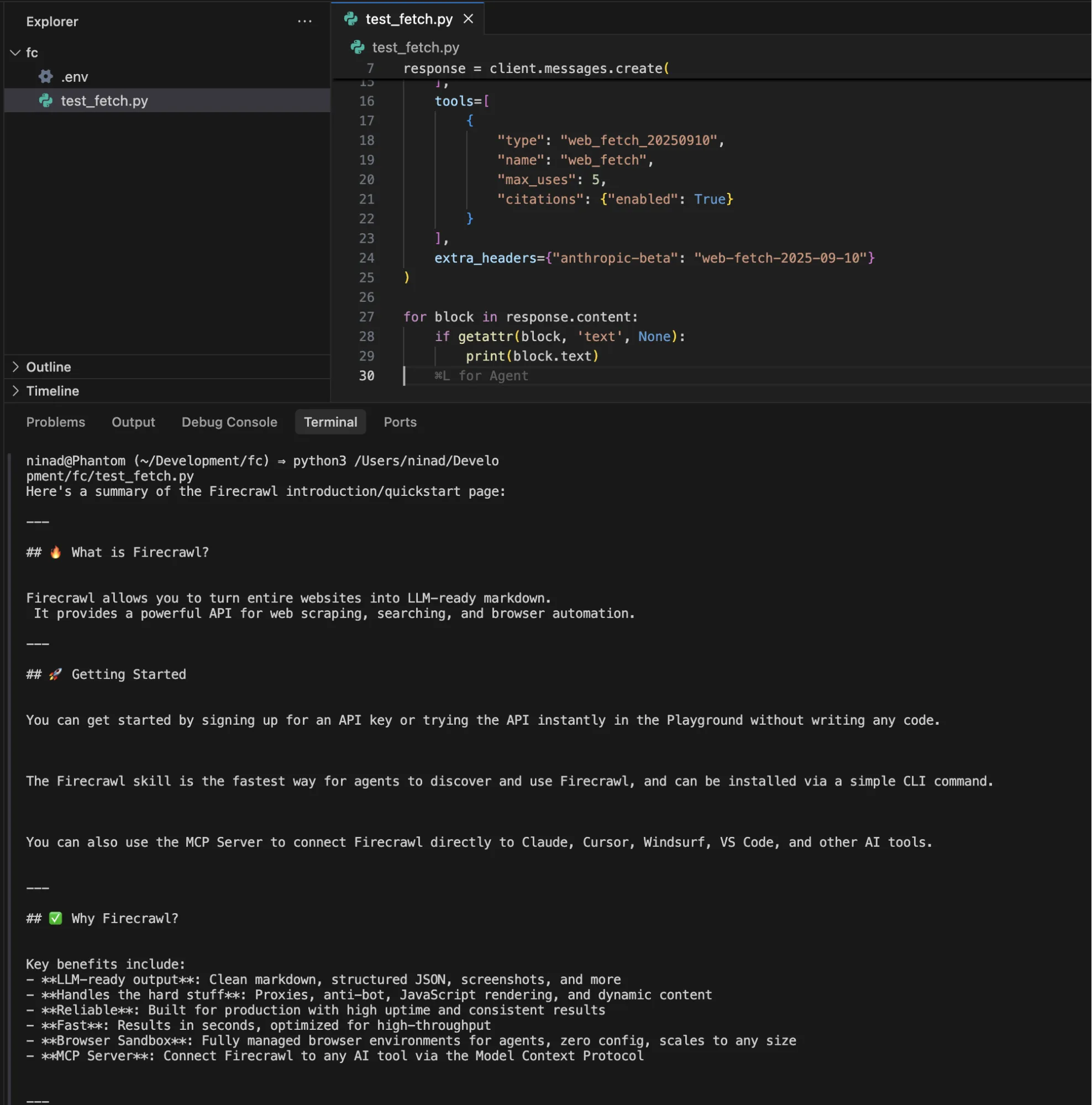
For workflows that combine discovery and retrieval, pair it with web_search:
tools=[
    {"type": "web_search_20260209", "name": "web_search", "max_uses": 3},
    {
        "type": "web_fetch_20250910",
        "name": "web_fetch",
        "max_uses": 5,
        "max_content_tokens": 50000
    }
]
The code works well for pulling static documentation into context before coding, summarizing research papers from known URLs, analyzing blog posts or changelogs referenced by a user, and PDF text extraction for reports or contracts.
As I'd already mentioned in the limitations, our fetch tool code will break if:
- A site loads content via JavaScript after the initial HTML response
- The URL is behind a login wall
- The link has multi-page crawl requirements
- Any domain that returns
url_not_accessibleorurl_not_allowederrors
These limitations mean, a meaningful chunk of modern sites won't be fetchable.
Web fetch output stays inside a Claude turn
Web fetch has no fetch-only call. Every page arrives as part of a Claude request, so each one costs a model turn, and the text lands inside Claude's response. On the API you can parse it out of the web_fetch_tool_result block (unless response_inclusion dropped it), but nothing about the tool is built for what comes next: there's no batch job, no crawl, no webhook when a run finishes, and no way to hand the same fetch to GPT or Gemini without going through Claude first. In claude.ai and Claude Code, the text never leaves the session.
That matters as soon as a page is useful more than once. Putting docs into a vector database, refreshing a pricing page nightly, or sharing one scrape across several models all need fetching to be its own step. Firecrawl is that step: /scrape, /batch/scrape, and /crawl run without a model call, return markdown or JSON you can store, cache with maxAge, send a webhook when a crawl or batch finishes, and feed whichever model you call next.
Where Claude web fetch is available
Web fetch is a Claude API server tool, so it only runs where Anthropic's server tools run:
| Platform | Web fetch |
|---|---|
| Claude API | All versions |
| Claude Platform on AWS | All versions |
| Microsoft Foundry, hosted on Anthropic | All versions |
| Microsoft Foundry, hosted on Azure | Basic web_fetch_20250910 only, no dynamic filtering |
| Amazon Bedrock | Not available |
| Google Cloud (Vertex AI) | Not available |
Zero Data Retention adds one more constraint. The basic version is ZDR-eligible, but the dynamic filtering versions (web_fetch_20260209 and later) aren't by default, because filtering runs on code execution. To use them under ZDR, you set allowed_callers: ["direct"], which turns dynamic filtering off. Details are in Anthropic's server tools docs.
Firecrawl is an HTTP API, so it works from any cloud and next to any model, including Claude on Bedrock or Vertex AI. The core is open source and can be self-hosted with Docker, and enterprise plans offer zero data retention.
Why use Firecrawl with Claude for web extraction
Claude web fetch was built to fetch a URL you already have. Firecrawl was built to be an agent's web layer. Every limitation in the previous section maps to something Firecrawl already does:
- Firecrawl runs a real headless Chromium browser against every URL, so React, Vue, and Angular pages return the same content a human would see. This is why OpenClaw uses Firecrawl as its
web_fetchfallback: when a plain HTTP request comes back empty, Firecrawl catches it automatically. - Firecrawl treats URL discovery as a first-class action.
/mapreturns every URL on a domain,/crawlrecursively walks a site with depth and regex controls,/searchstarts from a query instead of a URL, and/agentruns multi-step, multi-site extraction from a natural-language prompt. Your agent decides what to fetch instead of being handed a fixed list. - In Claude Code, Firecrawl's plugin and MCP tools return the page's markdown to the main model, where the built-in
WebFetchtool returns a smaller model's summary of it. Whatever Claude reasons over is what was actually on the page. This is the direct fix for the r/ClaudeAI failure mode described above. - Firecrawl guards the extraction step with an actual classifier.
checkPromptInjectioninspects the scraped page before extraction runs and blocks the request with HTTP 403 and error codeSCRAPE_PROMPT_INJECTION_DETECTEDif a hidden instruction is detected. Claude web fetch's domain lists and URL refusals stop requests to places you don't want it to go, but do nothing about hostile content on an allowed page. - Firecrawl outperforms Claude's native web search on developer retrieval by a wide margin. On our DevDex benchmark, Firecrawl's Developer Index scores
63.1%overall Recall@10 versus Claude web search at45.4%, with the biggest gaps on issue-to-fix (66.0%vs27.5%) and docs (47.2%vs28.0%). Same agent, same harness. - Firecrawl reaches data that was never a web page. Firecrawl Alexandria puts 100+ official data providers behind the same search call, so Claude can pull a 10-K section from SEC EDGAR or a CPI series from FRED as a typed record instead of fetching a page that quotes it. More on this below.
- Firecrawl exposes a stateful browser through the
/interactendpoint, so your agent can click, fill, scroll, log in, and paginate before extracting. Content behind any of those steps is unreachable from Claude web fetch. - If your agent fetches pages itself and passes raw HTML to Claude, Firecrawl cuts input tokens by roughly 93% per page on our token efficiency benchmark: ~38K input tokens down to ~2.8K (median 92.7% reduction). Web fetch already extracts text, so its token count per page is similar; the gain over web fetch is that the text comes from the rendered page.
Install is one line in Claude Code:
claude plugin install firecrawl@claude-plugins-officialThen /firecrawl:setup to bind your API key. Full walkthrough in the official Claude plugin announcement. Using Claude on the web or desktop? Add the official Firecrawl connector there in one click.
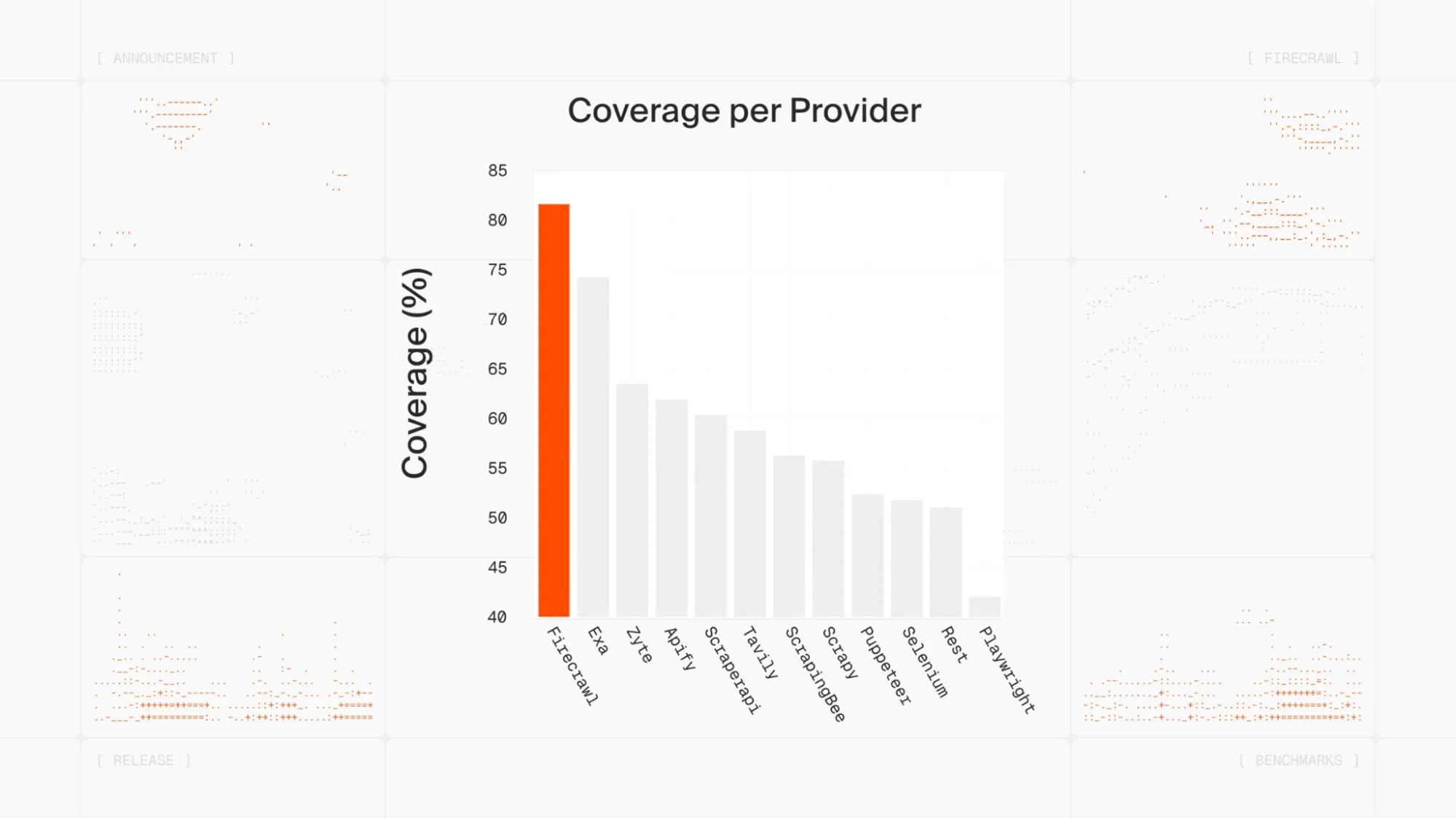
For context on where Firecrawl sits in the ecosystem: more than half a million developers use it, Zapier and Replit run production workloads on it, and the open-source repo passed 130K GitHub stars. Alex Reibman put the practical version on X:
Moved our internal agent's web scraping tool from Apify to Firecrawl because it benchmarked 50x faster with AgentOps.
Firecrawl Alexandria: the data Claude web fetch can't reach
Everything above compares two ways of reading web pages. A lot of the data an agent actually needs was never a web page to begin with: a company's 10-K risk factors, a monthly CPI series, analyst ratings, a podcast transcript, the work email of a VP of Engineering, last month's traffic for a competitor's site. On the open web, those show up secondhand, as an article or a chart that mentions the number. Web fetch can only read that article.
Firecrawl Alexandria is Firecrawl's knowledge library for superintelligence. It puts 100+ official data providers, plus Firecrawl's own Research, Developer, and Government indexes, behind the same search call an agent already uses for the web. Instead of fetching a page that describes the data, Claude finds the provider that holds it and pulls the record directly.
This is the difference that matters most when Claude is doing research rather than reading a link you pasted.
Why web fetch can't close this gap
The limits here are structural, not a missing feature that a future version of web fetch will add:
- Web fetch reads pages, and much of this data isn't on one. Licensed feeds (analyst ratings, standardized financials, contact data) and parameterized datasets (an economic series between two dates) live behind provider APIs. There's no public page that holds the full record for web fetch to read.
- Web fetch can't build the request. As covered in the limitations above, Claude can only fetch URLs that already appear in the conversation. Querying a dataset means constructing a request with parameters (a ticker, a series ID, a date range), and web fetch has no way to do that.
- Web fetch returns text, not records. Even when the source is public, web fetch hands back page text. A 10-K runs to hundreds of pages, so either the full text floods the context window or
max_content_tokenstruncates it, and in Claude Code theWebFetchtool replaces it with a smaller model's summary. The odds that the exact figure you need survives are not great. Alexandria returns structured fields from the source, so the number Claude reasons over is the number the provider published.
What's in the library
The catalog covers the sources research agents stall on most often:
| Category | Providers in Firecrawl Alexandria | What Claude can pull |
|---|---|---|
| Filings and financials | SEC EDGAR, Fiscal.ai, Benzinga, Nasdaq | 10-K and 10-Q sections, full-text filing search, standardized statements, earnings transcripts, analyst ratings, company news |
| Economic data | FRED, World Bank, IMF Data, US Treasury Fiscal Data | Historical series by ID and date range, with unit and frequency transforms |
| Companies and people | Apollo, FullEnrich, Companies House, GLEIF | People at a company by title and seniority, verified work emails, company registries and legal entity records |
| Research and code | Research Index, Semantic Scholar, Developer Index, GitHub, PyPI, Hugging Face, Stack Exchange | Papers and citations, issue threads and merged fixes, package and model metadata |
| Market and web signals | Similarweb, Firecrawl Trends, Wayback Machine, PeerSpot, Substack | Site traffic and channel mix, search interest over time, archived page snapshots, software reviews, newsletter archives |
| Government and public records | Government Index, USAspending, SAM.gov, Grants.gov, USPTO, US Census Bureau | Federal awards and contract opportunities, grants, patents and trademarks, census data |
| Audio | Particle | Podcast episode search, full transcripts, and quotable clips |
When no provider fits the question, the agent falls back to Firecrawl's web search and scraping, so a gap in coverage doesn't dead-end the task.
Same question, two tools
Here's how a few common research questions play out with each tool:
| Question | Claude web fetch | Firecrawl Alexandria |
|---|---|---|
| "What are the risk factors in Nvidia's latest 10-K?" | Needs the exact filing URL already in the conversation, then reads a very long document that may exceed max_content_tokens | SEC EDGAR returns Item 1A from the latest 10-K as plain text |
| "How has US CPI moved since 2020?" | Reads an article or chart page that mentions CPI | FRED returns the CPIAUCSL data points for the date range you ask for |
| "Who leads engineering at Stripe, and how do I reach them?" | No public page holds this reliably | Apollo or FullEnrich returns people by title and seniority, with verified work emails |
| "What did a competitor's pricing page say in January?" | Only works if you already have the exact archive URL | The Wayback Machine returns the snapshot closest to the date |
| "How much traffic did a competitor's site get last month?" | Not available on the page | Similarweb returns monthly traffic and channel mix |
How it works: find, check, run
Alexandria follows three steps, and an agent walks them on its own:
- Find. Add
alexandriato thesourcesof a search call. Alongside web results, the response carries atoolsarray of matching providers, each with a one-line description of when to use it. Finding tools is free. - Check. Each tool publishes a contract: the inputs it needs, the shape of its response, and its price in credits. Reading a contract is free too, so the agent knows what a call costs before it spends anything.
- Run. Call the scrape endpoint with an
alexandriablock (provider, capability, options) in place of a URL. The run is billed at the tool's listed price and deducted from your Firecrawl credits.
from firecrawl import Firecrawl

app = Firecrawl(api_key="fc-YOUR_API_KEY")

# 1. Find: web results plus matching Alexandria tools, at no cost
results = app.search(
    query="Nvidia 10-K risk factors",
    sources=["web", "alexandria"],
    limit=5,
)
for tool in results.tools or []:
    print(tool.provider, tool.capability, tool.description)

# 2-3. Check the contract, then run the tool
risk_factors = app.scrape(
    alexandria={
        "provider": "sec-gov",
        "capability": "filings/sections",
        "options": {"ticker": "NVDA", "items": ["1A"]},
    }
)
print(risk_factors.alexandria[0].data)
Some licensed providers require an organization admin to accept their terms once before the first call, which they can do from the Data Sources settings in the dashboard. Alexandria needs an API key on a team where it is enabled.
The evidence
In Firecrawl's own evaluation across 845 tasks, with the same model, the same prompts, and blind AI judging, agents using Firecrawl Alexandria scored 21% higher on answer quality than agents using built-in web tools. The gain comes from where the answer is read: the agent works from the provider's own record instead of a page that summarizes it.
Using Firecrawl Alexandria from Claude
In Claude on the web or desktop, add the official Firecrawl connector and connect your Firecrawl account. The connector includes Alexandria tool discovery and execution alongside search and scraping, so you can ask in plain language and Claude finds the provider, checks the price, and runs it.
In Claude Code, connect the Firecrawl MCP server with your API key:
claude mcp add firecrawl -e FIRECRAWL_API_KEY=your-api-key -- npx -y firecrawl-mcpThree MCP tools cover the workflow: firecrawl_search returns matching providers when the call includes alexandria in its sources, firecrawl_find_tools reads a tool's contract and price, and firecrawl_scrape runs it. The keyless MCP endpoint doesn't expose Alexandria, so connect with a key.
A few prompts to try in either:
Pull the risk factors section from Nvidia's latest 10-K and summarize what changed from the year before.Get monthly US CPI and the unemployment rate from FRED since 2020 and chart them together.Find engineering leaders at Stripe and enrich their profiles with verified work emails.Show me how our competitor's pricing page looked on January 1 using the Wayback Machine, then compare it with the live page.Which Firecrawl commands work inside Claude?
Once installed, Firecrawl exposes five commands to your agent:
- /firecrawl:scrape: Extracts a single page as clean markdown.
- /firecrawl:crawl: Recursively extracts content from an entire domain.
- /firecrawl:search: Searches the web and returns scraped results in one turn.
- /firecrawl:map: Discovers all nested URLs on a target site.
- /firecrawl:agent: Uses natural language to find and extract data across multiple sites autonomously.
With these five tools, your agent is better capable of crawling and reading through website content. You can prompt it as below:
Use Firecrawl agent to find the most recent research papers on browser automation and reference it in my article on browser automation
Firecrawl navigates, searches, and extracts, handling the multi-step browsing that web fetch just can't do.
Using web fetch and Firecrawl together
You don't have to pick one. Plenty of teams run both: web fetch for the static pages it handles well, Firecrawl for the rest. The pattern below is the same one OpenClaw uses. Claude gets web fetch as a server tool and Firecrawl as a client tool, and only reaches for Firecrawl when a fetch errors out (url_not_accessible, for example) or comes back with little or no text.
import anthropic
from firecrawl import Firecrawl

claude = anthropic.Anthropic()
firecrawl = Firecrawl(api_key="fc-YOUR_API_KEY")

tools = [
    {"type": "web_fetch_20250910", "name": "web_fetch", "max_uses": 5},
    {
        "name": "firecrawl_scrape",
        "description": (
            "Render a page in a headless browser and return its main content as markdown. "
            "Use only when web_fetch returns an error such as url_not_accessible, "
            "or returns little or no text, which usually means the page needs JavaScript."
        ),
        "input_schema": {
            "type": "object",
            "properties": {"url": {"type": "string"}},
            "required": ["url"],
        },
    },
]

messages = [
    {"role": "user", "content": "Summarize the pricing tiers at https://example.com/pricing"}
]

while True:
    response = claude.messages.create(
        model="claude-opus-5-5", max_tokens=4096, tools=tools, messages=messages
    )
    messages.append({"role": "assistant", "content": response.content})

    if response.stop_reason == "pause_turn":
        continue  # a long server-tool turn paused; send it back to resume
    if response.stop_reason != "tool_use":
        break

    results = []
    for block in response.content:
        if block.type == "tool_use" and block.name == "firecrawl_scrape":
            page = firecrawl.scrape(
                block.input["url"], formats=["markdown"], only_main_content=True
            )
            results.append(
                {"type": "tool_result", "tool_use_id": block.id, "content": page.markdown or ""}
            )
    messages.append({"role": "user", "content": results})

print("".join(b.text for b in response.content if b.type == "text"))
Static pages cost nothing beyond tokens, and you only spend Firecrawl credits on the pages web fetch couldn't read.
The full capability surface
The five commands are the shape of the API. Underneath each, there's a set of options and formats that web fetch simply doesn't have. A tour of what actually differs, in production terms:
Structured extraction with a schema. Web fetch returns freeform text and lets you prompt Claude for the fields you want. There is no schema, no validation, no guarantee the output matches the shape your code expects. Firecrawl's /scrape accepts formats: [{ type: "json", schema, checkPromptInjection: true }] and returns typed structured data. /agent does the same across many pages autonomously. Your downstream code parses once and moves on.
Output formats beyond markdown. Per scrape you can request markdown, cleaned html, rawHtml, categorized links, viewport or full-page screenshot (PNG), schema-driven json, changeTracking (diff vs prior scrape), and summary. Web fetch returns plain text for HTML pages and the document itself for PDFs.
Batch scraping. /batch/scrape takes a list of URLs and returns all of them in parallel with a single call. Web fetch is one URL per call, serial, one round trip each.
Change tracking as a first-class format. The changeTracking format returns a diff plus a status flag (new, same, changed, removed) between the current scrape and the prior one, with optional JSON-diff of extracted fields. Useful for monitoring pricing pages, changelogs, competitor sites, or any content where "did this change" is the actual question. Web fetch has no concept of a prior state.
File-format parsing. Firecrawl parses PDF and DOCX over HTTP (and local files) directly into markdown. Web fetch handles PDF text; DOCX and other document formats are out of scope.
Crawling primitives that a job scheduler expects. /crawl accepts depth limits, include/exclude path regex, subdomain toggles, external-link toggles, sitemap-first strategy, and concurrency limits, then returns a job id you poll or subscribe to via webhook. Web fetch has no notion of a crawl at all.
Search that hydrates. /search returns web search results and hydrates each result with full-page markdown in the same call. Web fetch has no search primitive; you have to already have the URL.
Content quality on messy pages. Web fetch returns the text of the initial response, so navigation, footers, and cookie banners can end up as text your model has to reason around, and JavaScript-rendered content is missing entirely. Dynamic filtering lets Claude write code to cut the noise after the fetch, which works well when Claude knows what to keep, at the cost of an extra code execution step. Firecrawl does the cleanup at the fetch layer: it renders the page, runs main-content detection, strips chrome, deduplicates repeated blocks, and returns LLM-optimized markdown before any model is involved. Against raw HTML from a DIY fetcher, this is where the ~93% token reduction comes from.
Operational surface. Firecrawl ships TypeScript, Python, Go, and Rust SDKs plus an MCP server, so the same agent code composes into non-Claude workflows (OpenAI, Gemini, local models, custom orchestration). It has server-side rate limit and retry handling, tunable caching (maxAge per scrape), and webhooks on crawl and batch jobs. Web fetch is an Anthropic tool that runs inside a Claude session. Its cache can be bypassed with use_cache: false (web_fetch_20260309 or later), but it's on or off, with no per-request freshness window like maxAge.
The one-line version: web fetch is curl | pandoc for a Claude session. Firecrawl is the web-data layer you'd build if you had to ship a product that depends on web content, and it's the layer you can call from anything, not just Claude.
Search quality: general web, papers, and code
Static fetch is one axis. Search quality is the other, and it's the one that decides whether an agent finds the right source in the first place. Firecrawl exposes three retrieval surfaces, each with its own evidence.
General web search
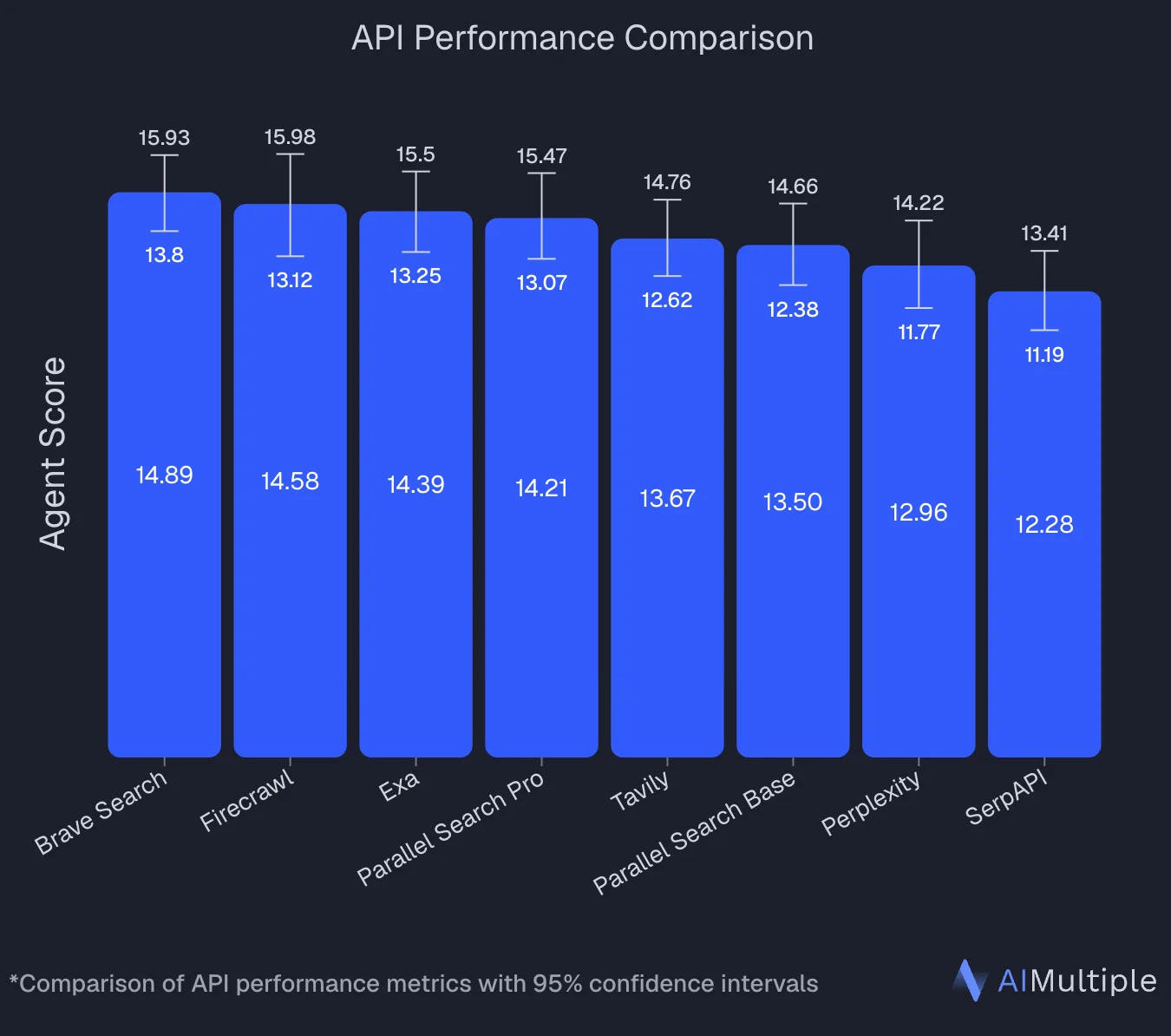
An independent benchmark by AIMultiple tested 8 search APIs on 100 real AI and LLM queries. Firecrawl finished second overall with an Agent Score of 14.58, statistically tied with Brave Search at the top (14.89), and posted the highest mean relevance score in the run at 4.30/5. Two independent runs across the industry now put Firecrawl in the top tier of agentic web search APIs. See the full methodology and per-provider breakdown in the best web search APIs guide.
Papers and academic content: Research Index
For agents that do research (surveying prior work, chasing citations, method-level lookups), the Research Index gives direct access to arXiv, GitHub search, and academic literature without a separate scraping step. It's a purpose-built surface for the deep-research pattern: query, hydrate, cite. Claude's web fetch has no equivalent primitive; it can retrieve one URL you already have, but it can't search academic sources or hydrate paper metadata.
Developer content: Developer Index (DevDex)
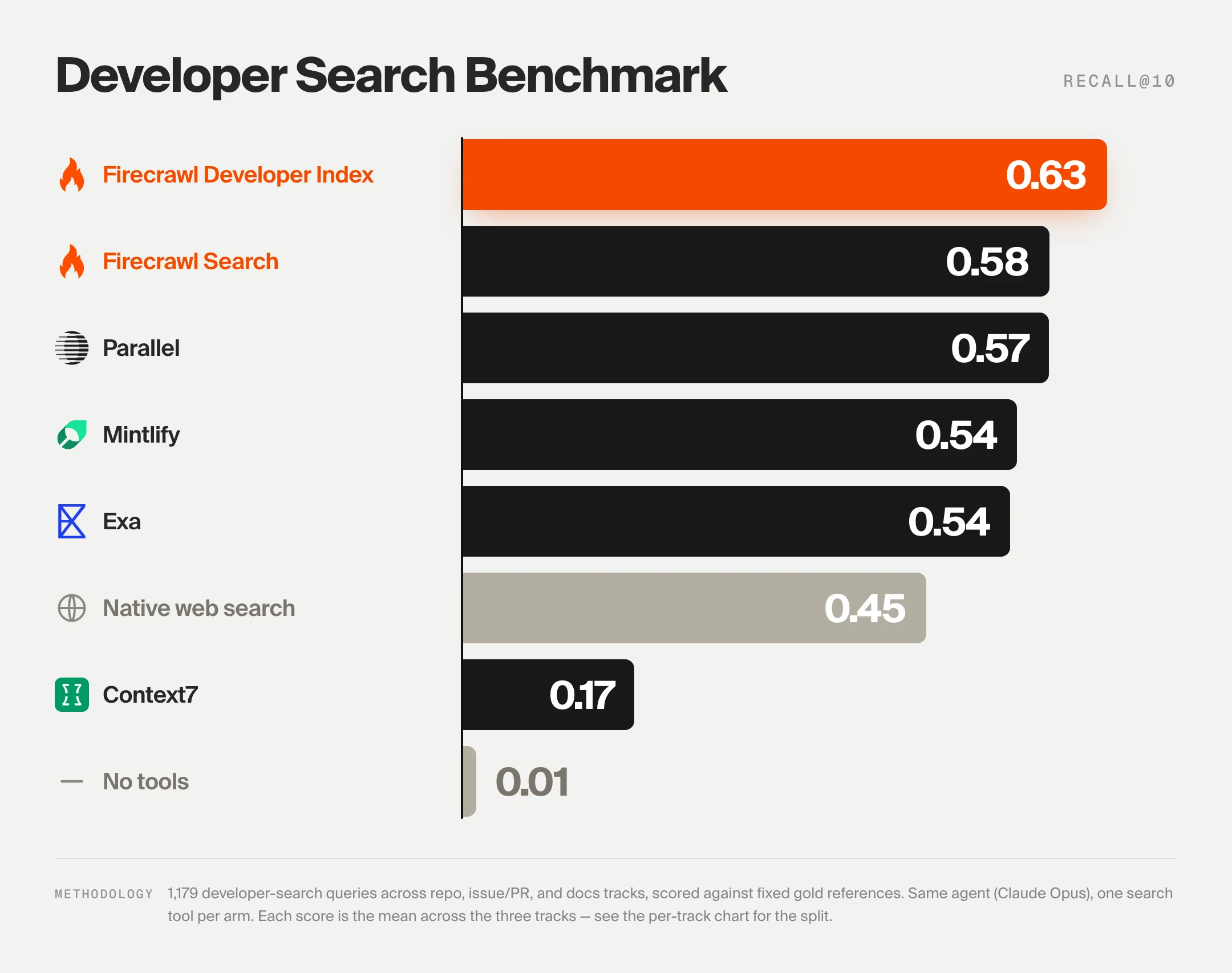
For code, issue, and docs retrieval, our open DevDex benchmark drives one agent (Claude Opus 4.8) through the same harness on every system: one search tool per call, ten results per call, answers scored deterministically against fixed golds. 1,179 tasks across three tracks (repo, issue-to-fix, docs).
Claude's own web search scores 45.4% overall Recall@10, dropping to 27.5% on issue-to-fix and 28.0% on docs. It ranks well on the repo track (80.7%), where the query leaks enough surface signal, but issue and docs retrieval are outside what a general web index is tuned for.
Firecrawl's Developer Index, queried through its MCP server, leads the field at 63.1% overall Recall@10 (ahead of Parallel 57.7%, Firecrawl Search 57.6%, Mintlify 54.6%, Exa 53.7%). It also leads on the two tracks Claude's web search struggles with: 66.0% on issue-to-fix and 47.2% on docs. That's ~40% more correct answers cited in the first ten results, absolute Recall@10. For a coding agent, that gap is the whole product. See the full methodology and confidence intervals on the DevDex benchmark page.
Going deeper: Firecrawl's /interact endpoint
One capability that has no equivalent in Claude's native web fetch is the /interact endpoint. Rather than fetching a static snapshot, it keeps a live browser session open so you can take actions inside the page after scraping it (clicking buttons, filling forms, navigating pagination, or extracting content that only appears after user interaction). For a full guide to this browser automation API for agents, including scraping-for-agents patterns and code examples, see the dedicated interact endpoint guide.
The workflow has three steps:
- Scrape a URL with
POST /v2/scrape. The response includes ascrapeId. - Interact by calling
POST /v2/scrape/{scrapeId}/interactwith either a natural languagepromptor Playwrightcode. - Stop the session with
DELETE /v2/scrape/{scrapeId}/interactwhen you're done.
Here's a minimal example that searches Amazon and extracts a price. Starting with the CLI:
# Step 1: scrape the page (scrape ID is saved automatically)
firecrawl scrape https://www.amazon.com

# Step 2: interact using natural language prompts
firecrawl interact "Search for iPhone 16 Pro Max"
firecrawl interact "Click on the first result and tell me the price"

# Step 3: stop the session
firecrawl interact stop
For more complex workflows you can pass raw Playwright code instead of a prompt, giving you full programmatic control over the browser. The endpoint also returns a liveViewUrl you can embed as an <iframe> to watch or share the session in real time.
Claude's web fetch has no concept of a stateful browser session. If the data you need is behind a button click, a login wall, or a lazy-loaded tab, /interact is the only path forward.
This is where the two tools divide cleanly. Firecrawl runs the extraction independently, against any URL, handling JavaScript rendering and proxy rotation before your model call ever happens. Claude receives clean markdown instead of raw HTML, which means less noise in the context window and more reliable reasoning over the content.
Pricing and operational limits
Firecrawl uses a credit-based model. 1 credit = 1 page on a basic scrape, crawl, or map. Search costs 2 credits per 10 results, /interact costs 2 credits per browser minute, and the JSON, Question, and Highlight formats on scrape and crawl add 4 credits per page (this is where checkPromptInjection and other advanced extraction features are billed).
| Tier | Price (billed monthly) | Price (billed annually) | Credits/month | Best for |
|---|---|---|---|---|
| Free | $0 | $0 | 1,000 | Prototyping only |
| Hobby | $19/mo | $16/mo | 5,000 | Light production use |
| Standard | $99/mo | $83/mo | 100,000 | 100,000 pages/mo |
| Growth | $399/mo | $333/mo | 500,000 | High-volume pipelines |
| Scale | $749/mo | $599/mo | 1,000,000 | Enterprise workloads |
A few things worth knowing before you commit to a plan:
- Credits do not roll over month to month on standard plans
- The free tier is 1,000 credits per month, refreshed monthly
- Pay-as-you-go adds credits in $5 USD increments on paid plans when your balance runs out, up to a monthly cap you set
- A scrape that returns no result is not charged; a page that responds with an error status (403, 404) is still returned and costs 1 credit
Claude web fetch has no per-request cost beyond standard token fees. max_content_tokens caps how much of a page enters context, and dynamic filtering lets Claude trim a page with code before it lands.
What 10K pages a month costs
Here's the math with Anthropic's own estimate of ~2,500 tokens for an average 10 kB page. Output tokens are left out because both setups pay them.
| Claude web fetch | Firecrawl + Claude | |
|---|---|---|
| Fetching | Free | Firecrawl credits (1 per page), covered by the Standard plan |
| Page tokens into Claude | 10,000 × 2,500 = 25M tokens | 10,000 × ~2,800 (median) = 28M tokens |
If every page is static and read once by a single Claude call, web fetch is cheaper: the token bill is about the same, and Firecrawl's credits are the added line. The math changes in three common cases:
- Pages get read more than once. Web fetch has no fetch-only call, so a page that five different prompts need is fetched, and billed as input tokens, five times: 125M tokens a month at this volume. Firecrawl scrapes it once, you store the markdown, and later calls can pull only the chunk they need.
- Pages need JavaScript. A page web fetch returns as an empty shell still costs a model turn and gets you nothing. Those pages are where Firecrawl's credits buy content you couldn't get otherwise.
- You're coming from raw HTML. A DIY fetcher passing ~38K tokens per page sends 380M tokens a month to Claude, more than 13 times the ~28M with Firecrawl.
The Standard plan also covers up to 100,000 pages, so the credit line stays flat while volume grows tenfold.
You get clean Markdown and structured JSON output which also helps with context engineering. What you feed into an agent's context window directly shapes what it produces, and raw HTML from a basic DIY fetch is far noisier than the filtered, structured content Firecrawl returns.
That noise is a real bill. On our own token efficiency benchmark, Firecrawl returns roughly 93% fewer input tokens than raw HTML per URL (median 92.7%, mean 93.7%), a direct discount on every LLM call an agent makes when it fetches pages itself. A page that costs Claude ~38K input tokens as raw HTML is closer to ~2.8K after Firecrawl. (Web fetch already extracts text, so this comparison is against DIY fetchers, not web fetch.) Multiply that across a research session and the credit-based price starts to look like the cheaper line, not the added one. If Claude Code is burning tokens on web research mid-session, see Claude Code web research token optimization for four Firecrawl techniques that cut what lands in context.
If you want to go deeper on how Firecrawl fits into Claude workflows, we cover the full setup in our official Claude plugin announcement.
There are also a few other interesting Claude Code plugins you can try if you're building out a broader Claude Code stack.
If you're using OpenAI Codex CLI instead, Firecrawl works there too, via either the MCP server or the Firecrawl CLI skill. Codex's built-in web search returns snippets only, and fetching full documentation pages from Codex hits the same JavaScript rendering wall. Both integration paths fix that.
When to stay with Claude web fetch vs Firecrawl
Though I'm writing on the Firecrawl blog, I still have to say that Firecrawl is not always the solution for everyone.
Stay with web fetch while your pages are static, you already have the URLs, and the text only needs to live for one Claude conversation. For documentation, a known blog post, or a PDF, it does the job and costs nothing beyond tokens.
Add Firecrawl the first time any of these happens:
- A page comes back empty. The first JavaScript-rendered page that returns a blank shell or
url_not_accessibleis the signal. Start with the fallback pattern rather than replacing web fetch outright. - You need to keep what you fetched. Storing pages in a database or vector index, refreshing them on a schedule, or tracking changes needs fetching as its own step, outside a Claude turn.
- A non-Anthropic model joins the pipeline. If GPT, Gemini, or a local model needs the same pages, fetch once with Firecrawl and pass the markdown to each.
- You deploy on Bedrock or Vertex AI. Web fetch isn't available on either, and Azure-hosted Foundry only gets the basic version.
- You need more than a handful of URLs. Crawling a site, mapping its URLs, or scraping a list in parallel is
/crawl,/map, and/batch/scrape; web fetch takes one URL at a time. - The data isn't on a page. Filings, economic series, licensed feeds, and contact data come from Firecrawl Alexandria, not a fetch.
- The content sits behind an interaction. Infinite scroll, a login form, a multi-step flow, or a lazy-loaded tab needs
/interact, which lets your agent click, fill, scroll, and navigate before handing the content back to Claude. Web fetch sees only the first server response.
Final thoughts on Claude web fetch vs Firecrawl
The native Claude web fetch tool is an excellent entry point for simple retrieval workflows. It is zero-setup and free for API users. But for production agents that need to act autonomously across the modern web, its limitations are a bottleneck.
Firecrawl removes the scraping infrastructure burden, letting you focus on the reasoning logic of your agent rather than proxy rotation or DOM parsing. With Firecrawl Alexandria, it also reaches past the web entirely, giving Claude 100+ official data providers and Firecrawl's own indexes so research runs on the source record rather than a page that summarizes it. And with the /interact endpoint, it goes further than any fetch tool can, keeping a live browser session open so your agent can click, scroll, log in, and extract content that never appears in a static HTML response.
If I wanted to make a long-term bet, I'd go with Firecrawl. It's robust, handles most scraping scenarios perfectly, and there's a team of devs working to make the crawling and data extraction experience better every day. For a broader look at how it compares against other AI web scraping solutions, see the full tool comparison.
Ready to give your agent complete web access? Try Firecrawl for free today, or add the Firecrawl connector to Claude.
Frequently Asked Questions
What is the Claude web fetch tool?
The Claude web fetch tool is an Anthropic server tool that lets Claude retrieve the full text of web pages and PDF documents during a conversation. You add it to the tools array of a Claude API request (the current version is web_fetch_20260318), and it costs nothing beyond standard input token fees for the fetched content.
Does Claude web fetch support JavaScript-rendered pages?
No. The web fetch tool extracts text from the initial server response. If a page loads its content dynamically via JavaScript, web fetch returns incomplete or empty content. For JavaScript-heavy sites, you need a headless browser-backed tool like Firecrawl.
Can Claude construct URLs to fetch on its own?
No. For security reasons, Claude can only fetch URLs that have already appeared in the conversation context, from user messages, previous search results, or earlier fetch results. This prevents prompt injection exfiltration attacks but also limits how much autonomy an agent has when discovering new URLs.
Is Firecrawl free to use with Claude?
Firecrawl offers 1,000 free credits per month on its free tier, enough for prototyping and testing. Production use requires a paid plan; Standard covers 100,000 pages at $99/month billed monthly, or $83/month billed annually. The Firecrawl Claude plugin and MCP server are free to install.
How do I install Firecrawl in Claude Code?
Run claude plugin install firecrawl@claude-plugins-official in your terminal, then run /firecrawl:setup and add your API key from firecrawl.dev/app/api-keys. The full setup takes about two minutes. Alternatively, add the Firecrawl MCP server directly: claude mcp add firecrawl -e FIRECRAWL_API_KEY=your-api-key -- npx -y firecrawl-mcp.
When should I use web fetch instead of Firecrawl?
Use web fetch when the target page is static, you already have the URL in your conversation, and you need a quick text extraction or PDF summary. Firecrawl is the better choice when you need JavaScript rendering, multi-page crawling, structured JSON output, or autonomous agent-style extraction across multiple sites.
Can Firecrawl work with self-hosted Claude or other LLMs?
Yes. Firecrawl's MCP server and API are LLM-agnostic. They work with Claude, GPT-4, Gemini, and any model that supports tool calling. You can also self-host the Firecrawl backend using Docker by pointing the CLI to a custom --api-url.
What is Firecrawl's /interact endpoint and when should I use it?
The /interact endpoint lets you scrape a page and then take actions inside it (clicking buttons, filling forms, scrolling, or navigating) using either natural language prompts or Playwright code. Use it when the content you need only appears after a user interaction, such as infinite scroll, a login wall, a multi-step form, or a lazy-loaded tab. Claude's native web fetch has no equivalent; it only sees the initial HTML response and cannot interact with the page at all.
How does Firecrawl handle prompt injection compared to Claude web fetch?
Claude web fetch's defenses control where it fetches: allowed_domains or blocked_domains lists, Anthropic-side refusal of private addresses, robots.txt-disallowed URLs, and URLs that appear to contain a credential, plus the rule that Claude can only fetch URLs already in the conversation. None of these inspect hostile content on a page it is allowed to fetch. Firecrawl offers an opt-in guard on JSON extraction called checkPromptInjection. A classifier inspects the scraped page before extraction runs, and if a hidden instruction aimed at the extraction LLM is detected the request fails with HTTP 403 and error code SCRAPE_PROMPT_INJECTION_DETECTED. No extraction output is returned, so attacker-controlled data never reaches your agent. The same guard is available on crawl, since crawl calls scrape per page and supports the same JSON extraction format.
How does Firecrawl compare to Claude web fetch on token usage?
Web fetch already strips HTML and returns plain text, and Anthropic estimates an average page at about 2,500 tokens, which is close to Firecrawl's typical output. The 93% reduction on our token efficiency benchmark (median 92.7%, mean 93.7%) is measured against raw HTML from DIY fetchers, where a page that costs around 38,000 input tokens lands at around 2,800 after Firecrawl. Against web fetch, the difference is what the text contains: Firecrawl renders JavaScript and keeps the main content, while web fetch returns whatever text the initial response held, which you can trim afterwards with dynamic filtering.
Does Claude web fetch actually read the pages it fetches?
It depends on which tool you mean. The Claude API's web_fetch server tool puts extracted text into context, subject to max_content_tokens and optional dynamic filtering. Claude Code's client-side WebFetch tool works differently: it passes the page to a smaller, faster model along with a prompt, and the main model sees that model's answer rather than the page. That summarizing pass is a documented source of hallucinated citations and fabricated stats. Firecrawl's plugin and MCP server return the page's markdown itself, so in Claude Code the main model reasons over what was on the page.
What is Firecrawl Alexandria?
Firecrawl Alexandria is Firecrawl's knowledge library for superintelligence. It brings 100+ official data providers, such as SEC EDGAR, FRED, Fiscal.ai, Benzinga, Apollo, and Similarweb, together with Firecrawl's own Research, Developer, and Government indexes. An agent finds the right provider through the same search call it uses for the web, checks the tool's inputs and price, and pulls the record directly from the source.
Can Claude web fetch get the same data as Firecrawl Alexandria?
No. Web fetch reads web pages, and only URLs that already appear in the conversation. Much of the data in Alexandria, such as licensed financial feeds, contact data, and parameterized economic series, sits behind provider APIs with no public page that holds the full record. Web fetch can read an article that quotes the data; Alexandria returns the record itself as structured fields.
How do I use Firecrawl Alexandria in Claude?
In Claude on the web or desktop, add the official Firecrawl connector and connect your Firecrawl account; it includes Alexandria. In Claude Code, connect the Firecrawl MCP server with your API key, which exposes firecrawl_search, firecrawl_find_tools, and firecrawl_scrape for finding, checking, and running Alexandria tools. Then ask for the data in plain language.
What does Firecrawl Alexandria cost?
Finding providers and reading a tool's contract and price is free. Running a tool is billed at its listed price in Firecrawl credits. Some licensed providers require an organization admin to accept their terms once before the first call, and Alexandria needs an API key on a team where it is enabled.
How does Firecrawl compare to Claude's native web search on developer retrieval?
On our open DevDex benchmark (1,179 tasks across repo, issue-to-fix, and docs tracks, one agent driving every system through the same harness), Firecrawl's Developer Index scores 63.1% overall Recall@10 versus Claude's native web search at 45.4%. The biggest gaps are on issue-to-fix (66.0% vs 27.5%) and docs (47.2% vs 28.0%). That is roughly 40% more correct answers cited in the first ten results, absolute Recall@10.
What Firecrawl features have no equivalent in Claude web fetch?
Firecrawl Alexandria's 100+ official data providers, real headless-browser rendering for JavaScript-heavy pages, structured JSON extraction against a schema, checkPromptInjection, the /interact endpoint for stateful browser sessions, /crawl for full-site walks with depth and regex controls, /batch/scrape for parallel URLs, /search that hydrates results with full markdown in one call, the Developer Index and Research Index, change tracking as a first-class format, PDF and DOCX parsing, webhooks on crawl and batch jobs, tunable caching, and SDKs for TypeScript, Python, Go, and Rust plus an MCP server that composes into non-Claude workflows.