


If you run an e-commerce brand, you’re probably swimming in customer support tickets. It feels like for every order you ship, you get three questions about where it is, how to return it, or if you have it in blue. Offering fast, consistent, 24/7 service isn't just a nice-to-have anymore; it's a huge operational cost and a big reason why a customer decides to buy from you again (or not).
This is where AI tools come in, promising to handle the repetitive questions, cut down on costs, and keep your customers happy. One name that comes up a lot, especially for stores on Shopify, is Yuma AI. It’s built from the ground up to handle the specific headaches of e-commerce support.
But is it the right tool for every store? In this article, we’ll take a straight-up look at Yuma AI, what it does, how you set it up, and what it costs. We'll also compare it to more flexible, modern alternatives that give you a bit more control over how you automate things.
What is Yuma AI?
At its core, Yuma AI is a set of AI tools designed to automate customer chats and tickets for online stores. You can think of it as a small team of specialized AI agents, where each one has a specific job to do.
Its main offerings are split into five areas:
- Support AI: This is their main thing. It’s designed to automatically answer the common support tickets that fill up e-commerce inboxes, like "Where is my order?" (WISMO), return requests, and billing questions.
- Sales AI: This tool is all about the money side of things. It engages with shoppers to try and boost average order value (AOV) and cut down on abandoned carts using personalized messages.
- Social AI: For brands that are big on social media, this feature helps manage comments and mentions, with the goal of turning those public chats into sales.
- Chat AI: This is their website chatbot, which gives AI-powered answers to shoppers right on your store’s website.
- Voice AI: Launched on September 22, 2026, it answers the support line 24/7 and takes real actions in backend systems during the call, such as address fixes, cancellations, refunds, and subscription changes. It confirms each change out loud and runs from the same Handbook as email and chat.
Yuma AI is definitely aimed at larger merchants on platforms like Shopify who are dealing with a ton of customer messages. It works with Shopify, WooCommerce, and Magento, and plugs into help desks like Gorgias, Zendesk, Kustomer, Salesforce Service Cloud, Gladly, and Front so it can fit into the tools you're already using.
Key features of Yuma AI
Let's get into what Yuma AI actually does day-to-day. It has some solid features for its specific niche, but it's also worth looking at where its focused approach might hold you back if you need something more adaptable.
E-commerce ticket automation with Yuma AI
This is where Yuma AI does its best work. It connects to your Shopify store and help desk to take action on common requests. It can automatically check an order status, grab tracking info, start a return, or handle a product exchange. For a typical online store, this can clear a decent portion of the daily ticket queue.
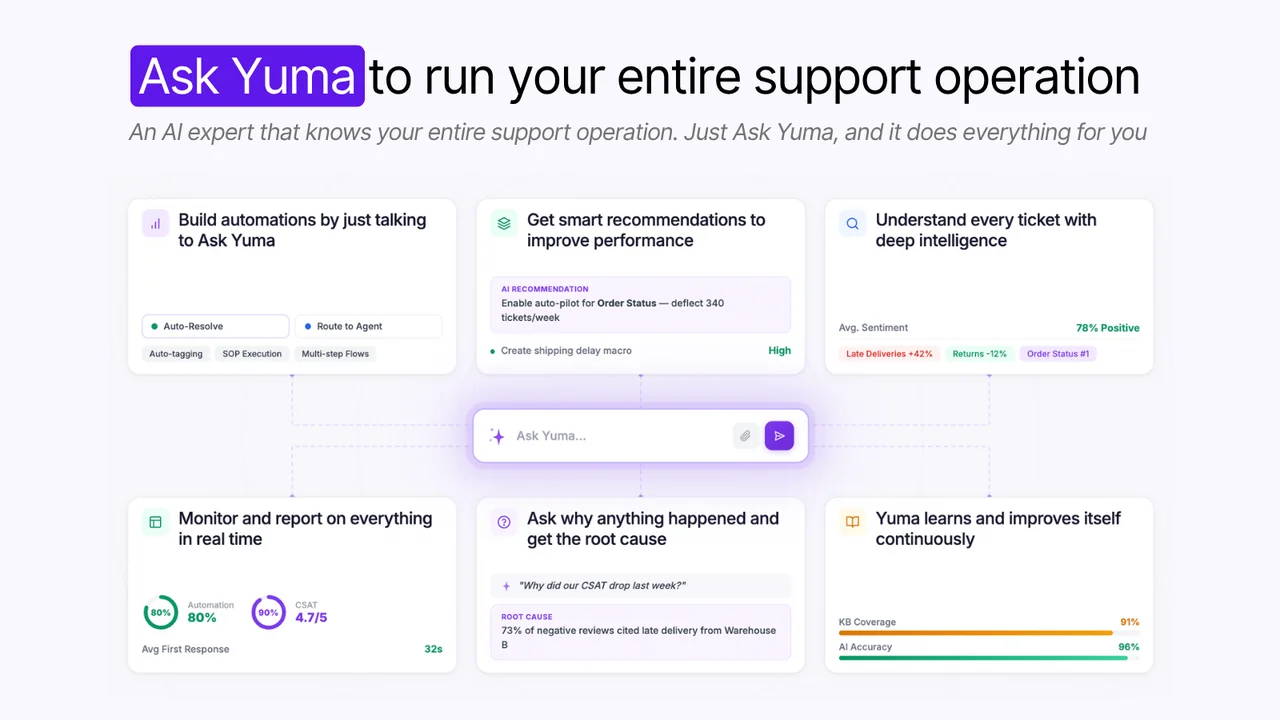
But here's the potential downside: This specialized approach can be a bit rigid. It works great if all your processes fit neatly into Yuma's pre-built boxes. But what happens when you need to check customer data in a custom database, look up a loyalty status in a separate app, or connect to an internal tool? Yuma covers 75+ Shopify actions and over 100 ready-to-use actions across its integrations, custom integrations scoped through sales, and Web Actions that drive a real browser for tools with no API, so it isn't a hard stop. Anything beyond that takes scoping with Yuma's team.
This is where a tool like eesel AI takes a different path with fully customizable workflows and custom AI actions. Instead of working from a fixed list of actions, you can build automations that pull information or trigger actions in any system with an API. That means you can automate the complex, unique scenarios that are specific to your business, not just the generic ones everyone else has.
Social media and sales engagement with Yuma AI
Yuma's tools for managing social media and nudging shoppers to prevent cart abandonment are a nice touch, especially for brands that get a lot of sales through social channels. It helps turn your social media accounts into another channel for support and sales.
Where it gets tricky: These features are almost entirely focused on talking to customers. But support teams don't work in a vacuum. They’re constantly getting questions from other departments. Marketing needs a customer quote, finance needs an order detail, and the product team is looking for feedback. A tool that only looks outward misses half the conversation.
An all-in-one platform like eesel AI brings your external and internal support together. You can set up an AI Internal Chat agent right inside Slack or Microsoft Teams. This internal helper can be trained on all your company knowledge, from internal wikis in Confluence to process docs in Google Docs, giving your whole company one place to ask questions and get answers.
AI-powered chat by Yuma AI
Like a lot of platforms, Yuma AI has a chatbot for your website to give shoppers instant answers. It's a standard feature these days for deflecting simple questions and keeping people from leaving your site.
The catch: A chatbot is only as smart as the information it can access. If it's only trained on a handful of FAQs or basic help articles, it’s going to say "I don't know" an awful lot.
This is why having all your knowledge in one place is so important. The AI Chatbot from eesel AI can be trained on a huge range of sources almost instantly. You can connect it to your help center, your entire history of past support tickets, Google Docs, Confluence, and even your full Shopify product catalog. Because it can pull from everywhere, it gives much better and more accurate answers, making it actually helpful instead of just another frustrating bot.
| Feature | Yuma AI | eesel AI |
|---|---|---|
| Primary Focus | E-commerce on Shopify, WooCommerce, Magento, Adobe Commerce, and BigCommerce; help desks include Gorgias, Zendesk, Kustomer, Salesforce Service Cloud, Gladly, and Front | Customer Service, ITSM, Internal Support |
| Ticket Automation | Handles common e-commerce tickets (WISMO, returns) | Handles any ticket type with custom actions & API calls |
| Knowledge Sources | Past tickets, help center articles, policy docs, spreadsheets, Google Docs, PDFs, product catalog | 100+ sources (help desk, Confluence, Google Docs, Slack, etc.) |
| Internal Support | Not a primary feature | Yes, via AI Internal Chat for Slack & MS Teams |
| Setup Process | Dedicated account manager configures it at no extra cost | Fully self-serve, go live in minutes |
| Pre-launch Testing | Every playbook carries tests, replayed as simulated conversations before changes go live; past conversations can become tests | Robust simulation mode on historical tickets |
The Yuma AI setup and implementation experience
Getting started with a new AI tool can be a real project. You know the drill: a bunch of discovery calls, a mandatory demo, a custom quote, and then a multi-week onboarding plan. Yuma's version of this is managed: a dedicated account manager configures the agents at no extra cost, and a new playbook typically starts on a small share of matching conversations, around 10%, with the rest handled as drafts your team reviews.
This old way of doing things is slow and takes up a lot of your team's time. It does take your team's time, though Yuma offers a 30-day trial on live tickets with your real data, usually kicked off with an agreed target automation rate, so you can see results before the commitment settles in. The tradeoff is that the setup is done with Yuma's team rather than on your own.
This is where a modern platform like eesel AI completely flips the script with a much simpler, truly self-serve approach.
- Go live in minutes, not months: You can sign up, connect your help desk with one click, and start setting up your AI agent without ever having to talk to a salesperson. The control is in your hands from the very beginning.
- Test with confidence using risk-free simulation: This is a big one. Before you let the AI talk to a single customer, eesel AI’s simulation lets you test your setup on hundreds of your real, past tickets. It shows you exactly how the AI would have responded and scores those answers against what your team actually sent, so you can see which tickets are easy wins and find any gaps in your knowledge base before you launch.
- Roll out gradually and safely: You don't have to automate everything at once. With eesel AI, you can start small. Set up your agent to handle just one simple ticket type, like WISMO requests, and have it pass everything else to your human team. As you get comfortable and see the results, you can slowly give it more to do. You’re always in charge.
Here’s a quick look at how the two approaches stack up:
Yuma AI pricing and plans
Yuma AI uses an outcome-based pricing model: you only pay when its AI fully resolves a ticket, with nothing charged for conversations or escalations a human touches. It publishes three annual plans on a 12-month commitment, paid upfront, and calls the figures illustrative since the exact bundle is built around your forecast:
- Starter: $14,400/year for 12,000 resolutions (about $1.20 each, or $1,200/month).
- Growth: $40,000/year for about 48,000 resolutions (about $0.83 each), adding a dedicated account manager, Deep Search across ticket history, and advanced analytics.
- Scale: $90,000/year for about 120,000 resolutions (about $0.75 each), with the rate dropping toward a $0.55 floor past that volume.
There is no implementation fee, no per-seat charge, and the first 30 days are free. Yuma's Shopify App Store listing also shows monthly plans from $850/month and $1,200/month, with overage fees.
Another thing to watch out for with AI support tools is the per-resolution pricing model. Some platforms charge you for every ticket the AI successfully closes. Sounds fair enough, right? You only pay for what works. The downside is that a bill can vary with volume, depending on the plan. On Yuma's annual plans there is no overage: usage pauses at the end of the bundle and resumes at renewal, so the Black Friday risk shifts to running out of resolutions rather than a surprise bill. Monthly plans bill extra full resolutions at a flat $1.50 each, so a tripled ticket volume would show up there.
The eesel AI approach is built around being transparent and predictable.
- No per-resolution fees: eesel AI’s pricing charges a flat rate for each ticket or chat the AI handles, billed the same whether or not it fully resolves the conversation. A hard monthly spend cap lets you set your ceiling in advance, so a Black Friday spike can’t push the bill somewhere you didn’t approve.
- Flexible, transparent plans: You can see all the plans and prices right on the website. You can start with a monthly plan and cancel anytime, giving you the freedom to adapt as your needs change without getting locked into a long-term contract.
- All-inclusive features: Core tools like the AI Agent, AI Copilot, AI Triage, and AI Chatbot are all included in the plans. You’re not getting nickel-and-dimed for features that should be standard.
Pro Tip: When you're looking at an AI support tool, always ask for a detailed breakdown of the pricing. If it's based on resolutions, try to project what your bill would look like during your busiest month of the year.
Is Yuma AI the right choice for you?
So, should you go with Yuma AI? It’s a solid platform that’s laser-focused on solving the most common support problems for e-commerce brands, especially those on Shopify. If your needs fit standard e-commerce workflows and you're comfortable with a managed, account-manager-led setup, it could be a good fit.
However, that narrow focus can also be a weakness. It can be rigid, and the managed setup and a 12-month upfront commitment on the annual plans might not work for teams that want to move quickly and stay flexible month to month.
For teams that want more power, control, and transparency, a modern, flexible platform like eesel AI is the obvious alternative. It’s built for any team that wants to automate support on their own terms.
With eesel AI, you get a platform that is:
- Radically self-serve: You can connect your tools and be up and running in minutes.
- Fully controllable: Customize everything from the AI's actions to its personality, and test it all without any risk using the simulation mode.
- Truly knowledgeable: Connect to over 100 sources like Google Docs, Confluence, and Slack to build an AI that understands your entire business.
- Transparently priced: Your costs are predictable and won't jump up just because you had a great sales month.
But don't just take my word for it. You can connect your help desk to eesel AI for free and run a simulation to see for yourself how many of your support tickets could be automated right now.
Frequently asked questions
We're a fast-growing Shopify store; is Yuma AI designed specifically for a business like ours?
Yes, Yuma AI is built primarily for e-commerce brands, especially larger merchants on Shopify. Its core features are designed to handle common support tickets like order status inquiries (WISMO), returns, and product exchanges.
I'm trying to figure out our budget, so how much does Yuma AI actually cost?
Yuma AI uses outcome-based pricing, so you only pay when its AI fully resolves a ticket. A full resolution is a ticket handled end to end with no human involved, and conversations and escalations are never charged. Yuma publishes three annual plans: Starter at $14,400/year (about $1.20 per resolution), Growth at $40,000/year (about $0.83), and Scale at $90,000/year (about $0.75). Its Shopify App Store listing also shows monthly plans from $850/month.
Beyond just answering questions, can Yuma AI take action on things like starting a return?
Yes, its main strength is taking action on common e-commerce requests. By connecting to your help desk and Shopify store, it can automate tasks like checking order statuses, initiating returns, and processing exchanges without human intervention.
We have some unique business rules that aren't standard. How flexible is Yuma AI with custom workflows?
The platform is quite specialized for standard e-commerce processes, which can make it feel rigid if your workflows are unique. For custom databases or internal tools, Yuma offers custom integrations on top of its 100+ out-of-the-box ones, Web Actions that drive a real browser for tools without an API, and Flows and custom actions for strict step-by-step logic. Custom integrations are scoped and priced through sales.
How long does it usually take to get up and running with Yuma AI?
Setup isn't self-serve: a dedicated account manager configures the agents at no extra cost, and there is no implementation fee. Yuma says most brands go live within a week, the first 30 days are free, and its Growth plan targets 30% automation in 30 days, depending on your processes and ramp. This contrasts with platforms where you can sign up and go live in a few minutes on your own.
Our support team gets a lot of questions from other departments. Can Yuma AI be used as an internal support tool?
Yuma AI is primarily an external, customer-facing tool focused on shoppers and social media engagement. It is not designed to function as an internal help desk for questions from departments like marketing or finance.
