Let’s imagine, for a moment, that we live in a perfect world.
In that world, you could check your company’s cloud bills and financial reports and find cleanly organized categories of spending that help you instantly understand where your money is going and why.
Your engineers would meticulously label every spend item with useful metadata tags so you can clearly see which costs have increased and which are most affecting your bottom line. And you could easily run a cloud cost analysis to see where you should make optimizations.
Now let’s pop back to reality and look at the actual state of things.
In all likelihood, your tagging system leaves something to be desired. Nearly every company we begin working with has some percentage of untagged cloud spend, as well as duplicate or even misspelled tags that obscure the picture even further.
Even if you were to painstakingly fix every single error and tag your untagged resources, you’d still likely come across some items that don’t support tags at all. This is known as untaggable cloud spend, and there’s not much you can do about it without the right tool (or a spreadsheet and a lot of time and patience).
Thankfully, the problems of untagged and untaggable items can be fixed. Below, we’ll explain how you can deal with these common issues and start tracking your spend in a clear and useful way.
How To Fix The Problem Of Untaggable And Untagged Cloud Spend
Since untagged and untaggable cloud spend are actually two different things, let’s address them one at a time.
Fixing untagged resources
The majority of cloud resources are taggable. When the right process & tagging strategy is in place, most taggable resources will be tagged during deployment through automation. The trouble is, untagged legacy resources require someone to manually add metadata that labels and tracks each item. There’s not really a way around this.
When that “someone” is an engineer who’s more focused on building and coding than on worrying about cloud spend, it’s easy to understand why resources go untagged in most companies’ systems.
The percentage of untagged resources can also vary based on your company’s tagging strategy. Some companies opt to use the native tags that come by default from cloud providers. These ”out of the box” tags tend to cover a wide range of items, and therefore require less manual intervention, but they also lack detail and customizability.
On the other end of the spectrum, you might have been using highly detailed and customized tags all along. This is great in that you can choose exactly how you want to track each item, but it’s not so great when you have to manually choose and assign those tags to every individual resource.
If you find yourself stuck in the weeds trying to assign custom tags to what seems like an endless list of untagged resources, you can always default back to the cloud provider’s out-of-the-box tags.
You’ll lose the detail you were trying to accomplish, but it can be a good way to quickly increase your percentage of tagged items and untangle a confusing mess.
Worth noting is how you can make things easier on yourself by using CloudZero’s tag prioritization dashboard.
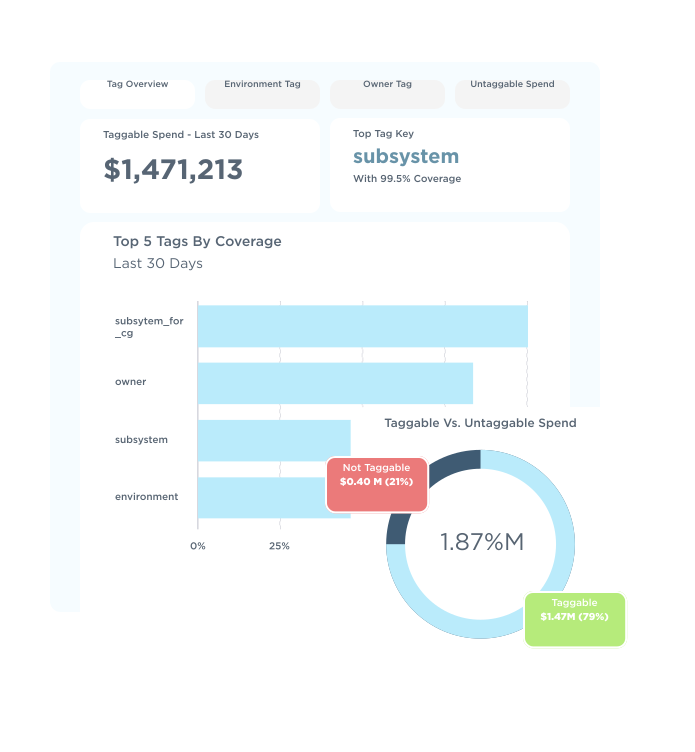 Using the dashboard, you can get an overview of your tag information, including:
- Which tags are you currently using?
- What are your custom tags?
- What percentage of resources are tagged and untagged?
This information helps you figure out where best to focus your efforts to make the most difference in the shortest amount of time.
Fixing untaggable resources
Despite your best efforts to reach a 100% tag rate, you will likely fall well short of this goal. It’s not your fault; roughly 5%–10% of cloud resources simply don’t support tags and therefore cannot be marked and tracked in the same way as your other items.
To make matters more complicated, it’s often difficult to discern untaggable resources in most cloud providers’ interfaces. AWS, for example, does not provide a clear way to identify items that don’t support tagging.
In contrast, if you use CloudZero’s tagging prioritization dashboard, you will be able to see how many of your resources are untaggable at a glance. These will be clearly separate from the taggable resources that are simply not tagged currently.
To track your untaggable resources, you’ll typically want to assign the total spend associated with untaggable resources to other categories. The manner in which you do this is up to you.
Someone in finance, for example, might want to sort untaggable spend into a bucket like “overhead,” which could include tagged overhead spend plus the untagged resources that cannot be tracked but contribute meaningfully to the company’s upkeep in some way.
Engineers, on the other hand, may care less about specific categories. Engineering leads simply want to know what portion of costs for a given project are taggable versus the costs that should be lumped into an untaggable infrastructure category.
Though they won’t be able to break down the untaggable spend much further than that, this generalized information can help them assign costs appropriately and not leave any unknown costs floating around.
For any items that don’t make sense to sort into overhead, infrastructure, or other similar buckets, it’s helpful to assign a default category. That way, even if not every untaggable item fits neatly into your specified categories, they’re not left completely unaddressed.
It’s also possible to distribute untaggable spend across many different products or teams instead of lumping it all into one bucket. You can opt to distribute untaggable spend evenly, so every team and product shares a small slice of the cost burden. In this way, the untaggable spend is treated like shared overhead.
Or, you can assign proportional amounts into specific categories that make sense to you. If one team spends the most money in the cloud, for example, they could take on a proportionally appropriate amount of the untaggable spend.
Distributing your untaggable spend is most easily accomplished using the CloudZero platform, which can automatically portion out your untaggable spend into categories of your choosing.
All you have to do is choose how you want it spread out, and the system takes care of it for you. Without CloudZero, you’d have to manually calculate each distribution and send it to the finance department to be finalized.
Report
Finance needs to prove AI’s return: CloudZero report
260 senior finance leaders (more than half CFOs) told us why the speed of seeing AI spend, not the size of it, separates who pulls ahead on AI from who gets burned.
If Your Tags (Or The Lack Thereof) Are Giving You A Headache, Try CloudZero
You might have messy and confusing tags, a huge percentage of untagged and untaggable items, or few tags at all. When you need a way to get visibility into your cloud costs but your tagging system is not in great shape, you might be looking for an alternative way to allocate your costs.
CloudZero doesn’t expect or require you to have perfect tagging. And we also don’t want you to spend months going through your system and meticulously updating each tag when you could achieve cost visibility in just a few hours. Instead, our platform organizes your cloud spend using code, not tags.
This means your untagged and untaggable resources no longer have to be a barrier to cost intelligence.
 to start allocating your costs.












