AI costs can spiral out of control before you know it. One day you’re building an AI feature that promises to bring in a solid chunk of revenue for the company. The next day you’re obsessing over an astronomically high cloud bill that will significantly eat into your profits — or consume them entirely.
To help you solve this problem, we brought in Jeremy Daly, Director of Research (and AI cost management guru) at CloudZero. His advice will help you rein in rogue costs and keep your AI budget under control.
How To Run AI In The Cloud While Keeping Costs Under Control
1. Have a foolproof way to monitor your AI costs in real time
The only way you’ll know if your AI costs have spun wildly out of control — before you get your next bill — is if you’re watching them grow on a daily basis. You want to know what costs you’ve already incurred this month, which resources generated those costs, and what your projected costs are for the remainder of the month.
That’s why Jeremy recommends implementing a cost management platform as the first step toward liberating yourself from uncontrollable cloud costs.
“Good cost monitoring goes well beyond generative AI. If you’re doing machine learning or other resource-intensive processes, staying on top of your real-time costs is just as important. It’s about keeping those runaway costs in check so you don’t get hit with a huge, unexpected bill.”
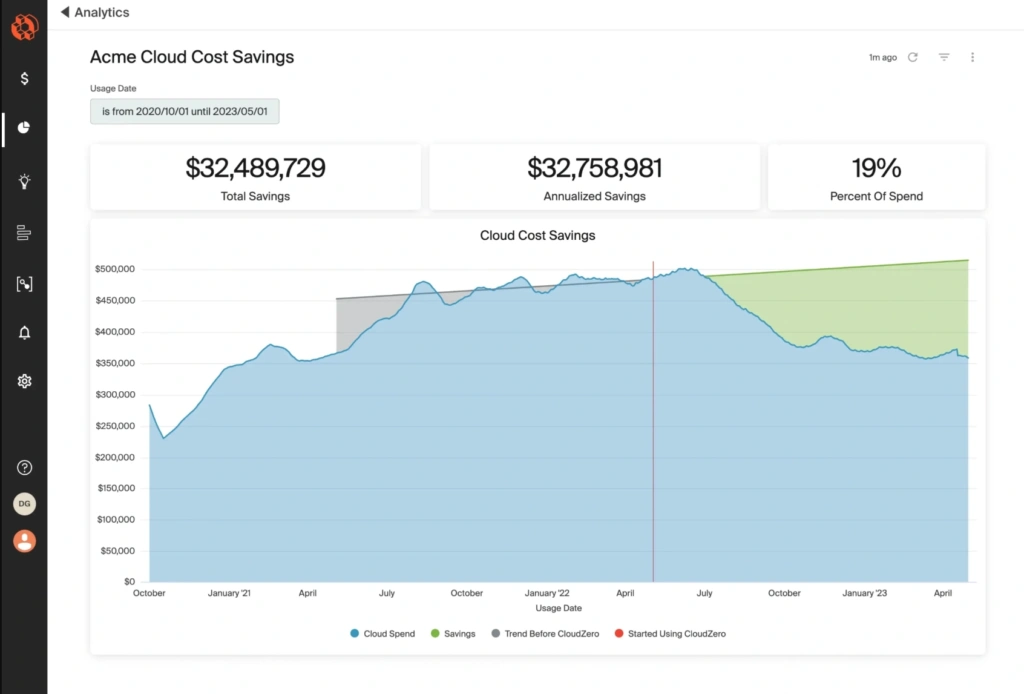
CloudZero monitors all your cloud costs — AI included — so you can see the full picture of where your money goes and why.
2. Take advantage of savings plans and spot instances
If you’ve been in the SaaS world for some time, you’ve probably used — or at least heard of — provider savings plans and spot instances as a potential solution for saving some money.
Savings plans are just what they sound like: You commit to a certain amount of usage, and your cloud provider offers you a discount as long as you stick to the terms of the agreement.
A savings plan won’t prevent your AI costs from snowballing, but it will guarantee your base costs are lower — and, therefore, that the ultimate price of your AI applications is lower than it would otherwise be.
Since savings plans typically require a specific commitment (and so, you need to know ahead of time what your usage might look like), they’re best for steady workloads.
According to Jeremy, “You could certainly think about savings plans if you have ongoing AI training. Machine learning workloads are also a little bit more predictable. So you could get an Amazon SageMaker savings plan because you’ll likely have predictable workloads on that.”
With spot instances, you can snap up unused compute resources from your provider at a steep discount, as long as you’re willing to let go of those resources at a moment’s notice when a higher bidder comes along.
“If you don’t need to run your AI training programs constantly, Amazon EC2 spot instances are a great choice.”
3. Look for opportunities to rightsize your instances
“Rightsizing your AI workloads is important,” Jeremy explains. “If you’re running machine learning models, for example, you can rightsize your SageMaker instances in order to do that cost effectively.”
Rightsizing is most effective when you can make decisions based on your company’s unique cost data. If you have plenty of data you’ve collected from allocating your costs with CloudZero, you can pick out places where instances might not be sized correctly for the workloads they support.
Downsizing idle resources might not seem like a huge money saver in the moment, but those savings will add up over time.
4. Go serverless
“SageMaker now has a serverless option,” Jeremy says. “If you’re not running machine learning applications all the time, you don’t need servers up and running the whole time either. It’s also possible to run smaller models using AWS Lambda functions or some other serverless compute in order to run these jobs on-demand.”
That means you can run your ML applications without having to manage infrastructure or incur the costs to keep them running.
5. Choose generative AI models carefully
“If you’re using generative AI, the model you use should really match your workload,” Jeremy explains. “For example, let’s say you’re doing something really complex, like writing a blog post or generating some code. You’ll need a larger, more mature model that can handle these complex tasks.”
Naturally, however, these larger models will cost more to use. That means picking one model based on its robust capabilities and sticking with it for all tasks could cost you unnecessary money. If you’re doing something simple, you can save costs by opting for a less powerful AI model.
Jeremy gives an example:
“Back in the day, natural language processing was a very complex problem to solve. Maybe you wanted to grab the sentiment of a passage or extract entities from a piece of natural language — those were difficult things to do. Now, with generative AI, it’s much easier.”
Let’s say a customer asks a question in a customer service chatbot. You need to categorize that input: Is it an account question? A technical question? A billing question? “You can use one of the very cheap models, like Claude Haiku, that barely cost anything to run and use that to do the first classification step. That way, you’re not spending a huge chunk of money on the simple task of classification.
After your simple AI model classifies the problem, then you can pass it off to a more complex model to solve the problem.”
6. Use intelligent prompt routing
The above point begs the question: How can you tell which model would be most efficient for the task you need to complete? The answer lies in intelligent prompt routing.
“With AWS, for example, you can enable intelligent prompt routing to take the question you ask and figure out which model you need to use. It’s basically automating your classification step without you having to manually configure it.”
This functionality is great because “it gives you the ability to take complex tasks and route them to the right model. That way, you’re not overspending on powerful AI models you don’t really need for the given problem.”
7. Try prompt caching and input caching
Think of how many AI prompt requests are basically different versions of the same scenario.
As Jeremy explains, “We generally send in these big system prompts that tell the AI how to respond whenever we get a user input. These system prompts may be something like, ‘You’re a helpful customer service agent that specializes in X, Y, and Z. You respond to these common scenarios in the following ways, et cetera et cetera.’”
These system prompts get sent with every request from a user, and they’re typically the same for most users in a system.
“So with prompt caching, we can cache that big system prompt so it doesn’t have to be sent in and interpreted by the AI over and over again.”
This means you can save costs because your AI model only needs to process the variable content at the end of your prompts.
Similarly, Jeremy recommends input caching when you expect many user prompts to be essentially the same.
“Think of the requests that get sent into a bank’s chatbot. You probably have several variations on, ‘What’s my ABA routing number?’ ‘What’s the ABA routing number for my bank?’ ‘Where do I find my ABA routing number?’ And so on.
Do you really need to run those almost identical questions through a complex model every time in order to effectively answer the question? Instead, you can cache that question and run it first through an extremely cheap search engine first. If it returns results, your system thinks, ‘Oh, we already know the answer to this question. There’s no need to even send it through a complex AI model.’”
Jeremy says that can save a tremendous amount of money, especially if your company’s chatbot handles numerous similar questions day in and day out.
Take The First Step Right Now
There’s no way around it: To visualize, understand, and ultimately control your costs through any of the most effective methods, you need a way to allocate and view those costs.
CloudZero was designed to help you do exactly that with next to no effort on your part. Our goal is to give you the cost data you need to choose great savings plans, rightsize your instances, and detect when AI costs have gone awry simply by glancing at your dashboard.
 to see the cost-saving decisions you could make if you had the data to guide you.












