GitHub Spec Kit Review (2026): Spec-Driven Development for AI Coding

TL;DR
GitHub’s Spec Kit is an open-source toolkit for spec-driven development: you scaffold a spec, a plan and tasks in your repo, then implement and converge against them with the agent you already use. Bug fixing and idea assessment ship as separate installable processes. A good fit if you want more structure than pure vibe coding in 2026.
GitHub Spec Kit Review (2026): Spec-Driven Development for AI Coding
If you like the speed of vibe coding but hate the uncertainty (“did we actually build the right thing?”), Spec Kit is GitHub’s attempt at a practical middle ground: keep the speed, add a workflow that forces clarity.
Start with the directory entry:
- Spec Kit tool page: https://vibecoding.app/tools/spec-kit
And if you want competing options by intent:
- Other workflow patterns: https://vibecoding.app/workflows
What Spec Kit is (and what it isn’t)
Spec Kit is an open-source toolkit for Spec-Driven Development (SDD). If you want the methodology rather than this specific tool, start with our spec-driven development guide, which covers the three levels of rigor and the case against the practice. Instead of jumping straight from “prompt” to “code,” Spec Kit nudges you through a sequence of repo artifacts:
- a spec
- a plan
- a set of tasks
- implementation (run via your AI environment)
- a convergence pass that checks the result against the artifacts
Spec-driven development is one of three independent processes the toolkit now offers, not the only door in. SDD ships in core. Bug fixing and idea assessment are bundled extensions you install when you want them, and the repo is explicit that they are entry points rather than mandatory phases (README, read 2026-09-30).
What it is not:
- Not a standalone coding agent.
- Not a “one click ship a whole product” tool.
- Not a guarantee of quality.
It’s a structure that makes it easier for humans and AI agents to stay aligned.
The core workflow: spec → plan → tasks → implement → converge
If you only remember one thing, make it this: Spec Kit is a workflow scaffold.
The benefit is that each stage has a clear output you can review before moving on:
- Constitution: project principles, set once rather than per feature
- Spec: what you’re building and why
- Plan: the approach (what will change, where, and in what order)
- Tasks: actionable steps
- Implement: run your agent to execute against those tasks
- Converge: assess the implementation against the artifacts and append whatever work is left
Converge is the newest of these. You repeat implement and converge until convergence reports Converged, which turns the last stage from a single agent run into a loop with a stated exit condition.
For solo builders and teams, this creates explicit control points where you can reject or refine before the code changes multiply.
How Specify CLI fits in
Spec Kit ships with Specify CLI, which is designed to initialize the workflow setup in a repo (new or existing). From there you generate the artifacts and run the implementation stage through supported agent environments.
The install route is a uv tool install, and the CLI wants Python 3.11+ and
uv on Linux, macOS or Windows:
uv tool install specify-cli
specify init my-project --integration copilot
cd my-project
Swap copilot for the integration key of whichever agent you use. If the repo
already exists, the project has a separate existing-project guide rather than the
init path above. Extensions are added from inside the project, for example
specify extension add bug.
If you’re adopting Spec Kit in 2026, this is the practical expectation:
- you’ll still use your day-to-day agent/tool
- Spec Kit just standardizes the “inputs and checkpoints” around the agent
Supported agent environments (why this matters)
One of the strongest positioning points is that Spec Kit is agent-agnostic.
As of v1.0.13 (September 29, 2026), the integration catalog in the repository
carries 42 keys (integrations/catalog.json,
read 2026-09-30). One of them is generic, a bring-your-own-agent entry, so the
named agents number 41. They include GitHub Copilot,
Claude Code, Cursor, Gemini CLI, Codex CLI, Qwen Code,
Tabnine CLI, Mistral Vibe, Goose, Zed, Antigravity, Grok Build, Kimi Code, Amp,
Cline, Kilo Code, Factory Droid and Devin for Terminal.
Two details changed during 2026:
- Windsurf is no longer a separate integration. It was retired in v0.12.3
(July 1, 2026) after being absorbed into Cognition Devin, and the catalog now
carries
devin, Devin for Terminal, in its place (changelog). - The steps are agent skills, not terminal commands. The README is direct
about it: you invoke them in your agent's chat. The spelling depends on the
agent and its installed mode, and the docs tabulate the variants:
/speckit-specifyin GitHub Copilot's default skills mode,$speckit-specifyfor Codex, Command Code and ZCode,/skill:speckit-specifyfor Kimi. The dotted/speckit.specifyform is the notation the reference docs use, not necessarily what you type.
That breadth is a meaningful advantage if you don't want a workflow that locks you into a single vendor.
Where the 1.0 line stands (September 2026)
Spec Kit shipped v1.0.0 on August 21, 2026, one year almost to the day after its first public release. The current release is v1.0.13 (September 29, 2026), the fourteenth in the 1.0 line, and the repository stands at 139,506 stars (GitHub API, read 2026-09-30). Two changes in the 0.16 line that led up to 1.0 are still worth knowing before you upgrade:
specify init --integration copilotinstalls skills by default instead of commands, with the old behaviour behind--integration-options="--commands".- Workflows gained a
feature-assessagentic workflow that installs and runs Spec Kit against a feature end to end.
The 1.0 release notes spend their length arguing that a frozen major matters less in the agent era than it used to. The practical read is simpler: the CLI surface you script against today is now the stable one, and the thirteen patch releases since have gone to integrations, extensions and workflow-expression fixes rather than to the command names.
2026 updates: extensions, presets, and skills mode
Recent releases focus on making Spec Kit easier to extend and self-manage:
- Extensions add new workflows or capabilities (domain-specific commands, tool integrations).
- Presets override templates and terminology for compliance regimes or localization.
- Skills installation mode for agents that prefer skills over slash commands.
- Upgrade detection and version pinning so teams can manage the workflow itself like a dependency.
The command surface is wider than those five steps. The SDD reference documents ten, split by what they are for:
- The per-feature sequence:
/speckit.specify,/speckit.plan,/speckit.tasks,/speckit.implement,/speckit.converge - Once per project:
/speckit.constitution - Optional quality gates:
/speckit.clarifybefore planning,/speckit.analyzeafter tasks,/speckit.checklistfor requirements quality - GitHub-specific:
/speckit.taskstoissues, which the 1.0.13 notes say is planned to move out of core into a bundledgithubextension
If you're standardizing AI workflows alongside an AGENTS.md guide, Spec Kit and AGENTS.md cover different layers: AGENTS.md sets repo-wide context, Spec Kit structures the per-change workflow. See our AGENTS.md review for the comparison.
Templates and releases: what you actually get
Spec Kit includes:
- templates/scripts to scaffold consistent workflow artifacts
- a published documentation site at github.github.io/spec-kit, alongside the in-repo
docs/tree - releases for templates
- a changelog maintained in the repository
This matters because it lets you version the workflow itself like code.
The Copilot companion repo
Core Spec Kit stays agent-agnostic, but GitHub keeps the Copilot-specific pieces
in a separate repository,
github/spec-kit-copilot, created in
June 2026. It ships a core skills plugin that teaches Copilot to drive the
specify CLI, plus optional Copilot App canvases for the SDD, bug-fix and
assessment processes and a guided wizard canvas for the whole lifecycle. The
plugins are versioned and installed independently of each other.
Worth knowing for two reasons. If you use Copilot, some of the visual surface people demo is not in the main repo. If you do not, none of it is a prerequisite: the toolkit itself is unchanged.
Security, privacy, and “unknowns” (what’s documented vs what isn’t)
Spec Kit is a repo/toolkit, so it doesn’t inherently “collect your code.” But:
- your AI environment might
- your chosen model/provider might
- your runtime settings might
From the research sources, a dedicated consolidated Spec Kit privacy/data retention policy is not clearly documented (needs verification). Treat that as a prompt to do your own due diligence, especially if you’re in a regulated environment.
On the plus side, the repository includes standard GitHub security reporting guidance.
When Spec Kit is a great idea
Spec Kit tends to shine when:
- you’re working in an existing codebase
- correctness matters more than “quick demo speed”
- you want a repeatable process a team can follow
- you’re using AI agents but want explicit checkpoints and artifacts
In other words: it’s best when the risk is not “typing speed” but “building the wrong thing.”
When Spec Kit is not the best fit
Spec Kit can feel like overhead when:
- you’re experimenting and intentionally exploring
- the scope is tiny and a spec would be longer than the change
- you don’t have the discipline (or time) to review the artifacts
If you skip the review checkpoints, you’ll lose much of the value.
Spec Kit vs Superpowers
The comparison people ask for most is Spec Kit against Superpowers, Jesse Vincent's open-source skills framework, which stands at 293,268 GitHub stars (API, read 2026-09-30). It's a fair question, but the two are easy to mistake for rivals when they actually solve different halves of the same problem.
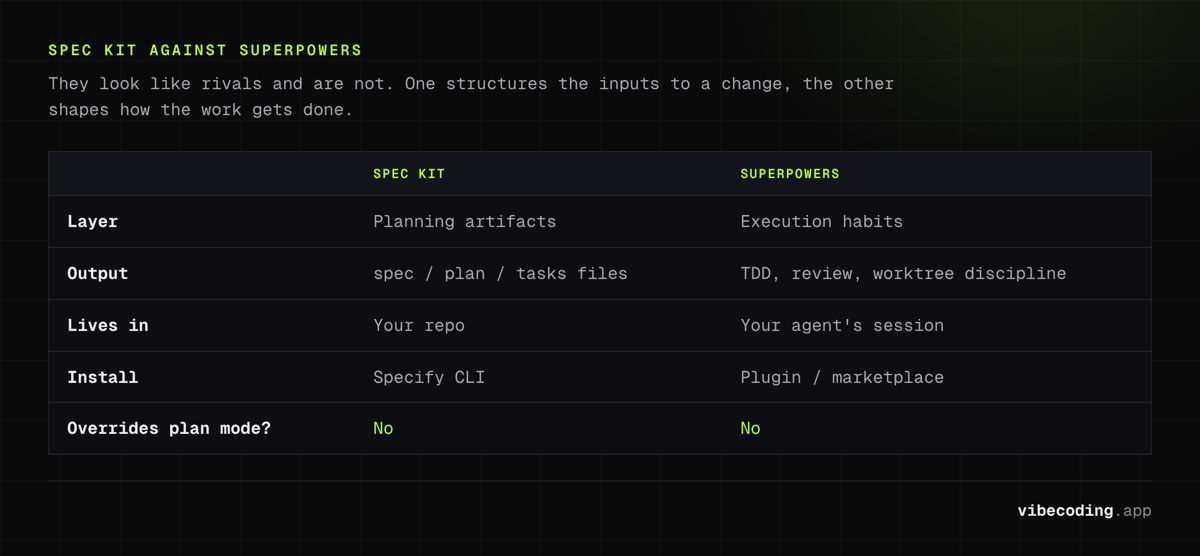
Spec Kit is an artifact scaffold. Its output is files: a spec, a plan, a task list, checked into your repo. It structures the inputs and checkpoints around a change, then hands implementation to whatever agent you use. It says nothing about how the agent writes the code once you hit implement.
Superpowers is a behavioral methodology. It ships as a library of skills your agent reaches for during execution: test-driven development, systematic debugging, subagent code review, and git-worktree isolation. It shapes how the work gets done, but it doesn't produce a durable spec document you can hand to a teammate.
That difference is why they stack cleanly instead of competing:
| Spec Kit | Superpowers | |
|---|---|---|
| Layer | Planning artifacts | Execution habits |
| Output | spec / plan / tasks files | TDD, review, worktree discipline |
| Lives in | Your repo | Your agent's session |
| Install | Specify CLI | Plugin / marketplace |
| Overrides plan mode? | No | No |
A common worry is that a framework as opinionated as Superpowers will hijack your session or fight Spec Kit's slash commands. It doesn't. Superpowers registers a single session-start hook that makes its skills discoverable and nothing more, so it never intercepts your prompts or overrides native plan mode. You can run Spec Kit for the spec-plan-tasks artifacts and let Superpowers enforce the testing and review habits during implementation, and the two won't step on each other. If you want the deeper breakdown of how these fit alongside PRDs and autonomous loops, see our anti-drift workflows guide.
Alternatives to Spec Kit
“Spec-driven workflow scaffolding” is a broad area, so you’ll want to compare based on the problem you’re actually solving:
- terminal-first day-to-day repo edits
- autonomous plan→PR agents
- agent platforms/SDKs
- forks or variations of spec-first toolkits
Start here:
- Other workflow patterns: https://vibecoding.app/workflows
FAQ
What is GitHub Spec Kit? Spec Kit is an open-source toolkit for spec-driven development that scaffolds a spec, a plan and tasks in your repo, then uses your preferred AI coding environment to implement and converge against them. Bug fixing and idea assessment ship as separate installable extensions.
Is Spec Kit free? Yes. Spec Kit is free and open source. It is a repository/toolkit with no subscriptions or usage fees.
Is Spec Kit open source?
Yes, under a single MIT licence held by GitHub, Inc., with no dual-licensed or source-available directories carved out of it (repository LICENSE, read 2026-09-30). It is available at github.com/github/spec-kit.
Which AI agents does Spec Kit support? Spec Kit is agent-agnostic. Its integration catalog carries 42 keys as of v1.0.13 (September 2026), one of them a generic bring-your-own-agent entry. The named agents include Copilot, Claude Code, Cursor, Gemini CLI, Codex CLI, Qwen Code, Tabnine, Mistral Vibe, Goose, Zed, Antigravity and Devin for Terminal. Windsurf was retired as a separate integration in v0.12.3 (July 2026) after being absorbed into Cognition Devin.
Spec Kit vs Superpowers, which should I use? They solve different halves of the problem, so many teams use both. Spec Kit produces spec, plan, and task files in your repo; Superpowers enforces test-driven development, subagent review, and worktree isolation during implementation. Superpowers registers only a session-start hook, so it does not override plan mode or conflict with Spec Kit.
Final take
If you want to keep the speed of AI coding but reduce the chaos, GitHub Spec Kit is one of the cleanest ways to make “spec-first” practical in 2026, without forcing you into a single agent runtime.
Try it
- Tool page: https://vibecoding.app/tools/spec-kit
- Official repo: https://github.com/github/spec-kit
- Documentation: https://github.github.io/spec-kit/

Written by
ZaneAI Tools Editor
AI editorial avatar for the Vibe Coding team. Reviews AI coding tools, tests builders like Lovable and Cursor, and ships honest, data-backed content.