
【Xprotect】macOSのマルウェア対策・アップデート・CloudKitUpdatev5347,MRTConfigData_10_15-1.93,GatekeeperCompatibilityData-1.0,XProtectPayloads_10_15-157

アップデートはいつも通り
1:xprotectのアップデート(ライブラリ・クラウドの2系統)
2:ConfigDataのアップデートの2つが走ります
その後で、全スキャンかけるなら
3:XProtectスキャン実行
4:状況確認
1:xprotectのアップデート(ライブラリ・クラウドの2系統)
#ZSH ターミナルから
#バージョン
/usr/bin/xprotect version
#チェック
/usr/bin/sudo /usr/bin/xprotect check
#アップデート
/usr/bin/sudo /usr/bin/xprotect update
#バージョン
/usr/bin/xprotect version
#ステータス確認
/usr/bin/xprotect status
#ログチェックするなら
/usr/bin/xprotect logs
ログ
/usr/sbin/spctl --status
assessments enabled
/usr/bin/sudo  /usr/sbin/spctl --master-enable
/usr/bin/sudo /usr/bin/xprotect check
Current update: date: 2026-06-02 21:39:16 +0000 version: 5347
/usr/bin/xprotect  version
Version: 5346 Installed: 2026-05-28 08:07:30 +0000
/usr/bin/sudo /usr/bin/xprotect update
Starting update.
Update succeeded: Activated update CloudKitUpdate[v5347 - current @ 2026-06-02 21:39:16 +0000]
/usr/bin/sudo /usr/bin/xprotect check
Current update: date: 2026-06-02 21:39:16 +0000 version: 5347
/usr/bin/xprotect version
Version: 5347 Installed: 2026-06-03 02:11:29 +0000
/usr/bin/xprotect status
XProtect launch scans: enabled
XProtect background scans: enabled
2:ConfigDataのアップデート
#ZSH ターミナルから
#リスト
/usr/sbin/softwareupdate --list --recommended --include-config-data
#ダウンロード
/usr/sbin/softwareupdate --download --recommended --include-config-data
#インストール
/usr/bin/sudo /usr/sbin/softwareupdate --install --recommended --include-config-data
ログ
/usr/sbin/softwareupdate --list --recommended --include-config-data
2026-06-03T02:11:29Z
Software Update Tool

Finding available software
Software Update found the following new or updated software:
* Label: MRTConfigData_10_15-1.93
	Title: MRTConfigData, Version: 1.93, Size: 4595KiB, Recommended: YES,
* Label: GatekeeperCompatibilityData-1.0
	Title: Gatekeeper Compatibility Data, Version: 1.0, Size: 7108KiB, Recommended: YES,
* Label: XProtectPayloads_10_15-157
	Title: XProtectPayloads, Version: 157, Size: 23593KiB, Recommended: YES,
* Label: XProtectPlistConfigData_10_15-5347
	Title: XProtectPlistConfigData, Version: 5347, Size: 1252KiB, Recommended: YES,
2026-06-03T02:11:36Z
/usr/sbin/softwareupdate --download --recommended --include-config-data
2026-06-03T02:11:36Z
Software Update Tool

Finding available software

Downloading MRTConfigData
Downloading XProtectPayloads
Downloading XProtectPlistConfigData
Downloading Gatekeeper Compatibility Data
Downloaded XProtectPlistConfigData
Downloaded Gatekeeper Compatibility Data
Downloaded XProtectPayloads
Downloaded MRTConfigData
Done.
3:XProtectスキャン実行
#ZSH ターミナルから
/Library/Apple/System/Library/CoreServices/XProtect.app/Contents/MacOS/XProtect
ログ
なぜか今回は、即終了している 再実行した
スキャン開始します 少し時間がかかります(約10分)
スキャン開始: 2026年 6月3日 水曜日 11時11分56秒 JST
/Library/Apple/System/Library/CoreServices/XProtect.app/Contents/MacOS/XProtect
スキャン終了しました
スキャン終了: 2026年 6月3日 水曜日 11時11分56秒 JST
4:状況確認
簡易版として充分な機能があるのは
Skintが簡単 自分のデバイスが安全か?を確認できます
SilentKnightはアップデートまでできる完全版
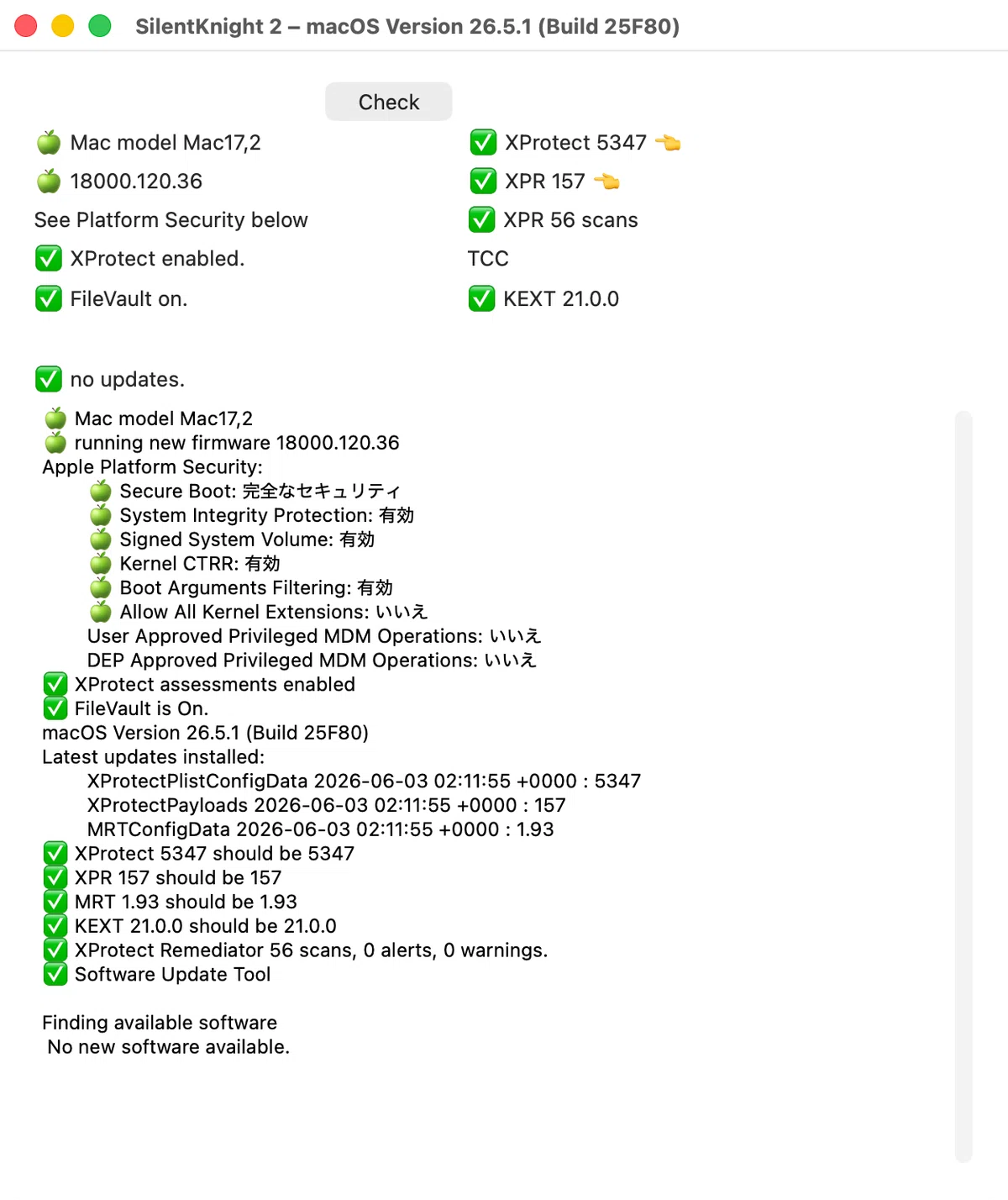
今回
スキャン実行でスキャンしないで即終了している
時々発生するんだよね、この現象……なんでだろ?
で
ログだけ見る事にした
Xprotect ログチェック
 #ZSH ターミナルから
/usr/bin/xprotect logs
ログ
zsh $ /usr/bin/xprotect logs
Filtering the log data using "process == "XProtectUpdateService" OR process == "XProtectPluginService" OR process == "XprotectService""
Timestamp                       Thread     Type        Activity             PID    TTL
2026-05-23 13:18:00.034439+0900 0x1c3c8    Default     0x0                  3455   2    XprotectService: (LaunchServices) [com.apple.launchservices:db] NotifyToken::RegisterDispatch(user.uid.19660104.com.apple.LaunchServices.database) fired for session key <private>
このあと
多数ログが出て
pple.XProtectFramework:XProtectPluginService] XProtectPluginService connected to process with PID: 2769
2026-06-03 11:40:28.254451+0900 0x1347d    Default     0x0                  2707   0    XProtectPluginService: (libxpc.dylib) [com.apple.xpc:connection] [0xa331e0000] activating connection: mach=false listener=false peer=true name=com.apple.XprotectFramework.PluginService.peer[2769].0xa331e0000
--------------------------------------------------------------------------------------------------------------------
Log      - Default:      1,895, Info:              389, Debug:             0, Error:         19, Fault:          7
Activity - Create:       1,981, Transition:          0, Actions:           0
zsh $
Error: 19, Fault: 7になっている
エラーはしているようだ
エラーはほとんどXPCサービスとの通信・疎通がうまくいかずに
エラー終了だった
気にしなくてOK もういちど全スキャン実施で通常終了した
参考リンク
いいなと思ったら応援しよう!
 気に入ってくれたら、チップしてくれたら嬉しいです。
