Microsoft Security | Microsoft Graph
An API that connects multiple Microsoft services, enabling data access and automation across platforms

This browser is no longer supported.
Upgrade to Microsoft Edge to take advantage of the latest features, security updates, and technical support.
Hello
Graph api does not return lookup columns when listing items even if requested in expand/select statement.
I have a lookup column a named "Client"
Everything works fine when I try to call graph api to get single item by its ID (https://graph.microsoft.com/beta/sites/{site-id}/lists/{list-id}/items/{item-id}?$expand=fields(select=Client,ClientLookupId). I get Client column text value and Client column LookupId value, no problem here.
But when I want to list all items in the list (https://graph.microsoft.com/beta/sites/{site-id}/lists/{list-id}/items?$expand=fields(select=Client,ClientLookupId) - it doesn't work, the field is not included in the results.
Is there any way I can get that field value returned while listing items ?
Regards
Piotr Kochanowski
An API that connects multiple Microsoft services, enabling data access and automation across platforms
I had the same issue and this post helped me. One of the items in the list was being returned as "Name0LookupId" with a numerical id. In order to get the actual name, I added "Name0" in the expand list (basically taking everything before LookupId). My API call became:
"https://graph.microsoft.com/v1.0/sites/<the name of your tenant>:/sites/<Name of your SharePoint site>:/lists/<Name of the list within the site>/items?expand=fields($select=Position,Name0)" If you are using IDs instead of the names of the tenant, site and list then it would be: "https://graph.microsoft.com/v1.0/sites/<Sharepoint site id which includes tenant and 2 comma separated ids>/lists/<Sharepoint list id>/items?expand=fields($select=Position,Name0)"
Hello @Anonymous ,
Hope you are doing well.
I have sharepoint list named "Employee" and Lookup column "Company Details" with 2 items as shown below.
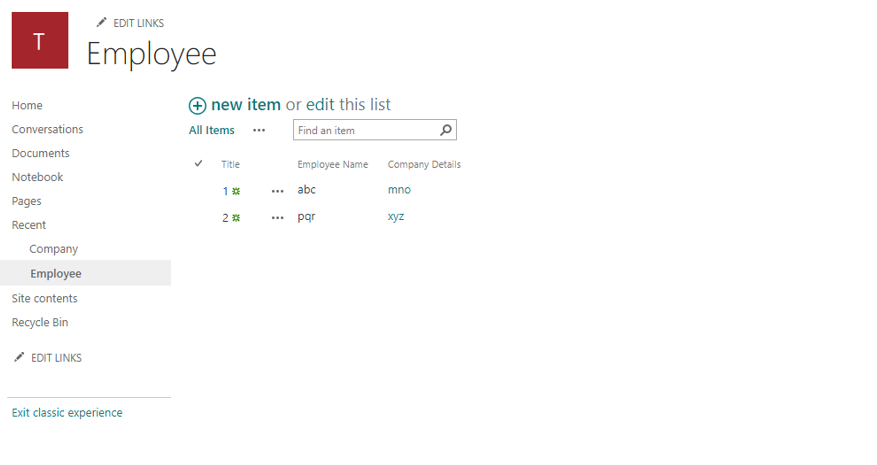
I tried below graph API endpoint,
With my Sharepoint Site Id, List Id I tried below Graph API Endpoint
I could able to get All items field values as shown below
{
    "@odata.context": "https://graph.microsoft.com/v1.0/$metadata#sites('raiinfy.sharepoint.com%2C37e3215c-e146-448d-9703-d885abebd366%2Ce0247e7e-4c0c-4d50-903c-06581b278f9c')/lists('9d67d52a-b7af-474d-8123-cbaaca8b90c2')/items",
    "value": [
        {
            "@odata.etag": "\"4615ef9d-71f8-4a24-9bd8-6a89b3952825,1\"",
            "createdDateTime": "2022-07-06T13:50:23Z",
            "eTag": "\"4615ef9d-71f8-4a24-9bd8-6a89b3952825,1\"",
            "id": "1",
            "lastModifiedDateTime": "2022-07-06T13:50:23Z",
            "webUrl": "https://raiinfy.sharepoint.com/sites/TestSite2/Lists/Employee/1_.000",
            "createdBy": {
                "user": {
                    "email": "******@raiinfy.onmicrosoft.com",
                    "id": "93feaf8f-b55f-476c-97ed-7817e2f69ca5",
                    "displayName": "Atul"
                }
            },
            "lastModifiedBy": {
                "user": {
                    "email": "******@raiinfy.onmicrosoft.com",
                    "id": "93feaf8f-b55f-476c-97ed-7817e2f69ca5",
                    "displayName": "Atul"
                }
            },
            "parentReference": {
                "siteId": "raiinfy.sharepoint.com,37e3215c-e146-448d-9703-d885abebd366,e0247e7e-4c0c-4d50-903c-06581b278f9c"
            },
            "contentType": {
                "id": "0x0100856E8A8C34906344ACBBBEF7C67EFA27",
                "name": "Item"
            },
            "fields@odata.context": "https://graph.microsoft.com/v1.0/$metadata#sites('raiinfy.sharepoint.com%2C37e3215c-e146-448d-9703-d885abebd366%2Ce0247e7e-4c0c-4d50-903c-06581b278f9c')/lists('9d67d52a-b7af-474d-8123-cbaaca8b90c2')/items('1')/fields/$entity",
            "fields": {
                "@odata.etag": "\"4615ef9d-71f8-4a24-9bd8-6a89b3952825,1\"",
                "Company_x0020_Details": "mno",
                "Company_x0020_DetailsLookupId": "1"
            }
        },
        {
            "@odata.etag": "\"c47fa1ef-09f1-4bf7-ad89-070b53498505,1\"",
            "createdDateTime": "2022-07-06T14:25:43Z",
            "eTag": "\"c47fa1ef-09f1-4bf7-ad89-070b53498505,1\"",
            "id": "2",
            "lastModifiedDateTime": "2022-07-06T14:25:43Z",
            "webUrl": "https://raiinfy.sharepoint.com/sites/TestSite2/Lists/Employee/2_.000",
            "createdBy": {
                "user": {
                    "email": "******@raiinfy.onmicrosoft.com",
                    "id": "93feaf8f-b55f-476c-97ed-7817e2f69ca5",
                    "displayName": "Atul"
                }
            },
            "lastModifiedBy": {
                "user": {
                    "email": "******@raiinfy.onmicrosoft.com",
                    "id": "93feaf8f-b55f-476c-97ed-7817e2f69ca5",
                    "displayName": "Atul"
                }
            },
            "parentReference": {
                "siteId": "raiinfy.sharepoint.com,37e3215c-e146-448d-9703-d885abebd366,e0247e7e-4c0c-4d50-903c-06581b278f9c"
            },
            "contentType": {
                "id": "0x0100856E8A8C34906344ACBBBEF7C67EFA27",
                "name": "Item"
            },
            "fields@odata.context": "https://graph.microsoft.com/v1.0/$metadata#sites('raiinfy.sharepoint.com%2C37e3215c-e146-448d-9703-d885abebd366%2Ce0247e7e-4c0c-4d50-903c-06581b278f9c')/lists('9d67d52a-b7af-474d-8123-cbaaca8b90c2')/items('2')/fields/$entity",
            "fields": {
                "@odata.etag": "\"c47fa1ef-09f1-4bf7-ad89-070b53498505,1\"",
                "Company_x0020_Details": "xyz",
                "Company_x0020_DetailsLookupId": "2"
            }
        }
    ]
}
Hope this helps.
If the answer is helpful, please click "Accept Answer" and kindly upvote it. If you have extra questions about this answer, please click "Comment".

Hello @Anonymous ,
Would you please provide us with an update on the status of your issue?
Hello,
It's still not working for me.
I'll just have to drop graph api and use the old rest api.
Regards,
Piotr
Hi @AtulThorat-MSFT ,
In my case, the LookupId is for a user type, like in ProjectOwnerLookupId and ProjectOwner , as in $expand=fields($select=ProjectOwnerLookupId,ProjectOwner) . And, your suggested solution works for me in the sense that I get the single string (LookupValue) listed, which is the name of the user.
But, the ProjectOwner type is defined as
ProjectOwner {
  LookupId: <int>,
  LookupValue: "<name>",
  Email: "******@address.com"
}
Now, I wonder: How can I $expand= this so that I get the Email value listed, not the user's name?
I have the same issue. It works when I try to get the one item as:
items = await client.sites.by_site_id(site_id).lists.by_list_id(list_id).items.by_list_item_id(check_id).get()
But when I am doing
from kiota_abstractions.base_request_configuration import RequestConfiguration
from msgraph.generated.sites.item.lists.item.items.items_request_builder import ItemsRequestBuilder

expand = "fields"
query_params = ItemsRequestBuilder.ItemsRequestBuilderGetQueryParameters(expand=expand,)

request_configuration = RequestConfiguration(query_parameters=query_params)

items = await client.sites.by_site_id(site_id).lists.by_list_id(list_id).items.get(
request_configuration=request_configuration )
I am missing the values for the Lookup column..
Will it be fixed anytime soon?
It does not work when we have external reference...
