Repository navigation
Microtuner UI update - #6206
Microtuner UI update#6206
Conversation


🤖 Hey, I'm @LmmsBot from github.com/lmms/bot and I made downloads for this pull request, click me to make them magically appear! 🎩
Linux
Windows
macOS🤖{"platform_name_to_artifacts": {"Linux": [{"artifact": {"title": {"title": "(AppImage)", "platform_name": "Linux"}, "link": {"link": "https://15133-15778896-gh.circle-artifacts.com/0/lmms-1.3.0-alpha.1.147%2Bg42c3d77b6-linux-x86_64.AppImage"}}, "build_link": "https://circleci.com/gh/LMMS/lmms/15133?utm_campaign=vcs-integration-link&utm_medium=referral&utm_source=github-build-link"}], "Windows": [{"artifact": {"title": {"title": "64-bit", "platform_name": "Windows"}, "link": {"link": "https://15134-15778896-gh.circle-artifacts.com/0/lmms-1.3.0-alpha.1.147%2Bg42c3d77b6-mingw-win64.exe"}}, "build_link": "https://circleci.com/gh/LMMS/lmms/15134?utm_campaign=vcs-integration-link&utm_medium=referral&utm_source=github-build-link"}, {"artifact": {"title": {"title": "32-bit", "platform_name": "Windows"}, "link": {"link": "https://15130-15778896-gh.circle-artifacts.com/0/lmms-1.3.0-alpha.1.147%2Bg42c3d77b6-mingw-win32.exe"}}, "build_link": "https://circleci.com/gh/LMMS/lmms/15130?utm_campaign=vcs-integration-link&utm_medium=referral&utm_source=github-build-link"}, {"artifact": {"title": {"title": "32-bit", "platform_name": "Windows"}, "link": {"link": "https://ci.appveyor.com/api/buildjobs/fj2noipwuq5r8orq/artifacts/build/lmms-1.3.0-alpha-msvc2017-win32.exe"}}, "build_link": "https://ci.appveyor.com/project/Lukas-W/lmms/builds/41328497"}, {"artifact": {"title": {"title": "64-bit", "platform_name": "Windows"}, "link": {"link": "https://ci.appveyor.com/api/buildjobs/stce6ftej0pi7ruo/artifacts/build/lmms-1.3.0-alpha-msvc2017-win64.exe"}}, "build_link": "https://ci.appveyor.com/project/Lukas-W/lmms/builds/41328497"}], "macOS": [{"artifact": {"title": {"title": "", "platform_name": "macOS"}, "link": {"link": "https://15131-15778896-gh.circle-artifacts.com/0/lmms-1.3.0-alpha.1.147%2Bg42c3d77b6-mac10.14.dmg"}}, "build_link": "https://circleci.com/gh/LMMS/lmms/15131?utm_campaign=vcs-integration-link&utm_medium=referral&utm_source=github-build-link"}]}, "commit_sha": "d0ae50040ffa66bcf39320677b5272df0f542e04"} |

|
As the confused user, may I offer some feedback? You are absolutely right that the tuning fork is the first thing a user notices, and that's why I wonder if it's a good idea to have it there. It would be better if the settings are not found before you find the actual feature - inside the instrument window where you select scale. In my would you'd have a pen icon for edit and a plus for add new somewhere close to the combobox in the instrument window. It would open a smaller window (perhaps one for scale and one for mapping to keys?) Since you have to hit apply before something happens, maybe it would make sense to have it as a modal dialog window? Inside the config window would be a good place for "remove this tuning". It would save space in the instrument window. No comboboxes at the top of the tuner config window. I understand the logic of them but I feel it's a bit uncommon UI design. They are essentially tabs. But tabs would be worse... |
|
I originally planned to have all settings in the instrument window, although not exactly as you describe (only a Load / Save button for file operations, with no way to make changes within LMMS). And while I agree that what you propose would be more intuitive for new users, I think it would also cause some problems that would make it worse overall. If scales are edited from the instrument window, there are two possible ways to understand it: The first case is intuitive, but impractical: if you want to switch the entire song or a group of instruments to a different scale (or fix an error in the scale you are using), you would have to go manually through all instruments in the project and make the same change. The second case is counter-intuitive: if I change some configuration from the instrument window, I expect to be changing settings for the instrument. I would not expect the change to ripple through the entire project. That's why the Microtuner Config is a separate, project-wide dialog. Some of the design choices are also influenced by technical reasons and the MIDI retuning standard. This is why there isn't (and won't be) any way to add or remove a scale or mapping. If a shared scale in the middle of the list was removed, all instruments in the project would have to update their references and select a different scale if they used the one that was removed (or any that comes after it). Same goes for any automation tracks, they could now all point to a different or non-existing scale or keymap ID. Not to mention that implementing all this in a realtime-safe way would be probably "fun". Instead, LMMS uses an approach similar to MIDI retuning standard, which means it has a fixed number of slots or "tuning tables". The most complex operation that can happen during playback is an atomic replacement of one scale or keymap with another, so there is no risk of a complicated "project-wide instrument update". LMMS currently shows only 10 slots to keep the UI reasonable, but MIDI standard has 128 tuning tables, and possibly in several (8?) banks if I'm not mistaken. If we decide to implement MIDI retuning messages in the future, some way of adding / removing slots will be useful, but technically it can only be a "show / hide" function, since the 128 pre-allocated tables will exist no matter what the user wants. As for the new user experience, an alternative way to address the visibility issue could be to "hide" the config dialog in the menu. The current toolbar icons are mostly for windows that are often opened and closed, so simply removing the Microtuner icon from the toolbar may not hurt its usability much. Most users will likely set everything up in the beginning and never touch the config window again. But on the other hand, how many people ever look to the Misc. tab in the instrument window? So hiding the icon could end up reducing the discoverability of custom scales / mappings support too much. |
I must admit my proposed logic isn't found anywhere else in LMMS. But as an example: brushes in photo editors, formatting templates in word editors - you can edit them from the same place where you select them, and the effect is global.
Microtuner config would still be a separate window, but opened from instrument window ... Yes, I know, poor excuse. The thing we'd need to communicate to the users in that case is "changes here are global". We could call it overwrite / edit slot etc. That would probably be easier to communicate than "you have to open the instrument window and click the misc tab to use this".
At lest people will have fun with microtuning before accidentally breaking their project, opposed to not having fun at all :)
Maybe people will yell at me...
I haven't dived into the code yet, but we do this for FX channels, no? So have a default 0 slot which cannot be edited, and corresponds to microtuner being turned off. And when a slot is removed, all instruments using it falls back to 0. Just a thought... But the current way works fine. |

|
I'm just dropping a UI mockup here. I know it would be a mess to implement (what has been seen in PianoRoll::paintEvent cannot be unseen)... Still I keep thinking of this:
|


|
Perhaps a help menu similar to Xpressive instead of moving the place where you add it? This could explain the general idea of microtuning (including how most western music doesn't use it) and how to use the microtuner
|

If that level of detail is needed it should really be in our GitBook documentation instead, see discussion here: #5596 |
|
@allejok96 as for: Now that I think about it, the only other setting on the Misc tab is the Master Pitch toggle, which is also sort of tuning-related. So a tuning fork may be actually more appropriate than the current Anyone against that idea? As for the other suggestions: sure, there are probably countless improvements or completely different GUI designs that could make the scale / map editing more user friendly. Even figuring out how scale degrees and the key mapping interact together can be pretty confusing, not to mention possibly adding a 3rd list (custom scale degree or note labels) or other features in the future. I originally wanted to include at least a piano visualization at the bottom of the Microtuner Config dialog, so that it is easier to see what maps where. But after finishing all the "required" functionality, I didn't really have energy and motivation left for non-essential GUI features. The current simple GUI is not really (and wasn't meant to be) a proper scale and keymap editor. It pretty much just shows what presets are loaded and available; allowing manual edits is just a convenient shortcut for advanced users. The others will probably prefer using pre-made scales, or a full, proper editor like Scala.* So developing our own complex GUI editor could be a waste of effort, especially when better, specialized editors already exist. Hard to say until it gets into a "nightly" build, more people start using it and we see how they are using it. *(OTOH, some features like custom labels are not available in the Scala format or application, so they would have to be configured directly in LMMS anyway. 🤷♂️ Seems like there is not a simple, clear answer..) |
|
Updated to master after refactors. I also thought about the suggested idea of changing the Misc instrument tab to a Tuning tab, or adding a new Tuning tab just for the Microtuner. I think it's a good idea (and nobody opposed it), but I'm now not sure which way to take:
Perhaps in time there will be new controls placed in the Tuning and Misc tabs to justify their separation, but for now, I'm inclined to go with a variant of the second path and just call it "Tuning and Transposition". The icon could be changed to a tuning fork with a +- sign (illustrating the transposition part), but that may be too much visual noise. |
…ialog to Edit menu and make it also available from instrument tab
|
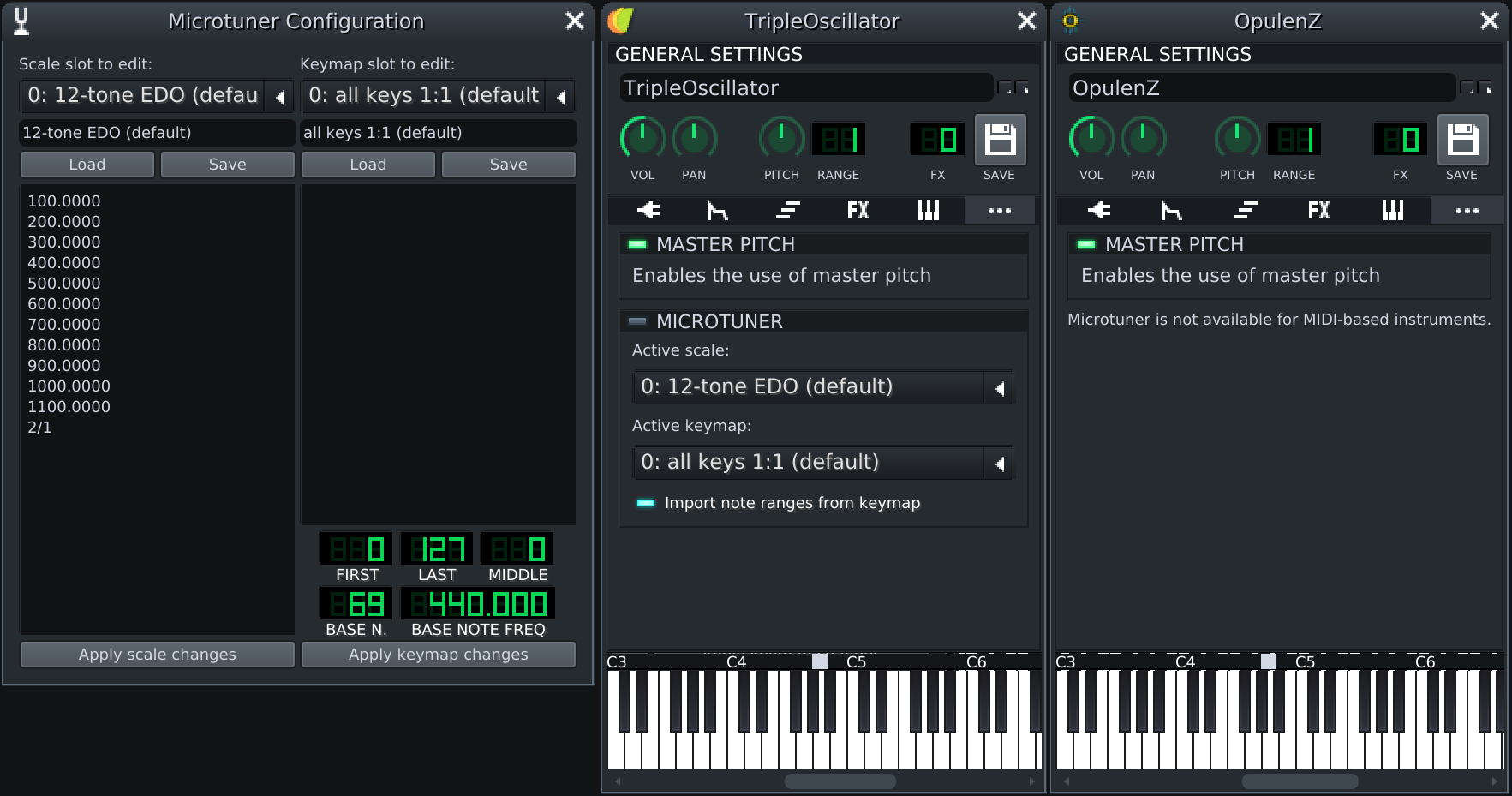
So I decided to implement the second variant and I think it turned out quite all right. I removed the Microtuner button from toolbar and moved it to [Edit] → [Scales and keymaps] menu. Most people will probably use it at most once (to set up scales and mappings for a new project), so a dedicated toolbar button was probably an overkill anyway. To keep microtonality discoverable after removing the toolbar button, I renamed the Misc tab to "Tuning and transposition" and changed the icon to a tuning fork. For convenience and to prevent "how do I edit the scale?" questions, I added a pencil button to the tuning tab, which also opens the Microtuner Configuration dialog (as suggested by @allejok96 earlier, although it does not directly edit a specific scale or keymap): Hopefully this clears up most of the confusion. As for any other suggestions or additions, I would direct them to a new issue to keep this PR relatively simple and ready to review / merge. |

|
New conflicts are resolved. I also noticed one of the checks fails in check-strings, because locales refer to the old |
|
I don't think Transifex handles these things that gracefully. You'll still need translators to approve the suggested string... I think. You renamed the file so all occurrences should be changed? In that case search and replace. Example with sed: |
That's what I first thought of doing. But then I remembered that I read somewhere to "avoid making local translation changes, since Transifex will overwrite them anyway". So now I'm not too sure. :) Maybe I should register on Transifex and finally figure out how it all works.. |
|
That may be true but in this case you're not really changing any strings, so there is nothing to lose on that approach. AFAIK translations isn't pushed and pulled from Transifex all the time, so it's better to solve this locally to not break translations (look who's talking btw) for the master branch until new translations are pulled from Transifex. |
Good point; thanks for the input. Test is now passing after the change. |

|
Is there an ETA on this merge ? |
|
Depends on when some other devs become interested in this PR and do a review. The changes are pretty trivial (mostly just changes in names and labels), so if you want to help moving it along, you can give it a try. If I remember correctly, LMMS requires at least 2 reviews (at least one should be from one a maintainer), so you could move the progress bar to ~50 %. :) I also see that some new conflicts have developed in the mean time, I'll look at that tomorrow. |
|
The new merge conflict should be resolved. |


Thanks! Will look into the PR. |


There was a problem hiding this comment.
I think this is good to be merged. In all an improvement. It is clear enough what's going on now that everything is gathered in the same place. The only comment I have is that one of the most frequent complaints is regarding fonts being too small and the size of the 'Import note ranges from keymap' text is on the smaller side. @he29-net Your call.


 sakertooth
left a comment
sakertooth
left a comment
sakertooth
left a comment
There was a problem hiding this comment.
I do wish we started to use function pointers for Qt signal & slot connections, but its fine for now if we want this to get merged as soon as possible.
Sorry for the late reply. Looking at the screenshots, the fonts do look a bit on the small size in comparison to the combo box. But when I open the microtuner settings on my computer now, the text fields use a fair bit larger font than on the image from 2 years ago. So something possibly changed in my OS, or in Qt version / environment. So I'm not even sure which version to take as the reference, since right now "it works on my machine". It also seems like the scaling was done differently for each widget type: Qt widgets (like the text fields or buttons) seem to be using fractional scaling (that would be around 1.5x on my old system on the screenshot), while LMMS widgets like Perhaps the solution is to also set a fixed font size for the Qt widgets? That could prevent them from using the "proper" font size (based on system DPI), and instead use the 1x / 2x scaling as the other GUI elements, even if the Qt setup or desktop environment is buggy and supplies mixed information. As for There is also a side question: what is the proper size to use? There are fixed font sizes all throughout LMMS, but I don't think we even have any standard for that? Each plugin or part of GUI just uses whatever was in the code that was copied from another part of LMMS to serve as a template for new code. :) Ideally we should have a globally defined base font size somewhere, and scale everything off of that. But that's another project for another time I suppose. |


Hi,
a while back, someone in the Discord support channel asked about how to use the Microtuner, saying something along the lines of "I click Apply and nothing happens". Looking back, I realized that in my tunnel vision as an author of the UI, I used some ambiguous terms that can be misleading to new users. For example, a button that says "Apply scale" may be interpreted as "take the displayed scale and apply it to all instruments in the project", which is something that did not even cross my mind, since I knew it did not work that way.
The new and prominent tuning fork icon is probably the first thing users will click to see what it does, while the toggle to actually enable microtuning on an instrument is buried in the last tab of its settings. This PR should make it more clear that "the tuning fork dialog" serves only as an editor for scale and keymap "presets", which are then used in some other place. It also adds tool-tips to all buttons (explaining actions in further detail) and resolves one Qt deprecation warning reported by PhysSong.
Before:
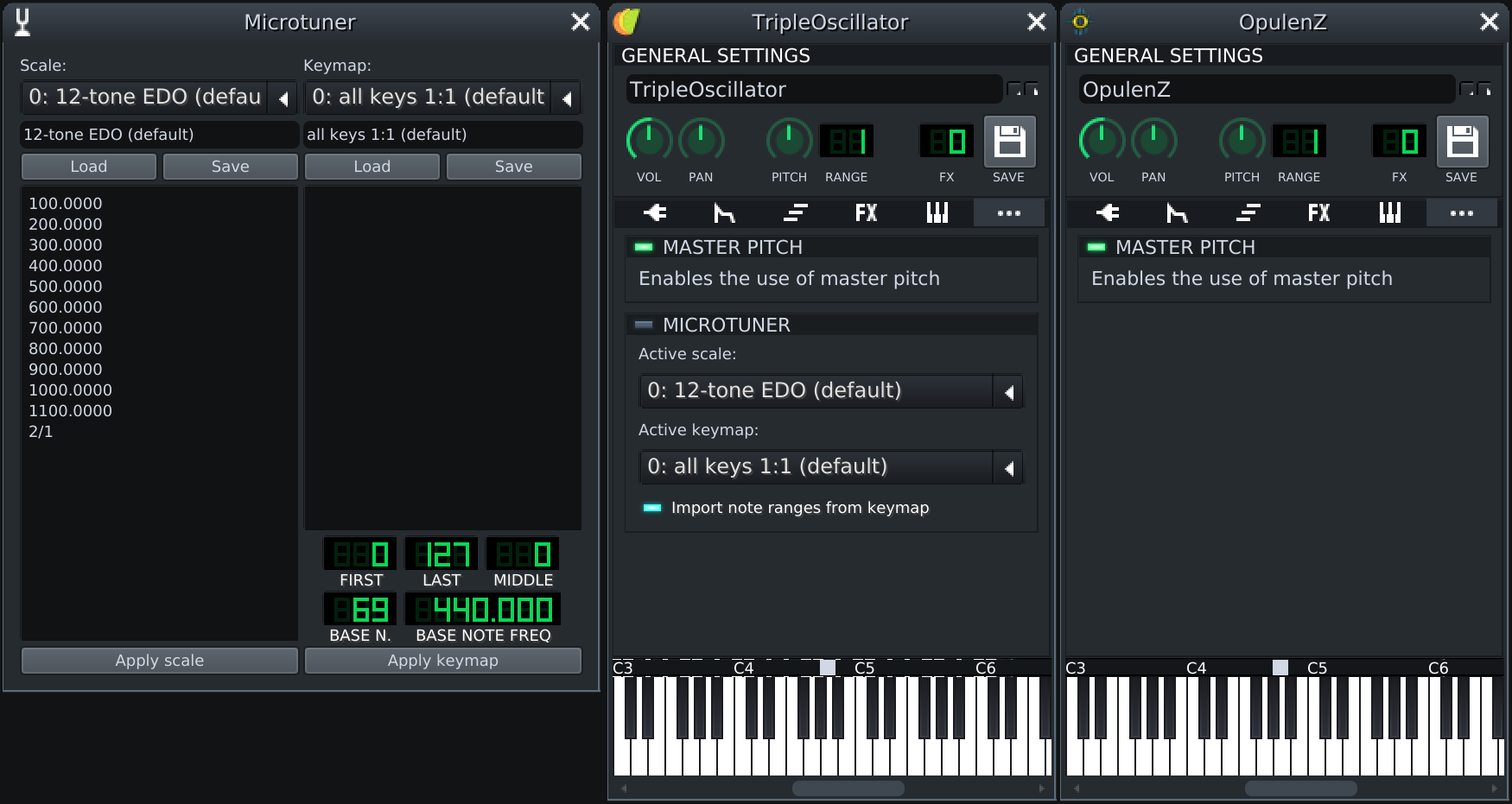
After: