Repository navigation
Releases: Abdelrhman-AK/WinPaletter
Release list
v1.1.0.0-Stable

Warning
Do not use unofficial builds. Some "cracked" versions appear on GitHub. WinPaletter is completely free and does not require a paid license. With GitHub integration for uploading and managing themes directly in the app, always use the official build for your safety.
Tip
Download sources:
- GitHub releases (This page)
- Softonic: Visit WinPaletter Page at Softonic
- Winget:
winget install Abdelrhman-AK.WinPaletterand run by typingwinpaletterin Terminal. - Chocolatey:
choco install WinPaletterorchoco install WinPaletter --version x.x.xx
1. New Features:
This release is a cumulative update to the previous two beta releases, 1.0.9.8 and 1.0.9.9.
1. Windows 9x Support!

- WinPaletter can now run on Windows 98 SE and Windows Me through dotnet48-win98 by @11EJDE11 and KernelEx.
- Windows 95 is not supported.
Warning
This is for fun and experimentation. It is not stable, so use a VM and take snapshots.
- Requires .NET Framework 4.8 (dotnet48-win98), KernelEx 4.5.2+, GDI+ (
gdiplus_dnld.exe), an SSE2-capable CPU and 512 MB of RAM or more (1 GB+ with Windows 9x RAM Patches are recommended). - Known limitations: random crashes,
OutOfMemoryException, no network features (updates, Store, GitHub Manager), no Explorer restart or log off, no restore points, and MS Sans Serif cannot be displayed or edited correctly. - Tip: apply one aspect at a time instead of a full theme.
- 📖 Setup guide
2. Application Improvements:
1. Icons Studio:
- Added drive icons (CD/DVD, floppy, and network drives) to the Drives tab. These are not new icons, but they are now remapped there #256.
- Fixed an issue where the reset buttons in the Drives tab did not reset the icons to their defaults.
- Improved form-opening responsiveness.

2. Miscellaneous:
- Updated dependencies and references.
- Slightly improved startup speed, though the difference is not noticeable.
- Application's UI: Dark mode fonts dialog picker (to make WinPaletter's UI more consistent with applied mode)

3. Bugs Fixes:
1. Fixed messy Windows Terminal bugs:
- Fixed settings not being saved at all.
- Fixed the new
dynamicBackground/Foreground settings for Windows Terminal causing WinPaletter to not open. #258 - Fixed the Terminal Preview config JSON file being saved as the stable JSON, causing misconfiguration.
- Fixed incorrect titlebar preview scheme (dark/light) in Windows Terminal.
- Improved simulation rendering.
2. Miscellaneous:
- Attempted a blind fix for the Windows Switcher (Alt+Tab) customizer crash. #260
- Attempted a blind fix for a crash when opening WinPaletter. After enough “Try continuing” presses it opened, but the window was fully black and unresponsive. #263
- Fixed parsing of LF-delimited theme color files. #265 by @dajiaohuang
- Fixed an inoperable, blank color picker form when DPI scaling is above 100%. #254 #257
- Fixed a freeze that could occur when forcing Windows to refresh accents through
User32.UpdatePerUserSystemParametersandUser32.SendMessage. #262 by @geneReeves, #255
Contributors


Assets 8
v1.0.9.9-Beta
Warning
Do not use unofficial builds. Some "cracked" versions appear on GitHub. WinPaletter is completely free and does not require a paid license. With GitHub integration for uploading and managing themes directly in the app, always use the official build for your safety.
Warning
This release is a beta build.
You may encounter bugs, unexpected behavior, or errors during usage.
If you experience any issues, please report them here:
https://github.com/Abdelrhman-AK/WinPaletter/issues/new/choose
Your feedback helps improve stability and functionality.
Warning
Windows Defender Detection Notice
If Windows Defender flags this program as Win32/DefenseEvasion.A!ml, please report that as a new issue,
Note that this is a known false positive currently being addressed through submissions to Microsoft Analysis.
You are completely free to choose whether or not to use WinPaletter while this detection persists.
Tip
Download sources:
- GitHub releases (This page)
- Softonic: Visit WinPaletter Page at Softonic
- Winget:
winget install Abdelrhman-AK.WinPaletter - Chocolatey:
choco install WinPaletterorchoco install WinPaletter --version x.x.xx
1. New Features:
1. WinPaletter Vault:
Overview:
Vault serves as a fallback mechanism designed to re-apply the user's selected Windows accent and personalization settings whenever session-change events incorrectly reset them to default values.
Functionality:
It ensures visual preferences are consistently restored following Windows logon or unlock events.
Recommendation:
Users should enable this feature exclusively when experiencing applied accents reverting back to default during active session changes.
Bug Fixes:
Helps resolve GitHub issues (Certain WinPaletter classic colors do not remain after a lock screen) #247 and #231.
Accessibility:
In Settings → Theme Applying Behaviour → Vault. Quick links and controls are also accessible directly from the Windows Theme, Classic Colors, and Metrics & Fonts troubleshoots tabs.
| Screenshot 1 | Screenshot 2 |
|---|---|
 |
 |
2. System Restore Points Manager
System Restore Points UI Integration:
Added a form to manage system restore points created by WinPaletter directly within WinPaletter.
Restore Point Overview:
Displays a detailed list of restore points including name, sequence number, and creation date/time.
Create Restore Points:
Ability to manually create new system restore points with custom names.
Delete Functionality::
Either individual selected or all restore points created by WinPaletter.
| Screenshot 3 | Screenshot 4 |
|---|---|
 |
 |
3. Classic Colors
Minor design refresh
| Screenshot 5 | Screenshot 6 |
|---|---|
 |
 |
Fix visual bug: WindowFrame color controls tooltip borders
| Screenshot 7 |
|---|
 |
Troubleshooter Relocation:
The troubleshooter has been moved from Settings → Theme applying behavior → Classic Colors directly into the Classic Colors form for easier access. It updates HKEY_LOCAL_MACHINE\Software\Microsoft\Windows\CurrentVersion\Themes\DefaultColors\Standard to resolve the Ctrl+Alt+Del color reset issue (addressing GitHub issues #247 and #231), which is also addressed by the WinPaletter Vault feature.
| Screenshot 8 |
|---|
 |
New schemes:
High Contrast: Crimson Red, High Contrast: Solar Flare, High Contrast: Neon Orange, High Contrast: Retro Amber, High Contrast: Amber Terminal, High Contrast: Neon Yellow, High Contrast: Lemon Lime, High Contrast: Neon Green, High Contrast: Toxic Green, High Contrast: Terminal, High Contrast: Green Phosphor CRT, High Contrast: Neon, High Contrast: Cyberpunk, High Contrast: Arctic White, High Contrast: Electric Blue, High Contrast: Proton Purple, High Contrast: Neon Violet, High Contrast: Synthwave, High Contrast: Neon Pink, High Contrast: Magenta, High Contrast: Cherry Blossom, High Contrast: Plasma, High Contrast: Plasma Burst, High Contrast: Solarized, Volcanic Eruption 3D, Spice Market 3D, Autumn Forest 3D, Sahara Sunset Hybrid, Lemonade Stand Flat, Carnival Hybrid, Watermelon Fresh Flat, Fruit Basket Hybrid, Tropical Punch Hybrid, Sunset Boulevard Flat, Midnight Jazz 3D, Desert Mirage Flat, Golden Era 3D, Alien Biome Hybrid, Neon Tokyo Hybrid, Neon Synthwave 3D, Neon Noir, Electric Storm Hybrid, Bubblegum Pop 3D, Miami Vice Flat, Deep Space 3D, Ocean Sunset Hybrid, Frost Bite Flat, Mountain Mist Flat, Mermaid Lagoon Flat, Enchanted Forest 3D, Cyberpunk 2077 3D, Galactic Core Hybrid, Retro Arcade 3D, Cerulean Sky 3D, Crimson Flat, Forest Canopy Hybrid, Sunset Orange 3D, Lavender Mist Flat, Golden Hour Hybrid, Ocean Depth 3D, Mint Frost Flat, Berry Hybrid, Charcoal Smoke 3D, Peach Sorbet Flat, Slate Storm Hybrid, Emerald 3D, Amber Glow Flat, Plum Velvet Hybrid, Solarized Light, Ice Blue, Baby Blue, Arctic, Steel Blue, Denim, Summer Ocean, Winter Frost, Executive Navy, Midnight Blue, Ocean Depth, Deep Sea, Jade, Mint, Mint Cream, Sage Serenity, Fern, Forest Executive, Forest, Pine, Sage, Olive, and Hacker Green.
| Screenshot 9 | Screenshot 10 |
|---|---|
 |
 |
4. Windows Version redirection
Accessibility:
Settings → Theme Applying Behaviour
Aim:
This allows WinPaletter to apply customization rules based on a selected Windows edition profile. This is useful for Windows mods and transformations that make Windows 11/10 look and behave like older versions such as Windows 8.1, Windows 8, Windows 7, Windows Vista, or Windows XP.
5. Settings new options:
- Limit update checks to once daily when WinPaletter is opened instead of checking every time WinPaletter is opened
- Automatically log in GitHub saved account when WinPaletter starts.
6. Windows XP LogonUI:
- Change logonUI.exe path for Windows XP

2. Application Improvements:
1. Winget Installation Support:
- Installing WinPaletter via
Wingetwill no longer require the-l "unzip path"argument. Users will be able to simply runwinget install Abdelrhman-AK.WinPaletterand use the aliaswinpaletterto launch the application directly (note that this feature will become available shortly after release, pending theWingetpackage upload).
2. Performance improvements:
2.1. Improve WallStudio memory usage and performance
| Before | After |
|---|---|
 |
 |
2.2. Making clicking "Load from Current Preferences" loads only the open aspect
And this is instead of loading a whole theme instance in memory, for lesser memory usage and better performance.
2.3. Exporting language JSON files is now significantly faster (almost immediate)
And this consumes less memory compared to the legacy method, which took over 10 seconds and had high memory usage.
| Before | After |
|---|---|
 |
 |
3. UI Improvements:
3.1. Native TaskDialog & Dark Mode: Fully implemented native TaskDialog support (removing the Ookii dependency) with complete dark mode integration, utilizing DarkTaskDialog-Native by @memoarfaa.
Tip
This not a system-wide change, it is a change in WinPaletter itself to make its UI consistent with applied dark/light mode.
| Before | After |
|---|---|
 |
 |
 |
<im... |
Contributors

Assets 8
v1.0.9.8-Beta
Warning
Do not use unofficial builds. Some "cracked" versions appear on GitHub. WinPaletter is completely free and does not require a paid license. With GitHub integration for uploading and managing themes directly in the app, always use the official build for your safety.
Warning
This release is highly experimental (GitHub Manager feature implementation).
You may encounter bugs, unexpected behavior, or errors during usage.
If you experience any issues, please report them here:
https://github.com/Abdelrhman-AK/WinPaletter/issues/new/choose
Your feedback helps improve stability and functionality.
Important
If you are using Windows XP or Vista, re-read their compatibility Wiki (as they are improved)
1. New Features:
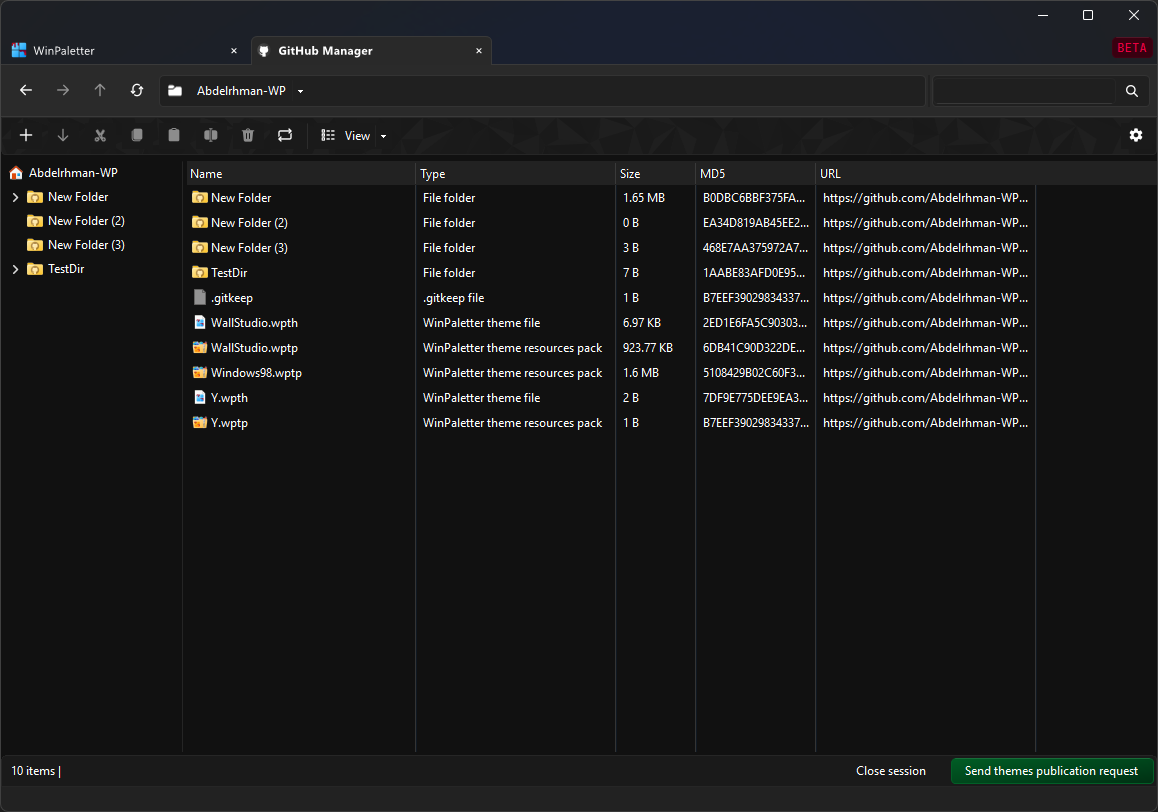
1. WinPaletter GitHub Manager - Upload, manage and publish your themes to everyone!
- The GitHub Manager is a built-in feature in WinPaletter that allows you to manage your own themes directly from your GitHub account.
- It replaces the older, complex theme publishing workflow and makes managing and publishing themes significantly easier.
- Use it by your secondary GitHub account.
- You must read Wikis to fully understand how to use GitHub Manager. Click here for Wikis.
Warning
The GitHub integration uses the official C# client library (Octokit) to communicate with GitHub APIs. All operations depend on API requests, so they are subject to GitHub rate limiting rules.
Rate limits vary based on authentication method, permissions, and the number of requests triggered during bulk operations such as sync, upload, delete, or repository scanning. These actions often generate multiple API calls, which can quickly exhaust the allowed quota and cause temporary throttling or request failures.
This limitation comes from GitHub’s platform restrictions, not the application itself.
When rate limits are reached, the application detects the restriction and clearly shows when it is safe to retry.
Warning
Accurate progress tracking for file operations is difficult because:
- Operations are executed through multiple API calls.
- Some processes complete asynchronously on GitHub’s side.
- The API does not always provide granular status updates.
- Batch tasks may partially complete before failing.
As a result, progress indicators represent estimated progress rather than the exact backend state.
2. WinPaletter Store for Themes — New Experience
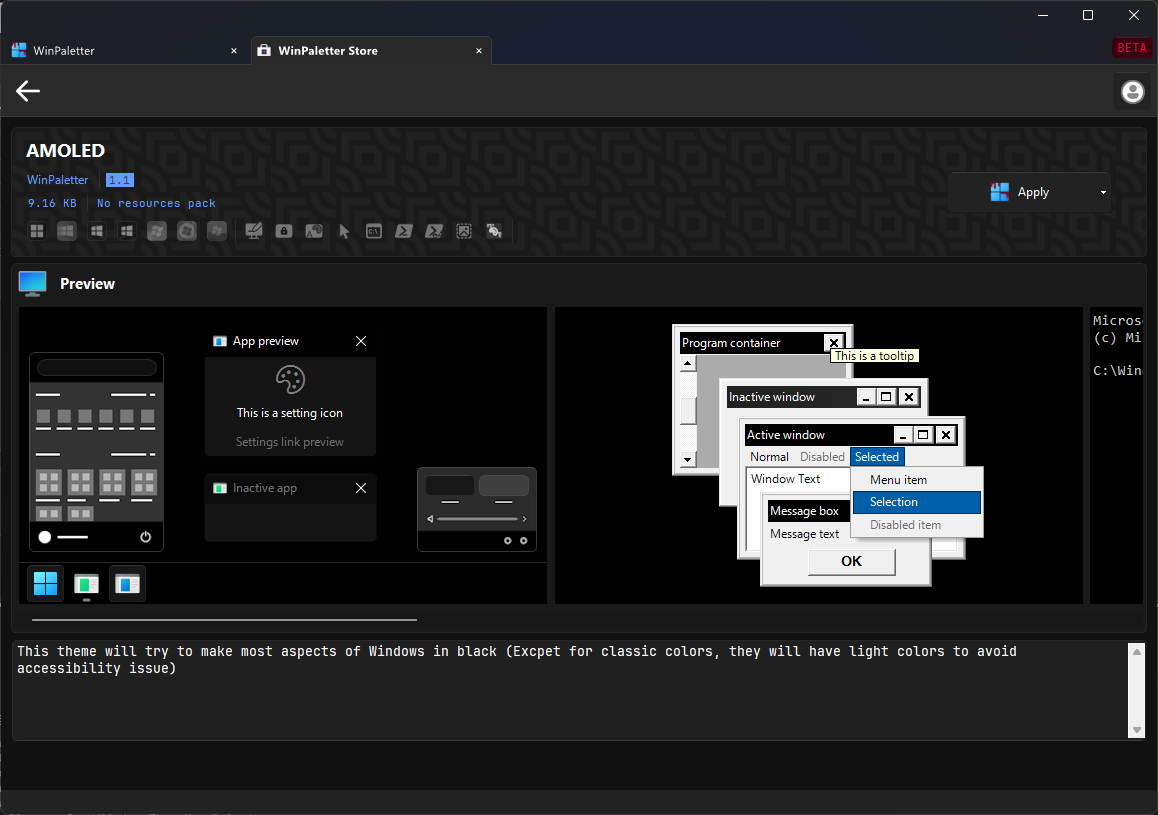
-
The WinPaletter Store has been redesigned with a completely new experience (GitHub Manager), including a new Hybrid Sources mode (load Store from both online themes and your offline local themes, in one place).
-
Further UI changes and improvements may be introduced in upcoming releases.
3. WallStudio — Generate a Full Theme from an Image
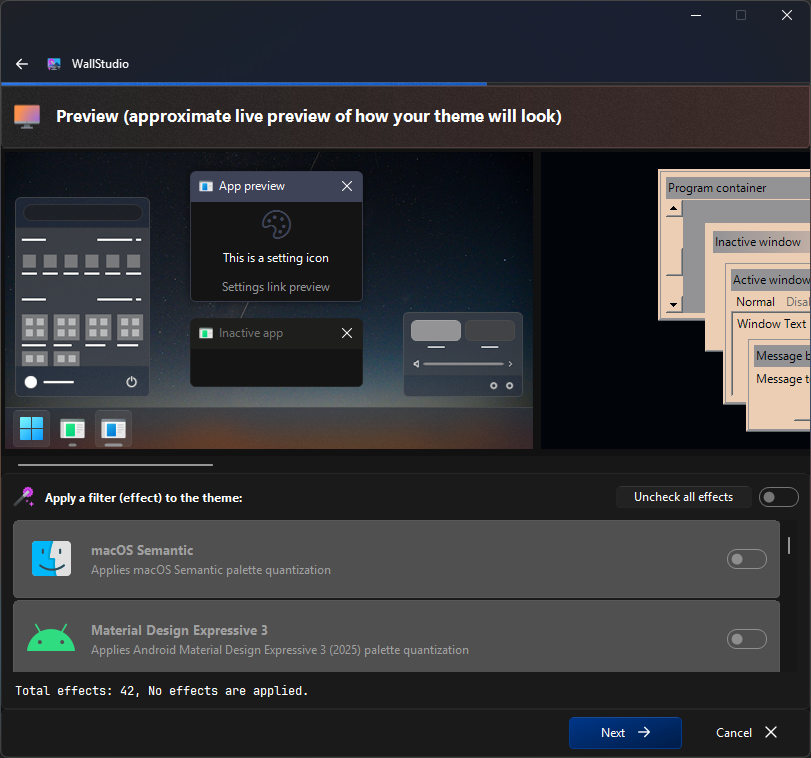
- WallStudio is a new built-in feature that creates a complete WinPaletter theme from any image you choose. Select a wallpaper, photo, or artwork, and WallStudio will analyze it, extract dominant and complementary colors, then generate a full Windows theme based on that palette.
- Everything runs locally — no internet, no cloud, no external AI. Fully offline, fast, and under your control.
- → Learn more about WallStudio
4. Palette Generator — Redesigned and Improved
| Feature | 1.0.9.8+ |
Older Versions |
|---|---|---|
| Palette distribution method | Intelligent approximation based on the currently opened aspect | Random distribution |
| Number of base colors allowed | One or multiple colors | One color (optional inverted second color) |
| Visual effects support | Yes | No |
| Random generation history | No | Yes |
| Control over max colors, quality, brightness | Not needed (palette adapts to current aspect) | Available |

5. New Effects in Palette Generator and WallStudio
A wide set of visual effects is now available to further refine generated palettes:
| Effect | Description |
|---|---|
| macOS Semantic | Reorganizes the palette to follow macOS-style semantic color grouping (background, accent, control, warning, etc.) |
| Material Design Expressive 3 | Applies the 2025 expressive variant of Material Design 3, with richer contrast and vibrant adaptive color relationships |
| Material Design | Maps the palette to Android Material Design principles — primary, secondary, and surface tones with light/dark harmony |
| 2016 | Mid-2010s nostalgic photo filter with boosted contrast and subtle tonal warmth |
| Metro | Flat, bold, high-contrast style of classic Metro UI |
| Frutiger Aero | Glossy, soft-gradient tones inspired by Windows Vista/7 aesthetics |
| 256 Colors | Reduces the palette to a classic 256-color limit |
| Web Safe | Snaps each color to the nearest web-safe value |
| Monochrome | Converts strictly to black and white tones |
| Posterize | Reduces color depth into distinct tonal blocks |
| Hard Light | Strong contrast blending for a dramatic, punchy appearance |
| Soft Light | Gentle blending that smooths transitions and reduces harsh contrast |
| Vibrance | Boosts muted colors while protecting already saturated tones |
| Highlight Tint | Adds a tint primarily to bright areas |
| Shadow Tint | Applies color emphasis to darker regions |
| Blend | Mixes the entire palette with a specified color |
| Glow Boost | Enhances luminosity in bright regions |
| X-Ray | Cool bluish glow with partial inversion |
| Infrared | Swaps red/green tonal relationships for surreal color transitions |
| Thermal Vision | Remaps brightness to heat-map colors (blue → red → white) |
| Underwater | Blue-green overlay with softened contrast |
| Fog (Haze) | Blends palette with white, simulating misty lighting |
| Matte | Flattens contrast for a cinematic matte appearance |
| Faded | Lowers contrast and slightly desaturates for an aged, washed-out style |
| Pop Art | Intensifies saturation and contrast for bold graphic visuals |
| Pastel | Softens saturation and increases lightness for gentle, airy tones |
| Noir | High-contrast black and white with deep shadows and bright highlights |
| Vintage (Retro) | Sepia-like warmth with reduced contrast, simulating aged film |
| Filmic (Cinematic Tone) | Cool shadows with warm highlights for cinematic color grading |
| Night (Moonlight) | Cool, slightly desaturated blue to mimic nighttime lighting |
| Sunset (Golden Hour) | Warm orange and amber tones resembling late afternoon sunlight |
| Hot | Shifts palette toward warmer reds and oranges |
| Cool | Shifts palette toward cooler blue tones |
| Saturate | Increases or decreases overall color intensity |
| Hue Rotation | Rotates all hues along the color wheel |
| Sepia | Brownish vintage tint across the palette |
| Grayscale | Removes color information, preserving luminance |
| Invert | Reverses RGB values for a negative-image appearance |
| Lighten | Raises overall brightness while preserving color relationships |
| Darken | Lowers overall brightness for a deeper, subdued theme |
| Brightness | Adjusts global luminance up or down |
| Reverse | Swaps RGB channel order (RGB ↔ BGR) |
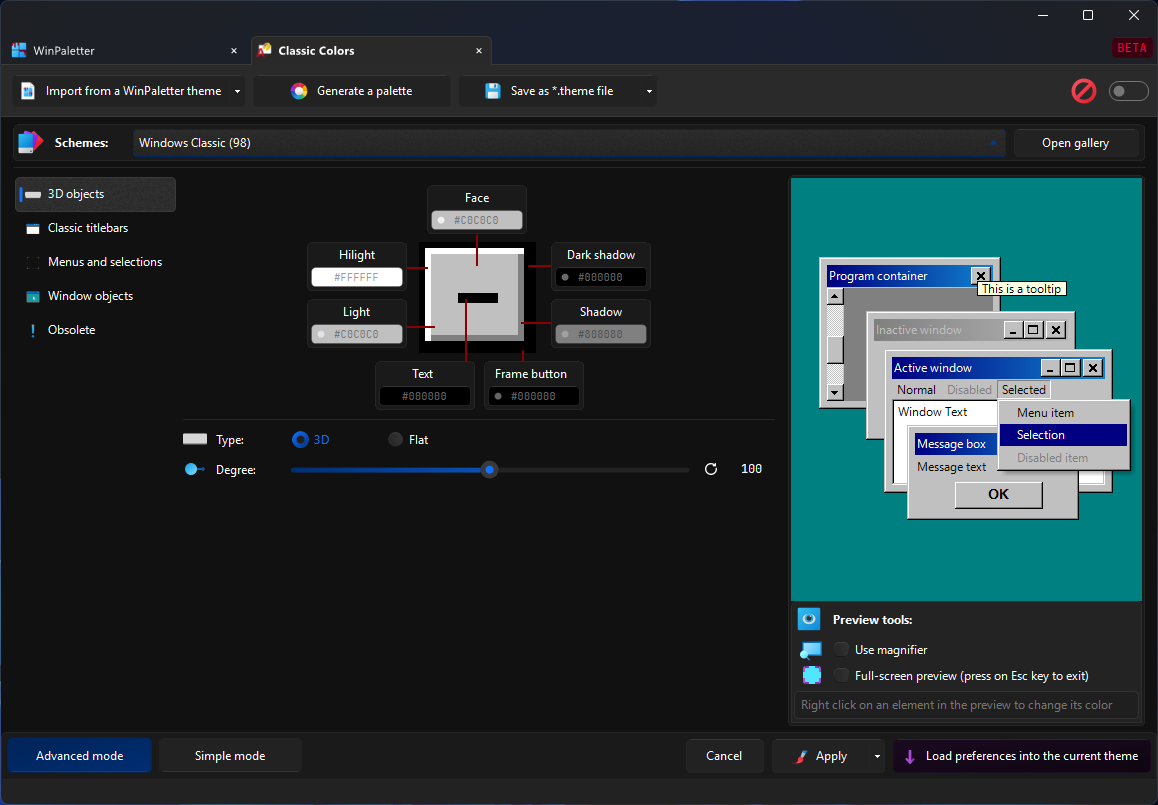
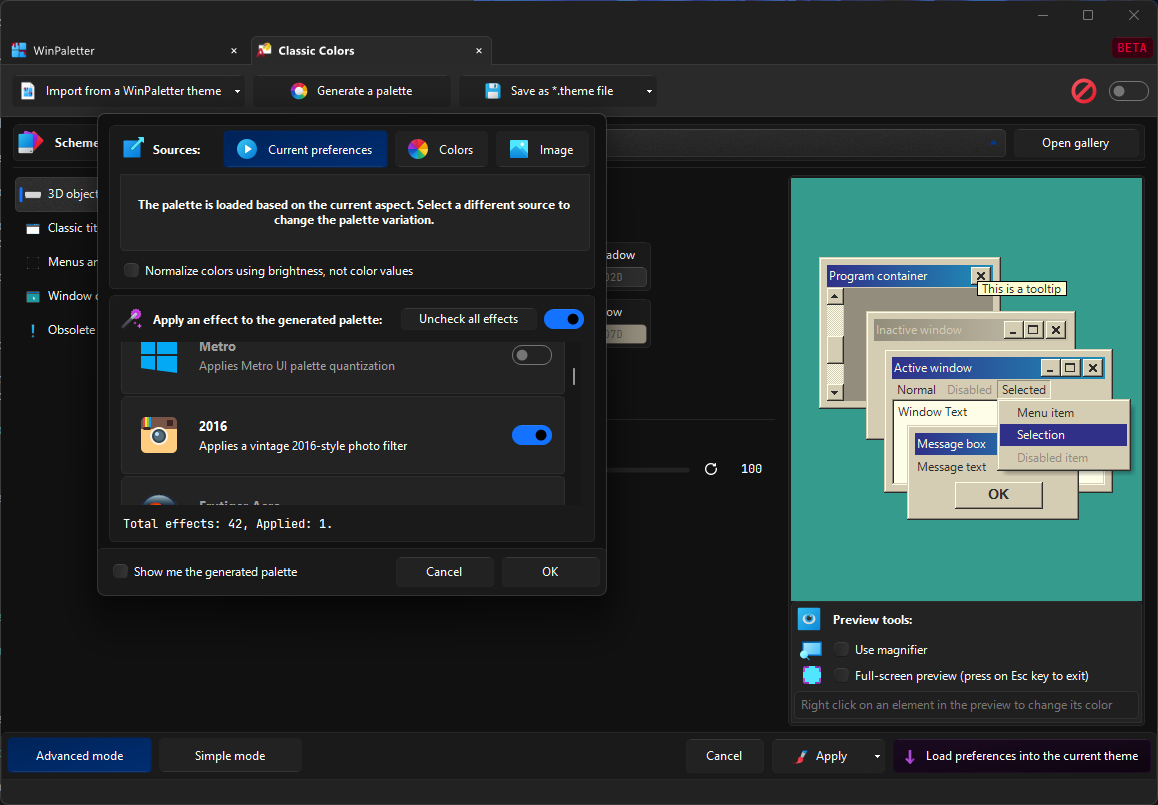
- Example in Palette Generator:
| No effect | 2016 Effect |
|---|---|
 |
 |
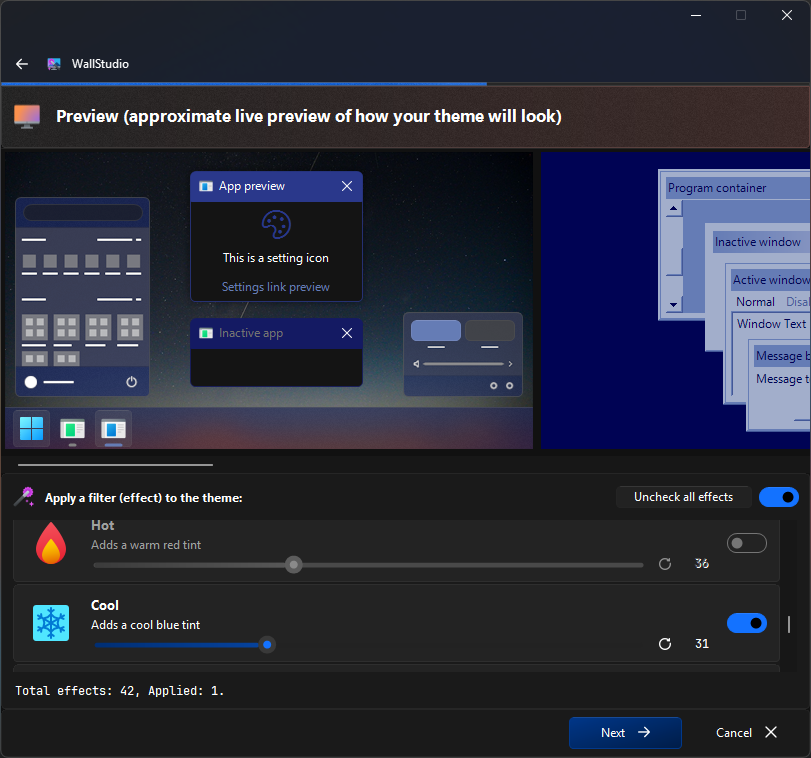
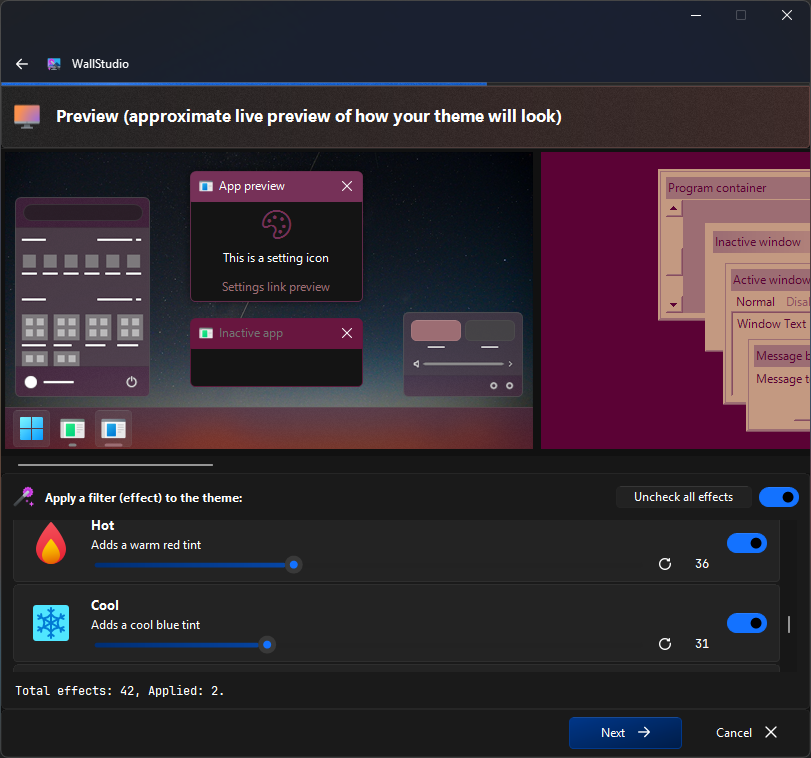
- Example in WallStudio:
| No effect | Hot | Cool | Hot + Cool |
|---|---|---|---|
 |
 |
 |
 |
6. New WinPaletter Application Theme Schemes (80+ themes)

A massive collection of new built-in UI theme schemes:
Platform-inspired:
Default Dark, Default Light, AMOLED, Extreme White, Discord Dark, Discord Light, Edge Dark, Edge Light, Firefox Dark, GitHub Dark, GitHub Light, KDE Breeze Dark, KDE Breeze Light, LinkedIn Light, macOS Dark, macOS Light, Notion Dark, Notion Light, Reddit Dark, Reddit Light, Slack Dark, Spotify Dark, Steam Dark, Telegram Dark, Telegram Light, Twitch Dark, Twitter Dark, Twitter Light, Ubuntu, Visual Studio Dark, Visual Studio Light, WhatsApp Dark, WhatsApp Light, Windows 11 Dark, Windows ...
v1.0.9.7-Stable
New features:
1. Animated Aero cursors from Windows Vista and 7, now fully customizable!
- This scheme recreates the look and feel of the classic Windows Vista\7 Aero cursors and allows you to customize their colors freely.
- For best results, change the animation speed to
20by selecting the cursor, navigating toBusy rotating part, and then adjustingAnimation speed. - It’s recommended to use bright colors for the
Busy background, as dark colors may cause accessibility issues.


2. Lock Screen Image Change Support (Windows 10/11)
- Lock screen image management has been extended to include Windows 10 and Windows 11.

2. Application Improvements:
1. Cursor schemes layout changed for better accessibility.


2. Log Viewer Removal
- The built-in Log Viewer has been removed.
- Log files can now be opened directly with text editors, providing more flexibility for inspecting, searching, and analyzing logs. This change also simplifies maintenance and reduces overhead.
3. Application log settings
A new settings section has been introduced, allowing users to control logging preferences — such as enabling/disabling registry.

4. Registry read/write enhancements (for developers only)
- Registry operations have been refined, which is useful for developers who have forked WinPaletter and work with the registry.
5. UI and General Enhancements
- Several small UI adjustments have been made to improve overall visual consistency.
6. Updated used dependencies.
3. Bugs fixes:
1- Fixed an issue where the log file remained in use after switching user accounts, preventing proper logging or cleanup.
2- Resolved a bug where attempting to log into a local account without a password triggered the Windows Credential UI dialog unnecessarily.
3- Fixed an issue where applying color effects resulted in all cursor files being replaced with the same cursor type as the selected cursor, instead of individually recolored versions.
4- Resolved a bug where the “Global” checkbox in Color Effects had no effect, causing all cursors to be recolored even when the option was not selected.
5- Corrected a problem with the WinPaletter Store Search functionality where results were not being filtering correctly.
6- Fixed an inconsistency in the Windows 10 Start Button vector color preview.
7- Fixed multiple UI layout bugs affecting Cursors Studio and the Wallpapers form, including control misalignment and inconsistent resizing behavior.
8- Resolved flickering issues in Mica title bars that occurred when the window gained or lost focus.
9- Fixed an issue that prevented Acrylic blur effects from rendering on WinPaletter forms running under Windows 10 systems.
10- Fixed a bug where message boxes did not display dark title bars when Dark Mode was enabled, leading to inconsistent appearance across dialogs.
11- Fixed missing color on extended title bars when the user enabled “Show accent color on title bars” in Windows 11 personalization settings.
Compare source code with:
| Version Type | Version Code | Link |
|---|---|---|
| Previous Stable | 1.0.9.6 |
Compare |
| Previous Beta | 1.0.9.5 |
Compare |
| Initial Release | 1.0.0.0 |
Compare |
v1.0.9.6-Stable
Critical fix for Windows 10 – All windows and tabs become unusable due to an incorrect DWM drop-effect mechanism in Windows 10. Now it is fixed.
Bug fix: Some preview panels contained two unnecessary navigation buttons, which have now been removed.
Important
The changelog is the same as 1.0.9.5. Please read it if you have not used 1.0.9.5.
Compare source code with:
| Version Type | Version Code | Link |
|---|---|---|
| Previous Stable | 1.0.9.5 |
Compare |
| Previous Beta | 1.0.9.4 |
Compare |
| Initial Release | 1.0.0.0 |
Compare |
v1.0.9.5-Stable
Warning
Do not use this version on Windows 10, as it is unusable there. Please use version 1.0.9.6 or later instead.
Important
If you are using a language file, some strings may not appear translated because the core language support has changed significantly. Please wait for the translators to update the language files accordingly.
Important
Development during this comeback phase will be limited. The developer will be available only one or two days per week (or every two weeks), and not for the full day. As a result, progress will be slower compared to the more active development period prior to archiving.
Important
This changelog is cumulative, meaning it includes every improvement, feature addition, and bug fix from earlier versions, along with the new changes introduced in this beta.
Reviewing the earlier notes will help you see the full progression of enhancements and provide better context for testing and feedback.
New features:
1. Colors effects
- You can now change the color by applying a conversion effect.
- You can invoke this in one of three ways: by clicking a color item and navigating to the tabs, by opening the color item’s context menu, or by pressing the Color Effects button in the Aspect form (this option changes all colors at once).
| Color picker | Context menu | Effects for all colors |
|---|---|---|
 |
 |
 |
- List of initially implemented effects:
| Name | Effect Explanation |
|---|---|
| Change brightness | Increases or decreases the overall lightness of the image or color. |
| Darken | Lowers brightness to make the image or color appear darker. |
| Lighten | Raises brightness to make the image or color appear lighter. |
| Rotate hue | Shifts all hues around the color wheel while keeping saturation and brightness. |
| Desaturate | Reduces color intensity, moving colors closer to gray. |
| Find closest color in image | Replaces a color with the most visually similar color found elsewhere in an image you choose. |
| Invert | Flips each color channel to its opposite (e.g., RGB → 255-value). |
| Reverse | Swaps the order of color channels from ARGB to ABGR format. |
| Sepia | Applies a warm brownish tone for a vintage photograph effect. |
| Web Safe | Maps colors to the classic 216-color “web safe” palette for older browsers. |
| 256 color | Reduces the image to a standard 256-color palette for indexed-color formats. |
| Frutiger Aero | Applies a bright, glossy gradient style reminiscent of mid-2000s “Frutiger Aero” UI. |
| Metro | Uses flat, bold colors inspired by Microsoft’s Metro (Windows 8) design language. |
| macOS Semantic | Adapts to macOS system semantic colors that change with light/dark mode and accents. |
| Android Material | Applies Google Material Design’s baseline color system and tonal palette. |
| Android Material Expressive 3 | Uses Material You’s expressive scheme 3 with dynamic hues. |
| Monochrome | Converts all colors to variations of a single chosen hue. |
| Grayscale | Converts the image to shades of gray, removing all color information. |

2. Windows Theme Aspect
- Merged Windows Colors and Visual Styles into a new refreshed aspect called Windows Theme.
- More organized and easier to navigate with tabs.
- Rebranded and redesigned Windows logos (refreshed designs in various aspects).

3. Windows 8 Support
- Added full support for Windows 8 (Build 9200).

4. Wallpaper Aspect
- Simplified layout for quicker and easier usage.
- Reduced memory usage in the Wallpaper Aspect preview, making it much faster than before.

5. Cursors Studio Aspect
- Redesigned layout with clearer separation of options into tabs (Background, Border, Busy Circles, Shadow).
- New options: Border thickness and Animation speed.
- Cursor size rendering above 32px now uses a new scaling method → avoids overlapping between loading circles and the cursor shape itself.
- Added option to customize all cursors at once.


6. Command Prompt & PowerShell Aspect
- Improved layout with a cleaner, modern design.
- Added list box to Color Table group for syncing colors from Windows Terminal stable/preview color schemes.
- Drag-and-drop from the table into track bars is now supported.
- Fixed raster font rendering issues.
- Added live preview of color changes directly in a real Command Prompt instance.


7. Newly implemented context menu for colors:
- It is now redesigned with a familiar layout to avoid ambiguity and includes effects for quick actions.
- You can copy and paste colors into other applications—such as a HEX color in Paint.NET—from WinPaletter.
2. Application Improvements:
- Added ability to delete Windows Terminal schemes/themes directly.

-
Removed
SecureUxThemeinstaller wrapper (previously caused login-loop issues on Windows). Use the officialSecureUxThemeinstaller instead #235. -
Split LogonUI configurations so each Windows version now maintains its own configuration.
- Example: Windows 10 no longer shares LogonUI settings with Windows 11.
-
Registry entries for Alarm and Ringtone sounds are no longer applied to unsupported systems (Windows 7 and below). Same applies to Windows XP’s NetMeeting and Speech Recognition (Vista and later only).
-
Added a notice: In Windows Switcher, the Classic NT scheme may cause the switcher to become invisible in Windows 11 24H2+. This behavior is intentional and comes from Microsoft’s implementation.
-
Improved Gaussian blur algorithm, resulting in better performance and lower memory usage.
-
Enhanced bitmap processing in previews (blurring, HSL, etc.).
-
Refined the layout of the palette extractor (Image + Color).

- Minor improvements to the application’s light mode.

- New colors formats (CSS, etc.).

- Restored support for default Windows Terminal color schemes (e.g., Campbell, etc.).
- These schemes are no longer shipped by default in the JSON but WinPaletter can still load them.
- With addition of new schemes implemented by Microsoft.

- Improved drag-and-drop functionality for color items—both between color items and between a color item and a tab—with an added label indicating the action that will occur when
Ctrl,Alt, orShiftis held.

- Dependencies
- Removed: ImageProcessor and ColorThiefDotNet (Implemented new and better methods inside WinPaletter's core.)
- Others are updated.
3. Bug Fixes
- Fixed: Colors not being applied to the password box on the lock screen. #236
- Fixed: Windows Terminal error when attempting to rename a scheme/theme.
- Fixed: Incorrect label color in **Windows Switcher Classic NT previ...
v1.0.9.4-Beta
WinPaletter is back!
This return release concentrates on cleaning up legacy issues and providing a better-honed experience. While significant new features are not anticipated, the goal is to place the project in a stable, workable condition.
Warning
You might encounter bugs, as this version is a beta and not a final, stable release. Please be patient and report any issues so I can fix them. I aim to make WinPaletter as stable and bug-free as possible.
Important
If you are using a language file, some strings may not appear translated because the core language support has changed significantly. Please wait for the translators to update the language files accordingly.
Important
Development during this comeback phase will be limited. The developer will be available only one or two days per week (or every two weeks), and not for the full day. As a result, progress will be slower compared to the more active development period prior to archiving.
New features:
1. System restore points
-
Windows System Restore Points are snapshots of your system files and settings at a specific moment in time. They allow you to revert your system back to a previous, stable state if something goes wrong—without affecting your personal files. This feature is especially useful before making system-level changes, like installing drivers, updates, or customization tools.
-
WinPaletter supports the creation of System Restore Points directly from within the app. Before applying any visual changes, you can create a restore point to ensure you have a safety net in case you need to undo the modifications. WinPaletter makes this process easy and integrated, helping you protect your system while you customize its appearance.
Important
Keep in mind that each restore point can take up around 100–300 MB of disk space, or even more. Frequently applying themes and creating restore points may consume significant storage over time. If your system is stable, consider reviewing and deleting older restore points to free up space. Always keep an eye on your system partition's free space to avoid running into performance or update issues.
- You can also take a system restorepoint before applying a single aspect, by doing this:


2. New aspect: Accessibility
It consists of High Contrast (was formerly in Classic Colors) and Color Filters (was formely in Windows Effects)
3. Logging system:
WinPaletter Log for diagnostics. It is accessible in main form toolbar.

Application improvement:
1. User Profiles Switching:
- Switching to a user profile protected by a password now uses the Windows Security (Credentials) dialog for better security, instead of WinPaletter's own password prompt.

-
Opening WinPaletter will no longer show a list of users; it will directly target the user who launched WinPaletter (mimicking Windows 10/11 login behavior). If you want to switch to another user in the current session, do so from the main form. (This method slightly improves startup speed, but you likely won’t notice the difference.)
-
The option to continue without a password has been removed to avoid conflicts between two users (the target user and the user who opened WinPaletter).
2. Other improvements:
- The .NET Framework dependency has been upgraded from version 4.7.2 to 4.8, which is now required (not a problem to any user.)
- The "What's New" form has been removed (the GitHub releases page is a better alternative).
- Bug and crash report system redesigned, now includes the ability to save theme files.
- Added "Plus! 95 For Kids" CD schemes for classic colors, metrics, and fonts.
- Rescue tools renamed to SOS, with command line options:
WinPaletter -forWinPaletter --SOS. - SOS mode will automatically activate when WinPaletter is opened in safe mode.
- When you download a theme from WinPaletter store, there is a check list of aspects will be edited. In this dialog, a button called "Proceed with all selected" is removed and replaced by two buttons "Check all" and "Uncheck all" to eliminate ambiguity.

- Improved default Windows themes; now all aspects will be restored correctly.
- Significant speed improvements in languages and the Language Editor.
- Startup speed has been slightly optimized.
- WinPaletter Store massive speed improvements.
- The "Save as theme" feature now recommends a filename based on the theme name instead of an empty string.
- Minor memory usage optimizations.
- Help button is placed into tab context menu
- UI minor refresh
Bugs fixes:
- Fixed store items not being downloaded and listed.
- Fixed an issue where pressing "Apply" in the Lighthouse at sunset theme store and then returning to the Windows previewer in the store caused an exception error.
- Fixed an issue where the store previewer did not show the wallpaper of a downloaded theme pack the first time in the current session, but displayed it correctly on subsequent attempts.
- Fixed an issue where the taskbar and Start menu showed a clipped, blurred portion of a different wallpaper if the theme had a wallpaper different from the current one.
- Skipping listing the WsiAccount user as it is part of system users.
- Closing the theme applying process form when Explorer is already killed now correctly restores Explorer.
- The Windows Effects alert dialog is now brought to the top. Previously, it was hidden behind the applying form, causing confusion that the applying process was not working.
- Fixed the magnifier with high DPI settings not centering correctly on the cursor position in classic colors.
- Fixed an issue where applying Classic Colors reset the cursors.
- Fixed icon label preview by correcting the shadow algorithm.
- Fixed exception errors when deleting store cache and logs in Settings > Storage Details.
- Fixed store classic colors preview that had incorrect fore colors.
- Fixed: closing Icons studio with drives tab selected threw an exception error.
Compare source code with:
| Version Type | Version Code | Link |
|---|---|---|
| Previous Stable | 1.0.9.3 |
Compare |
| Previous Beta | 1.0.8.9 |
Compare |
| Initial Release | 1.0.0.0 |
Compare |
v1.0.9.3-Stable
A new update is pushed, as I am trying to finalize WinPaletter and fix issues as much as I can.
New feature: High contrast mode (a part of Classic Colors aspect) #40
It is introduced in a new tab in classic colors tabs. It is supported in Windows 8 and higher not lower. More instructions are written in their part in the application.
Recording.2024-04-25.222251.mp4
Application improvement:
Applying Windows 10 and 11 colors won't require a system logoff and logon, colors and preferences will be applied instantely, and fully applied after an explorer restart.
Bugs fixes:
- Fix WinPaletter Store showing areo lite scheme on preview when the theme is not using aero lite in Windows 11 and 10.
- Fixed black rectangle that is shown instead of aero glass effect in tabs in Windows Vista and 7.
- Icons and Visual Styles were not included in store items check, now they are fixed.
- Changing metrics and fonts scheme from the schemes list disabled the aspect, now it is fixed.
- Fix issue of loading Windows 11/10 colors with alpha channels equal 0 (completely transparent) while they should be opaque (255).
- Fix exception error that might occur on opening WinPaletter (control or object is in use elsewhere). If it happens again, you can safely ignore this error.
- Fix context menu of 9th color item in Windows 11/10 colors not opening.
Compare source code with:
| Version Type | Version Code | Link |
|---|---|---|
| Previous Stable | 1.0.9.2 |
Compare |
| Previous Beta | 1.0.8.9 |
Compare |
| Initial Release | 1.0.0.0 |
Compare |
v1.0.9.2-Stable
Critical update
This update is pushed to fix an exception error that occurs when changing the cursor size, when the source is a file and not rendered by WinPaletter #230.
Compare source code with:
| Version Type | Version Code | Link |
|---|---|---|
| Previous Stable | 1.0.9.1 |
Compare |
| Previous Beta | 1.0.8.9 |
Compare |
| Initial Release | 1.0.0.0 |
Compare |
v1.0.9.1-Stable
Critical update
This update is pushed to fix an exception error occured on substituting font Segoe UI and opening back WinPaletter #228 #229.
Application improvements:
- Change cursors sizes as you like in Windows 10 and higher #227.
Recording.2024-04-11.185749.mp4
Bugs fixes
- Wrong wiki (help) URL for cursors is fixed.
Compare source code with:
| Version Type | Version Code | Link |
|---|---|---|
| Previous Stable | 1.0.9.0 |
Compare |
| Previous Beta | 1.0.8.9 |
Compare |
| Initial Release | 1.0.0.0 |
Compare |
