explained from first principles
Cite this article
You can cite this article in various citation styles as follows:
| MLA: | Etter, Kaspar. “Email explained from first principles.” Explained from First Principles, 7 May. 2021, https://explained-from-first-principles.com/email/. Accessed . |
|---|---|
| CMOS: | Etter, Kaspar. “Email explained from first principles.” Explained from First Principles, May 7, 2021. Accessed . https://explained-from-first-principles.com/email/. |
| APA: | Etter, K. (2021, May 7). Email explained from first principles. Explained from First Principles. Retrieved , from https://explained-from-first-principles.com/email/ |
| IEEE: | K. Etter, “Email explained from first principles,” Explained from First Principles, May. 7, 2021. [Online]. Available: https://explained-from-first-principles.com/email/. [Accessed: ]. |
| BibTeX: |
@misc{etter_2021_email,
title = {Email explained from first principles},
url = {https://explained-from-first-principles.com/email/},
journal = {Explained from First Principles},
author = {Etter, Kaspar},
date = {2021-05-07},
year = {2021},
month = {May},
day = {7},
edition = {2026-02-10},
urldate = {}
}
|
If you are worried about the persistence of this website, you can link to the latest snapshot of the Internet Archive instead.
If you are visiting this website for the first time, then please first read the front page, where I explain the intention of this blog and how to best make use of it. As far as your privacy is concerned, all data entered on this page is stored locally in your browser unless noted otherwise. While I researched the content on this page thoroughly, you take or omit actions based on it at your own risk. In no event shall I as the author be liable for any damages arising from information or advice on this website or on referenced websites.
Preface
Being one of the oldest services on the Internet, email has been with us for decades and will remain with us for at least another decade. Even though email plays an important role in everyday life, most people know very little about how it works. Before we roll up our sleeves and change this, here are a few things that you should know:
- This article covers all aspects of modern email. As a result, it became really long. While later chapters do build on earlier ones, you can start reading wherever you want and fill your knowledge gaps as you go.
- This article is structured as follows: After clarifying some user-facing concepts, we’ll look at the technical architecture of email and the roles of the various entities. We’ll then study the protocols used by these entities to communicate with one another and the format of the transmitted messages. Once we understand how email works, we can discuss its privacy and security issues and examine how some of the security issues are being fixed by more recent standards.
- Among many other things, you will learn in this article why mail clients use outgoing mail servers, why SMTP is used for the submission and the relay of messages, how mail loops are prevented, and how you should configure your custom domains.
- Even if you’re not interested in email, this article can teach you a lot about Internet protocols and IT security. For example, it covers Implicit and Explicit TLS; password-based authentication mechanisms with hash functions, replay attacks, encryption mechanisms, and channel bindings; internationalized domain names with Punycode encoding, Unicode normalization, case folding, and homograph attacks; transport security with DANE and HSTS; and end-to-end security with S/MIME and PGP.
- If you haven’t done so already, read the article about the Internet first. This article assumes that you’re familiar with the following acronyms and the concepts behind them: RFC, IP, TCP, TLS, DNS, and DNSSEC.
- This article contains 29 tools. To make it easier to play around with them, I’ve published them on a separate page as well.
- This article focuses on how modern email works, not on how you set up your own email infrastructure. If you want to do that, Mail-in-a-Box seems like a good place to start.
- During my research for this article, I made responsible disclosures to Gandi, Microsoft, and Mozilla Thunderbird. I also submitted quite a few RFC errata.
Impact
This article had the following impact in the email industry (beyond additional DNS records):
- The mail client Mutt gained an option to conceal the sender’s time zone for more privacy.
- Mail-in-a-Box added null
MXrecords for subdomains with address records. - Gandi.net no longer includes the sender’s IP address in sent messages.
If you made changes in your software project because of this article, let me know so that I can add your change to the list above.
Terminology
Email, which also used to be written as e-mail, stands for electronic mail. Since the term electronic mail applies to any mail that is transferred electronically, it also encompasses fax, SMS, and other systems. For this reason, I use only the short form email in this article and always mean the decentralized system to transfer messages over the Internet as documented in numerous RFCs. The term email doesn’t appear in the original RFC, and many RFCs just use mail or (Internet) message instead. In ordinary language, email refers both to the system of standards and to individual messages transmitted via these standards. While the English language would allow us to distinguish between the two usages by capitalizing the former but not the latter, I’ve never seen anyone doing this. Even though I’m tempted to pioneer the proper use of grammar here, I’d rather save my artistic license for other things. (Proper nouns refer to a single entity, whereas common nouns refer to a class of entities. Only proper nouns are capitalized in English. For example, Earth with a capital E refers to the planet we live on, whereas earth with a lowercase E refers to the soil in which plants grow.) Note that this is in contrast to Internet, which is commonly capitalized because there is only one Internet: You’re either connected to the Internet or not. Unfortunately, the Internet becomes increasingly fragmented along country borders due to legal reasons, such as copyright licenses, and political reasons, such as censorship. Therefore, we might have to degrade Internet to a common noun soon.
Concepts
Before diving into the technical aspects of email, let’s first look at email from the perspective of its users.
Message
The purpose of email is to send messages over the Internet. A message is a recorded piece of information which is delivered asynchronously from a sender to one or several recipients. Asynchronous communication means that a message can be consumed at an arbitrary point after it has been produced, rather than having to interact with the sender concurrently. A message can be transmitted with a physical object, such as a letter, or with a physical signal, such as an acoustic or electromagnetic wave. While humans have delivered messages in the form of objects for millennia with couriers and pigeons, it’s only since the invention of the optical telegraph in the late 18th century and the invention of the electrical telegraph in the middle of the 19th century that we can signal arbitrary messages over long distances. The fundamental principle of communication stayed the same over all those years: You can either start a new conversation or continue an existing one by replying to a previous message.
Mailbox
A mailbox is a box for incoming mail (also called an inbox), into which everyone can deposit messages, but ideally only the intended recipient can retrieve them. In some countries, the privacy of such messages is legally protected by the secrecy of correspondence.
Provider
There are three things that set email apart from the traditional postal system, which is sometimes also referred to as snail mail:
- Email conveys digital data, whereas a letter is a physical item. The former is much more useful for further processing.
- Email enables instant global delivery at a marginal cost of zero. The only fee you pay is for your access to the Internet.
- Mailboxes for email are provided and operated by companies, which are called mailbox providers. While you could operate your own server since email is an open and decentralized system, this is rarely done in practice for reasons we discuss later on.
Terminology: Earlier versions of this article used the term email service provider (ESP) instead of mailbox provider. Since the former term is also used to refer to email delivery vendors, I decided to replace it with the latter term. Somewhat confusingly, mail service provider (MSP) is a synonym for mailbox provider even though mail and email are used interchangeably in the context of email.
Which are the most popular mailbox providers?
Please treat all the numbers in this box with caution. They were surprisingly hard to come by, with the sources being scattered and not necessarily trustworthy. Additionally, the numbers were reported in different years, which distorts the market share of these companies.
It is estimated that around half of the human population uses email, with an average of 1.75 active accounts per user. In the Western world, the consumer market is dominated by Google with their Gmail service, which has 1.5 billion active users. In China, the biggest player is Tencent QQ with 900 million active accounts. Outlook by Microsoft has 400 million active users, which is followed by Yahoo! Mail with 225 million active users. Apple’s iCloud has 850 million users, but it’s not known how many of those use its email functionality.
Address
Email addresses are used to identify the sender and the recipient(s) of a message. They consist of a username followed by the @ symbol and a domain name. The domain name allows the sender to first determine and then connect to the mail server of each recipient. The username allows the mail server to determine the mailbox to which a message should be delivered. The hierarchical Domain Name System ensures that the domain name is unique, whereas the mailbox provider has to ensure that the name of each user is unique within its domain. There doesn’t have to be a one-to-one correspondence between addresses and mailboxes: A mailbox can be identified by several addresses, and an email sent to a single address can be delivered to multiple mailboxes.
Display name
Email protocols accept an optional display name in most places where an email address is expected.
The format for this is Display Name <user@example.com>
according to RFC 5322.
Mail clients display this name to the user as follows:
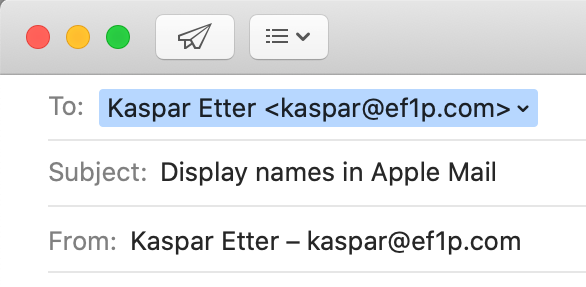
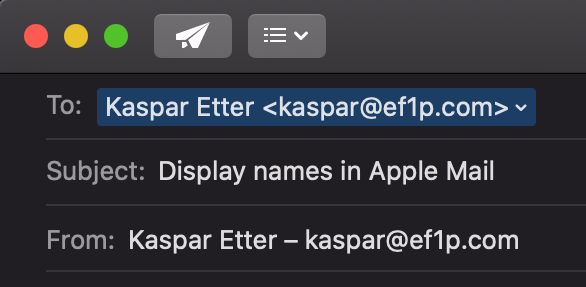
To and From fields – if you have Smart Addresses disabled, which you totally should.This feature seems totally benign, but, as we will see later on, it has serious privacy and security implications.
The @ symbol
While most of us know the @ symbol exclusively from email addresses and social media to tag another user, it has been used for centuries in commerce. In Spanish and Portuguese, it denoted a custom unit of weight. In English, it came to mean at the rate of similar to the French à. The @ symbol was already included in the first edition of the ASCII character set in 1963, years before the symbol was first used to designate the network host in a predecessor of today’s email in 1971.
Normalization
In the standard, the part before the @ symbol
is called the local part of an email address.
The interpretation of the local part is completely up to the receiving mail system specified after the @ symbol
and you shouldn’t make any assumptions about the recipient’s address as a sender.
In particular, implementations must preserve the case
of the letters in the local part, but mail servers are encouraged to deliver messages case-independently.
In other words, it is recommended but not mandatory
that mail servers treat John.Smith and john.smith as the same user.
Some mailbox providers go further than this:
Gmail, for example, removes all dots
from the local part of an address when determining the mailbox to deliver a message to.
This means that emails addressed to john.smith@gmail.com and johnsmith@gmail.com
are received by the same user – who also gets all messages for j.o.h.n.s.m.i.t.h@gmail.com.
The process of transforming data to its canonical form
is called normalization.
Subaddressing
Many mailbox providers support a technique known as
subaddressing as part of their address normalization.
By restricting the character set for usernames more than the standard demands,
a mailbox provider can designate a special character,
which is valid according to the standard but not in its set for usernames,
to split the local part into two.
The part before this special character is used to determine the recipient of a message.
The part after this special character is a tag that the user can choose when they share their address.
Since subaddressing can be implemented by the receiving mail system at will, it has never been formalized
beyond this draft from 2007.
Gmail and
Microsoft Exchange
support subaddressing with a plus.
For example, emails to user+tag@gmail.com are delivered to user@gmail.com.
If you reply to an email that you received at a subaddress with a plus,
Gmail still uses your main address in the From field, unfortunately.
In order to send emails (including replies) from a subaddress,
you have to add it in the settings:
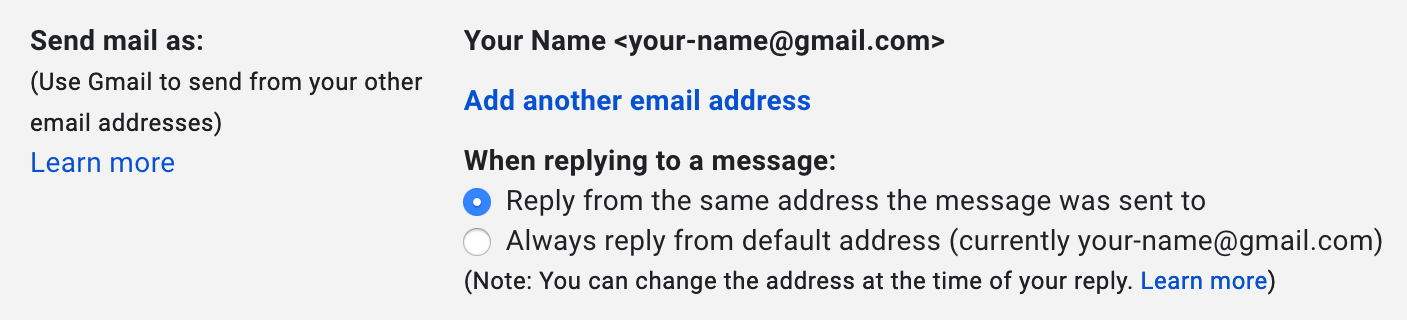
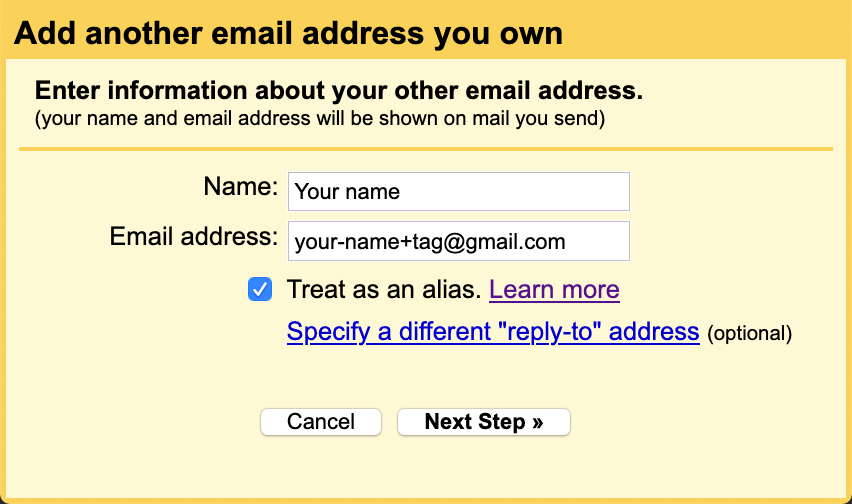
(In either case, Gmail asks the recipient to reply to your subaddress, while the main address is used in the
Return-Path header field.)Click on the button “Next Step” and you’re done. You can now select a different
From address the next time you compose a message.Subaddressing can be useful to filter incoming emails based on their context. Instead of creating several accounts, you can separate different areas of your life with the convenience of having just a single account. Subaddressing also allows you to track whether a company passed your email address on. When you no longer want to receive emails from a company and its affiliates, you can simply block all emails sent to the address variant you gave them. While subaddressing can be used for creating disposable email addresses on the fly, this protection against abuse can easily be circumvented. If the subaddressing scheme is publicly known, spammers can just remove the tag from customized addresses. A better method against unsolicited messages is to create proper email aliases or forwarding addresses, which are indistinguishable from ordinary addresses. The disadvantage of this approach is that you have to set them up before you can use them. If you use a custom domain for your emails, you might be able to use a so-called catch-all address or customize the subaddressing scheme by using wildcards.
Alias address
An alias address doesn’t have a mailbox associated with it but simply forwards all incoming messages to one or several addresses. The forwarding is done by the incoming mail server of the alias address and the expanded addresses may belong to the same or to different hosts. Unlike in the case of a mailing list, an automatic response by a recipient is sent to the original sender. Alias addresses can forward messages to other alias addresses, which can cause mail loops.
Mailing list
A mailing list is an address which forwards incoming messages to all the subscribers of the list. The administrator of the list can decide who is allowed to send messages to the list and whether each message needs to be approved by a moderator before it is forwarded. Unlike in the case of an alias address, the mailing list software has to change the envelope of the message so that automatic responses from subscribers of the list are sent to the administrator of the list rather than the original sender.
Address syntax
When is an email address valid? As with many technical standards, the answer to this question looks straightforward at first. But as soon as you dig a bit deeper, the answer becomes complicated and messy. What standards allow is often much more than what is widely accepted and used:
The syntax of email addresses is specified in
section 3.4.1 of RFC 5322.
As mentioned earlier, an address consists of a local part followed by the @ symbol and a domain name.
If we restrict ourselves to what is widely adopted, the local part has to consist of the characters
a to z, A to Z, 0 to 9, and any of !#$%&'*+-/=?^_`{|}~.
A dot . can be used as long as it is between two of the aforementioned characters.
In other words, you cannot have multiple dots in a row or at the beginning or end of the local part.
The local part has to consist of at least one character,
and every mail system must be able to handle addresses whose local part is up to
64 characters long, including any dots.
While this is the easy part of the standard, you should avoid most of the special characters
if you want to be confident that online services accept your email address.
Twitter, for example, accepts only !+-_ beyond the alphanumeric characters and the dot.
This allows me to sign up with an address such as !+-_@ef1p.com.
Gmail, on the other hand, accepts !#$%&'*+-/=?^_`{|}~@ef1p.com as a recipient
but fails to recognize this character sequence as an email address in text.
This paragraph is about the complicated part of the standard,
which is not widely supported and therefore more of theoretical than practical interest.
The local part of an email address can also be a quoted string.
Any printable ASCII character
is allowed inside of double quotes.
If we ignore the obsolete syntax,
which may no longer be generated but must still be accepted,
the quoted string has to be the whole local part,
i.e. it cannot be combined with non-quoted characters.
Both "@"@ef1p.com and ".."@ef1p.com are valid addresses,
and so is ""@ef1p.com (at least for now).
Only " and \ need to be escaped with a backslash in front of them.
This means that "\""@ef1p.com and "\\"@ef1p.com are also valid addresses.
When it comes to whitespace characters,
such as space and tab, the situation is a bit confusing.
A quoted string can contain escaped spaces ("\ ")
through the quoted-pair rule.
The only other way a space can be added to a quoted string
is as folding whitespace.
The standard says that runs of folding whitespace
which occur between lexical tokens in a structured header field
are semantically interpreted as a single space character.
My understanding of this is
that a local part with several unescaped spaces (" ")
is the same as a local part with a single space (" ").
It’s not clear to me, though, whether " " is to be interpreted as "".
I think this might be the case
because spaces are clearly excluded from the set of characters which don’t need to be escaped.
The qtext rule
doesn’t include the space character, which is %d32 in ASCII,
but this might change in the future.
If unescaped spaces were meant to have meaning beyond just folding lines,
which we’ll discuss later,
they could easily have been added to the qtext rule.
On the other hand,
the equivalent qtextSMTP rule of RFC 5321 does allow spaces.
What the standard does clarify is that the escape character \ is semantically invisible.
Therefore, "a" and "\a" are equivalent.
I assume this means that mail systems are allowed to remove the backslash in front of characters
which don’t need to be escaped in non-local addresses.
What about the domain part of an email address?
While the Domain Name System allows the use of pretty much any character,
the preferred name syntax
requires that each label
consists only of letters, digits, and hyphens, where labels may neither start nor end with a hyphen.
SMTP restricts domain names to this syntax.
All labels (except the one for the root zone)
have to contain at least one character and at most 63 characters.
The length of the whole domain name is limited to 255 characters,
including the dots.
Domain names are explicitly case-insensitive.
Only fully qualified domain names may be used in email addresses on the public Internet,
and the domain part of an email address is always written without the trailing dot.
The domain name in an email address must have an MX, A, or AAAA resource record.
According to RFC 5321, a CNAME record is also permitted
as long as its target can be resolved to an IP address through one of the just mentioned record types.
Can an email address use an IP address instead of a domain name?
Yes: The address format
allows an IP address in brackets in place of a domain name.
For example, user@[192.0.2.123] is a valid email address.
However, the SMTP specification says that a host should not
be identified by its IP address, unless
the host is not known to the Domain Name System.
One reason for this is that a single mail server can receive emails for multiple domains
and the same user might exist in several of these domains.
If the recipient address doesn’t include a domain name,
the mail server might not know to which mailbox it should deliver the message.
The domain part of an email address thus serves a similar purpose
as the Host header field in HTTP.
One might think that mail servers would reject messages with an IP address in the sender address as spam,
but a reader of this article convinced me that this works just fine in many cases.
Apple Mail,
Thunderbird,
and Gmail also accept such addresses as recipients,
while Outlook.com
and Yahoo! Mail don’t.
What about characters outside of the English alphabet? There was a working group dedicated to the internationalization of email addresses. RFC 6531 defines an SMTP extension which allows envelope fields to be encoded in UTF-8 if both the sender and the recipient support it. I’ll cover this later.
If you have to validate email addresses,
you can use the following regular expression
from the Living HTML Standard:
/^[a-zA-Z0-9.!#$%&'*+\/=?^_`{|}~-]+@[a-zA-Z0-9](?:[a-zA-Z0-9-]{0,61}[a-zA-Z0-9])?(?:\.[a-zA-Z0-9](?:[a-zA-Z0-9-]{0,61}[a-zA-Z0-9])?)*$/.
This regular expression allows adjacent dots in the local part but does not allow the local part to be quoted.
You could limit the length of the local part with [a-zA-Z0-9.!#$%&'*+\/=?^_`{|}~-]{1,64},
but you should be liberal in what you accept from others.
And since some top-level domains accept email,
the regular expression intentionally ends with *$/ instead of +$/.
As we will see later on,
the validation of internationalized domain names is much more difficult.
Common addresses
If you use your own domain for email, you can choose the local part of your addresses however you want as long as you adhere to the address syntax. Some local parts, though, are commonly used to reach the person with a specific role in an organization:
| Address | Expectation |
|---|---|
info@ |
Reach someone from the administrative office. |
contact@ |
Be directed to the desired person within the organization. |
sales@ |
Receive purchase information from the sales person. |
support@ |
Get support for the offered product or service. |
marketing@ |
Provide feedback to marketing campaigns. |
abuse@ |
Report inappropriate public behavior. |
security@ |
Responsibly disclose a security vulnerability. |
postmaster@ |
Reach the email administrator (required according to RFC 5321). |
hostmaster@ |
Reach the DNS administrator. |
webmaster@ |
Reach the Web administrator. |
admin@ |
Reach the technical administrator (as an alternative to the previous three addresses). |
Recipients
You can address the recipients of a message in three different ways:
- The
Tofield contains the address(es) of the primary recipient(s). As a sender, you expect the primary recipient(s) to read and often to react to your message. The expected reaction can be a reply or that they perform the requested task. - The
Ccfield contains the address(es) of the secondary recipient(s). As a sender, you want to keep the secondary recipient(s) informed without expecting them to read or react to your message. (Ccstands for carbon copy.) - The
Bccfield contains the address(es) of the hidden recipient(s). Their address(es) are not to be revealed to other recipients of the message. The field is usually fully preserved in your folder of sent messages but fully removed in the version of the email that is delivered to others. Alternatively, a different message could be delivered to each hidden recipient where their address alone is listed in theBccfield. The standard also allows hidden recipients to see each other; they just have to be removed for the primary and secondary recipients. The vague semantics of this feature leads to several problems. (Bccstands for blind carbon copy.)
Important: Just because someone is listed as another recipient doesn’t mean that they received the same message as you. The reason for this could be innocuous or malicious. On the one hand, it may be that the email could simply not be delivered to them. On the other hand, the sender might have delivered the message only to you in order to mislead you. Your mailbox provider has no way of verifying that the same message has also been delivered to the other recipients. This allows a fraudster to fake a relationship that they do not have or to lead you to believe that they have done the introduction you asked them for, even when this is not the case. If you reply to all, your reply would also be sent to the faked recipients, of course.
Group construct
The address specification
allows senders to group addresses with the following syntax: {GroupName}: {ListOfAddresses};,
where the curly brackets have to be replaced with actual values.
ListOfAddresses is a comma-separated list of addresses, where each address can also have a display name.
You can send an email to several groups, but you cannot nest groups.
The list of addresses can be empty, which allows the sender to hide the recipients of a message.
Even though the To field is optional and can therefore be skipped completely,
some mail clients prefer to put something like undisclosed-recipients:; into this field
when you list all the recipients in the Bcc field.
As far as I can tell, this is the primary use of the group construct nowadays.
Sender
There are two relevant fields to indicate the originator of a message:
- The
Fromfield contains the address of the person who is responsible for the content of the message. - The
Reply-Tofield indicates the address(es) to which replies should be sent. If absent, replies are sent to theFromaddress.
Important: The core email protocols do not authenticate the sender of an email.
It’s called spoofing
when the sender uses a From address which doesn’t belong to them.
Forged sender addresses are a huge problem for the security of email.
There are additional standards to authenticate emails.
For them to have the desired effect, though,
both the sender and the recipients have to use them.
Sender field
RFC 5322
differentiates between the author and the sender of a message.
The person who writes the message is usually also the one who sends it.
If the author and the sender are different, though,
the sender should be provided in the Sender field.
The standard also allows several addresses in the From field.
If this is the case, the email must include a Sender field with a single address.
However, I’m not aware of any mail clients which support this.
In practice, the addresses of the co-authors are simply added to the Cc field.
Their contribution is made clear to the primary recipients
by mentioning the names of all the authors at the end of the message.
Remember that a sender can lie about their co-authors:
The fact that a person’s address is listed in the Cc field
doesn’t imply that the email has been delivered to them
and that they agree with the content of the message.
No reply
Many emails are sent from automated systems, which cannot handle replies.
Examples of such emails are notifications about events on a platform and reports about some usage statistics.
RFC 5322
required each email to have a From field with one or several addresses.
RFC 6854 updated the standard in 2013
to allow the group construct to be used in the From field as well.
This allows automated systems to provide no reply address by using an empty group in the From field,
rather than having to rely on users interpreting an address such as no-reply@example.com correctly.
The automated system can still identify itself by choosing the name of the group appropriately,
for example LinkedIn Notification Bot:;.
In the absence of an alternative to indicate the originating domain to the user,
I strongly advise against using an empty group in the From field, though,
because this defeats all efforts towards domain authentication.
Even the RFC itself recommends against
the general use of this method and says
that it is for limited use only.
Thus, we still have to wait for a usable
No-Reply
header field, unfortunately.
(The empty group construct is used to