Three AI-powered IDEs, all forked from VS Code, all promising to change how you write code. Cursor has the momentum and a $29 billion valuation. Windsurf survived an ownership rollercoaster and was rebranded Devin Desktop by Cognition in mid-2026. Kiro, the newest entrant from Amazon, bets that the real problem isn’t writing code faster but thinking about requirements first.
Each takes a fundamentally different approach to the same question: how should AI fit into a developer’s workflow? After digging through official documentation, GitHub repos, pricing pages, changelogs, Reddit threads, Hacker News discussions, and real user switching stories, here’s what actually matters when choosing between them. Every plan, feature, and model detail below was checked against cursor.com, Cognition’s Devin Desktop announcement, and kiro.dev in July 2026.
One naming note up front, because it trips people up: if you are searching for “Windsurf,” you are looking for what is now called Devin Desktop. Cognition renamed it on June 2, 2026 and pushed the change as an automatic update, so the product, plans, and settings are the same. This guide keeps calling it Windsurf where the history matters and flags the Devin Desktop name where it changes what you actually see.
Quick Comparison: Cursor vs Windsurf vs Kiro at a Glance
Before the deep dive, here’s the high-level picture. This table covers the fundamentals that most developers ask about first.
| Feature | Cursor | Windsurf (Devin Desktop) | Kiro |
|---|---|---|---|
| Developer | Anysphere (San Francisco) | Cognition AI (rebranded from Codeium) | Amazon / AWS |
| Based on | VS Code fork | VS Code / Code OSS fork | Code OSS fork |
| Launch | March 2023 | November 2024 (Devin Desktop rebrand June 2026) | July 2025 (preview), late 2025 (GA) |
| Core approach | Conversational AI + multi-file agent | Agentic Devin Local + persistent memory | Spec-driven: requirements, design, then code |
| Free tier | Limited agent requests + completions | Daily/weekly refreshing credits | 50 credits/month |
| Pro price | $20/month | $20/month | $20/month |
| Top tier | Ultra $200/month | Max $200/month | Power $200/month |
| AI models | Claude, GPT, Gemini, Grok (multi-provider) | SWE family (proprietary), Claude, GPT, Gemini | Claude only (via Bedrock) |
| BYOK (bring your own key) | Yes (OpenAI, Anthropic, Google, Azure) | Limited (Claude Sonnet/Opus only) | No |
| MCP support | Yes (5,000+ servers) | Yes (marketplace + manual config) | Yes |
| Extension registry | Open VSX | Open VSX | Open VSX |
| Open source | No (GitHub repo is issue tracker only) | No (editor plugins are open source) | No (GitHub repo is issue tracker only) |
| Platforms | macOS, Windows, Linux | macOS, Windows, Linux | macOS, Windows, Linux |
| Compliance | SOC 2 Type II | SOC 2 Type II, FedRAMP, HIPAA | SOC 2 (via AWS) |
| GitHub stars | 32,600+ | N/A (editor not on GitHub) | 4,500+ issues on feedback repo |
| Valuation / backing | $29.3 billion (Series D, Nov 2025) | Part of Cognition AI ($10.2B) | Amazon (internal product) |
All three cost $20/month at the Pro tier. The differentiation isn’t price. It’s philosophy.
Cursor: The Multi-File Refactoring Powerhouse
Cursor was first to market in March 2023, built by four MIT students at Anysphere. It graduated from OpenAI’s accelerator and has since raised over $3 billion across multiple rounds, reaching a $29.3 billion valuation in November 2025. The company crossed $2 billion in annualized revenue by February 2026.
The growth numbers are staggering, but what drives them is a genuinely useful product. Cursor’s strength is making multi-file edits feel natural.
What Makes Cursor Different
Composer and Agent Mode are the headline features. Composer lets you describe a change that spans multiple files, and Cursor plans and executes edits across all of them in one shot. Agent mode takes this further by autonomously creating, editing, and deleting files based on your instructions. Professional developers on Reddit consistently call Composer “transformative” for refactoring sessions that touch 15+ files.
Background Agents (introduced in version 0.50, mid-2025) run tasks independently while you continue working. Cloud Agents take this even further by spinning up sandboxes to build, test, and demo features end-to-end.
Cursor 3.0 (April 2026) introduced the Agents Window: a full-screen tiled workspace where you can run multiple agents in parallel across different repos and branches. The /worktree command creates isolated git worktrees for each agent, and /best-of-n runs the same prompt across multiple models simultaneously so you can pick the best result.
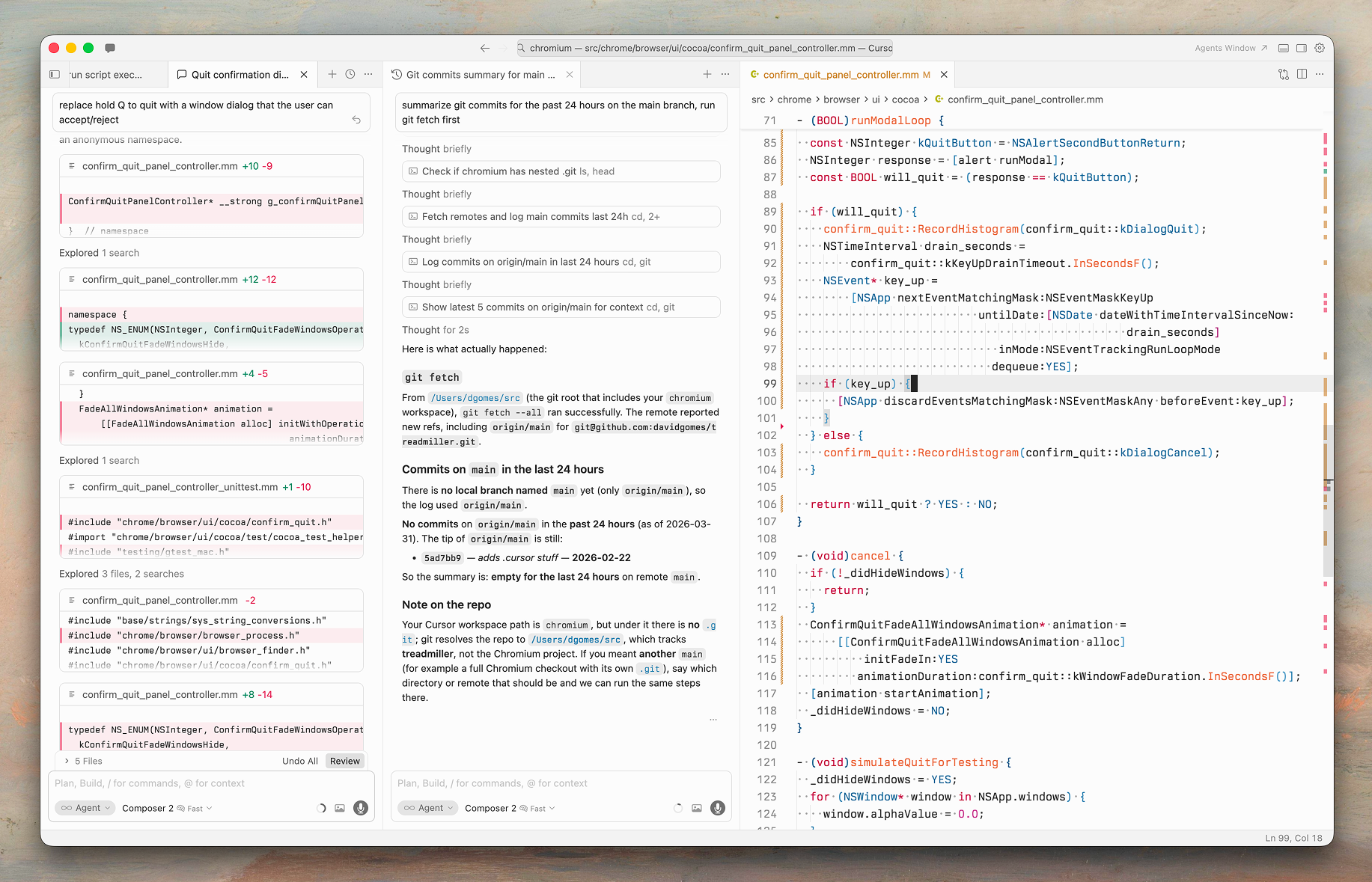
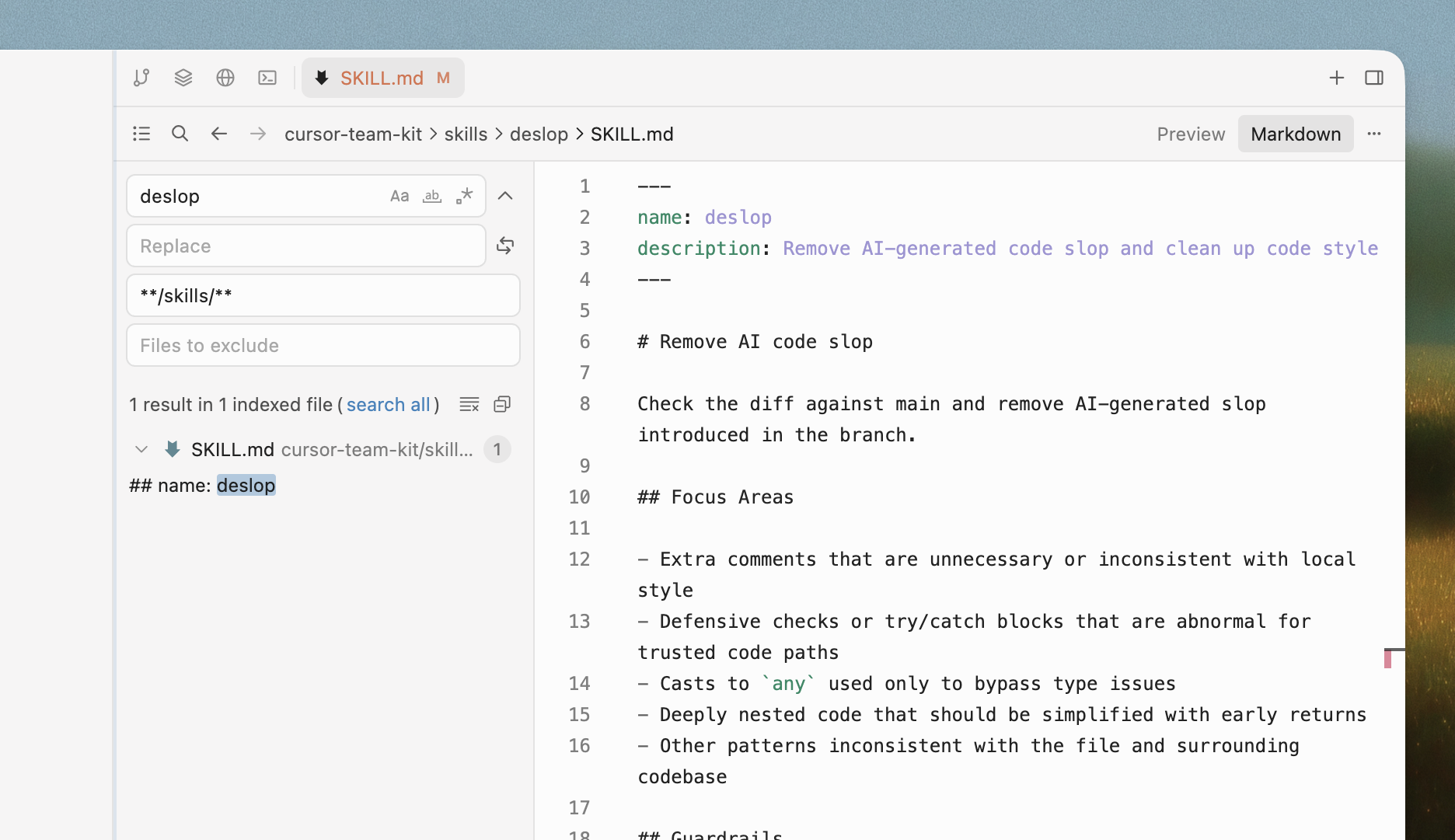
Codebase indexing is where Cursor earns its reputation for context awareness. It builds semantic embeddings of your entire codebase and lets you reference specific files, folders, symbols, or documentation with @-mentions. This granular context control is something power users cite as a key reason they stay on Cursor.
BugBot ($40/user/month, separate from IDE pricing) reviews GitHub PRs automatically and learns from your team’s feedback patterns over time.
Models and Flexibility
Cursor supports the widest range of AI models: the current OpenAI GPT, Anthropic Claude, Google Gemini, and xAI Grok families, all selectable per request. You can also bring your own API keys for OpenAI, Anthropic, Google, and Azure OpenAI. This model flexibility is a significant advantage for teams that want to experiment or have specific model preferences.
That flexibility comes with trade-offs, though.
Where Cursor Falls Short
The June 2025 pricing change from 500 fixed “fast” requests per month to usage-based credits was controversial. The effective number of requests dropped to roughly 225 for the same $20, and the company’s CEO publicly apologized after backlash. Rate limits (1 request per minute, 30 per hour) hit frequently during heavy Composer sessions. The current individual lineup is Hobby (free), Pro ($20), Pro+ ($60), and Ultra ($200), with the higher tiers buying multiples of the same usage rather than a different feature set.
Large codebases (100K+ files) can cause lag and indexing issues. The editor is VS Code only, with no JetBrains or Neovim support (though ACP integration for JetBrains was announced in March 2026). Microsoft-proprietary extensions like C# Dev Kit, Remote SSH, Pylance, and Live Share aren’t available since Cursor uses the Open VSX registry instead of the VS Code Marketplace.
Download Cursor: cursor.com/downloads (macOS, Windows, Linux)
GitHub (issue tracker): github.com/cursor/cursor (32.6K stars)
Windsurf (Now Devin Desktop): The Agentic IDE That Survived a Corporate Storm
Windsurf has the most turbulent backstory of the three. Originally built by Codeium (itself a rebrand of Exafunction), the Windsurf editor launched in November 2024 as “the first agentic IDE.” What followed was a corporate soap opera: OpenAI agreed to acquire Windsurf for $3 billion in May 2025, Microsoft blocked the deal over IP rights in July 2025, Google hired the CEO and co-founder in a $2.4 billion talent deal, and Cognition AI (makers of the Devin autonomous coding agent) picked up the remaining product, brand, and team for roughly $250 million.
That story reached its conclusion on June 2, 2026, when Cognition folded Windsurf into its Devin line and renamed the editor Devin Desktop. The change shipped as an over-the-air update, so plans, pricing, settings, and extensions carried over untouched. If you had Windsurf installed, you already have Devin Desktop. The rebrand is bigger than the name. The app now opens on an Agent Command Center, a Kanban-style board for running local and cloud agents, instead of dropping you straight into the editor canvas. It ships the open Agent Client Protocol (ACP), which lets outside agents such as Codex, Claude Agent, and OpenCode run as first-class citizens inside the editor. The pitch shifted from “a code-first IDE that can call an agent” to “an agent-management hub that contains a full IDE.”
The built-in agent changed too. Cascade, Windsurf’s original agent, reaches end of life on July 1, 2026 and is replaced by Devin Local: a from-scratch rewrite in Rust that Cognition says is up to 30% more token-efficient and can spawn subagents to handle subtasks in parallel. Devin Cloud, the hosted agent that used to be positioned for enterprise, now starts on the $20 Pro plan.
What Makes It Different
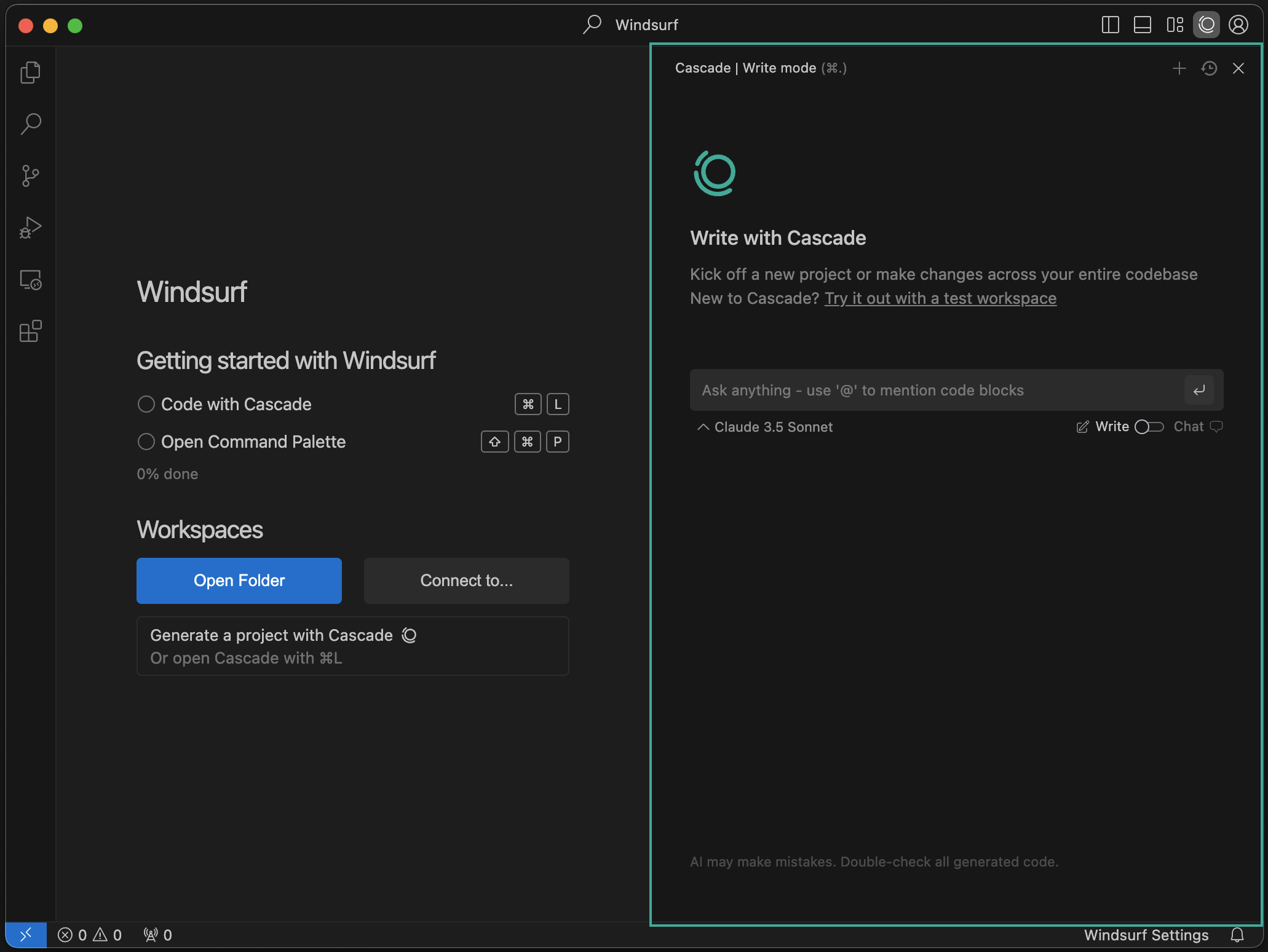
The agent (Cascade, now Devin Local) is accessed via Cmd+L and operates in two modes: Write mode (creates and modifies code, runs terminal commands, installs packages) and Chat mode (Q&A without changes). It can execute up to 20 tool calls per prompt, plans before acting, and generates Todo lists for complex tasks. Devin Local keeps that workflow and adds parallel subagents.
Supercomplete goes beyond traditional autocomplete. Instead of predicting the next line of code, it predicts your next editing action. It reads 30 to 90 seconds of your recent edit history, cursor movement, and surrounding context. If you renamed userId to accountId twice, Supercomplete pre-stages the next occurrence. It parses a lightweight AST to understand downstream effects of your edits.
Memories give the agent persistent context across sessions. After about 48 hours of use, it learns your architecture patterns and coding preferences. Unlike Cursor’s per-session context, these memories persist locally and are retrieved automatically in future sessions. One developer on dev.to noted that Windsurf automatically used an existing custom date-time picker from their project, while Cursor suggested installing a new npm package for the same task.
Rules (stored in .windsurf/rules/) are version-controlled, shareable configuration files that give the agent persistent project context. Similar to Cursor’s .cursorrules, but with activation modes: always-on, manual, or context-triggered via YAML frontmatter.
Proprietary Models: The SWE Family
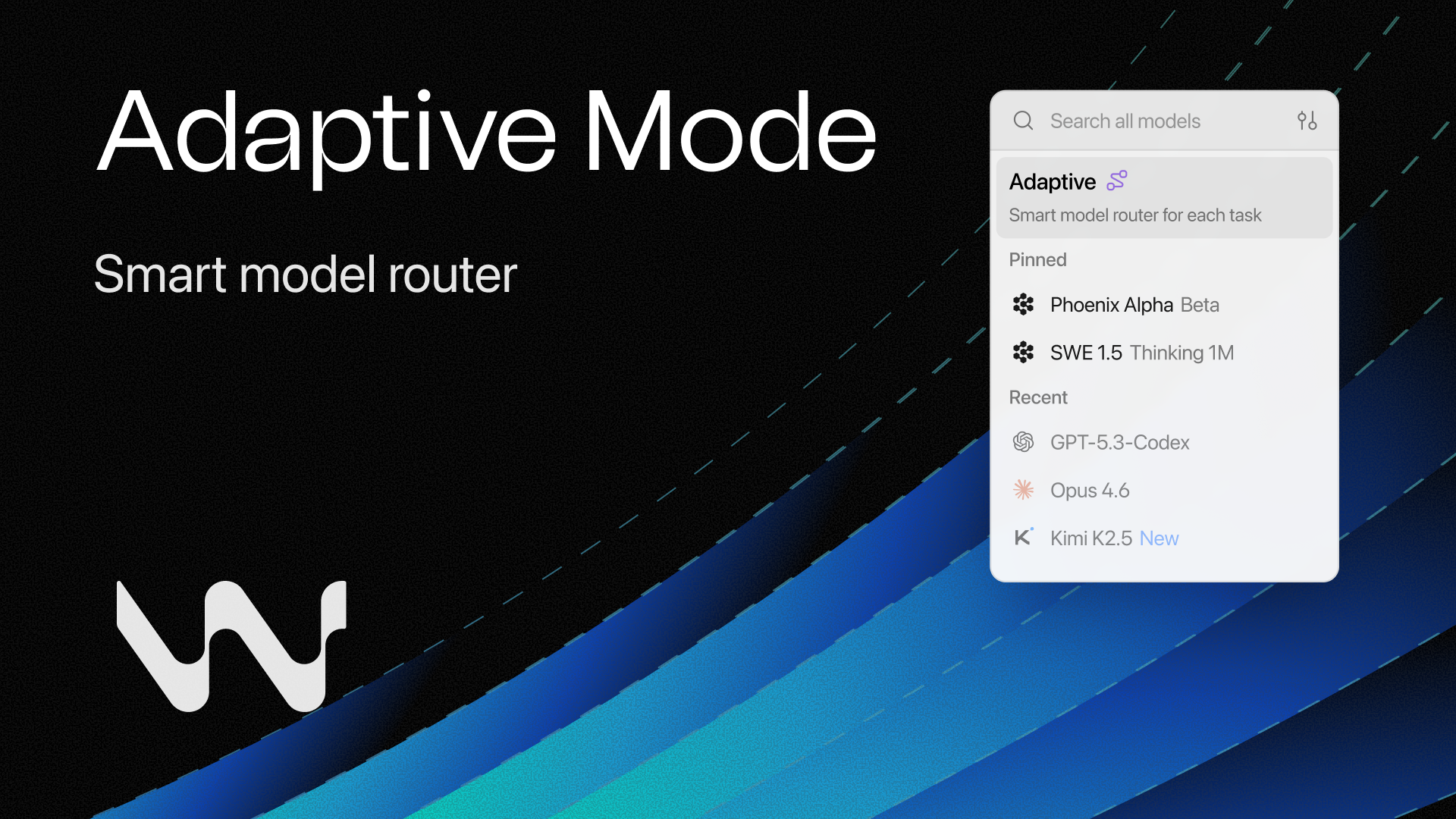
The most interesting technical development post-acquisition is the in-house SWE model family. SWE-1.5 was described as “near Claude 4.5-level, 13x faster than Sonnet 4.5,” with SWE-1.6 as the follow-on frontier model. These proprietary models cost 0 credits to use, which gives the editor a unique cost advantage: the best value per dollar comes from using the in-house models rather than Claude or GPT. That zero-credit option carries into Devin Desktop.
Third-party model support includes the current Claude Opus and Sonnet, GPT, and Gemini models. BYOK is limited to Claude Sonnet and Opus variants only.
The model variety is strong, but other aspects of the experience have rough edges.
Where It Falls Short
The ownership question that dominated every Windsurf thread is now settled: the editor IS Devin Desktop, and Cascade is on the way out. That resolves the uncertainty but introduces a transition cost. Long-time Codeium and Windsurf users have to relearn an agent-hub-first layout and move off Cascade before it retires on July 1, 2026. Whether Devin Local matches Cascade’s polish from day one is the open question now.
Performance degrades on files exceeding 300 to 500 lines, with a hard cap around 12,000 lines. The March 2026 quota changes drew backlash, with users reporting what felt like a 10x effective price increase on usage. Autocomplete suggestions occasionally lag or disappear, and agent sessions can stall during long operations.
The compliance story is genuinely strong: SOC 2 Type II, FedRAMP High, and HIPAA-eligible deployments are available, which matters for regulated industries.
Download Devin Desktop (formerly Windsurf): devin.ai/download (macOS, Windows, Linux). The old windsurf.com/download/editor link now redirects here.
GitHub (editor plugins): github.com/Exafunction (Vim, Neovim, and Visual Studio plugins are open source)
Kiro: Amazon’s Spec-Driven Approach
Kiro is the newest and most opinionated of the three. Built by Amazon/AWS, it launched in public preview in July 2025 (hitting capacity limits within days) and reached general availability in late 2025. Where Cursor and Windsurf jump straight from prompt to code, Kiro inserts a structured thinking phase in between.
What Makes Kiro Different
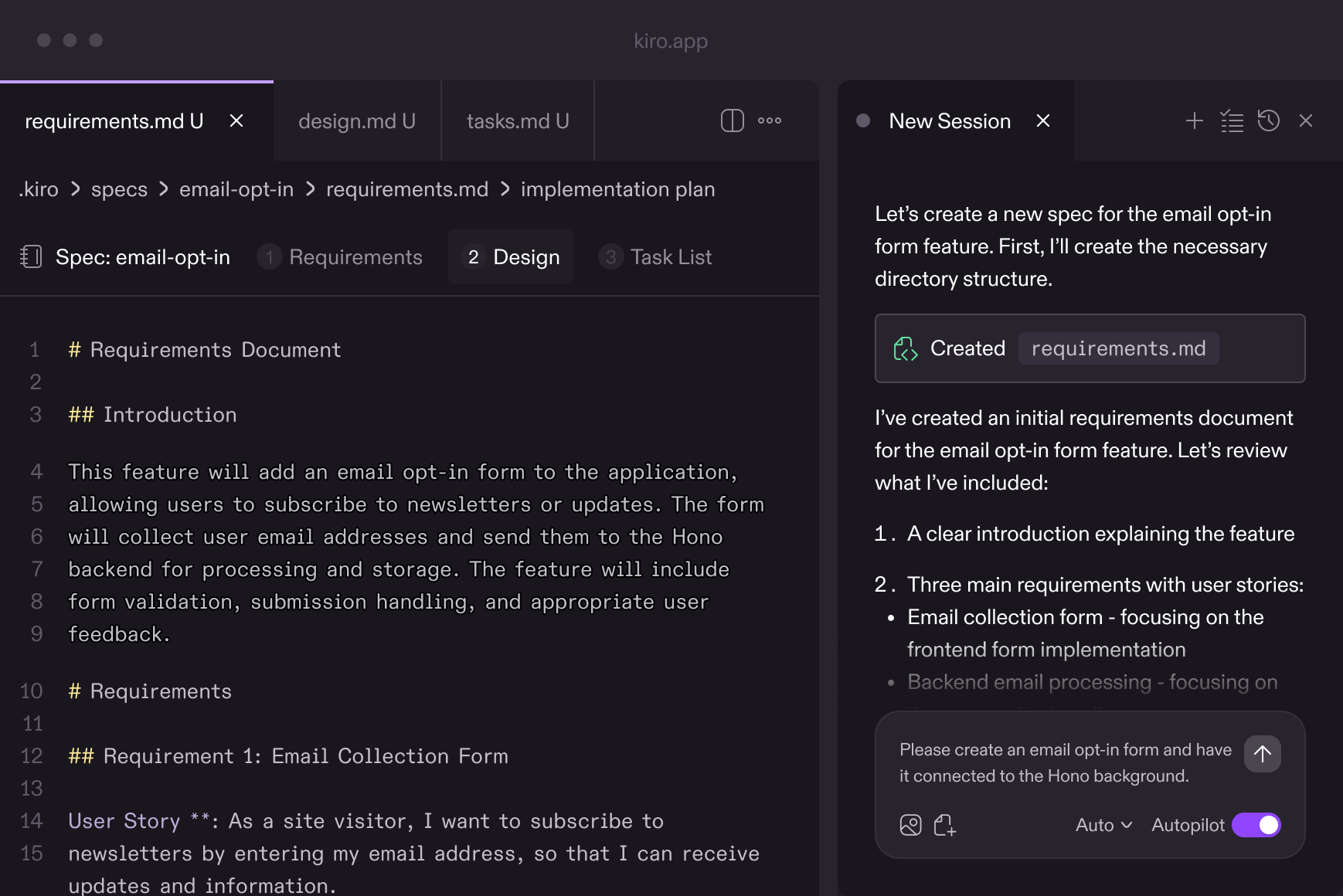
Spec-driven development is the core differentiator. When you give Kiro a task, it doesn’t immediately start generating code. Instead, it produces three artifacts first:
- Requirements with user stories in EARS (Easy Approach to Requirements Syntax) notation, including acceptance criteria
- Design document covering data models, APIs, and module structure
- Sequenced implementation tasks mapped back to requirements
Only after you review and approve these specs does Kiro generate code. A ThoughtWorks analysis found this approach produces code that more closely matches specifications with fewer hallucinated features compared to Cursor and Windsurf. The trade-off is speed: for a quick bug fix, generating requirements documents feels like overkill.
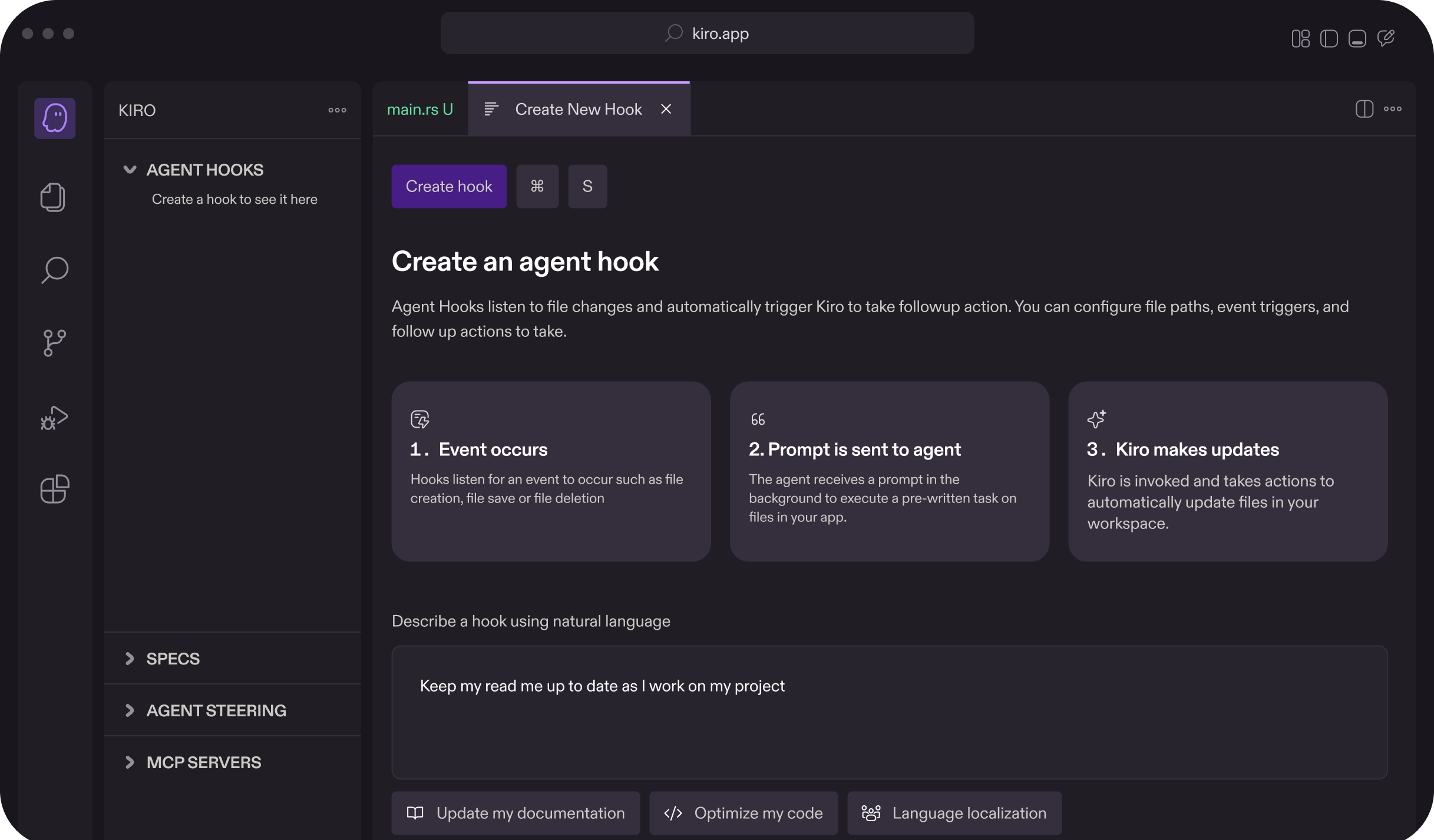
Agent Hooks are event-driven automation triggers. You configure what to watch (specific files or paths), when to act (on save, file create, file delete), and what to do (run tests, format code, update docs). This is similar to git hooks but integrated with the AI agent. There’s also a userTriggered mode for on-demand workflows.
Steering Rules live in .kiro/steering/ as three markdown files: product.md (product vision, target users), tech.md (frameworks, coding patterns), and structure.md (directory conventions, naming schemes). These give the agent persistent project context without repeating yourself in every prompt. They support YAML frontmatter for activation modes: always loaded, conditional (file pattern matching), manual, or auto.
Autopilot vs Supervised mode lets you toggle between fully autonomous execution and step-by-step approval. In Autopilot mode, Kiro makes architectural decisions and runs commands without asking. Supervised mode presents each change as individual hunks for granular accept/reject.
Claude-Only, Via Bedrock
Kiro runs exclusively on Anthropic’s Claude models through Amazon Bedrock: the current Sonnet, Haiku, and Opus generations. An “Auto” mode routes requests intelligently across models based on task complexity and is the default. There’s no OpenAI, no Gemini, and no BYOK option (this is a frequently requested feature on GitHub issue #481).
The credit system uses a multiplier: a task that costs a given number of credits via Auto costs about 1.3x more when pinned to Sonnet directly, which is why Auto is the recommended default. The free tier gives you 50 credits per month, which multiple reviewers describe as “disappearing in a single 2-hour session.” Paid tiers run Pro ($20/1,000 credits), Pro+ ($40/2,000 credits), Pro Max ($100/5,000 credits), and Power ($200/10,000 credits), with overage at $0.04 per credit.
Relationship to Amazon Q Developer
The relationship to Amazon Q Developer has turned into a migration story rather than a rivalry. Q Developer was AWS’s IDE extension (VS Code, JetBrains, Eclipse) for inline suggestions, chat, and deep AWS service integration, while Kiro is a standalone IDE built around spec-driven development. AWS has since announced that Q Developer’s IDE plugins and paid subscriptions reach end of support on April 30, 2027, blocked new subscription and free-tier sign-ups from May 15, 2026, and now points users to Kiro as the replacement. The Q Developer CLI has already been merged into the Kiro CLI, with an official migration guide available.
Where Kiro Falls Short
The spec-driven workflow adds overhead that doesn’t pay off for simple tasks. Multiple reviewers describe it as “overkill for quick bug fixes.” Credits burn faster than expected because spec generation and context summarization both consume them, punishing iterative debugging workflows.
A Medium deep dive titled “Brilliant, Broken, and Frustrating” documented tasks that frequently get stuck, lose context, and force complete restarts. There’s also an ironic gap in AWS integration: despite being an AWS product, Kiro has no native CloudFormation, CDK, Amplify, or S3 deployment support.
The trust question is real. AWS has a history of killing developer tools (CodeCommit, AppRunner, CodeCatalyst). Developers on Hacker News openly worry that Kiro could be next, though the decision to wind down Q Developer’s own IDE plugins in Kiro’s favor reads as a bet on Kiro, not against it.
Download Kiro: kiro.dev (macOS, Windows, Linux)
The CLI can be installed separately:
curl -fsSL https://cli.kiro.dev/install | bashGitHub (issue tracker): github.com/kirodotdev/Kiro
Head-to-Head: Key Dimensions Compared
The overview tables give you the broad picture. These sections go deeper on the dimensions that actually affect your daily workflow.
AI Code Generation Quality
In head-to-head tests reported across dev.to and Medium, Cursor tends to apply the smallest viable fix rather than redesigning entire subsystems. Professional developers who want predictable, minimal diffs prefer this conservative approach. Windsurf’s agent (Cascade, now Devin Local) is more aggressive, planning multi-step changes autonomously and directly modifying files rather than showing sidebar diffs. Kiro’s spec-driven output is the most structured, but the quality advantage shows primarily on greenfield features where requirements are ambiguous.
For rapid prototyping, Windsurf and Cursor are faster. For building features where getting the requirements right matters more than speed, Kiro’s approach produces fewer “hallucinated” features that you didn’t ask for.
Context and Codebase Awareness
| Capability | Cursor | Windsurf | Kiro |
|---|---|---|---|
| Codebase indexing | Semantic embeddings, @codebase search | Local and remote indexing | Codebase-aware via Bedrock context |
| File references | @file, @folder, @symbol | @-mentions for files and errors | Spec references link to source files |
| Persistent context | .cursorrules (per-project) | Memories (auto-generated, local) + Rules | Steering Rules (.kiro/steering/) |
| Cross-session memory | No (per-session only) | Yes (Memories persist locally) | Steering Rules persist, no auto-memory |
| Web/docs context | @web, @docs | Web search integration | No native web search |
Cursor gives you the most explicit control over what context the AI sees. Windsurf’s Memories feature is the most “set it and forget it” approach. Kiro’s Steering Rules are the most structured but require manual setup.
Pricing Deep Dive
All three have converged on $20/month for the Pro tier. The real cost differences are in what that $20 buys you.
| Aspect | Cursor Pro ($20/mo) | Windsurf Pro ($20/mo) | Kiro Pro ($20/mo) |
|---|---|---|---|
| Effective requests | ~225 (usage-based credits) | Unlimited on the SWE models | 1,000 credits (variable per model) |
| Premium model access | Claude, GPT, Gemini (costs credits) | Claude, GPT, Gemini (costs 1-30 credits each) | Claude only (1-1.3x credits) |
| Free model option | No (all models cost credits) | Yes (SWE models cost 0 credits) | No |
| Overage | Usage-based (can spike) | API price per extra request | $0.04/credit (disabled by default) |
| BYOK savings | Yes (use own API keys) | Limited (Claude only) | No |
Windsurf offers the best raw value at the Pro tier because its proprietary SWE models cost zero credits. If those models meet your needs, $20/month gets you effectively unlimited usage, and that carries into Devin Desktop, where Devin Cloud is now bundled into the same Pro plan. Cursor’s BYOK support lets cost-conscious teams route through their own API keys, bypassing Cursor’s credit system entirely for supported models. Kiro’s 1,000 credits sound generous until you realize that spec generation, context summarization, and the AI chat all consume credits.
Privacy and Security
| Capability | Cursor | Windsurf | Kiro |
|---|---|---|---|
| SOC 2 Type II | Yes | Yes | Yes (via AWS) |
| FedRAMP | No | Yes (High) | GovCloud available |
| HIPAA | No | Yes (eligible) | Via AWS BAA |
| Privacy mode | Yes (code never stored/trained on) | Telemetry opt-out available | AWS data handling policies |
| Self-hosted option | No | Yes (Enterprise) | No |
| File exclusion | .cursorignore | .codeiumignore | Not documented |
| Code training | Not with Privacy Mode | Not with telemetry disabled | Not used for training (AWS policy) |
Windsurf leads on compliance certifications with FedRAMP High and HIPAA eligibility. This matters for healthcare, finance, and government teams. Cursor’s Privacy Mode is well-documented and used by over 50% of its users. Kiro inherits AWS’s broad compliance framework but doesn’t yet have the IDE-specific certifications that enterprise security teams look for.
Extension and Plugin Ecosystem
All three use the Open VSX registry instead of Microsoft’s VS Code Marketplace. This means roughly 90% of VS Code extensions work, but Microsoft-proprietary extensions (C# Dev Kit, Remote SSH, Live Share, Pylance) are unavailable across all three IDEs.
Windsurf has an edge here: it ships open-source plugins for Vim, Neovim, Visual Studio, and other editors. If your team uses JetBrains or Neovim, Windsurf is the only one of the three that meets you where you are (with AI features, at least). Devin Desktop widens this further with the Agent Client Protocol, which lets external agents plug into the editor. Cursor and Kiro are standalone editors only.
What the Community Actually Says
Marketing copy says one thing. Developers on Reddit and Hacker News say another. Here’s the unfiltered sentiment from real users.
On Cursor
The praise centers on Composer’s multi-file editing. Developers consistently describe going from hours of manual refactoring to 20-minute Composer sessions. The .cursorrules feature has developed a community of its own, with teams sharing project-specific AI instructions on r/cursor.
The backlash centers on pricing. Cursor’s Trustpilot score sits at 1.7 across 203 reviews, driven almost entirely by the June 2025 credit system change. One Hacker News user reported “$350 in Cursor overage in a week.” The rate limiting (1 request/minute, 30/hour) frustrates developers in deep flow states.
On Windsurf
Windsurf’s Cascade gets credit for proactive codebase awareness. The switching story that comes up repeatedly: developers who moved from Cursor to Windsurf cite the simpler pricing (before March 2026 equalization), better Claude Sonnet implementation with larger context windows, and fewer hallucinations.
Those who switched back to Cursor cite the need for fine-grained context control (@codebase, @files shortcuts) and more reliable multi-file refactoring. Until mid-2026, the ownership uncertainty was the elephant in every Windsurf thread. Now that the editor is Devin Desktop, the conversation has moved on to whether Devin Local can replace Cascade cleanly before the July 1 cutover.
On Kiro
Early adopters appreciate the spec-driven workflow as “a surprisingly useful thinking partner” for breaking down rough ideas into structured plans. The code quality from Claude gets genuine praise.
The complaints are louder: credits disappear fast, tasks get stuck and lose context, and the lack of native AWS service integration (from an AWS product) confuses everyone. The trust deficit from AWS’s track record of killing developer tools comes up in nearly every Hacker News thread about Kiro.
The Emerging Pattern: IDE + CLI Combo
A growing segment of senior engineers reported using a split setup: Cursor or Windsurf for daily editing combined with Claude Code (Anthropic’s terminal-based agent) for complex reasoning tasks like refactors, architecture decisions, and multi-repo changes. The total cost runs $40 to $220 per month, but developers describe it as the best of both worlds, where each tool handles what it does best.
Who Should Use What
After synthesizing documentation, community feedback, and real switching stories, here’s the practical guidance.
| Developer Profile | Best Pick | Why |
|---|---|---|
| Solo dev shipping MVPs fast | Windsurf | Agent autonomy, zero-cost SWE models, beginner-friendly |
| Senior dev who wants control | Cursor | .cursorrules, explicit @-mentions, conservative diffs, BYOK |
| Enterprise with compliance needs | Windsurf | FedRAMP, HIPAA, self-hosted option, 40+ IDE plugins |
| Teams with ambiguous requirements | Kiro | Spec-driven workflow forces clarity before code generation |
| AWS-heavy teams | Kiro (with caution) | Bedrock integration, IAM Identity Center, but watch for service discontinuation |
| GitHub-native teams | VS Code + Copilot | Tight PR/issue/CI integration, lowest friction, $10/month |
| Mixed-IDE teams (JetBrains + VS Code) | Windsurf | Only one with plugins for JetBrains, Vim, Neovim, Visual Studio |
| Cost-sensitive developers | Windsurf (SWE models) or Cursor (BYOK) | Zero-credit SWE models, or bring your own cheaper API keys |
Download Links and Getting Started
| IDE | Download URL | Platforms | Authentication |
|---|---|---|---|
| Cursor | cursor.com/downloads | macOS (ARM64, x64), Windows (x64, ARM64), Linux (.deb, .rpm, AppImage) | Email or GitHub |
| Windsurf (Devin Desktop) | devin.ai/download | macOS (Intel, Apple Silicon), Windows, Linux (.deb, .rpm, .tar.gz) | Email, GitHub, or Google |
| Kiro | kiro.dev | macOS, Windows, Linux | GitHub, Google, AWS Builder ID, or IAM Identity Center |
All three offer free tiers, so the best way to decide is to install two of them and spend a week with each on a real project. Migration from VS Code is straightforward for all three since they’re all VS Code forks: settings, keybindings, themes, and most extensions transfer directly.
Frequently Asked Questions
What happened to Windsurf?
On June 2, 2026, Cognition rebranded the Windsurf editor to Devin Desktop and shipped the change as an over-the-air update, so existing installs kept their plans, settings, and extensions. Cognition acquired Windsurf’s product, brand, and remaining team in July 2025 for roughly $250 million; the original founders, Varun Mohan and Douglas Chen, left for Google. The built-in Cascade agent is being retired on July 1, 2026 in favor of Devin Local, a Rust rewrite that also runs subagents. If you search for “Windsurf” today, Devin Desktop is what you will find.
Can I use my own API keys with these IDEs?
Cursor has the most complete BYOK support: OpenAI, Anthropic, Google, and Azure OpenAI keys all work. Windsurf supports BYOK for Claude Sonnet and Opus only. Kiro does not support BYOK at all; it routes everything through Amazon Bedrock.
Are any of these IDEs open source?
None of the three are open source. All three are proprietary VS Code forks. Cursor and Kiro maintain GitHub repositories that function as issue trackers and community forums, not source code repos. Windsurf publishes open-source plugins for Vim, Neovim, and Visual Studio, but the IDE itself is closed source.
Which one has the best free tier?
Windsurf’s free tier is the most generous because the in-house SWE models cost zero credits, giving you functional AI assistance without hitting a paywall quickly. Cursor’s free tier provides limited agent requests and tab completions. Kiro’s 50 credits per month is the most restrictive, with users reporting they run out in a single coding session.
Will AWS discontinue Kiro like they did CodeCommit?
There’s no official statement either way. AWS invested heavily in Kiro’s GA launch and re:Invent 2025 keynote presence, and it is actively steering Amazon Q Developer users toward Kiro as Q Developer’s IDE plugins wind down (end of support April 30, 2027). That consolidation points to commitment rather than a hedge. Still, the AWS developer tools track record (CodeCommit, AppRunner, CodeCatalyst) gives developers legitimate reason to watch for signals before going all-in.