


有些小伙伴会遇到这样的问题:如果想让一个服务在后台长期的运行下去,而且在系统资源不足的情况下不会被系统kill掉,怎么办?这个时候上网google之后会发现,有个叫“前台服务”的东东,貌似很强大,无论怎样都会常驻系统内存。但是,都会发现,在高版本的Android版本中,前台服务一旦运行,就会默认在通知栏显示运行状态,无法手动去除。
有什么好的办法可以让其运行但又不会显示在通知栏的办法吗?
答案肯定有,在我动手实践后,发现了一个绝对有效的办法(也查阅过之前网友的做法,但是好像有漏洞,我这里说明的更详细,会考虑到各个版本,需要的小伙伴直接copy就可以用了),废话不多说,盖茨,上代码!
工程目录:
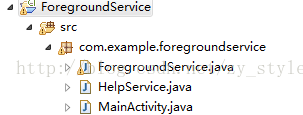
这里,前台服务名称为ForegroundService,协助我们去掉通知栏的Service为HelpService,入口为MainActivity
package com.example.foregroundservice;

import android.os.Bundle;
import android.app.Activity;
import android.content.Intent;
import android.view.View;

public class MainActivity extends Activity {
	public static final String TAG = "MainActivity";

	@Override
	protected void onCreate(Bundle savedInstanceState) {
		super.onCreate(savedInstanceState);
		setContentView(R.layout.activity_main);
	}

	public void startForeground(View view) {
		Intent intent = new Intent(this, ForegroundService.class);
		startService(intent);
	}

}
ForegroundService部分:
package com.example.foregroundservice;

import android.app.Notification;
import android.app.PendingIntent;
import android.app.Service;
import android.content.ComponentName;
import android.content.Intent;
import android.content.ServiceConnection;
import android.os.IBinder;
import android.os.Build.VERSION;
import android.util.Log;

/**
 * 需要开启的前台服务
 *
 * @author zhouyang
 */
public class ForegroundService extends Service {

	public static final String TAG = "ForegroundService";
	private final int PID = android.os.Process.myPid();
	private ServiceConnection mConnection;

	@Override
	public IBinder onBind(Intent intent) {
		return null;
	}

	@Override
	public void onCreate() {
		super.onCreate();
		Log.e(TAG, "ForegroundService is running");
		startForeground(PID, getNotification());// 正常启动前台服务
		// setForeground();// 启动前台服务,并隐藏前台服务的通知
	}

	public void setForeground() {
		// sdk < 18 , 直接调用startForeground即可,不会在通知栏创建通知
		if (VERSION.SDK_INT < 18) {
			this.startForeground(PID, getNotification());
			return;
		}

		if (null == mConnection) {
			mConnection = new CoverServiceConnection();
		}

		this.bindService(new Intent(this, HelpService.class), mConnection,
				Service.BIND_AUTO_CREATE);
	}

	private Notification getNotification() {
		// 定义一个notification
		Notification notification = new Notification();
		Intent notificationIntent = new Intent(this, ForegroundService.class);
		PendingIntent pendingIntent = PendingIntent.getActivity(this, 0,
				notificationIntent, 0);
		// notification.setLatestEventInfo(this, "Foreground", "正在运行哦",
		// pendingIntent);

		Notification.Builder builder = new Notification.Builder(this)
				.setAutoCancel(true).setContentTitle("ForegroundService")
				.setContentText("正在运行哦").setContentIntent(pendingIntent)
				.setSmallIcon(R.drawable.ic_launcher)
				.setWhen(System.currentTimeMillis()).setOngoing(true);
		notification = builder.getNotification();
		return notification;
	}

	private class CoverServiceConnection implements ServiceConnection {
		@Override
		public void onServiceDisconnected(ComponentName name) {
			Log.d(TAG, "ForegroundService: onServiceDisconnected");
		}

		@Override
		public void onServiceConnected(ComponentName name, IBinder binder) {
			Log.d(TAG, "ForegroundService: onServiceConnected");

			// sdk >= 18 的,会在通知栏显示service正在运行,这里不要让用户感知,所以这里的实现方式是利用2个同进程的service,利用相同的notificationID,
			// 2个service分别startForeground,然后只在1个service里stopForeground,这样即可去掉通知栏的显示
			Service helpService = ((HelpService.LocalBinder) binder)
					.getService();
			ForegroundService.this.startForeground(PID, getNotification());
			helpService.startForeground(PID, getNotification());
			helpService.stopForeground(true);

			ForegroundService.this.unbindService(mConnection);
			mConnection = null;
		}
	}

	@Override
	public void onDestroy() {
		super.onDestroy();
		stopForeground(true);
	}
}
HelpService部分:
package com.example.foregroundservice;

import android.app.Service;
import android.content.Intent;
import android.os.Binder;
import android.os.IBinder;
import android.util.Log;

/**
 * 协助去掉通知的服务
 *
 * @author zhouyang
 */
public class HelpService extends Service {

	private static final String TAG = "HelpService";

	public class LocalBinder extends Binder {
		public HelpService getService() {
			return HelpService.this;
		}
	}

	@Override
	public IBinder onBind(Intent intent) {
		Log.d(TAG, "HelpService: onBind()");
		return new LocalBinder();
	}

	@Override
	public void onDestroy() {
		super.onDestroy();
		Log.d(TAG, "HelpService: onDestroy()");
	}

}
现在正常卡开启前台服务:

我们来看效果:

现在改为setForeground()启动:
@Override
	public void onCreate() {
		super.onCreate();
		Log.e(TAG, "ForegroundService is running");
		// startForeground(PID, getNotification());// 正常启动前台服务
		setForeground();// 启动前台服务,并隐藏前台服务的通知
	}
看效果:

是不是隐藏掉了?没看错,确实隐藏了,具体原因代码里有解释,这里我就不详细说明啦,我们再来看打印日志:

确实,前台服务已经在运行了,证明了我们的猜想。
另外,在使用Notifacation的时候,有几点需注意:
低于API Level 11版本,也就是Android 2.3.3以下的系统中,setLatestEventInfo()函数是唯一的实现方法。前面的有关属性设置这里就不再提了,网上资料很多。
Intent  intent = new Intent(this,MainActivity);
PendingIntent pendingIntent = PendingIntent.getActivity(context, 0, intent, PendingIntent.FLAG_ONE_SHOT);
notification.setLatestEventInfo(context, title, message, pendingIntent);
manager.notify(id, notification);
Notification.Builder builder = new Notification.Builder(context)
            .setAutoCancel(true)
            .setContentTitle("title")
            .setContentText("describe")
            .setContentIntent(pendingIntent)
            .setSmallIcon(R.drawable.ic_launcher)
            .setWhen(System.currentTimeMillis())
            .setOngoing(true);
notification=builder.getNotification();
高于API Level 16的版本,就可以用Builder和build()函数来配套的方便使用notification了。
Notification notification = new Notification.Builder(context)
         .setAutoCancel(true)
         .setContentTitle("title")
         .setContentText("describe")
         .setContentIntent(pendingIntent)
         .setSmallIcon(R.drawable.ic_launcher)
         .setWhen(System.currentTimeMillis())
         .build();
所以,使用的时候需要注意版本问题,有些API已经过时了,就不要使用啦!
本次就到这里,希望能对你有所帮助~!
 990
990


 扫一扫
扫一扫


 被折叠的 条评论
为什么被折叠?
被折叠的 条评论
为什么被折叠?
 到【灌水乐园】发言


