




文章目录
简介
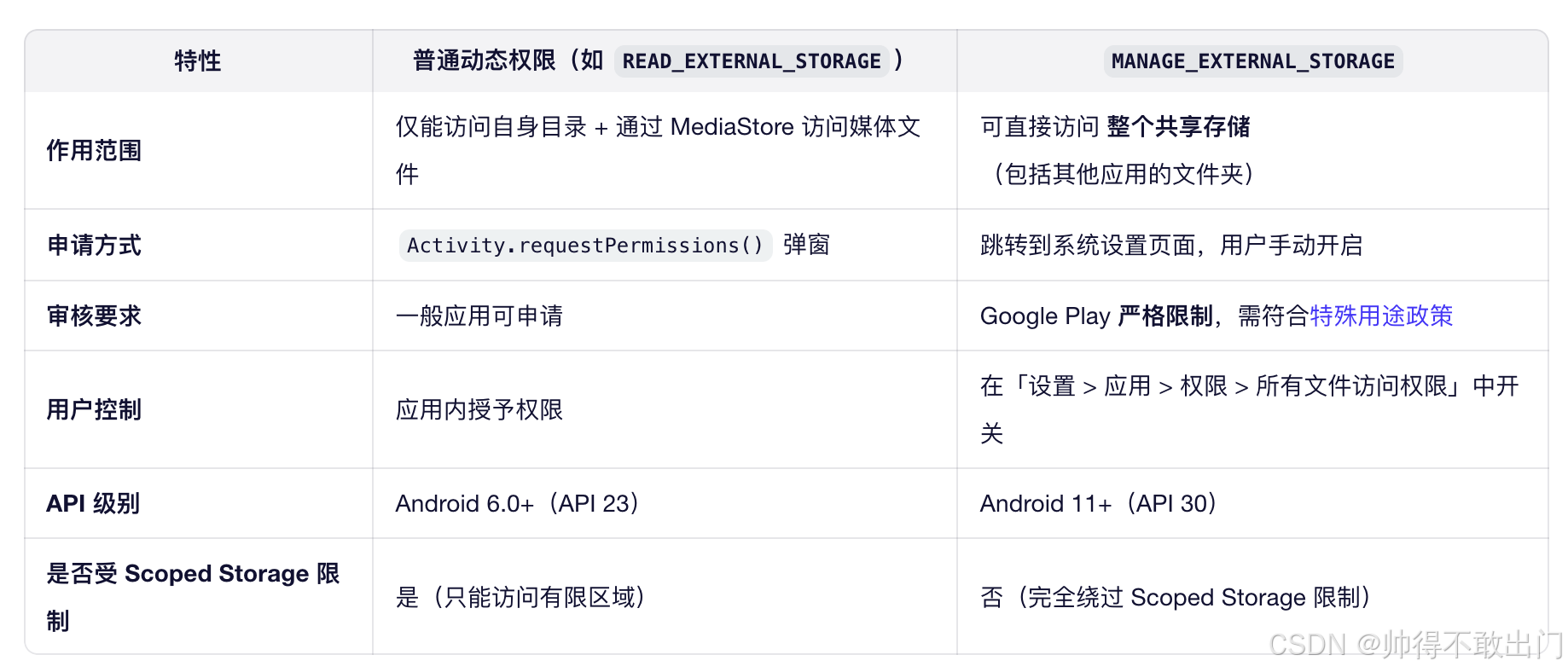
安卓权限,有普通动态权限与特殊权限比如MANAGE_EXTERNAL_STORAGE,要自动授予需要修改不同的代码。
二者差异:
Android11
动态权限(Runtime Permissions)
在安卓系统中,通过弹窗(对话框)授予的权限通常指的是 运行时权限(Runtime Permissions),也称为 危险权限(Dangerous Permissions)。
PermissionManagerService.java
该文件定义了 PermissionManagerService 类,它是 Android 权限模型的关键组成部分,负责处理应用权限的授予、撤销、查询、运行时权限检查等逻辑。
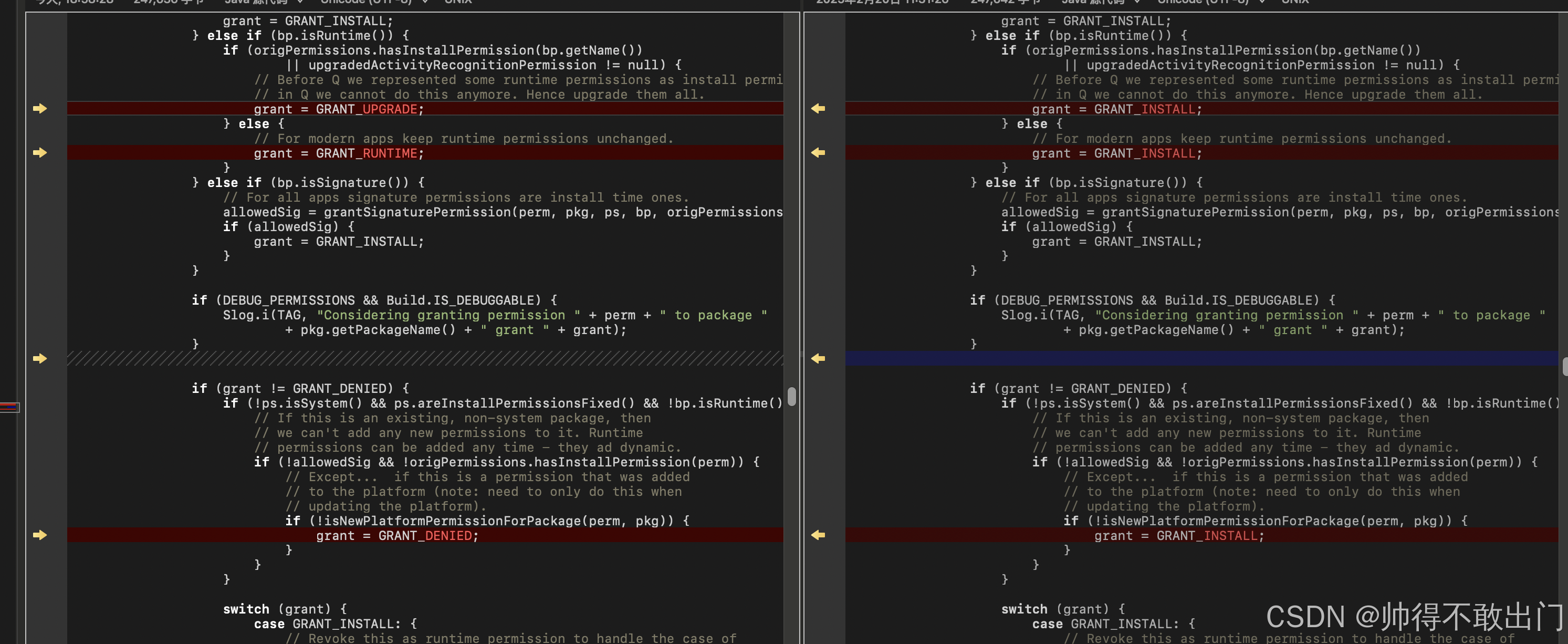
关键修改,左边是原始,右边是修改过代码,实现大部分权限运行时自动授予不弹窗,如下图:
源码路径
frameworks/base/services/core/java/com/android/server/pm/permission/PermissionManagerService.java
原始restorePermissionState函数中部分代码如下:
                // Keep track of app op permissions.
                if (bp.isAppOp()) {
                    mSettings.addAppOpPackage(perm, pkg.getPackageName());
                }

                if (bp.isNormal()) {
                    // For all apps normal permissions are install time ones.
                    grant = GRANT_INSTALL;
                } else if (bp.isRuntime()) {
                    if (origPermissions.hasInstallPermission(bp.getName())
                            || upgradedActivityRecognitionPermission != null) {
                        // Before Q we represented some runtime permissions as install permissions,
                        // in Q we cannot do this anymore. Hence upgrade them all.
                        grant = GRANT_UPGRADE;
                    } else {
                        // For modern apps keep runtime permissions unchanged.
                        grant = GRANT_RUNTIME;
                    }
                } else if (bp.isSignature()) {
                    // For all apps signature permissions are install time ones.
                    allowedSig = grantSignaturePermission(perm, pkg, ps, bp, origPermissions);
                    if (allowedSig) {
                        grant = GRANT_INSTALL;
                    }
                }

                if (DEBUG_PERMISSIONS && Build.IS_DEBUGGABLE) {
                    Slog.i(TAG, "Considering granting permission " + perm + " to package "
                            + pkg.getPackageName() + " grant " + grant);
                }

                if (grant != GRANT_DENIED) {
                    if (!ps.isSystem() && ps.areInstallPermissionsFixed() && !bp.isRuntime()) {
                        // If this is an existing, non-system package, then
                        // we can't add any new permissions to it. Runtime
                        // permissions can be added any time - they ad dynamic.
                        if (!allowedSig && !origPermissions.hasInstallPermission(perm)) {
                            // Except...  if this is a permission that was added
                            // to the platform (note: need to only do this when
                            // updating the platform).
                            if (!isNewPlatformPermissionForPackage(perm, pkg)) {
                                grant = GRANT_DENIED;
                            }
                        }
                    }
bp 是一个 BasePermission 对象,代表系统中已知的一个权限定义(如 CAMERA, READ_CONTACTS 等)。
GRANT_INSTALL表示在安装时自动授予,无需用户交互。
所以可以改成如下代码:
grant赋值为GRANT_INSTALL
                // Keep track of app op permissions.
                if (bp.isAppOp()) {
                    mSettings.addAppOpPackage(perm, pkg.getPackageName());
                }

                if (bp.isNormal()) {
                    // For all apps normal permissions are install time ones.
                    grant = GRANT_INSTALL;
                } else if (bp.isRuntime()) {
                    if (origPermissions.hasInstallPermission(bp.getName())
                            || upgradedActivityRecognitionPermission != null) {
                        // Before Q we represented some runtime permissions as install permissions,
                        // in Q we cannot do this anymore. Hence upgrade them all.
                        grant = GRANT_INSTALL;
                    } else {
                        // For modern apps keep runtime permissions unchanged.
                        grant = GRANT_INSTALL;
                    }
                } else if (bp.isSignature()) {
                    // For all apps signature permissions are install time ones.
                    allowedSig = grantSignaturePermission(perm, pkg, ps, bp, origPermissions);
                    if (allowedSig) {
                        grant = GRANT_INSTALL;
                    }
                }

                if (DEBUG_PERMISSIONS && Build.IS_DEBUGGABLE) {
                    Slog.i(TAG, "Considering granting permission " + perm + " to package "
                            + pkg.getPackageName() + " grant " + grant);
                }


                if (grant != GRANT_DENIED) {
                    if (!ps.isSystem() && ps.areInstallPermissionsFixed() && !bp.isRuntime()) {
                        // If this is an existing, non-system package, then
                        // we can't add any new permissions to it. Runtime
                        // permissions can be added any time - they ad dynamic.
                        if (!allowedSig && !origPermissions.hasInstallPermission(perm)) {
                            // Except...  if this is a permission that was added
                            // to the platform (note: need to only do this when
                            // updating the platform).
                            if (!isNewPlatformPermissionForPackage(perm, pkg)) {
                                grant = GRANT_INSTALL;
                            }
                        }
                    }
MANAGE_EXTERNAL_STORAGE权限
MANAGE_EXTERNAL_STORAGE与传统的读写权限有很大的区别, 它与浮窗的权限类似, 由AppOpsService进行管理, 要与其它的动态权限改法分开。
MANAGE_EXTERNAL_STORAGE 权限概述
- 权限定义:MANAGE_EXTERNAL_STORAGE 权限允许应用对共享存储空间中的所有文件进行读写访问,包括 MediaStore.Files 表的内容、USB On-The-Go (OTG) 驱动器和 SD 卡的根目录,以及对大多数内部存储目录的写入权限。
- 使用场景:该权限通常用于需要广泛访问设备文件的应用,如文件管理器、备份和恢复应用、防病毒应用等。

修改
frameworks/base/core/java/android/app/AppOpsManager.java
   /**
     * This specifies the default mode for each operation.
     */
    private static int[] sOpDefaultMode = new int[] {
            AppOpsManager.MODE_ALLOWED, // COARSE_LOCATION
            AppOpsManager.MODE_ALLOWED, // FINE_LOCATION
            AppOpsManager.MODE_ALLOWED, // GPS
            AppOpsManager.MODE_DEFAULT, // MANAGE_EXTERNAL_STORAGE
    }
把MANAGE_EXTERNAL_STORAGE改成MODE_ALLOWED,如下代码
   /**
     * This specifies the default mode for each operation.
     */
    private static int[] sOpDefaultMode = new int[] {
            AppOpsManager.MODE_ALLOWED, // COARSE_LOCATION
            AppOpsManager.MODE_ALLOWED, // FINE_LOCATION
            AppOpsManager.MODE_ALLOWED, // GPS
            AppOpsManager.MODE_ALLOWED, // MANAGE_EXTERNAL_STORAGE
    }
Android12
动态权限(Runtime Permissions)
与Android11的改法有点不一样
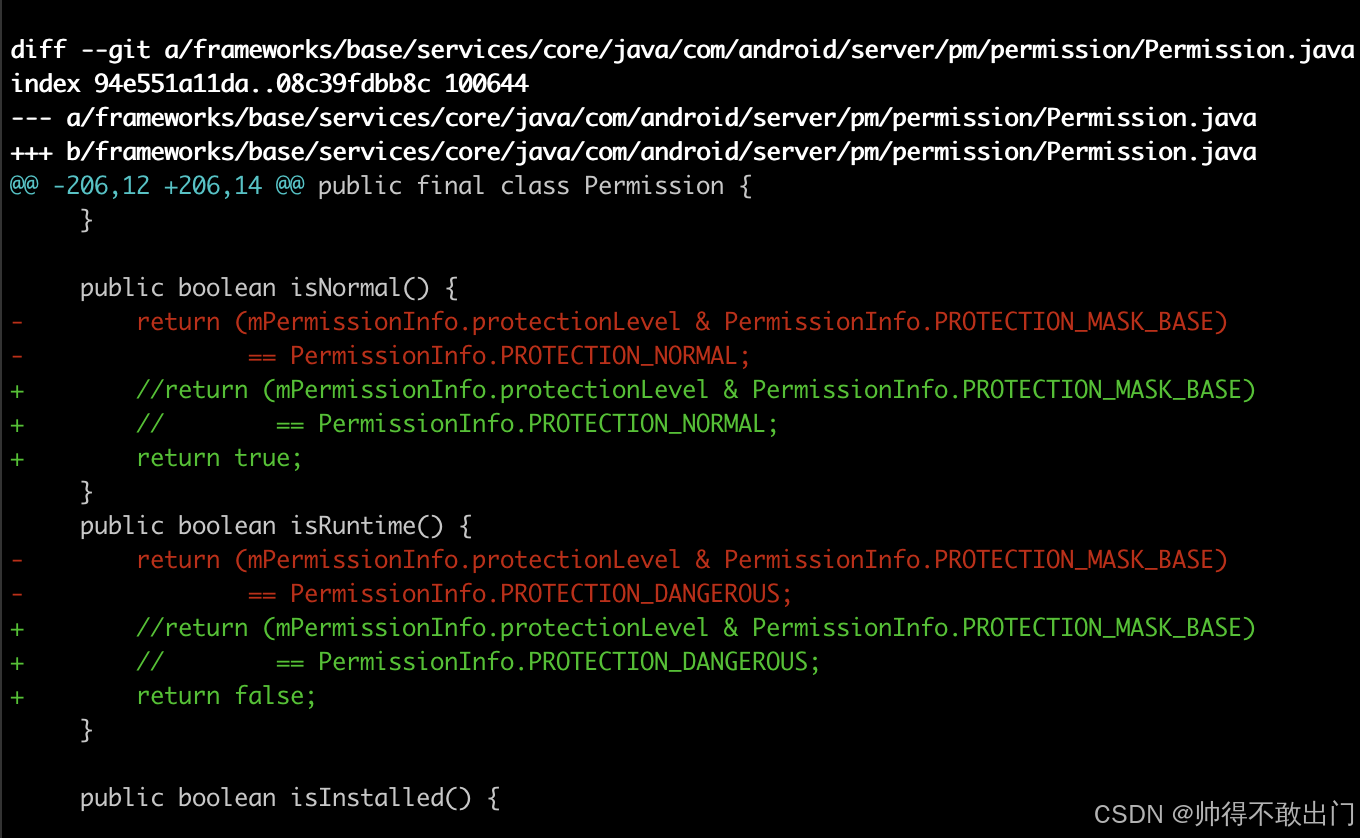
改法如下图:
实际修改此文件
frameworks/base/services/core/java/com/android/server/pm/permission/Permission.java
    public boolean isNormal() {
        return (mPermissionInfo.protectionLevel & PermissionInfo.PROTECTION_MASK_BASE)
                == PermissionInfo.PROTECTION_NORMAL;
    }
    public boolean isRuntime() {
        return (mPermissionInfo.protectionLevel & PermissionInfo.PROTECTION_MASK_BASE)
                == PermissionInfo.PROTECTION_DANGEROUS;
    }
改成
    public boolean isNormal() {
        //return (mPermissionInfo.protectionLevel & PermissionInfo.PROTECTION_MASK_BASE)
        //        == PermissionInfo.PROTECTION_NORMAL;
        return true;
    }
    public boolean isRuntime() {
        //return (mPermissionInfo.protectionLevel & PermissionInfo.PROTECTION_MASK_BASE)
        //        == PermissionInfo.PROTECTION_DANGEROUS;
        return false;
    }
MANAGE_EXTERNAL_STORAGE权限
与Android11改法一样。
Android Framework专栏链接
作者:帅得不敢出门



 扫一扫
扫一扫


 7683
7683

 被折叠的 条评论
为什么被折叠?
被折叠的 条评论
为什么被折叠?
 到【灌水乐园】发言


