


 本文对比了Glide、Picasso和Fresco三个Android图片加载库的特点及使用方式。Glide和Picasso都提供了简洁的API,但Glide支持更多的图片类型且加载速度更快。Fresco虽然配置较复杂,但在加载流程上更为自动化。
Glide、Picasso和Fresco都是目前Android图片加载的主流框架。
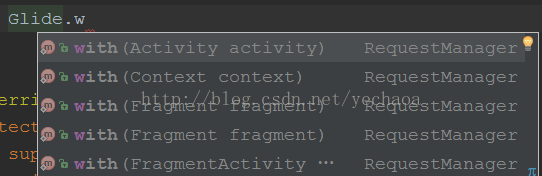
Glide与Picasso使用方式及其相似,都是链式一行代码即可搞定。
一、Glide
compile 'com.github.bumptech.glide:glide:3.7.0'
Glide.with(this).load("http://goo.gl/gEgYUd").into(imageView);
Glide
    .with(myFragment)
    .load(url)
    .centerCrop()
    .placeholder(R.drawable.loading_spinner)
    .crossFade()
    .into(myImageView);
二、Picasso
compile 'com.squareup.picasso:picasso:2.5.2'
Picasso.with(context).load("http://i.imgur.com/DvpvklR.png").into(imageView);

Picasso.with(context)
  .load(url)
  .resize(50, 50)
  .centerCrop()
  .into(imageView)
1.显然Glide更易用,因为Glide的with方法不光接受Context,还接受Activity 和 Fragment,Context会自动的从他们获取。
2.Glide加载的图片质量要差于Picasso,但几乎难以分辨,而且Glide的加载速度更快,但也需要更大的空间来缓存。
(最近项目中用Picasso加载了一张4209*4209的图片(我也不知道什么鬼...),根据网速的不同,页面绘制完成之后,图片要等1到3秒,而且滑动相当卡顿,换成Glide之后瞬间流畅。。)
原因在于Picasso是加载了全尺寸的图片到内存,然后让GPU来实时重绘大小。而Glide加载的大小和ImageView的大小是一致的,因此更小。当然,Picasso也可以指定加载的图片大小的,resize方法。
3.Picasso和Glide在磁盘缓存策略上有很大的不同。Picasso缓存的是全尺寸的,而Glide缓存的是跟ImageView尺寸相同的。
4.Glide可以加载GIF动态图,而Picasso不能。
5.Picasso (v2.5.1)的大小约118kb,而Glide (v3.5.2)的大小约430kb。
6.Picasso和Glide的方法个数分别是840和2678个。
另外:
Picasso是Square(美国一家移动支付公司)出的,官网介绍配合OkHttp使用更佳。
Square也是出了一堆的精品:Picasso、okhttp、otto、dagger、retrofit。。。
Glide是谷歌出的,作者是bumptech
三、Fresco
compile 'com.facebook.fresco:fresco:0.12.0'
dependencies {
  // 在 API < 14 上的机器支持 WebP 时,需要添加
  compile 'com.facebook.fresco:animated-base-support:0.12.0'

  // 支持 GIF 动图,需要添加
  compile 'com.facebook.fresco:animated-gif:0.12.0'

  // 支持 WebP (静态图+动图),需要添加
  compile 'com.facebook.fresco:animated-webp:0.12.0'
  compile 'com.facebook.fresco:webpsupport:0.12.0'

  // 仅支持 WebP 静态图,需要添加
  compile 'com.facebook.fresco:webpsupport:0.12.0'
}1.application初始化
public class MyApplication extends Application {
	@Override
	public void onCreate() {
		super.onCreate();
		Fresco.initialize(this);
	}
}
2.加入命名空间
<LinearLayout
    xmlns:android="http://schemas.android.com/apk/res/android"
    xmlns:fresco="http://schemas.android.com/apk/res-auto"
    android:layout_height="match_parent"
    android:layout_width="match_parent">
<com.facebook.drawee.view.SimpleDraweeView
    android:id="@+id/my_image_view"
    android:layout_width="130dp"
    android:layout_height="130dp"
    fresco:placeholderImage="@drawable/my_drawable"
  />
Uri uri = Uri.parse("https://raw.githubusercontent.com/facebook/fresco/gh-pages/static/logo.png");
SimpleDraweeView draweeView = (SimpleDraweeView) findViewById(R.id.my_image_view);
draweeView.setImageURI(uri);显示占位图直到加载完成;
下载图片;
缓存图片;
图片不再显示时,从内存中移除;
等等等等。
-------------------------传送门-------------------------
1.Glide
github:https://github.com/bumptech/glide
使用详解:http://jcodecraeer.com/a/anzhuokaifa/androidkaifa/2015/0327/2650.html
http://blog.csdn.net/shangmingchao/article/details/51125554
2.Picasso
github:https://github.com/square/picasso
官网:http://square.github.io/picasso/
使用详解:http://www.jcodecraeer.com/a/anzhuokaifa/androidkaifa/2014/0731/1639.html
3.Fresco
github:https://github.com/liaohuqiu/fresco-docs-cn
官方文档:https://www.fresco-cn.org/docs/index.html
使用详解:http://www.open-open.com/lib/view/open1451915129323.html


 扫一扫
扫一扫


 3108
3108

 被折叠的 条评论
为什么被折叠?
被折叠的 条评论
为什么被折叠?
 到【灌水乐园】发言


