namespace sy3_2_20193947
{
    public partial class Form1 : Form
    {
        public Form1()
        {
            InitializeComponent();
        }

        private void button1_Click(object sender, EventArgs e)
        {
            if (textBox1.Text != "") { label7.Text = textBox1.Text; }                                  //姓名

            else MessageBox.Show("姓名不能为空!\n");
            if (radioButton1.Checked) { label2.Text = radioButton1.Text; } //男

            if (radioButton2.Checked) { label2.Text = radioButton2.Text; } //女
            if (checkBox1.CheckState == CheckState.Checked) { label10.Text = checkBox1.Text; }

            else label10.Text = "";

            if (checkBox2.CheckState == CheckState.Checked) { label16.Text = checkBox2.Text; }

            else label16.Text = "";

            if (checkBox3.CheckState == CheckState.Checked) { label17.Text = checkBox3.Text; }

            else label17.Text = "";

            if (checkBox3.CheckState == CheckState.Checked) { label18.Text = checkBox4.Text; }

            else label18.Text = "";
            if (checkBox1.CheckState == CheckState.Unchecked && checkBox2.CheckState == CheckState.Unchecked && checkBox3.CheckState == CheckState.Unchecked && checkBox4.CheckState == CheckState.Unchecked) { MessageBox.Show("请选择所学课程\n"); }
            if (comboBox1.Text != "") { label13.Text = comboBox1.Text; }//班级

            else MessageBox.Show("班级不能为空!\n");
            if (listBox1.Text != "") { label15.Text = listBox1.Text; } //爱好

            else MessageBox.Show("请选择爱好!\n");

        }

        private void button2_Click(object sender, EventArgs e)
        {
            this.Close();
        }
    }
}
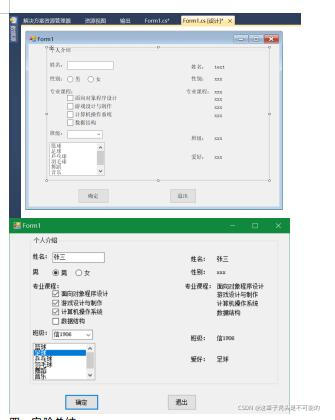


 此篇博客详细介绍了使用C#编写的Windows Form应用程序,展示了如何验证用户输入的姓名、性别、课程选择和爱好,同时强调了必填字段的检查。通过实例演示了控件交互和条件判断在用户界面中的应用。


 扫一扫
扫一扫


 2614
2614

 被折叠的 条评论
为什么被折叠?
被折叠的 条评论
为什么被折叠?
 到【灌水乐园】发言


