


爬取URL=https://www.u17.com/chapter/26636.html#image_id=221085
爬取有妖气漫画,本人谷歌浏览器获取到的信息:
位置selector:#cur_img_221085
属性位置:tc > comic_read_img 盒子下

开始爬取
url='https://www.u17.com/chapter/26636.html#image_id=221085'
resp=requests.get(url)
print(resp.text)
发现并没有img图片,重新摸索浏览器信息,在加载HTML页面是JS部分声明img列表;由此可判断该部分img图片由js动态生成。
原因:requests爬取静态HTML文内容
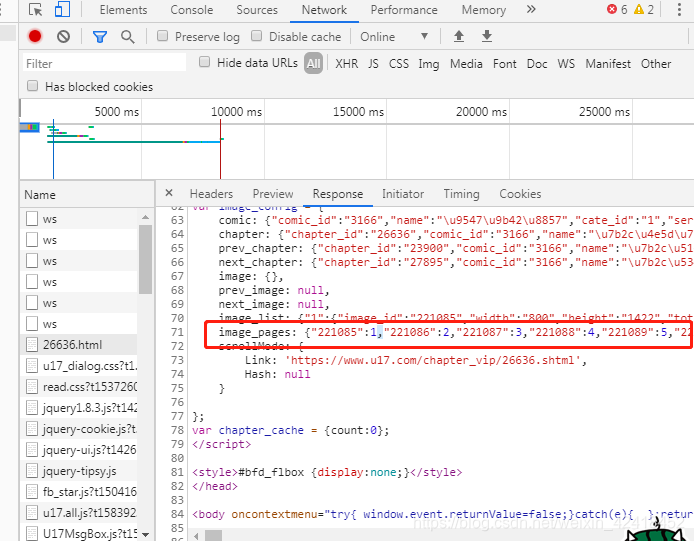
当然动态加载的网页自然也有办法爬取
准备:
pip install selenium
下载PhantomJS
下载地址:https://phantomjs.org/download.html
或http://npm.taobao.org/dist/phantomjs/
环境变量path加入phantomjs/bin即可

import requests
from bs4 import BeautifulSoup
from selenium import webdriver
pic_list=[]
url='https://www.u17.com/chapter/929918.shtml#image_id=8108355'
driver=webdriver.PhantomJS(executable_path='D:/Program Files (x86)/phantomjs-2.1.1-windows/bin/phantomjs.exe')
driver.get(url)
soup=BeautifulSoup(driver.page_source,'html.parser')
result=soup.find_all('img',class_='image_cache loading')
for img_src in result:
    if img_src['data-src'] not in pic_list:
        pic_list.append(img_src['data-src'])
head={'User-Agent':'Mozilla/5.0 (iPhone; CPU iPhone OS 13_2_3 like Mac OS X) AppleWebKit/605.1.15 (KHTML, like Gecko) Version/13.0.3 Mobile/15E148 Safari/604.1',
      'Connection':'keep-alive'}
for img_src in pic_list:
    count=1
    resp=requests.get(img_src)
    f=open('Z-H-J-'+count+'.jpg','wb')
    f.write(resp.content)
    count=count+1
如果出现以下信息,请忽略,只是因为目前的Selenium版本放弃 PhantomJS,但不影响程序运行
UserWarning: Selenium support for PhantomJS has been deprecated, please use headless versions of Chrome or Firefox instead
  warnings.warn('Selenium support for PhantomJS has been deprecated, please use headless '
结果爬取到的图片,像素化的图片有待结果…

 8158
8158


 扫一扫
扫一扫


 被折叠的 条评论
为什么被折叠?
被折叠的 条评论
为什么被折叠?
 到【灌水乐园】发言


