


 本文详细介绍了如何在MyEclipse环境中使用Hibernate框架与MySQL数据库进行整合,包括项目的创建、配置文件编写、表与类的映射及具体操作方法。
准备:建表
用MySQL在名为STMS数据库中建表person
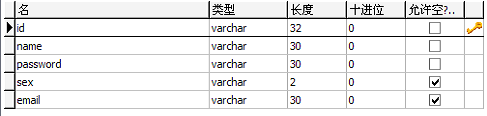
在MyEclipse中建连接数据库的连接名为MySQL_localhost,在Driver JARS中导入MySQL的驱动程序mysql-connector-java-5.1.6-bin.jar

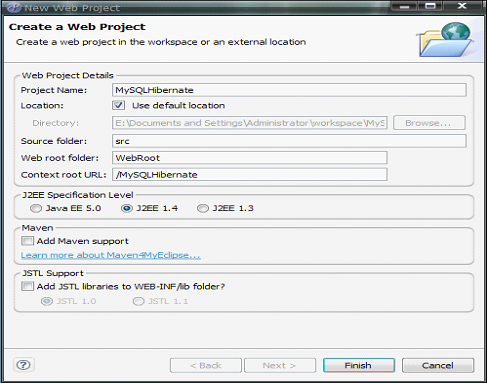
一.新建名为MySQLHibernate的Web Project
File—new—project—MyEclipse—Java Enterprice Projects—Web Project(Optional Maven Support)
在Project Name中输入MySQLHibernate---点击Finsh完成
 xml version='1.0' encoding='UTF-8'
?>
xml version='1.0' encoding='UTF-8'
?>
2
DOCTYPE hibernate-configuration PUBLIC3
"-//Hibernate/Hibernate Configuration DTD 3.0//EN"4
"http://hibernate.sourceforge.net/hibernate-configuration-3.0.dtd"
>
5
6
7
<
hibernate-configuration
>
8
9
<
session-factory
>
10
11
<
property
name
="connection.username"
>
root
property
>
12
13
14
<
property
name
="connection.url"
>
15
jdbc:mysql://localhost:3306/STMS?useUnicode=true
&
characterEncoding=GBK16
property
>
17
18
19
<
property
name
="dialect"
>
20
org.hibernate.dialect.MySQLDialect21
property
>
22
23
24
<
property
name
="myeclipse.connection.profile"
>
25
MySql_localhost26
property
>
27
28
29
<
property
name
="connection.password"
>
root
property
>
30
31
32
<
property
name
="connection.driver_class"
>
33
com.mysql.jdbc.Driver34
property
>
35
36
37
<
property
name
="show_sql"
>
true
property
>
38
39
40
<
mapping
resource
="org/lxh/hibernate/demo01/Person.hbm.xml"
/>
41
42
session-factory
>
43
44
hibernate-configuration
>
二:给项目加入Hibernate支持
选中刚刚新建的项目—MyEcplipse—Project Capabilites—Add Hibernate Capabilites

Next—Next—选择连接数据库的连接名—Next--


点击Finash完成
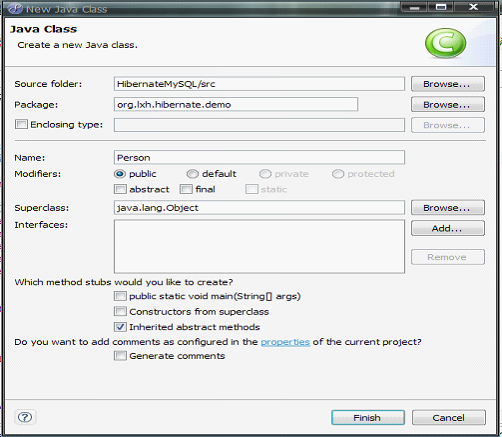
三:建立Person表的POJO类
package
org.lxh.hibernate.demo01;2
3
 /**
/**

4
 *
@author
∪∩BUG E-mail: tidelgl@163.com
*
@author
∪∩BUG E-mail: tidelgl@163.com5
*
@version
Aug 30, 2008 8:05:41 AM6
* @person表的POJO类,类名与表名相同7
 */
*/
8
public
class
Person
{
9
10
//
以下的
属性与Person表中的字段名相同
11
private
String id;12
private
String name;13
private
String password;14
private
String sex;15
private
String email;16
17
 public
String getId()
{
public
String getId()
{ public
String getId()
public
String getId()
18
return
id;19
 }
}
20
21
public
void
setId(String id)
{22
this
.id
=
id;23
}
24
25
public
String getName()
{26
return
name;27
}
28
29
public
void
setName(String name)
{30
this
.name
=
name;31
}
32
33
public
String getPassword()
{34
return
password;35
}
36
37
public
void
setPassword(String password)
{38
this
.password
=
password;39
}
40
41
public
String getSex()
{42
return
sex;43
}
44
45
public
void
setSex(String sex)
{46
this
.sex
=
sex;47
}
48
49
public
String getEmail()
{50
return
email;51
}
52
53
public
void
setEmail(String email)
{54
this
.email
=
email;55
}
56
57
}
58
四:通过Hibernate反向工程建立person表与Person类的映射
首先调出DB Browser视图(Windows—view show—other—MyEclipse datebase—DB Browser)—展开MySQL_localhost至表person—右键表person—Hibernate Reverse Engineering

Finash完成
xml version="1.0" encoding="utf-8"
?>
2
DOCTYPE hibernate-mapping PUBLIC "-//Hibernate/Hibernate Mapping DTD 3.0//EN"3
"http://hibernate.sourceforge.net/hibernate-mapping-3.0.dtd"
>
4
7
<
hibernate-mapping
>
8
13
<
class
name
="Dao.Student"
table
="student"
catalog
="stms"
>
14
<
id
name
="sno"
type
="java.lang.String"
>
15
<
column
name
="Sno"
length
="20"
/>
16
17
<
generator
class
="increment"
/>
18
id
>
19
<
property
name
="sname"
type
="java.lang.String"
>
20
<
column
name
="Sname"
length
="20"
not-null
="true"
/>
21
property
>
22
<
property
name
="password"
type
="java.lang.String"
>
23
<
column
name
="Password"
length
="20"
/>
24
property
>
25
class
>
26
hibernate-mapping
>
27
五:建立具体操作Hibernate的类
src/org.lxh.hibernate.demo01.PersonOperate.java
package
org.lxh.hibernate.demo01;2
3
import
java.util.Iterator;4
import
java.util.List;5
6
import
org.hibernate.Query;7
import
org.hibernate.Session;8
import
org.hibernate.SessionFactory;9
import
org.hibernate.Transaction;10
import
org.hibernate.cfg.Configuration;11
12
/**
13
*
@author
∪∩BUG E-mail: tidelgl@163.com14
*
@version
Aug 30, 2008 8:27:53 AM 15
* @ 具体操作Hibernate的类 16
* @ 功能:增加,删除,个性,按ID查询,模糊查询,查询全部操作17
* @注意导入的包:从org.hibernate.*;18
*/
19
public
class
PersonOperate
{20
//
在
Hibernate中所有的操作都是通过Session来完成
21
private
Session session
=
null
;22
23
//
Session 是
一个接口,必须实例化24
//
在构
造方法中实例实化Session对象
25
public
PersonOperate()
{26
//
找
到Hibernate配置文件
27
Configuration config
=
new
Configuration().configure();28
29
//
从
全局配置文件中取出SessionFactory
30
SessionFactory factory
=
config.buildSessionFactory();31
32
//
从
SessionFactory中取出一个Session
33
this
.session
=
factory.openSession();34
35
}
36
37
//
所有
的操作都是通过Session进行38
//
(1)
实现向数据库中插入数据
39
public
void
insert(Person p)
{40
//
1.
开始事务
41
Transaction tran
=
this
.session.beginTransaction();42
43
//
2.
执行语句
44
this
.session.save(p);45
46
//
提
交事务
47
tran.commit();48
}
49
50
//
(2)
实现修改数据库的数据
51
public
void
update(Person p)
{52
//
1.
开始事务
53
Transaction tran
=
this
.session.beginTransaction();54
55
//
2.
执行语句
56
this
.session.update(p);57
58
//
提
交事务
59
tran.commit();60
61
}
62
63
//
(3)
实现查询数据库的数据64
//
使用
HQL按ID查询
65
public
Person queryById(String id)
{66
Person p
=
null
;67
68
//
使
用Hibernate查询语句(HQL)
69
String hql
=
"
From Person as p where p.id=?
"
;
//
从Person类中对象p的
id查70
71
//
通
过Query接口查询
72
Query q
=
this
.session.createQuery(hql);73
q.setString(
0
, id);
//
下标从0开始
(id是第一个属性)
74
List l
=
q.list();
//
导入的包是 java.util.List;
75
Iterator iter
=
l.iterator();76
if
(iter.hasNext())
{77
p
=
(Person) iter.next();78
}
79
return
p;80
}
81
82
//
(4)
实现删除数据库的数据
83
public
void
delete(Person p)
{84
//
1.
开始事务
85
Transaction tran
=
this
.session.beginTransaction();86
87
//
2.
执行语句
88
this
.session.delete(p);89
90
//
提
交事务
91
tran.commit();92
93
}
94
95
//
通过
HQL语句实现删除数据库的数据(推荐)
96
public
void
delete(String id)
{97
String hql
=
"
delete Person where id=?
"
;98
Query q
=
this
.session.createQuery(hql);99
//
设
置参数
100
q.setString(
0
, id); 101
//
执
行更新语句
102
q.executeUpdate(); 103
//
提
交事务处理
104
this
.session.beginTransaction().commit();105
106
}
107
108
//
通过
HQL查询全部数据
109
public
List queryAll()
{110
List l
=
null
;111
String hql
=
"
From Person as p
"
;112
Query q
=
this
.session.createQuery(hql);113
l
=
q.list();114
return
l;115
}
116
117
//
通过
HQL查询全部数据
118
public
List queryByLike(String cond)
{119
List l
=
null
;120
//
条
件
121
String hql
=
"
From Person as p where p.name like ?
"
;122
Query q
=
this
.session.createQuery(hql);123
//
设
置参数
124
q.setString(
0
,
"
%
"
+
cond
+
"
%
"
);125
l
=
q.list();126
return
l;127
}
128
129
}
130
六:建立测试类
src/org.lxh.hibernate.demo01.TestPO.java
package
org.lxh.hibernate.demo01;2
3
import
java.util.Iterator;4
import
java.util.List;5
6
/**
7
*
@author
∪∩BUG E-mail: tidelgl@163.com8
*
@version
Aug 29, 2008 9:53:52 PM9
* @POJO类的测试类10
*/
11
public
class
TestPO
{12
13
/**
14
*
@param
args15
*/
16
public
static
void
main(String[] args)
{17
18
//
生
成POJO类实例化对象
19
Person p
=
new
Person();20
21
//
p.setId("Hibernate");22
//
p.setId("MySQL");23
//
p.setName("
学习笔记");
24
p.setName(
"
使用用Hibernate
"
);25
p.setPassword(
"
123
"
);26
p.setEmail(
"
tidelgl@163.com
"
);27
p.setSex(
"
男
"
);28
29
//
实
例化PersonOperate对象
30
PersonOperate po
=
new
PersonOperate();31
32
//
1.
插入数据33
//
po.insert(p);34
35
//
2.
修改数据36
//
po.update(p);37
38
//
3.
查询数据39
//
Person p = po.queryById("Hibernate");40
//
System.out.println(p.getName());41
42
//
通
过HQL查询全部数据43
//
List l = po.queryAll();44
//
通
过HQL模糊查询45
//
List l = po.queryByLike("
用");46
//
Iterator iter = l.listIterator();47
//
while(iter.hasNext()){48
//
Person p = (Person)iter.next();49
//
System.out.println(p.getName());50
//
51
//
}52
53
//
4.
删除数据54
//
po.delete(p);
//
通过查询结果删除55
//
po.delete("Hibernate");
//
通过HQL语句删除
56
57
58
}
59
60
}
61
例子结构:


 扫一扫
扫一扫


 707
707

 被折叠的 条评论
为什么被折叠?
被折叠的 条评论
为什么被折叠?
 到【灌水乐园】发言


