


SpringMVC Pipeline [A] part2
SpringMVC Project







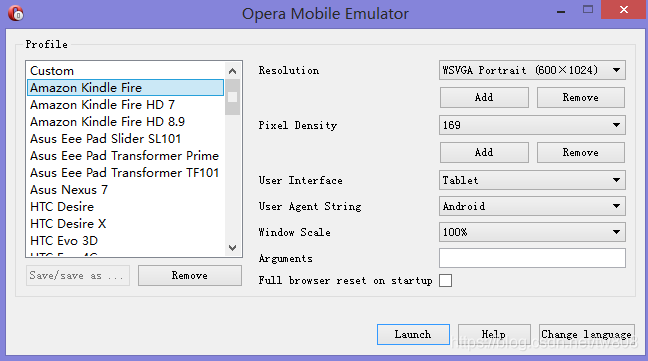


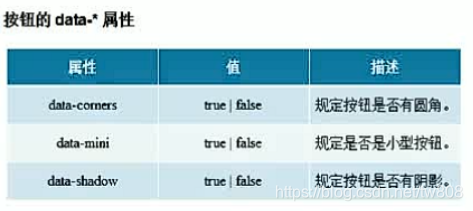




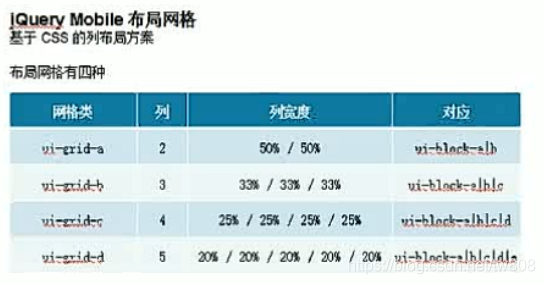



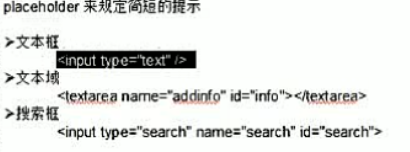


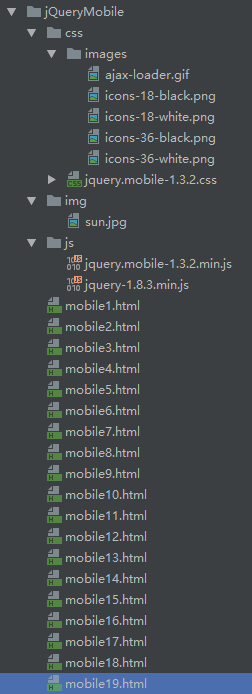
- mobile1.html
<!DOCTYPE html>
<html lang="en">
<head>
    <meta charset="UTF-8">
    <title>mobileWeb</title>
    <link href="css/jquery.mobile-1.3.2.css" rel="stylesheet">
    <script src="js/jquery-1.8.3.min.js"></script>
    <script src="js/jquery.mobile-1.3.2.min.js"></script>
</head>
<body>
<div data-role="page" id="page1">
    <div data-role="header">
        <h1>mobile web</h1>
    </div>
    <div data-role="content">
        <p>content <a href="#page2">page2</a> </p>
    </div>
    <div data-role="footer">
        <h1>footer</h1>
    </div>
</div>
<div data-role="page" id="page2">
    <div data-role="header">
        <h1>mobile web2</h1>
    </div>
    <div data-role="content">
        <p>content2 <a href="#page1">page1</a> </p>
    </div>
    <div data-role="footer">
        <h1>footer2</h1>
    </div>
</div>

</body>
</html>
- mobile2.html
<!DOCTYPE html>
<html lang="en">
<head>
    <meta charset="UTF-8">
    <title>dialog</title>
    <meta name="viewport" content="width-device-width, initial-scale=1">
    <link href="css/jquery.mobile-1.3.2.css" rel="stylesheet">
    <script src="js/jquery-1.8.3.min.js"></script>
    <script src="js/jquery.mobile-1.3.2.min.js"></script>
</head>
<body>
<div data-role="page" id="page1">
    <div data-role="header">
        <h1>mobile web</h1>
    </div>
    <div data-role="content">
        <!--<p>content <a href="#page2" data-transition="fade" data-rel="dialog">page2</a> </p>-->
        <!--<p>content <a href="#page2" data-transition="flip" data-rel="dialog">page2</a> </p>-->
        <!--<p>content <a href="#page2" data-transition="flow" data-rel="dialog">page2</a> </p>-->
        <!--<p>content <a href="#page2" data-transition="pop" data-rel="dialog">page2</a> </p>-->
        <!--<p>content <a href="#page2" data-transition="slide" data-rel="dialog">page2</a> </p>-->
        <!--<p>content <a href="#page2" data-transition="slideup" data-rel="dialog">page2</a> </p>-->
        <p>content <a href="#page2" data-transition="pop" data-rel="dialog">page2</a> </p>
    </div>
    <div data-role="footer">
        <h1>footer</h1>
    </div>
</div>
<div data-role="page" id="page2">
    <div data-role="header">
        <h1>dialog info</h1>
    </div>
    <div data-role="content">
        <p>content2 <a href="#page1">page1</a> </p>
    </div>
    <div data-role="footer">
        <h1>footer</h1>
    </div>
</div>
</body>
- mobile3.html
<!DOCTYPE html>
<html lang="en">
<head>
    <meta charset="UTF-8">
    <title>button</title>
    <meta name="viewport" content="width-device-width, initial-scale=1">
    <link href="css/jquery.mobile-1.3.2.css" rel="stylesheet">
    <script src="js/jquery-1.8.3.min.js"></script>
    <script src="js/jquery.mobile-1.3.2.min.js"></script>
</head>
<body>
<div data-role="page" id="page1">
    <div data-role="header">
        <h1>mobile web</h1>
    </div>
    <div data-role="content">
        <button data-inline="true">button1</button>
        <input type="button" value="button2">
        <a href="#page2" data-role="button">button3</a>
    </div>
    <div data-role="footer">
        <h1>footer</h1>
    </div>
</div>
<div data-role="page" id="page2">
    <div data-role="header">
        <h1>mobile web2</h1>
    </div>
    <div data-role="content">
        <button>button1</button>
        <input type="button" value="button2">
        <a href="#page1" data-role="button">button3</a>
        <a href="#" data-role="button" data-rel="back">back</a>
    </div>
    <div data-role="footer">
        <h1>footer2</h1>
    </div>
</div></body>
</html>
- mobile4.html
<!DOCTYPE html>
<html lang="en">
<head>
    <meta charset="UTF-8">
    <title>button</title>
    <meta name="viewport" content="width-device-width, initial-scale=1">
    <link href="css/jquery.mobile-1.3.2.css" rel="stylesheet">
    <script src="js/jquery-1.8.3.min.js"></script>
    <script src="js/jquery.mobile-1.3.2.min.js"></script>
</head>
<body>
<div data-role="page" id="page1">
    <div data-role="header">
        <h1>mobile web</h1>
    </div>
    <div data-role="content">
        horizontal: <br/>
        <div data-role="controlgroup" data-type="horizontal">
            <a href="#" data-role="button">A</a>
            <a href="#" data-role="button">B</a>
            <a href="#" data-role="button">C</a>
            <a href="#" data-role="button">D</a>
        </div>
        Vertical: <br/>
        <div data-role="controlgroup" data-type="vertical">
            <a href="#" data-role="button">Add</a>
            <a href="#" data-role="button">Edit</a>
            <a href="#" data-role="button">Delete</a>
            <a href="#" data-role="button">Query</a>
        </div>
    </div>
    <div data-role="footer">
        <h1>footer</h1>
    </div>
</div>
</body>
</html>
- mobile5.html
<!DOCTYPE html>
<html lang="en">
<head>
    <meta charset="UTF-8">
    <title>button</title>
    <meta name="viewport" content="width-device-width, initial-scale=1">
    <link href="css/jquery.mobile-1.3.2.min.css" rel="stylesheet">
    <script src="js/jquery-1.8.3.min.js"></script>
    <script src="js/jquery.mobile-1.3.2.min.js"></script>
</head>
<body>
<div data-role="page" id="page1">
    <div data-role="header">
        <h1>mobile web</h1>
    </div>
    <div data-role="content">
        <a href="#" data-role="button" data-icon="search" data-inline="true">add</a>
        <a href="#" data-role="button" data-icon="info" data-inline="true">add</a>
        <button data-icon="minus">Edit</button>
        <input type="button" data-icon="delete" value="delete" >
        <input type="button" data-icon="home" value="home" data-inline="true">
        <input type="button" data-icon="arrow-l" data-iconpos="notext" data-inline="true">
        <input type="button" data-icon="arrow-r" data-iconpos="notext" data-inline="true">
        <a href="#link" data-role="button" data-icon="search" data-iconpos="top" data-inline="true">top</a>
        <a href="#link" data-role="button" data-icon="search" data-iconpos="left" data-inline="true">left</a>
        <a href="#link" data-role="button" data-icon="search" data-iconpos="bottom" data-inline="true">bottom</a>
        <a href="#link" data-role="button" data-icon="search" data-iconpos="right" data-inline="true">right</a>
    </div>
    <div data-role="footer">
        <h1>footer</h1>
    </div>
</div>
</body>
</html>
- mobile6.html
<!DOCTYPE html>
<html lang="en">
<head>
    <meta charset="UTF-8">
    <title>button</title>
    <meta name="viewport" content="width-device-width, initial-scale=1">
    <link href="css/jquery.mobile-1.3.2.min.css" rel="stylesheet">
    <script src="js/jquery-1.8.3.min.js"></script>
    <script src="js/jquery.mobile-1.3.2.min.js"></script>
</head>
<body>
<div data-role="page">
    <div data-role="header">
        <h1>Home</h1>
        <a href="#" data-role="button" class="ui-btn-right">search</a>
    </div>
    <div data-role="content">content</div>
    <div data-role="footer">
        <a href="#" data-role="button">add</a>
        <a href="#" data-role="button">edit</a>
        <a href="#" data-role="button">delete</a>
    </div>
</div>
</body>
</html>
- mobile7.html
<!DOCTYPE html>
<html lang="en">
<head>
    <meta charset="UTF-8">
    <title>button</title>
    <meta name="viewport" content="width-device-width, initial-scale=1">
    <link href="css/jquery.mobile-1.3.2.min.css" rel="stylesheet">
    <script src="js/jquery-1.8.3.min.js"></script>
    <script src="js/jquery.mobile-1.3.2.min.js"></script>
</head>
<body>
<div data-role="page">
    <div data-role="header">
        <h1>Home</h1>
        <a href="#" data-role="button" class="ui-btn-right">search</a>
    </div>
    <div data-role="content">content<br/>content</div>
    <div data-role="footer">
        <div align="center" data-role="controlgroup" data-type="horizontal">
            <a href="#" data-role="button">add</a>
            <a href="#" data-role="button">edit</a>
            <a href="#" data-role="button">delete</a>
        </div>
    </div>
</div>
</body>
</html>
- mobile8.html
<!DOCTYPE html>
<html lang="en">
<head>
    <meta charset="UTF-8">
    <title>button</title>
    <meta name="viewport" content="width-device-width, initial-scale=1">
    <link href="css/jquery.mobile-1.3.2.min.css" rel="stylesheet">
    <script src="js/jquery-1.8.3.min.js"></script>
    <script src="js/jquery.mobile-1.3.2.min.js"></script>
</head>
<body>
<div data-role="page">
    <!--<div data-role="header" data-position="fixed">-->
        <div data-role="header" data-position="fixed" data-fullscreen="true">
        <h1>Home</h1>
        <a href="#" data-role="button" class="ui-btn-right">search</a>
    </div>
    <div data-role="content">
        content<br/>content<br/>content<br/>content<br/>content<br/>content<br/>content<br/>content<br/>content<br/>
        content<br/>content<br/>content<br/>content<br/>content<br/>content<br/>content<br/>content<br/>content<br/>
        content<br/>content<br/>content<br/>content<br/>content<br/>content<br/>content<br/>content<br/>content<br/>
        content<br/>content<br/>content<br/>content<br/>content<br/>content<br/>content<br/>content<br/>content<br/>
        content<br/>content<br/>content<br/>content<br/>content<br/>content<br/>content<br/>content<br/>content<br/>
        content<br/>content<br/>content<br/>content<br/>content<br/>content<br/>content<br/>content<br/>content<br/>
        content<br/>content<br/>content<br/>content<br/>content<br/>content<br/>content<br/>content<br/>content<br/>
        content<br/>content<br/>content<br/>content<br/>content<br/>content<br/>content<br/>content<br/>content<br/>
        content<br/>content<br/>content<br/>content<br/>content<br/>content<br/>content<br/>content<br/>content<br/>
    </div>
    <!--<div data-role="footer" >-->
        <div data-role="footer" data-position="fixed" data-fullscreen="true">
        <div align="center" data-role="controlgroup" data-type="horizontal">
            <a href="#" data-role="button">add</a>
            <a href="#" data-role="button">edit</a>
            <a href="#" data-role="button">delete</a>
        </div>
    </div>
</div>
</body>
</html>
- mobile9.html
<!DOCTYPE html>
<html lang="en">
<head>
    <meta charset="UTF-8">
    <title>button</title>
    <meta name="viewport" content="width-device-width, initial-scale=1">
    <link href="css/jquery.mobile-1.3.2.min.css" rel="stylesheet">
    <script src="js/jquery-1.8.3.min.js"></script>
    <script src="js/jquery.mobile-1.3.2.min.js"></script>
</head>
<body>
<div data-role="page" id="pagehome">
    <!--<div data-role="header" data-position="fixed">-->
    <div data-role="header">
        <h1>Home</h1>
        <div data-role="navbar">
            <ul>
                <li><a href="#pagehome" class="ui-btn-active ui-state-persist" data-icon="home">Home</a></li>
                <li><a href="#pagecpjs" data-icon="home">Info</a></li>
                <li><a href="#" data-icon="home">Products</a></li>
                <li><a href="#" data-icon="home">News</a></li>
                <li><a href="#" data-icon="home">Contact</a></li>
            </ul>
        </div>
    </div>
    <div data-role="content">CONTENT1<br/>
        <div data-role="navbar">
            <ul>
                <li><a href="#pagehome" class="ui-btn-active ui-state-persist" data-icon="home">Home</a></li>
                <li><a href="#pagecpjs" data-icon="home">Info</a></li>
                <li><a href="#" data-icon="home">Products</a></li>
                <li><a href="#" data-icon="home">News</a></li>
                <li><a href="#" data-icon="home">Contact</a></li>
            </ul>
        </div>
    </div>
    <!--<div data-role="footer" >-->
    <div data-role="footer">
        <div align="center" data-role="controlgroup" data-type="horizontal">
            <a href="#" data-role="button">add</a>
            <a href="#" data-role="button">edit</a>
            <a href="#" data-role="button">delete</a>
        </div>
    </div>
</div>
<div data-role="page" id="pagecpjs">
    <!--<div data-role="header" data-position="fixed">-->
    <div data-role="header">
        <h1>Home</h1>
        <div data-role="navbar">
            <ul>
                <li><a href="#pagehome" data-icon="home">Home</a></li>
                <li><a href="#pagecpjs" class="ui-btn-active ui-state-persist" data-icon="home">Info</a></li>
                <li><a href="#" data-icon="home">Products</a></li>
                <li><a href="#" data-icon="home">News</a></li>
                <li><a href="#" data-icon="home">Contact</a></li>
            </ul>
        </div>
    </div>
    <div data-role="content">CONTENT2<br/>
        <div data-role="navbar">
            <ul>
                <li><a href="#pagehome" data-icon="home">Home</a></li>
                <li><a href="#pagecpjs" class="ui-btn-active ui-state-persist" data-icon="home">Info</a></li>
                <li><a href="#" data-icon="home">Products</a></li>
                <li><a href="#" data-icon="home">News</a></li>
                <li><a href="#" data-icon="home">Contact</a></li>
            </ul>
        </div>
    </div>
    <!--<div data-role="footer" >-->
    <div data-role="footer">
        <div align="center" data-role="controlgroup" data-type="horizontal">
            <a href="#" data-role="button">add</a>
            <a href="#" data-role="button">edit</a>
            <a href="#" data-role="button">delete</a>
        </div>
    </div>
</div>
</body>
</html>
- mobile10.html
<!DOCTYPE html>
<html lang="en">
<head>
    <meta charset="UTF-8">
    <title>collapse</title>
    <meta name="viewport" content="width-device-width, initial-scale=1">
    <link href="css/jquery.mobile-1.3.2.min.css" rel="stylesheet">
    <script src="js/jquery-1.8.3.min.js"></script>
    <script src="js/jquery.mobile-1.3.2.min.js"></script>
</head>
<body>
<div data-role="page">
    <div data-role="header">
        <h1>Home</h1>
    </div>
    <div data-role="content">
        <div data-role="collapsible-set">
            <div data-role="collapsible" data-inset="false" data-mini="true" data-collapsed="false">
                <h1>collapse1</h1>
                <p>content<br/>content<br/>content<br/>content<br/>
                    content<br/>content<br/>content<br/>content<br/></p>
            </div>
            <div data-role="collapsible" data-inset="true" data-mini="false" data-collapsed="true">
                <h1>collapse2</h1>
                <p>content<br/>content<br/>content<br/>content<br/>
                    content<br/>content<br/>content<br/>content<br/></p>
            </div>
            <div data-role="collapsible" data-collapsed="true">
                <h1>collapse3</h1>
                <p>content<br/>content<br/>content<br/>content<br/>
                    content<br/>content<br/>content<br/>content<br/></p>
            </div>
        </div>
    </div>
    <div data-role="collapsible" data-inset="false" data-mini="true" data-collapsed="false">
        <h1>collapse1</h1>
        <p>content<br/>content<br/>content<br/>content<br/>
            content<br/>content<br/>content<br/>content<br/></p>
    </div>
    <div data-role="collapsible" data-inset="true" data-mini="false" data-collapsed="true">
        <h1>collapse2</h1>
        <p>content<br/>content<br/>content<br/>content<br/>
            content<br/>content<br/>content<br/>content<br/></p>
    </div>
    <div data-role="collapsible" data-collapsed="true"
         data-collapsed-icon="arrow-d" data-expanded-icon="arrow-u">
        <h1>collapse3</h1>
        <p>content<br/>content<br/>content<br/>content<br/>
            content<br/>content<br/>content<br/>content<br/></p>
    </div>
</div>
</body>
</html>
- mobile11.html
<!DOCTYPE html>
<html lang="en">
<head>
    <meta charset="UTF-8">
    <title>viewport</title>
    <meta name="viewport" content="width-device-width, initial-scale=1">
    <link href="css/jquery.mobile-1.3.2.min.css" rel="stylesheet">
    <script src="js/jquery-1.8.3.min.js"></script>
    <script src="js/jquery.mobile-1.3.2.min.js"></script>
</head>
<body>
<div data-role="page">
    <div data-role="header">
        <h1>Home</h1>
    </div>
    <div data-role="content">
        <div class="ui-grid-a">
            <div class="ui-block-a">
                <button>button1</button>
            </div>
            <div class="ui-block-b">
                <button>button2</button>
            </div>
        </div>
        <div class="ui-grid-b">
            <div class="ui-block-a">
                <button>button1</button>
            </div>
            <div class="ui-block-b">
                <button>button2</button>
            </div>
            <div class="ui-block-c">
                <button>button3</button>
            </div>
        </div>
        <div class="ui-grid-c">
            <div class="ui-block-a">
                <button>button1</button>
            </div>
            <div class="ui-block-b">
                <button>button2</button>
            </div>
            <div class="ui-block-c">
                <button>button3</button>
            </div>
            <div class="ui-block-d">
                <button>button4</button>
            </div>
        </div>
        <div class="ui-grid-d">
            <div class="ui-block-a">
                <button>button1</button>
            </div>
            <div class="ui-block-b">
                <button>button2</button>
            </div>
            <div class="ui-block-c">
                <button>button3</button>
            </div>
            <div class="ui-block-d">
                <button>button4</button>
            </div>
            <div class="ui-block-e">
                <button>button5</button>
            </div>
        </div>
    </div>
</div>
</body>
</html>
- mobile12.html
<!DOCTYPE html>
<html lang="en">
<head>
    <meta charset="UTF-8">
    <title>mobile</title>
    <meta name="viewport" content="width-device-width, initial-scale=1">
    <link href="css/jquery.mobile-1.3.2.min.css" rel="stylesheet">
    <script src="js/jquery-1.8.3.min.js"></script>
    <script src="js/jquery.mobile-1.3.2.min.js"></script>
</head>
<body>
<div data-role="page">
    <div data-role="content">
        <h1>ul:</h1>
        <ul data-role="listview" data-inset="true">
            <li><a href="#">li1</a></li>
            <li><a href="#">li1</a></li>
        </ul>
        <h1>ol:</h1>
        <ol data-role="listview" data-inset="true">
            <li><a href="#">li2</a></li>
            <li><a href="#">li2</a></li>
        </ol>
        <h1>ul:</h1>
        <ul data-role="listview" >
            <li><a href="#">li1</a></li>
            <li><a href="#">li1</a></li>
        </ul>
        <h1>ol:</h1>
        <ol data-role="listview" >
            <li><a href="#">li2</a></li>
            <li><a href="#">li2</a></li>
        </ol>
    </div>
</div>
</body>
</html>
- mobile13.html
<!DOCTYPE html>
<html lang="en">
<head>
    <meta charset="UTF-8">
    <title>mobile</title>
    <meta name="viewport" content="width-device-width, initial-scale=1">
    <link href="css/jquery.mobile-1.3.2.min.css" rel="stylesheet">
    <script src="js/jquery-1.8.3.min.js"></script>
    <script src="js/jquery.mobile-1.3.2.min.js"></script>
</head>
<body>
<div data-role="page">
    <div data-role="content">
        <h1>ul:</h1>
        <ul data-role="listview" data-inset="true">
            <li data-role="list-divider">block1</li>
            <li><a href="#">li1</a></li>
            <li><a href="#">li1</a></li>
            <li data-role="list-divider">block2</li>
            <li><a href="#">li2</a></li>
            <li><a href="#">li2</a></li>
        </ul>
        <h1>ul:</h1>
        <ul data-role="listview" data-filter="true"
            data-filter-placeholder="enter search"
            data-autodividers="true" data-inset="true">
            <li><a href="#">ai1</a></li>
            <li><a href="#">aai1</a></li>
            <li><a href="#">ccci2</a></li>
            <li><a href="#">ci2</a></li>
        </ul>
    </div>
</div>
</body>
</html>
- mobile14.html
<!DOCTYPE html>
<html lang="en">
<head>
    <meta charset="UTF-8">
    <title>mobile</title>
    <meta name="viewport" content="width-device-width, initial-scale=1">
    <link href="css/jquery.mobile-1.3.2.min.css" rel="stylesheet">
    <script src="js/jquery-1.8.3.min.js"></script>
    <script src="js/jquery.mobile-1.3.2.min.js"></script>
</head>
<body>
<div data-role="page">
    <div data-role="content">
        <h1>ul:</h1>
        <ul data-role="listview" data-inset="true">
            <li><a href="#"><img class="ui-li-icon" src="img/sun.jpg">
                <h2>h2</h2>
                <p>paragraph</p></a></li>
            <li><a href="#"><img src="img/sun.jpg">
                <h2>h2</h2>
                <p>paragraph</p></a></li>
            <li><a href="#"><img src="img/sun.jpg">
                <h2>h2</h2><p>paragraph</p></a>
            <a href="#page2" data-rel="dialog">download</a>
            </li>
        </ul>
    </div>
</div>
<div data-role="page" id="page2">
    <div data-role="header"><h1>info</h1></div>
    <div data-role="content">
        dialog
    </div>
</div>
</body>
</html>
- mobile15.html
<!DOCTYPE html>
<html lang="en">
<head>
    <meta charset="UTF-8">
    <title>mobile</title>
    <meta name="viewport" content="width-device-width, initial-scale=1">
    <link href="css/jquery.mobile-1.3.2.min.css" rel="stylesheet">
    <script src="js/jquery-1.8.3.min.js"></script>
    <script src="js/jquery.mobile-1.3.2.min.js"></script>
</head>
<body>
<div data-role="page">
    <div data-role="content">
        <h1>ul:</h1>
        <ul data-role="listview" data-inset="true">
            <li><a>send info</a><span class="ui-li-count">100</span></li>
            <li><a>receive info</a><span class="ui-li-count">100</span></li>
            <li><a>draft info</a><span class="ui-li-count">100</span></li>
        </ul>
    </div>
</div>

</body>
</html>
- mobile16.html
<!DOCTYPE html>
<html lang="en">
<head>
    <meta charset="UTF-8">
    <title>Form</title>
    <meta name="viewport" content="width-device-width, initial-scale=1">
    <link href="css/jquery.mobile-1.3.2.min.css" rel="stylesheet">
    <script src="js/jquery-1.8.3.min.js"></script>
    <script src="js/jquery.mobile-1.3.2.min.js"></script>
</head>
<body>
<div data-role="page">
    <div data-role="header">
        <h1>Home</h1>
    </div>
    <div data-role="content">
        <form action="" method="get">
            <div data-role="fieldcontain">
                <label for="userId">userId:</label>
                <input type="text" id="userId" placeholder="userId" name="userId"/>
                <label for="password">password:</label>
                <input type="text" id="password" placeholder="password" name="password"/>
                <label for="info">info:</label>
                <textarea name="info" id="info"></textarea>
                <label for="search">search:</label>
                <input type="search" name="search" id="search">
                <label for="gender">sex:</label>
                <fieldset data-role="controlgroup" id="gender">
                    <label for="sex1">secret</label>
                    <input type="radio" name="sex" id="sex1" checked value="secret">
                    <label for="sex2">F</label>
                    <input type="radio" name="sex" id="sex2" value="F">
                    <label for="sex3">M</label>
                    <input type="radio" name="sex" id="sex3" value="M">
                </fieldset>
                <label for="interests">interests</label>
                <fieldset data-role="controlgroup" id="interests">
                    <label for="lol">lol</label>
                    <input type="checkbox" name="int" id="lol" value="lol">
                    <label for="lol2">lol2</label>
                    <input type="checkbox" name="int" id="lol2" value="lol">
                    <label for="lol3">lol3</label>
                    <input type="checkbox" name="int" id="lol3" value="lol">
                </fieldset>
            </div>
            <input type="submit" value="login"/>
        </form>
        <form action="" method="get">
            <label for="userId2">userId:</label>
            <input type="text" id="userId2" data-role="none" placeholder="userId" name="userId2"/>
            <br/>
            <label for="password2">password:</label>
            <input type="text" id="password2" data-role="none" placeholder="password" name="password2"/>
            <label for="info">info:</label>
            <textarea data-role="none" name="info2" id="info2"></textarea>
            <label type="search2">search:</label>
            <input data-role="none" type="search2" name="search2" id="search2">
            <input data-role="none" type="submit" value="login"/>
            <br/>
            <label>sex:</label>
            <fieldset data-role="none">
                <label for="sex11">secret</label>
                <input data-role="none" type="radio" name="sexx" id="sex11" checked value="secret">
                <label for="sex22">F</label>
                <input data-role="none" type="radio" name="sexx" id="sex22" value="F">
                <label for="sex33">M</label>
                <input data-role="none" type="radio" name="sexx" id="sex33" value="M">
            </fieldset>
            <br/>
            <label for="interestss">interests</label>
            <fieldset data-role="none" id="interestss">
                <label for="loll">lol</label>
                <input data-role="none" type="checkbox" name="int" id="loll" value="lol">
                <label for="loll2">lol2</label>
                <input data-role="none" type="checkbox" name="int" id="loll2" value="lol">
                <label for="loll3">lol3</label>
                <input data-role="none" type="checkbox" name="int" id="loll3" value="lol">
            </fieldset>
        </form>
    </div>
</div>
</body>
</html>
- mobile17.html
<!DOCTYPE html>
<html lang="en">
<head>
    <meta charset="UTF-8">
    <title>Form</title>
    <meta name="viewport" content="width-device-width, initial-scale=1">
    <link href="css/jquery.mobile-1.3.2.min.css" rel="stylesheet">
    <script src="js/jquery-1.8.3.min.js"></script>
    <script src="js/jquery.mobile-1.3.2.min.js"></script>
</head>
<body>
<div data-role="page">
    <div data-role="header">
        <h1>Home</h1>
    </div>
    <div data-role="content">
        <form action="" method="get">
            <div data-role="fieldcontain">
                <label for="gender">sex:</label>
                <fieldset data-role="controlgroup" id="gender" data-type="horizontal">
                    <label for="sex1">secret</label>
                    <input type="radio" name="sex" id="sex1" checked value="secret">
                    <label for="sex2">F</label>
                    <input type="radio" name="sex" id="sex2" value="F">
                    <label for="sex3">M</label>
                    <input type="radio" name="sex" id="sex3" value="M">
                </fieldset>
                <label for="interests">interests</label>
                <fieldset data-role="controlgroup" id="interests" data-type="horizontal">
                    <label for="lol">lol</label>
                    <input type="checkbox" name="int" id="lol" value="lol">
                    <label for="lol2">lol2</label>
                    <input type="checkbox" name="int" id="lol2" value="lol">
                    <label for="lol3">lol3</label>
                    <input type="checkbox" name="int" id="lol3" value="lol">
                </fieldset>
            </div>
            <input type="submit" value="login"/>
        </form>
    </div>
</div>
</body>
</html>
- mobile18.html
<!DOCTYPE html>
<html lang="en">
<head>
    <meta charset="UTF-8">
    <title>Form</title>
    <meta name="viewport" content="width-device-width, initial-scale=1">
    <link href="css/jquery.mobile-1.3.2.min.css" rel="stylesheet">
    <script src="js/jquery-1.8.3.min.js"></script>
    <script src="js/jquery.mobile-1.3.2.min.js"></script>
</head>
<body>
<div data-role="page">
    <div data-role="header">
        <h1>Home</h1>
    </div>
    <div data-role="content">
        <form action="" method="get">
            <label for="dpt">department</label>
            <select name="dpt" id="dpt">
                <option value=""> choose</option>
                <option value="tech">tech</option>
                <option value="human">human</option>
                <option value="clean">clean</option>
            </select>
            <label for="dpt1">department2</label>
            <select name="dpt" id="dpt1" data-native-menu="false">
                <option value=""> choose</option>
                <optgroup label="area1">
                    <option value="tech2">tech2</option>
                    <option value="human2">human2</option>
                    <option value="clean2">clean2</option>
                </optgroup>
                <optgroup label="area2">
                    <option value="tech2">tech2</option>
                    <option value="human2">human2</option>
                    <option value="clean2">clean2</option>
                </optgroup>
            </select>
            <label for="dpt2">department2</label>
            <select name="dpt" id="dpt2" multiple data-native-menu="false">
                <option value=""> choose</option>
                <optgroup label="area1">
                    <option value="tech2">tech2</option>
                    <option value="human2">human2</option>
                    <option value="clean2">clean2</option>
                </optgroup>
                <optgroup label="area2">
                    <option value="tech2">tech2</option>
                    <option value="human2">human2</option>
                    <option value="clean2">clean2</option>
                </optgroup>
            </select>
        </form>
    </div>
</div>
</body>
</html>
- mobile19.html
<!DOCTYPE html>
<html lang="en">
<head>
    <meta charset="UTF-8">
    <title>Form</title>
    <meta name="viewport" content="width-device-width, initial-scale=1">
    <link href="css/jquery.mobile-1.3.2.min.css" rel="stylesheet">
    <script src="js/jquery-1.8.3.min.js"></script>
    <script src="js/jquery.mobile-1.3.2.min.js"></script>
</head>
<body>
<div data-role="page">
    <div data-role="header">
        <h1>Home</h1>
    </div>
    <div data-role="content">
        <form action="" method="get">
          <label for="age">age</label>
            <input type="range" name="age" id="age" data-hightlight="true"
                   value="18" min="0" max="150"/>
            <label>switch</label>
            <div data-role="fieldcontain">
                <select name="switch" data-role="slider">
                    <option value="ON">ON</option>
                    <option value="OFF" selected>OFF</option>
                </select>
            </div>
        </form>
    </div>
</div>
</body>
</html>
- powerdesigner

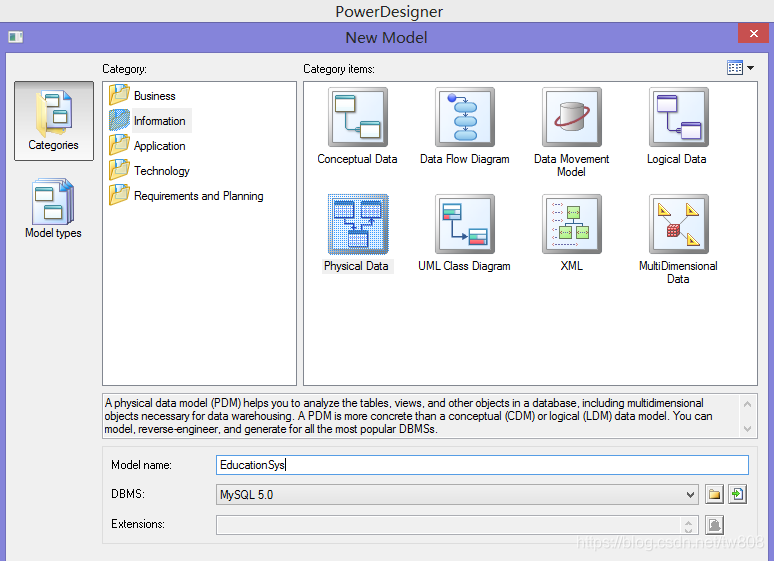
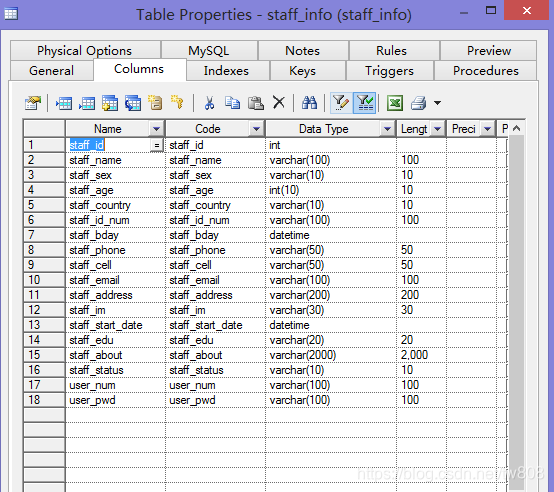
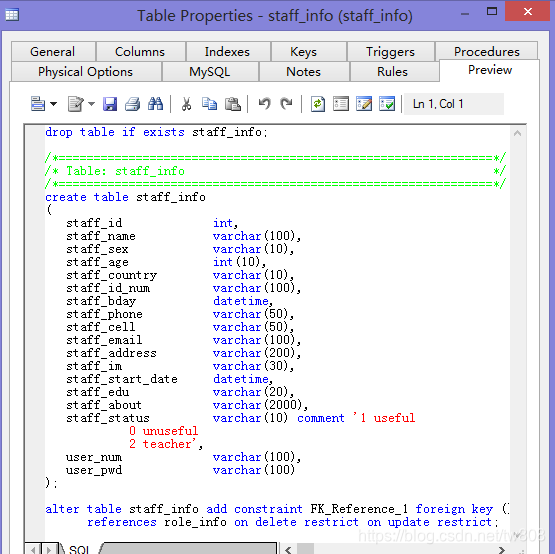
 Text
Text
 Table
Table
 Reference
- EducationSys.pdm
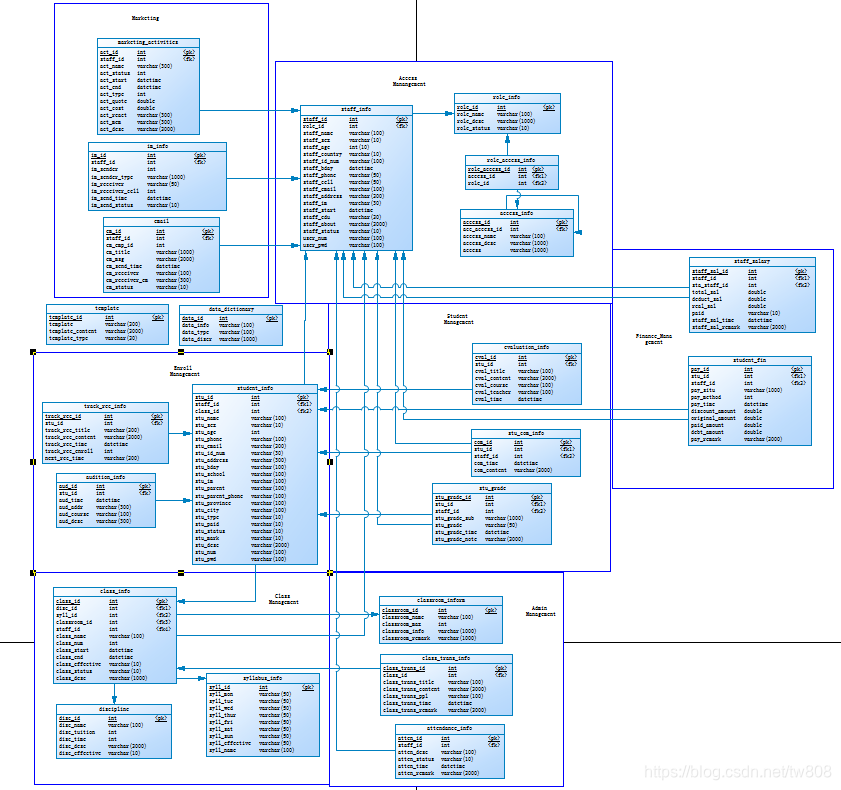
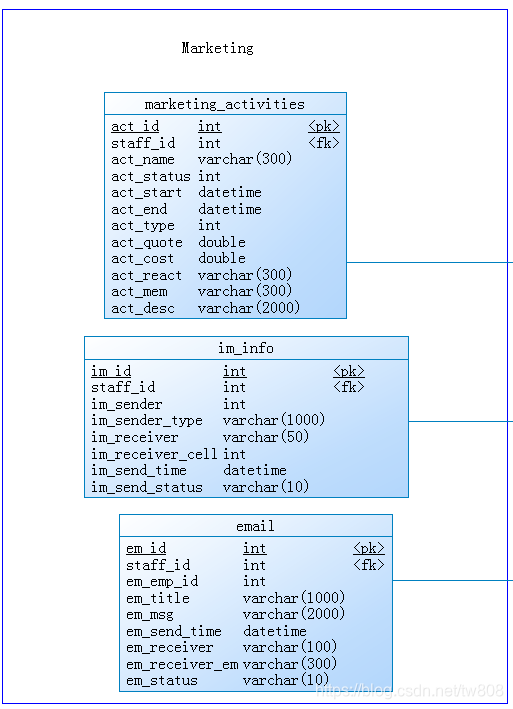
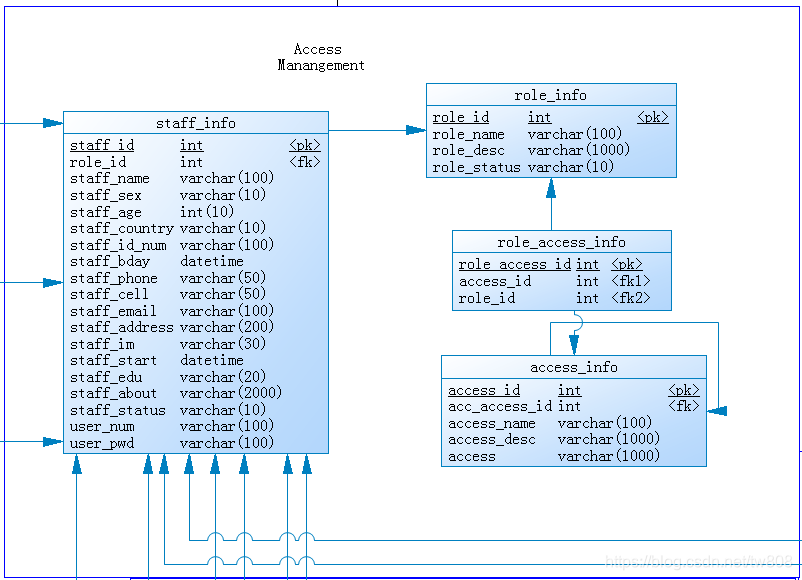

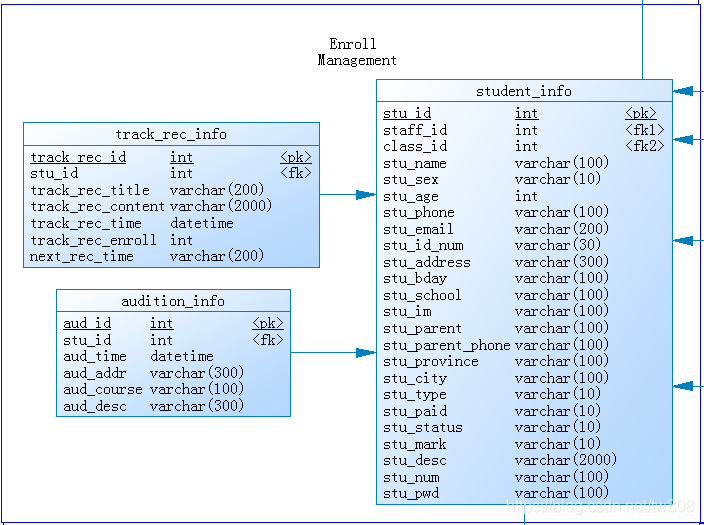
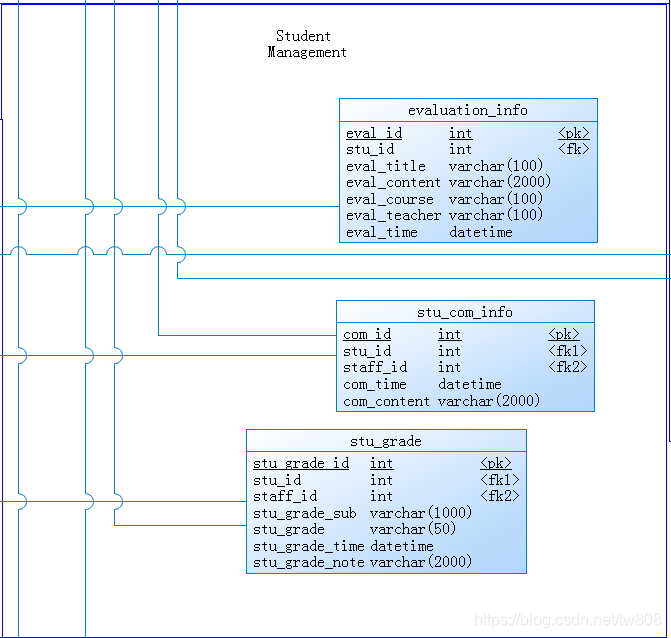
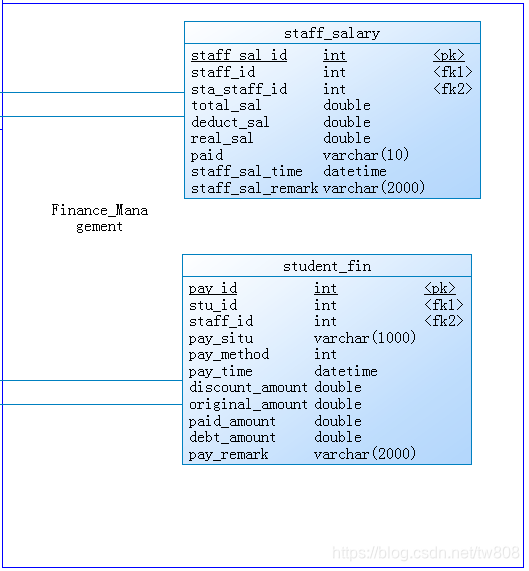
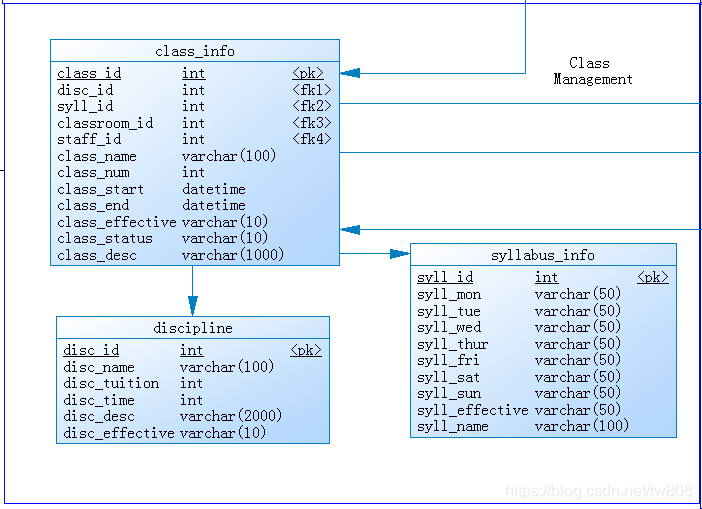
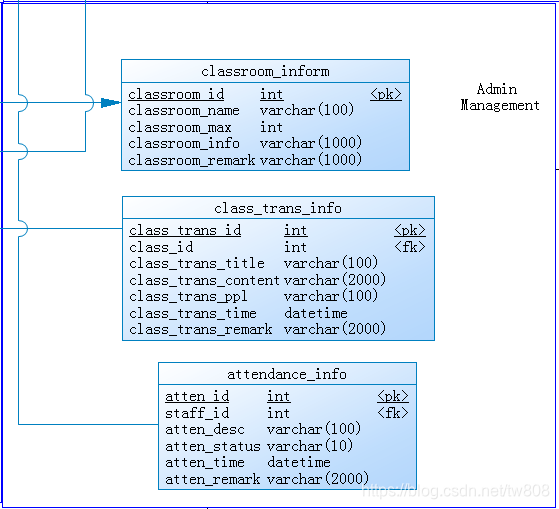
- export sql
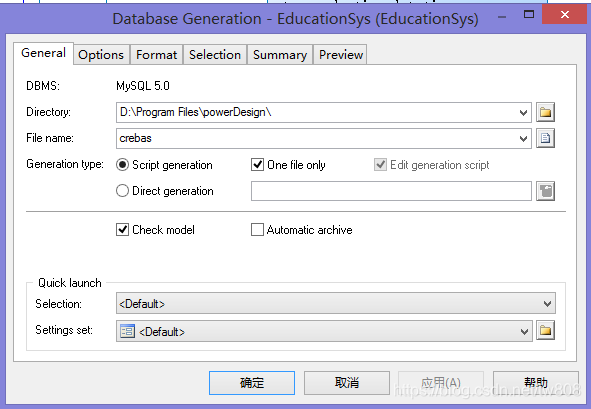
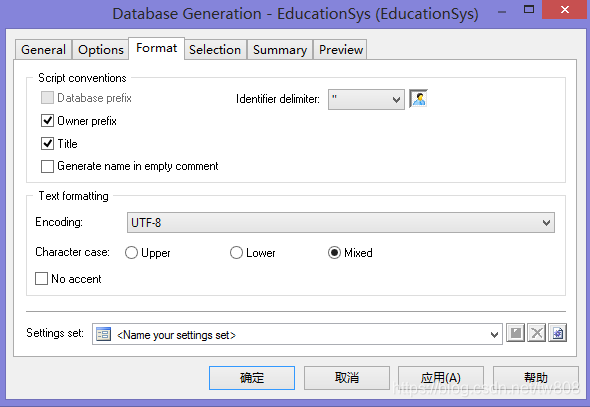
- crebas2.sql
/*==============================================================*/
/* DBMS name:      MySQL 5.0                                    */
/* Created on:     2021/6/1 21:25:15                            */
/*==============================================================*/
drop table if exists access_info;
drop table if exists attendance_info;
drop table if exists audition_info;
drop table if exists class_info;
drop table if exists class_trans_info;
drop table if exists classroom_inform;
drop table if exists data_dictionary;
drop table if exists discipline;
drop table if exists email;
drop table if exists evaluation_info;
drop table if exists im_info;
drop table if exists marketing_activities;
drop table if exists role_access_info;
drop table if exists role_info;
drop table if exists staff_info;
drop table if exists staff_salary;
drop table if exists stu_com_info;
drop table if exists stu_grade;
drop table if exists student_fin;
drop table if exists student_info;
drop table if exists syllabus_info;
drop table if exists template;
drop table if exists track_rec_info;
/*==============================================================*/
/* Table: access_info                                           */
/*==============================================================*/
create table access_info
(
   access_id            int not null,
   acc_access_id        int,
   access_name          varchar(100),
   access_desc          varchar(1000),
   access               varchar(1000),
   primary key (access_id)
)
 ENGINE = InnoDB;
/*==============================================================*/
/* Table: attendance_info                                       */
/*==============================================================*/
create table attendance_info
(
   atten_id             int not null,
   staff_id             int,
   atten_desc           varchar(100),
   atten_status         varchar(10),
   atten_time           datetime,
   atten_remark         varchar(2000),
   primary key (atten_id)
)
 ENGINE = InnoDB;
/*==============================================================*/
/* Table: audition_info                                         */
/*==============================================================*/
create table audition_info
(
   aud_id               int not null,
   stu_id               int,
   aud_time             datetime,
   aud_addr             varchar(300),
   aud_course           varchar(100),
   aud_desc             varchar(300),
   primary key (aud_id)
)
 ENGINE = InnoDB;
/*==============================================================*/
/* Table: class_info                                            */
/*==============================================================*/
create table class_info
(
   class_id             int not null,
   disc_id              int,
   syll_id              int,
   classroom_id         int,
   staff_id             int,
   class_name           varchar(100),
   class_num            int,
   class_start          datetime,
   class_end            datetime,
   class_effective      varchar(10),
   class_status         varchar(10),
   class_desc           varchar(1000),
   primary key (class_id)
)
 ENGINE = InnoDB;
/*=============================================================*/
/* Table: class_trans_info                                      */
/*==============================================================*/
create table class_trans_info
(
   class_trans_id       int not null,
   class_id             int,
   class_trans_title    varchar(100),
   class_trans_content  varchar(2000),
   class_trans_ppl      varchar(100),
   class_trans_time     datetime,
   class_trans_remark   varchar(2000),
   primary key (class_trans_id)
)
 ENGINE = InnoDB;
/*==============================================================*/
/* Table: classroom_inform                                      */
/*==============================================================*/
create table classroom_inform
(
   classroom_id         int not null,
   classroom_name       varchar(100),
   classroom_max        int,
   classroom_info       varchar(1000),
   classroom_remark     varchar(1000),
   primary key (classroom_id)
)
 ENGINE = InnoDB;

/*==============================================================*/
/* Table: data_dictionary                                       */
/*==============================================================*/
create table data_dictionary
(
   data_id              int not null,
   data_info            varchar(100),
   data_ENGINE            varchar(100),
   data_discr           varchar(1000),
   primary key (data_id)
)
 ENGINE = InnoDB;
/*==============================================================*/
/* Table: discipline                                            */
/*==============================================================*/
create table discipline
(
   disc_id              int not null,
   disc_name            varchar(100),
   disc_tuition         int,
   disc_time            int,
   disc_desc            varchar(2000),
   disc_effective       varchar(10),
   primary key (disc_id)
)
 ENGINE = InnoDB;
/*==============================================================*/
/* Table: email                                                 */
/*==============================================================*/
create table email
(
   em_id                int not null,
   staff_id             int,
   em_emp_id            int,
   em_title             varchar(1000),
   em_msg               varchar(2000),
   em_send_time         datetime,
   em_receiver          varchar(100),
   em_receiver_em       varchar(300),
   em_status            varchar(10),
   primary key (em_id)
)
 ENGINE = InnoDB;
/*==============================================================*/
/* Table: evaluation_info                                       */
/*==============================================================*/
create table evaluation_info
(
   eval_id              int not null,
   stu_id               int,
   eval_title           varchar(100),
   eval_content         varchar(2000),
   eval_course          varchar(100),
   eval_teacher         varchar(100),
   eval_time            datetime,
   primary key (eval_id)
)
 ENGINE = InnoDB;
/*==============================================================*/
/* Table: im_info                                               */
/*==============================================================*/
create table im_info
(
   im_id                int not null,
   staff_id             int,
   im_sender            int,
   im_sender_ENGINE       varchar(1000),
   im_receiver          varchar(50),
   im_receiver_cell     int,
   im_send_time         datetime,
   im_send_status       varchar(10),
   primary key (im_id)
)
 ENGINE = InnoDB;
/*==============================================================*/
/* Table: marketing_activities                                  */
/*==============================================================*/
create table marketing_activities
(
   act_id               int not null,
   staff_id             int,
   act_name             varchar(300),
   act_status           int,
   act_start            datetime,
   act_end              datetime,
   act_ENGINE             int,
   act_quote            double,
   act_cost             double,
   act_react            varchar(300),
   act_mem              varchar(300),
   act_desc             varchar(2000),
   primary key (act_id)
)
 ENGINE = InnoDB;
/*==============================================================*/
/* Table: role_access_info                                      */
/*==============================================================*/
create table role_access_info
(
   role_access_id       int not null,
   access_id            int,
   role_id              int,
   primary key (role_access_id)
)
 ENGINE = InnoDB;
/*==============================================================*/
/* Table: role_info                                             */
/*==============================================================*/
create table role_info
(
   role_id              int not null,
   role_name            varchar(100),
   role_desc            varchar(1000),
   role_status          varchar(10),
   primary key (role_id)
)
 ENGINE = InnoDB;
/*==============================================================*/
/* Table: staff_info                                            */
/*==============================================================*/
create table staff_info
(
   staff_id             int not null,
   role_id              int,
   staff_name           varchar(100),
   staff_sex            varchar(10),
   staff_age            int(10),
   staff_country        varchar(10),
   staff_id_num         varchar(100),
   staff_bday           datetime,
   staff_phone          varchar(50),
   staff_cell           varchar(50),
   staff_email          varchar(100),
   staff_address        varchar(200),
   staff_im             varchar(30),
   staff_start          datetime,
   staff_edu            varchar(20),
   staff_about          varchar(2000),
   staff_status         varchar(10) comment '1 useful
            0 unuseful
            2 teacher',
   user_num             varchar(100),
   user_pwd             varchar(100),
   primary key (staff_id)
)
 ENGINE = InnoDB;
/*==============================================================*/
/* Table: staff_salary                                          */
/*==============================================================*/
create table staff_salary
(
   staff_sal_id         int not null,
   staff_id             int,
   sta_staff_id         int,
   total_sal            double,
   deduct_sal           double,
   real_sal             double,
   paid                 varchar(10),
   staff_sal_time       datetime,
   staff_sal_remark     varchar(2000),
   primary key (staff_sal_id)
)
 ENGINE = InnoDB;
/*==============================================================*/
/* Table: stu_com_info                                          */
/*==============================================================*/
create table stu_com_info
(
   com_id               int not null,
   stu_id               int,
   staff_id             int,
   com_time             datetime,
   com_content          varchar(2000),
   primary key (com_id)
)
 ENGINE = InnoDB;
/*==============================================================*/
/* Table: stu_grade                                             */
/*==============================================================*/
create table stu_grade
(
   stu_grade_id         int not null,
   stu_id               int,
   staff_id             int,
   stu_grade_sub        varchar(1000),
   stu_grade            varchar(50),
   stu_grade_time       datetime,
   stu_grade_note       varchar(2000),
   primary key (stu_grade_id)
)
 ENGINE = InnoDB;
/*==============================================================*/
/* Table: student_fin                                           */
/*==============================================================*/
create table student_fin
(
   pay_id               int not null,
   stu_id               int,
   staff_id             int,
   pay_situ             varchar(1000),
   pay_method           int,
   pay_time             datetime,
   discount_amount      double,
   original_amount      double,
   paid_amount          double,
   debt_amount          double,
   pay_remark           varchar(2000),
   primary key (pay_id)
)
 ENGINE = InnoDB;
/*==============================================================*/
/* Table: student_info                                          */
/*==============================================================*/
create table student_info
(
   stu_id               int not null,
   staff_id             int,
   class_id             int,
   stu_name             varchar(100),
   stu_sex              varchar(10),
   stu_age              int,
   stu_phone            varchar(100),
   stu_email            varchar(200),
   stu_id_num           varchar(30),
   stu_address          varchar(300),
   stu_bday             varchar(100),
   stu_school           varchar(100),
   stu_im               varchar(100),
   stu_parent           varchar(100),
   stu_parent_phone     varchar(100),
   stu_province         varchar(100),
   stu_city             varchar(100),
   stu_ENGINE             varchar(10),
   stu_paid             varchar(10),
   stu_status           varchar(10),
   stu_mark             varchar(10),
   stu_desc             varchar(2000),
   stu_num              varchar(100),
   stu_pwd              varchar(100),
   primary key (stu_id)
)
 ENGINE = InnoDB;
/*==============================================================*/
/* Table: syllabus_info                                         */
/*==============================================================*/
create table syllabus_info
(
   syll_id              int not null,
   syll_mon             varchar(50),
   syll_tue             varchar(50),
   syll_wed             varchar(50),
   syll_thur            varchar(50),
   syll_fri             varchar(50),
   syll_sat             varchar(50),
   syll_sun             varchar(50),
   syll_effective       varchar(50),
   syll_name            varchar(100),
   primary key (syll_id)
)
 ENGINE = InnoDB;
/*==============================================================*/
/* Table: template                                              */
/*==============================================================*/
create table template
(
   template_id          int not null,
   template_title       varchar(200),
   template_content     varchar(2000),
   template_ENGINE        varchar(20),
   primary key (template_id)
)
 ENGINE = InnoDB;
/*==============================================================*/
/* Table: track_rec_info                                        */
/*==============================================================*/
create table track_rec_info
(
   track_rec_id         int not null,
   stu_id               int,
   track_rec_title      varchar(200),
   track_rec_content    varchar(2000),
   track_rec_time       datetime,
   track_rec_enroll     int,
   next_rec_time        varchar(200),
   primary key (track_rec_id)
)
 ENGINE = InnoDB;
alter table access_info add constraint FK_Reference_2 foreign key (acc_access_id)
      references access_info (access_id) on delete restrict on update restrict;
alter table attendance_info add constraint FK_Reference_23 foreign key (staff_id)
      references staff_info (staff_id) on delete restrict on update restrict;
alter table audition_info add constraint FK_Reference_10 foreign key (stu_id)
      references student_info (stu_id) on delete restrict on update restrict;
alter table class_info add constraint FK_Reference_18 foreign key (disc_id)
      references discipline (disc_id) on delete restrict on update restrict;
alter table class_info add constraint FK_Reference_19 foreign key (syll_id)
      references syllabus_info (syll_id) on delete restrict on update restrict;
alter table class_info add constraint FK_Reference_20 foreign key (classroom_id)
      references classroom_inform (classroom_id) on delete restrict on update restrict;
alter table class_info add constraint FK_Reference_21 foreign key (staff_id)
      references staff_info (staff_id) on delete restrict on update restrict;
alter table class_trans_info add constraint FK_Reference_22 foreign key (class_id)
      references class_info (class_id) on delete restrict on update restrict;
alter table email add constraint FK_Reference_7 foreign key (staff_id)
      references staff_info (staff_id) on delete restrict on update restrict;
alter table evaluation_info add constraint FK_Reference_12 foreign key (stu_id)
      references student_info (stu_id) on delete restrict on update restrict;
alter table im_info add constraint FK_Reference_6 foreign key (staff_id)
      references staff_info (staff_id) on delete restrict on update restrict;
alter table marketing_activities add constraint FK_Reference_5 foreign key (staff_id)
      references staff_info (staff_id) on delete restrict on update restrict;
alter table role_access_info add constraint FK_Reference_11 foreign key (role_id)
      references role_info (role_id) on delete restrict on update restrict;
alter table role_access_info add constraint FK_Reference_4 foreign key (access_id)
      references access_info (access_id) on delete restrict on update restrict;
alter table staff_info add constraint FK_Reference_1 foreign key (role_id)
      references role_info (role_id) on delete restrict on update restrict;
alter table staff_salary add constraint FK_Reference_26 foreign key (staff_id)
      references staff_info (staff_id) on delete restrict on update restrict;
alter table staff_salary add constraint FK_Reference_27 foreign key (sta_staff_id)
      references staff_info (staff_id) on delete restrict on update restrict;
alter table stu_com_info add constraint FK_Reference_13 foreign key (stu_id)
      references student_info (stu_id) on delete restrict on update restrict;
alter table stu_com_info add constraint FK_Reference_14 foreign key (staff_id)
      references staff_info (staff_id) on delete restrict on update restrict;
alter table stu_grade add constraint FK_Reference_15 foreign key (stu_id)
      references student_info (stu_id) on delete restrict on update restrict;
alter table stu_grade add constraint FK_Reference_16 foreign key (staff_id)
      references staff_info (staff_id) on delete restrict on update restrict;
alter table student_fin add constraint FK_Reference_24 foreign key (stu_id)
      references student_info (stu_id) on delete restrict on update restrict;
alter table student_fin add constraint FK_Reference_25 foreign key (staff_id)
      references staff_info (staff_id) on delete restrict on update restrict;
alter table student_info add constraint FK_Reference_17 foreign key (class_id)
      references class_info (class_id) on delete restrict on update restrict;
alter table student_info add constraint FK_Reference_8 foreign key (staff_id)
      references staff_info (staff_id) on delete restrict on update restrict;
alter table track_rec_info add constraint FK_Reference_9 foreign key (stu_id)
      references student_info (stu_id) on delete restrict on update restrict;
-
ERROR: [Err] 1064 - You have an error in your SQL syntax; check the manual that corresponds to your MySQL server version for the right syntax to use near 'type = ISAM type = InnoDB;
-
solve: delete TYPE=ISAM change TYPE=InnoDB to ENGINE=InnoDB
-
MySQL Navcat: ems> run sql
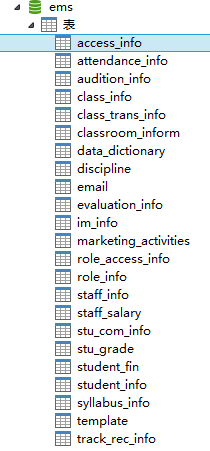
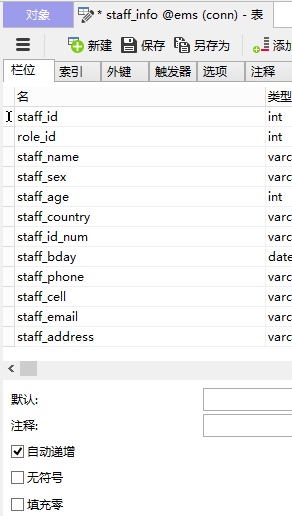
-
ems project
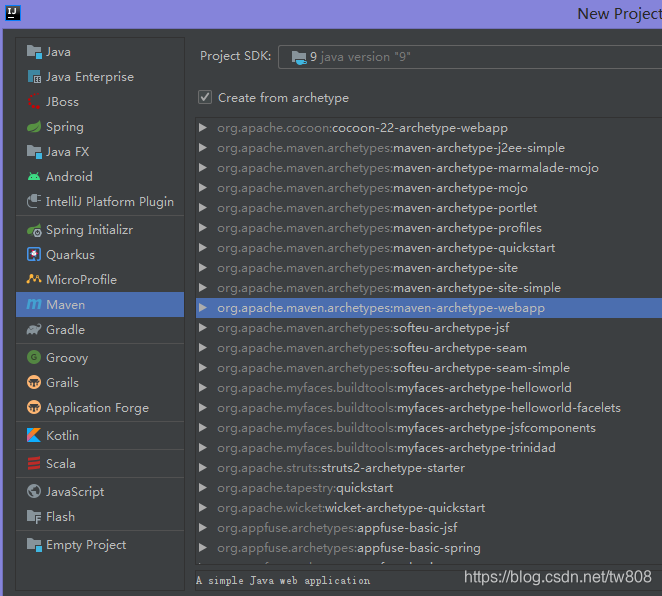
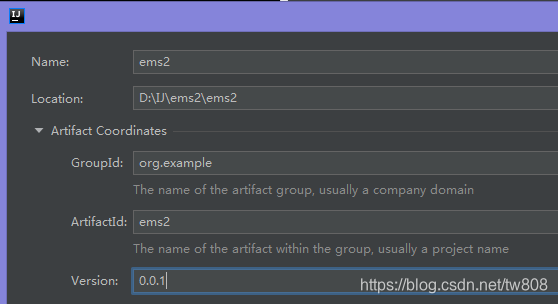
-
use mabatis-generator
-
pom add:
        <dependency>
            <groupId>org.mybatis.generator</groupId>
            <artifactId>mybatis-generator-core</artifactId>
            <version>1.3.2</version>
        </dependency>
   ...
   			<plugin>
                    <groupId>org.mybatis.generator</groupId>
                    <artifactId>mybatis-generator-maven-plugin</artifactId>
                    <version>1.3.2</version>
                    <configuration>
                        <configurationFile>src/main/java/generatorConfig.xml</configurationFile>
                        <verbose>true</verbose>
                        <overwrite>true</overwrite>
                    </configuration>
                    <executions>
                        <execution>
                            <id>Generate MyBatis Artifacts</id>
                            <goals>
                                <goal>generate</goal>
                            </goals>
                        </execution>
                    </executions>
                </plugin>
- create generatorConfig.xml
<?xml version="1.0" encoding="UTF-8"?>
<!DOCTYPE generatorConfiguration
        PUBLIC "-//mybatis.org//DTD MyBatis Generator Configuration 1.0//EN"
        "http://mybatis.org/dtd/mybatis-generator-config_1_0.dtd">
<generatorConfiguration>
    <!-- driver-->
    <classPathEntry location="D:\IJ\ems2\ems2\webapp\WEB-INF\lib\mysql-connector-java-8.0.23.jar"/>
    <context id="context1">
        <commentGenerator>
            <property name="suppressDate" value="true"/>
            <property name="suppressAllComments" value="true"/>
        </commentGenerator>
        <jdbcConnection driverClass="com.mysql.cj.jdbc.Driver"
                        connectionURL="jdbc:mysql://localhost:3306/ems"
                        userId="root" password="12345"></jdbcConnection>
        <!-- bean generator-->
        <javaModelGenerator targetPackage="com.ems.po" targetProject="src/main/java"></javaModelGenerator>
        <!--mapper xml    -->
        <sqlMapGenerator targetPackage="com.ems.system.mapper" targetProject="src/main/java"></sqlMapGenerator>
        <!--mapper interface       -->
        <javaClientGenerator type="XMLMAPPER" targetPackage="com.ems.system.mapper" targetProject="src/main/java">
        </javaClientGenerator>
        <table schema="" tableName="staff_info"
               enableCountByExample="false" enableUpdateByExample="false"
               enableDeleteByExample="false" enableSelectByExample="false"
               selectByExampleQueryId="false">
        </table>
    </context>
</generatorConfiguration>
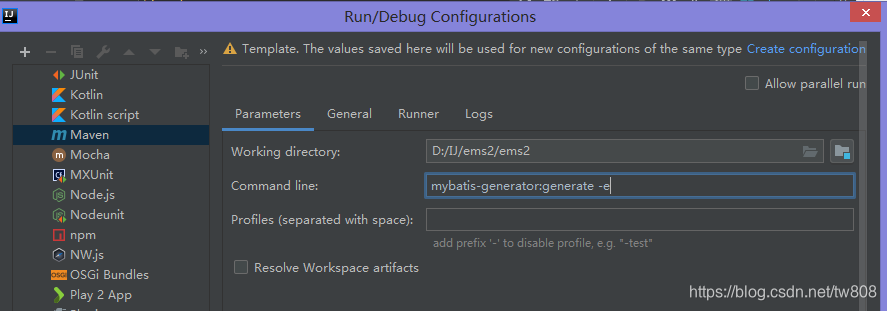
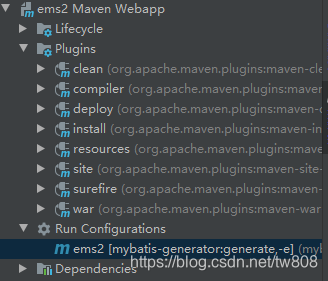
- Error: cannot resolve method getContextPath()
- Solve: add following to pom.xml
...
       <dependency>
            <groupId>javax.servlet</groupId>
            <artifactId>jsp-api</artifactId>
            <version>2.0</version>
        </dependency>
        <dependency>
            <groupId>javax.servlet</groupId>
            <artifactId>javax.servlet-api</artifactId>
            <version>3.1.0</version>
        </dependency>
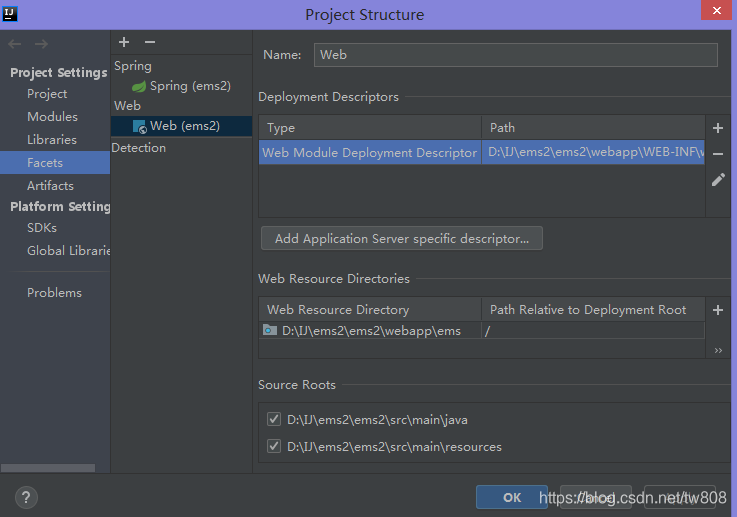
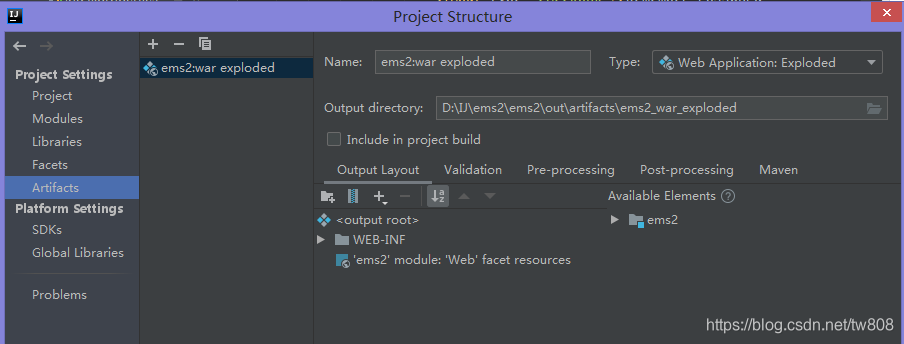
- result
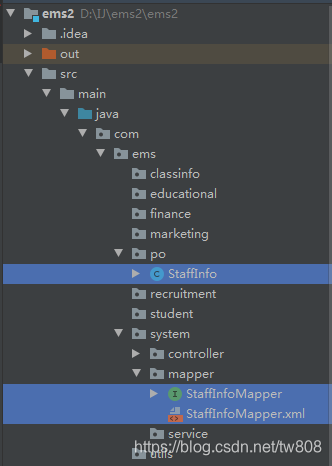
- ERROR: org.apache.ibatis.builder.BuilderException: Error parsing SQL Mapper Configuration. Cause: java.io.IOException: Could not find resource classpath:com/ems/system/mapper/StaffInfoMapper.xml
- Solve: move StaffInfoMapper to resource folder
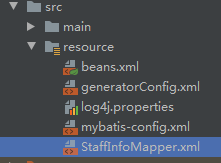
- solve: mybatis-config.xml
...
<mappers>
    <mapper resource="StaffInfoMapper.xml"/>
</mappers>
...
- ERROR:org.springframework.beans.factory.NoSuchBeanDefinitionException: No bean named ‘staffInfoServiceImpl’ available
- solve: add @Service
...
@Service
public class StaffInfoServiceImpl implements StaffInfoService{
...
-
idea: surround with: ctrl+alt+t surround with
-
copy into project

- destroydrop
- edit dtree.css
	this.icon = {
		root				: 'bootstrap/img/base.gif',
		folder			: 'bootstrap/img/folder.gif',
		folderOpen	: 'bootstrap/img/folderopen.gif',
		node				: 'bootstrap/img/page.gif',
		empty				: 'bootstrap/img/empty.gif',
		line				: 'bootstrap/img/line.gif',
		join				: 'bootstrap/img/join.gif',
		joinBottom	: 'bootstrap/img/joinbottom.gif',
		plus				: 'bootstrap/img/plus.gif',
		plusBottom	: 'bootstrap/img/plusbottom.gif',
		minus				: 'bootstrap/img/minus.gif',
		minusBottom	: 'bootstrap/img/minusbottom.gif',
		nlPlus			: 'bootstrap/img/nolines_plus.gif',
		nlMinus			: 'bootstrap/img/nolines_minus.gif'
	};
- Edit access_info sql
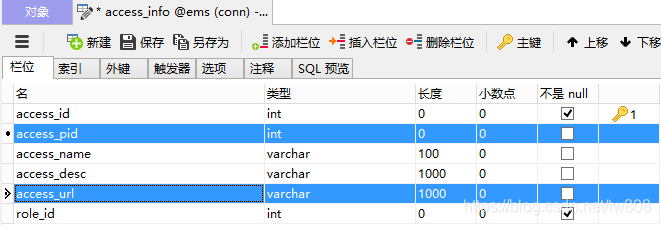
- delete following fk

- Error: org.apache.ibatis.binding.BindingException: Invalid bound statement (not found): com.ems1.system.mapper.AccessInfoMapper.getAccessInfoList
- add to mybatis-config.xml
<mapper resource="RoleInfoMapper.xml"/>
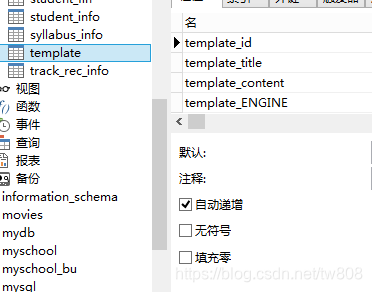
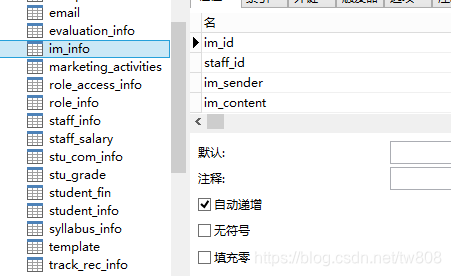
- change role access info : role access id to auto increment
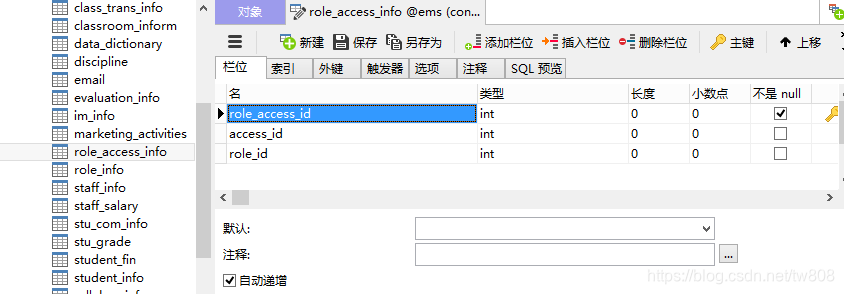
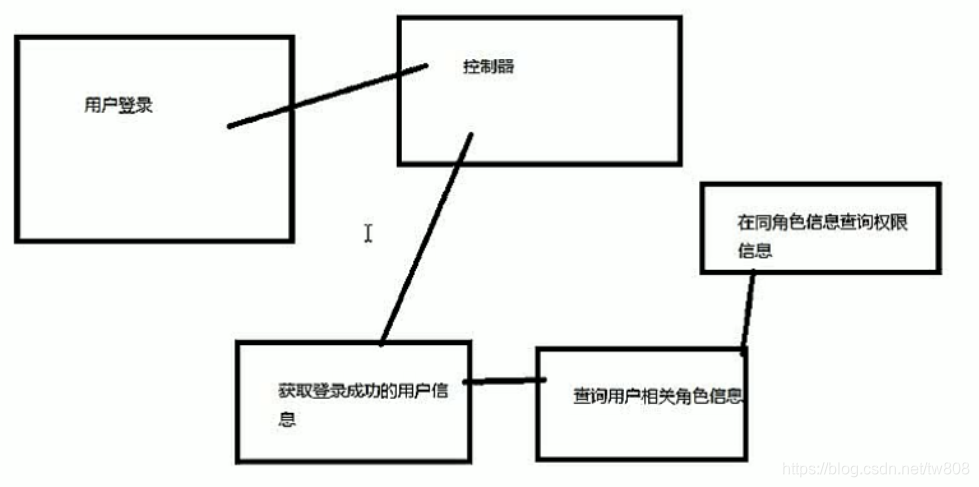
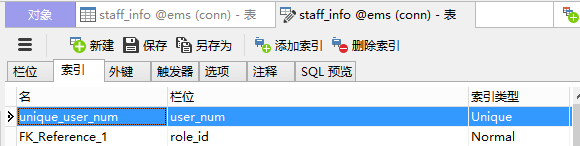
- make staffinfo: user_num unique
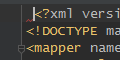
- ERROR: ororg.springframework.beans.factory.BeanCreationException: Error creating bean with name ‘imController’: Injection of resource dependencies failed; nested exception is org.springframework.beans.factory.BeanCreationException: Error creating bean with name ‘imServiceImpl’: Injection of resource dependencies failed; nested exception is org.springframework.beans.factory.UnsatisfiedDependencyException: Error creating bean with name ‘imInfoMapper’ defined in file [ D:\IJ\ems2\ems2\target\ems2\WEB-INF\classes\com\ems1\marketing\mapper\ImInfoMapper.class]: Unsatisfied dependency expressed through bean property ‘sqlSessionFactory’; nested exception is org.springframework.beans.factory.BeanCreationException: Error creating bean with name ‘sqlSessionFactory’ defined in class path resource [beans.xml]: Invocation of init method failed; nested exception is org.springframework.core.NestedIOException: Failed to parse config resource: class path resource [mybatis-config.xml]; nested exception is org.apache.ibatis.builder.BuilderException: Error parsing SQL Mapper Configuration. Cause: org.apache.ibatis.builder.BuilderException: Error creating document instance. Cause: org.xml.sax.SAXParseException; lineNumber: 1; columnNumber: 7; 不允许有匹配 " [ xX][mM][lL]" 的处理指令目标。
- SOLVE: get rid of following space
- taskkill
C:\Users\Administrator>netstat -ano|findstr 1099
  TCP    0.0.0.0:1099           0.0.0.0:0              LISTENING       14600
  TCP    [::]:1099              [::]:0                 LISTENING       14600

C:\Users\Administrator>taskkill /f /pid 14600
成功: 已终止 PID 为 14600 的进程。

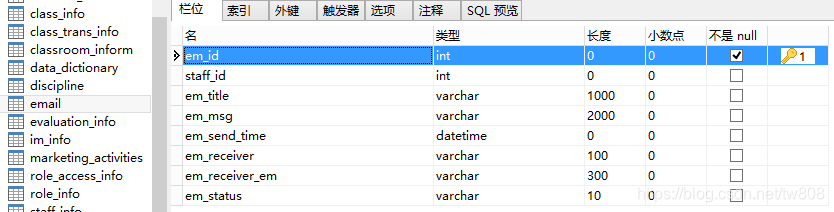
- activation
- ems overview: name ems2, for details see SpringMVC Pipeline [A] part3
- ERROR: java.lang.ClassNotFoundException: com.sun.mail.util.MailLogger
- change in POM
<dependency >
    <groupId >javax.mail </groupId >
    <artifactId >mail </artifactId >
    <version >1.4.7 </version >
</dependency >
- ERROR: trying to connect to host “smtp.163.com”, port 25, isSSL false
- Solve add to controller
MailSSLSocketFactory sf = new MailSSLSocketFactory();
sf.setTrustAllHosts(true);
properties.put("mail.smtp.ssl.enable", "true");
properties.put("mail.smtp.ssl.socketFactory", sf);
- ERROR: javax.mail.AuthenticationFailedException: 550 User has no permission
- Solve
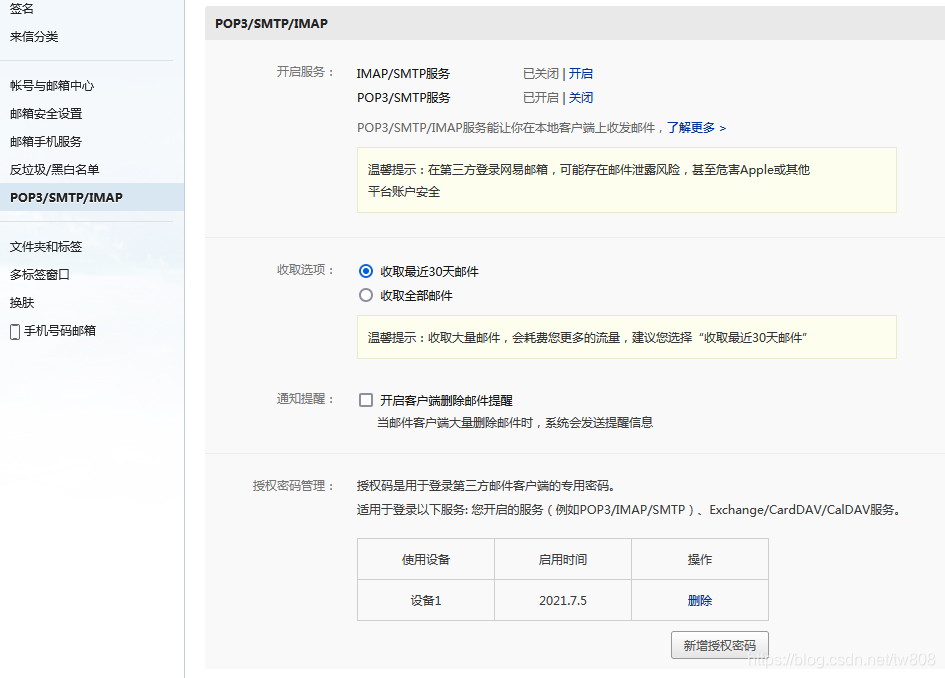
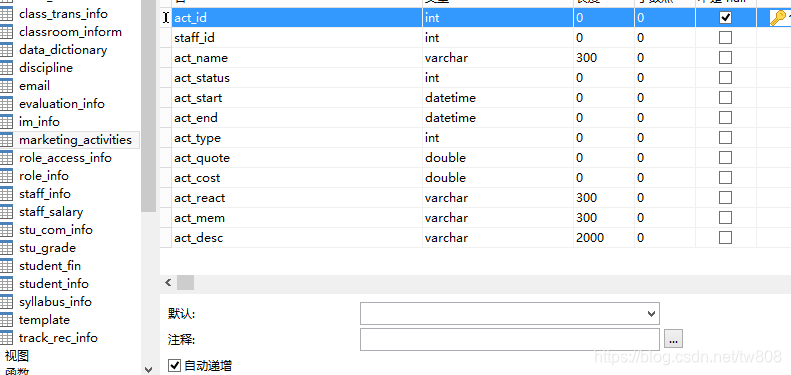
- ERROR: smtp.SMTPSendFailedException: 553 Mail from must equal authorized user
- Solve
message.setFrom(new InternetAddress("dummy12345@163.com"));
- ERROR: org.apache.ibatis.binding.BindingException: Invalid bound statement (not found): com.ems1.marketing.mapper.MarketingActivitiesMapper.getMActivList
- Solve: add to mybatis-config.xml
<mapper resource="MarketingActivitiesMapper.xml"/>
- ERROR: [Failed to convert property value of type ‘java.lang.String’ to required type ‘java.util.Date’ for property ‘actStart’; nested exception is java.lang.IllegalStateException: Cannot convert value of type ‘java.lang.String’ to required type ‘java.util.Date’ for property ‘actStart’: no matching editors or conversion strategy found]
- solve: add to controller:
//    time init
    @InitBinder
    public void initBinder(ServletRequestDataBinder bin) {
        bin.registerCustomEditor(Date.class,
                new CustomDateEditor(new SimpleDateFormat("yyyy-MM-dd"), true));
    }
- student_info



-
tracking record
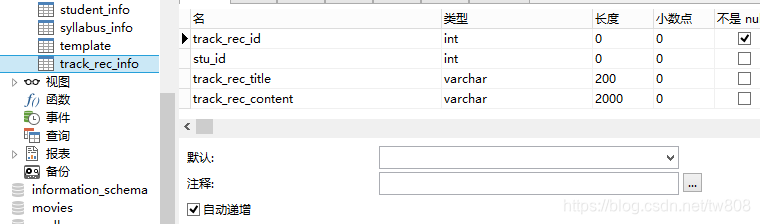
-
audition
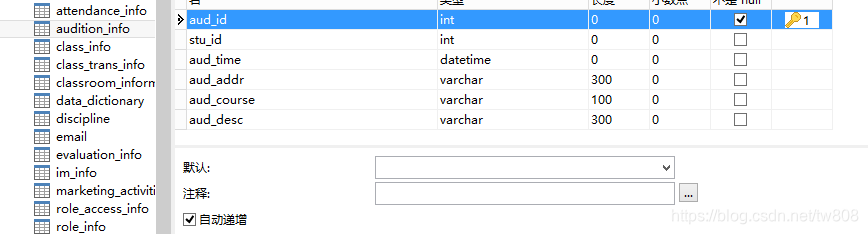
-
classroom

-
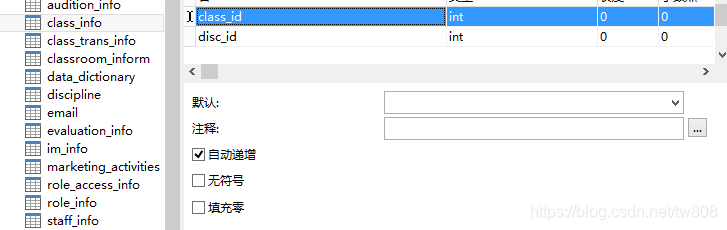
class
-
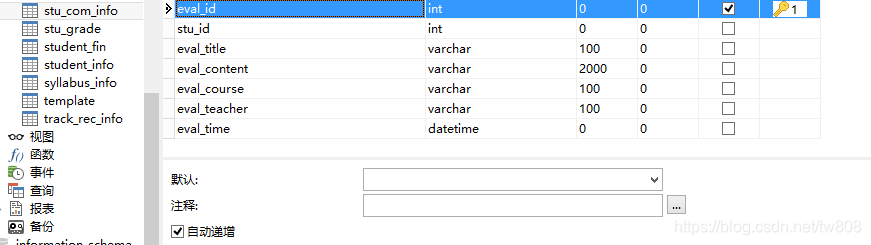
evaluation
-
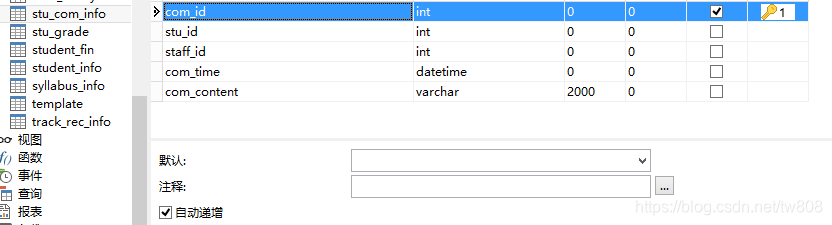
stu_com_info
-
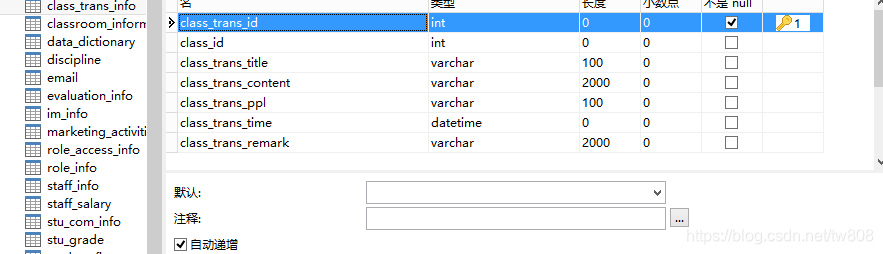
class activity transaction
-
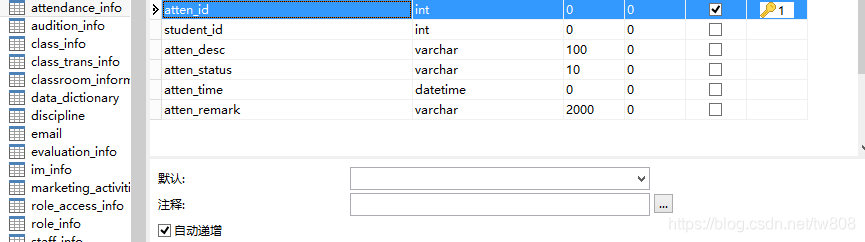
attendance
-
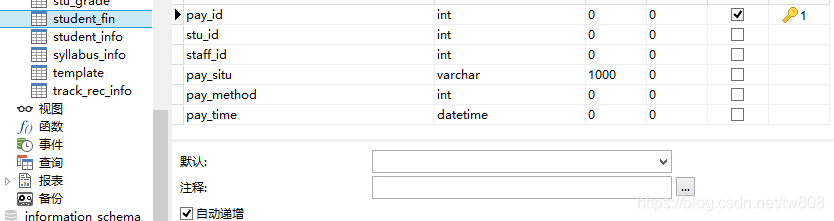
student finance
-
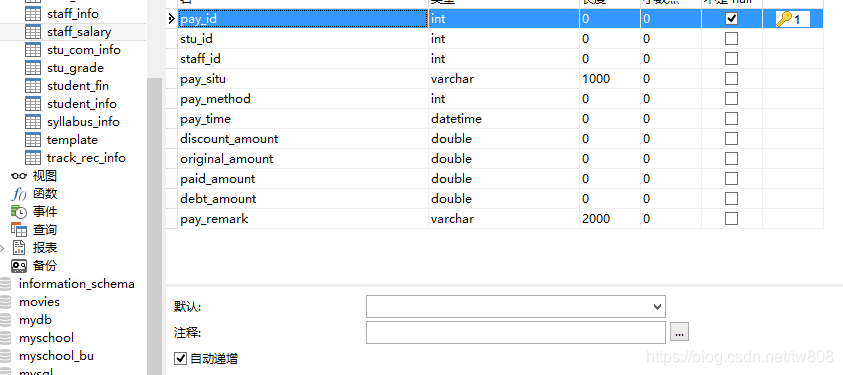
staff salary
-
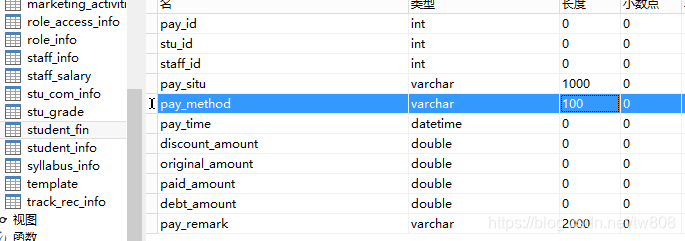
stuFin change pay_method
-
get HighCharts
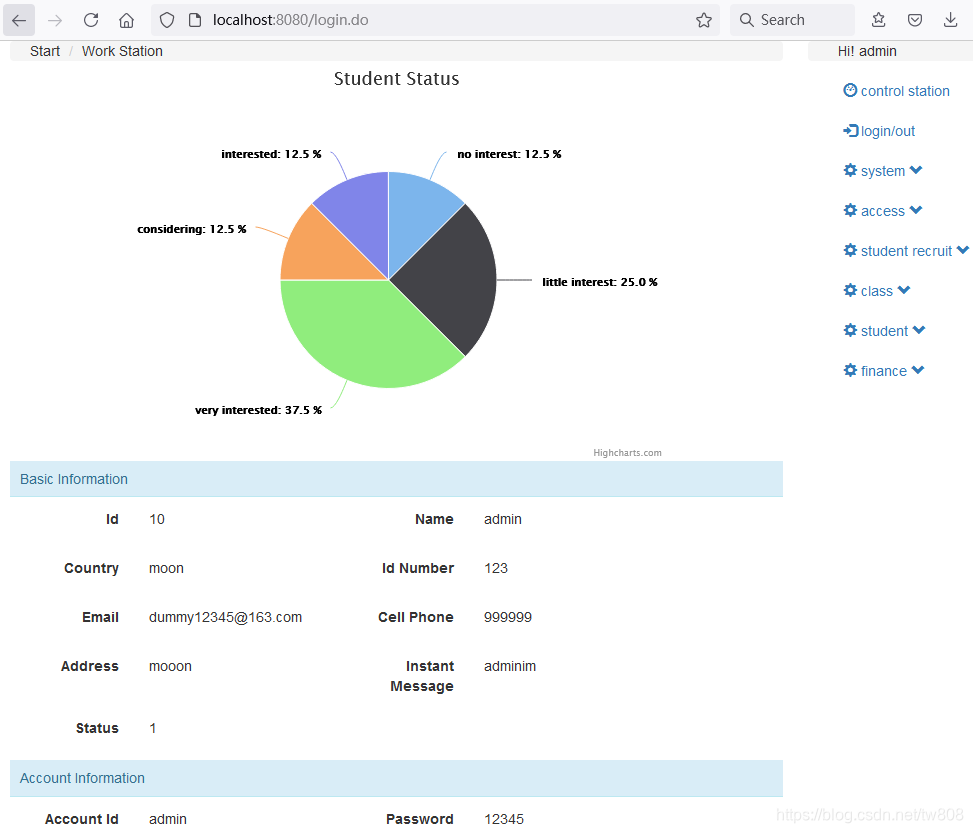
- Project Preview:
- eliminated educational folder
- Project Preview
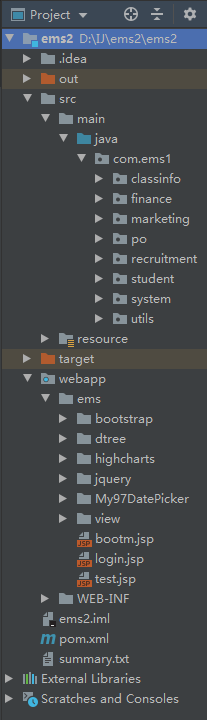
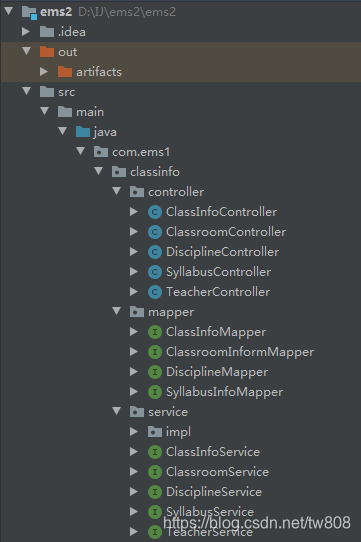
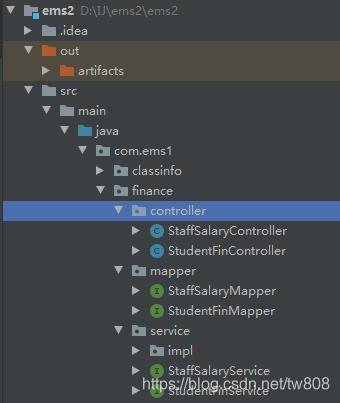
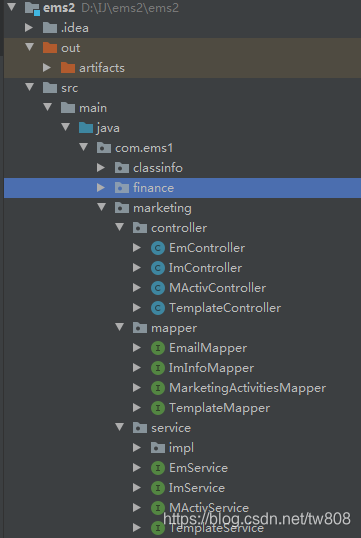
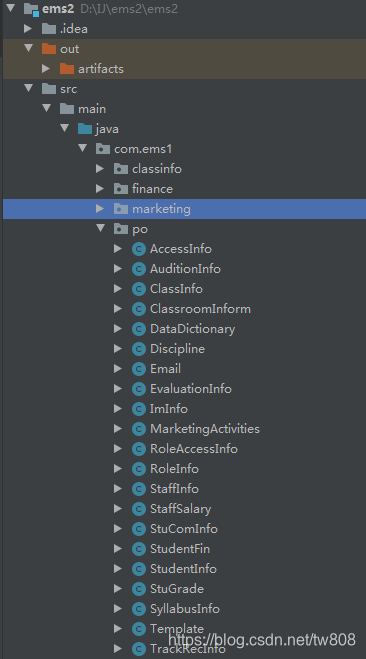
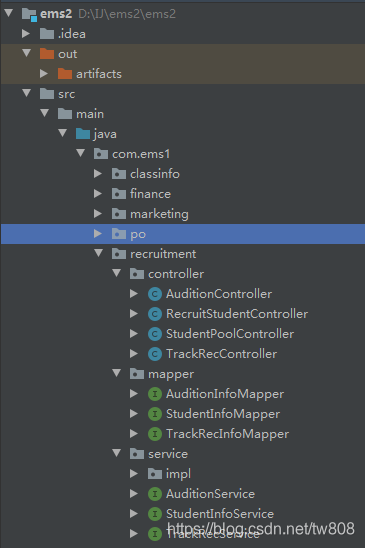
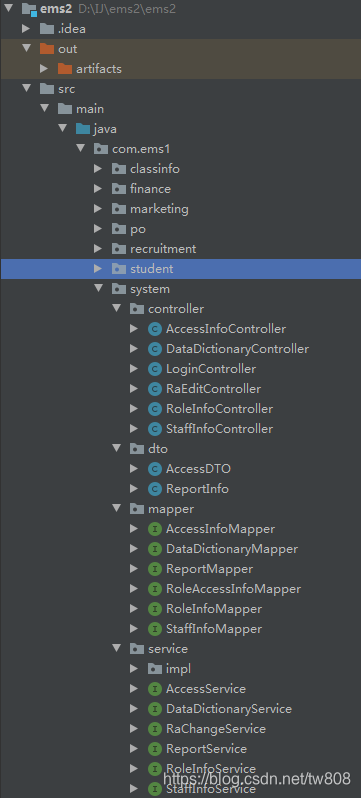
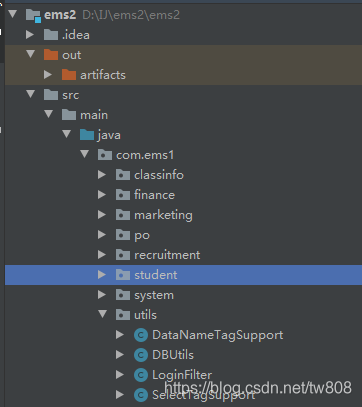
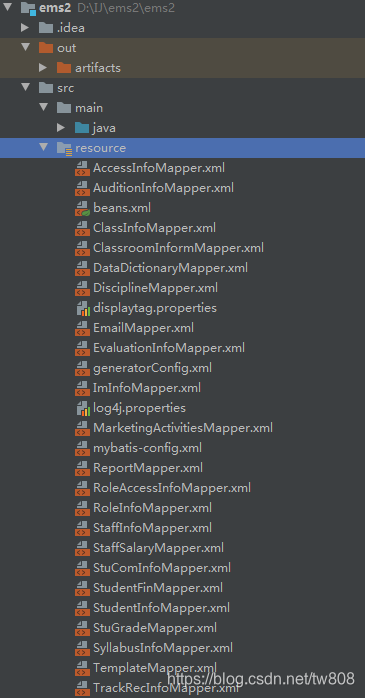
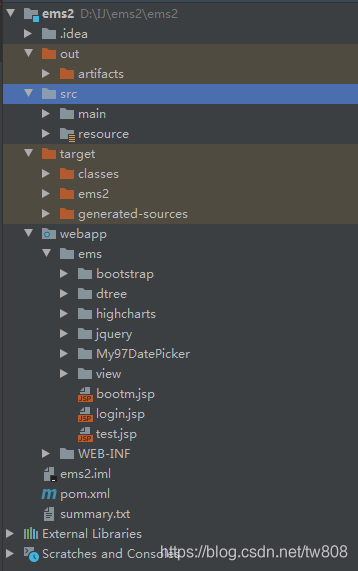
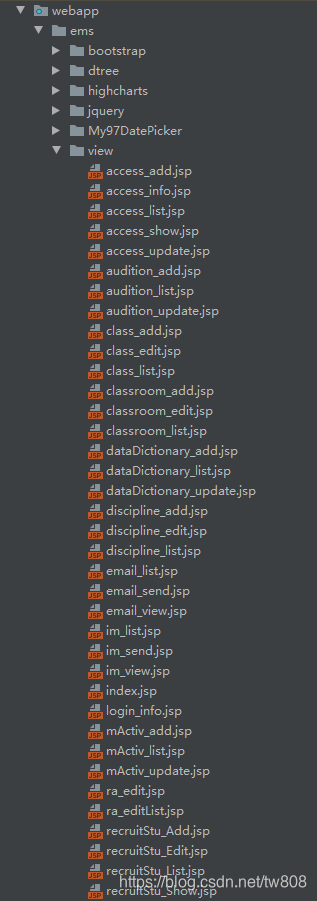
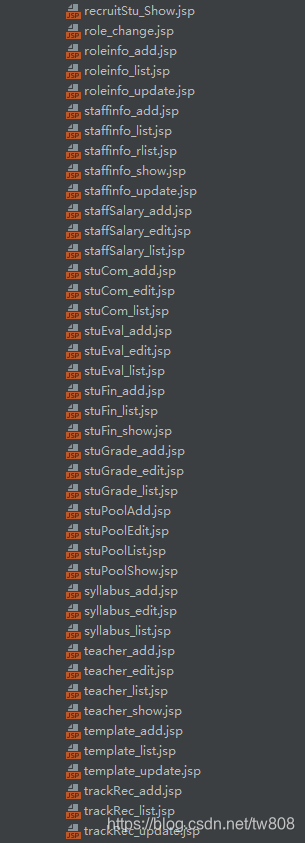
Project
login: admin 12345
output:

 616
616


 扫一扫
扫一扫


 被折叠的 条评论
为什么被折叠?
被折叠的 条评论
为什么被折叠?
 到【灌水乐园】发言


