有关IEEE文章出现“One or more fonts are not embedded”字体问题

Word2010转PDF问题One or more fonts are not embedded(EDAS平台)” Word2010转PDF问题 问题:收到错误“未嵌入PDF字体”。 在论文投稿的时候需要上传PDF,特别是在EDAS平台上传论文手稿时遇到了问题: A PDF font is not embedded。 Word格式也照着IEEE格式调好了,导出成PDF查看也没有字体,间距,公式也什么问题。最后判断是转PDF时的问题。 解决方法: 官方给出的解决方法: Q: I’m getting the e... 阅读详情

有关问题解释:

I'm getting the error "A PDF font is not embedded." What can I do about this?

This error occurs when a PDF document does not include all the fonts that it references. This may cause fonts to be substituted when printing or rendering, yielding papers that have incorrect spacing or equations. IEEE, ACM and other publishers require all fonts to be embedded.

Hints on fixing this problem can be found at IEEE or PaperPlaza or dvipdfm.

NSF also publishes a set of related suggestions for generating PDF.

If you are using Adobe Acrobat to produce the PDF, check the "press quality" option in the print menu.

To check if all fonts are embedded, open the PDF of the paper or the figure in Acrobat and check under "File/Document Properties/Fonts" (Windows) or "File/Properties/Fonts" (MacOS). All fonts must say "embedded" or "embedded-subset". (The precise location of the menu option may depend on the version of Adobe Acrobat.)

The IEEE maintains a set of Acrobat job options and templates. ACM SIGGRAPH has also published a set of hints. Another set of hints was compiled by USENIX.

For MacOS, you can open the file in Preview and save the document to another file. This will embed all the fonts. Also, Microsoft Word on MacOS exports proper PDF with embedded fonts.

Gnuplot-generated PostScript often has this problem. Mohit Lad recommends the following:

By default, gnuplot does not embed fonts in eps files; insert this line in your gnuplot script (note that 26 is the font size that can be changed).
set terminal postscript eps enhanced "NimbusSanL-Regu" fontfile "uhvr8a.pfb" 26

If you use MATLAB figures, you need to use export_fig and then generate the PDF file using pdflatex.

If you convert Postscript to PDF using ps2pdf, use the following arguments:

ps2pdf -dEmbedAllFonts=true -dSubsetFonts=true -dEPSCrop=true -dPDFSETTINGS=/prepress graph.eps

You may also try the command above if your LaTeX file produces an embedded-font error.

For EPS files generated by xmgrace, one should deactivate the Option "use device fonts" in the xmgrace print setup window.

It has been reported that FreePDFConvert and cutePDF properly include fonts. The cutePDF support page indicates the configuration file, %Program Files%\Acro Software\CutePDF Writer\PDFWrite.rsp, may contain the parameter CompatibilityLevel=1.5 to generate PDF files with version 1.5.


我的问题是由于我用了MATLAB生成的eps文档其中采用了字体Helvetica,这种字体不是嵌入式的字体,在LATEX中生成的PDF文档不具有广泛阅读性。

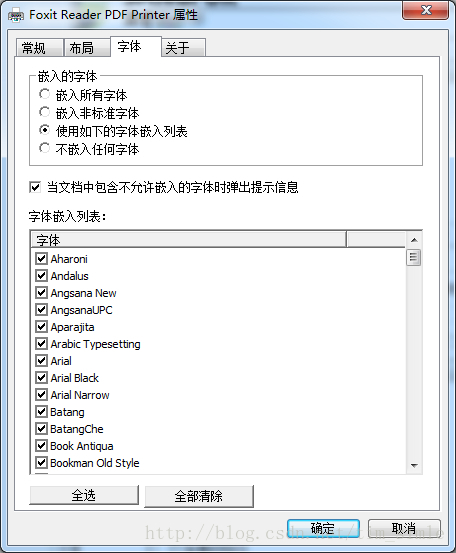
采用了Foxit PDF Printer (福昕虚拟打印机)或者Foxit PDF Creator,将LATEX生成的PDF在重新生成一遍。

方法:

打印文档,选择Foxit PDF Printer,点击“属性,在弹出的对话框中点击“字体”属性,在“嵌入的字体”一栏中选择“使用如下的字体嵌入列表”


【LaTex】写论文时关于嵌入字体embedded fonts问题 什么是字体嵌入Font Embedding? 维基百科的定义是Font embedding is the inclusion of font files inside an electronic document。 我用自己的理解说一下。 举个栗子,比如我们在网上下载了一个非常漂亮的字体,叫做我很漂亮体,然后安装到了你的电脑系统里。这时你在word里编辑文件的时候就可以把文字的字体设置成这个我很漂... 阅读详情

相关推荐

Palabos User Guide中文解读 | 第五章 | Palabos编程 (跳过了第四章Palabos-Java接口)

作者的话:本人在学习palabos时,发现国内中文资料甚少,恰好网上可以直接搜到palabos user guide这种英文资料,加之时间充裕,便打算开始翻译,翻了一节后发现这可能算侵权,就比较伤脑筋,突然想到自己写中文解读即可,便有了下面的博客。 Palabos User Guide Release 1.0 r1 Copyright © 2019 University of Geneva Jul...

Yulan Fang's notes. 2279

投论文遇到的小问题One or more fonts are not embedded

遇到这个问题可能是因为字体未嵌入使用了Adobe Acrobat.检查 文件--属性---字体是否是有字体未嵌入然乎使用工具 印前检查--文档---嵌入字体 另存文件即可。参考:https://www.youtube.com/watch?v=9SdIVy2D4b4...

m0_38086218的博客 2597

信道估计之MMSE算法

信道估计之MMSE算法前言MMSE估计的原理总结 前言        前篇分析了LS信道估计算法,也说明了由于没有考虑SNR的影响,所以LS算法不适合在低信噪比的情况下使用。本篇来学习信道估计的另外一种常用的算法–MMSE。        为什么说LS没有考虑噪声大小的情况呢,因为LS算法使用的是实际观测量与估计观测量的误差,这并不能精确的代表估计量的真值与估计值的误

大白的博客 2万+

解决论文提交问题Upload failed: One or more fonts are not embedded

在通过EDAS系统投稿时,提交pdf时有时会出现Upload failed: One or more fonts are not embedded,上传失败。 原因:使用的字体有非内嵌式字体,打开文件-> 属性 ->字体即可查看是否有非内嵌字体。 解决方案:使用Adobe acrobat Pro版本,普通版本可能不支持。 1.使用Adobe打开pdf文件,文件 ->...

归去来兮的博客 3011

IEEE论文PDF文件的字体嵌入(embedded font)问题

今天投稿一个IEEE会议时遇到了一个不大不小的问题,在指定的论文提交网站进行格式检查(PDF Test)时,总是在字体嵌入那一项提示错误:Font embeddingFonts that are not embedded may be rendered incorrectlyAll fonts except the Base 14 fonts mus

晨宇思远 4万+

Fixing "font not embedded" issue to pass the IEEE PDF eXpress check

I'm getting the error "A PDF font is not embedded." What can I do about this? This error occurs when a PDF document does not include all the fonts that it references. This may cause fonts to be sub

Cloud-Datacenter-Renewable Energy-Big Data-Model 3170

Good XAML Patterns

1:写xaml的时候写在multiply line里(使用Xaml Styler插件会自动转行)。 2:Naming Conventient Resources以文件名.key的形式写:InputPageOilSwellResources.DesignNameColumnStyle,若已经在本层的话就不用写文件名了。 x:Name应该用'_master'的形式,同coding的priva...

weixin_30938149的博客 155

科研论文书写基本要求

本文有的内容是期刊风格,所以会随着期刊变化而变化。有的内容不属于风格,比如易错的东西,摘要的功能等,所有期刊都一样。 文章目录一篇想被捞的论文的基本要求标题摘要公式 equations单位 units图 graphics交叉引用 cross references公式,图,表参考文献结论 conclusion其他常见错误 common mistakes 一篇想被捞的论文的基本要求 技术性论文必须要...

wulimmya的博客 1752

解决论文提交时IEEE PDF eXpress通过但提交系统提示字体未嵌入的问题

解决论文提交时系统提示字体未嵌入的问题

weixin_44987694的博客 3054

EDAS: Upload failed:The font “XXX“ is not embedded in the file问题解决方法

5.最后打开需要修改的pdf,对其进行打印生成新的pdf即可。问题是由于提交的pdf文件没有嵌入一些需要的字体导致的。4.选择字体,点击添加名称选项添加需要的字体并保存配置。3.在默认设置那里选择编辑。

daijingxin的博客 982

edas提交论文因字体没有内嵌(fonts are not embedded)被拒接提交

上传Camera-Ready版本的时候,遇到EDAS阻止提交,提示一些字体未嵌入。  Publishers require that PDF font are embedded so that documents can be printed everywhere; one or more of your document fonts are not embedded. 貌似刚开始提交

someonelikesyou的专栏 1万+

PDF document contains some fonts that are not embedded.解决方法

使用Adobe工具将PDF字体嵌入

mmmmmm儒丶的博客 496

论文检查报“字体未嵌入”解决办法

投递论文的一个常见步骤是检查论文格式上的兼容性(正确性),EDAS上的检查工具、IEEE PDF eXpress系统等都会对论文进行检查,其中一个常见错误是字体未嵌入,如“The font Helvetica is not embedded.” 原因 出现该错误的原因是利用Matlab画图并导出pdf时,文件中没有嵌入该字体(如下图),如果将该文件直接插入到论文中,论文便没有嵌入该字体,导致报错。 解决办法 针对论文中的每一幅图所对应的文件,查看其字体,找出错误的文件(有未嵌入字体的文件)。 打印该文件

Hey___Man的博客 3912

论文检测的字体未嵌入问题Times New Roman,Bold, Times New Roman,Italic is not embedded解决方法

Adobe Acrobat,下载后你打开你的pdf文件,选择最左上角的文件,属性,进入字体,在这里可以看到你的文件是什么状态  打开你要的word,点击左上角的文件如图所示,选择打印 下图所示的是两个细节,一个是可以选择打印机,第二是打印机属性,点击进入打印机,顺便说一下博主用的是word2013,其他版本应该也是类似的,应该问题都不大,如果有问题就下载一个2013吧。 进入属性后,会出现如...

qwe2508的博客 7005

提交IEEE论文出现“Upload failed: One or more fonts are not embedded. See EDAS FAQ.”的问题

楼主提交ieee的论文一直提示这个,查了好几个小时的资料,试着用adobe 打印,但是就是没用,最后检查发现是因为adobe中存在始终不嵌入的字体,二楼主论文中图使用的字体刚好就在其中。现在推荐一个最有效的方法,楼主亲测; https://blog.csdn.net/qq_30592147/article/details/83592629 下载cutePdf writer的链接为; http://...

小翠学姐的博客 1348

IEEE会议上传字体问题

最近用EDAS上传一篇文章,总是提示PDF文件中缺少字体,但是Latex编译又没有问题。错误信息: The PDF file cannot be accepted: Publishers require that PDF fonts are embedded so that documents can be printed everywhere; one or more of your

一心两用 1353

Publishers require that PDF font are embedded so that documents can be printed everywhere...

准备投IEEE文章的人可以看看今天我被IEEE郁闷了,一个小小的字体嵌入问题,耗费了我整整3个多小时的时间来解决,现在把经验告诉大家:IEEE有一个很变态的要求,说是为了能够在任何地方打印文档,所以要求投稿的PDF文档一定要嵌入所有的字体(Publishers require that PDF font are embedded so that documents can be p

上善若水的专栏 8417

数字逻辑-交通灯系统设计(HUST) 1-12关 头歌

数字逻辑---交通灯系统设计(HUST) 1-12关 头歌【一个代码可通12关】1.7段数码管驱动电路设计2.4位无符号比较器设计3.8位无符号比较器设计4.1位2路选择器设计5.8位2路选择器设计6.双向BCD计数器状态机设计7.双向BCD计数器输出函数设计8.双向BCD计数器设计9.双位BCD双向计数器设计10.交通灯核心状态机设计11.交通灯输出函数设计12.交通灯系统设计

上一篇: LeetCode: Best Time to Buy and Sell Stock I、II、III
tim_simle
博客等级 码龄12年 5粉丝 10原创
评论
添加红包

请填写红包祝福语或标题

红包个数最小为10个

红包金额最低5元

当前余额3.43前往充值 >
需支付:10.00
成就一亿技术人!
领取后你会自动成为博主和红包主的粉丝 规则
hope_wisdom
发出的红包
实付
使用余额支付
点击重新获取
扫码支付
钱包余额 0

抵扣说明:

1.余额是钱包充值的虚拟货币,按照1:1的比例进行支付金额的抵扣。
2.余额无法直接购买下载,可以购买VIP、付费专栏及课程。

余额充值