




 本文介绍了在系统优化过程中遇到的Dapper批量新增性能问题。原先保存300条数据需要6到8秒,通过优化后性能显著提升。推荐了一篇关于批量新增性能对比的文章,并提供了优化后的代码示例,测试结果显示性能提升明显。
今天 对系统进行了下优化,涉及3张表,差不多每张300条数据,一起保存,界面保存到 重新加载出来,花了 6到8秒,速度太慢了。
经过排查 最后定位问题:发现 Dapper自带内部集合插入,性能着实不咋样,网上找了下文章,最后优化了下 ,性能明细提高。
批量新增 性能对比,网上可以去查看下这个篇文章:https://www.cnblogs.com/wwg1990/p/10362667.html ,总结的挺好,值得好好学习。
不多说 直接上代码吧,供参考学习。
1. 批量新增封装:
        public int BatchCreateNew(List<Evaluation_SurveyData_detailsEntity> list)
        {
            int insertedRows = -1;
            try
            {
                //自带内部集合 新增
                //string sql = BaseMethodUtility.GetCreateSql(list);
                //insertedRows = _Respository.ExecuteNonQueryAsync(sql, list).Result;
                //优化后 新增
                string sqlnew = BaseMethodUtility.GetRoutineCreateSql(list);
                insertedRows = _Respository.ExecuteNonQueryAsync(sqlnew, null).Result;
            }
            catch (Exception ex)
            {
                throw ex;
            }
            return insertedRows;
        }
2. 核心封装:
    public class BaseMethodUtility
    {
        /// <summary>
        /// Dapper自带内部集合插入 ,数据量小的情况下 可以使用
        /// </summary>
        /// <typeparam name="T"></typeparam>
        /// <param name="list"></param>
        /// <returns></returns>
        public static string GetCreateSql<T>(List<T> list)
        {
            IEnumerable<string> fields = typeof(T).GetProperties().
                    SkipWhile(p => p.CustomAttributes.Any(a => a.AttributeType == typeof(KeyAttribute))).Select(p => p.Name);
            string tableName = ((Dapper.Contrib.Extensions.TableAttribute)typeof(T).
                GetCustomAttributes(typeof(Dapper.Contrib.Extensions.TableAttribute), true).First()).Name;
            string fieldNames = string.Join(", ", fields);
            string fieldParameters = string.Join(", @", fields);
            string sql = $"INSERT into {tableName}({fieldNames}) values(@{fieldParameters})";
            return sql;
        }
        /// <summary>
        /// 批量新增 ,大数据 新增使用
        /// </summary>
        /// <typeparam name="T"></typeparam>
        /// <param name="list"></param>
        /// <returns></returns>
        public static string GetRoutineCreateSql<T>(List<T> list)
        {
            //声明字段列表
            List<string> listFiledList = new List<string>();

            var strsql = new StringBuilder();
            IEnumerable<string> fields = typeof(T).GetProperties().
                    SkipWhile(p => p.CustomAttributes.Any(a => a.AttributeType == typeof(KeyAttribute))).Select(p => p.Name);
            string tableName = ((Dapper.Contrib.Extensions.TableAttribute)typeof(T).
                GetCustomAttributes(typeof(Dapper.Contrib.Extensions.TableAttribute), true).First()).Name;
            string fieldNames = string.Join(", ", fields);
            strsql.Append($"INSERT into {tableName}({fieldNames}) values");
            //循环存储
            foreach (var item in list)
            {
                //声明值列表
                List<string> listValueList = new List<string>();
                var fieldList = fields.ToList();
                listValueList = GetFieldValue(fieldList, item);
                string strValueText = string.Join(",", listValueList);
                strsql.AppendFormat("({0}),", strValueText);
            }
            var inserSql = strsql.ToString();
            var sql = inserSql.Substring(0, inserSql.LastIndexOf(','));
            return sql;
        }
        internal static List<string> GetFieldValue(List<string> fieldList, object item)
        {
            //声明值列表
            List<string> listValueList = new List<string>();
            foreach (var dtColumn in fieldList)
            {
                int i = fieldList.IndexOf(dtColumn);
                var properInfo = item.GetType().GetProperty(dtColumn);
                Type type = properInfo.PropertyType;
                object FieldValue = properInfo.GetValue(item, null);
                var ttt = GetFieldValue(type, FieldValue);
                listValueList.Add(ttt);
            }
            return listValueList;
        }
        internal static string GetFieldValue(Type type, object val)
        {
            //如果属性不存在,返回 null
            if (val == null)
                return "null";
            string FieldValue = val.ToString();
            //根据属性的类型决定是否加“双引号”
            if (type.IsGenericType)
            {
                if (type.GetGenericTypeDefinition() == typeof(Nullable<>))
                {
                    Type originalType = type.GetGenericArguments()[0];
                    if (originalType == typeof(int) || originalType == typeof(byte))
                    {
                        return FieldValue;
                    }
                    else if (originalType == typeof(DateTime))
                    {
                        return "'" + FieldValue + "'";
                    }
                    else
                    {
                        return "null";
                    }
                }
            }
            if ((type == typeof(int) || type == typeof(byte)))
            {
                return FieldValue;
            }
            else if (type == typeof(string))
            {
                return "'" + FieldValue + "'";
            }
            else if (type == typeof(DateTime))
            {
                return "'" + FieldValue + "'";
            }
            else
            {
                return "null";
            }
        }

    }
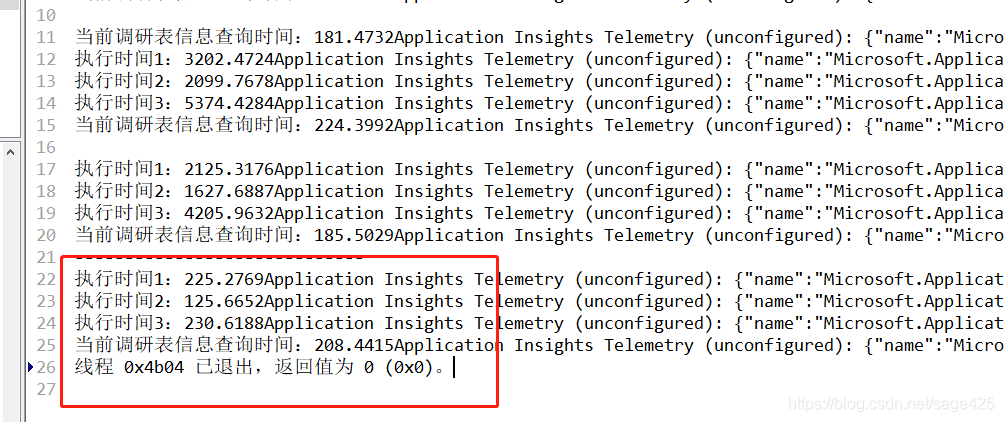
3. 两者对比性能测试结果:以下单位 都是毫秒 哦,红色框的 是调用优化后的 结果,这速度 贼溜。


 扫一扫
扫一扫


 4289
4289

 被折叠的 条评论
为什么被折叠?
被折叠的 条评论
为什么被折叠?
 到【灌水乐园】发言


