


一、Mybatis简介:
1、 Jdbc操作数据库存在的问题
频繁创建和打开、关闭数据连接,太消耗资源
Sql语句存在硬编码,不利于维护
Sql参数设置硬编码,不利于维护
结果集获取与遍历复杂,存在硬编码,不利于维护,期望能够查询后返回一个java对象
2、 Myabtis简介
MyBatis 本是apache的一个开源项目iBatis, 2010年这个项目由apache software foundation 迁移到了google code,并且改名为MyBatis ,2013年11月迁移到Github。
Mybatis是面向sql的持久层框架,他封装了jdbc访问数据库的过程,我们开发,只需专注于sql语句本身的拼装,其它复杂的过程全部可以交给mybatis去完成。
Mybatis将传统的jdbc的硬伤都解决了,复杂的传参、结果集处理、sql于接口代码的强耦合、及连接问题全部由mybatis封装自动完成,程序员只需要简单对应的配置映射文件即可,极大简化了持久层的开发过程!
Github:Releases · mybatis/mybatis-3 · GitHub
中文文档:https://mybatis.org/mybatis-3/zh/index.html
二、Mybatis的入门程序
1、入门程序的搭建流程
1、建maven项目
2、引入依赖jar坐标
<?xml version="1.0" encoding="UTF-8"?>

<project xmlns="http://maven.apache.org/POM/4.0.0" xmlns:xsi="http://www.w3.org/2001/XMLSchema-instance"
  xsi:schemaLocation="http://maven.apache.org/POM/4.0.0 http://maven.apache.org/xsd/maven-4.0.0.xsd">
  <modelVersion>4.0.0</modelVersion>

  <groupId>com.wu</groupId>
  <artifactId>maven</artifactId>
  <version>1.0-SNAPSHOT</version>

  <dependencies>
    <!--mybatis-->
    <dependency>
      <groupId>org.mybatis</groupId>
      <artifactId>mybatis</artifactId>
      <version>3.5.13</version>
    </dependency>
    <!--mysql-->
    <dependency>
      <groupId>com.mysql</groupId>
      <artifactId>mysql-connector-j</artifactId>
      <version>8.0.31</version>
    </dependency>
    <!--测试jar-->
    <dependency>
      <groupId>org.junit.jupiter</groupId>
      <artifactId>junit-jupiter</artifactId>
      <version>RELEASE</version>
      <scope>compile</scope>
    </dependency>
  </dependencies>

</project>
3、在resources下写数据源配置文件(db.properties)
driver=com.mysql.cj.jdbc.Driver
user=root
pwd=root
url=jdbc:mysql://127.0.0.1:3306/stu
4、在resources下写Mybatis核心配置文件 (mybatis-config.xml)
<?xml version="1.0" encoding="UTF-8" ?>
<!DOCTYPE configuration
        PUBLIC "-//mybatis.org//DTD Config 3.0//EN"
        "http://mybatis.org/dtd/mybatis-3-config.dtd">
<configuration>
    <!--加载  db.properties 到内存中 -->
    <properties resource="db.properties"></properties>
    <!--配置连接环境-->
    <environments default="dev">
        <environment id="dev">
            <transactionManager type="JDBC"></transactionManager>
            <!--<dataSource type="POOLED">
                <property name="driver" value="com.mysql.cj.jdbc.Driver"/>
                <property name="username" value="root"/>
                <property name="password" value="123456"/>
                <property name="url"
                          value="jdbc:mysql://127.0.0.1:3306/stu?serverTimezone=Asia/Shanghai"/>
            </dataSource>-->
            <dataSource type="POOLED">
                <property name="driver" value="${driver}"/>
                <property name="username" value="${user}"/>
                <property name="password" value="${pwd}"/>
                <property name="url" value="${url}"/>
            </dataSource>
        </environment>
    </environments>

    <!--读取加载 GoodsDao.xml 文件-->
    <mappers>
        <mapper resource="StudentDao.xml"></mapper>
    </mappers>
</configuration>
5、 创建一个与数据库对应的实体类对象(student)
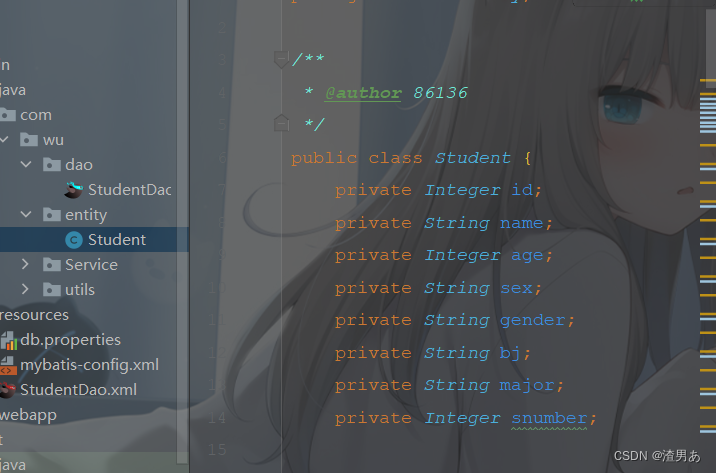
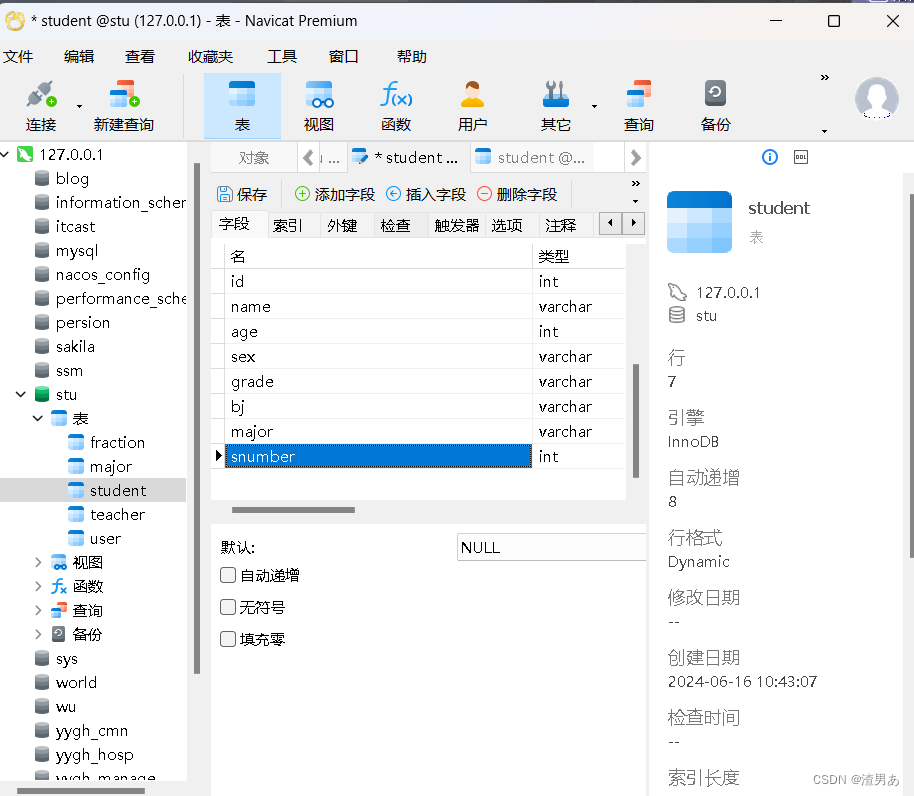
6、在dao包下创建一个接口
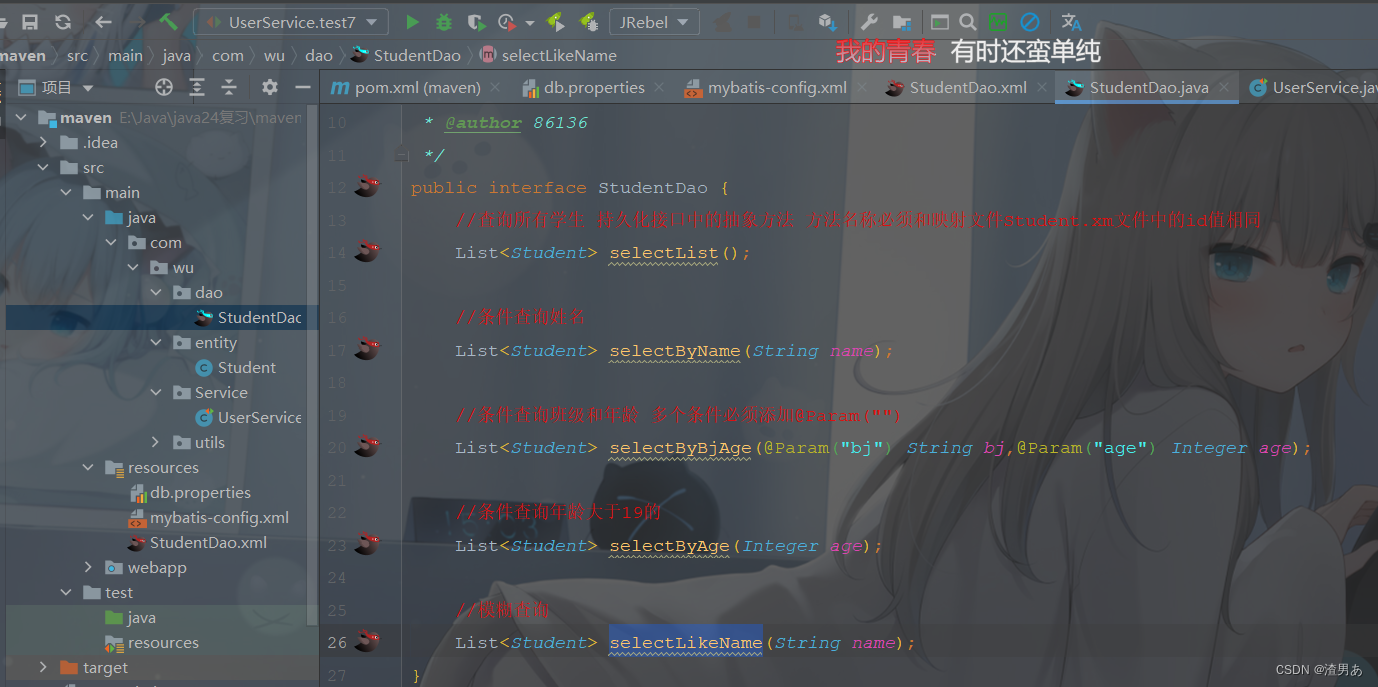
7、在resources下创建一个与dao层对应的接口名字后缀为xml
<?xml version="1.0" encoding="UTF-8" ?>
<!DOCTYPE mapper
PUBLIC "-//mybatis.org//DTD Mapper 3.0//EN"
"http://mybatis.org/dtd/mybatis-3-mapper.dtd">
<mapper namespace="com.wu.dao.StudentDao">
<!--查询所有学生-->
<select id="selectList" resultType="com.wu.entity.Student">
select * from student
</select>
<!--条件查询姓名-->
<select id="selectByName" resultType="com.wu.entity.Student">
select * from student where name = #{name}
</select>
<!--查询年龄大于-->
<!--< <(小于) --> <!--> >(大于) --> <!--<= <=(小于等于) -->
<select id="selectByAge" resultType="com.wu.entity.Student">
select * from student where age < #{age}
</select>
<!--查询班级和年龄-->
<select id="selectByBjAge" resultType="com.wu.entity.Student">
select * from student where bj = #{bj} and age = #{age}
</select>
<!--模糊查询--> <!--不能用字符拼接 要用拼接函数concat()-->
<select id="selectLikeName" resultType="com.wu.entity.Student">
select * from student where name like concat("%",#{nmae},"%")
</select>
</mapper>8、在service包下创建一个类测试是否能查询到数据库数据
public class UserService {
    @Test
    public void test1() throws IOException {
        //加载mybatis的配置文件到内存中
        InputStream resource = Resources.getResourceAsStream("mybatis-config.xml");
        //创建连接工厂
        SqlSessionFactory factory = new SqlSessionFactoryBuilder().build(resource);
        //通过连接工厂创建连接对象
        SqlSession session = factory.openSession();
        //执行sql语句
        List<Student> list = session.selectList("com.wu.dao.StudentDao.selectList");
        //打印结果
        list.forEach(System.out::println);
    }
        @Test
    public void test2() throws IOException {
        //加载mybatis的配置文件到内存
        InputStream inputStream = Resources.getResourceAsStream("mybatis-config.xml");
        //创建连接工厂
        SqlSessionFactory factory = new SqlSessionFactoryBuilder().build(inputStream);
        //通过连接工厂创建连接对象
        SqlSession session = factory.openSession();
        //获取dao接口 mybatis会动态代理去根据对应的xml文件创建实现
        StudentDao mapper = session.getMapper(StudentDao.class);
        //调用接口中的方法
        List<Student> list = mapper.selectList();
        //打印结果
        list.forEach(System.out::println);
         //提交事务
        //session.commit();
        //关闭事务
        session.close();
    }
}
注意:每次都需要加载mybatis配置文件和创建工厂所有我们可以提前出来创建一个工具类
9、在utils包下创建一个工具类(MybatisUtils)
package com.wu.utils;

import org.apache.ibatis.io.Resources;
import org.apache.ibatis.session.SqlSession;
import org.apache.ibatis.session.SqlSessionFactory;
import org.apache.ibatis.session.SqlSessionFactoryBuilder;
import java.io.IOException;
import java.io.InputStream;

/**
 * @author 86136
 */
public class MybatisUtils {
    private static SqlSessionFactory factory;
    //静态代码块 加载配置 创建连接工厂
    static {
        InputStream inputStream = null;
        try {
            inputStream = Resources.getResourceAsStream("mybatis-config.xml");
            factory = new SqlSessionFactoryBuilder().build(inputStream);
        } catch (IOException e) {
            e.printStackTrace();
        }
    }
    //获取连接对象
    public static SqlSession getSqlSession() {
        return factory.openSession();
    }
}
10、调用工具类来连接对象
package com.wu.Service;
import com.wu.dao.StudentDao;
import com.wu.entity.Student;
import com.wu.utils.MybatisUtils;
import org.apache.ibatis.io.Resources;
import org.apache.ibatis.session.SqlSession;
import org.apache.ibatis.session.SqlSessionFactory;
import org.apache.ibatis.session.SqlSessionFactoryBuilder;
import org.junit.jupiter.api.Test;
import java.io.IOException;
import java.io.InputStream;
import java.util.List;

/**
 * @author 86136
 */
public class UserService {
    @Test
    public void test3() throws IOException {
        SqlSession session = MybatisUtils.getSqlSession();
        StudentDao dao = session.getMapper(StudentDao.class);
        List<Student> list = dao.selectList();
        list.forEach(System.err::println);
    }


 扫一扫
扫一扫


 5331
5331

 被折叠的 条评论
为什么被折叠?
被折叠的 条评论
为什么被折叠?
 到【灌水乐园】发言


