




一、说明
由于篇幅限制此篇只显示3个仪表,剩余见下一篇
二、效果展示
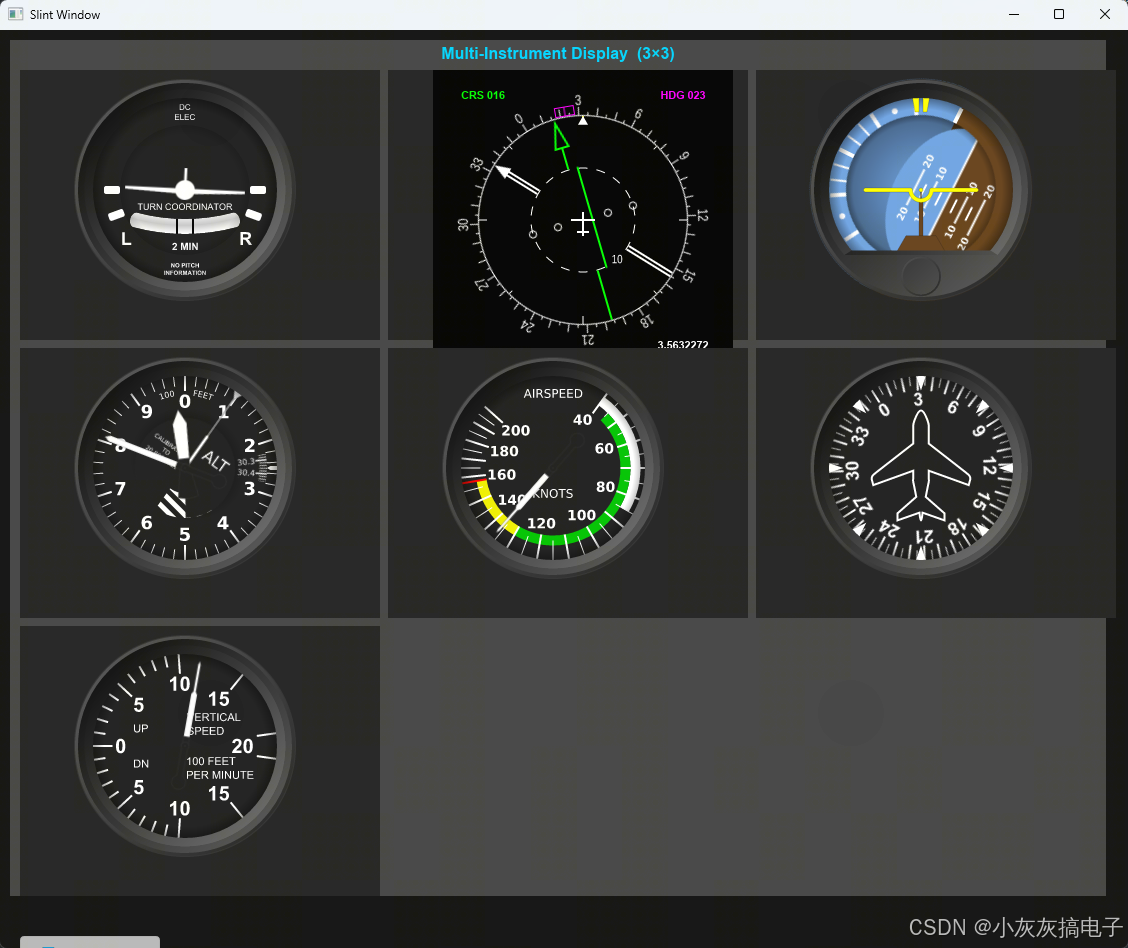
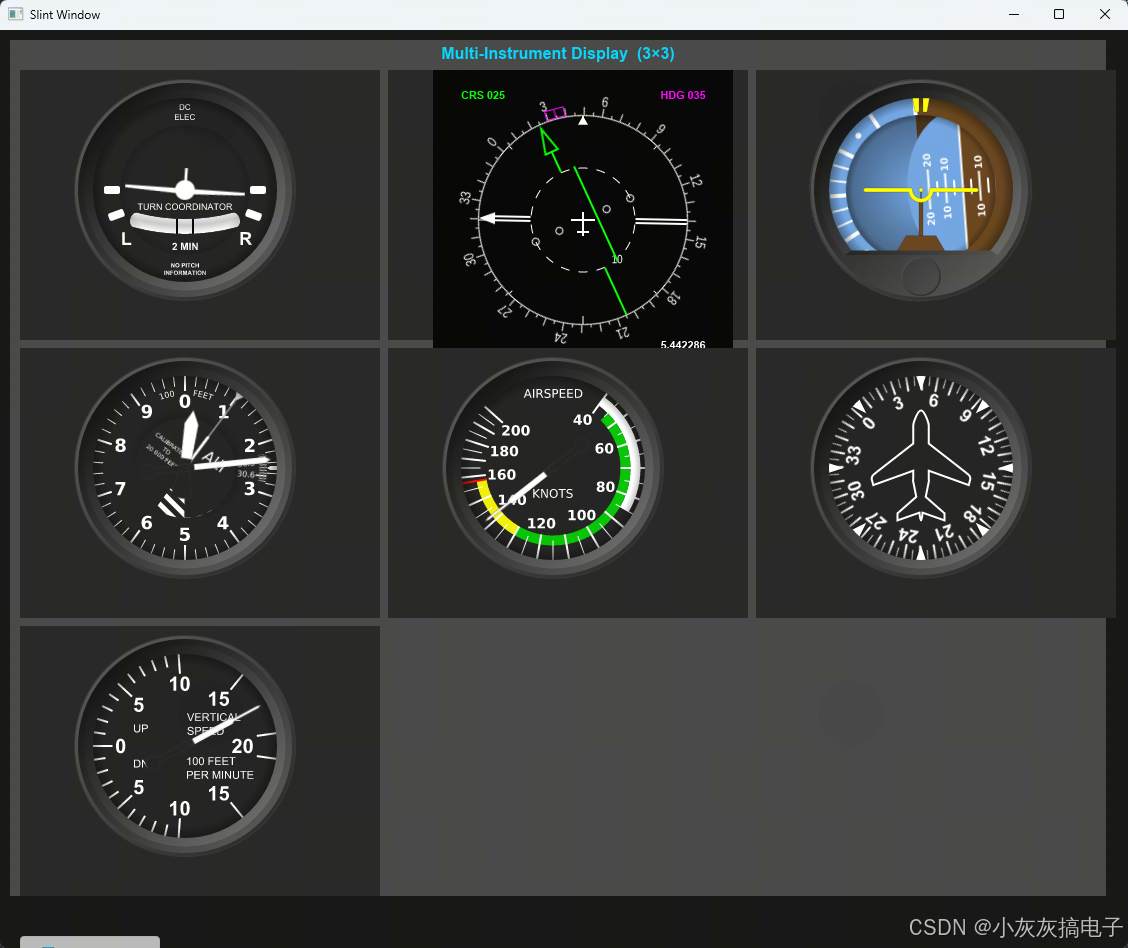
三、源码分享
1、工程结构
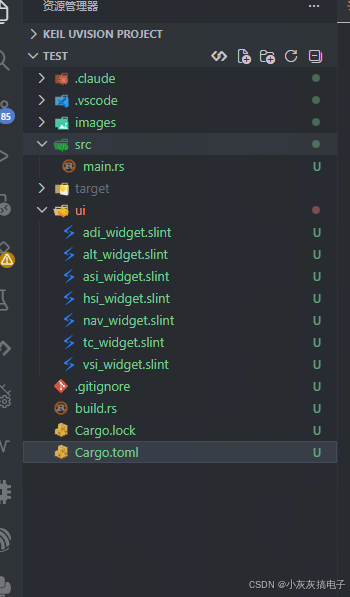
2、alt_widget.slint
// ALT Widget — matching alt_widget.py (240x240 scene)
export component AltWidget {
    in property<float> altitude: 0;
    in property<float> pressure: 28;
    in property<float> wScale: 1.0;

    property<float> h1Angle: altitude * 0.036;
    property<float> h2Angle: (altitude + 0.5 - Math.floor((altitude + 0.5) / 1000.0) * 1000.0) * 0.36;
    property<float> f1Angle: -(pressure - 28.0) * 100.0;
    property<float> f3Angle: altitude * 0.0036;

    // z=-50
    Image {
        x: 0; y: 0;
        width: 240px; height: 240px;
        transform-origin: { x: 120px, y: 120px };
        transform-rotation: f1Angle * 1deg;
        source: @image-url("../images/alt/alt_face_1.svg");
    }
    // z=-40
    Image {
        x: 0; y: 0;
        width: 240px; height: 240px;
        source: @image-url("../images/alt/alt_face_2.svg");
    }
    // z=-30
    Image {
        x: 0; y: 0;
        width: 240px; height: 240px;
        transform-origin: { x: 120px, y: 120px };
        transform-rotation: f3Angle * 1deg;
        source: @image-url("../images/alt/alt_face_3.svg");
    }
    // z=-20
    Image {
        x: 0; y: 0;
        width: 240px; height: 240px;
        transform-origin: { x: 120px, y: 120px };
        transform-rotation: h1Angle * 1deg;
        source: @image-url("../images/alt/alt_hand_1.svg");
    }
    // z=-10
    Image {
        x: 0; y: 0;
        width: 240px; height: 240px;
        transform-origin: { x: 120px, y: 120px };
        transform-rotation: h2Angle * 1deg;
        source: @image-url("../images/alt/alt_hand_2.svg");
    }
    // z=10
    Image {
        x: 0; y: 0;
        width: 240px; height: 240px;
        source: @image-url("../images/alt/alt_case.svg");
    }
}
3、asi_widget.slint
// ASI Widget — matching asi_widget.py (240x240 scene)
export component AsiWidget {
    in property<float> airspeed: 0;
    in property<float> wScale: 1.0;

    // Piecewise angle calculation (matching Python exactly)
    property<float> spd: Math.min(235, Math.max(0, airspeed));
    property<float> angle: spd < 40
        ? 0.9 * spd
        : spd < 70
            ? 36.0 + 1.8 * (spd - 40.0)
            : spd < 130
                ? 90.0 + 2.0 * (spd - 70.0)
                : spd < 160
                    ? 210.0 + 1.8 * (spd - 130.0)
                    : 264.0 + 1.2 * (spd - 160.0);

    // z=-20
    Image {
        x: 0; y: 0;
        width: 240px; height: 240px;
        source: @image-url("../images/asi/asi_face.svg");
    }
    // z=-10: hand rotates around center
    Image {
        x: 0; y: 0;
        width: 240px; height: 240px;
        transform-origin: { x: 120px, y: 120px };
        transform-rotation: angle * 1deg;
        source: @image-url("../images/asi/asi_hand.svg");
    }
    // z=10
    Image {
        x: 0; y: 0;
        width: 240px; height: 240px;
        source: @image-url("../images/asi/asi_case.svg");
    }
}
4、hsi_widget.slint
// HSI Widget — matching hsi_widget.py (240x240 scene)
export component HsiWidget {
    in property<float> heading: 0;
    in property<float> wScale: 1.0;

    // z=-20: face rotates with -heading
    Image {
        x: 0; y: 0;
        width: 240px; height: 240px;
        transform-origin: { x: 120px, y: 120px };
        transform-rotation: -heading * 1deg;
        source: @image-url("../images/hsi/hsi_face.svg");
    }
    // z=10
    Image {
        x: 0; y: 0;
        width: 240px; height: 240px;
        source: @image-url("../images/hsi/hsi_case.svg");
    }
}
5、main.slint
// Aircraft instruments — Rust + Slint
// 3×3 grid matching main.py, Auto Simulate only.

import { Button } from "std-widgets.slint";
import { AdiWidget } from "adi_widget.slint";
import { TcWidget } from "tc_widget.slint";
import { NavWidget } from "nav_widget.slint";
import { AltWidget } from "alt_widget.slint";
import { AsiWidget } from "asi_widget.slint";
import { HsiWidget } from "hsi_widget.slint";
import { VsiWidget } from "vsi_widget.slint";

export component MainWindow inherits Window {
    preferred-width: 1200px;
    preferred-height: 980px;
    background: #111;

    // ── grid cell size ──
    property<float> cellW: 360;
    property<float> cellH: 270;
    property<float> gridGap: 8;
    property<float> s240: Math.min(cellW, cellH) / 240;
    property<float> s300: Math.min(cellW, cellH) / 300;

    // ════════════════════════════════════════════════
    //  Grid View (3×3)
    // ════════════════════════════════════════════════
    Rectangle {
        x: 10px; y: 10px;
        width: (3 * cellW + 2 * gridGap) * 1px;
        height: (3 * cellH + 2 * gridGap + 30) * 1px;
        background: #444;

        Text {
            x: 0; y: 4px; width: 100%;
            text: "Multi-Instrument Display  (3×3)";
            color: #00d4ff; font-size: 16px; font-weight: FontWeight.bold;
            horizontal-alignment: center;
        }

        // ── row 0: TC  Nav  ADI ──
        Rectangle {
            x: 10px; y: 30px;
            width: cellW * 1px; height: cellH * 1px;
            background: #222;
            TcWidget {
                x: (parent.width - 240px * s240) / 2;
                y: (parent.height - 240px * s240) / 2;
                wScale: s240;
                turnRate: root.turnRate;
                slipSkid: root.slipSkid;
            }
        }
        Rectangle {
            x: (10 + cellW + gridGap) * 1px; y: 30px;
            width: cellW * 1px; height: cellH * 1px;
            background: #222;
            NavWidget {
                x: (parent.width - 300px * s300) / 2;
                y: (parent.height - 300px * s300) / 2;
                wScale: s300;
                heading: root.gridHeading;
                headingBug: root.gridHeadingBug;
                course: root.gridCourse;
                bearing: root.gridBearing;
                deviation: root.gridDeviation;
                distance: root.gridDistance;
                brgVisible: true;
                devVisible: true;
                distVisible: true;
                crsText: root.navCrsText;
                hdgText: root.navHdgText;
            }
        }
        Rectangle {
            x: (10 + 2 * (cellW + gridGap)) * 1px; y: 30px;
            width: cellW * 1px; height: cellH * 1px;
            background: #222;
            AdiWidget {
                x: (parent.width - 240px * s240) / 2;
                y: (parent.height - 240px * s240) / 2;
                wScale: s240;
                roll: root.roll;
                pitch: root.pitch;
            }
        }

        // ── row 1: ALT  ASI  HSI ──
        Rectangle {
            x: 10px; y: (30 + cellH + gridGap) * 1px;
            width: cellW * 1px; height: cellH * 1px;
            background: #222;
            AltWidget {
                x: (parent.width - 240px * s240) / 2;
                y: (parent.height - 240px * s240) / 2;
                wScale: s240;
                altitude: root.altitude;
                pressure: root.pressure;
            }
        }
        Rectangle {
            x: (10 + cellW + gridGap) * 1px; y: (30 + cellH + gridGap) * 1px;
            width: cellW * 1px; height: cellH * 1px;
            background: #222;
            AsiWidget {
                x: (parent.width - 240px * s240) / 2;
                y: (parent.height - 240px * s240) / 2;
                wScale: s240;
                airspeed: root.airspeed;
            }
        }
        Rectangle {
            x: (10 + 2 * (cellW + gridGap)) * 1px; y: (30 + cellH + gridGap) * 1px;
            width: cellW * 1px; height: cellH * 1px;
            background: #222;
            HsiWidget {
                x: (parent.width - 240px * s240) / 2;
                y: (parent.height - 240px * s240) / 2;
                wScale: s240;
                heading: root.heading;
            }
        }

        // ── row 2: VSI  empty  empty ──
        Rectangle {
            x: 10px; y: (30 + 2 * (cellH + gridGap)) * 1px;
            width: cellW * 1px; height: cellH * 1px;
            background: #222;
            VsiWidget {
                x: (parent.width - 240px * s240) / 2;
                y: (parent.height - 240px * s240) / 2;
                wScale: s240;
                climbRate: root.climbRate;
            }
        }
    }

    // ════════════════════════════════════════════════
    //  Auto Simulate button (bottom)
    // ════════════════════════════════════════════════
    Button {
        x: 20px;
        y: (30 + 3 * cellH + 2 * gridGap + 50) * 1px;
        width: 140px; height: 36px;
        text: { sim_running ? "■ Stop" : "▶ Auto Simulate" };
        clicked => { sim_running = !sim_running; }
    }

    // ════════════════════════════════════════════════
    //  Properties
    // ════════════════════════════════════════════════
    in-out property<float> pitch: 0;
    in-out property<float> roll: 0;
    in-out property<float> heading: 0;
    in-out property<float> altitude: 0;
    in-out property<float> airspeed: 0;
    in-out property<float> machNo: 0;
    in-out property<float> pressure: 0;
    in-out property<float> climbRate: 0;
    in-out property<float> aoa: 0;
    in-out property<float> sideslip: 0;
    in-out property<float> slipSkid: 0;
    in-out property<float> turnRate: 0;
    in-out property<float> devH: 0;
    in-out property<float> devV: 0;
    in-out property<float> gridHeading: 0;
    in-out property<float> gridHeadingBug: 0;
    in-out property<float> gridCourse: 0;
    in-out property<float> gridBearing: 0;
    in-out property<float> gridDeviation: 0;
    in-out property<float> gridDistance: 0;
    in property<float> asiS1Y: 0;
    in property<float> asiS2Y: 0;
    in property<float> altS1Y: 0;
    in property<float> altS2Y: 0;
    in property<float> altGY: 0;
    in property<float> vsiDelta: 0;
    in property<float> altVal1: 500;  in property<float> altVal2: 0;   in property<float> altVal3: -500;
    in property<float> altPosY1: 50;  in property<float> altPosY2: 125; in property<float> altPosY3: 200;
    in property<float> asiVal1: 60;  in property<float> asiPosY1: 35;
    in property<float> asiVal2: 40;  in property<float> asiPosY2: 65;
    in property<float> asiVal3: 20;  in property<float> asiPosY3: 95;
    in property<float> asiVal4: 0;   in property<float> asiPosY4: 125;
    in property<float> asiVal5: -20; in property<float> asiPosY5: 155;
    in property<float> asiVal6: -40; in property<float> asiPosY6: 185;
    in property<float> asiVal7: -60; in property<float> asiPosY7: 215;
    in property<string> spdText: "000";
    in property<string> machText: ".000";
    in property<string> altText: "     0";
    in property<string> hdgText: "000";
    in property<string> pressText: "STD";
    in property<string> navCrsText: "CRS 000";
    in property<string> navHdgText: "HDG 000";
    in-out property<int> pressureUnit: 0;
    callback cyclePressureUnit();
    in-out property<bool> sim_running: false;
    callback tick();
}
6、main.rs
slint::include_modules!();

use std::time::Duration;

// ── pressure unit ──
#[derive(Clone, Copy, PartialEq)]
enum PressureUnit { Std = 0, Mb = 1, In = 2 }

impl PressureUnit {
    fn from_i32(v: i32) -> Self {
        match v { 1 => PressureUnit::Mb, 2 => PressureUnit::In, _ => PressureUnit::Std }
    }
    fn next(self) -> Self {
        match self {
            PressureUnit::Std => PressureUnit::Mb,
            PressureUnit::Mb => PressureUnit::In,
            PressureUnit::In => PressureUnit::Std,
        }
    }
}

// ── wrap helpers ──
fn wrap_s1(val: f32) -> f32 { let mut v = val; while v > 374.5 { v -= 600.0; } v }
fn wrap_s2(val: f32) -> f32 { let mut v = val; while v > 674.5 { v -= 600.0; } v }
fn wrap_ground(val: f32) -> f32 { val.clamp(0.0, 100.0) }

// ── VSI delta ──
fn vsi_delta(cr: f32) -> f32 {
    let cr = cr.clamp(-6.3, 6.3);
    let a = cr.abs();
    let d = if a <= 1.0 { 30.0 * a }
        else if a <= 2.0 { 30.0 + 20.0 * (a - 1.0) }
        else { 50.0 + 5.0 * (a - 2.0) };
    if cr < 0.0 { -d } else { d }
}

// ── text formatters ──
fn format_airspeed(s: f32) -> String { format!("{:03}", s.clamp(0.0, 9999.0).round() as i64 % 10000) }
fn format_mach(m: f32) -> String {
    let m = m.clamp(0.0, 99.9);
    if m < 1.0 { format!(".{:03}", (m * 1000.0).round() as i64) }
    else if m < 10.0 { format!("{:.2}", m) }
    else { format!("{:.1}", m) }
}
fn format_altitude(a: f32) -> String { format!("{:5}", a.clamp(0.0, 99999.0).round() as i64) }
fn format_pressure(p: f32, u: PressureUnit) -> String {
    match u {
        PressureUnit::Std => "  STD  ".into(),
        PressureUnit::Mb => format!("{} MB", p.round() as i64),
        PressureUnit::In => format!("{:.2} IN", p),
    }
}
fn format_hdg(h: f32) -> String {
    let mut h = h; while h < 0.0 { h += 360.0; } while h > 360.0 { h -= 360.0; }
    format!("{:03}", (h + 0.5).floor() as i64 % 1000)
}
fn format_nav_crs(c: f32) -> String {
    let mut c = c; while c < 0.0 { c += 360.0; } while c > 360.0 { c -= 360.0; }
    format!("CRS {:03}", (c + 0.5).floor() as i64 % 1000)
}
fn format_nav_hdg(h: f32) -> String {
    let mut h = h; while h < 0.0 { h += 360.0; } while h > 360.0 { h -= 360.0; }
    format!("HDG {:03}", (h + 0.5).floor() as i64 % 1000)
}

// ── altitude label cycling ──
fn update_alt_labels(w: &slint::Weak<MainWindow>) {
    let Some(m) = w.upgrade() else { return };
    let alt = m.get_altitude().clamp(0.0, 99999.0);
    let base = ((alt + 0.5).floor() as i64 / 500) * 500;
    let (mut v1, mut v2, mut v3) = (base as f32 + 500.0, base as f32, base as f32 - 500.0);
    let mut delta = 0.15 * alt;
    while delta > 37.5 { delta -= 75.0; }
    if delta < 0.0 && alt > v2 { v1 += 500.0; v2 += 500.0; v3 += 500.0; }
    m.set_altVal1(v1); m.set_altVal2(v2); m.set_altVal3(v3);
    m.set_altPosY1(50.0 + delta); m.set_altPosY2(125.0 + delta); m.set_altPosY3(200.0 + delta);
}

// ── airspeed label cycling ──
fn update_asi_labels(w: &slint::Weak<MainWindow>) {
    let Some(m) = w.upgrade() else { return };
    let spd = m.get_airspeed().clamp(0.0, 9999.0);
    let base = ((spd + 0.5).floor() as i64 / 20) * 20;
    let mut vals = [0.0; 7];
    for i in 0..7 { vals[i] = (base + (60 - i as i64 * 20)) as f32; }
    let mut delta = 1.5 * spd;
    while delta > 15.0 { delta -= 30.0; }
    if delta < 0.0 && spd > vals[3] { for v in &mut vals { *v += 20.0; } }
    let by = [35.0, 65.0, 95.0, 125.0, 155.0, 185.0, 215.0];
    m.set_asiVal1(vals[0]); m.set_asiPosY1(by[0] + delta);
    m.set_asiVal2(vals[1]); m.set_asiPosY2(by[1] + delta);
    m.set_asiVal3(vals[2]); m.set_asiPosY3(by[2] + delta);
    m.set_asiVal4(vals[3]); m.set_asiPosY4(by[3] + delta);
    m.set_asiVal5(vals[4]); m.set_asiPosY5(by[4] + delta);
    m.set_asiVal6(vals[5]); m.set_asiPosY6(by[5] + delta);
    m.set_asiVal7(vals[6]); m.set_asiPosY7(by[6] + delta);
}

fn update_display(w: &slint::Weak<MainWindow>) {
    let Some(m) = w.upgrade() else { return };
    let airspeed = m.get_airspeed();
    let altitude = m.get_altitude();
    let heading = m.get_heading();
    m.set_asiS1Y(wrap_s1(1.5 * airspeed.max(0.0).min(9999.0)));
    m.set_asiS2Y(wrap_s2(1.5 * airspeed.max(0.0).min(9999.0)));
    m.set_altS1Y(wrap_s1(0.150 * altitude.max(0.0).min(99999.0)));
    m.set_altS2Y(wrap_s2(0.150 * altitude.max(0.0).min(99999.0)));
    m.set_altGY(wrap_ground(0.150 * altitude.max(0.0).min(99999.0)));
    m.set_vsiDelta(vsi_delta(m.get_climbRate()));
    update_alt_labels(&w);
    update_asi_labels(&w);
    m.set_spdText(format_airspeed(airspeed).into());
    m.set_machText(format_mach(m.get_machNo()).into());
    m.set_altText(format_altitude(altitude).into());
    m.set_hdgText(format_hdg(heading).into());
    m.set_pressText(format_pressure(m.get_pressure(), PressureUnit::from_i32(m.get_pressureUnit())).into());
    m.set_navCrsText(format_nav_crs(m.get_gridCourse()).into());
    m.set_navHdgText(format_nav_hdg(m.get_gridHeadingBug()).into());
}

fn main() -> Result<(), Box<dyn std::error::Error>> {
    let main_window = MainWindow::new()?;
    update_display(&main_window.as_weak());

    // pressure unit cycle
    main_window.on_cyclePressureUnit({
        let w = main_window.as_weak();
        move || {
            let Some(m) = w.upgrade() else { return };
            m.set_pressureUnit(PressureUnit::from_i32(m.get_pressureUnit()).next() as i32);
            update_display(&w);
        }
    });

    // simulation state
    let sim_time = std::cell::Cell::new(0.0f32);

    main_window.on_tick({
        let w = main_window.as_weak();
        move || {
            let Some(m) = w.upgrade() else { return };
            if !m.get_sim_running() { return; }
            let t = sim_time.get() + 0.01;
            sim_time.set(t);

            m.set_roll(180.0 * (t / 10.0).sin());
            m.set_pitch(90.0 * (t / 20.0).sin());
            m.set_heading(360.0 * (t / 40.0).sin());
            m.set_slipSkid(1.0 * (t / 10.0).sin());
            m.set_turnRate((7.0 * (t / 10.0).sin()) / 6.0);
            m.set_devH(1.0 * (t / 20.0).sin());
            m.set_devV(1.0 * (t / 20.0).sin());

            let aspeed = 125.0 * (t / 40.0).sin() + 125.0;
            let alt = 9000.0 * (t / 40.0).sin() + 9000.0;
            let cr = 650.0 * (t / 20.0).sin();
            let press = 2.0 * (t / 20.0).sin() + 30.0;

            m.set_airspeed(aspeed);
            m.set_machNo(aspeed / 650.0);
            m.set_altitude(alt);
            m.set_climbRate(cr / 100.0);
            m.set_pressure(press);

            // grid nav simulation (matching main.py)
            let gh = 360.0 * (t / 40.0).sin();
            m.set_gridHeading(gh);
            m.set_gridHeadingBug(gh * 0.7);
            m.set_gridCourse(gh * 0.5);
            m.set_gridBearing(-360.0 * (t / 50.0).sin());
            m.set_gridDeviation(1.0 * (t / 20.0).sin());
            m.set_gridDistance((99.0 * (t / 100.0).sin()).abs());

            update_display(&w);
        }
    });

    let timer = slint::Timer::default();
    timer.start(slint::TimerMode::Repeated, Duration::from_millis(10), {
        let w = main_window.as_weak();
        move || { if let Some(m) = w.upgrade() { m.invoke_tick(); } }
    });

    eprintln!("Instruments started — View:Grid = 3x3 layout, View:PFD = combined display");
    main_window.run()?;
    Ok(())
}
7、Cargo.toml
[package]
name = "chart"
version = "0.1.0"
edition = "2024"

[dependencies]
slint = "1.16.1"
[build-dependencies]
slint-build = "1.16.1"
8、完整工程和资源下载
https://download.csdn.net/download/qq_15181569/93270485
四、Slint详解
Slint 是一个用于构建原生用户界面的声明式 GUI 框架,它采用 Rust 语言编写,并支持 C++、JavaScript 等多种语言绑定。本项目的仪表盘界面正是基于 Slint 实现的,下面将从几个方面详细解析 Slint 在本项目中的应用。
1、 Slint 的核心特性
1.1 、声明式语法
Slint 使用 .slint 域特定语言(DSL)来描述 UI 的结构、样式和行为。这种声明式语法让界面布局和逻辑分离更清晰,例如本项目中的 main.slint 文件:
export component MainWindow inherits Window {
    preferred-width: 1200px;
    preferred-height: 980px;
    background: #111;

    // 属性定义
    property<float> cellW: 360;
    property<float> cellH: 270;

    // 回调定义
    callback tick();
}
1.2、 响应式属性系统
Slint 的属性系统是响应式的,当属性值发生变化时,依赖该属性的 UI 元素会自动更新。这在仪表盘中尤为重要:
// 在 tc_widget.slint 中
export component TcWidget {
    in property<float> turnRate: 0;
    in property<float> slipSkid: 0;

    // 计算属性,自动响应 turnRate 的变化
    property<float> markAngle: (turnRate / 3.0) * 20.0;

    Image {
        transform-rotation: markAngle * 1deg;  // 自动更新旋转角度
    }
}
1.3 、组件化架构
Slint 支持创建可复用的自定义组件,本项目中的每个仪表都是独立的组件:
// 定义 ADI 组件
export component AdiWidget {
    in property<float> roll: 0;
    in property<float> pitch: 0;
    in property<float> wScale: 1.0;

    // 组件内部实现...
}

// 在 main.slint 中复用
import { AdiWidget } from "adi_widget.slint";

AdiWidget {
    roll: root.roll;
    pitch: root.pitch;
    wScale: s240;
}
2、本项目中的 Slint 实践
2.1 、分层渲染与 Z 轴顺序
航空仪表通常由多个图层叠加而成,Slint 通过 z 属性控制渲染顺序:
// tc_widget.slint 中的分层示例
Image { /* z=-70: 背景层 */ }
Image { /* z=-60: 球体层,随 slipSkid 旋转 */ }
Image { /* z=-50: 刻度盘层 */ }
Image { /* z=-40: 指针层 */ }
Image { /* z=-30: 标记层,随 turnRate 旋转 */ }
Image { /* z=10: 外壳层 */ }
2.2 、坐标变换系统
Slint 提供了完整的 2D 变换支持,包括平移、旋转、缩放:
// 旋转变换(以中心点为原点)
Image {
    transform-origin: { x: 120px, y: 120px };
    transform-rotation: -roll * 1deg;  // 逆时针旋转
}

// 平移变换(基于 pitch 和 roll 计算)
property<float> fdx: 1.7 * pitch * Math.sin(roll * 1deg);
property<float> fdy: 1.7 * pitch * Math.cos(roll * 1deg);

Image {
    x: fdx * 1px;  // 水平偏移
    y: fdy * 1px;  // 垂直偏移
}
2.3 、属性绑定与数据流
本项目展示了从 Rust 后端到 Slint 前端的数据流:
// Rust 端更新属性
main_window.set_roll(180.0 * (t / 10.0).sin());
main_window.set_pitch(90.0 * (t / 20.0).sin());

// Slint 端响应更新
export component MainWindow {
    in-out property<float> pitch: 0;
    in-out property<float> roll: 0;

    // UI 自动更新
    AdiWidget {
        roll: root.roll;
        pitch: root.pitch;
    }
}
2.4、 网格布局系统
main.slint 中实现了复杂的 3×3 网格布局:
// 网格参数
property<float> cellW: 360;
property<float> cellH: 270;
property<float> gridGap: 8;

// 第一行布局计算
Rectangle {
    x: 10px; y: 30px;
    width: cellW * 1px; height: cellH * 1px;
}
Rectangle {
    x: (10 + cellW + gridGap) * 1px; y: 30px;
    width: cellW * 1px; height: cellH * 1px;
}
3、Slint 与 Rust 的集成
3.1、 模块包含机制
通过 slint::include_modules!() 宏将 .slint 文件编译为 Rust 模块:
// main.rs 开头
slint::include_modules!();  // 包含所有 .slint 文件中定义的组件
3.2 、类型安全的数据传递
Slint 提供了类型安全的属性访问接口:
// 获取属性值
let airspeed = m.get_airspeed();
let altitude = m.get_altitude();

// 设置属性值
m.set_roll(180.0 * (t / 10.0).sin());
m.set_pitch(90.0 * (t / 20.0).sin());

// 枚举类型的处理
enum PressureUnit { Std = 0, Mb = 1, In = 2 }
m.set_pressureUnit(PressureUnit::Mb as i32);
3.3、 回调与事件处理
Slint 支持从 UI 触发 Rust 回调:
// 在 .slint 中定义回调
callback cyclePressureUnit();
Button {
    text: "切换单位";
    clicked => { root.cyclePressureUnit(); }
}
// 在 Rust 中处理回调
main_window.on_cyclePressureUnit({
    let w = main_window.as_weak();
    move || {
        let Some(m) = w.upgrade() else { return };
        // 处理单位切换逻辑
        m.set_pressureUnit(new_unit as i32);
    }
});
3.4 、定时器与动画
通过 Slint 的定时器实现平滑的仪表动画:
let timer = slint::Timer::default();
timer.start(slint::TimerMode::Repeated, Duration::from_millis(10), {
    let w = main_window.as_weak();
    move || {
        if let Some(m) = w.upgrade() {
            m.invoke_tick();  // 触发 Slint 端的 tick 回调
        }
    }
});
4、性能优化技巧
4.1、 属性计算优化
将复杂计算放在 Rust 端,减少 Slint 端的计算负担:
// Rust 端预先计算
fn vsi_delta(cr: f32) -> f32 {
    let cr = cr.clamp(-6.3, 6.3);
    let a = cr.abs();
    let d = if a <= 1.0 { 30.0 * a }
        else if a <= 2.0 { 30.0 + 20.0 * (a - 1.0) }
        else { 50.0 + 5.0 * (a - 2.0) };
    if cr < 0.0 { -d } else { d }
}

// 设置到 Slint 属性
m.set_vsiDelta(vsi_delta(m.get_climbRate()));
4.2、 图片资源管理
使用相对路径引用 SVG 资源,Slint 会在编译时处理:
Image {
    source: @image-url("../images/tc/tc_back.svg");  // 编译时解析路径
}
4.3 、条件渲染
通过 visible 属性控制元素的显示/隐藏,避免不必要的渲染:
Image {
    visible: devVisible;  // 根据属性决定是否渲染
    source: @image-url("../images/nav/nav_dev_scale.svg");
}
5、 开发工作流
5.1、 构建配置
Cargo.toml 中的 Slint 依赖配置:
[dependencies]
slint = "1.16.1"  # 运行时库

[build-dependencies]
slint-build = "1.16.1"  # 构建时编译 .slint 文件
5.2 、热重载开发
Slint 支持热重载,修改 .slint 文件后无需重新编译整个项目:
# 在开发模式下运行,启用热重载
cargo run --features slint/enable-hot-reload
5.3 、调试技巧
- 使用
eprintln!在控制台输出调试信息 - 通过 Slint 的
debug()函数在 UI 中显示调试信息 - 利用 Rust 的类型系统在编译时捕获错误
6、与其他 GUI 框架的对比
| 特性 | Slint | GTK | Qt | Tauri |
|---|---|---|---|---|
| 语言 | Rust(主) | C | C++ | Web 技术 |
| 渲染 | 原生 | 原生 | 原生 | WebView |
| 包大小 | 较小 | 中等 | 较大 | 中等 |
| 学习曲线 | 中等 | 陡峭 | 中等 | 平缓 |
| 性能 | 优秀 | 优秀 | 优秀 | 良好 |
| 跨平台 | 是 | 是 | 是 | 是 |
7、 总结
本项目展示了 Slint 在复杂仪表盘应用中的强大能力:
- 声明式 UI:通过
.slint文件清晰描述界面结构 - 响应式系统:属性变化自动触发 UI 更新
- 高性能:原生渲染,无虚拟 DOM 开销
- 类型安全:Rust 编译器保证前后端类型一致
- 跨平台:支持 Windows、macOS、Linux、WebAssembly
Slint 特别适合需要高性能、原生外观和复杂动画的应用,如仪表盘、工业控制界面、嵌入式设备界面等。通过本项目的实践,可以看到 Slint 如何将 Rust 的系统级性能与现代化的 UI 开发体验完美结合。




 扫一扫
扫一扫


 3655
3655

 被折叠的 条评论
为什么被折叠?
被折叠的 条评论
为什么被折叠?
 到【灌水乐园】发言


