VisProg解析:根据自然语言指令解决复杂视觉任务

CVPR 2023 Best Paper|VISPROG:以神经符号方式将人工智能推向更广泛、更复杂的任务领域 CVPR 2023年最佳论文:Visual Programming: Compositional visual reasoning without training,代码已开源 阅读详情

VisProg:根据自然语言指令解决复杂视觉任务

1. 介绍

VisProg 是一种神经符号系统,可以根据自然语言指令解决复杂的组合视觉任务。VisProg 使用 GPT3 的上下文学习能力来生成 Python 程序,然后执行这些程序以获得解决方案和全面且可解释的基本原理。生成的程序的每一行都可以调用几个现成的计算机视觉模型、图像处理例程或Python函数之一来产生可由程序的后续部分使用的中间输出。

相关论文:Paper for VisProg

2. 安装和配置 VisProg

首先,如果你的系统上还没有安装 Conda,请前往 Anaconda 安装适合你的平台的 Conda 工具。

然后,使用以下命令安装和配置 VisProg:

# 克隆 VisProg 仓库
git clone https://github.com/allenai/visprog.git

# 切换到仓库目录
cd visprog

# 创建 conda 环境并安装依赖
conda env create -f environment.yaml

# 激活 VisProg 环境
conda activate visprog

3. 使用VisProg

在VSCODE中打开文件,填入对应的OpenAI密钥
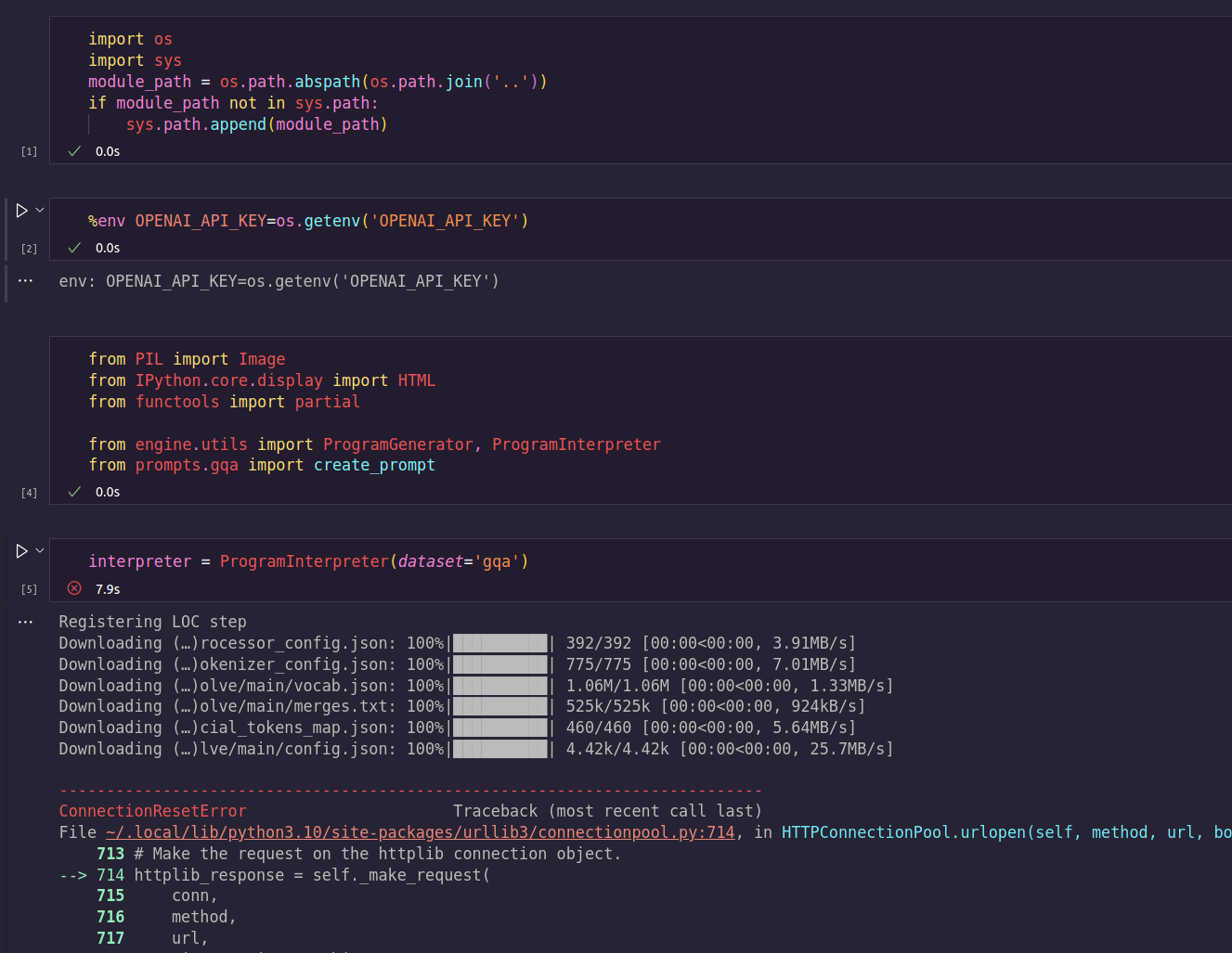
在这里插入图片描述
笔者在测试时Conda环境有相关依赖需要补充安装:
在visprog环境下执行

pip install appdirs
pip install ipywidgets

4. VisProg 解读

VisProg的关键组成部分是一系列名为interpreter的类,这些类在visprog/engine/step_interpreters.py文件中定义。

例如,EvalInterpreter 类解析和执行 ‘EVAL’ 步骤。它首先使用 parse 方法来解析步骤,然后使用 execute 方法来执行该步骤。如果 inspect 参数为 True,execute 方法还会生成描述该步骤的 HTML 字符串。

class EvalInterpreter():
    step_name = 'EVAL'

    def __init__(self):
        print(f'Registering {self.step_name} step')

# 解析步骤
    def parse(self,prog_step):
        parse_result = parse_step(prog_step.prog_str)
        step_name = parse_result['step_name']
        output_var = parse_result['output_var']
        step_input = eval(parse_result['args']['expr'])
        assert(step_name==self.step_name)
        return step_input, output_var

# 生成 HTML 字符串    
    def html(self,eval_expression,step_input,step_output,output_var):
        eval_expression = eval_expression.replace('{','').replace('}','')
        step_name = html_step_name(self.step_name)
        var_name = html_var_name(output_var)
        output = html_output(step_output)
        expr = html_arg_name('expression')
        return f"""<div>{var_name}={step_name}({expr}="{eval_expression}")={step_name}({expr}="{step_input}")={output}</div>"""

# 执行步骤
    def execute(self,prog_step,inspect=False):
        step_input, output_var = self.parse(prog_step)
        prog_state = dict()
        for var_name,var_value in prog_step.state.items():
            if isinstance(var_value,str):
                if var_value in ['yes','no']:
                    prog_state[var_name] = var_value=='yes'
                elif var_value.isdecimal():
                    prog_state[var_name] = var_value
                else:
                    prog_state[var_name] = f"'{var_value}'"
            else:
                prog_state[var_name] = var_value
        
        eval_expression = step_input

        if 'xor' in step_input:
            step_input = step_input.replace('xor','!=')

        step_input = step_input.format(**prog_state)
        step_output = eval(step_input)
        prog_step.state[output_var] = step_output
        if inspect:
            html_str = self.html(eval_expression, step_input, step_output, output_var)
            return step_output, html_str

        return step_output

Breadcrumbsvisprog/engine /step_interpreters.py中的parse_step函数从步骤字符串中解析出步骤名称、输出变量和参数。它使用了 Python 的 tokenize 库来解析步骤字符串。

def parse_step(step_str,partial=False):
    tokens = list(tokenize.generate_tokens(io.StringIO(step_str).readline))
    output_var = tokens[0].string
    step_name = tokens[2].string
    parsed_result = dict(
        output_var=output_var,
        step_name=step_name)
    if partial:
        return parsed_result

    arg_tokens = [token for token in tokens[4:-3] if token.string not in [',','=']]
    num_tokens = len(arg_tokens) // 2
    args = dict()
    for i in range(num_tokens):
        args[arg_tokens[2*i].string] = arg_tokens[2*i+1].string
    parsed_result['args'] = args
    return parsed_result

5. Notebooks 介绍

VisProg 还包含一些 Jupyter 笔记本,用于展示其在不同任务上的应用:

  • notebooks/ok_det.ipynb:这个 notebook 与 “外部知识对象标记(Outside Knowledge Object Tagging)” 相关。它包含了一些用于通过自然语言处理技术对外部知识对象进行标注的代码和示例。

  • notebooks/image_editing.ipynb:这个 notebook 与 “自然语言图像编辑(Natural Language Image Editing)” 相关。它包含了一些用于根据自然语言指令对图像进行编辑和处理的代码和示例。

  • notebooks/nlvr.ipynb:这个 notebook 与 “自然语言视觉推理(Natural Language Visual Reasoning)” 相关。它包含了一些用于处理自然语言与图像之间的推理任务的代码和示例。

  • notebooks/gqa.ipynb:这个 notebook 与 “视觉问答(Visual Question Answering)” 相关。它包含了一些用于处理视觉问答任务的代码和示例。

整体流程梳理

此处以 notebooks/gqa.ipynb为例子,梳理VisProg的程序整体流程:

# 导入必要的库
import os
import sys
from PIL import Image
from IPython.core.display import HTML
from functools import partial

# 添加上级目录到系统路径,使得可以导入在上级目录中的模块
module_path = os.path.abspath(os.path.join('..'))
if module_path not in sys.path:
    sys.path.append(module_path)
    
# 设置OpenAI Key环境变量
%env OPENAI_API_KEY=<Enter you key here> 

# 从自定义模块导入函数和类
from engine.utils import ProgramGenerator, ProgramInterpreter
from prompts.gqa import create_prompt

# 创建ProgramGenerator和ProgramInterpreter实例对象
# 这些对象将被用于,生成程序和解释程序
# partial方法调用create_prompt生成测试用的Prompts,这些prompts作为generator的输入
interpreter = ProgramInterpreter(dataset='gqa')
prompter = partial(create_prompt,method='all')
generator = ProgramGenerator(prompter=prompter)

# 读取一张图片,并将其大小缩放为合适的大小,并转换为 RGB 格式
# 将要进行推理的图像加载到内存中,以便在后续的操作中使用
image = Image.open('../assets/camel1.png')
image.thumbnail((640,640),Image.Resampling.LANCZOS)
init_state = dict(IMAGE=image.convert('RGB'))
image

# 指定自然语言问题/陈述/指令:定义你的自然语言问题、陈述或指令,这将作为输入提供给程序生成器以生成相应的程序
question = "How many people or animals are in the image?"
# 使用程序生成器对象,将指定的问题/陈述/指令作为输入,生成相应的程序。
prog,_ = generator.generate(dict(question=question))
print(prog)
# 利用程序解释器对象,对生成的程序进行解释和执行,返回结果
result, prog_state, html_str = interpreter.execute(prog,init_state,inspect=True)

# 输出程序的结果
result

# 输出HTML字符串
# 将返回的结果以及执行过程的可视化(比如执行追踪)展示出来,以便更好地理解和分析程序的执行情况
# 该做法也是OpenAI Code Interpreter的做法,使用可视化增强程序的可解释性
HTML(html_str)

对于其中出现的ProgramInterpreter.execute,create_prompt,ProgramGenerator.generate进一步解释如下:

visprog/engine/utils.py/ProgramInterpreter
class ProgramInterpreter:
    def __init__(self, dataset='nlvr'):
        """
        初始化 ProgramInterpreter 类的实例。

        参数:
        dataset (str): 一个字符串,用来注册程序步骤的解释器。

        属性:
        step_interpreters (dict): 字典,存储了与每个程序步骤名称对应的解释器。
        """
        # .step_interpreter中包含了各类图像处理的解释器
        self.step_interpreters = register_step_interpreters(dataset)

    def execute_step(self, prog_step, inspect):
        """
        执行一个程序步骤,并返回结果。

        参数:
        prog_step (Program): 需要执行的程序步骤。
        inspect (bool): 是否需要返回可供检查的结果。

        返回值:
        根据 inspect 的值,可能会返回步骤的输出结果,也可能会返回一个包含步骤的输出结果和 HTML 字符串的元组。
        """
        # 解析程序步骤的字符串形式,获取步骤名称
        step_name = parse_step(prog_step.prog_str, partial=True)['step_name']
        print(step_name)
        # 从步骤解释器字典中获取对应的解释器,然后用它执行程序步骤
        return self.step_interpreters[step_name].execute(prog_step, inspect)

    def execute(self, prog, init_state, inspect=False):
        """
        执行一个完整的程序,并返回结果。

        参数:
        prog (str or Program): 需要执行的程序,可以是字符串形式,也可以是 Program 类的实例。
        init_state (dict): 程序的初始状态。
        inspect (bool): 是否需要返回可供检查的结果。

        返回值:
        根据 inspect 的值,可能会返回程序的输出结果和状态,也可能会返回一个包含程序的输出结果、状态和 HTML 字符串的元组。
        """
        # 如果程序是字符串形式,则转化为 Program 类的实例
        if isinstance(prog, str):
            prog = Program(prog, init_state)
        else:
            assert(isinstance(prog, Program))

        # 将程序的每个指令都转化为 Program 类的实例
        prog_steps = [Program(instruction, init_state=prog.state) \
            for instruction in prog.instructions]

        html_str = '<hr>'
        for prog_step in prog_steps:
            if inspect:
                # 如果需要返回可供检查的结果,则执行每个步骤时都返回步骤的输出结果和 HTML 字符串
                step_output, step_html = self.execute_step(prog_step, inspect)
                html_str += step_html + '<hr>'
            else:
                # 否则,只返回步骤的输出结果
                step_output = self.execute_step(prog_step, inspect)

        # 返回程序的结果
        if inspect:
            return step_output, prog.state, html_str

        return step_output, prog.state

visprog/engine/utils.py/ProgramGenerator
class ProgramGenerator():
    def __init__(self, prompter, temperature=0.7, top_p=0.5, prob_agg='mean'):
        """
        初始化 ProgramGenerator 类的实例。

        参数:
        prompter (function): 函数,用于生成 prompt。
        temperature (float): 控制生成的文本的随机性的参数,值越高,结果越随机。
        top_p (float): 控制生成的文本的多样性的参数,值越高,结果越多样。
        prob_agg (str): 用于计算输出文本概率的聚合函数,可以是 'mean' 或 'sum'。

        属性:
        prompter (function): 存储输入的 prompter。
        temperature (float): 存储输入的 temperature。
        top_p (float): 存储输入的 top_p。
        prob_agg (str): 存储输入的 prob_agg。
        """
        openai.api_key = os.getenv("OPENAI_API_KEY")
        self.prompter = prompter
        self.temperature = temperature
        self.top_p = top_p
        self.prob_agg = prob_agg

    def compute_prob(self, response):
        """
        计算生成的文本的概率。

        参数:
        response (openai.completion_v1.Completion): OpenAI API 返回的响应。

        返回值:
        float: 生成的文本的概率。
        """
        eos = ''
        for i, token in enumerate(response.choices[0]['logprobs']['tokens']):
            if token == eos:
                break

        if self.prob_agg == 'mean':
            agg_fn = np.mean
        elif self.prob_agg == 'sum':
            agg_fn = np.sum
        else:
            raise NotImplementedError

        return np.exp(agg_fn(response.choices[0]['logprobs']['token_logprobs'][:i]))

    def generate(self, inputs):
        """
        根据输入生成一个程序。

        参数:
        inputs (dict): 字典,包含了生成 prompt 所需的输入信息。

        返回值:
        tuple: 包含生成的程序和程序的概率的元组。
        """
        response = openai.Completion.create(
            model="text-davinci-003",
            prompt=self.prompter(inputs),
            temperature=self.temperature,
            max_tokens=512,
            top_p=self.top_p,
            frequency_penalty=0,
            presence_penalty=0,
            n=1,
            logprobs=1
        )

        prob = self.compute_prob(response)
        prog = response.choices[0]['text'].lstrip('\n').rstrip('\n')
        return prog, prob

visprog/prompts/gqa.py/create_prompt
def create_prompt(inputs, num_prompts=8, method='random', seed=42, group=0):
    """
    创建一个提示字符串,该字符串包含一个问题和一些之前生成的程序示例。

    参数:
    inputs (dict): 一个字典,包含需要插入到提示中的值。它应该有一个名为'question'的键,对应的值将被插入到提示的最后一个问题中。
    num_prompts (int, 可选): 如果 method='random',这个参数决定了选择多少个随机的程序示例来构成提示。默认值为8。
    method (str, 可选): 选择程序示例的方法。如果为'random',将会随机选择;如果为'all',将使用所有程序示例。默认值为'random'。
    seed (int, 可选): 用于随机数生成器的种子,以便于复现。默认值为42。
    group (int, 可选): 未使用的参数,保留给可能的未来扩展。默认值为0。

    返回值:
    str: 生成的提示字符串,它包含一些程序示例,然后是一个问题,最后是"Program:",表明下一部分应该是一个程序。
    """
    if method == 'all':
        # 如果方法为 'all',则选择所有的程序示例
        prompt_examples = GQA_CURATED_EXAMPLES
    elif method == 'random':
        # 如果方法为 'random',则随机选择一些程序示例
        random.seed(seed)  # 设置随机数生成器的种子,以便复现
        prompt_examples = random.sample(GQA_CURATED_EXAMPLES, num_prompts)  # 随机选择 num_prompts 个程序示例
    else:
        # 如果 method 不是 'all' 或 'random',则抛出错误
        raise NotImplementedError

    # 将选择的程序示例合并为一个字符串,每个示例之间用换行符分隔
    prompt_examples = '\n'.join(prompt_examples)

    # 在前面添加一些指示性的文字
    prompt_examples = f'Think step by step to answer the question.\n\n{prompt_examples}'

    # 在最后添加问题和 "Program:"
    return prompt_examples + "\nQuestion: {question}\nProgram:".format(**inputs)

6. 结论

本文主要介绍了VisProg,这是一种神经符号系统,可以根据自然语言指令解决复杂的组合视觉任务。VisProg利用GPT3的上下文学习能力生成Python程序,通过执行这些程序来找到解决方案,并提供全面且可解释的解答。

安装和配置VisProg主要涉及克隆VisProg仓库,创建和激活Conda环境,并安装相关依赖。

VisProg的主要组件是一系列名为interpreter的类,这些类定义在visprog/engine/step_interpreters.py文件中。每个类都有解析和执行步骤的方法,如果inspect参数为True,execute方法还会生成描述该步骤的HTML字符串。

VisProg还提供了一些Jupyter笔记本,展示了在不同任务上的应用,包括外部知识对象标记、自然语言图像编辑、自然语言视觉推理和视觉问答等任务。

Visual Programming: Compositional visual reasoning without training (视觉编程:无需训练的组合视觉推理) 我们提出了 VISPROG,这是一种神经符号方法,用于根据自然语言指令解决复杂且组合的视觉任务。VISPROG 避免了任何特定于任务的训练(无需训练)。相反,它使用大型语言模型的上下文学习能力来生成类似 Python 的模块化程序,然后执行这些程序以获得解决方案以及全面且可解释的基本原理。生成的程序的每一行都可以调用几个现成的计算机视觉模型、图像处理子程序或 Python 函数之一来产生中间输出,这些输出可能会被程序的后续部分使用。 阅读详情

相关推荐

【脑电绘图教程 2】使用Brainstorm进行脑电处理及源定位

Brainstorm 是一个开源应用程序,支持MEG、EEG、fNIRS、ECoG、深度电极和其他电生理学的数据分析,尤其用于MEG、EEG的源定位。Brainstorm的主要优点是其简单直观的图形界面,不需要进行任何编程,即可上手MEG、EEG分析,此外,它还支持多种数据类型(基本上EEGLab支持的,它都支持),并且具有数据批量处理功能,可以很方便的分析自己的数据。

qq_40735196的博客 1万+

r2modmanPlus 错误处理与调试技巧:常见问题排查与解决方案大全

r2modmanPlus 是一款基于 Thunderstore 的简单易用的游戏模组管理器,帮助玩家轻松管理多个游戏的模组。本文将为你提供全面的错误处理与调试技巧,解决使用过程中可能遇到的各种常见问题,让你快速掌握排查方法和解决方案。 ## 一、游戏选择相关错误及解决方法 在使用 r2modmanPlus 时,首先需要选择要管理模组的游戏。如果在此步骤遇到问题,可按以下方法解决。 ### 1

gitblog_00053的博客 479

手把手教你用Python+Playwright实现抖音/B站/视频号三平台自动上传(附完整配置流程)

本文详细介绍了如何使用Python和Playwright构建一个多平台视频自动化上传系统,涵盖抖音、B站和视频号三大平台。文章从环境搭建、身份验证持久化、平台特异性上传引擎设计到任务调度与错误处理,提供了完整的配置流程和实战代码,帮助开发者实现高效、稳定的批量上传功能。

weixin_29294975的博客 1128

探索视觉编程的未来:VisProg——无需训练的组合视觉推理

在计算机视觉领域,如何高效地处理复杂的组合视觉任务一直是一个挑战。为了解决这一问题,[Tanmay Gupta](http://tanmaygupta.info/) 和 [Aniruddha Kembhavi](https://anikem.github.io/) 开发了 **VisProg**,一个无需训练的组合视觉推理系统。VisProg 利用 GPT-3 的上下文学习能力,生成并执行 Pyt

gitblog_00382的博客 1061

PLL Performance,Simulation and Design 4th学习笔记——Chapter1

Chapter1:基本PLL概述 VCO:Voltage-Controlled Oscillator压控振荡器,对于给定的一个输入电压,输出特定频率的振荡信号。 PLL:Phase-Locked Loops锁相环,输出特定频率,特定相位的振荡信号。 基本PLL操作和术语 基本模块 基本模块 输入 输出 传输函数 说明 XTAL - 参考频率ϕref\phi_{ref}ϕref​ - 稳定的晶振提供输入参考频率(这里用相位,便于理解鉴相器) R Counter ϕref\phi_{ref

张硕的博客 1543

手把手教你用TUSB2E22中继器实现eUSB2与USB 2.0互转(附实测数据对比)

本文详细介绍了如何利用TUSB2E22中继器实现eUSB2与USB 2.0的高效互转,包括技术背景、硬件设计要点、信号完整性测试方法及故障排查策略。通过实测数据对比,展示了TUSB2E22在信号延迟、功耗和眼图性能上的显著优势,为工程师提供了实用的工程方案。

weixin_29199873的博客 276

Visual Programming: Compositional visual reasoning without training(CVPR2023)

研究者们提出了一种基于神经符号结合的新方法:VISPROG。利用提示学习中的上下文学习,使用GPT-3生成类似python的程序,这些程序通过调用现有的模型(比如CLIP、ViLT或者python库等,论文中成为模块)用来解决视觉各种任务。该方法是可解释的、可干预的,可以用于多种任务处理。

weixin_39699362的博客 908

ThinkBook 16p 2024 BIOS降压定频实战:从解锁CFG Lock到AC Loadline调优

高性能笔记本在满载时频繁撞上温度墙,通常源于固件层默认电压冗余过大,而系统级降压工具又受限于CFG Lock锁定。要根治问题,需要从BIOS固件层面理解电压管理机制——AC/DC Loadline参数控制着CPU在不同负载下的电压请求,通过修改这些负载线值可以安全降低电压,解锁CFG Lock后还能让XTU、ThrottleStop等软件调参工具恢复可用。这种BIOS级调优在工程实践中广泛用于改善散热、稳定频率、压降风扇噪音,尤其适用于联想ThinkBook 16p 2024与拯救者Y9000P等采用HX平

weixin_32496547的博客 382

从零开始扩展VisProg功能:手把手教你添加自定义视觉推理模块(附代码)

VisProg是CVPR 2023最佳论文项目,它提供了一个强大的视觉推理框架,通过模块化设计让开发者能够轻松构建复杂的视觉任务流程。本文将带你一步步扩展VisProg功能,添加自定义视觉推理模块,无需深厚的深度学习背景也能快速上手。 ## VisProg模块系统架构解析 🧩 VisProg采用模块化设计,将视觉推理任务分解为可组合的步骤。核心模块系统包含三大类: [![VisProg模块

gitblog_00898的博客 638

YOLO26原创自研: 魔改Bottleneck,具备多尺度和特征通道融合的结构

魔改Bottleneck,具备多尺度和特征通道融合的结构,该模型在检测准确性方面都取得了良好的效果,尤其在缺陷检测方向。

①答疑群聊服务;②YOLO大模型知识问答系统;③计算机视觉论文生成智能体; 304

基于江协科技STM32创建HAL库工程模板

基于江协科技STM32入门教程创建的HAL库工程模板

2401_82728381的博客 1124

​基于文本提示就可自动实现复杂计算机视觉任务?

作者:PCIPG-HAY | 来源:3DCV在公众号「3DCV」后台,回复「原论文」即可获取论文pdf。添加微信:dddvisiona,备注:3D点云,拉你入群。文末附行业细分群。本文提出了 VISPROG,一种神经符号方法,用于在给定自然语言指令的情况下解决复杂的组合视觉任务。VISPROG 无需进行任何特定任务的训练。相反,它利用大型语言模型的上下文学习能力来生成类似Python的模块化程序...

3D视觉工坊 366

YOLO11改进-注意力-引入多尺度注意力聚合(MSAA)模块

对来自backbone的特征进行细化处理。通过空间和通道两个路径的操作,增强了空间和通道方面的特征信息,使得输出的特征图在空间和通道维度上都更加优质。1. 在空间细化路径中,通过对不同核大小的卷积进行求和以及一系列的空间特征聚合操作,实现了多尺度空间信息的融合。2. 在通道聚合路径中,通过全局平均池化、卷积和激活等操作生成通道注意力图,并与空间细化后的图相结合,实现了通道维度上的多尺度信息融合。

qq_64693987的博客 4669

如何用VisProg解决四大视觉任务?GQA/NLVR/图像编辑/目标标记实战教程

VisProg是CVPR 2023最佳论文项目,它提供了一种强大的视觉编程框架,能够轻松解决复杂的视觉任务。本文将带你通过实战教程,掌握使用VisProg处理四大核心视觉任务:GQA(视觉问答)、NLVR(自然语言视觉推理)、图像编辑和目标标记的完整流程。 ## 📋 VisProg框架简介 VisProg采用模块化设计,将视觉任务分解为可执行的程序步骤。其核心优势在于能够将自然语言指令转换为

gitblog_00921的博客 998

深度学习工具包 DeepLearningToolbox

深度学习工具包Deprecation notice.-----This toolbox is outdated and no longer maintained.There are much better tools available for deep learning than this toolbox, e.g. [Theano](http://deeplearning.net/software/theano/), [torch](http://torch.ch/) or [tensorflow](http://www.tensorflow.org/)I would suggest you use one of the tools mentioned above rather than use this toolbox.Best, Rasmus.DeepLearnToolbox================A Matlab toolbox for Deep Learning.Deep Learning is a new subfield of machine learning that focuses on learning deep hierarchical models of data.It is inspired by the human brain's apparent deep (layered, hierarchical) architecture.A good overview of the theory of Deep Learning theory is[Learning Deep Architectures for AI](http://www.iro.umontreal.ca/~bengioy/papers/ftml_book.pdf)For a more informal introduction, see the following videos by Geoffrey Hinton and Andrew Ng.* [The Next Generation of Neural Networks](http://www.youtube.com/watch?v=AyzOUbkUf3M) (Hinton, 2007)* [Recent Developments in Deep Learning](http://www.youtube.com/watch?v=VdIURAu1-aU) (Hinton, 2010)* [Unsupervised Feature Learning and Deep Learning](http://www.youtube.com/watch?v=ZmNOAtZIgIk) (Ng, 2011)If you use this toolbox in your research please cite [Prediction as a candidate for learning deep hierarchical models of data](http://www2.imm.dtu.dk/pubdb/views/publication_details.php?id=6284)```@MASTERSTHESIS\{IMM2012-06284, author = "R. B. Palm", title = "Prediction as a candidate for learning deep hierarchical models of data", year = "2012",}```Contact: rasmusbergpalm at gmail dot comDirectories included in the toolbox-----------------------------------`NN/` - A library for Feedforward Backpropagation Neural Networks`CNN/` - A library for Convolutional Neural Networks`DBN/` - A library for Deep Belief Networks`SAE/` - A library for Stacked Auto-Encoders`CAE/` - A library for Convolutional Auto-Encoders`util/` - Utility functions used by the libraries`data/` - Data used by the examples`tests/` - unit tests to verify toolbox is workingFor references on each library check REFS.mdSetup-----1. Download.2. addpath(genpath('DeepLearnToolbox'));Example: Deep Belief Network---------------------```matlabfunction test_example_DBNload mnist_uint8;train_x = double(train_x) / 255;test_x = double(test_x) / 255;train_y = double(train_y);test_y = double(test_y);%% ex1 train a 100 hidden unit RBM and visualize its weightsrand('state',0)dbn.sizes = [100];opts.numepochs = 1;opts.batchsize = 100;opts.momentum = 0;opts.alpha = 1;dbn = dbnsetup(dbn, train_x, opts);dbn = dbntrain(dbn, train_x, opts);figure; visualize(dbn.rbm{1}.W'); % Visualize the RBM weights%% ex2 train a 100-100 hidden unit DBN and use its weights to initialize a NNrand('state',0)%train dbndbn.sizes = [100 100];opts.numepochs = 1;opts.batchsize = 100;opts.momentum = 0;opts.alpha = 1;dbn = dbnsetup(dbn, train_x, opts);dbn = dbntrain(dbn, train_x, opts);%unfold dbn to nnnn = dbnunfoldtonn(dbn, 10);nn.activation_function = 'sigm';%train nnopts.numepochs = 1;opts.batchsize = 100;nn = nntrain(nn, train_x, train_y, opts);[er, bad] = nntest(nn, test_x, test_y);assert(er < 0.10, 'Too big error');```Example: Stacked Auto-Encoders---------------------```matlabfunction test_example_SAEload mnist_uint8;train_x = double(train_x)/255;test_x = double(test_x)/255;train_y = double(train_y);test_y = double(test_y);%% ex1 train a 100 hidden unit SDAE and use it to initialize a FFNN% Setup and train a stacked denoising autoencoder (SDAE)rand('state',0)sae = saesetup([784 100]);sae.ae{1}.activation_function = 'sigm';sae.ae{1}.learningRate = 1;sae.ae{1}.inputZeroMaskedFraction = 0.5;opts.numepochs = 1;opts.batchsize = 100;sae = saetrain(sae, train_x, opts);visualize(sae.ae{1}.W{1}(:,2:end)')% Use the SDAE to initialize a FFNNnn = nnsetup([784 100 10]);nn.activation_function = 'sigm';nn.learningRate = 1;nn.W{1} = sae.ae{1}.W{1};% Train the FFNNopts.numepochs = 1;opts.batchsize = 100;nn = nntrain(nn, train_x, train_y, opts);[er, bad] = nntest(nn, test_x, test_y);assert(er < 0.16, 'Too big error');```Example: Convolutional Neural Nets---------------------```matlabfunction test_example_CNNload mnist_uint8;train_x = double(reshape(train_x',28,28,60000))/255;test_x = double(reshape(test_x',28,28,10000))/255;train_y = double(train_y');test_y = double(test_y');%% ex1 Train a 6c-2s-12c-2s Convolutional neural network %will run 1 epoch in about 200 second and get around 11% error. %With 100 epochs you'll get around 1.2% errorrand('state',0)cnn.layers = { struct('type', 'i') %input layer struct('type', 'c', 'outputmaps', 6, 'kernelsize', 5) %convolution layer struct('type', 's', 'scale', 2) %sub sampling layer struct('type', 'c', 'outputmaps', 12, 'kernelsize', 5) %convolution layer struct('type', 's', 'scale', 2) %subsampling layer};cnn = cnnsetup(cnn, train_x, train_y);opts.alpha = 1;opts.batchsize = 50;opts.numepochs = 1;cnn = cnntrain(cnn, train_x, train_y, opts);[er, bad] = cnntest(cnn, test_x, test_y);%plot mean squared errorfigure; plot(cnn.rL);assert(er<0.12, 'Too big error');```Example: Neural Networks---------------------```matlabfunction test_example_NNload mnist_uint8;train_x = double(train_x) / 255;test_x = double(test_x) / 255;train_y = double(train_y);test_y = double(test_y);% normalize[train_x, mu, sigma] = zscore(train_x);test_x = normalize(test_x, mu, sigma);%% ex1 vanilla neural netrand('state',0)nn = nnsetup([784 100 10]);opts.numepochs = 1; % Number of full sweeps through dataopts.batchsize = 100; % Take a mean gradient step over this many samples[nn, L] = nntrain(nn, train_x, train_y, opts);[er, bad] = nntest(nn, test_x, test_y);assert(er < 0.08, 'Too big error');%% ex2 neural net with L2 weight decayrand('state',0)nn = nnsetup([784 100 10]);nn.weightPenaltyL2 = 1e-4; % L2 weight decayopts.numepochs = 1; % Number of full sweeps through dataopts.batchsize = 100; % Take a mean gradient step over this many samplesnn = nntrain(nn, train_x, train_y, opts);[er, bad] = nntest(nn, test_x, test_y);assert(er < 0.1, 'Too big error');%% ex3 neural net with dropoutrand('state',0)nn = nnsetup([784 100 10]);nn.dropoutFraction = 0.5; % Dropout fraction opts.numepochs = 1; % Number of full sweeps through dataopts.batchsize = 100; % Take a mean gradient step over this many samplesnn = nntrain(nn, train_x, train_y, opts);[er, bad] = nntest(nn, test_x, test_y);assert(er < 0.1, 'Too big error');%% ex4 neural net with sigmoid activation functionrand('state',0)nn = nnsetup([784 100 10]);nn.activation_function = 'sigm'; % Sigmoid activation functionnn.learningRate = 1; % Sigm require a lower learning rateopts.numepochs = 1; % Number of full sweeps through dataopts.batchsize = 100; % Take a mean gradient step over this many samplesnn = nntrain(nn, train_x, train_y, opts);[er, bad] = nntest(nn, test_x, test_y);assert(er < 0.1, 'Too big error');%% ex5 plotting functionalityrand('state',0)nn = nnsetup([784 20 10]);opts.numepochs = 5; % Number of full sweeps through datann.output = 'softmax'; % use softmax outputopts.batchsize = 1000; % Take a mean gradient step over this many samplesopts.plot = 1; % enable plottingnn = nntrain(nn, train_x, train_y, opts);[er, bad] = nntest(nn, test_x, test_y);assert(er < 0.1, 'Too big error');%% ex6 neural net with sigmoid activation and plotting of validation and training error% split training data into training and validation datavx = train_x(1:10000,:);tx = train_x(10001:end,:);vy = train_y(1:10000,:);ty = train_y(10001:end,:);rand('state',0)nn = nnsetup([784 20 10]); nn.output = 'softmax'; % use softmax outputopts.numepochs = 5; % Number of full sweeps through dataopts.batchsize = 1000; % Take a mean gradient step over this many samplesopts.plot = 1; % enable plottingnn = nntrain(nn, tx, ty, opts, vx, vy); % nntrain takes validation set as last two arguments (optionally)[er, bad] = nntest(nn, test_x, test_y);assert(er < 0.1, 'Too big error');```[![Bitdeli Badge](https://d2weczhvl823v0.cloudfront.net/rasmusbergpalm/deeplearntoolbox/trend.png)](https://bitdeli.com/free "Bitdeli Badge")

廖雪峰Python教程[完整版]

廖雪峰的python教程整理的,已经排好版了,而且还是完整的,适合小白

CVPR 2023最佳论文VisProg:革命性视觉编程框架,零训练实现复杂视觉推理

在计算机视觉领域,一个突破性的创新正在改变我们处理复杂视觉任务的方式。VisProg,这个荣获CVPR 2023最佳论文奖的革命性视觉编程框架,让零训练实现复杂视觉推理成为现实。这个创新的神经符号系统通过自然语言指令就能解决组合式视觉任务,为AI视觉理解带来了全新的可能性。 ## 🚀 什么是VisProg视觉编程框架? VisProg是一个创新的神经符号系统,它巧妙地将大型语言模型GPT-3

gitblog_00548的博客 1051

最新的sdio 4.0 spec 协议标准 带书签 高清完整PDF版

Part-E1-SDIO-Specification-Ver4.00-Final-120220.pdf:最新的sdio 4.0 spec 协议标准 带书签 高清完整PDF版,包括SDIO 接口的外设,SDIO 接口官方协议等。

visprog

CVPR 2023年最佳论文Visual Programming: Compositional visual reasoning without training (视觉编程:无需训练的组合式视觉推理)VISPROG是一种神经符号方法,可利用自然语言指令解决复杂的组合式视觉任务。VISPROG避免了任何特定于任务的训练需求。相反,它利用大型语言模型的上下文学习能力生成类似Python的可组合程序,这些程序将被执行以获得解决方案和全面可解释的推理结果。 whaosoft aiot http://143ai.c

whaosoft143ai的博客 192

OV9734 DATASHEET,完整规格书

OV9734完整规格书,包括电气参数,尺寸规格,寄存器配置表等

VisProg核心模块解析:18个视觉推理工具如何让AI像程序员一样思考

VisProg是一个革命性的神经符号系统,它通过让AI像程序员一样思考来解决复杂的视觉推理任务。这个CVPR 2023最佳论文获奖项目通过组合18个专门的视觉推理工具,实现了无需训练的视觉编程能力。本文将深入解析VisProg的核心模块架构,揭示这些工具如何协同工作,让AI能够理解并执行复杂的视觉任务指令。 ## 🔍 VisProg视觉编程系统架构概览 VisProg采用模块化的设计思想,将

gitblog_00879的博客 959

VisProg与GPT-3的完美结合:揭秘自然语言生成Python视觉程序的黑科技

想要让AI理解你的自然语言指令并自动生成Python视觉程序吗?🤔 VisProg正是这样一个革命性的神经符号系统,它能将复杂的视觉推理任务转化为可执行的Python代码!🚀 在本文中,我们将深入探讨这个CVPR 2023最佳论文项目如何通过GPT-3的强大能力,实现自然语言到视觉程序的智能转换。 ## 🔥 VisProg是什么? VisProg是一个创新的**视觉编程系统**,它能够将

gitblog_01179的博客 335

CVPR 23最佳论文 | 视觉编程:无需训练的组合视觉推理

来源:投稿 作者:橡皮编辑:学姐论文链接:https://arxiv.org/abs/2211.11559项目主页:https://prior.allenai.org/projects/visprog图 1. VISPROG 是一个用于组合视觉推理的模块化且可解释的神经符号系统。给定一些自然语言指令的示例和所需的高级程序,VISPROG 使用 GPT-3 中的上下文学习为任何新指令生成一个程序,然后在输入图像上执行该程序以获得预测。VISPROG 还将中间输出总结为可解释的视觉原理(图 4)。

学姐带你玩AI的博客 727

CVPR 2023 最佳论文!VISPROG:以神经符号方式将人工智能推向更广泛、更复杂的任务领域...

点击下方卡片,关注“CVer”公众号AI/CV重磅干货,第一时间送达点击进入—>【目标检测和Transformer】交流群转载自:AI Around本文将为大家介绍CVPR 2023年最佳论文两篇中的Visual Programming: Compositional visual reasoning without training (视觉编程:无需训练的组合式视觉推理),代码已开源。Tit...

阿木寺的博客 1679

VisProg vs 传统CV模型:为什么神经符号编程是视觉AI的未来?

在计算机视觉领域,一场革命正在悄然发生。传统的深度学习模型虽然在某些特定任务上表现出色,但在处理复杂的组合性视觉推理任务时常常力不从心。今天,我们要探讨的**VisProg**——一个获得CVPR 2023最佳论文奖的神经符号编程系统——正在重新定义视觉AI的可能性。这个创新的系统将大型语言模型与计算机视觉模块巧妙结合,为复杂视觉任务提供了全新的解决方案。 ## 什么是VisProg?神经符号编

gitblog_00420的博客 419

VisProg完全指南:从安装到执行,5分钟上手神经符号视觉推理系统

你是否想要一个能理解复杂视觉任务并给出解释性推理的AI系统?🤔 VisProg正是这样一个革命性的神经符号视觉推理系统!作为CVPR 2023最佳论文获奖项目,VisProg结合了GPT-3的语言理解能力和计算机视觉模型,通过生成可执行的Python程序来解决复杂的视觉推理任务。 ## 🚀 VisProg是什么? **VisProg**是一个创新的神经符号系统,能够解析自然语言指令并生成可

gitblog_00460的博客 380

VisProg视觉解释器深度剖析:COUNT/Loc/VQA模块的工作原理与实现

想要了解AI如何像人类一样进行视觉推理吗?VisProg视觉解释器正是这样一个革命性的神经符号系统,它通过组合式编程的方式解决复杂的视觉任务。今天,我们将深入探讨VisProg中三个核心模块——COUNT、Loc和VQA的工作原理与实现细节,带您揭开AI视觉推理的神秘面纱。🚀 ## VisProg视觉解释器:零训练的组合式视觉推理系统 VisProg是CVPR 2023最佳论文获奖项目,它利

gitblog_00819的博客 484

w~视觉~合集6

总体来说,每种模型都有自己独特的优势。这表明模型的选择应取决于目标用例,因为标准性能指标可能会忽略特定任务的关键细微差别。此外,许多现有的基准都来自于 ImageNet,这也会使评估产生偏差。开发具有不同数据分布的新基准对于在更具现实世界代表性的环境中评估模型至关重要。

whaosoft~aiotの开发板商城 1979
上一篇: ViperGPT解析:结合视觉输入与文本查询生成和执行程序
下一篇: HuggingGPT解析:使用 ChatGPT及HuggingFace上的族系解决AI问题
HermanYe996
博客等级 码龄6年 994粉丝 131原创
评论
成就一亿技术人!
拼手气红包6.0元
还能输入1000个字符
 
 条评论被折叠 查看
添加红包

请填写红包祝福语或标题

个

红包个数最小为10个

元

红包金额最低5元

当前余额3.43元 前往充值 >
需支付:10.00元
成就一亿技术人!
领取后你会自动成为博主和红包主的粉丝 规则
hope_wisdom
发出的红包
实付元
使用余额支付
点击重新获取
扫码支付
钱包余额 0

抵扣说明:

1.余额是钱包充值的虚拟货币,按照1:1的比例进行支付金额的抵扣。
2.余额无法直接购买下载,可以购买VIP、付费专栏及课程。

余额充值