


一、虚拟机先增加需要的磁盘
1.需要先关机才能增加。
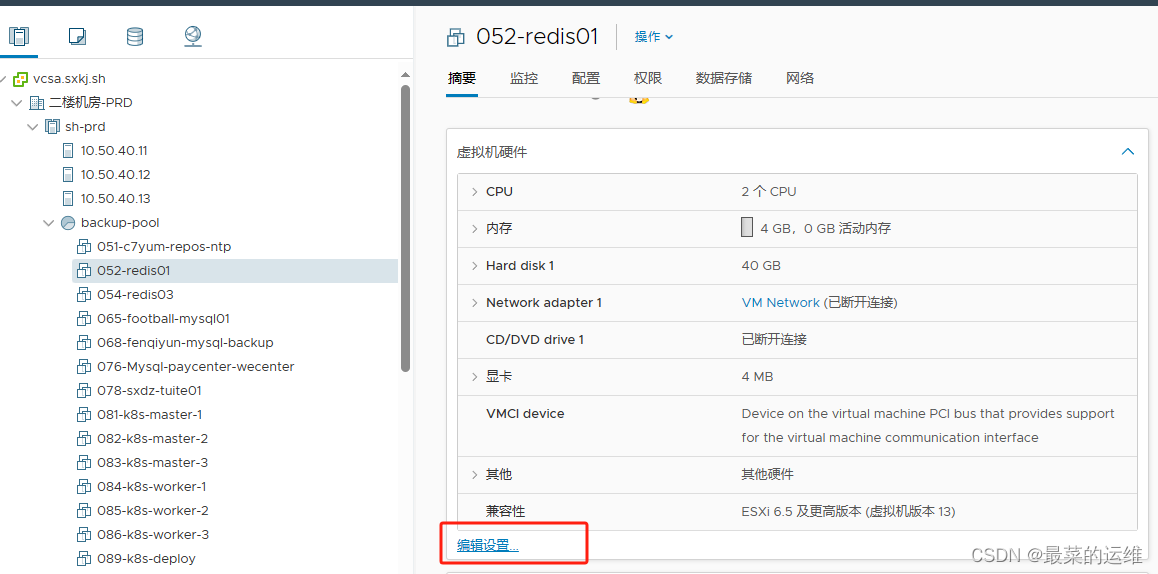
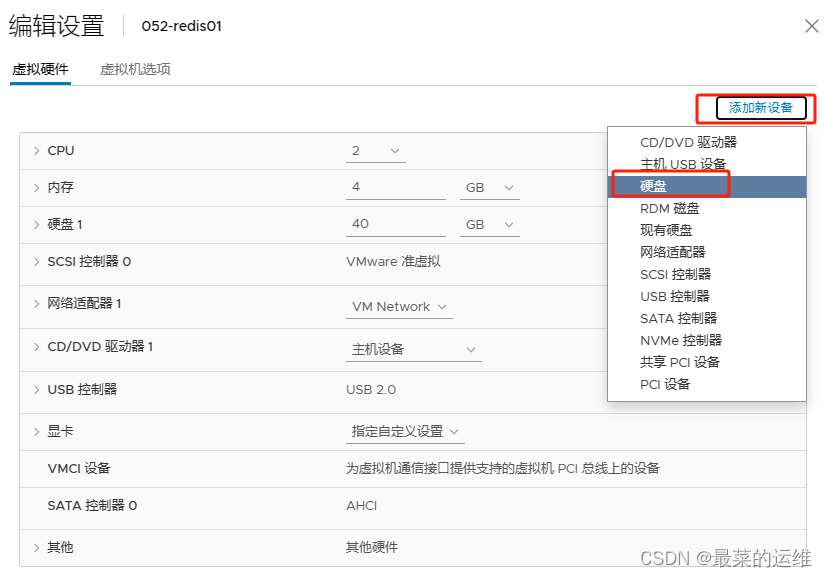
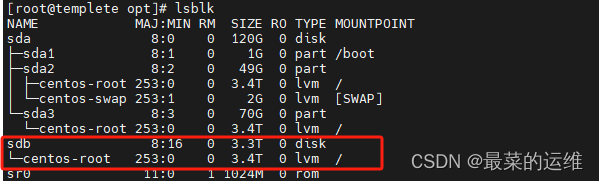
2.增加后的磁盘可以在机器中查看,使用命令lsblk查看新增的磁盘
[root@templete opt]# lsblk
NAME MAJ:MIN RM SIZE RO TYPE MOUNTPOINT
sda 8:0 0 120G 0 disk
├─sda1 8:1 0 1G 0 part /boot
├─sda2 8:2 0 49G 0 part
│ ├─centos-root 253:0 0 3.4T 0 lvm /
│ └─centos-swap 253:1 0 2G 0 lvm [SWAP]
└─sda3 8:3 0 70G 0 part
└─centos-root 253:0 0 3.4T 0 lvm /
sdb 8:16 0 3.3T 0 disk
└─centos-root 253:0 0 3.4T 0 lvm /
sr0 11:0 1 1024M 0 rom
3.查看需要扩容的分区,使用fdisk -l,因为/目录空间需要扩容所以扩容/dev/mapper/centos-root。
[root@templete opt]# fdisk -l
Disk /dev/sda: 128.8 GB, 128849018880 bytes, 251658240 sectors
Units = sectors of 1 * 512 = 512 bytes
Sector size (logical/physical): 512 bytes / 512 bytes
I/O size (minimum/optimal): 512 bytes / 512 bytes
Disk label type: dos
Disk identifier: 0x000b3914
Device Boot Start End Blocks Id System
/dev/sda1 * 2048 2099199 1048576 83 Linux
/dev/sda2 2099200 104857599 51379200 8e Linux LVM
/dev/sda3 104857600 251658239 73400320 83 Linux
Disk /dev/sdb: 3628.4 GB, 3628388371456 bytes, 7086696038 sectors
Units = sectors of 1 * 512 = 512 bytes
Sector size (logical/physical): 512 bytes / 512 bytes
I/O size (minimum/optimal): 512 bytes / 512 bytes
Disk /dev/mapper/centos-root: 3753.0 GB, 3753012887552 bytes, 7330103296 sectors
Units = sectors of 1 * 512 = 512 bytes
Sector size (logical/physical): 512 bytes / 512 bytes
I/O size (minimum/optimal): 512 bytes / 512 bytes
Disk /dev/mapper/centos-swap: 2147 MB, 2147483648 bytes, 4194304 sectors
Units = sectors of 1 * 512 = 512 bytes
Sector size (logical/physical): 512 bytes / 512 bytes
I/O size (minimum/optimal): 512 bytes / 512 bytes
二、机器上使用逻辑卷进行磁盘扩容。
1.新建分区
输入【fdisk /dev/sdb】
命令行提示下输入【m】
输入命令【n】添加新分区。
输入命令【p】创建主分区。
输入【回车】,选择默认
输入【回车】,选择默认
输入【w】,保持修改
这时在/dev/目录下,才能看到了新的分区比如/dev/sdb1
2.创建pv(给刚刚新建的分区 /dev/sdb1)
[root@templete ~]# pvcreate /dev/sdb1
Physical volume “/dev/sdb1” successfully created
3.把pv加入vg中,相当于扩充vg的大小
root@localhost ~]# vgs
VG #PV #LV #SN Attr VSize VFree
centos wz–n- .150g 3.3T
4.扩展vg,使用vgextend命令
[root@templete ~]# vgextend centos /dev/sdb1
Volume group “centos” successfully extended
5.扩展lv,使用lvextend命令
[root@templete ~]# lvextend -L +3.3T /dev/mapper/centos-root
Size of logical volume centos/root changed from 150 GiB ( extents) to 3379.2GiB ( extents).
Logical volume root successfully resized.
或者全部分配不使用单独增加多少
[root@localhost bin]# lvextend -l +100%FREE /dev/mapper/ao-root
Size of logical volume ao/root changed from <380.00 GiB (97279 extents) to <450.00 GiB (115199 extents).
Logical volume ao/root successfully resized.
6.使用命令使系统重新读取大小
[root@templete ~]# xfs_growfs /dev/mapper/centos-root
[root@templete ~]# df -Th
Filesystem Type Size Used Avail Use% Mounted on
devtmpfs devtmpfs 1.4G 0 1.4G 0% /dev
tmpfs tmpfs 1.4G 0 1.4G 0% /dev/shm
tmpfs tmpfs 1.4G 8.9M 1.4G 1% /run
tmpfs tmpfs 1.4G 0 1.4G 0% /sys/fs/cgroup
/dev/mapper/centos-root xfs 3.5T 1.6G 3.5T 1% /
/dev/sda1 xfs 1014M 150M 865M 15% /boot
tmpfs tmpfs 285M 0 285M 0% /run/user/0
这样就已经扩容好了,/目录已经扩容到3.5T



 扫一扫
扫一扫


 3217
3217

 被折叠的 条评论
为什么被折叠?
被折叠的 条评论
为什么被折叠?
 到【灌水乐园】发言


