


ssms 连接 ssis
In this article, I will first give an overview of the OLE DB, ODBC, and ADO.NET SSIS connection managers. Then I will try to illustrate the difference between them when trying to connect to SQL Server.
在本文中,我将首先概述OLE DB,ODBC和ADO.NET SSIS连接管理器。 然后,我将尝试说明尝试连接到SQL Server时它们之间的区别。
This article is the 8th article in the SSIS feature face to face series which aims to remove confusion and to illustrate some of the differences between similar features provided by SQL Server Integration Services.
本文是SSIS功能面对面系列文章中的第八篇,旨在消除混淆并说明SQL Server Integration Services提供的相似功能之间的某些区别。
SSIS连接管理器 (SSIS Connection Managers)
In general, SSIS connection managers are used to configure a connection between SSIS and an external data source. There are different types of connection managers that are included in SSIS.
通常,SSIS连接管理器用于配置SSIS与外部数据源之间的连接。 SSIS中包含不同类型的连接管理器。
In this article, I will mention the SSIS connection managers listed in SQL Server Data Tools for Visual Studio 2017 with their description (The following table is taken from Visual Studio “Add SSIS Connection Manager” dialog):
在本文中,我将提及针对Visual Studio 2017SQL Server数据工具中列出的SSIS连接管理器及其描述(下表摘自Visual Studio的``添加SSIS连接管理器''对话框) :
Connection Manager | Description |
ADO | Connection manager for ADO connections |
ADO.NET | Connection manager for ADO.NET connections |
CACHE | Connection manager for cache |
DQS | Connection manager for DQS Server (Data Quality Services) |
EXCEL | Connection manager for Excel files |
FILE | Connection manager for files |
FLATFILE | Connection manager for flat files |
FTP | Connection manager for FTP |
Hadoop | Connection manager for Hadoop |
HTTP | Connection manager for HTTP connections |
MSMQ | Connection manager for the Message Queue task |
MSOLAP100 | Connection manager for Analysis Services connections |
MULTIFILE | Connection manager for multiple files |
MULTIFLATFILE | Connection manager for multiple flat files |
ODATA | Connection Manager for ODATA Services |
ODBC | Connection manager for ODBC connections |
OLEDB | Connection manager for OLE DB connections |
ORACLE | Connection manager for Oracle connections |
PowerQuery | Connection manager for Power Query Source |
SMOServer | Connection manager for SQL Server transfer tasks |
SMTP | Connection manager for Send Mail Tasks |
SQLMOBILE | Connection manager for SQL Server Compact connections |
WMI | Connection manager for the WMI tasks |
连接管理器 | 描述 |
阿多 | ADO连接的连接管理器 |
ADO.NET | ADO.NET连接的连接管理器 |
缓存 | 缓存的连接管理器 |
DQS | DQS服务器的连接管理器(数据质量服务) |
卓越 | Excel文件的连接管理器 |
文件 | 文件的连接管理器 |
平面文件 | 平面文件的连接管理器 |
的FTP | FTP的连接管理器 |
Hadoop的 | Hadoop的连接管理器 |
HTTP | HTTP连接的连接管理器 |
MSMQ | Message Queue任务的连接管理器 |
MSOLAP100 | Analysis Services连接的连接管理器 |
多文件 | 多个文件的连接管理器 |
多文件 | 多个平面文件的连接管理器 |
ODATA | ODATA服务的连接管理器 |
ODBC | ODBC连接的连接管理器 |
OLEDB | OLE DB连接的连接管理器 |
Oracle | 用于Oracle连接的连接管理器 |
PowerQuery | 电源查询源的连接管理器 |
SMO服务器 | 用于SQL Server传输任务的连接管理器 |
SMTP | 发送邮件任务的连接管理器 |
SQL移动 | SQL Server Compact连接的连接管理器 |
WMI | WMI任务的连接管理器 |
SSIS connection managers are can be added from the connection managers tab located in the bottom of the main screen:
可以从位于主屏幕底部的“连接管理器”选项卡中添加SSIS连接管理器:
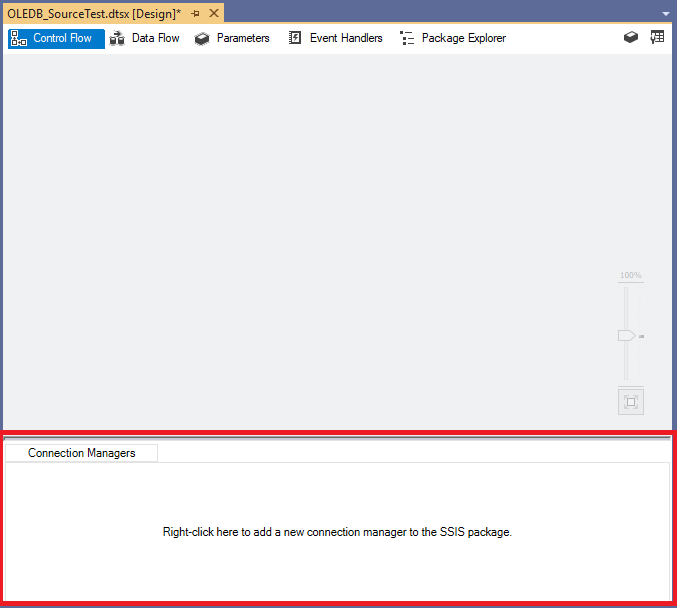
Figure 1 – SSIS connection managers tab
图1 – SSIS连接管理器选项卡
As mentioned in the SSIS connection managers tab, add a new connection manager, right-click inside the tab panel, and select the connection manager type from the context menu strip.
如SSIS连接管理器选项卡中所述,添加一个新的连接管理器,在选项卡面板内右键单击,然后从上下文菜单栏中选择连接管理器类型。
Figure 2 – Add SSIS connection manager context menu strip
图2 –添加SSIS连接管理器上下文菜单栏
The context menu strip contains a few types of connection managers, to see all types click on New Connection
上下文菜单栏包含几种类型的连接管理器,要查看所有类型,请单击“ 新建连接”
In the following sections, we will describe only the OLE DB, ODBC and ADO.NET connection managers since they are the one used to connect to SQL Server.
在以下各节中,我们将仅描述OLE DB,ODBC和ADO.NET连接管理器,因为它们是用于连接到SQL Server的连接管理器。
OLE DB连接管理器 (OLE DB connection manager)
OLE DB stands for Object Linking and Embedding, Database. It is an API designed by Microsoft, that allows users accessing a variety of data sources in a uniform manner. Between all SSIS connection managers, OLE DB connection managers is the most popular.
OLE DB代表数据库的对象链接和嵌入 。 它是Microsoft设计的API,允许用户以统一的方式访问各种数据源。 在所有SSIS连接管理器之间,OLE DB连接管理器是最受欢迎的。
When you click on Add OLE DB connection in the context menu above, the following window appears:
当您单击上方上下文菜单中的“添加OLE DB连接”时,将出现以下窗口:
Figure 3 – Defined OLE DB connections form
图3 –定义的OLE DB连接表单
In this window, all previously defined connections are listed with their properties. To add a new connection, you have to click on New button. The following image shows the main OLE DB connection configuration form:
在此窗口中,所有先前定义的连接及其属性都会列出。 要添加新连接,您必须单击“ 新建”按钮。 下图显示了主要的OLE DB连接配置形式:
Figure 4 – OLE DB Connection manager editor
图4 – OLE DB连接管理器编辑器
If we click on the Provider drop-down list, all available data sources providers are shown:
如果单击提供程序下拉列表,则会显示所有可用的数据源提供程序:
Figure 5 – OLE DB providers list
图5 – OLE DB提供程序列表
The main OLE DB connection properties are:
OLE DB连接的主要属性是:
- Provider: The OLE DB provider used to connect to the data source 提供程序:用于连接到数据源的OLE DB提供程序
- Server name: The Server that you want to connect to 服务器名称:您要连接的服务器
- Authentication type: The security parameters used to establish the connection 认证类型:用于建立连接的安全参数
- Database Name: The database name that we want to connect to (if this property is not specified, the default database is used) 数据库名称:我们要连接的数据库名称(如果未指定此属性,则使用默认数据库)
For more information about OLE DB connection managers, you can refer to the following official documentation:
有关OLE DB连接管理器的更多信息,您可以参考以下官方文档:
- OLE DB connection manager OLE DB连接管理器
- Add and configure an OLE DB connection manager 添加和配置OLE DB连接管理器
In general, OLE DB connection manager is used in all tasks and components that can connect to an external database such as:
通常,OLE DB连接管理器用于所有可以连接到外部数据库的任务和组件,例如:
- Execute SQL Task 执行SQL任务
- Execute T-SQL Task 执行T-SQL任务
- OLE DB Source OLE DB源
- OLE DB Destination OLE DB目标
- OLE DB command OLE DB命令
- Look up Transformation 查找转换
ODBC连接管理器 (ODBC connection manager)
ODBC stands for Open Database Connectivity. It is a standard API used to access database management systems. ODBC provides access only to relational databases and they are used by OLE DB to access SQL-based data sources.
ODBC代表开放式数据库连接。 它是用于访问数据库管理系统的标准API。 ODBC仅提供对关系数据库的访问,OLE DB使用它们来访问基于SQL的数据源。
ODBC SSIS connection managers are also popular and they are used when data sources are defined as DSN (Database Source Name) in the operating system.
ODBC SSIS连接管理器也很流行,并且在操作系统中将数据源定义为DSN(数据库源名称)时使用它们。
To add an ODBC connection manager, right-click inside the connection manager tab panel. Click on New Connection button. The following form will appear:
要添加ODBC连接管理器,请在连接管理器选项卡面板内右键单击。 单击新建连接按钮。 将显示以下形式:
Figure 6 – Defined ODBC connections form
图6 –定义的ODBC连接表单
This form contains all ODBC connections added previously. To add a new one, click on New button. The following image shows the ODBC connection manager configuration form:
此表单包含以前添加的所有ODBC连接。 要添加一个新的,请单击“ 新建”按钮。 下图显示了ODBC连接管理器配置表单:
Figure 7 – ODBC connection manager editor
图7 – ODBC连接管理器编辑器
The ODBC Connection can be defined by selecting a data source name (DSN) defined in the operating system, or by directly writing the connection string. In addition, you may have to provide the login information.
可以通过选择操作系统中定义的数据源名称(DSN)或直接写入连接字符串来定义ODBC连接。 另外,您可能必须提供登录信息。
To learn more about creating and configuring DSN, you can refer to the following links:
要了解有关创建和配置DSN的更多信息,可以参考以下链接:
- Creating a data source name (DSN) for Windows 为Windows创建数据源名称(DSN)
- How To Set up a Microsoft SQL Server ODBC Data Source 如何设置Microsoft SQL Server ODBC数据源
ODBC connections are mainly used in the ODBC flow components. You can refer to the following official documentation for more information:
ODBC连接主要用于ODBC流组件中。 您可以参考以下官方文档以获取更多信息:
ADO.NET连接管理器 (ADO.NET connection manager)
ADO.NET stands for ActiveX Data Objects using .NET framework. It is a set of classes that expose data access services for .NET Framework programmers.
ADO.NET代表使用.NET框架的ActiveX数据对象。 它是一组为.NET Framework程序员提供数据访问服务的类。
Similar to the previous SSIS connection managers, the ADO.NET connection manager allows accessing external data sources, but it uses .NET providers to establish connections.
与以前的SSIS连接管理器类似,ADO.NET连接管理器允许访问外部数据源,但是它使用.NET提供程序来建立连接。
ADO.NET connection manager editor is very similar to the OLE DB Connection manager editor as shown in the image below:
ADO.NET连接管理器编辑器与OLE DB连接管理器编辑器非常相似,如下图所示:
Figure 8 – ADO.NET connection manager editor
图8 – ADO.NET连接管理器编辑器
It has the same connection properties such as the provider, server name, authentication, and database name.
它具有相同的连接属性,例如提供程序,服务器名称,身份验证和数据库名称。
For additional information about ADO.NET connection manager, you can refer to the following official documentation:
有关ADO.NET连接管理器的其他信息,您可以参考以下官方文档:
The ADO.NET connection manager is mainly used by Execute SQL Tasks and ADO.NET Source and ADO.NET destination.
ADO.NET连接管理器主要由Execute SQL Tasks和ADO.NET Source和ADO.NET Destination使用 。
OLE DB与ODBC与ADO.NET (OLE DB vs ODBC vs ADO.NET)
First of all, it is good to know that ADO.NET used OLE DB providers to access data while OLE DB uses ODBC to access relational databases.
首先,很高兴知道ADO.NET使用OLE DB提供程序来访问数据,而OLE DB使用ODBC访问关系数据库。
After giving an overview of these three SSIS connection managers, I will try to illustrate some of the differences between them from an SSIS development perspective.
在概述了这三个SSIS连接管理器之后,我将尝试从SSIS开发的角度说明它们之间的一些区别。
SQL语法 (SQL Syntax)
The SQL Syntax may differ between these connections types, especially when using parameters. As example, if we need to use parameters within an Execute SQL Task, each connection type has its own syntax as illustrated in the table below:
这些连接类型之间SQL语法可能有所不同,尤其是在使用参数时。 例如,如果我们需要在Execute SQL Task中使用参数,则每种连接类型都有其自己的语法,如下表所示:
Connection Type | Marker | Parameter name |
ADO.NET | @<parameter name> | @<parameter name> |
OLEDB | ? | 0,1,2,3 … |
ODBC | ? | 1,2,3 … |
连接类型 | 记号笔 | 参数名称 |
ADO.NET | @ <参数名称> | @ <参数名称> |
OLEDB | ? | 0,1,2,3… |
ODBC | ? | 1,2,3… |
数据源 (Data Sources)
While ADO.NET and OLE DB can access the same data sources, ODBC can only access relational databases system and they cannot access XML-based sources, Microsoft Exchange Server and others.
虽然ADO.NET和OLE DB可以访问相同的数据源,但是ODBC仅可以访问关系数据库系统,而不能访问基于XML的源,Microsoft Exchange Server和其他数据库。
On the other hand, ODBC may be required when you don’t have the connection information and you are asked to use local DSN to establish the connection.
另一方面,当您没有连接信息并且被要求使用本地DSN建立连接时,可能需要ODBC。
性能 (Performance)
I will run my own experiments to check the difference between these connection types, since you can find a lot of experiments made that illustrate the difference. One of the amazing articles providing information about that is the one written by Gilbert Quevauvilliers on Datatelblog.
我将运行自己的实验来检查这些连接类型之间的差异,因为您可以找到许多说明差异的实验。 Gilbert Quevauvilliers在Datatelblog上撰写的其中一篇令人惊讶的文章提供了有关信息。
As a summary, the experiments shows that when connecting to SQL Server database, OLE DB guarantee higher performance in extracting and loading data.
总而言之,实验表明,当连接到SQL Server数据库时,OLE DB保证了提取和加载数据时的更高性能。
讨论区 (Discussion)
After showing some of the differences between these SSIS connection managers, you can see that choosing one to use can differ based on the logic you are trying to implement. But, after working for years with SSIS, I can recommend using OLE DB connection managers for one main reason, which is the popularity. Since you may find a lot of resources while troubleshooting while you will not find using ADO.NET and ODBC connection managers.
在展示了这些SSIS连接管理器之间的一些差异之后,您可以看到根据您要实现的逻辑,选择要使用的一个可能会有所不同。 但是,在使用SSIS多年之后,我可以推荐使用OLE DB连接管理器,其主要原因之一是受欢迎。 由于在进行故障排除时可能会发现很多资源,而找不到使用ADO.NET和ODBC连接管理器。
In addition, there are many other differences that can be listed, you can check the external links below to get more information.
此外,还可以列出许多其他差异,您可以检查下面的外部链接以获取更多信息。
外部链接 (External Links)
- What is the difference between OLE DB and ODBC data sources? OLE DB和ODBC数据源之间有什么区别?
- OLEDB V/S ODBC OLEDB V / S ODBC
- How to use SSIS ODBC source and differences between OLE DB and ODBC? 如何使用SSIS ODBC源以及OLE DB和ODBC之间的区别?
- SSIS Data Flows – ADO.NET vs. OLE DB vs. ODBC SSIS数据流– ADO.NET与OLE DB与ODBC
目录 (Table of contents)
翻译自: https://www.sqlshack.com/ssis-connection-managers-ole-db-vs-odbc-vs-ado-net/
ssms 连接 ssis
 1331
1331


 扫一扫
扫一扫


 被折叠的 条评论
为什么被折叠?
被折叠的 条评论
为什么被折叠?
 到【灌水乐园】发言


