



目录
- 1. 复用函数
- 2. 编码流程
- 2.1 打开视频文件 (avformat_open_input)
- 2.2 查找流信息 (avformat_find_stream_info)
- 2.3 获得流索引 (for 遍历流)
- 2.4 查找视频解码器 (avcodec_find_decoder)
- 2.5 创建解码器上下文 (avcodec_alloc_context3)
- 2.6 将流参数复制到解码器上下文 (avcodec_parameters_to_context)
- 2.7 打开解码器 (avcodec_open2)
- 2.8 查找视频编码器 (avcodec_find_encoder)
- 2.9 创建编码器上下文 (avcodec_alloc_context3)
- 2.10 设置编码器基础参数 (宽/高/像素格式/帧率/时间基)
- 2.11 打开编码器 (avcodec_open2)
- 2.12 创建复用上下文 (avformat_alloc_output_context2)⭐️
- 2.13 创建音视频流 (avformat_new_stream 视频+音频)⭐️
- 2.14 打开io (avio_open2)⭐️
- 2.15 写入文件头 (avformat_write_header)⭐️
- 2.16 读取数据包 (av_read_frame)
- 2.17 发送数据包到解码器 (avcodec_send_packet)
- 2.18 接收解码帧 (avcodec_receive_frame)
- 2.19 帧PTS重缩放:输入时间基→编码时间基 (av_rescale_q)
- 2.20 发送帧到编码器 (avcodec_send_frame)
- 2.21 接收编码帧 (avcodec_receive_packet)
- 2.22 重新计算pts/dts/duration (av_rescale)
- 2.23 交错写入文件 (av_interleaved_write_frame)⭐️
- 2.24 冲刷解码器 (avcodec_send_packet NULL)
- 2.25 冲刷编码器 (avcodec_send_frame NULL)
- 2.26 写入文件尾部 (av_write_trailer)⭐️
- 2.27 释放所有资源
- 3. 代码合集
- 4. 视频效果截图
- 5. 进阶
封装,是将视频和音频封装到容器中,即MP4、MKV、FLV、AVI等;
前面已经学习编码、解码、像素格式转换、解复用,现在继续了解最后一个,复用;
综合前面的所学知识点,解复用-解码-编码-复用成一个新的视频。
大致流程图:
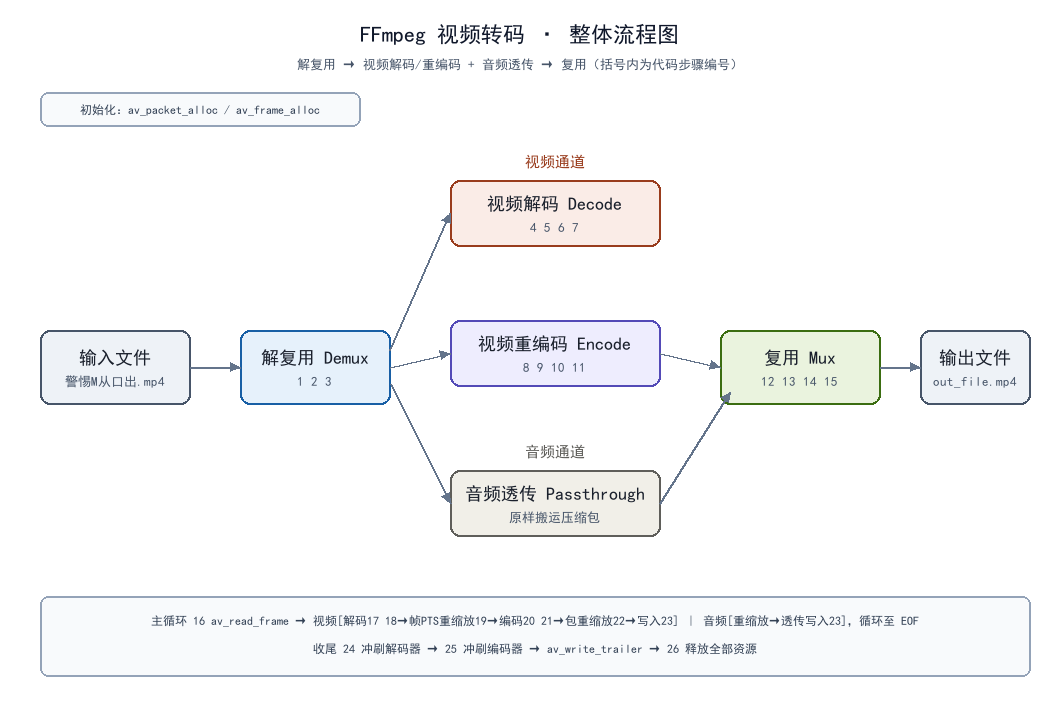
整体流程:
					开始(begin)
						↓
					1. 打开视频文件 (avformat_open_input)
						↓
					2. 查找流信息 (avformat_find_stream_info)
						↓
					3. 获得流索引 (for 遍历流)
						↓
					4. 查找视频解码器 (avcodec_find_decoder)
						↓
					5. 创建解码器上下文 (avcodec_alloc_context3)
						↓
					6. 将流参数复制到解码器上下文 (avcodec_parameters_to_context)
						↓
					7. 打开解码器 (avcodec_open2)
						↓
					8. 查找视频编码器 (avcodec_find_encoder)
						↓
					9. 创建编码器上下文 (avcodec_alloc_context3)
						↓
					10. 设置编码器基础参数 (宽/高/像素格式/帧率/时间基)
						↓
					11. 打开编码器 (avcodec_open2)
						↓
					12. 创建复用上下文 (avformat_alloc_output_context2)⭐️
						↓
					13. 创建音视频流 (avformat_new_stream 视频+音频)⭐️
						↓
					14. 打开io (avio_open2)⭐️
						↓
					15. 写入文件头 (avformat_write_header)⭐️
						↓
					16. 读取数据包 (av_read_frame)
						↓
					17. 发送数据包到解码器 (avcodec_send_packet)
						↓
					18. 接收解码帧 (avcodec_receive_frame)
						↓
					19. 帧PTS重缩放:输入时间基→编码时间基 (av_rescale_q)
						↓
					20. 发送帧到编码器 (avcodec_send_frame)
						↓
					21. 接收编码帧 (avcodec_receive_packet)
						↓
					22. 重新计算pts/dts/duration (av_rescale)
						↓
					23. 交错写入文件 (av_interleaved_write_frame)⭐️
						↓
					24. 冲刷解码器 (avcodec_send_packet NULL)
						↓
					25. 冲刷编码器 (avcodec_send_frame NULL)
						↓
					26. 写入文件尾部 (av_write_trailer)⭐️
						↓
					27. 释放所有资源
						↓
					结束(end)
包含头文件:
#include <iostream>
#include <string>

extern "C" {
#include <libavformat/avformat.h>
#include <libavcodec/avcodec.h>
}
1. 复用函数
1.1 avformat_alloc_output_context2
avformat_alloc_output_context2 是 FFmpeg 库中用于多媒体封装的核心初始化函数。与 avformat_open_input 不同的是,它不负责打开文件进行读取,而是负责创建并初始化一个用于写入数据的上下文环境,确定输出的容器格式(如 MP4、FLV、MKV 等)。
①函数原型
int avformat_alloc_output_context2(
    AVFormatContext **ctx,
    const AVOutputFormat *oformat,
    const char *format_name,
    const char *filename
);
②参数说明
| 参数 | 类型 | 说明 |
|---|---|---|
| ctx | AVFormatContext ** | 输出参数,指向创建好的输出格式上下文。调用前可传 NULL,函数内部自动分配内存 |
| oformat | const AVOutputFormat * | 强制指定输出封装格式,传 NULL 时 FFmpeg 自动通过其他参数匹配格式 |
| format_name | const char * | 字符串形式指定输出格式名称(如 “mp4”、“flv”),传 NULL 时按文件名后缀推断 |
| filename | const char * | 输出文件/推流地址,支持本地文件路径、RTMP 推流地址等,作为格式推断的兜底依据 |
③返回值
- 成功:返回 0
- 失败:失败返回负的错误码(如 AVERROR(ENOMEM)、AVERROR_MUXER_NOT_FOUND 等)
④使用示例
std::string out_file_path = "out_file.mp4";
AVFormatContext *mux_ctx = nullptr;

re = avformat_alloc_output_context2(&mux_ctx, NULL, NULL, out_file_path.c_str());
if (0 > re) {
    std::cout << "avformat_alloc_output_context2 failed!" << std::endl;
    PrintErr(re);
    goto Failed;
}
1.2 avformat_new_stream
avformat_new_stream 是 FFmpeg 库中用于创建媒体流(Stream)的核心函数。在多媒体封装过程中,它负责向 AVFormatContext 中添加一个新的流通道(如视频流、音频流或字幕流),并分配相应的内存空间。
它是连接“格式上下文”与“具体编码数据”的桥梁。只有创建了 Stream,才能后续配置编码参数、写入头部信息以及推送音视频数据包。
①函数原型
AVStream *avformat_new_stream(AVFormatContext *s, const AVCodec *c);
②参数说明
| 参数 | 类型 | 说明 |
|---|---|---|
| s | AVFormatContext * | 输入参数。指向格式上下文的指针。必须是之前通过 avformat_alloc_output_context2() 创建的输出上下文。不能是输入上下文(解复用场景下由 demuxer 自动创建流)。 |
| c | const AVCodec * | 可选参数。指向编解码器的指针。- 若为 NULL(推荐):仅分配 AVStream 和 AVCodecParameters,不设置具体编码参数,需后续手动填充 codecpar。- 若非 NULL:FFmpeg 会根据该编解码器的默认属性初始化流的 codec_type 和 codec_id,但现代 FFmpeg 开发中通常仍建议传 NULL 以保留最大控制权。 |
③返回值
- 成功:返回指向新创建的 AVStream 结构体的指针
- 失败:返回 NULL(通常是因为内存分配失败 AVERROR(ENOMEM))
④使用示例
AVStream *stream = avformat_new_stream(mux_ctx, NULL); // 新建流
1.3 avio_open2
avio_open2 是 FFmpeg 库中用于打开输入/输出资源的核心底层函数。它的主要任务是创建一个 AVIOContext 上下文,并建立与指定 URL(可以是本地文件路径,也可以是网络流地址如 RTMP、HTTP、UDP 等)的连接,为后续的数据读写操作提供统一的接口。
①函数原型
int avio_open2(AVIOContext **s,
               const char *url,
               int flags,
               const AVIOInterruptCB *int_cb,
               AVDictionary **options);
②参数说明
| 参数 | 类型 | 说明 |
|---|---|---|
| s | AVIOContext ** | 输出参数。指向创建好的 AVIOContext 指针。函数内部会分配内存并初始化该结构体,包含读写缓冲区及底层协议的操作函数指针。若失败,*s 被设为 NULL。 |
| url | const char * | 资源地址。支持广义 URL:- 本地文件:“C:/video/test.mp4” 或 “./output.flv”- 网络流:“rtmp://server/live/stream”、“http://example.com/video.ts”、“udp://@239.1.1.1:1234” |
| flags | int | 打开标志。控制资源的访问模式:- AVIO_FLAG_READ:只读- AVIO_FLAG_WRITE:只写- AVIO_FLAG_READ_WRITE:读写(注意:某些协议可能不支持同时读写) |
| int_cb | const AVIOInterruptCB * | 中断回调。可选参数。用于在阻塞操作(如网络连接、文件读取)期间检查是否应中止操作。传 NULL 表示不使用中断机制。 |
| options | AVDictionary ** | 协议私有选项。可选参数。字典形式,用于传递特定协议的配置项(如 HTTP 的超时时间、RTMP 的 app/playpath 等)。函数返回后,未识别的选项会保留在字典中,已使用的会被移除。传 NULL 表示使用默认选项。 |
③返回值
- 成功:成功返回 0
- 失败:返回负的错误码(如 AVERROR(EIO)、AVERROR(ENOMEM)、AVERROR_PROTOCOL_NOT_FOUND 等)
④使用示例
re = avio_open2(&mux_ctx->pb, out_file_path.c_str(), AVIO_FLAG_WRITE, NULL, NULL);
if (0 > re) {
    std::cout << "avio_open2 failed!" << std::endl;
    PrintErr(re);
    goto Failed;
}
1.4 avformat_write_header
avformat_write_header 是 FFmpeg 封装流程中的关键里程碑函数。它的主要作用是将媒体文件的元数据(Metadata)和流结构信息写入输出文件的头部(Header)。
只有成功调用该函数之后,才能开始向文件写入音视频数据包(AVPacket)。它标志着封装过程从“参数配置阶段”进入“数据写入阶段”。
①函数原型
int avformat_write_header(AVFormatContext *s, AVDictionary **options);
②参数说明
| 参数 | 类型 | 说明 |
|---|---|---|
| s | AVFormatContext * | 输入/输出参数。指向已通过 avformat_alloc_output_context2 初始化、且已通过 avformat_new_stream 添加了所有流的格式上下文。函数执行过程中可能会修改 s 内部的某些字段(如流的 time_base、全局头部数据等)。 |
| options | AVDictionary ** | 可选参数。指向复用器(Muxer)私有选项的字典指针。函数返回后,未被复用器识别的选项会保留在字典中,已被识别并使用的选项会被移除。传 NULL 表示使用默认配置。 |
③返回值
- 成功:返回 >= 0 的值
- 失败:返回负的错误码(如 AVERROR_INVALIDDATA 参数无效、AVERROR(EIO) 写入失败等)
④使用示例
re = avformat_write_header(mux_ctx, NULL);
if (0 > re) {
    std::cout << "avformat_write_header failed!" << std::endl;
    PrintErr(re);
    goto Failed;
}
1.5 av_rescale_q
av_rescale_q 是 FFmpeg 库中最常用的时间基转换工具函数。在多媒体处理中,不同的组件(编码器、解码器、容器、滤镜)往往使用不同的时间单位(Time Base)来表示时间戳(PTS/DTS)。av_rescale_q 的作用就是将一个数值(通常是时间戳或时长)从一种时间基精确换算到另一种时间基,避免使用浮点数运算带来的精度损失。
①函数原型
int64_t av_rescale_q(int64_t a, AVRational bq, AVRational cq);
②参数说明
| 参数 | 类型 | 说明 |
|---|---|---|
| a | int64_t | 待转换的原始数值。通常是 PTS(显示时间戳)、DTS(解码时间戳)或 duration(时长),单位由 bq 决定。 |
| bq | AVRational | 源时间基(Source Timebase)。定义了数值 a 的单位。例如 {1, 25} 表示 a 的单位是 1/25 秒(即帧数)。 |
| cq | AVRational | 目标时间基(Destination Timebase)。定义了返回值的单位。例如 {1, 1000} 表示返回值单位是毫秒。 |
③返回值
- 返回 转换后的 int64_t 数值
- 数学含义:返回
a * bq / cq的结果
④核心原理
时间基 (Time Base) 是什么?
AVRational 是一个分数,由分子(num)和分母(den)组成,如 {1, 90000} 表示 1/90000 秒。
时间戳的物理意义:时间戳 pts 乘以时间基 time_base 才是真实的秒数。
公式:真实时间(秒) = pts * time_base.num / time_base.den
换算公式
要将一个时间戳从时间基 A 转换到时间基 B,本质上是先算出真实时间,再除以目标时间基。
推导过程:
1)真实时间 = a * bq.num / bq.den
2)目标时间戳 = 真实时间 / 目标时间基 = 真实时间 * cq.den / cq.num
3)合并公式:结果 = a * bq.num / bq.den * cq.den / cq.num
4)整理得:结果 = (a * bq.num * cq.den) / (bq.den * cq.num)
av_rescale_q 内部使用了 64 位整数运算来执行这个乘法和除法,并通过特殊的取整策略避免溢出和精度丢失。它等价于 av_rescale(a, bq.num * cq.den, bq.den * cq.num)。
⑤使用示例
frame->pts = av_rescale_q(frame->pts, demux_ctx->streams[in_video_index]->time_base, encodec_ctx->time_base);

pkt->duration = av_rescale_q(pkt->duration, cur_time_base, target_time_base);
1.6 av_rescale_q_rnd
av_rescale_q_rnd 是 FFmpeg 库中最底层、最灵活的时间基转换函数。它是 av_rescale_q 的增强版本,区别在于允许调用者显式指定舍入模式(Rounding Mode)。
在多媒体处理中,时间戳通常是整数,当换算结果不是整数时,需要决定如何取整(向上取整、向下取整、四舍五入等)。av_rescale_q_rnd 正是为这种需要精确控制取整策略的场景而设计。
①函数原型
int64_t av_rescale_q_rnd(int64_t a, AVRational bq, AVRational cq, enum AVRounding rnd);
②参数说明
| 参数 | 类型 | 说明 |
|---|---|---|
| a | int64_t | 待转换的原始数值。通常是 PTS、DTS 或 duration,单位由 bq 决定。 |
| bq | AVRational | 源时间基(Source Timebase)。数值 a 的单位,例如 {1, 25} 表示 a 以 1/25 秒为单位。 |
| cq | AVRational | 目标时间基(Destination Timebase)。返回值的单位,例如 {1, 1000} 表示返回值以毫秒为单位。 |
| rnd | enum AVRounding | 舍入模式。指定当换算结果不是整数时如何取整。是该函数与 av_rescale_q 的核心区别。 |
③返回值
- 返回 转换后的 int64_t 数值。具体舍入方式由 rnd 参数决定
- 数学含义:返回
a * bq / cq的结果,并按指定规则取整
④舍入模式 (AVRounding) 详解
enum AVRounding 定义了 FFmpeg 中所有的取整策略。常用的枚举值及含义如下:
| 枚举值 | 数值 | 说明 | 等价 C 表达式 (a/b) | 示例 (5/2=2.5) | 示例 (-5/2=-2.5) |
|---|---|---|---|---|---|
| AV_ROUND_ZERO | 0 | 向零取整(截断)。结果向 0 的方向靠近,即直接丢掉小数部分。 | a / b (整数除法) | 2 | -2 |
| AV_ROUND_INF | 1 | 向无穷取整。结果的绝对值只增不减,远离 0。 | — | 3 | -3 |
| AV_ROUND_DOWN | 2 | 向下取整(向负无穷)。结果总是小于或等于真实值。 | floor(a / b) | 2 | -3 |
| AV_ROUND_UP | 3 | 向上取整(向正无穷)。结果总是大于或等于真实值。 | ceil(a / b) | 3 | -2 |
| AV_ROUND_NEAR_INF | 5 | 四舍五入,对半向无穷。最接近标准的“四舍五入”。小数部分大于 0.5 则向无穷方向进 1;等于 0.5 时也向无穷方向进 1。 | — | 3 | -3 |
| AV_ROUND_PASS_MINMAX | 8192 | 特殊标志位,需与其他模式按位或。表示如果输入是 INT64_MIN 或 INT64_MAX,则不做转换直接返回原值,避免溢出。通常用于处理 AV_NOPTS_VALUE。 | — | — | — |
⑤核心原理
为什么需要不同的舍入模式?
在音视频同步或帧对齐场景中,取整方向直接影响播放体验:
- 向下取整 (Round Down):适用于计算开始时间。确保实际播放时间不会早于预期(避免黑屏或卡顿)。
- 向上取整 (RoundUp):适用于计算结束时间或时长。确保完整覆盖所有数据(避免丢尾帧)。
- 四舍五入 (Nearnf):适用于普通的数值转换,追求统计意义上的最小误差。
av_rescale_q:简单方便,适用于大多数常规转换场景。
av_rescale_q_rnd:精确可控,适用于对时间戳精度敏感、需要明确取整方向的场景。
⑥使用示例
pkt->pts = av_rescale_q_rnd(pkt->pts, cur_time_base,target_time_base,
                            (AVRounding)(AV_ROUND_NEAR_INF | AV_ROUND_PASS_MINMAX));

pkt->dts = av_rescale_q_rnd(pkt->dts, cur_time_base,target_time_base,
                            (AVRounding)(AV_ROUND_NEAR_INF | AV_ROUND_PASS_MINMAX));
1.7 av_interleaved_write_frame
av_interleaved_write_frame 是 FFmpeg 封装流程中写入音视频数据包的标准推荐函数。它负责将编码完成的 AVPacket 交付给复用器,内部会自动对多个流的数据包按解码时间(DTS)进行交错排序,确保输出文件中媒体数据的排列符合播放器的解码需求,避免音画不同步或缓冲溢出问题。
与简单的 av_write_frame(立即写入)不同,它引入了内部缓存机制,是绝大多数包含音视频多流的封装场景的首选。
①函数原型
int av_interleaved_write_frame(AVFormatContext *s, AVPacket *pkt);
②参数说明
| 参数 | 类型 | 说明 |
|---|---|---|
| s | AVFormatContext * | 输出格式上下文。必须是已通过 avformat_write_header 完成头部写入的输出上下文。 |
| pkt | AVPacket * | 待写入的数据包。- 其 pts/dts/duration 必须已经转换为对应输出流的 time_base 单位。- 其 stream_index 必须正确指向 s->streams 中的对应流。- 传 NULL 表示刷新内部缓存,将所有排队的包写出。 |
③返回值
- 成功:返回 0
- 失败:返回负的错误码(如 AVERROR(EINVAL) 参数无效、AVERROR(EIO) 写入失败等)
④使用示例
re = av_interleaved_write_frame(mux_ctx, pkt);
if (0 != re) {
    std::cout << "av_interleaved_write_frame failed!" << std::endl;
    PrintErr(re);
    goto Failed;
}
1.8 av_write_trailer
av_write_trailer 是 FFmpeg 封装流程中的收尾函数。它标志着媒体文件写入的结束,负责刷新所有缓存数据、写入文件尾部的元数据(如 MP4 的 moov box、MKV 的 SeekHead 等),并完成输出文件的最终结构。
它与 avformat_write_header 遥相呼应,缺一不可。漏掉这一步会导致输出文件损坏、无法播放或时长显示为 0。
①函数原型
int av_write_trailer(AVFormatContext *s);
②参数说明
| 参数 | 类型 | 说明 |
|---|---|---|
| s | AVFormatContext * | 输出格式上下文。必须是已通过 avformat_write_header 完成头部写入的输出上下文。函数执行后,内部缓存被清空,部分流信息可能被改写。 |
③返回值
- 成功:返回 0
- 失败:返回负的错误码(如 AVERROR(EIO) 写入失败、AVERROR(ENOMEM) 内存不足等)
④使用示例
re = av_write_trailer(mux_ctx);
if (0 != re) {
    std::cout << "av_write_trailer failed!" << std::endl;
    PrintErr(re);
    goto Failed;
}
2. 编码流程
2.1 打开视频文件 (avformat_open_input)
re = avformat_open_input(&demux_ctx, in_file_path.c_str(), NULL, NULL);
if (0 != re) {
    std::cout << "avformat_open_input failed!" << std::endl;
    PrintErr(re);
    goto Failed;
}
2.2 查找流信息 (avformat_find_stream_info)
re = avformat_find_stream_info(demux_ctx, NULL);
if (0 > re) {
    std::cout << "avformat_find_stream_info failed!" << std::endl;
    PrintErr(re);
    goto Failed;
}
2.3 获得流索引 (for 遍历流)
for (int i = 0; i < demux_ctx->nb_streams; ++i) {
    if (AVMEDIA_TYPE_VIDEO == demux_ctx->streams[i]->codecpar->codec_type) {
        in_video_index = i;
    } else if (AVMEDIA_TYPE_AUDIO == demux_ctx->streams[i]->codecpar->codec_type) {
        in_audio_index = i;
    } else {
        std::cout << "other index: " << i;
    }
}
2.4 查找视频解码器 (avcodec_find_decoder)
decodec = avcodec_find_decoder(demux_ctx->streams[in_video_index]->codecpar->codec_id);
if (!decodec) {
    std::cout << "avcodec_find_decoder failed!" << std::endl;
    goto Failed;
}
2.5 创建解码器上下文 (avcodec_alloc_context3)
decodec_ctx = avcodec_alloc_context3(decodec);
if (!decodec_ctx) {
    std::cout << "avcodec_alloc_context3 failed!" << std::endl;
    goto Failed;
}
2.6 将流参数复制到解码器上下文 (avcodec_parameters_to_context)
re = avcodec_parameters_to_context(decodec_ctx, demux_ctx->streams[in_video_index]->codecpar);
if (0 > re) {
    std::cout << "avcodec_parameters_to_contextv failed!" << std::endl;
    PrintErr(re);
    goto Failed;
}
2.7 打开解码器 (avcodec_open2)
re = avcodec_open2(decodec_ctx, decodec, NULL);
if (0 != re) {
    std::cout << "avcodec_open2 failed!" << std::endl;
    PrintErr(re);
    goto Failed;
}
2.8 查找视频编码器 (avcodec_find_encoder)
encodec = avcodec_find_encoder(demux_ctx->streams[in_video_index]->codecpar->codec_id);
if (!encodec) {
    std::cout << "avcodec_find_encoder failed!" << std::endl;
    goto Failed;
}
2.9 创建编码器上下文 (avcodec_alloc_context3)
encodec_ctx = avcodec_alloc_context3(encodec);
if (!encodec_ctx) {
    std::cout << "avcodec_alloc_context3 failed!" << std::endl;
    goto Failed;
}
2.10 设置编码器基础参数 (宽/高/像素格式/帧率/时间基)
{
    encodec_ctx->width = decodec_ctx->width;
    encodec_ctx->height = decodec_ctx->height;
    encodec_ctx->pix_fmt = decodec_ctx->pix_fmt;

    // time_base
    AVRational framerate = demux_ctx->streams[in_video_index]->avg_frame_rate;
    if (0 >= framerate.den || 0 >= framerate.num) {
        // 根据参数‘猜测’结果
        framerate = av_guess_frame_rate(demux_ctx, demux_ctx->streams[in_video_index], NULL);
    }
    if (0 >= framerate.den || 0 >= framerate.num) {
        framerate = (AVRational){ 25, 1 };
    }
    encodec_ctx->framerate = framerate;
    encodec_ctx->time_base = av_inv_q(framerate);

    // 像素宽高比
    encodec_ctx->sample_aspect_ratio = decodec_ctx->sample_aspect_ratio;
}
2.11 打开编码器 (avcodec_open2)
re = avcodec_open2(encodec_ctx, encodec, NULL);
if (0 != re) {
    std::cout << "avcodec_open2 failed!" << std::endl;
    PrintErr(re);
    goto Failed;
}
2.12 创建复用上下文 (avformat_alloc_output_context2)⭐️
re = avformat_alloc_output_context2(&mux_ctx, NULL, NULL, out_file_path.c_str());
if (0 > re) {
    std::cout << "avformat_alloc_output_context2 failed!" << std::endl;
    PrintErr(re);
    goto Failed;
}
2.13 创建音视频流 (avformat_new_stream 视频+音频)⭐️
// 创建【视频流】
if (0 <= in_video_index) {
    AVStream *stream = avformat_new_stream(mux_ctx, NULL);      // 新建视频流
    stream->time_base = encodec_ctx->time_base;                 // 输出流 time_base 先与编码器保持一致
    out_video_index = stream->index;
    avcodec_parameters_from_context(stream->codecpar, encodec_ctx);     // 把编码器参数写进流
}
// 创建【音频流】:走“透传”——不解码不编码,直接复制参数、原样搬运压缩包
if (0 <= in_audio_index) {
    AVStream *stream = avformat_new_stream(mux_ctx, NULL);
    avcodec_parameters_copy(stream->codecpar, demux_ctx->streams[in_audio_index]->codecpar);
    stream->time_base = demux_ctx->streams[in_audio_index]->time_base;
    out_audio_index = stream->index;
}
2.14 打开io (avio_open2)⭐️
re = avio_open2(&mux_ctx->pb, out_file_path.c_str(), AVIO_FLAG_WRITE, NULL, NULL);
if (0 > re) {
    std::cout << "avio_open2 failed!" << std::endl;
    PrintErr(re);
    goto Failed;
}
2.15 写入文件头 (avformat_write_header)⭐️
re = avformat_write_header(mux_ctx, NULL);
if (0 > re) {
    std::cout << "avformat_write_header failed!" << std::endl;
    PrintErr(re);
    goto Failed;
}
2.16 读取数据包 (av_read_frame)
re = av_read_frame(demux_ctx, pkt);
// 已经读完
if (AVERROR_EOF == re) {
    break;
}
if (0 > re) {
    std::cout << "av_read_frame failed!" << std::endl;
    PrintErr(re);
    goto Failed;
}
2.17 发送数据包到解码器 (avcodec_send_packet)
re = avcodec_send_packet(decodec_ctx, pkt);
av_packet_unref(pkt);
if (0 > re) {
    std::cout << "avcodec_send_packet failed!" << std::endl;
    PrintErr(re);
    goto Failed;
}
2.18 接收解码帧 (avcodec_receive_frame)
re = avcodec_receive_frame(decodec_ctx, frame);
// 还未有完整的数据 | 已经读完
if (AVERROR(EAGAIN) == re || AVERROR_EOF == re) {
    break;
}

if (0 > re) {
    std::cout << "avcodec_receive_frame failed!" << std::endl;
    PrintErr(re);
    goto Failed;
}
2.19 帧PTS重缩放:输入时间基→编码时间基 (av_rescale_q)
frame->pts = av_rescale_q(frame->pts, demux_ctx->streams[in_video_index]->time_base, encodec_ctx->time_base);
2.20 发送帧到编码器 (avcodec_send_frame)
re = avcodec_send_frame(encodec_ctx, frame);
av_frame_unref(frame);
if (0 > re) {
    std::cout << "avcodec_send_frame failed!" << std::endl;
    PrintErr(re);
    goto Failed;
}
2.21 接收编码帧 (avcodec_receive_packet)
re = avcodec_receive_packet(encodec_ctx, pkt);
// 还未有完整的数据 | 已经读完
if (AVERROR(EAGAIN) == re || AVERROR_EOF == re) {
    break;
}

if (0 > re) {
    std::cout << "avcodec_receive_packet failed!" << std::endl;
    PrintErr(re);
    goto Failed;
}
2.22 重新计算pts/dts/duration (av_rescale)
void rescale_packet_ts(AVPacket *&pkt, AVRational cur_time_base, AVRational target_time_base) {
    pkt->pts = av_rescale_q_rnd(pkt->pts, cur_time_base,target_time_base,
                                (AVRounding)(AV_ROUND_NEAR_INF | AV_ROUND_PASS_MINMAX));
    pkt->dts = av_rescale_q_rnd(pkt->dts, cur_time_base,target_time_base,
                                (AVRounding)(AV_ROUND_NEAR_INF | AV_ROUND_PASS_MINMAX));
    pkt->duration = av_rescale_q(pkt->duration, cur_time_base, target_time_base);
    pkt->pos = -1;
}

rescale_packet_ts(pkt, encodec_ctx->time_base, mux_ctx->streams[out_video_index]->time_base);
2.23 交错写入文件 (av_interleaved_write_frame)⭐️
re = av_interleaved_write_frame(mux_ctx, pkt);
av_packet_unref(pkt);
if (0 != re) {
    std::cout << "av_interleaved_write_frame failed!" << std::endl;
    PrintErr(re);
    goto Failed;
}
2.24 冲刷解码器 (avcodec_send_packet NULL)
re = avcodec_send_packet(decodec_ctx, NULL);
if (0 > re) {
    std::cout << "avcodec_send_packet failed!" << std::endl;
    PrintErr(re);
    goto Failed;
}
while (1) {
    // 接收解码
    re = avcodec_receive_frame(decodec_ctx, frame);
    // 还未有完整的数据 | 已经读完
    if (AVERROR(EAGAIN) == re || AVERROR_EOF == re) {
        break;
    }

    if (0 > re) {
        std::cout << "avcodec_receive_frame failed!" << std::endl;
        PrintErr(re);
        goto Failed;
    }


    frame->pts = av_rescale_q(frame->pts, demux_ctx->streams[in_video_index]->time_base, encodec_ctx->time_base);


    // 发送编码
    re = avcodec_send_frame(encodec_ctx, frame);
    av_frame_unref(frame);
    if (0 > re) {
        std::cout << "avcodec_send_frame failed!" << std::endl;
        PrintErr(re);
        goto Failed;
    }


    while (1) {
        // 接收编码
        re = avcodec_receive_packet(encodec_ctx, pkt);
        // 还未有完整的数据 | 已经读完
        if (AVERROR(EAGAIN) == re || AVERROR_EOF == re) {
            break;
        }

        if (0 > re) {
            std::cout << "avcodec_receive_packet failed!" << std::endl;
            PrintErr(re);
            goto Failed;
        }


        // 重新计算pts、dts、duration
        rescale_packet_ts(pkt, encodec_ctx->time_base, mux_ctx->streams[out_video_index]->time_base);

        // 写入文件
        re = av_interleaved_write_frame(mux_ctx, pkt);
        av_packet_unref(pkt);
        if (0 != re) {
            std::cout << "av_interleaved_write_frame failed!" << std::endl;
            PrintErr(re);
            goto Failed;
        }

        std::cout << "- ";
    }
}
2.25 冲刷编码器 (avcodec_send_frame NULL)
re = avcodec_send_frame(encodec_ctx, NULL);
if (0 > re) {
    std::cout << "avcodec_send_frame failed!" << std::endl;
    PrintErr(re);
    goto Failed;
}
while (1) {
    // 接收编码
    re = avcodec_receive_packet(encodec_ctx, pkt);
    // 还未有完整的数据 | 已经读完
    if (AVERROR(EAGAIN) == re || AVERROR_EOF == re) {
        break;
    }

    if (0 > re) {
        std::cout << "avcodec_receive_packet failed!" << std::endl;
        PrintErr(re);
        goto Failed;
    }


    // 重新计算pts、dts、duration
    rescale_packet_ts(pkt, encodec_ctx->time_base, mux_ctx->streams[out_video_index]->time_base);

    // 写入文件
    re = av_interleaved_write_frame(mux_ctx, pkt);
    av_packet_unref(pkt);
    if (0 != re) {
        std::cout << "av_interleaved_write_frame failed!" << std::endl;
        PrintErr(re);
        goto Failed;
    }

    std::cout << "= ";
}
2.26 写入文件尾部 (av_write_trailer)⭐️
re = av_write_trailer(mux_ctx);
if (0 != re) {
    std::cout << "av_write_trailer failed!" << std::endl;
    PrintErr(re);
    goto Failed;
}
2.27 释放所有资源
avformat_close_input(&demux_ctx);
avcodec_free_context(&decodec_ctx);
avcodec_free_context(&encodec_ctx);
if (mux_ctx) {
    if (mux_ctx->pb) {
        avio_closep(&mux_ctx->pb);
    }
    avformat_free_context(mux_ctx);
}

av_packet_free(&pkt);
av_frame_free(&frame);
3. 代码合集
mp4 → 解封装 → 解码 → 编码 → 封装 → mp4
#include <iostream>
#include <string>


extern "C" {
#include <libavformat/avformat.h>
#include <libavcodec/avcodec.h>
}


// 打印错误信息
void PrintErr(int err) {
    char buf[1024] = { 0 };
    av_strerror(err, buf, sizeof(buf));
    std::cout << buf << std::endl;
}


// 重新计算pts、dts、duration
void rescale_packet_ts(AVPacket *&pkt, AVRational cur_time_base, AVRational target_time_base) {
    pkt->pts = av_rescale_q_rnd(pkt->pts, cur_time_base,target_time_base,
                                (AVRounding)(AV_ROUND_NEAR_INF | AV_ROUND_PASS_MINMAX));
    pkt->dts = av_rescale_q_rnd(pkt->dts, cur_time_base,target_time_base,
                                (AVRounding)(AV_ROUND_NEAR_INF | AV_ROUND_PASS_MINMAX));
    pkt->duration = av_rescale_q(pkt->duration, cur_time_base, target_time_base);
    pkt->pos = -1;
}

int main(void) {

    // 解复用
    std::string in_file_path = "警惕M从口出.mp4";
    AVFormatContext *demux_ctx = NULL;
    int in_video_index = -1;
    int in_audio_index = -1;


    // 解码
    const AVCodec *decodec = NULL;
    AVCodecContext *decodec_ctx = NULL;


    // 编码
    const AVCodec *encodec = NULL;
    AVCodecContext *encodec_ctx = NULL;


    // 复用
    std::string out_file_path = "out_file.mp4";
    AVFormatContext *mux_ctx = nullptr;
    int out_video_index = -1;
    int out_audio_index = -1;


    // 其它
    AVPacket *pkt = av_packet_alloc();
    AVFrame *frame = av_frame_alloc();
    int re = -1;


    ////////////////////////////////////////////////////////////////////////////////////////////////////////////////////////////////
    /// 解复用

    // 1.打开视频文件
    re = avformat_open_input(&demux_ctx, in_file_path.c_str(), NULL, NULL);
    if (0 != re) {
        std::cout << "avformat_open_input failed!" << std::endl;
        PrintErr(re);
        goto Failed;
    }


    // 2.查找流信息
    re = avformat_find_stream_info(demux_ctx, NULL);
    if (0 > re) {
        std::cout << "avformat_find_stream_info failed!" << std::endl;
        PrintErr(re);
        goto Failed;
    }


    // 3.获得流索引
    for (int i = 0; i < demux_ctx->nb_streams; ++i) {
        if (AVMEDIA_TYPE_VIDEO == demux_ctx->streams[i]->codecpar->codec_type) {
            in_video_index = i;
        } else if (AVMEDIA_TYPE_AUDIO == demux_ctx->streams[i]->codecpar->codec_type) {
            in_audio_index = i;
        } else {
            std::cout << "other index: " << i;
        }
    }

    std::cout << "in video index: " << in_video_index << "\nin audio index: " << in_audio_index << std::endl;

    av_dump_format(demux_ctx, in_video_index, in_file_path.c_str(), 0);


    ////////////////////////////////////////////////////////////////////////////////////////////////////////////////////////////////


    ////////////////////////////////////////////////////////////////////////////////////////////////////////////////////////////////
    /// 解码

    // 4.查找视频解码器
    decodec = avcodec_find_decoder(demux_ctx->streams[in_video_index]->codecpar->codec_id);
    if (!decodec) {
        std::cout << "avcodec_find_decoder failed!" << std::endl;
        goto Failed;
    }

    // 5.创建解码器上下文
    decodec_ctx = avcodec_alloc_context3(decodec);
    if (!decodec_ctx) {
        std::cout << "avcodec_alloc_context3 failed!" << std::endl;
        goto Failed;
    }

    // 6.将流参数复制到解码器上下文
    re = avcodec_parameters_to_context(decodec_ctx, demux_ctx->streams[in_video_index]->codecpar);
    if (0 > re) {
        std::cout << "avcodec_parameters_to_contextv failed!" << std::endl;
        PrintErr(re);
        goto Failed;
    }

    // 7.打开解码器
    re = avcodec_open2(decodec_ctx, decodec, NULL);
    if (0 != re) {
        std::cout << "avcodec_open2 failed!" << std::endl;
        PrintErr(re);
        goto Failed;
    }

    ////////////////////////////////////////////////////////////////////////////////////////////////////////////////////////////////


    ////////////////////////////////////////////////////////////////////////////////////////////////////////////////////////////////
    /// 编码

    // 8.查找视频编码器
    encodec = avcodec_find_encoder(demux_ctx->streams[in_video_index]->codecpar->codec_id);
    if (!encodec) {
        std::cout << "avcodec_find_encoder failed!" << std::endl;
        goto Failed;
    }

    // 9.创建编码器上下文
    encodec_ctx = avcodec_alloc_context3(encodec);
    if (!encodec_ctx) {
        std::cout << "avcodec_alloc_context3 failed!" << std::endl;
        goto Failed;
    }

    // 10.设置编码器基础参数
    {
        encodec_ctx->width = decodec_ctx->width;
        encodec_ctx->height = decodec_ctx->height;
        encodec_ctx->pix_fmt = decodec_ctx->pix_fmt;

        // time_base
        AVRational framerate = demux_ctx->streams[in_video_index]->avg_frame_rate;
        if (0 >= framerate.den || 0 >= framerate.num) {
            // 根据参数‘猜测’结果
            framerate = av_guess_frame_rate(demux_ctx, demux_ctx->streams[in_video_index], NULL);
        }
        if (0 >= framerate.den || 0 >= framerate.num) {
            framerate = (AVRational){ 25, 1 };
        }
        encodec_ctx->framerate = framerate;
        encodec_ctx->time_base = av_inv_q(framerate);

        // 像素宽高比
        encodec_ctx->sample_aspect_ratio = decodec_ctx->sample_aspect_ratio;
    }


    // 11.打开编码器
    re = avcodec_open2(encodec_ctx, encodec, NULL);
    if (0 != re) {
        std::cout << "avcodec_open2 failed!" << std::endl;
        PrintErr(re);
        goto Failed;
    }

    ////////////////////////////////////////////////////////////////////////////////////////////////////////////////////////////////


    ////////////////////////////////////////////////////////////////////////////////////////////////////////////////////////////////
    /// 复用

    // 12.创建复用上下文
    re = avformat_alloc_output_context2(&mux_ctx, NULL, NULL, out_file_path.c_str());
    if (0 > re) {
        std::cout << "avformat_alloc_output_context2 failed!" << std::endl;
        PrintErr(re);
        goto Failed;
    }

    // 13.创建音视频流
    // 创建【视频流】
    if (0 <= in_video_index) {
        AVStream *stream = avformat_new_stream(mux_ctx, NULL);      // 新建视频流
        stream->time_base = encodec_ctx->time_base;                 // 输出流 time_base 先与编码器保持一致
        out_video_index = stream->index;
        avcodec_parameters_from_context(stream->codecpar, encodec_ctx);     // 把编码器参数写进流
    }
    // 创建【音频流】:走“透传”——不解码不编码,直接复制参数、原样搬运压缩包
    if (0 <= in_audio_index) {
        AVStream *stream = avformat_new_stream(mux_ctx, NULL);
        avcodec_parameters_copy(stream->codecpar, demux_ctx->streams[in_audio_index]->codecpar);
        stream->time_base = demux_ctx->streams[in_audio_index]->time_base;
        out_audio_index = stream->index;
    }

    std::cout << "out video index: " << out_video_index << "\nout audio index: " << out_audio_index << std::endl;

    // 14.打开io
    re = avio_open2(&mux_ctx->pb, out_file_path.c_str(), AVIO_FLAG_WRITE, NULL, NULL);
    if (0 > re) {
        std::cout << "avio_open2 failed!" << std::endl;
        PrintErr(re);
        goto Failed;
    }

    av_dump_format(mux_ctx, out_video_index, out_file_path.c_str(), 1);

    ////////////////////////////////////////////////////////////////////////////////////////////////////////////////////////////////


    // 15.写入文件头
    re = avformat_write_header(mux_ctx, NULL);
    if (0 > re) {
        std::cout << "avformat_write_header failed!" << std::endl;
        PrintErr(re);
        goto Failed;
    }


    while (1) {
        // 16.读取数据包
        re = av_read_frame(demux_ctx, pkt);
        // 已经读完
        if (AVERROR_EOF == re) {
            break;
        }
        if (0 > re) {
            std::cout << "av_read_frame failed!" << std::endl;
            PrintErr(re);
            goto Failed;
        }


        if (in_video_index == pkt->stream_index) {
            // 17.发送数据包到解码器
            re = avcodec_send_packet(decodec_ctx, pkt);
            av_packet_unref(pkt);
            if (0 > re) {
                std::cout << "avcodec_send_packet failed!" << std::endl;
                PrintErr(re);
                goto Failed;
            }

            while (1) {
                // 18.接收解码帧
                re = avcodec_receive_frame(decodec_ctx, frame);
                // 还未有完整的数据 | 已经读完
                if (AVERROR(EAGAIN) == re || AVERROR_EOF == re) {
                    break;
                }

                if (0 > re) {
                    std::cout << "avcodec_receive_frame failed!" << std::endl;
                    PrintErr(re);
                    goto Failed;
                }


                // 19.把帧的时间单位“翻译”成编码器能看懂的单位
                // 将解码后视频帧的显示时间戳(PTS),从“输入流的时间基”换算成“编码器的时间基”
                frame->pts = av_rescale_q(frame->pts, demux_ctx->streams[in_video_index]->time_base, encodec_ctx->time_base);


                // 20.发送数据包到编码器
                re = avcodec_send_frame(encodec_ctx, frame);
                av_frame_unref(frame);
                if (0 > re) {
                    std::cout << "avcodec_send_frame failed!" << std::endl;
                    PrintErr(re);
                    goto Failed;
                }


                while (1) {
                    // 21.接收编码帧
                    re = avcodec_receive_packet(encodec_ctx, pkt);
                    // 还未有完整的数据 | 已经读完
                    if (AVERROR(EAGAIN) == re || AVERROR_EOF == re) {
                        break;
                    }

                    if (0 > re) {
                        std::cout << "avcodec_receive_packet failed!" << std::endl;
                        PrintErr(re);
                        goto Failed;
                    }


                    // 22.重新计算pts、dts、duration
                    rescale_packet_ts(pkt, encodec_ctx->time_base, mux_ctx->streams[out_video_index]->time_base);

                    // 23.交错写入文件
                    re = av_interleaved_write_frame(mux_ctx, pkt);
                    av_packet_unref(pkt);
                    if (0 != re) {
                        std::cout << "av_interleaved_write_frame failed!" << std::endl;
                        PrintErr(re);
                        goto Failed;
                    }

                    std::cout << ". ";
                }
            }

        } else if (in_audio_index == pkt->stream_index) {
            // 重新计算pts、dts、duration
            // 音频是"透传"——包是从解复用器直接搬过来的,它的 pts/dts/duration 单位是输入音频流的 time_base(1/48000),从头到尾没碰过编码器
            rescale_packet_ts(pkt, demux_ctx->streams[in_audio_index]->time_base, mux_ctx->streams[out_audio_index]->time_base);


            // 交错写入文件
            re = av_interleaved_write_frame(mux_ctx, pkt);
            av_packet_unref(pkt);
            if (0 != re) {
                std::cout << "av_interleaved_write_frame failed!" << std::endl;
                PrintErr(re);
                goto Failed;
            }

        } else {
            std::cout << "other index: " << pkt->stream_index << std::endl;
            av_packet_unref(pkt);
        }
    }


    // 24.冲刷解码器
    re = avcodec_send_packet(decodec_ctx, NULL);
    if (0 > re) {
        std::cout << "avcodec_send_packet failed!" << std::endl;
        PrintErr(re);
        goto Failed;
    }
    while (1) {
        // 接收解码
        re = avcodec_receive_frame(decodec_ctx, frame);
        // 还未有完整的数据 | 已经读完
        if (AVERROR(EAGAIN) == re || AVERROR_EOF == re) {
            break;
        }

        if (0 > re) {
            std::cout << "avcodec_receive_frame failed!" << std::endl;
            PrintErr(re);
            goto Failed;
        }


        frame->pts = av_rescale_q(frame->pts, demux_ctx->streams[in_video_index]->time_base, encodec_ctx->time_base);


        // 发送编码
        re = avcodec_send_frame(encodec_ctx, frame);
        av_frame_unref(frame);
        if (0 > re) {
            std::cout << "avcodec_send_frame failed!" << std::endl;
            PrintErr(re);
            goto Failed;
        }


        while (1) {
            // 接收编码
            re = avcodec_receive_packet(encodec_ctx, pkt);
            // 还未有完整的数据 | 已经读完
            if (AVERROR(EAGAIN) == re || AVERROR_EOF == re) {
                break;
            }

            if (0 > re) {
                std::cout << "avcodec_receive_packet failed!" << std::endl;
                PrintErr(re);
                goto Failed;
            }


            // 重新计算pts、dts、duration
            rescale_packet_ts(pkt, encodec_ctx->time_base, mux_ctx->streams[out_video_index]->time_base);

            // 写入文件
            re = av_interleaved_write_frame(mux_ctx, pkt);
            av_packet_unref(pkt);
            if (0 != re) {
                std::cout << "av_interleaved_write_frame failed!" << std::endl;
                PrintErr(re);
                goto Failed;
            }

            std::cout << "- ";
        }
    }


    // 25.冲刷编码器
    re = avcodec_send_frame(encodec_ctx, NULL);
    if (0 > re) {
        std::cout << "avcodec_send_frame failed!" << std::endl;
        PrintErr(re);
        goto Failed;
    }
    while (1) {
        // 接收编码
        re = avcodec_receive_packet(encodec_ctx, pkt);
        // 还未有完整的数据 | 已经读完
        if (AVERROR(EAGAIN) == re || AVERROR_EOF == re) {
            break;
        }

        if (0 > re) {
            std::cout << "avcodec_receive_packet failed!" << std::endl;
            PrintErr(re);
            goto Failed;
        }


        // 重新计算pts、dts、duration
        rescale_packet_ts(pkt, encodec_ctx->time_base, mux_ctx->streams[out_video_index]->time_base);

        // 写入文件
        re = av_interleaved_write_frame(mux_ctx, pkt);
        av_packet_unref(pkt);
        if (0 != re) {
            std::cout << "av_interleaved_write_frame failed!" << std::endl;
            PrintErr(re);
            goto Failed;
        }

        std::cout << "= ";
    }


    // 26.写入文件尾部
    re = av_write_trailer(mux_ctx);
    if (0 != re) {
        std::cout << "av_write_trailer failed!" << std::endl;
        PrintErr(re);
        goto Failed;
    }


    std::cout << "\nend!" << std::endl;


Failed:
    // 27.释放所有资源
    avformat_close_input(&demux_ctx);
    avcodec_free_context(&decodec_ctx);
    avcodec_free_context(&encodec_ctx);
    if (mux_ctx) {
        if (mux_ctx->pb) {
            avio_closep(&mux_ctx->pb);
        }
        avformat_free_context(mux_ctx);
    }

    av_packet_free(&pkt);
    av_frame_free(&frame);

    return 0;
}
4. 视频效果截图

需要注意的是,当前编码器使用默认参数(低码率),输出文件可能不够清晰。
可以在打开编码器之前添加(第 11 步之前):
av_opt_set(encodec_ctx->priv_data, "crf", "18", 0);        // 高质量(数值越小越清晰)
av_opt_set(encodec_ctx->priv_data, "preset", "medium", 0); // 平衡速度与压缩率
encodec_ctx->bit_rate = 2000000;                           // 2 Mbps		根据实际情况设置
5. 进阶
上方的代码在特殊点上会出问题的,在设置编码参数时,像素格式直接从解码器中复制;
encodec_ctx->pix_fmt = decodec_ctx->pix_fmt;
因为最终使用libx264编码,需要的格式是yuv420p的格式,如果解码出来的格式不是yuv420p,例如rgb24等,将其赋值给编码器,最终会在avcodec_open2时报错;
所以,为了解决这个问题,需要sws_scale像素格式转换,将其它格式转换成yuv420p即可解决!
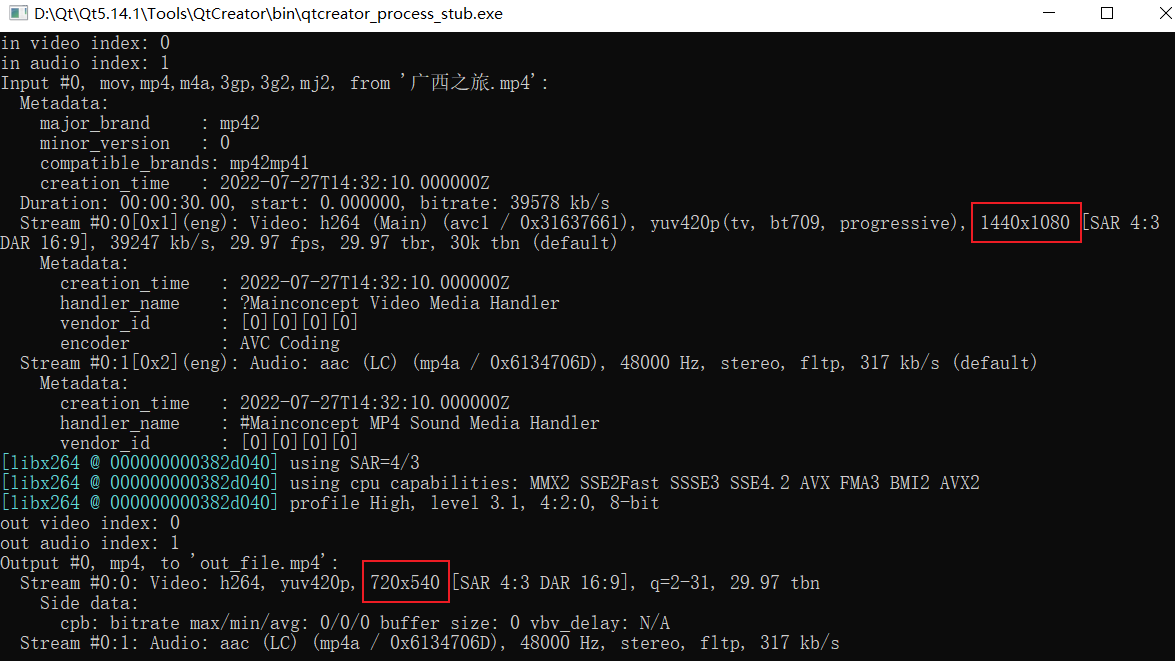
如下给出实现代码,从上述代码中修改得来,其中画面大小会缩小一半:
// 大小为原来的一半
encodec_ctx->width = decodec_ctx->width / 2;
encodec_ctx->height = decodec_ctx->height / 2;
// 指定格式为yuv420p
encodec_ctx->pix_fmt = AV_PIX_FMT_YUV420P;
实现代码:
解复用 → 解码 → 像素转换 → 编码 → 复用
#include <iostream>
#include <string>


extern "C" {
#include <libavformat/avformat.h>
#include <libavcodec/avcodec.h>
#include <libswscale/swscale.h>
}


// 打印错误信息
void PrintErr(int err) {
    char buf[1024] = { 0 };
    av_strerror(err, buf, sizeof(buf));
    std::cout << buf << std::endl;
}


// 重新计算pts、dts、duration
void rescale_packet_ts(AVPacket *&pkt, AVRational cur_time_base, AVRational target_time_base) {
    pkt->pts = av_rescale_q_rnd(pkt->pts, cur_time_base,target_time_base,
                                (AVRounding)(AV_ROUND_NEAR_INF | AV_ROUND_PASS_MINMAX));
    pkt->dts = av_rescale_q_rnd(pkt->dts, cur_time_base,target_time_base,
                                (AVRounding)(AV_ROUND_NEAR_INF | AV_ROUND_PASS_MINMAX));
    pkt->duration = av_rescale_q(pkt->duration, cur_time_base, target_time_base);
    pkt->pos = -1;
}

int main(void) {

    // 解复用
    std::string in_file_path = "video1.mp4";
    AVFormatContext *demux_ctx = NULL;
    int in_video_index = -1;
    int in_audio_index = -1;


    // 解码
    const AVCodec *decodec = NULL;
    AVCodecContext *decodec_ctx = NULL;


    // 编码
    const AVCodec *encodec = NULL;
    AVCodecContext *encodec_ctx = NULL;


    // 复用
    std::string out_file_path = "out_file.mp4";
    AVFormatContext *mux_ctx = nullptr;
    int out_video_index = -1;
    int out_audio_index = -1;


    // 像素格式转换
    SwsContext *sws_ctx = nullptr;
    AVFrame *sws_frame = av_frame_alloc();


    // 其它
    AVPacket *pkt = av_packet_alloc();
    AVFrame *frame = av_frame_alloc();
    int re = -1;


    ////////////////////////////////////////////////////////////////////////////////////////////////////////////////////////////////
    /// 解复用

    // 1.打开视频文件
    re = avformat_open_input(&demux_ctx, in_file_path.c_str(), NULL, NULL);
    if (0 != re) {
        std::cout << "avformat_open_input failed!" << std::endl;
        PrintErr(re);
        goto Failed;
    }


    // 2.查找流信息
    re = avformat_find_stream_info(demux_ctx, NULL);
    if (0 > re) {
        std::cout << "avformat_find_stream_info failed!" << std::endl;
        PrintErr(re);
        goto Failed;
    }


    // 3.获得流索引
    for (int i = 0; i < demux_ctx->nb_streams; ++i) {
        if (AVMEDIA_TYPE_VIDEO == demux_ctx->streams[i]->codecpar->codec_type) {
            in_video_index = i;
        } else if (AVMEDIA_TYPE_AUDIO == demux_ctx->streams[i]->codecpar->codec_type) {
            in_audio_index = i;
        } else {
            std::cout << "other index: " << i;
        }
    }

    std::cout << "in video index: " << in_video_index << "\nin audio index: " << in_audio_index << std::endl;

    av_dump_format(demux_ctx, in_video_index, in_file_path.c_str(), 0);


    ////////////////////////////////////////////////////////////////////////////////////////////////////////////////////////////////


    ////////////////////////////////////////////////////////////////////////////////////////////////////////////////////////////////
    /// 解码

    // 4.查找视频解码器
    decodec = avcodec_find_decoder(demux_ctx->streams[in_video_index]->codecpar->codec_id);
    if (!decodec) {
        std::cout << "avcodec_find_decoder failed!" << std::endl;
        goto Failed;
    }

    // 5.创建解码器上下文
    decodec_ctx = avcodec_alloc_context3(decodec);
    if (!decodec_ctx) {
        std::cout << "avcodec_alloc_context3 failed!" << std::endl;
        goto Failed;
    }

    // 6.将流参数复制到解码器上下文
    re = avcodec_parameters_to_context(decodec_ctx, demux_ctx->streams[in_video_index]->codecpar);
    if (0 > re) {
        std::cout << "avcodec_parameters_to_contextv failed!" << std::endl;
        PrintErr(re);
        goto Failed;
    }

    // 7.打开解码器
    re = avcodec_open2(decodec_ctx, decodec, NULL);
    if (0 != re) {
        std::cout << "avcodec_open2 failed!" << std::endl;
        PrintErr(re);
        goto Failed;
    }

    ////////////////////////////////////////////////////////////////////////////////////////////////////////////////////////////////


    ////////////////////////////////////////////////////////////////////////////////////////////////////////////////////////////////
    /// 编码

    // 8.查找视频编码器
    encodec = avcodec_find_encoder(demux_ctx->streams[in_video_index]->codecpar->codec_id);
    if (!encodec) {
        std::cout << "avcodec_find_encoder failed!" << std::endl;
        goto Failed;
    }

    // 9.创建编码器上下文
    encodec_ctx = avcodec_alloc_context3(encodec);
    if (!encodec_ctx) {
        std::cout << "avcodec_alloc_context3 failed!" << std::endl;
        goto Failed;
    }

    // 10.设置编码器基础参数
    {
        // 大小为原来的一半
        encodec_ctx->width = decodec_ctx->width / 2;
        encodec_ctx->height = decodec_ctx->height / 2;
        // 指定格式为yuv420p
        encodec_ctx->pix_fmt = AV_PIX_FMT_YUV420P;

        // time_base
        AVRational framerate = demux_ctx->streams[in_video_index]->avg_frame_rate;
        if (0 >= framerate.den || 0 >= framerate.num) {
            // 根据参数‘猜测’结果
            framerate = av_guess_frame_rate(demux_ctx, demux_ctx->streams[in_video_index], NULL);
        }
        if (0 >= framerate.den || 0 >= framerate.num) {
            framerate = (AVRational){ 25, 1 };
        }
        encodec_ctx->framerate = framerate;
        encodec_ctx->time_base = av_inv_q(framerate);

        // 像素宽高比
        encodec_ctx->sample_aspect_ratio = decodec_ctx->sample_aspect_ratio;
    }


    // 11.打开编码器
    re = avcodec_open2(encodec_ctx, encodec, NULL);
    if (0 != re) {
        std::cout << "avcodec_open2 failed!" << std::endl;
        PrintErr(re);
        goto Failed;
    }

    ////////////////////////////////////////////////////////////////////////////////////////////////////////////////////////////////


    ////////////////////////////////////////////////////////////////////////////////////////////////////////////////////////////////
    /// 复用

    // 12.创建复用上下文
    re = avformat_alloc_output_context2(&mux_ctx, NULL, NULL, out_file_path.c_str());
    if (0 > re) {
        std::cout << "avformat_alloc_output_context2 failed!" << std::endl;
        PrintErr(re);
        goto Failed;
    }

    // 13.创建音视频流
    // 创建【视频流】
    if (0 <= in_video_index) {
        AVStream *stream = avformat_new_stream(mux_ctx, NULL);      // 新建视频流
        stream->time_base = encodec_ctx->time_base;                 // 输出流 time_base 先与编码器保持一致
        out_video_index = stream->index;
        avcodec_parameters_from_context(stream->codecpar, encodec_ctx);     // 把编码器参数写进流
    }
    // 创建【音频流】:走“透传”——不解码不编码,直接复制参数、原样搬运压缩包
    if (0 <= in_audio_index) {
        AVStream *stream = avformat_new_stream(mux_ctx, NULL);
        avcodec_parameters_copy(stream->codecpar, demux_ctx->streams[in_audio_index]->codecpar);
        stream->time_base = demux_ctx->streams[in_audio_index]->time_base;
        out_audio_index = stream->index;
    }

    std::cout << "out video index: " << out_video_index << "\nout audio index: " << out_audio_index << std::endl;

    // 14.打开io
    re = avio_open2(&mux_ctx->pb, out_file_path.c_str(), AVIO_FLAG_WRITE, NULL, NULL);
    if (0 > re) {
        std::cout << "avio_open2 failed!" << std::endl;
        PrintErr(re);
        goto Failed;
    }

    av_dump_format(mux_ctx, out_video_index, out_file_path.c_str(), 1);

    ////////////////////////////////////////////////////////////////////////////////////////////////////////////////////////////////


    ////////////////////////////////////////////////////////////////////////////////////////////////////////////////////////////////
    /// 像素格式转换

    sws_ctx = sws_getContext(decodec_ctx->width, decodec_ctx->height, (AVPixelFormat)decodec_ctx->pix_fmt,
                             encodec_ctx->width, encodec_ctx->height, (AVPixelFormat)encodec_ctx->pix_fmt,
                             SWS_BILINEAR, NULL, NULL, NULL);
    if (!sws_ctx) {
        std::cout << "sws_getContext failed! " << std::endl;
        return -1;
    }

    // 分配内存,用于接收转换后的一帧图像
    sws_frame->width = encodec_ctx->width;
    sws_frame->height = encodec_ctx->height;
    sws_frame->format = encodec_ctx->pix_fmt;
    re = av_frame_get_buffer(sws_frame, 32);
    if (0 > re) {
        std::cout << "av_frame_get_buffer failed! " << std::endl;
        PrintErr(re);
        goto Failed;
    }

    ////////////////////////////////////////////////////////////////////////////////////////////////////////////////////////////////


    // 15.写入文件头
    re = avformat_write_header(mux_ctx, NULL);
    if (0 > re) {
        std::cout << "avformat_write_header failed!" << std::endl;
        PrintErr(re);
        goto Failed;
    }


    while (1) {
        // 16.读取数据包
        re = av_read_frame(demux_ctx, pkt);
        // 已经读完
        if (AVERROR_EOF == re) {
            break;
        }
        if (0 > re) {
            std::cout << "av_read_frame failed!" << std::endl;
            PrintErr(re);
            goto Failed;
        }


        if (in_video_index == pkt->stream_index) {
            // 17.发送数据包到解码器
            re = avcodec_send_packet(decodec_ctx, pkt);
            av_packet_unref(pkt);
            if (0 > re) {
                std::cout << "avcodec_send_packet failed!" << std::endl;
                PrintErr(re);
                goto Failed;
            }

            while (1) {
                // 18.接收解码帧
                re = avcodec_receive_frame(decodec_ctx, frame);
                // 还未有完整的数据 | 已经读完
                if (AVERROR(EAGAIN) == re || AVERROR_EOF == re) {
                    break;
                }

                if (0 > re) {
                    std::cout << "avcodec_receive_frame failed!" << std::endl;
                    PrintErr(re);
                    goto Failed;
                }


                // 像素格式转换
                re = sws_scale(sws_ctx, frame->data, frame->linesize, 0, frame->height, sws_frame->data, sws_frame->linesize);
                if (0 > re) {
                    std::cout << "sws_scale failed! " << std::endl;
                    PrintErr(re);
                    goto Failed;
                }

                // 19.把帧的时间单位“翻译”成编码器能看懂的单位
                // 将解码后视频帧的显示时间戳(PTS),从“输入流的时间基”换算成“编码器的时间基”
                sws_frame->pts = av_rescale_q(frame->pts, demux_ctx->streams[in_video_index]->time_base, encodec_ctx->time_base);
                av_frame_unref(frame);

                // 20.发送数据包到编码器
                re = avcodec_send_frame(encodec_ctx, sws_frame);
                if (0 > re) {
                    std::cout << "avcodec_send_frame failed!" << std::endl;
                    PrintErr(re);
                    goto Failed;
                }


                while (1) {
                    // 21.接收编码帧
                    re = avcodec_receive_packet(encodec_ctx, pkt);
                    // 还未有完整的数据 | 已经读完
                    if (AVERROR(EAGAIN) == re || AVERROR_EOF == re) {
                        break;
                    }

                    if (0 > re) {
                        std::cout << "avcodec_receive_packet failed!" << std::endl;
                        PrintErr(re);
                        goto Failed;
                    }


                    // 22.重新计算pts、dts、duration
                    rescale_packet_ts(pkt, encodec_ctx->time_base, mux_ctx->streams[out_video_index]->time_base);

                    // 23.写入文件
                    re = av_interleaved_write_frame(mux_ctx, pkt);
                    av_packet_unref(pkt);
                    if (0 != re) {
                        std::cout << "av_interleaved_write_frame failed!" << std::endl;
                        PrintErr(re);
                        goto Failed;
                    }

                    std::cout << ". ";
                }
            }

        } else if (in_audio_index == pkt->stream_index) {
            // 重新计算pts、dts、duration
            // 音频是"透传"——包是从解复用器直接搬过来的,它的 pts/dts/duration 单位是输入音频流的 time_base(1/48000),从头到尾没碰过编码器
            rescale_packet_ts(pkt, demux_ctx->streams[in_audio_index]->time_base, mux_ctx->streams[out_audio_index]->time_base);


            // 写入文件
            re = av_interleaved_write_frame(mux_ctx, pkt);
            av_packet_unref(pkt);
            if (0 != re) {
                std::cout << "av_interleaved_write_frame failed!" << std::endl;
                PrintErr(re);
                goto Failed;
            }

        } else {
            std::cout << "other index: " << pkt->stream_index << std::endl;
            av_packet_unref(pkt);
        }
    }


    // 24.冲刷解码器
    re = avcodec_send_packet(decodec_ctx, NULL);
    if (0 > re) {
        std::cout << "avcodec_send_packet failed!" << std::endl;
        PrintErr(re);
        goto Failed;
    }
    while (1) {
        // 接收解码
        re = avcodec_receive_frame(decodec_ctx, frame);
        // 还未有完整的数据 | 已经读完
        if (AVERROR(EAGAIN) == re || AVERROR_EOF == re) {
            break;
        }

        if (0 > re) {
            std::cout << "avcodec_receive_frame failed!" << std::endl;
            PrintErr(re);
            goto Failed;
        }


        // 像素格式转换
        re = sws_scale(sws_ctx, frame->data, frame->linesize, 0, frame->height, sws_frame->data, sws_frame->linesize);
        if (0 > re) {
            std::cout << "sws_scale failed! " << std::endl;
            PrintErr(re);
            goto Failed;
        }
        sws_frame->pts = av_rescale_q(frame->pts, demux_ctx->streams[in_video_index]->time_base, encodec_ctx->time_base);
        av_frame_unref(frame);


        // 发送编码
        re = avcodec_send_frame(encodec_ctx, sws_frame);
        if (0 > re) {
            std::cout << "avcodec_send_frame failed!" << std::endl;
            PrintErr(re);
            goto Failed;
        }


        while (1) {
            // 接收编码
            re = avcodec_receive_packet(encodec_ctx, pkt);
            // 还未有完整的数据 | 已经读完
            if (AVERROR(EAGAIN) == re || AVERROR_EOF == re) {
                break;
            }

            if (0 > re) {
                std::cout << "avcodec_receive_packet failed!" << std::endl;
                PrintErr(re);
                goto Failed;
            }


            // 重新计算pts、dts、duration
            rescale_packet_ts(pkt, encodec_ctx->time_base, mux_ctx->streams[out_video_index]->time_base);

            // 写入文件
            re = av_interleaved_write_frame(mux_ctx, pkt);
            av_packet_unref(pkt);
            if (0 != re) {
                std::cout << "av_interleaved_write_frame failed!" << std::endl;
                PrintErr(re);
                goto Failed;
            }

            std::cout << "- ";
        }
    }


    // 25.冲刷编码器
    re = avcodec_send_frame(encodec_ctx, NULL);
    if (0 > re) {
        std::cout << "avcodec_send_frame failed!" << std::endl;
        PrintErr(re);
        goto Failed;
    }
    while (1) {
        // 接收编码
        re = avcodec_receive_packet(encodec_ctx, pkt);
        // 还未有完整的数据 | 已经读完
        if (AVERROR(EAGAIN) == re || AVERROR_EOF == re) {
            break;
        }

        if (0 > re) {
            std::cout << "avcodec_receive_packet failed!" << std::endl;
            PrintErr(re);
            goto Failed;
        }


        // 重新计算pts、dts、duration
        rescale_packet_ts(pkt, encodec_ctx->time_base, mux_ctx->streams[out_video_index]->time_base);

        // 写入文件
        re = av_interleaved_write_frame(mux_ctx, pkt);
        av_packet_unref(pkt);
        if (0 != re) {
            std::cout << "av_interleaved_write_frame failed!" << std::endl;
            PrintErr(re);
            goto Failed;
        }

        std::cout << "= ";
    }


    // 写入文件尾部
    re = av_write_trailer(mux_ctx);
    if (0 != re) {
        std::cout << "av_write_trailer failed!" << std::endl;
        PrintErr(re);
        goto Failed;
    }


    std::cout << "\nend!" << std::endl;


Failed:
    // 26.释放所有资源
    avformat_close_input(&demux_ctx);
    avcodec_free_context(&decodec_ctx);
    avcodec_free_context(&encodec_ctx);
    if (mux_ctx) {
        if (mux_ctx->pb) {
            avio_closep(&mux_ctx->pb);
        }
        avformat_free_context(mux_ctx);
    }

    if (sws_ctx) sws_freeContext(sws_ctx);
    av_frame_free(&sws_frame);
    av_packet_free(&pkt);
    av_frame_free(&frame);


    return 0;
}


 扫一扫
扫一扫


 1363
1363

 被折叠的 条评论
为什么被折叠?
被折叠的 条评论
为什么被折叠?
 到【灌水乐园】发言


