


Spark 2.4.0 standalone 模式安装
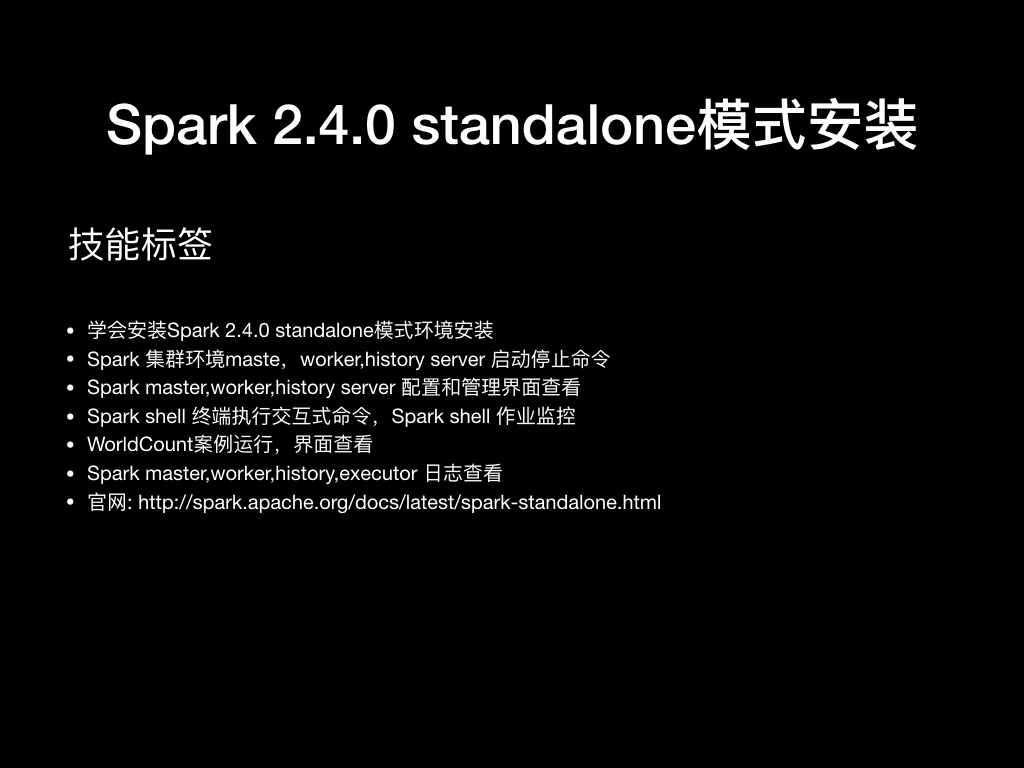
视频
- Spark 2.4.0 standalone 模式安装(bilibili视频) : https://www.bilibili.com/video/av38193405/?p=1
<iframe width="800" height="500" src="//player.bilibili.com/player.html?aid=38193405&cid=67137841&page=1" scrolling="no" border="0" frameborder="no" framespacing="0" allowfullscreen="true"> </iframe>
更多资源
官网文档
技能标签
- 学会安装Spark 2.4.0 standalone模式环境安装
- Spark 集群环境maste,worker,history server 启动停止命令
- Spark master,worker,history server 配置和管理界面查看
- Spark shell 终端执行交互式命令,Spark shell 作业监控
- WorldCount案例运行,界面查看
- Spark master,worker,history,executor 日志查看
- 官网: http://spark.apache.org/docs/latest/spark-standalone.html
前置条件
- 已安装好java(选用的是java 1.8.0_191)
- 已安装好scala(选用的是scala 2.11.121)
- 已安装好hadoop(选用的是Hadoop 3.1.1)
安装
- 下载安装包 : spark-2.4.0-bin-without-hadoop.tgz
- 安装包下载地址: https://archive.apache.org/dist/spark/spark-2.4.0/spark-2.4.0-bin-without-hadoop.tgz
- 将安装包上传到服务器上进行安装
- 解压压缩包
tar -zxvf spark-2.4.0-bin-without-hadoop.tgz -C /opt/module/bigdata/
- 配置环境变量(配的是~/.bashrc)
export JAVA_HOME=/opt/module/jdk/jdk1.8.0_191
export CLASSPATH=.:$JAVA_HOME/lib/dt.jar:$JAVA_HOME/lib/tools.jar

export SCALA_HOME=/opt/module/scala/scala-2.11.12
export HADOOP_HOME=/opt/module/bigdata/hadoop-3.1.1
export SPARK_HOME=/opt/module/bigdata/spark-2.4.0-bin-without-hadoop
export PATH=$JAVA_HOME/bin:$SCALA_HOME/bin:$SPARK_HOME/bin:$SPARK_HOME/sbin:$HADOOP_HOME/bin:$HADOOP_HOME/sbin:$PATH
配置
配置hadoop的classpath
- 下载不带hadoop依赖jar的spark版本
- 需要在spark配置中指定hadoop的classpath
- 配置文件spark-env.sh
### in conf/spark-env.sh ###

# If 'hadoop' binary is on your PATH
export SPARK_DIST_CLASSPATH=$(hadoop classpath)

# With explicit path to 'hadoop' binary
export SPARK_DIST_CLASSPATH=$(/path/to/hadoop/bin/hadoop classpath)

# Passing a Hadoop configuration directory
export SPARK_DIST_CLASSPATH=$(hadoop --config /path/to/configs classpath)
spark-env.sh配置
#!/usr/bin/env bash


#
# Licensed to the Apache Software Foundation (ASF) under one or more
# contributor license agreements.  See the NOTICE file distributed with
# this work for additional information regarding copyright ownership.
# The ASF licenses this file to You under the Apache License, Version 2.0
# (the "License"); you may not use this file except in compliance with
# the License.  You may obtain a copy of the License at
#
#    http://www.apache.org/licenses/LICENSE-2.0
#
# Unless required by applicable law or agreed to in writing, software
# distributed under the License is distributed on an "AS IS" BASIS,
# WITHOUT WARRANTIES OR CONDITIONS OF ANY KIND, either express or implied.
# See the License for the specific language governing permissions and
# limitations under the License.
#

# This file is sourced when running various Spark programs.
# Copy it as spark-env.sh and edit that to configure Spark for your site.

# Options read when launching programs locally with
# ./bin/run-example or ./bin/spark-submit
# - HADOOP_CONF_DIR, to point Spark towards Hadoop configuration files
# - SPARK_LOCAL_IP, to set the IP address Spark binds to on this node
# - SPARK_PUBLIC_DNS, to set the public dns name of the driver program

# Options read by executors and drivers running inside the cluster
# - SPARK_LOCAL_IP, to set the IP address Spark binds to on this node
# - SPARK_PUBLIC_DNS, to set the public DNS name of the driver program
# - SPARK_LOCAL_DIRS, storage directories to use on this node for shuffle and RDD data
# - MESOS_NATIVE_JAVA_LIBRARY, to point to your libmesos.so if you use Mesos

# Options read in YARN client/cluster mode
# - SPARK_CONF_DIR, Alternate conf dir. (Default: ${SPARK_HOME}/conf)
# - HADOOP_CONF_DIR, to point Spark towards Hadoop configuration files
# - YARN_CONF_DIR, to point Spark towards YARN configuration files when you use YARN
# - SPARK_EXECUTOR_CORES, Number of cores for the executors (Default: 1).
# - SPARK_EXECUTOR_MEMORY, Memory per Executor (e.g. 1000M, 2G) (Default: 1G)
# - SPARK_DRIVER_MEMORY, Memory for Driver (e.g. 1000M, 2G) (Default: 1G)

# Options for the daemons used in the standalone deploy mode
# - SPARK_MASTER_HOST, to bind the master to a different IP address or hostname
# - SPARK_MASTER_PORT / SPARK_MASTER_WEBUI_PORT, to use non-default ports for the master
# - SPARK_MASTER_OPTS, to set config properties only for the master (e.g. "-Dx=y")
# - SPARK_WORKER_CORES, to set the number of cores to use on this machine
# - SPARK_WORKER_MEMORY, to set how much total memory workers have to give executors (e.g. 1000m, 2g)
# - SPARK_WORKER_PORT / SPARK_WORKER_WEBUI_PORT, to use non-default ports for the worker
# - SPARK_WORKER_DIR, to set the working directory of worker processes
# - SPARK_WORKER_OPTS, to set config properties only for the worker (e.g. "-Dx=y")
# - SPARK_DAEMON_MEMORY, to allocate to the master, worker and history server themselves (default: 1g).
# - SPARK_HISTORY_OPTS, to set config properties only for the history server (e.g. "-Dx=y")
# - SPARK_SHUFFLE_OPTS, to set config properties only for the external shuffle service (e.g. "-Dx=y")
# - SPARK_DAEMON_JAVA_OPTS, to set config properties for all daemons (e.g. "-Dx=y")
# - SPARK_DAEMON_CLASSPATH, to set the classpath for all daemons
# - SPARK_PUBLIC_DNS, to set the public dns name of the master or workers

# Generic options for the daemons used in the standalone deploy mode
# - SPARK_CONF_DIR      Alternate conf dir. (Default: ${SPARK_HOME}/conf)
# - SPARK_LOG_DIR       Where log files are stored.  (Default: ${SPARK_HOME}/logs)
# - SPARK_PID_DIR       Where the pid file is stored. (Default: /tmp)
# - SPARK_IDENT_STRING  A string representing this instance of spark. (Default: $USER)
# - SPARK_NICENESS      The scheduling priority for daemons. (Default: 0)
# - SPARK_NO_DAEMONIZE  Run the proposed command in the foreground. It will not output a PID file.
# Options for native BLAS, like Intel MKL, OpenBLAS, and so on.
# You might get better performance to enable these options if using native BLAS (see SPARK-21305).
# - MKL_NUM_THREADS=1        Disable multi-threading of Intel MKL
# - OPENBLAS_NUM_THREADS=1   Disable multi-threading of OpenBLAS


# Passing a Hadoop configuration directory
export SPARK_DIST_CLASSPATH=$(hadoop classpath)

#master setting
SPARK_MASTER_HOST=standalone.com  #绑定master的主机域名
SPARK_MASTER_PORT=7077            # master 通信端口,worker和master通信端口
SPARK_MASTER_WEBUI_PORT=8080      # master SParkUI用的端口


# worker setting

SPARK_WORKER_MEMORY=1g  #配置worker的内存大小
slaves配置
- 配置路径$SPARK_HOME/conf/slaves
standalone.com
history server 配置
- 配置 $SPARK_HOME/conf/spark-defaults.conf
- 注意spark.eventLog.dir 和spark.history.fs.logDirectory 要相同路径
#
# Licensed to the Apache Software Foundation (ASF) under one or more
# contributor license agreements.  See the NOTICE file distributed with
# this work for additional information regarding copyright ownership.
# The ASF licenses this file to You under the Apache License, Version 2.0
# (the "License"); you may not use this file except in compliance with
# the License.  You may obtain a copy of the License at
#
#    http://www.apache.org/licenses/LICENSE-2.0
#
# Unless required by applicable law or agreed to in writing, software
# distributed under the License is distributed on an "AS IS" BASIS,
# WITHOUT WARRANTIES OR CONDITIONS OF ANY KIND, either express or implied.
# See the License for the specific language governing permissions and
# limitations under the License.
#

# Default system properties included when running spark-submit.
# This is useful for setting default environmental settings.

# Example:
# spark.master                     spark://master:7077
# spark.eventLog.enabled           true
# spark.eventLog.dir               hdfs://namenode:8021/directory
# spark.serializer                 org.apache.spark.serializer.KryoSerializer
# spark.driver.memory              5g
# spark.executor.extraJavaOptions  -XX:+PrintGCDetails -Dkey=value -Dnumbers="one two three"


# history
spark.master=spark://standalone.com:7077
spark.eventLog.enabled=true
spark.eventLog.dir=hdfs://standalone.com:9000/spark/log/historyEventLog
spark.serializer=org.apache.spark.serializer.KryoSerializer
spark.driver.memory=1g
spark.history.fs.logDirectory=hdfs://standalone.com:9000/spark/log/historyEventLog

spark.history.ui.port=18080
spark.history.fs.update.interval=10s
#	The number of application UIs to retain. If this cap is exceeded, then the oldest applications will be removed.
spark.history.retainedApplications=50
spark.history.fs.cleaner.enabled=false
spark.history.fs.cleaner.interval=1d
spark.history.fs.cleaner.maxAge=7d
spark.history.ui.acls.enable=false
master
master启动命令
- 默认master日志路径 $SPARK_HOME/logs/--org.apache.spark.deploy.master.Master--.out
start-master.sh
master停止命令
stop-master.sh
worker
master启动命令
- 默认worker日志路径 $SPARK_HOME/logs/--org.apache.spark.deploy.master.Worker--.out
start-slave.sh spark://standalone.com:7077
worker停止命令
stop-slave.sh
启动所有worker命令
- 配置 $SPARK_HOME/conf/slaves 所有worker配置
start-slaves.sh spark://standalone.com:7077
停止所有worker命令
stop-slaves.sh
启动spark-shell命令
- 启动spark-shell后可以在界面管理: http://standalone:4040
spark-shell
启动history-server命令
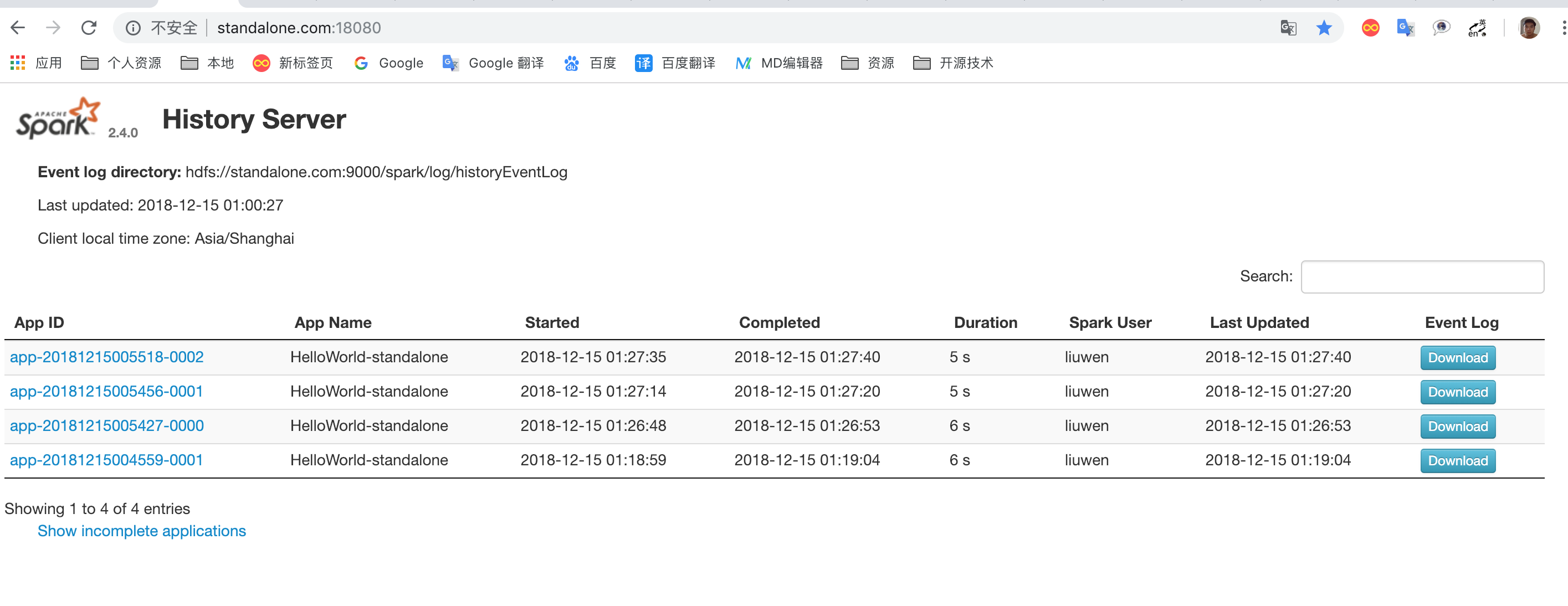
- history url: http://standalone.com:18080
start-history-server.sh
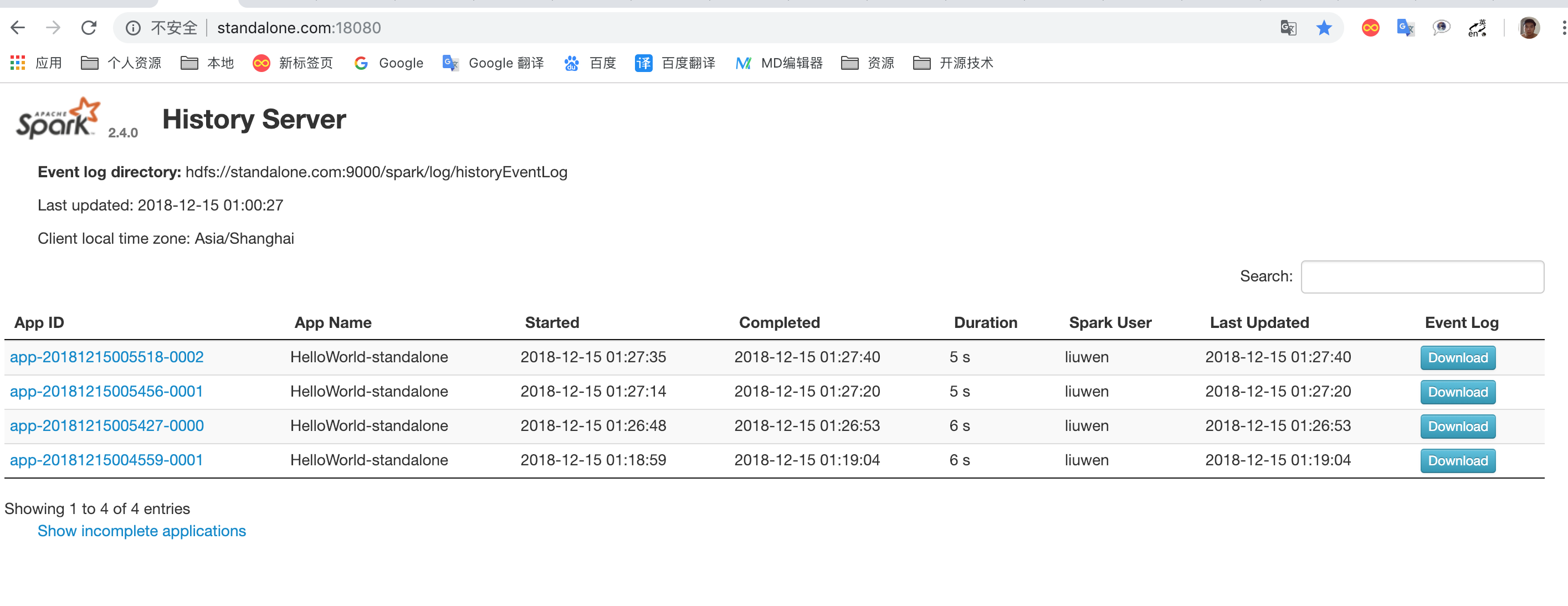
停上history-server 命令
stop-history-server.sh
管理控制台
master控制台
spark-shell命令
- 界面管理 : http://standalone:4040
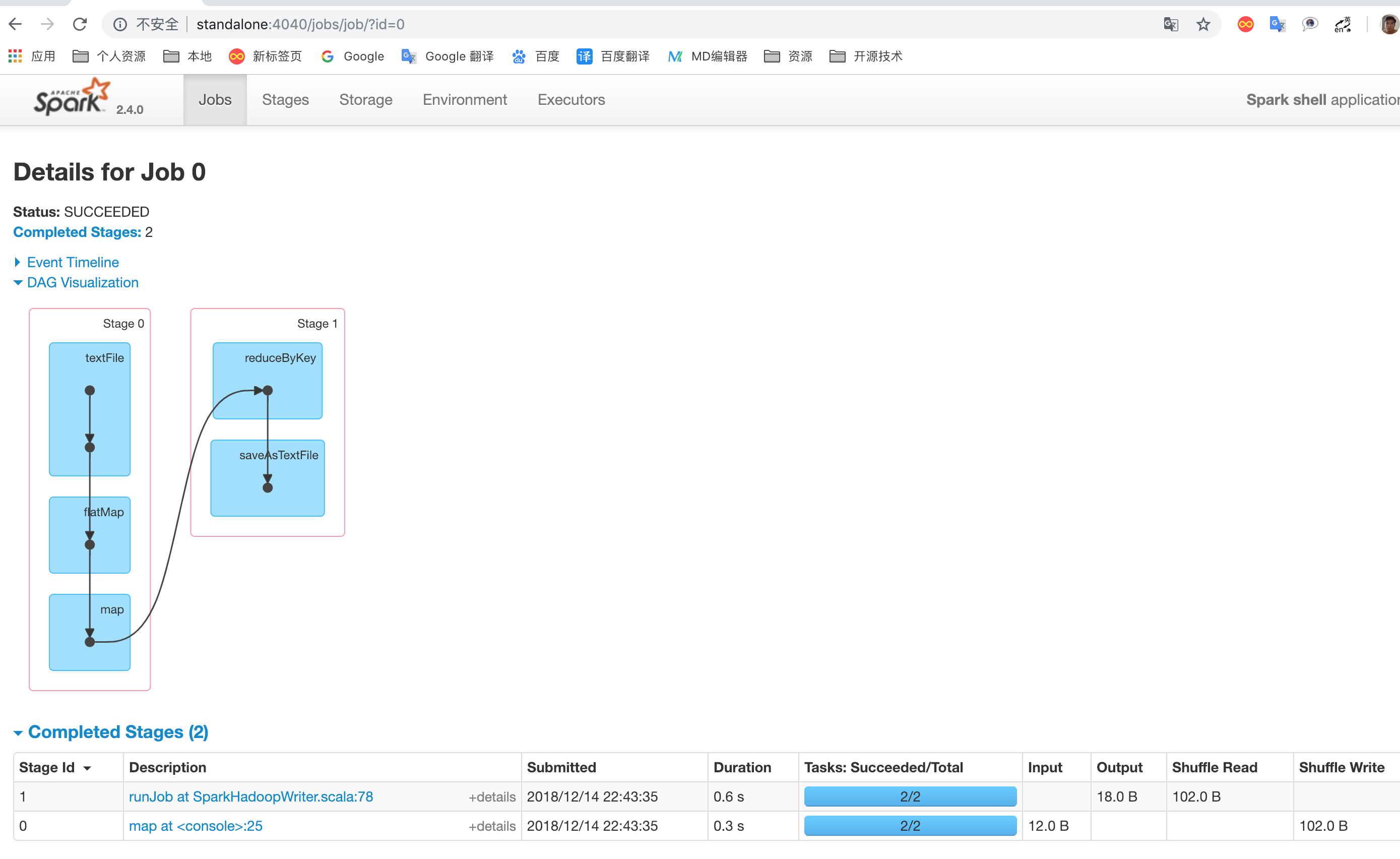
- 终端交互界面

end
 23万+
23万+


 扫一扫
扫一扫


 被折叠的 条评论
为什么被折叠?
被折叠的 条评论
为什么被折叠?
 到【灌水乐园】发言


