



邓立国Agent开发入门必读书《AI Agent智能体开发实践》1~12章试读_《ai agent 智能体开发实践》在线阅读-CSDN博客
本节将使用Qwen-VL模型来实现这个完整可运行的简化版多模态电商客服机器人。这个简化版的多模态电商客服机器人使用Qwen-VL实现多模态问答与图像理解,整体设计兼顾了功能性和实用性,并提供了友好的用户交互界面和历史记录功能,适合作为电商平台的智能客服解决方案。具体实现说明如下。
【示例11.1】multi_modal_ecommerce_bot.py。
1. 项目目标
构建一个能理解用户上传图片并回答相关问题的电商客服机器人。例如,用户上传一张“红色连衣裙”图片,并问“这件衣服多少钱?”,客服机器人结合图像和问题生成合理回答,比如“该款连衣裙售价为299元。”
2. 技术栈
- 阿里云Qwen-VL的在线API,无须本地部署。
- Qwen-VL多模态问答逻辑。
- Qwen-VL图像理解(商品识别)。
- 可访问的图床服务,可以生成任意尺寸的占位图。
3. 代码实现
# multi_modal_ecommerce_bot.py
import torch
from PIL import Image
import gradio as gr
import numpy as np
import requests
import json
from io import BytesIO
from sklearn.metrics.pairwise import cosine_similarity
import base64
# -----------------------------
# 1. 阿里云 DashScope API 配置(请替换为你自己的 API Key)
# -----------------------------
DASHSCOPE_API_KEY = "your-dashscope-api-key-here" # 🔐 替换为你的实际 DashScope API Key
QWEN_VL_ENDPOINT = "https://dashscope.aliyuncs.com/api/v1/services/aigc/ multimodal-generation/generation"
# -----------------------------
# 2. 模拟商品数据库(使用国内可访问图床)
# -----------------------------
product_db = [
{
"id": 1,
"name": "红色连衣裙",
"price": 299,
"desc": "时尚红色修身连衣裙,适合夏季穿着。",
"image_url": "https://pic.imgdb.cn/item/red.jpg?width=200&height=300"
},
{
"id": 2,
"name": "蓝色牛仔裤",
"price": 199,
"desc": "高腰直筒牛仔裤,舒适透气。",
"image_url": "https://pic.imgdb.cn/item/blue.jpg?width=200&height=300"
},
{
"id": 3,
"name": "白色T恤",
"price": 59,
"desc": "纯棉基础款白色T恤,百搭。",
"image_url": "https://pic.imgdb.cn/item/white.jpg?width=200&height=300"
}
]
# 预加载商品图像(带容错机制)
product_images = []
for item in product_db:
try:
response = requests.get(item["image_url"], timeout=5)
response.raise_for_status()
img = Image.open(BytesIO(response.content)).convert("RGB")
img = img.resize((224, 224)) # 标准化尺寸用于 HSV 匹配
product_images.append(img)
print(f"✅ 成功加载: {item['name']}")
except Exception as e:
print(f"❌ 加载失败 {item['name']}: {e}")
# 创建灰色占位图作为后备
img = Image.new("RGB", (224, 224), color="gray")
product_images.append(img)
# -----------------------------
# 3. 调用 DashScope Qwen-VL API 进行多模态推理
# -----------------------------
def query_qwen_vl(image_base64, prompt):
"""
调用阿里云 DashScope Qwen-VL 模型进行图文问答
:param image_base64: 图像的 base64 编码字符串
:param prompt: 用户提问文本
:return: 模型生成的回答
"""
headers = {
"Authorization": f"Bearer {DASHSCOPE_API_KEY}",
"Content-Type": "application/json"
}
payload = {
"model": "qwen-vl-plus", # 推荐使用 qwen-vl-plus,性价比高
"input": {
"messages": [
{
"role": "user",
"content": [
{"image": image_base64},
{"text": prompt}
]
}
]
}
}
try:
response = requests.post(QWEN_VL_ENDPOINT, headers=headers, data=json.dumps(payload), timeout=10)
response.raise_for_status()
result = response.json()
if result.get("output") and result["output"].get("choices"):
return result["output"]["choices"][0]["message"]["content"]
else:
return "抱歉,Qwen-VL 未能理解图片内容。"
except requests.exceptions.RequestException as e:
return f"API 调用失败(网络或认证错误): {str(e)}"
except Exception as e:
return f"解析响应失败: {str(e)}"
def encode_image_to_base64(image):
"""将 PIL 图像编码为 base64 字符串"""
buffer = BytesIO()
image.save(buffer, format="JPEG")
return base64.b64encode(buffer.getvalue()).decode('utf-8')
def find_similar_product_by_image(raw_image):
"""
使用 HSV 直方图相似度进行简单图像匹配(替代 CLIP)
适用于无 GPU 环境,仅做粗略商品识别
"""
def compute_hsv_histogram(img):
hsv = img.convert('HSV')
hist = hsv.histogram()
return np.array(hist[:256]) / sum(hist[:256]) # 仅取 H 通道(色相)
target_hist = compute_hsv_histogram(raw_image)
sims = []
for img in product_images:
hist = compute_hsv_histogram(img)
sim = cosine_similarity(target_hist.reshape(1, -1), hist.reshape(1, -1))[0][0]
sims.append(sim)
best_match_idx = np.argmax(sims)
confidence = sims[best_match_idx]
return product_db[best_match_idx], confidence
# -----------------------------
# 4. 多模态客服机器人主函数
# -----------------------------
def ecommerce_bot(image, text):
if image is None:
return "请上传一张商品图片。"
raw_image = Image.fromarray(image).convert("RGB")
# 🔍 步骤1:用 HSV 直方图匹配最相似的商品
matched_product, confidence = find_similar_product_by_image(raw_image)
if confidence < 0.15:
return "⚠️ 未识别出图片中的商品,请上传更清晰的商品图片。"
# 💬 步骤2:调用 Qwen-VL 进行图文问答
image_b64 = encode_image_to_base64(raw_image)
prompt = f"这是一张商品图片,请根据图片内容简短回答以下问题:{text}"
answer = query_qwen_vl(image_b64, prompt)
# 🔄 步骤3:增强回答(结合商品信息,避免模型幻觉)
enhanced_answer = answer
# 价格相关问题
if any(keyword in text for keyword in ["价格", "多少钱", "price"]):
enhanced_answer = f"这款{matched_product['name']}的价格是{matched_product['price']}元。"
# 款式相关问题
elif any(keyword in text for keyword in ["什么款式", "款式", "款型", "类型"]):
enhanced_answer = f"这是{matched_product['name']},{matched_product['desc']}"
# 材质相关问题
elif any(keyword in text for keyword in ["材质", "材料"]):
enhanced_answer = f"该商品为{matched_product['desc']}。"
# 推荐相关问题
elif "推荐" in text:
enhanced_answer = f"我们推荐您购买{matched_product['name']},价格为{matched_product ['price']}元。"
return f"🔍 识别商品:{matched_product['name']}(相似度: {confidence:.3f})\n💬 Qwen-VL 回答:{enhanced_answer}"
# 存储历史结果的列表
history_results = []
def process_and_store(image, text):
result = ecommerce_bot(image, text)
if image is not None and text:
user_op = f"上传图 + 问"{text}""
history_results.append({"用户操作": user_op, "输出结果": result})
return result
def show_history():
history_text = ""
for i, item in enumerate(history_results, 1):
history_text += f"**{i}. 用户操作**\n{item['用户操作']}\n\n**输出结果**\n{item['输出结果']}\n\n---\n"
return history_text
# -----------------------------
# 5. Gradio 界面
# -----------------------------
with gr.Blocks() as demo:
gr.Markdown("# 📷 多模态电商客服机器人(基于 Qwen-VL)")
gr.Markdown("上传商品图片并提问,机器人将使用阿里云 Qwen-VL 多模态模型进行理解和回答。\n\n💡 注意:请确保已配置 DashScope API Key。")
with gr.Row():
with gr.Column():
input_image = gr.Image(label="上传商品图片")
input_text = gr.Textbox(label="您的问题", placeholder="例如:这件衣服多少钱?")
submit_btn = gr.Button("提交")
with gr.Row():
response_text = gr.Textbox(label="当前客服回复")
history_output = gr.Textbox(label="历史操作与结果列表", lines=20)
show_history_btn = gr.Button("显示历史结果")
submit_btn.click(
process_and_store,
inputs=[input_image, input_text],
outputs=response_text
)
show_history_btn.click(
show_history,
inputs=[],
outputs=history_output
)
# 示例(去掉图片部分,只保留文本问题)
gr.Examples(
examples=[
[None, "这件衣服多少钱?"],
[None, "这是什么款式的裤子?"],
[None, "这件T恤是什么材质?"]
],
inputs=[input_image, input_text],
outputs=response_text
)
# 启动服务
if __name__ == "__main__":
print("🚀 启动中... 请确保已设置 DASHSCOPE_API_KEY")
demo.launch(server_name="0.0.0.0", server_port=65534)
4. 运行结果
运行代码,输出如图11.2所示。
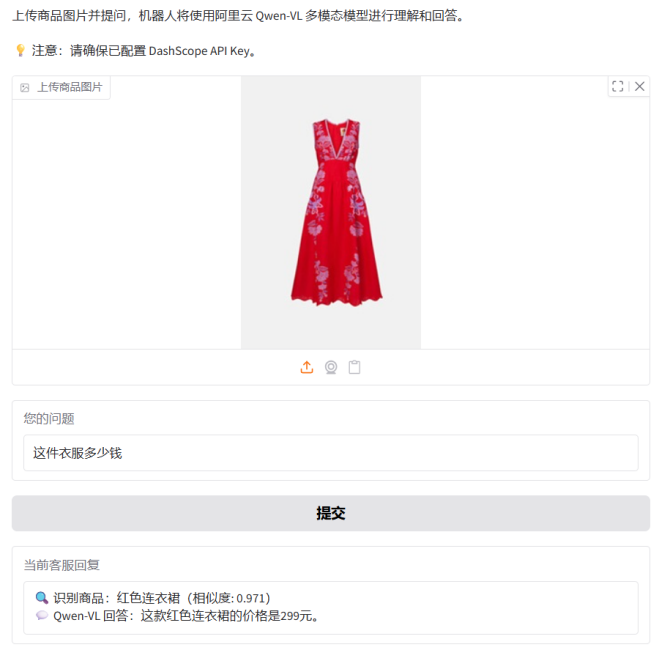
图11.2 上传商品图片到智能体的处理结果展示
5. 注意事项
(1)模型选择:本案例使用在线模型服务,读者可以选择本地部署大模型。
(2)真实电商场景:需接入真实商品数据库、图像检索系统(如FAISS)、对话状态管理(如Rasa)。
(3)安全性:生产环境需加入输入过滤、限流、日志等。
(4)延迟优化:可对模型进行量化或使用ONNX加速。


 扫一扫
扫一扫


 339
339

 被折叠的 条评论
为什么被折叠?
被折叠的 条评论
为什么被折叠?
 到【灌水乐园】发言


