


文章目录
ElasticSearch(ES) 搜索入门笔记
ElasticSearch简称ES,经过多年的发展,已是很流行的搜索工具了,无需多介绍,下面就粘一点官方介绍
You know, for search (and analysis)
Elasticsearch is the distributed search and analytics engine at the heart of the Elastic Stack. Logstash and Beats facilitate collecting, aggregating, and enriching your data and storing it in Elasticsearch. Kibana enables you to interactively explore, visualize, and share insights into your data and manage and monitor the stack. Elasticsearch is where the indexing, search, and analysis magic happens.
https://www.elastic.co/guide/en/elasticsearch/reference/current/elasticsearch-intro.html
环境准备-本地安装ES和Kibana
为了更好的学习和理解ES,可以在自己电脑上安装一个ES
-
在官方网站下载所需版本 https://www.elastic.co/cn/downloads/elasticsearch
-
将下载的文件解压到指定目录
tar -xzf /Users/cc/Downloads/elasticsearch-8.11.3-darwin-aarch64.tar.gz -C /Applications -
然后进入安装目录执行
./bin/elasticsearch以启动ES(注:较高的ES版本是以安全模式启动的; Windows上的启动命令为./bin/elasticsearch.bat) -
验证是否正常启动
curl -k -u elastic:password https://localhost:9200(注:以前未以安全模式启动时不需要输入用户名和密码curl 'http://localhost:9200/?pretty')
为了更方便学习和调试ES,可以使用Kibana提供的图形化开发工具,本地安装过程也很简单,如下所示:
-
在官方网站下载所需版本 https://www.elastic.co/downloads/kibana
-
将下载的文件解压到指定目录
tar -xzf /Users/cc/Downloads/kibana-8.11.3-darwin-aarch64.tar.gz -C /Applications -
然后进入安装目录执行
./bin/kibana以启动kinaba( Windows上的启动命令为./bin/kibana.bat) -
kibana启动成功后需要去配置ES,可以在终端打印出的链接 http://localhost:5601/?code=971215 去配置,将ES启动时生成的enrollment token粘贴确认即可。(注:生成enrollment token的有效期是30分钟,过期后可以通过
bin/elasticsearch-create-enrollment-token -s kibana --url https://localhost:9200重新生成(命令里的–url必须指定,不然会报错ERROR: Failed to determine the health of the cluster. , with exit code 69) ) -
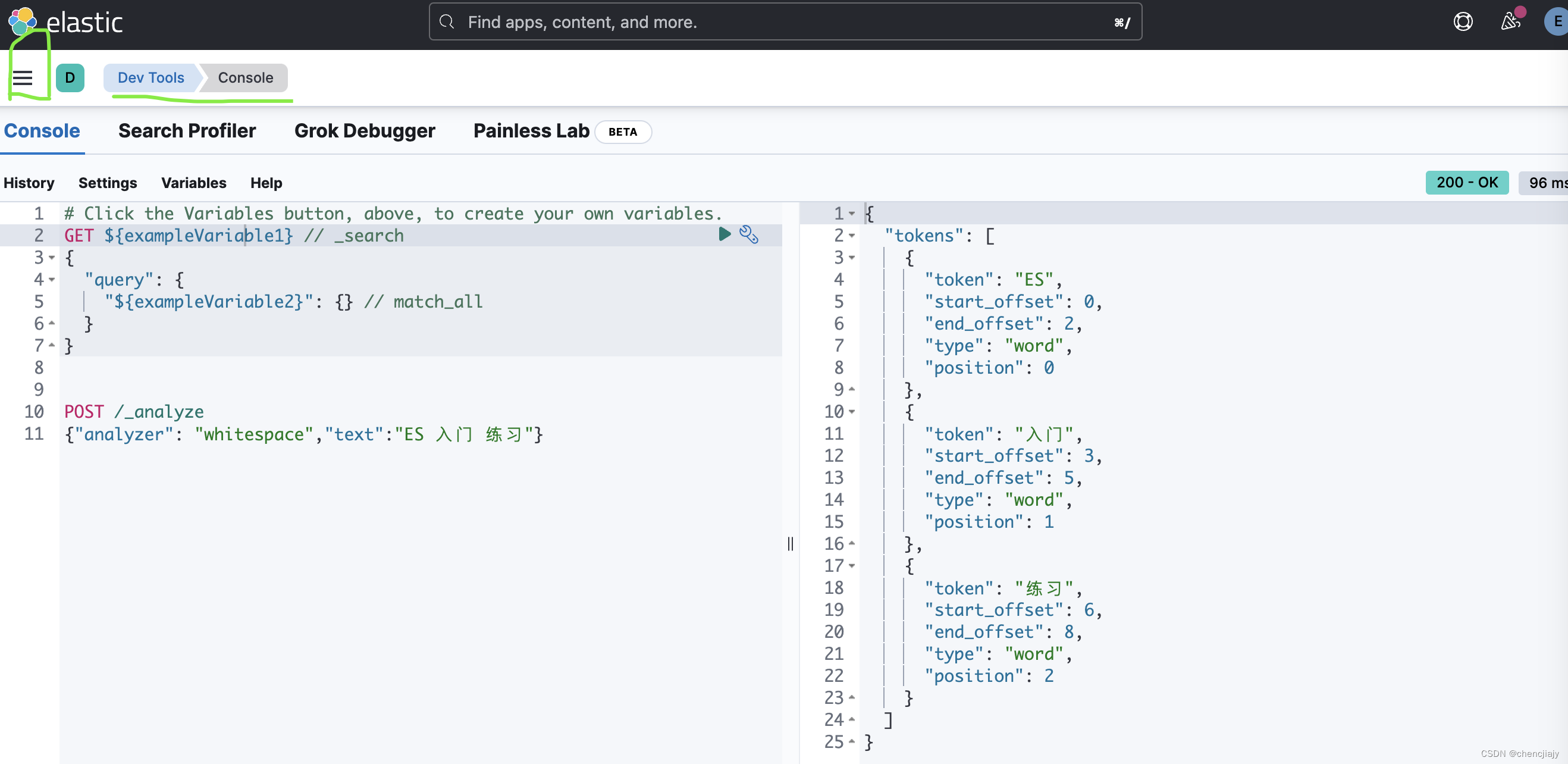
成功配置ES后,用ES的用户名密码登录后就可以正常使用kibina了,在kibana的首页左侧菜单栏-Management-Dev Tools 就可以看到图形化调试界面Console。(在ES的官方文档中的示例里的Console就是这个工具,使用它相比于使用curl来开发调试更方便)
mapping
ES索引创建时定义的mapping相当于数据库中的表结构定义schema,它定义了索引中的字段名称和数据类型,以及字段倒排索引的相关配置如分词器、是否可索引等。
比如我们可以定义如下索引名为my-index-000001的索引,索引有三个字段age、email、name,对应的类型分别为integer、keyword、text。
 PUT /my-index-000001
{
  "mappings": {
    "properties": {
      "age":    { "type": "integer" },
      "email":  { "type": "keyword"  },
      "name":   { "type": "text"  }
    }
  }
}
字段类型
这里记录下常见数据类型,更多ES定义类型参见ES官方文档定义的数据类型
-
text 是默认会被分词的字段类型,如果不指定分词器,ES会用标准分词器切分文本。
-
keyword 适用于保存不需要分词的原始文本,比如邮箱地址、id、标签、主机名等。
-
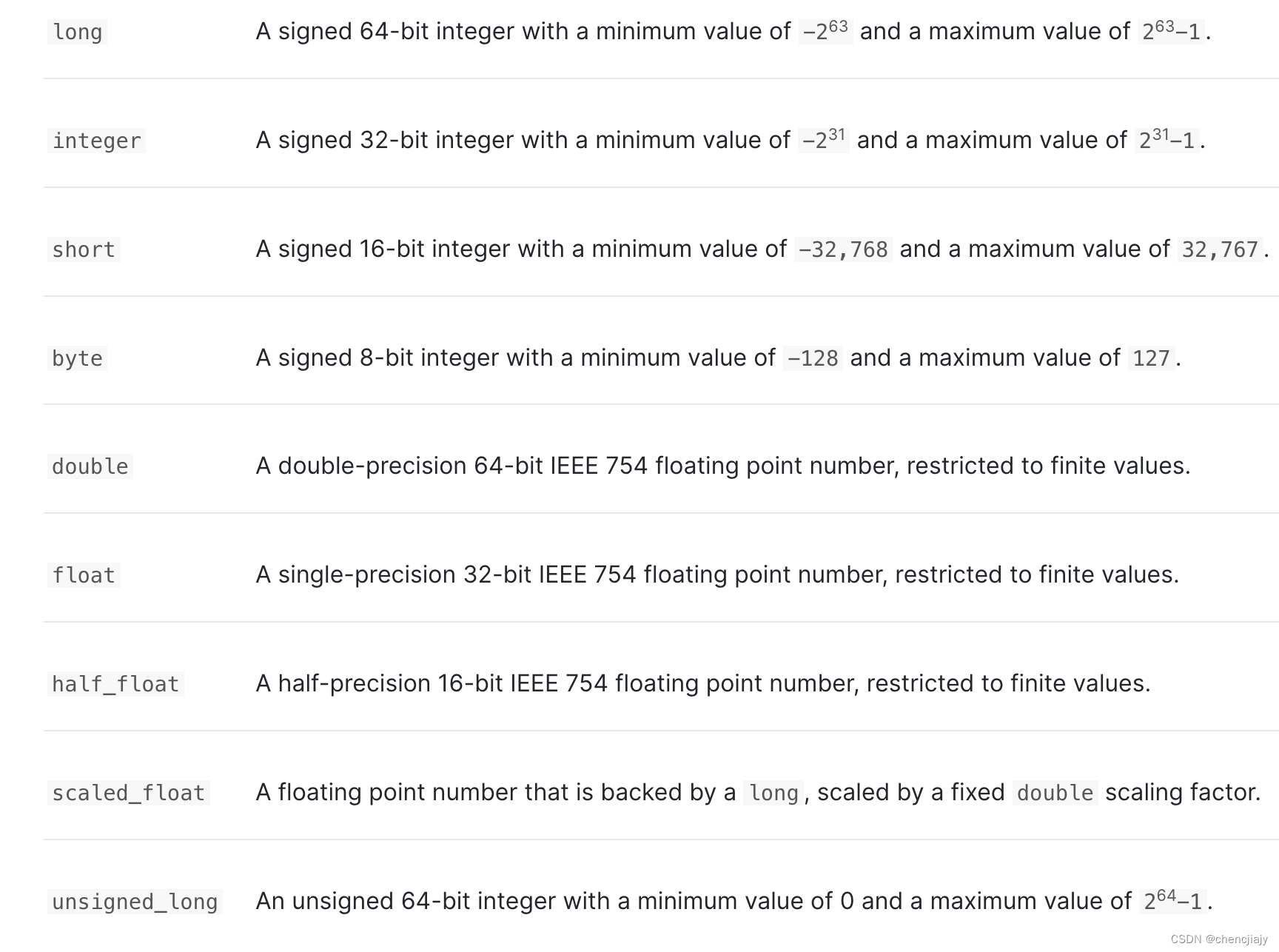
数字类型有 long、integer、short、byte、double、float、half_float、scaled_float、unsigned_long。对整数类型(byte、short、integer、long)应选择满足业务场景范围的最小的整数类型。而对于浮点类型优先选择scaled_float会更高效,它有一个属性
scaling_factor,用它转换后将数据存储为整型;当scaled_float无法满足要求时尽量选择满足业务场景的精度最小的类型。
-
date 日期类型,格式可以是格式化的日期字符串如
"2024-01-01"or"2024/01/01 12:10:30"、毫秒时间戳等。默认情况下,索引中的日期为UTC时间格式,其比北京时间晚8h,所以在使用date类型时务必注意时区。 -
boolean 布尔类型,存储true和false,也支持"false",“”(空字符,表示False) , "true"字符串。
-
binary, 可以存储如Base64编码字符,默认不被索引和搜索。
-
geo_point,可以存储经纬度相关信息,可以用来实现诸如查找在指定地理区域内相关的文档、根据距离来聚合文档、根据距离排序、根据地理位置修改评分规则等需求。
-
object 对象类型,字段本身也可以是一个object。
假设定义如下索引
 PUT my-index-000001
{
  "mappings": {
    "properties": {
      "region": {
        "type": "keyword"
      },
      "manager": {
        "properties": {
          "age":  { "type": "integer" },
          "name": {
            "properties": {
              "first": { "type": "text" },
              "last":  { "type": "text" }
            }
          }
        }
      }
    }
  }
}
并写入一条数据
 PUT my-index-000001/_doc/1
{
  "region": "US",
  "manager": {
    "age":     30,
    "name": {
      "first": "John",
      "last":  "Smith"
    }
  }
}
数据实际上被存储为
{ "region": "US", "manager.age": 30, "manager.name.first": "John", "manager.name.last": "Smith" } -
nested 允许对每一项为object的列表索引后可以被独立查询。
假设我们创建一个索引,其字段user类型是object,但是其实际数据是一个列表
 PUT my-index-000001
{
  "mappings": {
    "properties": {
      "group": {
        "type": "keyword"
      },
      "user": {
        "properties": {
              "first": { "type": "text" },
              "last":  { "type": "text" }
          }
        }
    }
  }
}
写入一条数据
PUT my-index-000001/_doc/1
{
  "group" : "fans",
  "user" : [
    {
      "first" : "John",
      "last" :  "Smith"
    },
    {
      "first" : "Alice",
      "last" :  "White"
    }
  ]
}
因为object类型存储时会被ES 展平,所以数据存储的形式如下
{
  "group" :        "fans",
  "user.first" : [ "alice", "john" ],
  "user.last" :  [ "smith", "white" ]
}
这时user.first和user.last的数据被存储成了一个列表,用户的first和last之间的关联被丢失了。如果我们有如下检索,ES仍可以返回答案:
GET my-index-000001/_search
{
  "query": {
    "bool": {
      "must": [
        { "match": { "user.first": "Alice" }},
        { "match": { "user.last":  "Smith" }}
      ]
    }
  }
}
如果我们要去索引每一项为object的列表,并且希望维持列表中object的独立性,我们就需要使用
nested类型了。如果我们将上面的例子的索引mapping的user定义为nested
 PUT my-index-000001
{
  "mappings": {
    "properties": {
      "group": {
        "type": "keyword"
      },
      "user": {
        "type":"nested",
        "properties": {
              "first": { "type": "text" },
              "last":  { "type": "text" }
          }
        }
    }
  }
}
再写入一条数据
PUT my-index-000001/_doc/1
{
  "group" : "fans",
  "user" : [
    {
      "first" : "John",
      "last" :  "Smith"
    },
    {
      "first" : "Alice",
      "last" :  "White"
    }
  ]
}
此时我们再运行下面查询语句,因为数据中不存在first为Alice,last为Smith的数据,检索结果为空
GET my-index-000001/_search { "query": { "nested": { "path": "user", "query": { "bool": { "must": [ { "match": { "user.first": "Alice" }}, { "match": { "user.last": "Smith" }} ] } } } } } -
向量类型:dense_vector和sparse_vector 支持存储向量
mapping 参数
每个字段除了类型之外,还有其他属性可以定义,列举常用的属性:
- dynamic: 控制一个字段是可以被动态地加入,比如说写入的数据里是否可以包含未定义的字段。其取值默认是true,也就是支持动态新增。我们可以定义整个索引的dynamic,字段是继承整个索引的dynamic,字段也可以再指定与索引不一样的取值。(通常企业里的ES会要求将dynamic设置为strict)
| dynamic取值 | 取值解释 |
|---|---|
true | New fields are added to the mapping (default). |
runtime | New fields are added to the mapping as runtime fields. These fields are not indexed, and are loaded from _source at query time. |
false | New fields are ignored. These fields will not be indexed or searchable, but will still appear in the _source field of returned hits. These fields will not be added to the mapping, and new fields must be added explicitly. |
strict | If new fields are detected, an exception is thrown and the document is rejected. New fields must be explicitly added to the mapping. |
- index:控制字段值是否会被索引,取值为true或false,默认是true。
- store: ES默认不会存储字段的原始值,设置store为true可以存储原始值,并且在查询时,可以用
stored_fields来获取字段的值。 - enabled:设置为false时存储但是不会索引,默认为true。
- copy_to: 允许将多个字段的值拷贝到一个组合字段中去,这个组合字段就能够像单个字段那样检索。
比如下面例子first_name 和last_name 可以被拷贝到full_name中用来查询
PUT my-index-000001
{
  "mappings": {
    "properties": {
      "first_name": {
        "type": "text",
        "copy_to": "full_name"
      },
      "last_name": {
        "type": "text",
        "copy_to": "full_name"
      },
      "full_name": {
        "type": "text"
      }
    }
  }
}

PUT my-index-000001/_doc/1
{
  "first_name": "John",
  "last_name": "Smith"
}

GET my-index-000001/_search
{
  "query": {
    "match": {
      "full_name": {
        "query": "John Smith",
        "operator": "and"
      }
    }
  }
}
- fields 有时候我们想对一个字段用不同的方式来索引实现不同的目的,这就是multi-fields的目标。比如对于一个字符串字段我们可以定义为text类型实现全文检索,但是也想以keyword的形式来进行精确匹配或者聚合。我们甚至可以定义multi-field时都是text类型,但是使用不同的analyzer。
下面的例子,定义了类型为text的city字段,并定义了一个类型为keyword的city.raw字段
PUT my-index-000001
{
  "mappings": {
    "properties": {
      "city": {
        "type": "text",
        "fields": {
          "raw": {
            "type":  "keyword"
          }
        }
      }
    }
  }
}
- ignore_above 超过ignore_above指定长度的字符串不会被索引或存储,一般是keyword类型字段会使用。
Analyzer
对于text字段,我们可以定义analyzer属性来指定如何对文本进行分析。
ES中定义了8种内置analyzer(分析器),如果不对text 字段指定分析器,默认使用的是standard Analyzer。
The
standardanalyzer divides text into terms on word boundaries, as defined by the Unicode Text Segmentation algorithm. It removes most punctuation, lowercases terms, and supports removing stop words.The
simpleanalyzer divides text into terms whenever it encounters a character which is not a letter. It lowercases all terms.The
whitespaceanalyzer divides text into terms whenever it encounters any whitespace character. It does not lowercase terms.The
stopanalyzer is like thesimpleanalyzer, but also supports removal of stop words.The
keywordanalyzer is a “noop” analyzer that accepts whatever text it is given and outputs the exact same text as a single term.The
patternanalyzer uses a regular expression to split the text into terms. It supports lower-casing and stop words.Elasticsearch provides many language-specific analyzers like
englishorfrench.The
fingerprintanalyzer is a specialist analyzer which creates a fingerprint which can be used for duplicate detection.
内置analyzer可以无需配置就直接使用,一些analyzer也可以通过配置来改变其行为,比如standard analyzer 可以配置以支持停用词
## 定义一个mapping,其支持了停用词
PUT my-index-000001
{
  "settings": {
    "analysis": {
      "analyzer": {
        "std_english": {
          "type":      "standard",
          "stopwords": "_english_"
        }
      }
    }
  },
  "mappings": {
    "properties": {
      "my_text": {
        "type":     "text",
        "analyzer": "standard",
        "fields": {
          "english": {
            "type":     "text",
            "analyzer": "std_english"
          }
        }
      }
    }
  }
}

# 测试标准分析器的效果
POST my-index-000001/_analyze
{
  "field": "my_text",
  "text": "The old brown cow"
}

# 测试使用配置停用词后的标准分析器的效果
POST my-index-000001/_analyze
{
  "field": "my_text.english",
  "text": "The old brown cow"
}
在ES中,触发文本分析的时机有两个:
- 索引时:当索引映射中存在text字段时,默认会使用标准分析器进行文本分析,如果不喜欢默认的分析器,也可以在mapping中指定某个text类型字段使用其他分析器。
- 全文检索时:对一个索引的text类型字段做全文检索时也会触发文本分析,这时文本分析的对象是搜索的内容。默认的分析器也是标准分析器,如果需要改变分析器,可以通过搜索参数analyzer进行设置。为了保持搜索效果的一致性,索引时的分析器和全文检索时的分析器一般会设置成相同的,但中文一般会在索引时设置更细的粒度的分词器,在搜索使用粒度更粗的分词器。
索引和检索时分析器设置举例:
PUT my-index-000001
{
  "mappings": {
    "properties": {
      "title": {
        "type": "text",
        "analyzer": "whitespace",
        "search_analyzer": "simple"
      }
    }
  }
}
自定义分析器
Elasticsearch规定,一个完整的文本分析过程需要经过大于等于零个character filters(字符过滤器)、一个tokenizers(分词器)、大于等于零个token filters(分词过滤器)的处理过程。文本分析的顺序是先进行字符过滤器的处理,然后是分词器的处理,最后是分词过滤器的处理。
- character filters:用于对原始文本做简单的字符过滤和转换,例如ES内置的HTML strip字符过滤器可以用于方便地剔除文本中的HTML标签。ES 中定义了html_strip、mapping、pattern_replace三种内置character filters。
- tokenizers:分词器的功能就是把原始的文本按照一定的规则切分成一个个单词,比如内置的
whitespace分词器根据空格符来切分单词,会将"Quick brown fox!"变成[Quick, brown, fox!]。分词器还会保留每个关键词在原始文本中出现的位置数据。Elasticsearch内置的分词器有几十种,通常针对不同语言的文本需要使用不同的分词器,当然也可以安装一些第三方的分词器来扩展分词的功能,比如中文分词常用ik分词器。 - token filters:对用分词器切词后的单词做进一步过滤和转换,例如,停用词分词过滤器(stop token filter)可以把分词器切分出来的冠词a、介词of等无实际意义的单词直接丢弃,避免它们影响搜索结果。ES中也有几十种内置token filter,在自定义我们的分析器时可以使用。
在自定义分析器时,有如下5个参数可以配置:
参数名 参数说明 typeAnalyzer type. Accepts built-in analyzer types. For custom analyzers, use customor omit this parameter.tokenizerA built-in or customised tokenizer. (Required) char_filterAn optional array of built-in or customised character filters. filterAn optional array of built-in or customised token filters. position_increment_gapWhen indexing an array of text values, Elasticsearch inserts a fake “gap” between the last term of one value and the first term of the next value to ensure that a phrase query doesn’t match two terms from different array elements. Defaults to 100. Seeposition_increment_gapfor more.
下面的mapping自定义了一个分析器,对char_filter、tokenizer、filter分别进行了配置:
PUT my-index-000001
{
  "settings": {
    "analysis": {
      "analyzer": {
        "my_custom_analyzer": {
          "char_filter": [
            "emoticons"
          ],
          "tokenizer": "punctuation",
          "filter": [
            "lowercase",
            "english_stop"
          ]
        }
      },
      "tokenizer": {
        "punctuation": {
          "type": "pattern",
          "pattern": "[ .,!?]"
        }
      },
      "char_filter": {
        "emoticons": {
          "type": "mapping",
          "mappings": [
            ":) => _happy_",
            ":( => _sad_"
          ]
        }
      },
      "filter": {
        "english_stop": {
          "type": "stop",
          "stopwords": "_english_"
        }
      }
    }
  }
}

# 测试效果
POST my-index-000001/_analyze
{
  "analyzer": "my_custom_analyzer",
  "text": "I'm a :) person, and you?"
}
分析器的测试
我们可以使用ES 提供的analyze API 来测试分析器的效果
POST _analyze
{
  "analyzer": "whitespace",
  "text":     "I'm studying ElasticSearch"
}
analyze API也可以测试tokenizer、token filter、character filter的组合效果
POST _analyze
{
  "tokenizer": "standard",
  "filter":  [ "lowercase", "asciifolding" ],
  "text":      "I'm studying ElasticSearch"
}
对于我们在创建索引时自定义的分析器,也可以在指定索引上用analyze API来测试自定义分析器的效果。下面例子在创建mapping时定义了std_folded这个自定分析器,字段my_text使用自定义分析器,我们在指定索引名称后依然可以使用测试api:
## 创建索引,定义了std_folded这个自定分词器
PUT my-index-000001
{
  "settings": {
    "analysis": {
      "analyzer": {
        "std_folded": {
          "type": "custom",
          "tokenizer": "standard",
          "filter": [
            "lowercase",
            "asciifolding"
          ]
        }
      }
    }
  },
  "mappings": {
    "properties": {
      "my_text": {
        "type": "text",
        "analyzer": "std_folded"
      }
    }
  }
}

## 在索引my-index-000001上测试自定义分词器std_folded的效果
GET my-index-000001/_analyze
{
  "analyzer": "std_folded",
  "text":     "Is this déjà vu?"
}

## 在索引my-index-000001上测试指定自定义分词器std_folded的字段my_text的效果
GET my-index-000001/_analyze
{
  "field": "my_text",
  "text":  "Is this déjà vu?"
}
中文分词 ik_max
安装方法:在ik_max github 主页下载与ES版本一致的ik_max压缩包,将下载的压缩包解压,将解压后的文件放入ES安装目录/plugins/ik 文件夹下,重新启动ES,就可以使用ik_max提供的分词器ik_max_word和 ik_smart 了。
-
ik_max_word 是细粒度分词 (一般用于索引)
-
ik_smart 粗粒度分词(一般用于搜索)
(可以用analyze API来测试ik_max_word 和 ik_smart的区别)
Normalizer
Normalizer 与 analyzer有点类似但只作用于单个token,所以它不包括tokenizer,只包括部分char filters 和token filters。
只有在单个字符维度处理的filter才能用于Normalizer,比如可以小写转换filter可以使用,但stemming filter不可以。Normalizer支持的filter有:arabic_normalization, asciifolding, bengali_normalization, cjk_width, decimal_digit, elision, german_normalization, hindi_normalization, indic_normalization, lowercase, pattern_replace, persian_normalization, scandinavian_folding, serbian_normalization, sorani_normalization, trim, uppercase.
ES有一个小写转换lowercase内置normalizer,其他形式的Normalizer需要自定义。
自定义Normalizer举例:
UT index
{
  "settings": {
    "analysis": {
      "char_filter": {
        "quote": {
          "type": "mapping",
          "mappings": [
            "« => \"",
            "» => \""
          ]
        }
      },
      "normalizer": {
        "my_normalizer": {
          "type": "custom",
          "char_filter": ["quote"],
          "filter": ["lowercase", "asciifolding"]
        }
      }
    }
  },
  "mappings": {
    "properties": {
      "foo": {
        "type": "keyword",
        "normalizer": "my_normalizer"
      }
    }
  }
}
其他关于mapping的要点
- 一旦创建好索引的mapping后,可以继续给mapping添加新的字段,但是旧的字段无法删除和修改
ES 搜索
Elasticsearch提供了领域特定语言(Domain Specific Language,DSL)查询语句,使用JSON字符串来定义每个查询请求。(ES查询语句有很多内容,这里只记录一下用过的查询语句,遇到具体场景再去看是否有其他适合的查询用法)
match all 查询
直接查询索引的全部数据,默认返回前10个文档,每个文档的得分被设置为1.0
GET my-index-000001/_search
{
  "query": {
    "match_all": {
    }
  }
}
GET my-index-000001/_search
{
}
精准搜索
查询对象大多数是非text类型字段,直接匹配字段中的完整内容,在这个过程中不会对搜索内容进行文本分析。
- term 查询,直接返回包含搜索内容的文档,常用来查询索引中某个类型为keyword的文本字段,类似于SQL的“=”查询。
POST my-index-000001/_search
{
 "query": {
   "term": {
     "name.keyword": {
       "value": "张三"
     }
   }
 }
}
-
terms 查询的功能与term 查询的基本一样,只是多术语查询允许在参数中传递多个查询词,被任意一个查询词匹配到的结果都会被搜索出来。
POST my-index-000001/_search { "query": { "terms": { "name.keyword": { "value": ["张三", "李四"] } } } } -
ids 查询指定主键的文档,实际查询的是文档的
_id键POST my-index-000001/_search { "query": { "ids" : { "values" : ["1", "4", "100"] } } } -
exists查询用于筛选某个字段不为空的文档,其作用类似于SQL的“is not null”语句的作用。
下面的例子查询user字段不为空的数据``` GET /_search { "query": { "exists": { "field": "user" } } } ``` -
prefix 查询用于搜索某个字段的前缀与搜索内容匹配的文档,前缀查询比较耗费性能,如果是text字段,可以在映射中配置index_prefixes参数,它会把每个分词的前缀字符写入索引,从而大大加快前缀查询的速度
GET /_search { "query": { "prefix": { "user.id": { "value": "ki" } } } } -
regexp正则查询允许查询内容是正则表达式,它会查询出某个字段符合正则表达式的所有文档(支持的正则语法),它有好几个参数可以指定。
GET /_search
{
  "query": {
    "regexp": {
      "user.id": {
        "value": "k.*y",
        "flags": "ALL",
        "case_insensitive": true,
        "max_determinized_states": 10000,
        "rewrite": "constant_score_blended"
      }
    }
  }
}
- wildcard 通配符查询允许在查询代码中添加两种通配符,“*”可匹配任意长度的任意字符串,“?”可匹配任意单个字符。
GET /_search
{
  "query": {
    "wildcard": {
      "user.id": {
        "value": "ki*y",
        "boost": 1.0,
        "rewrite": "constant_score_blended"
      }
    }
  }
}
全文检索
- match 查询比较搜索词和每个文档的相似度,只要搜索词能命中文档的分词就会被搜索到,主要用于对指定text类型字段做全文搜索,是很常用的一个查询。
GET /_search
{
  "query": {
    "match": {
      "message": {
        "query": "this is a test"
      }
    }
  }
}
match查询时可以指定一些参数,boost 参数是指相比于检索字段,权重的大小,其默认值为1
{
  "query": {
    "match": {
      "title": {
        "query": "quick brown fox",
        "boost": 2
      }
    }
  }
}
operator 参数用来控制查询内容之间的逻辑关系,是否要全部检索(AND)到或者部分检索(OR)到就可以,默认是OR。
- match_phrase 会对搜索文本进行文本分析,然后到索引中寻找搜索的每个分词并要求分词相邻,可以通过调整slop参数设置分词出现的最大间隔距离。match_phrase的分词结果必须在被检索字段的分词中都包含,而且**顺序必须相同,**而且默认必须都是连续的(slot=0)。
GET /_search
{
  "query": {
    "match_phrase": {
      "message": {
        "query": "this is a test",
        "slot":1
      }
    }
  }
}
复合搜索
复合搜索按照一定的方式组织多条不同的搜索语句,有bool、boosting等
The default query for combining multiple leaf or compound query clauses, as
must,should,must_not, orfilterclauses. Themustandshouldclauses have their scores combined — the more matching clauses, the better — while themust_notandfilterclauses are executed in filter context.Return documents which match a
positivequery, but reduce the score of documents which also match anegativequery.A query which wraps another query, but executes it in filter context. All matching documents are given the same “constant”
_score.A query which accepts multiple queries, and returns any documents which match any of the query clauses. While the
boolquery combines the scores from all matching queries, thedis_maxquery uses the score of the single best- matching query clause.Modify the scores returned by the main query with functions to take into account factors like popularity, recency, distance, or custom algorithms implemented with scripting.
现在主要用到了bool查询,它有四种类型:
| Occur | Description |
|---|---|
must | The clause (query) must appear in matching documents and will contribute to the score. |
filter | The clause (query) must appear in matching documents. However unlike must the score of the query will be ignored. Filter clauses are executed in filter context, meaning that scoring is ignored and clauses are considered for caching. |
should | The clause (query) should appear in the matching document. |
must_not | The clause (query) must not appear in the matching documents. Clauses are executed in filter context meaning that scoring is ignored and clauses are considered for caching. Because scoring is ignored, a score of 0 for all documents is returned. |
使用时可以用minimum_should_match 参数,它是一个文档被召回需要满足的最小匹配的should语句数量,取值有几种不同的写法。如果布尔查询存在must或filter子句,则该值默认为1;否则,该值默认为0。
POST _search
{
  "query": {
    "bool" : {
      "must" : {
        "term" : { "user.id" : "kimchy" }
      },
      "filter": {
        "term" : { "tags" : "production" }
      },
      "must_not" : {
        "range" : {
          "age" : { "gte" : 10, "lte" : 20 }
        }
      },
      "should" : [
        { "term" : { "tags" : "env1" } },
        { "term" : { "tags" : "deployed" } }
      ],
      "minimum_should_match" : 1,
      "boost" : 1.0
    }
  }
}
ES 搜索时的分数是如何计算的
script score 和 function score 获取自定义分数 script score function score
解释搜索结果
当我们想知道为什么一个文档在搜索结果中没有出现,或者为什么它出现了,可以使用explain api来显示原因
GET /my-index-000001/_explain/0
{
  "query" : {
    "match" : { "message" : "elasticsearch" }
  }
}
python ES 客户端
ES提供了python客户端, 安装:pip install elasticsearch
import json
from elasticsearch import Elasticsearch

query_dsl = {
    "match": {
      "message": {
        "query": "this is a test"
       }
    }
  }

# 建立连接
elastic_search = Elasticsearch(es_host, http_auth=(es_username, es_password), port=es_port)
query = elastic_search.search(index="my-index-000001",
                                    query=query_dsl,
                                    size=20,
                                    request_timeout=1)
# 搜索结果
res = query.get("hits", {}).get("hits", [])
参考资料
-
书籍《Elasticsearch数据搜索与分析实战》by 王深湛

 481
481


 扫一扫
扫一扫


 被折叠的 条评论
为什么被折叠?
被折叠的 条评论
为什么被折叠?
 到【灌水乐园】发言


