



 本文详细解析了在SpringBoot2.1及以上版本中集成Mybatis时出现的关于mysql驱动类的报错问题。指出该问题是由于springboot版本升级引起的,并提供了两种解决方案:一是将springboot版本回退到2.0.4.RELEASE;二是更新mysql驱动类为com.mysql.cj.jdbc.Driver,并在JDBC连接中指定时区。这为遇到类似问题的开发者提供了明确的指导。
新建springboot项目集成mybatis 启动报错:
Loading class com.mysql.jdbc.Driver'. This is deprecated. The new driver class iscom.mysql.cj.jdbc.Driver’. The driver is automatically registered via the SPI and manual loading of the driver class is generally unnecessary.
如图:
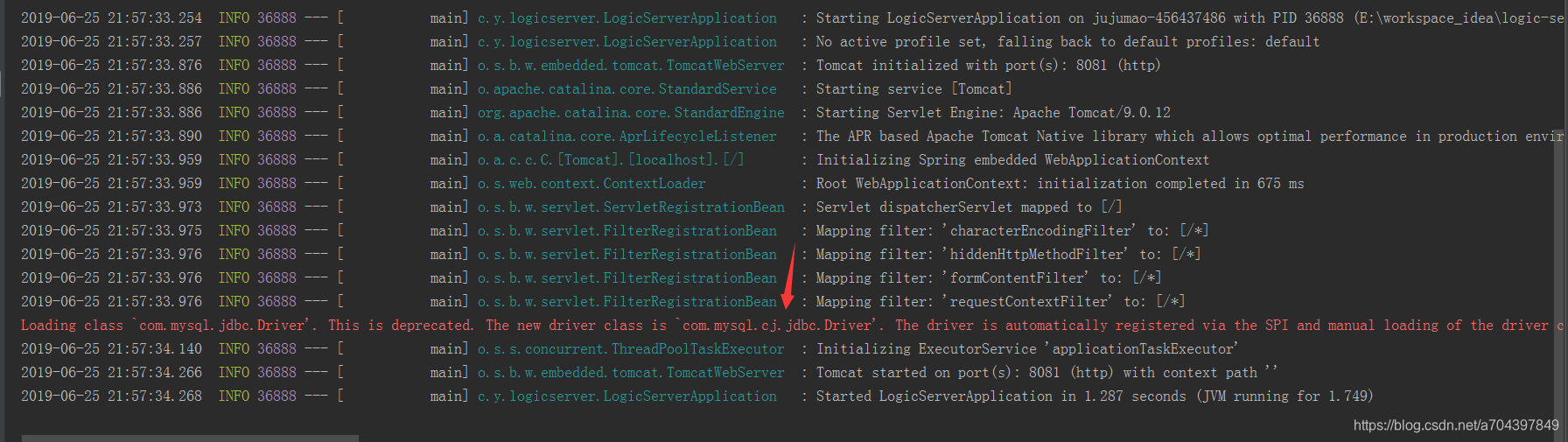
网上大多原因都是说 mysql驱动包依赖的版本6以上的原因,但是我的依赖5.1.38 照样报错
        <!-- Mybatis -->
        <dependency>
            <groupId>org.mybatis.spring.boot</groupId>
            <artifactId>mybatis-spring-boot-starter</artifactId>
            <version>1.3.1</version>
        </dependency>
        <dependency>
            <groupId>org.mybatis</groupId>
            <artifactId>mybatis</artifactId>
            <version>3.4.6</version>
        </dependency>
        <dependency>
            <groupId>mysql</groupId>
            <artifactId>mysql-connector-java</artifactId>
            <scope>5.1.38</scope>
        </dependency>
反复和之前没问题项目进行比较发现,是springboot版本问题,版本2.1.0.RELEASE及以上版本会报上面错误,将版本改2.0不再报错:
    <parent>
        <groupId>org.springframework.boot</groupId>
        <artifactId>spring-boot-starter-parent</artifactId>
        <version>2.0.4.RELEASE</version>
        <relativePath/>
    </parent>
修改springboot版本2.0.4.RELEASE后,重新导入pom.xml , 右键pom.xml -> Maven ->Reimport
再次启动不再报错 The new driver class is `com.mysql.cj.jdbc.Driver’ 问题解决!
应该是springboot2.1版本改动导致,有时间去看下2.1的变化.
如果还是希望使用springboot2.1以后的版本的话,那就将mysql驱动类配置由com.mysql.jdbc.Driver 改为 com.mysql.cj.jdbc.Driver ,同时注意 JDBC连接Mysql6 com.mysql.cj.jdbc.Driver 需要指定时区serverTimezone ,如下:
jdbc:mysql://127.0.0.1:3306/robot_information?useUnicode=true&characterEncoding=UTF-8&usessl=false&servertimezone=GMT%2B8


 扫一扫
扫一扫


 3594
3594

 被折叠的 条评论
为什么被折叠?
被折叠的 条评论
为什么被折叠?
 到【灌水乐园】发言


