





 本文详细介绍了Thymeleaf模板引擎的使用,包括它的基本语法、属性设置、迭代和条件运算等。Thymeleaf是一个现代化的Java服务器端模板引擎,适用于Web和独立环境。通过引入Spring Boot的Thymeleaf starter,可以轻松在项目中集成并创建动态HTML页面。学习笔记涵盖了变量取值、链接生成、条件运算和迭代等核心概念,为Java开发者提供了一个快速上手Thymeleaf的指南。
🔰 学习视频 🔰
尚硅谷雷神SpringBoot2零基础入门springboot全套完整版(spring boot2)
集数:43
🔰 学习笔记 🔰
视图解析:SpringBoot默认不支持 JSP,需要引入第三方模板引擎技术实现页面渲染。
1 简介
Thymeleaf is a modern server-side Java template engine for both web and standalone environments, capable of processing HTML, XML, JavaScript, CSS and even plain text.
现代化、服务端Java模板引擎。
2 使用
🔶 引入依赖Starter
<dependency>
    <groupId>org.springframework.boot</groupId>
    <artifactId>spring-boot-starter-thymeleaf</artifactId>
</dependency>
🔶 案例
<!DOCTYPE html>
<html lang="en" xmlns:th="http://www.thymeleaf.org">
<head>
    <meta charset="UTF-8">
    <title>Title</title>
</head>
<body>
<h1 th:text="${msg}">哈哈</h1>
<h2>
    <a href="www.atguigu.com" th:href="${link}">去百度</a>  <br/>
    <a href="www.atguigu.com" th:href="@{link}">去百度2</a>
</h2>
</body>
</html>
3 基本语法
🔶 表达式
| 表达式名字 | 语法 | 用途 |
|---|---|---|
| 变量取值 | ${…} | 获取请求域、session域、对象等值 |
| 选择变量 | *{…} | 获取上下文对象值 |
| 消息 | #{…} | 获取国际化等值 |
| 链接 | @{…} | 生成链接 |
| 片段表达式 | ~{…} | jsp:include 作用,引入公共页面片段 |
🔶 字面量
文本值: ‘one text’ , ‘Another one!’ ,…
数字: 0 , 34 , 3.0 , 12.3 ,…
布尔值: true , false
空值: null
变量: one,two,… 变量不能有空格
🔶 文本操作
字符串拼接: +
变量替换: The name is ${name}
🔶 数学运算
运算符: + , - , * , / , %
🔶 布尔运算
运算符: and , or
一元运算: ! , not
🔶 比较运算
比较: > , < , >= , <= ( gt , lt , ge , le )
等式: == , != ( eq , ne )
🔶 条件运算
If-then: (if) ? (then)
If-then-else: (if) ? (then) : (else)
Default: (value) ?: (defaultvalue)
🔶 特殊操作
无操作: _
4 设置属性值 th:attr
设置单个值
<form action="subscribe.html" th:attr="action=@{/subscribe}">
  <fieldset>
    <input type="text" name="email" />
    <input type="submit" value="Subscribe!" th:attr="value=#{subscribe.submit}"/>
  </fieldset>
</form>
设置多个值
<img src="../../images/gtvglogo.png" th:attr="src=@{/images/gtvglogo.png},title=#{logo},alt=#{logo}" />
以上两个的代替写法 th:xxxx
<input type="submit" value="Subscribe!" th:value="#{subscribe.submit}"/>
<form action="subscribe.html" th:action="@{/subscribe}">
所有h5兼容的标签写法
https://www.thymeleaf.org/doc/tutorials/3.0/usingthymeleaf.html#setting-value-to-specific-attributes
5 迭代
<tr th:each="prod : ${prods}">
	<td th:text="${prod.name}">Onions</td>
	<td th:text="${prod.price}">2.41</td>
	<td th:text="${prod.inStock}? #{true} : #{false}">yes</td>
</tr>
<tr th:each="prod,iterStat : ${prods}" th:class="${iterStat.odd}? 'odd'">
	<td th:text="${prod.name}">Onions</td>
	<td th:text="${prod.price}">2.41</td>
	<td th:text="${prod.inStock}? #{true} : #{false}">yes</td>
</tr>
6 条件运算
<a href="comments.html"
th:href="@{/product/comments(prodId=${prod.id})}"
th:if="${not #lists.isEmpty(prod.comments)}">view</a>
<div th:switch="${user.role}">
  <p th:case="'admin'">User is an administrator</p>
  <p th:case="#{roles.manager}">User is a manager</p>
  <p th:case="*">User is some other thing</p>
</div>
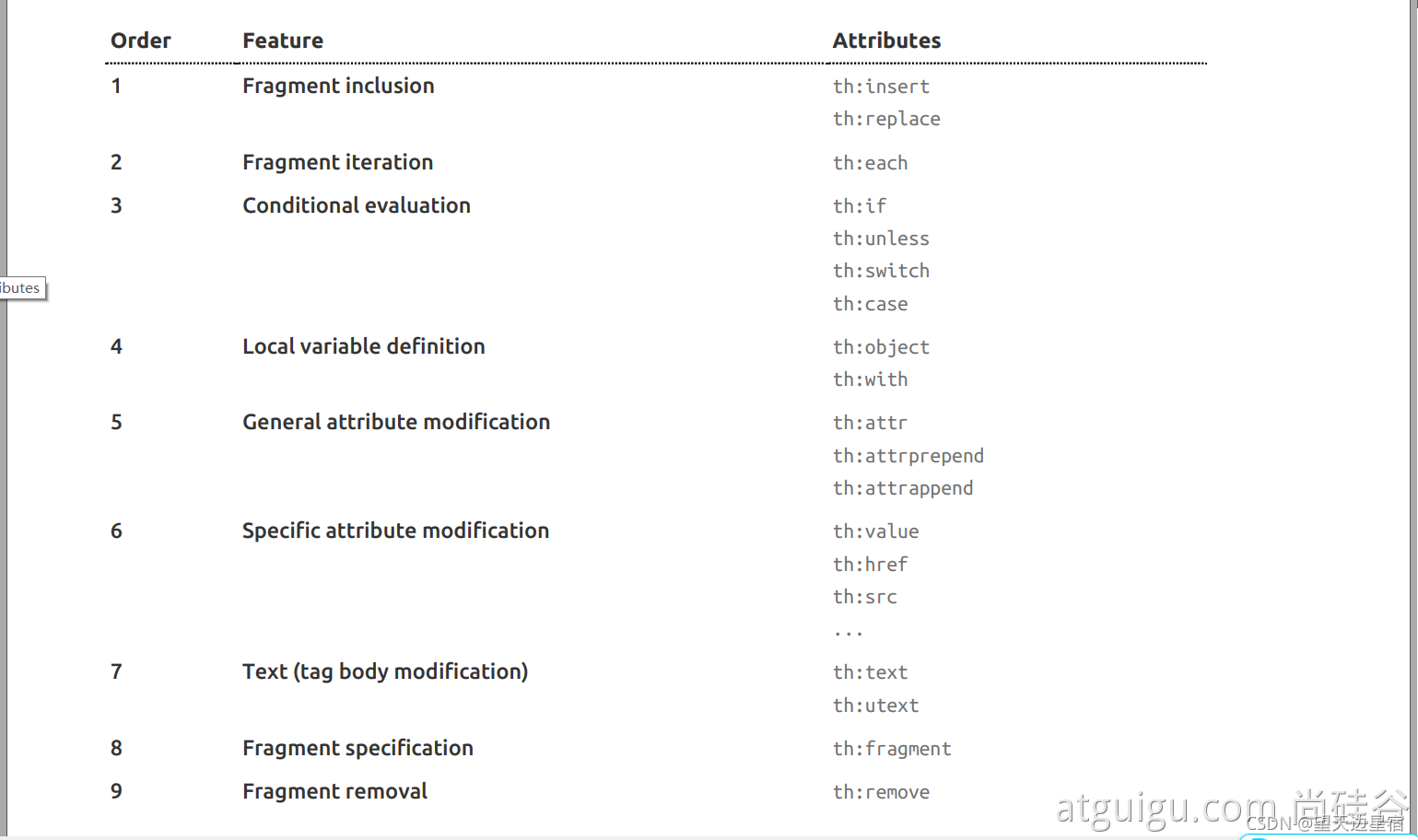
7 属性优先级


 扫一扫
扫一扫


 21万+
21万+

 被折叠的 条评论
为什么被折叠?
被折叠的 条评论
为什么被折叠?
 到【灌水乐园】发言


