


Dockerfile部署haproxy
dockerfile
//目录结构
[root@192 ~]# tree haproxy/
haproxy/
├── Dockerfile
├── files
│   ├── haproxy-2.4.0.tar.gz
│   └── install.sh
└── start.sh

//dockerfile
[root@192 haproxy]# cat Dockerfile
FROM centos
LABEL MAINTAINER='wawa 1@2.com'

ENV PATH /usr/local/haproxy/sbin:$PATH
ENV version 2.4.0
COPY files /usr/src/
COPY start.sh /start.sh

RUN ["/bin/bash","-c","/usr/src/install.sh"]

EXPOSE 80 8189
WORKDIR /usr/local/haproxy

CMD  /start.sh $rs1 $rs2

//安装脚本
[root@192 files]# cat install.sh
yum -y install make gcc pcre-devel bzip2-devel openssl-devel systemd-devel
useradd -r -M -s /sbin/nologin haproxy
cd /usr/src
tar xf haproxy-${version}.tar.gz
cd haproxy-$version
make clean
make -j $(grep 'processor' /proc/cpuinfo |wc -l) \
TARGET=linux-glibc  \
USE_OPENSSL=1  \
USE_ZLIB=1  \
USE_PCRE=1  \
USE_SYSTEMD=1 && \
make install PREFIX=/usr/local/haproxy && \
echo 'net.ipv4.ip_nonlocal_bind = 1' >>  /etc/sysctl.conf
echo 'net.ipv4.ip_forward = 1' >> /etc/sysctl.conf
mkdir /etc/haproxy
yum -y remove gcc  make
rm -rf /usr/src/*  /var/cache/*

//启动脚本
[root@192 haproxy]# cat start.sh
#!/bin/bash

cat >> /etc/haproxy/haproxy.cfg << EOF
#--------------全局配置----------------
global
    log 127.0.0.1 local0  info
    #log loghost local0 info
    maxconn 20480
#chroot /usr/local/haproxy
    pidfile /var/run/haproxy.pid
    #maxconn 4000
    user haproxy
    group haproxy
    daemon
#---------------------------------------------------------------------
#common defaults that all the 'listen' and 'backend' sections will
#use if not designated in their block
#---------------------------------------------------------------------
defaults
    mode http
    log global
    option dontlognull
    option httpclose
    option httplog
    #option forwardfor
    option redispatch
    balance roundrobin
    timeout connect 10s
    timeout client 10s
    timeout server 10s
    timeout check 10s
    maxconn 60000
    retries 3
#--------------统计页面配置------------------
listen admin_stats
    bind 0.0.0.0:8189
    stats enable
    mode http
    log global
    stats uri /haproxy_stats
    stats realm Haproxy\ Statistics
    stats auth admin:admin
    #stats hide-version
    stats admin if TRUE
    stats refresh 30s
#---------------web设置-----------------------
listen webcluster
    bind 0.0.0.0:80
    mode http
    #option httpchk GET /index.html
    log global
    maxconn 3000
    balance roundrobin
    cookie SESSION_COOKIE insert indirect nocache
    server web01 ${rs1}:80 check inter 2000 fall 5
    server web02 ${rs2}:80 check inter 2000 fall 5
EOF
/usr/local/haproxy/sbin/haproxy -f /etc/haproxy/haproxy.cfg
tail -f /etc/hosts

//构建镜像
[root@192 ~]# docker build -t soumnswa/haproxy:v1.6 haproxy
[root@192 ~]# docker images
REPOSITORY         TAG       IMAGE ID       CREATED         SIZE
soumnswa/haproxy   v1.6      43147a840fda   5 minutes ago   359MB

//启动容器
[root@192 ~]# docker run -d --name haproxy -p 80:80 -e rs1=172.17.0.2 -e rs2=172.17.0.3 soumnswa/haproxy:v1.6
caa6b6fdae25a82d3ab3b5a4afbdaf0e86882848ffa8df64df880552884cd941
[root@192 ~]# docker ps
CONTAINER ID   IMAGE                   COMMAND                  CREATED         STATUS         PORTS                                         NAMES
caa6b6fdae25   soumnswa/haproxy:v1.6   "/bin/sh -c '/bin/ba…"   3 seconds ago   Up 2 seconds   0.0.0.0:80->80/tcp, :::80->80/tcp, 8189/tcp   haproxy
ec97ee8c7e3b   nginx                   "/docker-entrypoint.…"   12 minutes ago   Up 12 minutes   80/tcp                              web02
d0b5d61bde4b   httpd                   "httpd-foreground"       15 minutes ago   Up 15 minutes   80/tcp                              web01


[root@192 ~]# docker exec -it haproxy /bin/bash
[root@4e078b054832 haproxy]# ss -antl
State   Recv-Q  Send-Q    Local Address:Port     Peer Address:Port  Process
LISTEN  0       128             0.0.0.0:80            0.0.0.0:*
LISTEN  0       128             0.0.0.0:8189          0.0.0.0:*

[root@4e078b054832 haproxy]# cat /etc/haproxy/haproxy.cfg
.......
    server web01 172.17.0.2:80 check inter 2000 fall 5
    server web02 172.17.0.3:80 check inter 2000 fall 5
网站服务器
//网站服务web01
[root@192 ~]# docker run -d --name web01 httpd
d0b5d61bde4ba5efe352a57bb1b776fd87f0d09cba360c761cf110ebf903c1a3
[root@192 ~]# docker inspect web01
......
                    "Gateway": "172.17.0.1",
                    "IPAddress": "172.17.0.3",
                    "IPPrefixLen": 16,
                    "IPv6Gateway": "",
                    "GlobalIPv6Address": "",
                    "GlobalIPv6PrefixLen": 0,
                    "MacAddress": "02:42:ac:11:00:03",
                    "DriverOpts": null
......
[root@192 ~]# curl 172.17.0.3
<html><body><h1>It works!</h1></body></html>


//网站服务web02
[root@192 ~]# docker run -d --name web02 nginx
ec97ee8c7e3b92dd28a9af5e4693ea42e88d99c4769ed79ee89e883b966fe3c2
[root@192 ~]# docker inspect web02
......
                    "Gateway": "172.17.0.1",
                    "IPAddress": "172.17.0.2",
                    "IPPrefixLen": 16,
                    "IPv6Gateway": "",
                    "GlobalIPv6Address": "",
                    "GlobalIPv6PrefixLen": 0,
                    "MacAddress": "02:42:ac:11:00:02",
                    "DriverOpts": null
......
[root@192 ~]# curl 172.17.0.3
<html><body><h1>It works!</h1></body></html>
[root@192 ~]# curl 172.17.0.2
<!DOCTYPE html>
<html>
<head>
<title>Welcome to nginx!</title>
<style>
html { color-scheme: light dark; }
body { width: 35em; margin: 0 auto;
font-family: Tahoma, Verdana, Arial, sans-serif; }
</style>
</head>
<body>
<h1>Welcome to nginx!</h1>
<p>If you see this page, the nginx web server is successfully installed and
working. Further configuration is required.</p>

<p>For online documentation and support please refer to
<a href="http://nginx.org/">nginx.org</a>.<br/>
Commercial support is available at
<a href="http://nginx.com/">nginx.com</a>.</p>

<p><em>Thank you for using nginx.</em></p>
</body>
</html>
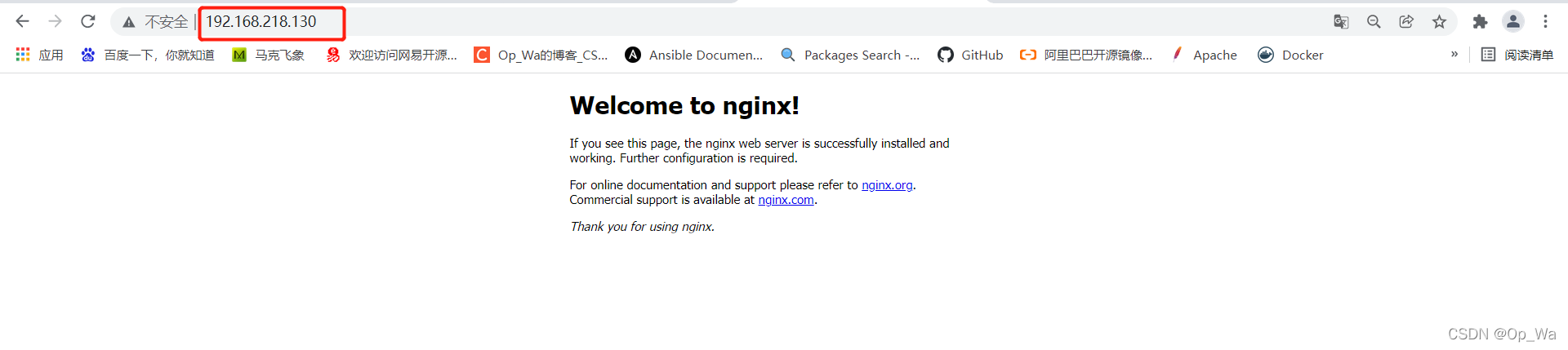
测试功能


 188
188


 扫一扫
扫一扫


 被折叠的 条评论
为什么被折叠?
被折叠的 条评论
为什么被折叠?
 到【灌水乐园】发言


