



目录
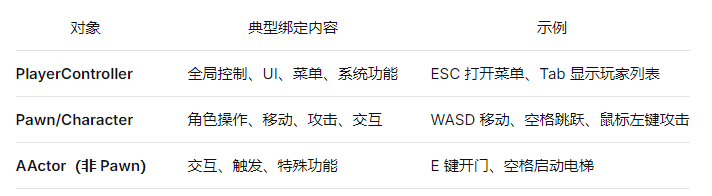
普通Actor需手动
Enable Input或设置Auto Receive Input才能接收输入;关卡蓝图无需
Enable Input默认自动接收输入;GameMode内的默认Pawn会自动接收来自控制器的输入;
APlayerController 类定义了一个虚函数 SetupInputComponent 用于设置自定义按键输入绑定,通过InputComponent调用自身对应的动作函数;
APawn / ACharacter 类 SetupPlayerInputComponent() 用于为该角色设置自定义按键输入绑定,通过InputComponent调用自身对应的动作函数;
注:InputComponent / EnhancedInputComponent 均是通过委托实现的;
// UObject → UPlayerInput → UEnhancedPlayerInput
APlayerController::PlayerInput 实时记录用户所有的按键信息

// 引擎每帧Tick调用并将原始按键状态最终分发到各个对象的绑定函数上;
ProcessPlayerInput()
    // 构建输入栈,收集并压入 InputComponent
    // 按优先级,通常为 Actor → 控制器自身 → Level Blueprint → 玩家控制的 Pawn
    BuildInputStack(InputStack);
    // 处理输入栈,遍历 InputStack 查询并匹配 InputComponent 里绑定的动作名,匹配即触发调用 Actor 上的绑定函数
    // PlayerInput旧版是UPlayerInput,新版是UEnhancedPlayerInput
    PlayerInput->ProcessInputStack(InputStack, DeltaTime, bGamePaused);
    // 清理临时栈
InputStack.Reset(); 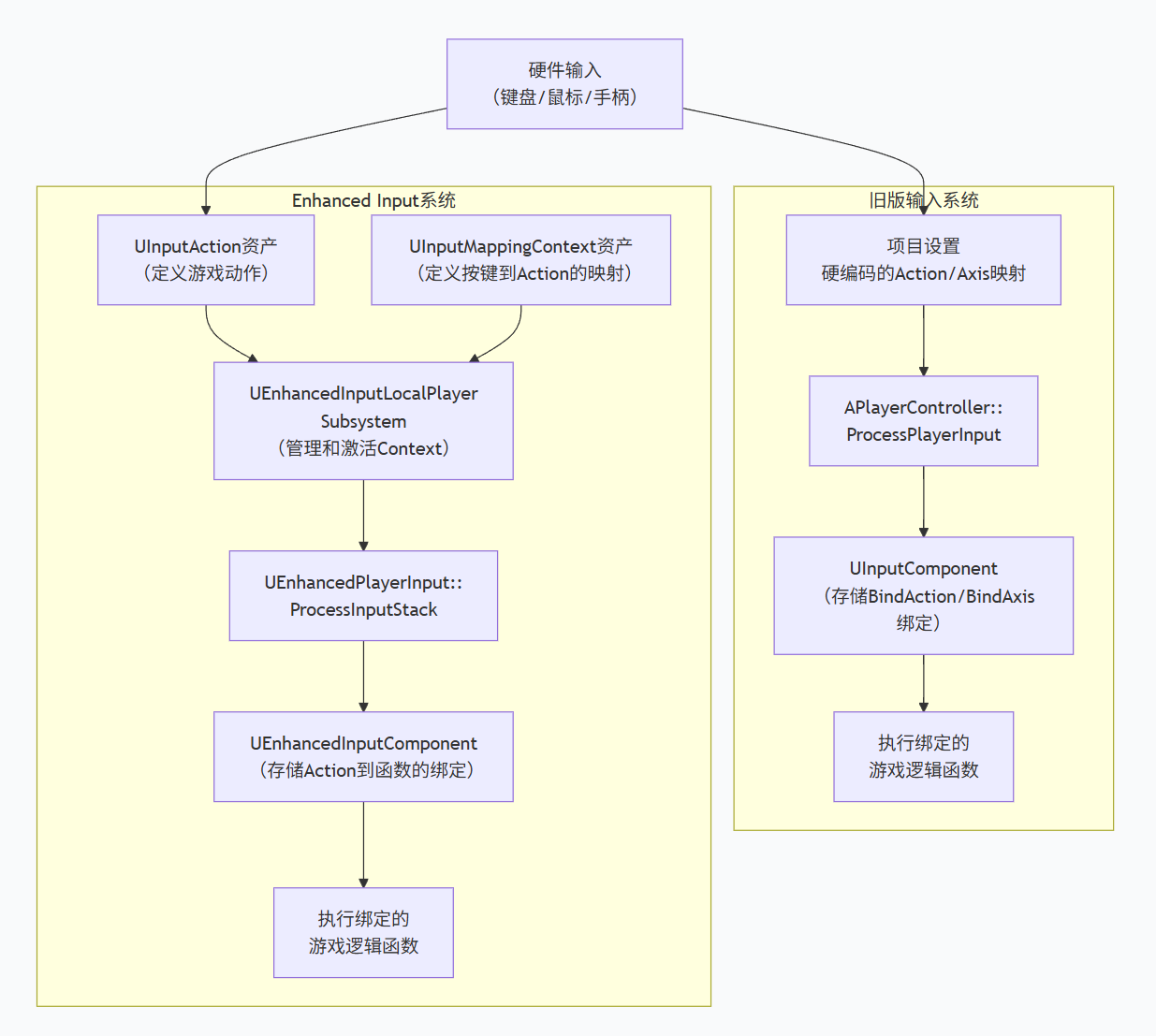
旧版输入系统
在项目设置中静态配置输入映射方式;
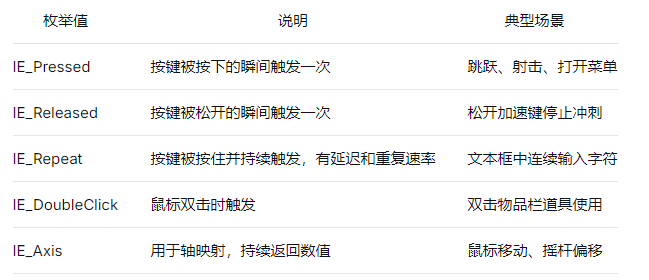
// 旧版按键输入绑定,绑定到项目设置好的 Action Mappings 和 Axis Mappings
void AMyPlayerController::SetupInputComponent()
{
    Super::SetupInputComponent();

    // 绑定动作(如跳跃,按下触发一次)
    InputComponent->BindAction("Jump", IE_Pressed, this, &AMyPlayerController::StartJump);
    InputComponent->BindAction("Jump", IE_Released, this, &AMyPlayerController::StopJump);

    // 绑定轴(如移动,持续触发,提供连续值)
    InputComponent->BindAxis("MoveForward", this, &AMyPlayerController::MoveForward);
    InputComponent->BindAxis("MoveRight", this, &AMyPlayerController::MoveRight);
}
// 普通AActor动作绑定
void AMyActor::BeginPlay()
{
Super::BeginPlay();
auto PC = GetWorld()->GetFirstPlayerController();
if (PC) {
EnableInput(PC); // 关卡蓝图不需要启用,引擎默认自动接收输入
InputComponent->BindAction("Jump", IE_Pressed, this, &AMyActor::test);
InputComponent->BindKey(EKeys::One, IE_Pressed, this, &AMyActor::test);
}
}Enhanced Input System
UE5后推荐使用增强输入系统 (Enhanced Input System),更强大更灵活;通过 Input Action,Input Mapping Context 等资产来解耦输入映射和逻辑;
- 项目设置内设置默认输入类;

- 在
BeginPlay中,在 Input Mapping Context 添加UEnhancedInputLocalPlayerSubsystem;

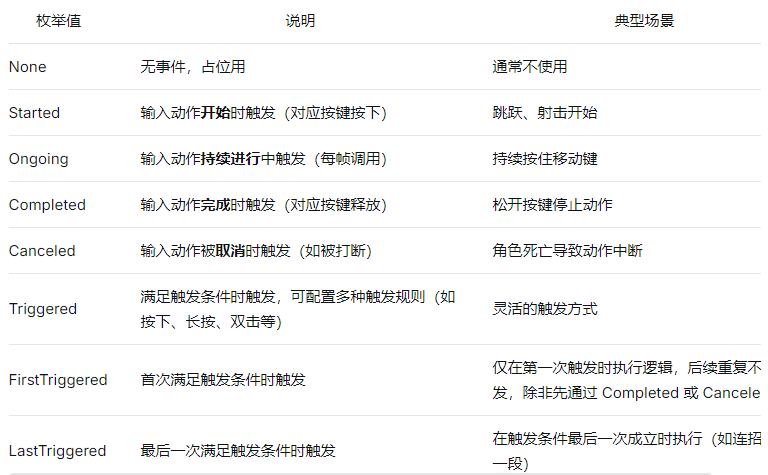
// 类中声明输入动作资产指针
UPROPERTY(EditAnywhere, Category = "Input")
class UInputAction* JumpAction;

void AMyPlayerController::SetupInputComponent()
{
    Super::SetupInputComponent();

    // InputComponent 是根据项目设置自动创建的子类实例,需转化
    if (UEnhancedInputComponent* EnhancedInputComponent = Cast<UEnhancedInputComponent>(InputComponent))
    {
        // 绑定增强输入动作
        EnhancedInputComponent->BindAction(JumpAction, ETriggerEvent::Started, this, &AMyPlayerController::StartJump);
        EnhancedInputComponent->BindAction(MoveAction, ETriggerEvent::Triggered, this, &AMyPlayerController::Move);
    }
}


 扫一扫
扫一扫


 487
487

 被折叠的 条评论
为什么被折叠?
被折叠的 条评论
为什么被折叠?
 到【灌水乐园】发言


