





往期鸿蒙5.0全套实战文章必看:(文中附带全栈鸿蒙5.0学习资料)
简介
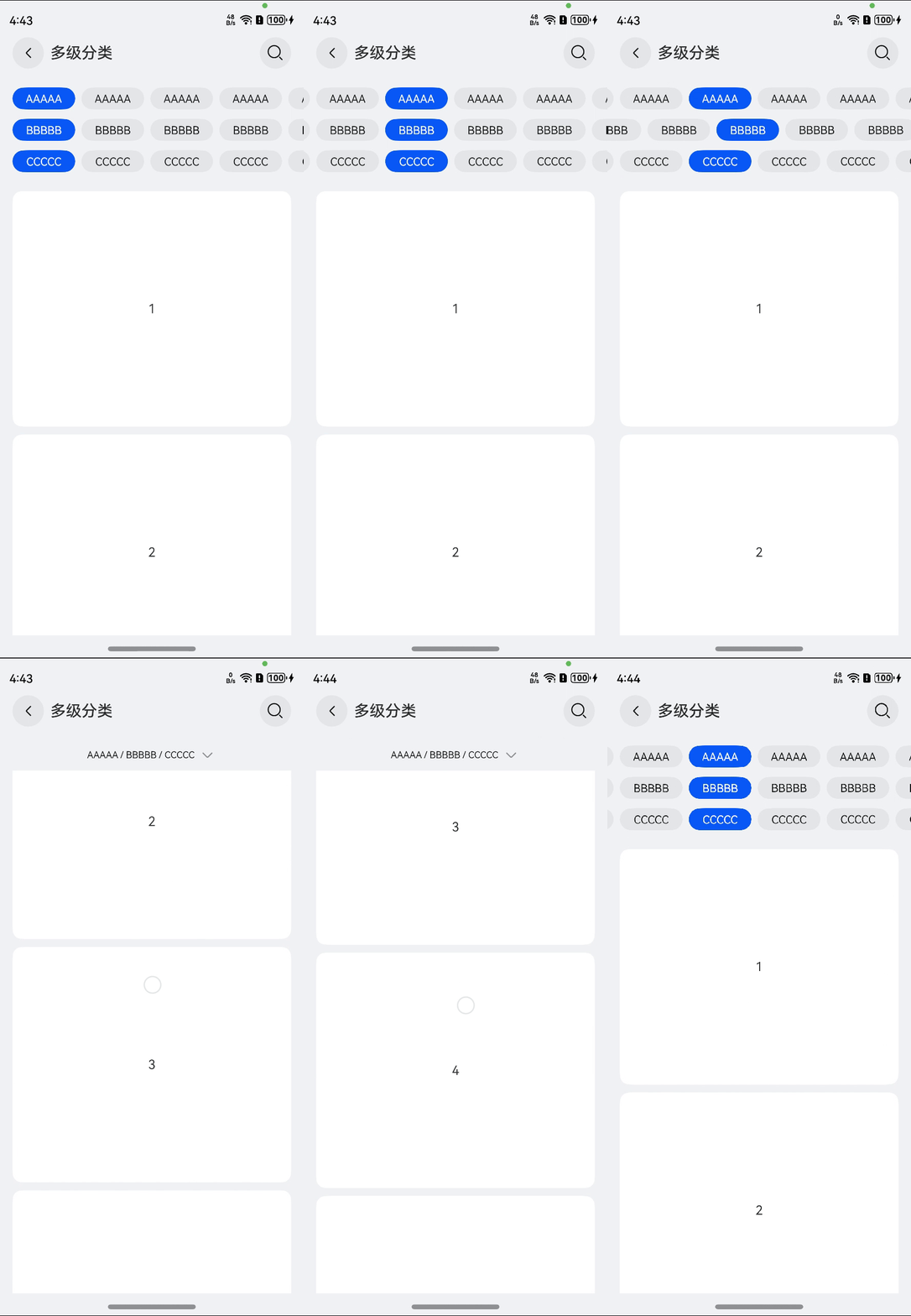
UICategory是基于open harmony基础组件开发的分类组件,支持单级分类、多级分类。
快速开始
安装
ohpm install @hw-agconnect/ui-base
ohpm install @hw-agconnect/ui-category
使用
// 在应用的入口文件进行初始化,比如说EntryAbility.ets
import { UIBase } from '@hw-agconnect/ui-base';

onWindowStageCreate(windowStage: window.WindowStage): void {
  UIBase.init(windowStage);
}

// 引入组件
import { UICategory } from '@hw-agconnect/ui-category';

UICategory({
  title: '标题',
  type: TypeCategory.SINGLE,
  options: [this.options],
  isLayoutFullScreen: true,
  buildContentParam: () => {
    this.buildContent()
  },
})
约束与限制
- 支持设备:手机、pad和pc
- API:兼容API12、API11
子组件
无
接口
UICategory(options: UICategoryOptions)
UICategoryOptions对象说明
| 参数名 | 类型 | 必填 | 说明 |
|---|---|---|---|
| type | TypeCategory | 否 | 分类类别,默认是一级分类,TypeCategory.SINGLE |
| title | string/Resource | 是 | 页面标题 |
| backIcon | Resource | 否 | 自定义返回图标 |
| searchIcon | Resource | 否 | 自定义搜索图标 |
| customSelectedColor | ResourceColor | 否 | 自定义按钮选中后的文字颜色 |
| customSelectedBgColor | ResourceColor | 否 | 自定义按钮选中后的背景色 |
| btnMinWidth | Length | 否 | 单个按钮最小宽度,默认值80,限制不可小于40 |
| btnMaxWidth | Length | 否 | 单个按钮最大宽度,默认值130,限制不可大于200 |
| options | CategoryList[] | 是 | 按钮数据 |
| isLayoutFullScreen | boolean | 是 | 当前窗口是否为沉浸式,默认值true |
| showBackIcon | boolean | 否 | 是否展示返回按钮,默认值true |
| showSearchIcon | boolean | 否 | 是否展示搜索按钮,默认值true |
| defaultSelectFirst | boolean | 否 | 是否默认选择第一个选项,默认值true |
| briefLabelWithParentInfo | boolean | 否 | 缩略label是否含有父类信息,默认值false,只对多级分类生效 |
| customBriefLabel | string/Resource | 否 | 自定义简化的label,只对多级分类生效 |
| enableBriefLabel | boolean | 否 | 是否启用简化label,只对多级分类生效,默认值true |
| buildTitleBar | () => void; | 否 | 自定义标题栏 |
| buildContentParam | () => void; | 是 | 自定义内容区 |
TypeCategory枚举说明
| 名称 | 描述 |
|---|---|
| SINGLE | 单级分类 |
| MULTIPLE | 多级分类 |
CategoryList类型说明
| 参数名 | 参数类型 | 必填 | 参数描述 |
|---|---|---|---|
| id | string | 是 | 分类id,唯一索引 |
| label | string/Resource | 是 | 分类文字描述 |
| items | CategoryItem[] | 是 | 分类所包含的条目 |
CategoryItem类型说明
| 参数名 | 参数类型 | 必填 | 参数描述 |
|---|---|---|---|
| id | string | 是 | 每个子分类的id,唯一索引 |
| label | string/Resource | 是 | 每个子分类的文字展示 |
| disabled | boolean | 否 | 是否禁选,默认值false |
| handler | () => void | 否 | 每个子分类点击后的onClick事件 |
使用限制
针对多级分类,当启用展示缩略信息时,即enableBriefLabel设置为true时,自定义内容区仅支持Scroll、List容器组件。
事件
| 名称 | 功能描述 |
|---|---|
| onSelected(callback: (selected: Map<string, CategoryItem>) => void | 点击分类后触发该事件,参数为当前所选择的分类 |
| onSearch(callback: () => void) | 搜索按钮的onClick事件 |
| onBack(callback: () => void) | 顶部标题栏中返回按钮的onClick事件 |
示例
示例1
import { UICategory, CategoryList, CategoryItem, TypeCategory } from '@hw-agconnect/ui-category';

@Entry
@Component
struct Index {
  @State options: CategoryList = new CategoryList('itemA', 'itemA', [
    new CategoryItem('itemA1', 'AAAAA'),
    new CategoryItem('itemA2', 'AAAAA'),
    new CategoryItem('itemA3', 'AAAAA'),
    new CategoryItem('itemA4', 'AAAAA'),
    new CategoryItem('itemA5', 'AAAAA'),
    new CategoryItem('itemA6', 'AAAAA'),
    new CategoryItem('itemA7', 'AAAAA'),
    new CategoryItem('itemA8', 'AAAAA'),
    new CategoryItem('itemA9', 'AAAAA'),
    new CategoryItem('itemA10', 'AAAAA'),
  ]);
  @State contentList: string[] = ['1', '2', '3'];

  @Builder
  buildContent() {
    Column({ space: 10 }) {
      ForEach(this.contentList, (item: string) => {
        Text(item)
          .width('100%')
          .height(200)
          .backgroundColor(Color.White)
          .textAlign(TextAlign.Center)
          .borderRadius(12)
      })
    }.padding(16)
  }

  build() {
    Row() {
      Column() {
        UICategory({
          title: '单级分类',
          type: TypeCategory.SINGLE,
          showBackIcon: true,
          showSearchIcon: true,
          isLayoutFullScreen: false,
          options: [this.options],
          buildContentParam: () => {
            this.buildContent()
          },
        })
      }
      .width('100%')
    }
    .height('100%')
  }
}
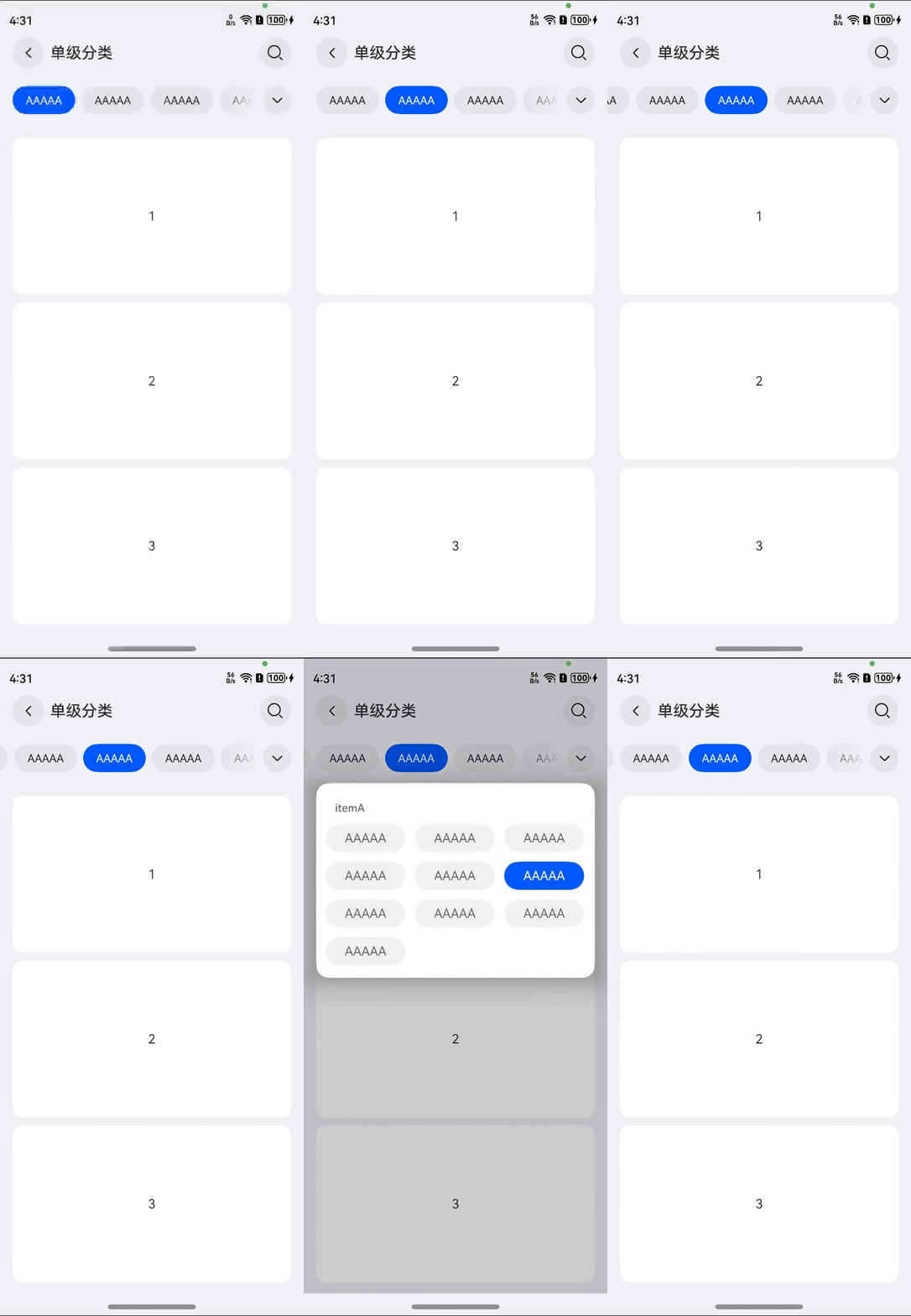
示例2
import { UICategory, CategoryList, CategoryItem, TypeCategory, CategoryListArray } from '@hw-agconnect/ui-category';

@Entry
@Component
struct Index {
  private scroller: Scroller = new Scroller();
  @State options: CategoryListArray = [
    new CategoryList('itemA', 'itemA', [
      new CategoryItem('itemA1', 'AAAAA'),
      new CategoryItem('itemA2', 'AAAAA'),
      new CategoryItem('itemA3', 'AAAAA'),
      new CategoryItem('itemA4', 'AAAAA'),
      new CategoryItem('itemA5', 'AAAAA'),
      new CategoryItem('itemA6', 'AAAAA'),
      new CategoryItem('itemA7', 'AAAAA'),
      new CategoryItem('itemA8', 'AAAAA'),
      new CategoryItem('itemA9', 'AAAAA'),
      new CategoryItem('itemA10', 'AAAAA'),
    ]),
    new CategoryList('itemB', 'itemB', [
      new CategoryItem('itemB1', 'BBBBB'),
      new CategoryItem('itemB2', 'BBBBB'),
      new CategoryItem('itemB3', 'BBBBB'),
      new CategoryItem('itemB4', 'BBBBB'),
      new CategoryItem('itemB5', 'BBBBB'),
      new CategoryItem('itemB6', 'BBBBB'),
      new CategoryItem('itemB7', 'BBBBB'),
      new CategoryItem('itemB8', 'BBBBB'),
      new CategoryItem('itemB9', 'BBBBB'),
      new CategoryItem('itemB10', 'BBBBB'),
    ]),
    new CategoryList('itemC', 'itemC', [
      new CategoryItem('itemC1', 'CCCCC'),
      new CategoryItem('itemC2', 'CCCCC'),
      new CategoryItem('itemC3', 'CCCCC'),
      new CategoryItem('itemC4', 'CCCCC'),
      new CategoryItem('itemC5', 'CCCCC'),
      new CategoryItem('itemC6', 'CCCCC'),
      new CategoryItem('itemC7', 'CCCCC'),
      new CategoryItem('itemC8', 'CCCCC'),
      new CategoryItem('itemC9', 'CCCCC'),
      new CategoryItem('itemC10', 'CCCCC'),
    ]),
  ];
  @State contentList: string[] = ['1', '2', '3', '4', '5', '6', '7'];

  @Builder
  buildContent() {
    Scroll(this.scroller) {
      Column({ space: 10 }) {
        ForEach(this.contentList, (item: string) => {
          Text(item)
            .width('100%')
            .height(300)
            .backgroundColor(Color.White)
            .textAlign(TextAlign.Center)
            .borderRadius(12)
        })
      }.padding(16)
    }
    .width('100%')
    .nestedScroll({
      scrollForward: NestedScrollMode.PARENT_FIRST,
      scrollBackward: NestedScrollMode.SELF_FIRST,
    })
    .align(Alignment.Top)
    .edgeEffect(EdgeEffect.Spring)
    .scrollBar(BarState.Off)
  }

  build() {
    Row() {
      Column() {
        UICategory({
          title: '多级分类',
          type: TypeCategory.MULTIPLE,
          options: this.options,
          buildContentParam: () => {
            this.buildContent()
          },
          onSelected: () => {
            this.scroller.scrollTo({ xOffset: 0, yOffset: 0, animation: { duration: 0 } })
          }
        })
      }
      .width('100%')
    }
    .height('100%')
  }
}
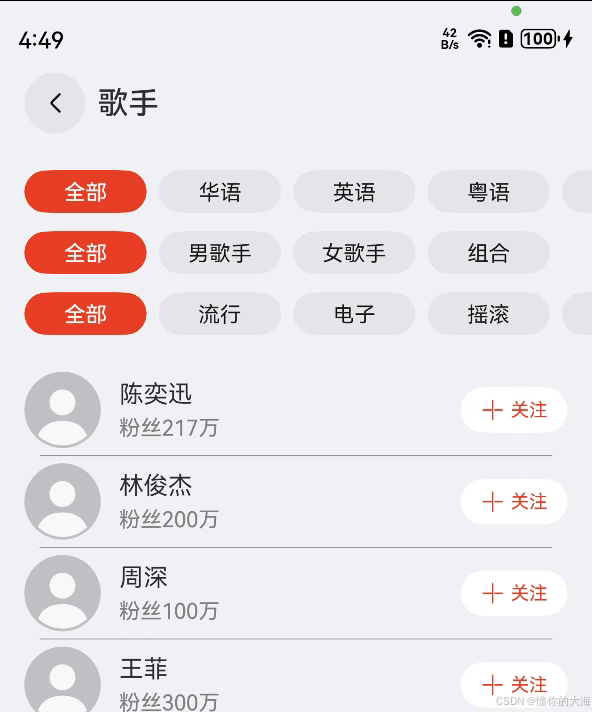
示例3
import { UICategory, CategoryList, CategoryItem, TypeCategory, CategoryListArray } from '@hw-agconnect/ui-category';

class Singer {
  name: string = '';
  followers: number = 0;
  langId: string = '';
  genderId: string = '';
  typeId: string = '';

  constructor(name: string, followers: number, langId: string, genderId: string, typeId: string) {
    this.name = name;
    this.followers = followers;
    this.langId = langId;
    this.genderId = genderId;
    this.typeId = typeId;
  }
}


@Entry
@Component
struct Index {
  @State customBtnBgColor: ResourceColor = '#E84026';
  @State selected: Map<string, CategoryItem> = new Map();
  @State options: CategoryListArray = [
    new CategoryList('111', $r('app.string.music_lang'), [
      new CategoryItem('itemA0', $r('app.string.label_total')),
      new CategoryItem('itemA1', $r('app.string.music_lang_chinese')),
      new CategoryItem('itemA2', $r('app.string.music_lang_english')),
      new CategoryItem('itemA3', $r('app.string.music_lang_hk')),
      new CategoryItem('itemA4', $r('app.string.music_lang_japan')),
      new CategoryItem('itemA5', $r('app.string.music_lang_Korea')),
      new CategoryItem('itemA6', $r('app.string.music_lang_other')),
    ]),
    new CategoryList('222', $r('app.string.music_gender'), [
      new CategoryItem('itemB0', $r('app.string.label_total')),
      new CategoryItem('itemB1', $r('app.string.music_gender_male')),
      new CategoryItem('itemB2', $r('app.string.music_gender_female')),
      new CategoryItem('itemB3', $r('app.string.music_gender_couple')),
    ]),
    new CategoryList('333', $r('app.string.music_type'), [
      new CategoryItem('itemC0', $r('app.string.label_total')),
      new CategoryItem('itemC1', $r('app.string.music_type_pop')),
      new CategoryItem('itemC2', $r('app.string.music_type_elec')),
      new CategoryItem('itemC3', $r('app.string.music_type_yao')),
      new CategoryItem('itemC4', $r('app.string.music_type_gu')),
      new CategoryItem('itemC5', $r('app.string.music_type_qing')),
      new CategoryItem('itemC6', $r('app.string.music_type_rap')),
      new CategoryItem('itemC7', $r('app.string.music_type_duli')),
    ]),
  ];
  @State contentList: Singer[] = [
    new Singer('陈奕迅', 217, 'itemA1', 'itemB1', 'itemC1'),
    new Singer('林俊杰', 200, 'itemA1', 'itemB1', 'itemC1'),
    new Singer('周深', 100, 'itemA1', 'itemB1', 'itemC1'),
    new Singer('王菲', 300, 'itemA1', 'itemB2', 'itemC1'),
    new Singer('孙燕姿', 150, 'itemA1', 'itemB2', 'itemC1'),
    new Singer('毛不易', 170, 'itemA1', 'itemB1', 'itemC1'),
    new Singer('郭顶', 217, 'itemA1', 'itemB1', 'itemC1'),
    new Singer('陈粒', 217, 'itemA1', 'itemB1', 'itemC1'),
    new Singer('许嵩', 217, 'itemA1', 'itemB1', 'itemC1'),
    new Singer('方大同', 217, 'itemA1', 'itemB1', 'itemC1'),
    new Singer('莫文蔚', 217, 'itemA1', 'itemB1', 'itemC1'),
    new Singer('陈楚生', 217, 'itemA1', 'itemB1', 'itemC1'),
    new Singer('周传雄', 217, 'itemA1', 'itemB1', 'itemC1'),
    new Singer('徐佳莹', 217, 'itemA1', 'itemB1', 'itemC1'),
    new Singer('胡彦斌', 217, 'itemA1', 'itemB1', 'itemC1'),
    new Singer('蔡依林', 217, 'itemA1', 'itemB1', 'itemC1'),
    new Singer('王心凌', 217, 'itemA1', 'itemB1', 'itemC1'),
    new Singer('唐朝乐队', 217, 'itemA1', 'itemB3', 'itemC3'),
    new Singer('新裤子乐队', 217, 'itemA1', 'itemB3', 'itemC3'),
    new Singer('Justin Bieber', 217, 'itemA2', 'itemB1', 'itemC1'),
    new Singer('Alan Walker', 217, 'itemA2', 'itemB1', 'itemC1'),
  ];
  private scroller: Scroller = new Scroller();

  onSelect(selected: Map<string, CategoryItem>) {
    this.selected = selected;
    this.scroller.scrollTo({ xOffset: 0, yOffset: 0, animation: { duration: 0 } })
  }

  getList() {
    return this.contentList.filter((item) => {
      const langIdSelected = this.selected.get('111')?.id;
      const genderIdSelected = this.selected.get('222')?.id;
      const typeIdSelected = this.selected.get('333')?.id;

      return (item.langId === langIdSelected || 'itemA0' === langIdSelected)
        && (item.genderId === genderIdSelected || 'itemB0' === genderIdSelected)
        && (item.typeId === typeIdSelected || 'itemC0' === typeIdSelected);
    })
  }

  @Builder
  buildContent() {
    Column() {
      List({ space: 10, scroller: this.scroller }) {
        ForEach(this.getList(), (item: Singer) => {
          ListItem() {
            Row() {
              Row({ space: 12 }) {
                Image($r('app.media.ic_user_portrait')).width(50).height(50)
                Column({ space: 4 }) {
                  Text(item.name).fontSize($r('sys.float.ohos_id_text_size_body1'))
                  Text($r('app.string.music_followers', item.followers.toString()))
                    .fontSize($r('sys.float.ohos_id_text_size_body2'))
                    .fontColor(Color.Grey)
                }.constraintSize({ maxWidth: '80%' }).alignItems(HorizontalAlign.Start)
              }

              Button() {
                Row({ space: 4 }) {
                  Image($r('app.media.ic_public_add')).width(16).height(16).fillColor(this.customBtnBgColor)
                  Text('关注').fontSize($r('sys.float.ohos_id_text_size_button3')).fontColor(this.customBtnBgColor)
                }.width(70).height(30).justifyContent(FlexAlign.Center)
              }.backgroundColor($r('sys.color.ohos_id_color_background'))
            }.width('100%').justifyContent(FlexAlign.SpaceBetween)
          }
          .stateStyles({
            pressed: { .backgroundColor($r('sys.color.ohos_id_color_click_effect'))
            },
          })
        })
      }
      .width('100%')
      .padding(16)
      .divider({ strokeWidth: 0.5, color: Color.Grey, startMargin: 10, endMargin: 10 })
      .edgeEffect(EdgeEffect.Spring, { alwaysEnabled: true })
      .scrollBar(BarState.Off)
      .nestedScroll({
        scrollForward: NestedScrollMode.PARENT_FIRST,
        scrollBackward: NestedScrollMode.SELF_FIRST,
      })
    }
    .width('100%')
  }

  build() {
    Row() {
      Column() {
        UICategory({
          type: TypeCategory.MULTIPLE,
          title: $r('app.string.music_title'),
          options: this.options,
          isLayoutFullScreen: true,
          customSelectedBgColor: this.customBtnBgColor,
          showSearchIcon: false,
          buildContentParam: () => {
            this.buildContent()
          },
          onSelected: (selected) => {
            this.onSelect(selected);
          },
        })
      }
      .width('100%')
    }
    .height('100%')
  }
}


 扫一扫
扫一扫


&spm=1001.2101.3001.5002&articleId=147561137&d=1&t=3&u=ac327afe6ae44b1bbdaf76e4f40befbd)
 10万+
10万+

 被折叠的 条评论
为什么被折叠?
被折叠的 条评论
为什么被折叠?
 到【灌水乐园】发言


