


Label 控件显示用户无法编辑的文本,主要用于标识窗体上的对象,并提供特定控件所代表或执行的作的说明。例如,可以使用标签向文本框、列表框、组合框等添加描述性标题,还可以编写代码来更改Label在运行时显示的文本。Label控件的关键属性如下所示:
- Text,用于在Lable控件上显示的内容。
- TextAlign,设置文本在Lable控件中的对齐方式。
- UseMnemonic ,由于Label控件无法接收焦点,因此可用于为其他相邻控件创建访问键,此属性用于标识是否将Text属性中文本的与号(&)设置为标签分配访问键。
- TabIndex 的Tab键的索引值,当被置为访问键时,它的TabIndex属性,需要比被相邻控件小1。
- AutoSize 自动设置Lable控件的大小,当此属性为true时,有助于调整控件的大小以适应较大或较小的标题,如果标题在运行时更改,则特别有用。如果此属性为false,则Text 属性中指定的单词将尽可能换行到下一行,但控件不会增长。
说明:使用一个符号 (&) 指示访问键,用两个符号 (&&) 显示符号,当设置访问键是,即可通过Alt+访问键进行快捷访问。
首先创建两个Label控件和TextBox控件,用于设置学生的年龄和姓名,在Form的Load事件中设置控件TabIndex和访问键属性,如下所示:
private void FrmText_Load(object sender, EventArgs e) | |
{ | |
this.lblStudent.Text = "姓名(&N)"; | |
this.lblStudent.TabIndex = 0; | |
this.lblStudent.UseMnemonic = true; | |
this.txtName.TabIndex = 1; | |
this.lblAge.Text = "年龄(&A)"; | |
this.lblAge.TabIndex = 2; | |
this.lblAge.UseMnemonic = true; | |
this.txtAge.TabIndex = 3; | |
} |
运行程序,在软件页面上通过Alt+访问键进行聚焦文本框,如下所示:
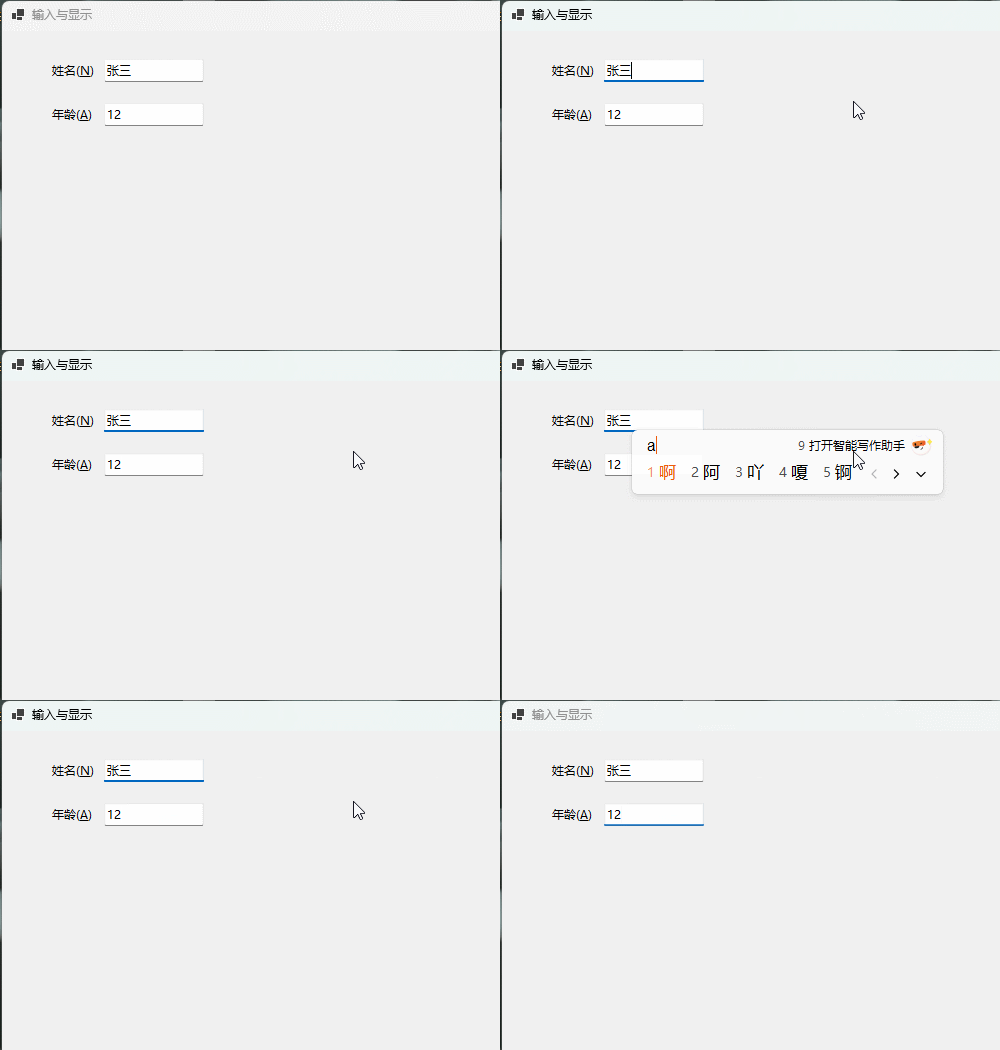
在上述示例中,不需要通过鼠标选择聚焦文本框,只需要通过Alt+访问键进行聚焦即可。需要注意的是首先Focus焦点应该在当前软件页面上,才可以通过快捷键进行访问。
LinkLabel
LinkLabel控件使你可以向 Windows 窗体应用程序添加 Web 样式链接,LinkLabel 控件具有Label控件的所有内容;还可以将文本的一部分设置为指向文件、文件夹或网页的链接。LinkLable控件的关键属性,如下所示:
- LinkArea 属性设置激活链接的文本区域。
- LinkColor VisitedLinkColor和ActiveLinkColor属性设置链接的颜色。
- LinkClicked 事件确定选择链接文本时会发生什么情况。
- Links 属性显示多个超链接。
- LinkData 可用于存储要显示的文件的位置或网站的地址。
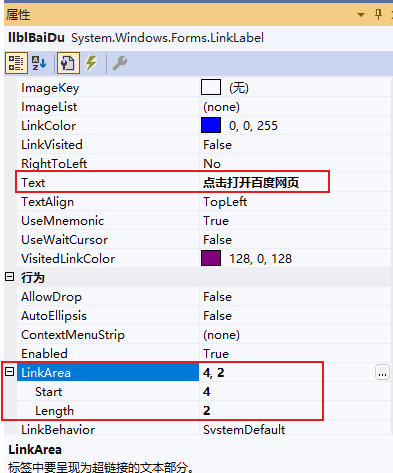
首先拖动一个LinkLable控件到Form表单中,并设置Text和LinkArea属性,如下所示:
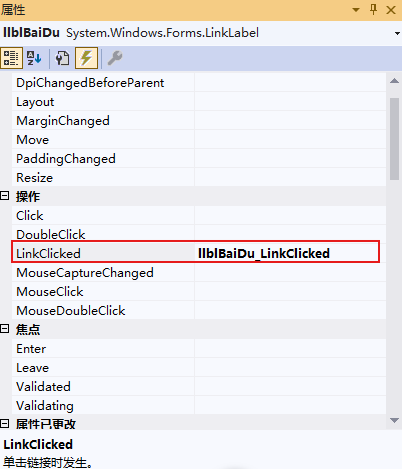
在LinkLabel控件的属性窗体的事件Tab页,通过双击设置LinkLabel的LinkClicked事件,如下所示:
在LinkClicked事件中,编写逻辑,打开网页,如下所示:
private void llblBaiDu_LinkClicked(object sender, LinkLabelLinkClickedEventArgs e) | |
{ | |
System.Diagnostics.Process.Start(@"C:\Users\Alan.hsiang\AppData\Local\Google\Chrome\Application\chrome.exe","https://www.baidu.com"); | |
} |
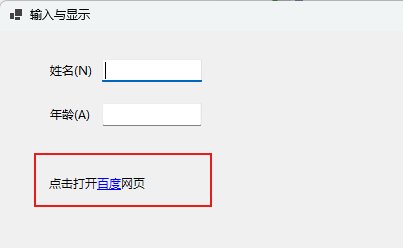
运行程序,如下所示:
TextBox
TextBox控件用于从用户处获取输入或显示文本。此控件通常用于可编辑文本,但也可以将其设置为只读。 文本框可以显示多行,换行文本以适应控件大小并添加基本格式。 TextBox控件允许在控件中显示的或输入的文本使用单一格式。TextBox控件的关键属性:
- Text ,显示文本框中的文本。 默认情况下,文本框中最多输入 2048 个字符。 如果将 Multiline 属性设置为 true,则最多可以输入 32 KB 的文本。 Text 属性可以在设计时通过“属性”窗口设置,也可以在运行时通过代码或用户输入进行设置。通过读取 Text 属性,可以在运行时获取文本框中的当前输入内容。
- SelectionStart 属性设置当前选择内容的起始位置,如果设置为0,则将插入点立即置于第一个字符的左侧。
- SelectionLength 属性设置为要选择的文本长度。
- TabIndex,Tab键的索引,当TabIndex属性设置为0时,则默认将焦点设置为此控件,并显示插入点光标。
- PasswordChar,指定文本框中显示的字符,如将PasswordChar设置为星号,则无论用户在文本框中键入什么字符,都会显示星号。
- MaxLength,标识可以在文本框中键入多少个字符。 如果超出最大长度,系统将发出蜂鸣声,文本框不接受更多字符。
- ReadOnly,标识是否可以修改文本框中的文本内容,如果设置为true,文本框转换为只读控件。
- SelectedText 属性访问所选文本。
- Multiline 是否显示多行文本,如果设置为true,则显示为多行文本,如果要在多行 TextBox 中显示回车符,请使用 NewLine 属性。
- WordWrap属性,是否自动换行,如果设置为true,不会显示水平滚动条,如果设置为false,控件中的文本不会自动换行,因此将向右滚动,直到到达换行符。
- ScrollBars 属性是否显示滚动条,None:完全不显示,Horizontal:仅显示水平滚动条,Vertical:仅显示垂直滚动条,Both:同时显示水平和垂直滚动条。
首先拖动TextBox,Label控件到Form表单中,分别显示密文和明文,如下所示:
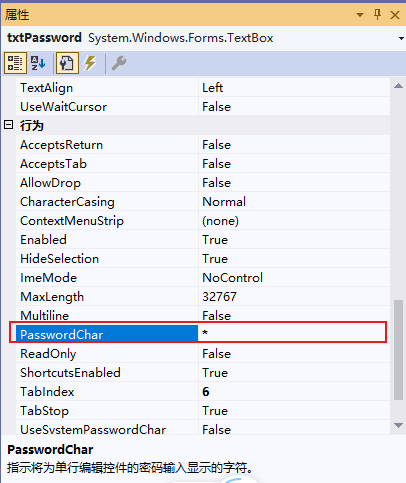
在属性窗体的事件Tab页,设置TextBox的TextChanged事件,如下所示:
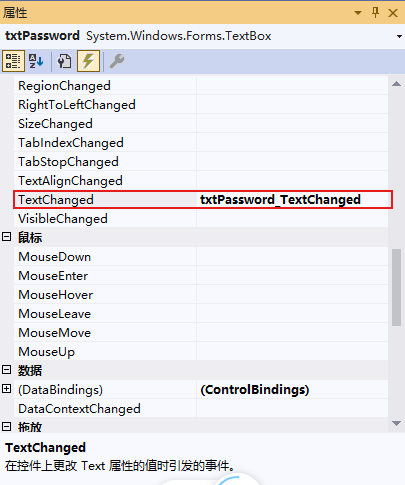
在TextChanged事件中,同步将TextBox的内容显示在Label上,如下所示:
private void txtPassword_TextChanged(object sender, EventArgs e) | |
{ | |
this.lblContent.Text = this.txtPassword.Text; | |
} |
运行程序,效果如下所示:
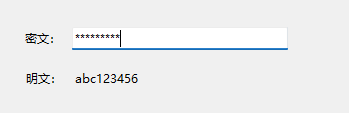
通过上述示例可以看出:PasswordChar只是在显示上加密,但实际输入的文本不会以任何方式加密。
MaskedTextBox
MaskedTextBox是一个增强 TextBox 控件,支持用于接受或拒绝用户输入的声明性语法,通过此控件可以使用掩码区分正确和不正确的用户输入。MaskedTextBox控件的关键属性如下所示:
- Mask属性,可以设置控件的掩码。
-
MaskInputRejected当字符不符合掩码时,使用事件处理程序向用户发出警报
- TypeValidationCompleted事件处理程序在尝试提交的值对类型无效时向用户发出警报,即失去Focus焦点时触发类型验证事件。
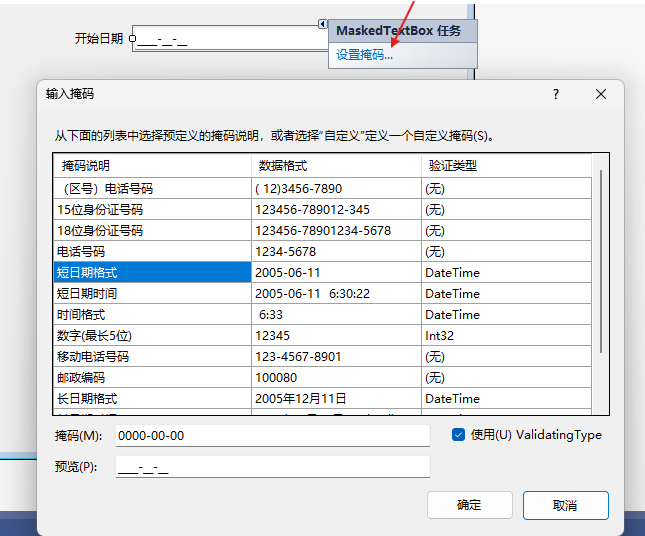
首先拖动MaskedTextBox控件的Form窗体中,选择控件,点击控件右上角的“黑色右箭头”,在弹出的“MaskedTextBox任务”窗口中点击“设置掩码...”打开“输入掩码”对话框,如下所示:
在MaskedTextBox的属性窗口中,切换到事件Tab页,分别为控件设置TypeValidationCompleted事件和MaskInputRejected事件,如下所示:
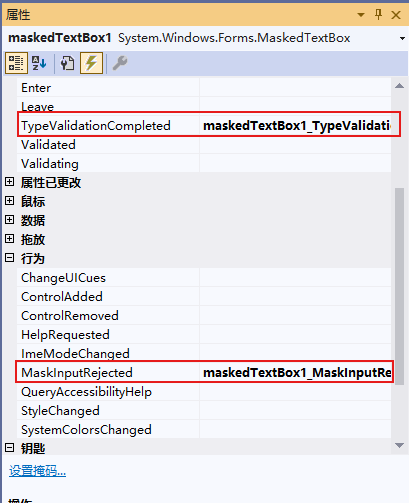
在两个事件中,输入错误提示:
private void maskedTextBox1_MaskInputRejected(object sender, MaskInputRejectedEventArgs e) | |
{ | |
lblError.Text = "输入错误"; | |
} | |
private void maskedTextBox1_TypeValidationCompleted(object sender, TypeValidationEventArgs e) | |
{ | |
if (e.IsValidInput) | |
{ | |
this.lblError.Text = ""; | |
} | |
} |
运行程序,示例效果如下:
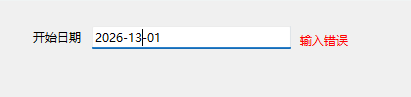
说明:系统预先定义了一部分掩码,如果不合适还可以自定义新的掩码。
RichTextBox
Windows窗体中的RichTextBox控件用于显示,输入和操作格式化的文本,RichTextBox除了拥有TextBox控件的所有功能外,还可以显示字体,颜色,链接,从文件中读取和加载图像,以及查找指定的字符。RichTextBox控件通常用于提供类似字体处理程序(如Microsoft Word)的文本操作和显示功能。RichTextBox控件可以显示滚动条,且默认根据需要进行显示。RichTextBox的关键属性如下所示:
- SelectionFont 获取或设置当前选定文本或插入点的字体。
- FontStyle 指定应用到文本的字形信息。
- SelectionAlignment 获取或设置应用到当前选定内容或插入点的对齐方式。
- SelectionIndent 获取或设置所选内容开始行的缩进距离(以像素为单位)。
- SelectionCharOffset 获取或设置控件中的文本是显示在基线上、作为上标还是作为基线下方的下标。
- SelectionColor 获取或设置当前选定文本或插入点的文本颜色。
- SelectionBackColor 获取或设置在 System.Windows.Forms.RichTextBox 控件中选中文本时文本的颜色。
- SelectionBullet 获取或设置一个值,通过该值指示项目符号样式是否应用到当前选定内容或插入点。
- Clipboard Paste 粘贴指定剪贴板格式的剪贴板内容【插入图片时使用】。
- Find 在对搜索应用特定选项的情况下,在 System.Windows.Forms.RichTextBox 控件的文本中搜索位于控件内特定位置的字符串。
首先布局UI页面,主要包括RichTextBox,和一些功能按钮,如加粗,斜体,下划线等,如下所示:
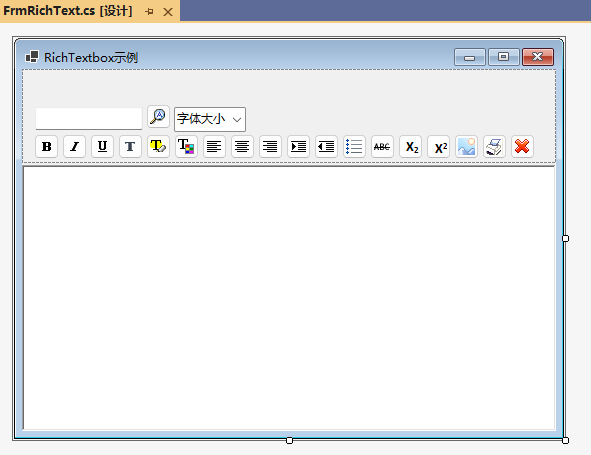
定义RichTextBox的格式接口,和枚举类型:
namespace Okcoder.WinForm.Demo.Model | |
{ | |
/// <summary> | |
/// 富文本框格式 | |
/// </summary> | |
public interface IRichFormat | |
{ | |
void SetFormat(RichTextBox rtbInfo); | |
} | |
} | |
namespace Okcoder.WinForm.Demo.Model | |
{ | |
/// <summary> | |
/// 按钮类型 | |
/// </summary> | |
public enum BTNType | |
{ | |
Bold = 0, | |
Italic, | |
UnderLine, | |
Font, | |
BGColor, | |
ForeColor, | |
Left, | |
Center, | |
Right, | |
Indent, | |
OutIndent, | |
Ul, | |
StrikeLine, | |
SubScript, | |
SuperScript, | |
Pic, | |
Print, | |
Search, | |
Del, | |
FontSize | |
} | |
} | |
namespace Okcoder.WinForm.Demo.Model | |
{ | |
public abstract class BaseRichFormat : IRichFormat | |
{ | |
public abstract void SetFormat(RichTextBox rtbInfo); | |
} | |
} |
实现具体的每一个按钮的功能:
namespace Okcoder.WinForm.Demo.Model | |
{ | |
public class DefaultRickFormat : BaseRichFormat | |
{ | |
public override void SetFormat(RichTextBox rtbInfo) | |
{ | |
} | |
} | |
/// <summary> | |
/// 加粗格式 | |
/// </summary> | |
public class BoldRichFormat : BaseRichFormat | |
{ | |
public override void SetFormat(RichTextBox rtbInfo) | |
{ | |
Font oldFont = rtbInfo.SelectionFont; | |
Font newFont; | |
if (oldFont.Bold) | |
{ | |
newFont = new Font(oldFont, oldFont.Style & ~FontStyle.Bold);//支持位于运算 | |
} | |
else | |
{ | |
newFont = new Font(oldFont, oldFont.Style | FontStyle.Bold); | |
} | |
rtbInfo.SelectionFont = newFont; | |
} | |
} | |
/// <summary> | |
/// 斜体 | |
/// </summary> | |
public class ItalicRichFormat : BaseRichFormat | |
{ | |
public override void SetFormat(RichTextBox rtbInfo) | |
{ | |
Font oldFont = rtbInfo.SelectionFont; | |
Font newFont; | |
if (oldFont.Italic) | |
{ | |
newFont = new Font(oldFont, oldFont.Style & ~FontStyle.Italic); | |
} | |
else | |
{ | |
newFont = new Font(oldFont, oldFont.Style | FontStyle.Italic); | |
} | |
rtbInfo.SelectionFont = newFont; | |
rtbInfo.Focus(); | |
} | |
} | |
/// <summary> | |
/// 下划线 | |
/// </summary> | |
public class UnderLineRichFormat : BaseRichFormat | |
{ | |
public override void SetFormat(RichTextBox rtbInfo) | |
{ | |
Font oldFont = rtbInfo.SelectionFont; | |
Font newFont; | |
if (oldFont.Underline) | |
{ | |
newFont = new Font(oldFont, oldFont.Style & ~FontStyle.Underline); | |
} | |
else | |
{ | |
newFont = new Font(oldFont, oldFont.Style | FontStyle.Underline); | |
} | |
rtbInfo.SelectionFont = newFont; | |
rtbInfo.Focus(); | |
} | |
} | |
/// <summary> | |
/// 删除线 | |
/// </summary> | |
public class StrikeLineRichFormat : BaseRichFormat | |
{ | |
public override void SetFormat(RichTextBox rtbInfo) | |
{ | |
Font oldFont = rtbInfo.SelectionFont; | |
Font newFont; | |
if (oldFont.Underline) | |
{ | |
newFont = new Font(oldFont, oldFont.Style & ~FontStyle.Strikeout); | |
} | |
else | |
{ | |
newFont = new Font(oldFont, oldFont.Style | FontStyle.Strikeout); | |
} | |
rtbInfo.SelectionFont = newFont; | |
rtbInfo.Focus(); | |
} | |
} | |
/// <summary> | |
/// 左对齐 | |
/// </summary> | |
public class LeftRichFormat : BaseRichFormat | |
{ | |
public override void SetFormat(RichTextBox rtbInfo) | |
{ | |
rtbInfo.SelectionAlignment = HorizontalAlignment.Left; | |
rtbInfo.Focus(); | |
} | |
} | |
/// <summary> | |
/// 居中对齐 | |
/// </summary> | |
public class CenterRichFormat : BaseRichFormat | |
{ | |
public override void SetFormat(RichTextBox rtbInfo) | |
{ | |
if (rtbInfo.SelectionAlignment == HorizontalAlignment.Center) | |
{ | |
rtbInfo.SelectionAlignment = HorizontalAlignment.Left; | |
} | |
else | |
{ | |
rtbInfo.SelectionAlignment = HorizontalAlignment.Center; | |
} | |
rtbInfo.Focus(); | |
} | |
} | |
/// <summary> | |
/// 右对齐 | |
/// </summary> | |
public class RightRichFormat : BaseRichFormat | |
{ | |
public override void SetFormat(RichTextBox rtbInfo) | |
{ | |
if (rtbInfo.SelectionAlignment == HorizontalAlignment.Right) | |
{ | |
rtbInfo.SelectionAlignment = HorizontalAlignment.Left; | |
} | |
else | |
{ | |
rtbInfo.SelectionAlignment = HorizontalAlignment.Right; | |
} | |
rtbInfo.Focus(); | |
} | |
} | |
/// <summary> | |
/// 缩进对齐 | |
/// </summary> | |
public class IndentRichFormat : BaseRichFormat | |
{ | |
public override void SetFormat(RichTextBox rtbInfo) | |
{ | |
//每次以10个像素进行缩进 | |
rtbInfo.SelectionIndent = rtbInfo.SelectionIndent + 10; | |
rtbInfo.Focus(); | |
} | |
} | |
/// <summary> | |
/// 缩进对齐 | |
/// </summary> | |
public class OutIndentRichFormat : BaseRichFormat | |
{ | |
public override void SetFormat(RichTextBox rtbInfo) | |
{ | |
//每次以10个像素进行缩进 | |
rtbInfo.SelectionIndent = rtbInfo.SelectionIndent - 10; | |
rtbInfo.Focus(); | |
} | |
} | |
/// <summary> | |
/// 下标 | |
/// </summary> | |
public class SubScriptRichFormat : BaseRichFormat | |
{ | |
public override void SetFormat(RichTextBox rtbInfo) | |
{ | |
if (rtbInfo.SelectionCharOffset < 0) | |
{ | |
rtbInfo.SelectionCharOffset = 0; | |
} | |
else { | |
rtbInfo.SelectionCharOffset = -5; | |
} | |
rtbInfo.Focus(); | |
} | |
} | |
/// <summary> | |
/// 上标 | |
/// </summary> | |
public class SuperScriptRichFormat : BaseRichFormat | |
{ | |
public override void SetFormat(RichTextBox rtbInfo) | |
{ | |
if (rtbInfo.SelectionCharOffset > 0) | |
{ | |
rtbInfo.SelectionCharOffset = 0; | |
} | |
else { | |
rtbInfo.SelectionCharOffset = 5; | |
} | |
rtbInfo.Focus(); | |
} | |
} | |
/// <summary> | |
/// 字体 | |
/// </summary> | |
public class FontRichFormat : BaseRichFormat | |
{ | |
public override void SetFormat(RichTextBox rtbInfo) | |
{ | |
FontDialog f = new FontDialog(); | |
if (f.ShowDialog() == DialogResult.OK) | |
{ | |
FontFamily family = f.Font.FontFamily; | |
rtbInfo.SelectionFont = new Font(family, rtbInfo.SelectionFont.Size, rtbInfo.SelectionFont.Style); | |
} | |
rtbInfo.Focus(); | |
} | |
} | |
/// <summary> | |
/// 文本颜色 | |
/// </summary> | |
public class ForeColorRichFormat : BaseRichFormat | |
{ | |
public override void SetFormat(RichTextBox rtbInfo) | |
{ | |
ColorDialog f = new ColorDialog(); | |
if (f.ShowDialog() == DialogResult.OK) | |
{ | |
rtbInfo.SelectionColor = f.Color; | |
} | |
rtbInfo.Focus(); | |
} | |
} | |
/// <summary> | |
/// 文本背景颜色 | |
/// </summary> | |
public class BgColorRichFormat : BaseRichFormat | |
{ | |
public override void SetFormat(RichTextBox rtbInfo) | |
{ | |
ColorDialog f = new ColorDialog(); | |
if (f.ShowDialog() == DialogResult.OK) | |
{ | |
rtbInfo.SelectionBackColor = f.Color; | |
} | |
rtbInfo.Focus(); | |
} | |
} | |
/// <summary> | |
/// UL列表,项目符号样式 | |
/// </summary> | |
public class UlRichFormat : BaseRichFormat | |
{ | |
public override void SetFormat(RichTextBox rtbInfo) | |
{ | |
if (rtbInfo.SelectionBullet) | |
{ | |
rtbInfo.SelectionBullet = false; | |
} | |
else { | |
rtbInfo.SelectionBullet = true; | |
rtbInfo.BulletIndent = 10; | |
} | |
rtbInfo.Focus(); | |
} | |
} | |
/// <summary> | |
/// 图片插入 | |
/// </summary> | |
public class PicRichFormat : BaseRichFormat | |
{ | |
public override void SetFormat(RichTextBox rtbInfo) | |
{ | |
OpenFileDialog o = new OpenFileDialog(); | |
o.InitialDirectory = AppDomain.CurrentDomain.BaseDirectory; | |
o.Title = "请选择图片"; | |
o.Filter = "jpeg|*.jpeg|jpg|*.jpg|png|*.png|gif|*.gif"; | |
if (o.ShowDialog() == DialogResult.OK) { | |
string fileName = o.FileName; | |
try | |
{ | |
Image bmp = Image.FromFile(fileName); | |
Clipboard.SetDataObject(bmp); | |
DataFormats.Format dataFormat = DataFormats.GetFormat(DataFormats.Bitmap); | |
if (rtbInfo.CanPaste(dataFormat)) | |
{ | |
rtbInfo.Paste(dataFormat); | |
} | |
} | |
catch (Exception exc) | |
{ | |
MessageBox.Show("图片插入失败。" + exc.Message, "提示", | |
MessageBoxButtons.OK, MessageBoxIcon.Information); | |
} | |
} | |
rtbInfo.Focus(); | |
} | |
} | |
/// <summary> | |
/// 删除 | |
/// </summary> | |
public class DelRichFormat : BaseRichFormat | |
{ | |
public override void SetFormat(RichTextBox rtbInfo) | |
{ | |
rtbInfo.SelectedText = ""; | |
rtbInfo.Focus(); | |
} | |
} | |
/// <summary> | |
/// 查找 | |
/// </summary> | |
public class SearchRichFormat : BaseRichFormat | |
{ | |
public override void SetFormat(RichTextBox rtbInfo) | |
{ | |
string find = rtbInfo.Tag.ToString(); | |
int index= rtbInfo.Find(find, 0,RichTextBoxFinds.None); | |
int startPos = index; | |
int nextIndex = 0; | |
while (nextIndex != startPos)//循环查找字符串,并用蓝色加粗12号Times New Roman标记之 | |
{ | |
rtbInfo.SelectionStart = index; | |
rtbInfo.SelectionLength = find.Length; | |
rtbInfo.SelectionColor = Color.Blue; | |
rtbInfo.SelectionFont = new Font("Times New Roman", (float)12, FontStyle.Bold); | |
rtbInfo.Focus(); | |
nextIndex = rtbInfo.Find(find, index + find.Length, RichTextBoxFinds.None); | |
if (nextIndex == -1)//若查到文件末尾,则充值nextIndex为初始位置的值,使其达到初始位置,顺利结束循环,否则会有异常。 | |
{ | |
nextIndex = startPos; | |
} | |
index = nextIndex; | |
} | |
rtbInfo.Focus(); | |
} | |
} | |
/// <summary> | |
/// 打印 | |
/// </summary> | |
public class PrintRichFormat : BaseRichFormat | |
{ | |
private RichTextBox richTextbox; | |
public override void SetFormat(RichTextBox rtbInfo) | |
{ | |
this.richTextbox = rtbInfo; | |
PrintDocument pd = new PrintDocument(); | |
pd.PrintPage += new PrintPageEventHandler(pd_PrintPage); | |
// 打印文档 | |
pd.Print(); | |
} | |
private void pd_PrintPage(object sender, PrintPageEventArgs ev) | |
{ | |
//ev.Graphics.DrawString(richTextbox.Text); | |
//ev.HasMorePages = true; | |
} | |
} | |
/// <summary> | |
/// 字体大小 | |
/// </summary> | |
public class FontSizeRichFormat : BaseRichFormat | |
{ | |
public override void SetFormat(RichTextBox rtbInfo) | |
{ | |
string fontSize = rtbInfo.Tag.ToString(); | |
float fsize = 0.0f; | |
if (float.TryParse(fontSize, out fsize)) { | |
rtbInfo.SelectionFont = new Font(rtbInfo.Font.FontFamily, fsize, rtbInfo.SelectionFont.Style); | |
} | |
rtbInfo.Focus(); | |
} | |
} | |
} |
创建RichFormatFactory工厂,用于实现根据枚举类型,创建实例对象的方法:
namespace Okcoder.WinForm.Demo.Model | |
{ | |
public class RichFormatFactory | |
{ | |
public static IRichFormat CreateRichFormat(BTNType btnType) | |
{ | |
IRichFormat richFormat; | |
switch (btnType) | |
{ | |
case BTNType.Bold: | |
richFormat = new BoldRichFormat(); | |
break; | |
case BTNType.BGColor: | |
richFormat = new BgColorRichFormat(); | |
break; | |
case BTNType.Center: | |
richFormat = new CenterRichFormat(); | |
break; | |
case BTNType.Del: | |
richFormat = new DelRichFormat(); | |
break; | |
case BTNType.Font: | |
richFormat = new FontRichFormat(); | |
break; | |
case BTNType.ForeColor: | |
richFormat = new ForeColorRichFormat(); | |
break; | |
case BTNType.FontSize: | |
richFormat = new FontSizeRichFormat(); | |
break; | |
case BTNType.Indent: | |
richFormat = new IndentRichFormat(); | |
break; | |
case BTNType.Italic: | |
richFormat = new ItalicRichFormat(); | |
break; | |
case BTNType.Left: | |
richFormat = new LeftRichFormat(); | |
break; | |
case BTNType.OutIndent: | |
richFormat = new OutIndentRichFormat(); | |
break; | |
case BTNType.Pic: | |
richFormat = new PicRichFormat(); | |
break; | |
case BTNType.Print: | |
richFormat = new PrintRichFormat(); | |
break; | |
case BTNType.Right: | |
richFormat = new RightRichFormat(); | |
break; | |
case BTNType.Search: | |
richFormat = new SearchRichFormat(); | |
break; | |
case BTNType.StrikeLine: | |
richFormat = new StrikeLineRichFormat(); | |
break; | |
case BTNType.SubScript: | |
richFormat = new SubScriptRichFormat(); | |
break; | |
case BTNType.SuperScript: | |
richFormat = new SuperScriptRichFormat(); | |
break; | |
case BTNType.Ul: | |
richFormat = new UlRichFormat(); | |
break; | |
case BTNType.UnderLine: | |
richFormat = new UnderLineRichFormat(); | |
break; | |
default: | |
richFormat = new DefaultRickFormat(); | |
break; | |
} | |
return richFormat; | |
} | |
} | |
} |
在Form表单中,当点击按钮时,根据点击按钮的类型,创建不同的实例,来实现相应的功能:
namespace Okcoder.WinForm.Demo | |
{ | |
public partial class FrmRichText : Form | |
{ | |
public FrmRichText() | |
{ | |
InitializeComponent(); | |
} | |
public void btnButtonClick(object sender, EventArgs e) { | |
Button btn = (Button)sender; | |
BTNType btnType; | |
if (Enum.TryParse<BTNType>(btn.Tag.ToString(), out btnType)) { | |
if (btnType == BTNType.Search) { | |
if (!string.IsNullOrEmpty(this.txtSearch.Text.Trim())) | |
{ | |
this.rtbInfo.Tag = this.txtSearch.Text.Trim(); | |
} | |
else { | |
return; | |
} | |
} | |
IRichFormat richFomat = RichFormatFactory.CreateRichFormat(btnType); | |
richFomat.SetFormat(this.rtbInfo); | |
} | |
} | |
private void combFontSize_SelectedIndexChanged(object sender, EventArgs e) | |
{ | |
float fsize = 12.0f; | |
if (combFontSize.SelectedIndex > -1) { | |
if (float.TryParse(combFontSize.SelectedItem.ToString(), out fsize)) { | |
rtbInfo.Tag = fsize.ToString(); | |
IRichFormat richFomat = RichFormatFactory.CreateRichFormat(BTNType.FontSize); | |
richFomat.SetFormat(this.rtbInfo); | |
} | |
return; | |
} | |
} | |
} | |
} |


 扫一扫
扫一扫


 17
17

 被折叠的 条评论
为什么被折叠?
被折叠的 条评论
为什么被折叠?
 到【灌水乐园】发言


