



1、功能介绍:
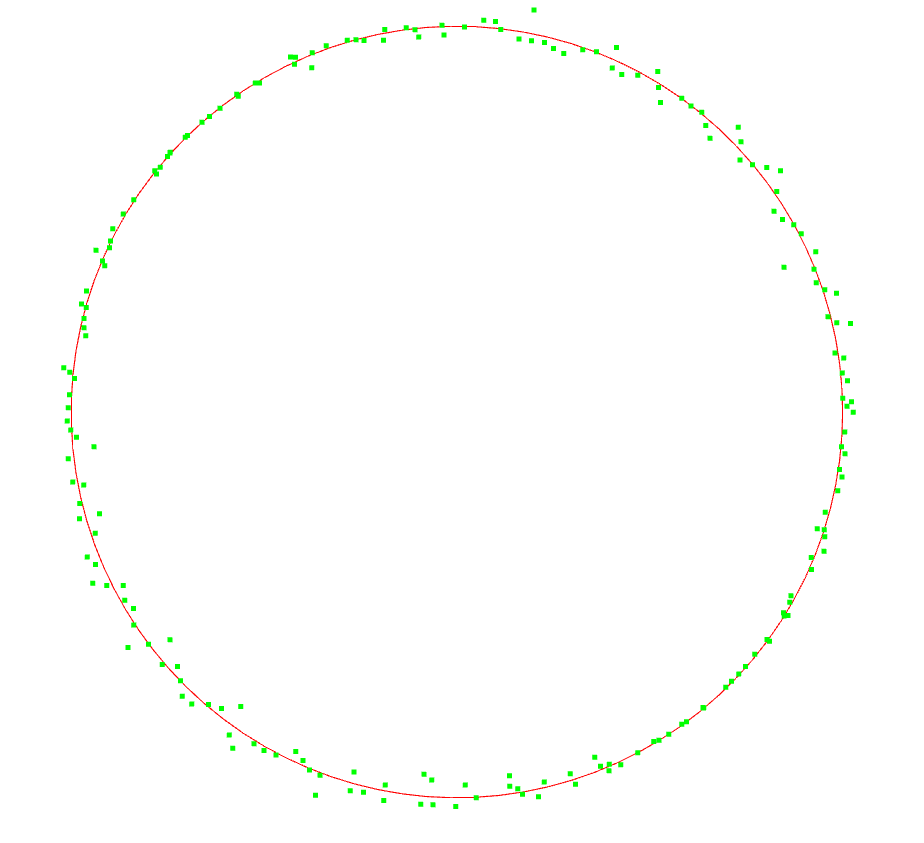
对带有噪声的二维点云数据进行圆拟合,并使用 open3d 进行可视化
2、代码部分:
import numpy as np
import open3d as o3d

# 参数设置
radius = 5.0  # 圆的半径
center = [0, 0]  # 圆心
num_points = 200  # 点的数量
noise_level = 0.1  # 噪声级别

# 生成近似圆的点
angles = np.linspace(0, 2 * np.pi, num_points)
x = center[0] + radius * np.cos(angles)
y = center[1] + radius * np.sin(angles)
z = np.zeros(num_points)  # 假设圆在XY平面
noise = np.random.normal(0, noise_level, num_points)  # 添加噪声
x += noise
y += noise
points = np.vstack((x, y, z)).T

# 拟合圆(最小二乘法)
A = np.c_[2 * points[:, 0], 2 * points[:, 1], np.ones(points.shape[0])]
b = points[:, 0]**2 + points[:, 1]**2
# 通过最小二乘法解线性方程组
params = np.linalg.lstsq(A, b, rcond=None)[0]
xc = params[0]  # 圆心的x坐标
yc = params[1]  # 圆心的y坐标
r = np.sqrt(params[2] + xc**2 + yc**2)  # 半径

# 打印拟合结果
print(f"拟合圆心: ({xc}, {yc})")
print(f"拟合圆半径: {r}")

# 使用Open3D可视化点和拟合的圆
# 创建点云对象
point_cloud = o3d.geometry.PointCloud()
point_cloud.points = o3d.utility.Vector3dVector(points)
point_cloud.paint_uniform_color([0, 1, 0])  # 设置点云颜色为绿色

# 创建拟合圆的点
angles = np.linspace(0, 2 * np.pi, 100)
fitted_x = xc + r * np.cos(angles)
fitted_y = yc + r * np.sin(angles)
fitted_z = np.zeros_like(fitted_x)
fitted_circle = np.vstack((fitted_x, fitted_y, fitted_z)).T

# 创建拟合圆的线段(用于绘制圆的边界)
lines = [[i, (i + 1) % len(fitted_circle)] for i in range(len(fitted_circle))]  # 连接每个相邻的点
line_set = o3d.geometry.LineSet()
line_set.points = o3d.utility.Vector3dVector(fitted_circle)
line_set.lines = o3d.utility.Vector2iVector(lines)
line_set.paint_uniform_color([1, 0, 0])  # 设置圆的颜色为红色

# 显示点云和拟合圆
o3d.visualization.draw_geometries([point_cloud, line_set])
3、运行结果:


 扫一扫
扫一扫


 421
421

 被折叠的 条评论
为什么被折叠?
被折叠的 条评论
为什么被折叠?
 到【灌水乐园】发言


