
SEO isn’t complicated.
But every beginner guide makes it feel that way.
Schema, XML sitemaps, topical authority, E-E-A-T… after a while, everything starts to blur together.
In this guide, I’m going to show you that SEO doesn’t have to feel like information overload. You just need to think of it as being made up of four basic building blocks:
- Technical SEO: Making sure search engines can find and understand your website
- On-Page SEO: Signalling to search engines and AI tools what each page is about and who it’s for
- Content: Filling each page with words that respond directly to what people are searching for
- Authority: Earning votes of confidence from outside your site that tell search engines and AI systems you’re trustworthy
At the end of this guide, you’ll understand how these four pillars of SEO work together, and exactly where to start — whether you’re trying to show up in Google or AI search results.
First off, let’s cover what SEO is and why it’s important for your brand.
What Is SEO?
SEO (Search Engine Optimization) is the process of improving your website so it appears higher in search results when people look for topics related to your business.
The goal isn’t to game Google’s ranking algorithms. It’s to make your content genuinely useful, clear, and easy for search engines and AI systems to find and understand.
How Does SEO Work?
SEO works by sending signals to search engines that your page is the best answer for a given search.
Think of Google as the world’s most obsessive librarian. It constantly crawls the web, reading and cataloging the pages it finds.
When you type something into the search bar, Google doesn’t search the internet like you do — it searches its own index to find the best match.
The more good signals you send, the better your chances of gaining visibility.
Why Is SEO Important?
SEO is important because it helps your brand show up where your target audience and customers are searching.
When you understand SEO basics, you can build pages that appear at the top of Google search results and get cited by AI platforms.
So while other businesses pay for ad spots, your brand gets organic visibility for free.*

* You do still need to invest in content and website setup and maintenance. But you don’t need to pay for ad spots in the search results.
The Four Pillars of SEO: How They Connect, and Where to Start
You don’t necessarily need to approach the four areas of SEO below in a strict sequence. In practice, they’ll have some overlap. And the individual action steps in each area will depend on the type of site and your goals.
But if you’re starting from zero, this order will ensure you’re focusing on the highest impact tasks first.

Pillar 1: Technical SEO
I asked the team at Semrush what should come first for SEO beginners. Chris Shirlow — Editor at Semrush and founder of SEO agency FourHorse Digital — said this:

For a beginner, you need to stop and ask yourself one question: Can Google find you? That’s the only thing that matters in technical SEO for a beginner.
Yes, you can take the weight of deep technical topics off your shoulders. All you need right now are the absolute basics to make sure Google (and AI platforms) can find you.
Think of your website as a physical store.
You could have the best products, beautiful displays, and a great location. But if the doors are locked and the lights are off, nobody can get in to buy what you’re selling.
Technical SEO makes sure your doors are unlocked and the lights are on so that search engines can find and enter your website.
Technical SEO Foundations: Crawling, Indexing & Ranking
Technical SEO works by helping search engines find and understand your content. In its simplest form, this process involves three steps:
- Crawling: Google uses automated software programs known as crawlers to discover text, images, and videos from the pages of your website
- Indexing: Google analyzes what’s on those pages, and stores the information in its database, called an index
- Ranking: When someone submits a search query, Google looks in its index. If the search engine deems your page to be a good match for that query, it ranks your page in the search results.

Before your pages can ever rank, Google needs to be able to find them, crawl them, and add them to its index.
If any of those steps fail, your content never reaches anyone — no matter how good it is.
Beyond Google, many AI search tools also use crawlers (or bots) to find and understand your site, although the process of finding and “ranking” content in AI answers isn’t quite the same as it is for search engines like Google. Many AI crawlers rely on Google’s index, for example, rather than having their own.

But this still means a technically “closed” site won’t show up in AI-generated answers any more than it will in traditional results.
Here’s the good news: For most beginners, technical SEO doesn’t require any coding knowledge or complex tools.
For the absolute basic level of discoverability, you just need to check that a few essentials are set up correctly.
How to Do Technical SEO
Below are the fundamentals of technical SEO. With this foundation set up, you’ll have the doors open to search engine and AI crawlers. That’s the first step to improving your visibility in search.
First, set up Google Search Console (GSC). This is your direct line to Google. It shows you which pages are indexed, flags crawling errors, and tells you how your site is performing in search. It’s free, and it’s one of the first things to set up on any new site.

Further reading: Google Search Console: The Definitive Guide
Next, check that your pages are indexed. For new sites with few pages, the easiest way to do this is a quick Google search. Use a search like “site:[your URL]” to see if a specific page appears in Google.
For example, if I search “site:backlinko.com/marketing-strategy”, I get this result:

So I know that page is indexed, since it shows up in search results.
This doesn’t always show every page that’s indexed on your site, and it’s not always a perfect method. But it’s a quick and easy way to perform a rough check. For a more sure-fire method using Google Search Console’s indexing report, see the detailed guide to GSC I linked above.
Once you know you’re getting indexed, make sure your site works on mobile. Google uses mobile-first indexing. That means they mainly use the mobile version of your website for ranking — even if the searcher is on a desktop.
So if your mobile site is broken or slow, your rankings will reflect that. For a quick check, pull up your website on your phone and see how it looks. If things look off, don’t load correctly, or you can’t tap buttons, you have a mobile usability problem.
To fix these issues, check out our guide to mobile SEO, or contact a web developer to take care of it for you.
Next, check your page speed. You can use Google’s free PageSpeed Insights tool to test your site. Just enter your URL, then scroll to the Performance section. This will tell you how long it takes for your page to load in different stages.
There’s a lot to take in here, but the one number to pay attention to at the start is LCP (Largest Contentful Paint). This measures how long it takes for the main content on your page to load — usually the hero image, the headline, or the first block of text.

A good LCP is under 2.5 seconds. If yours is in the red, that’s worth addressing.
You don’t need to fix everything flagged on this page. But if your LCP is slow, it’s worth flagging for a developer. Or, try looking into your image sizes as a first step, since large images at the top of the page are a common culprit.
Finally, if you’re working on SEO for an existing site, look for what’s broken. Broken links, 404s errors, and missing images all create a poor experience.

If you’ve inherited an existing site, one of the first things that can help your SEO is to find these issues and fix them. Replace broken links, add redirects to pages that no longer exist, and replace images that are missing and won’t load.
A tool like Semrush’s Site Audit can help you surface these quickly. Just add your domain, and let it run. In a few minutes, it’ll show you exactly what needs to be fixed on the “Issues” tab, and you can filter by the word “broken” to find priority technical issues.

Further reading: 5 Best SEO Audit Tools for More Traffic
Pillar 2: On-Page SEO
You now have a site that Google and AI platforms can find. The next step is to make sure they understand what each page is about.
That’s where on-page SEO comes in.
On-page SEO is the collection of signals on each individual page that communicate relevance — to search engines, AI systems, and to people searching.
So, how do you optimize these signals?
At the basic level, this hinges on the terms you want your content to appear for (in search results or AI answers). Which is why keyword research becomes the basis to help you optimize your page.
On-Page SEO Foundations: Keyword Research
Think of keyword research as a type of audience research — you want to understand what your core audience is searching for.
That helps you decide which pages to create, or how to optimize your existing pages so they rank higher and show up in more AI answers.
To find keywords, you might start by listing out broad terms related to your industry and business.
For a software company, that could be “email marketing tool.” For a local business, it might be “florist in philadelphia.”
Use these category-level keywords as a starting point to dig deeper. You can do this in a few easy ways, by:
Looking at the “People also ask” or “People also search for” suggestions in search results:

Checking what people are asking in forums like Reddit:

Using the auto-suggest search in YouTube or Google:


Note: These methods are a good starting point, but they’re on the very basic side. That means you’re unlikely to uncover gaps your competitors are missing this way, since they can also easily do the same thing. But for a new site, these are 100% valid methods to find content ideas.
You can also use Backlinko’s free keyword research tool to find keyword ideas.
Just add a broad keyword into the search bar, and you’ll get a bunch of ideas for similar keywords.

The tool also tells you more information about those keywords, which can help you decide which keywords are the right ones for you.
For example, you’ll see:
- Search volume: The number of times people search for this every month
- Keyword difficulty (KD): How hard it would be to rank for this keyword

Use these numbers to prioritize among keywords that are already relevant to your business — not to decide whether a keyword is worth targeting in the first place.
The most important questions to ask yourself when you’re looking for keywords are:
- Does this directly relate to a product, service, or topic we cover?
- Would someone searching for this realistically become a customer/follower/subscriber?
- Can we create genuinely useful content around this topic?
These questions matter more than how many people search for a keyword, since a keyword with high volume but no connection to what you do will never drive results.
One practical way to find keywords with a good balance of relevance, volume, and competition: focus on long-tail keywords (keyword phrases with three or more words).

They’re more specific, less competitive, and more likely to attract people who are looking for exactly what you offer.
How to Do On-Page SEO
Now that you have your keywords, here’s exactly how you’ll use them.
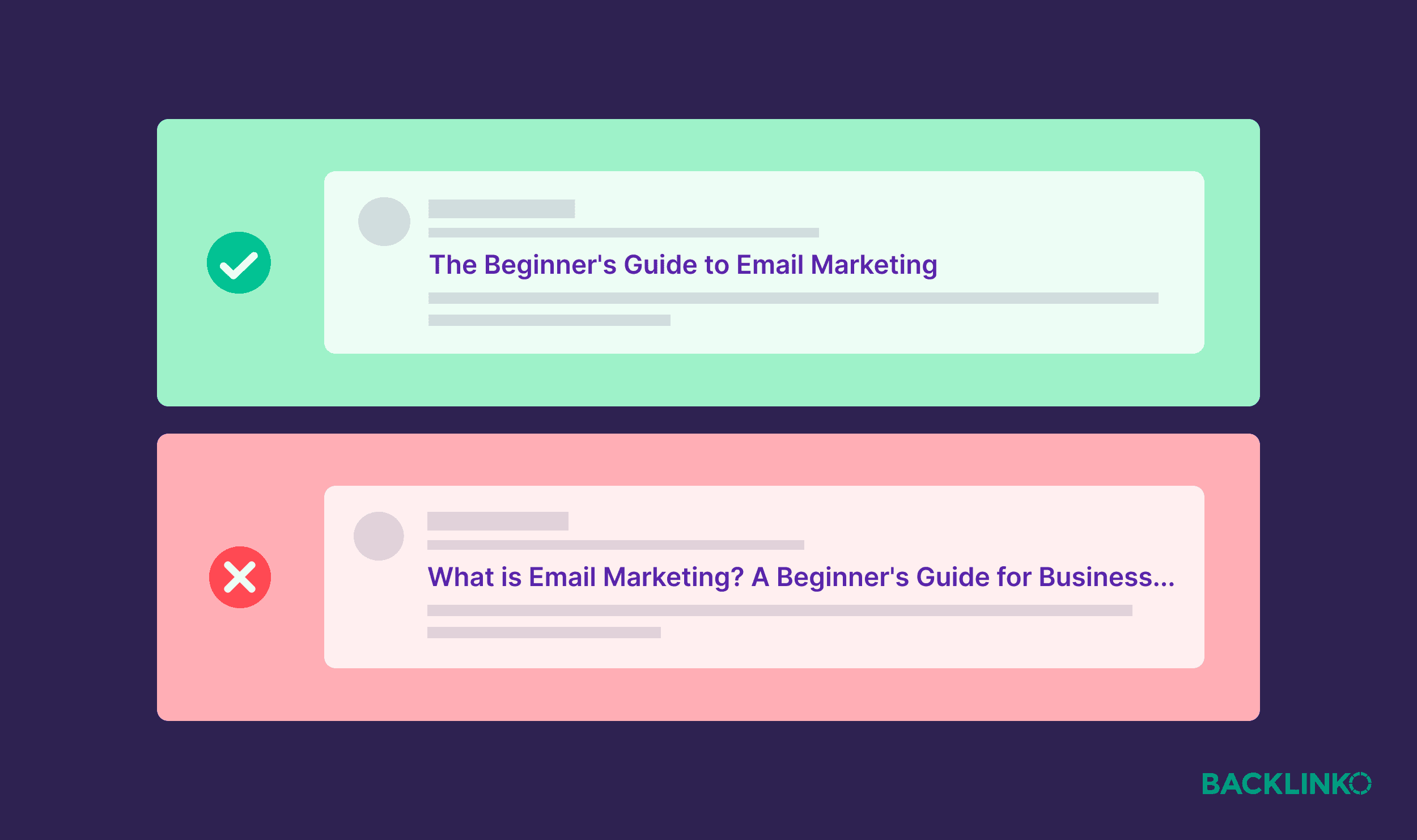
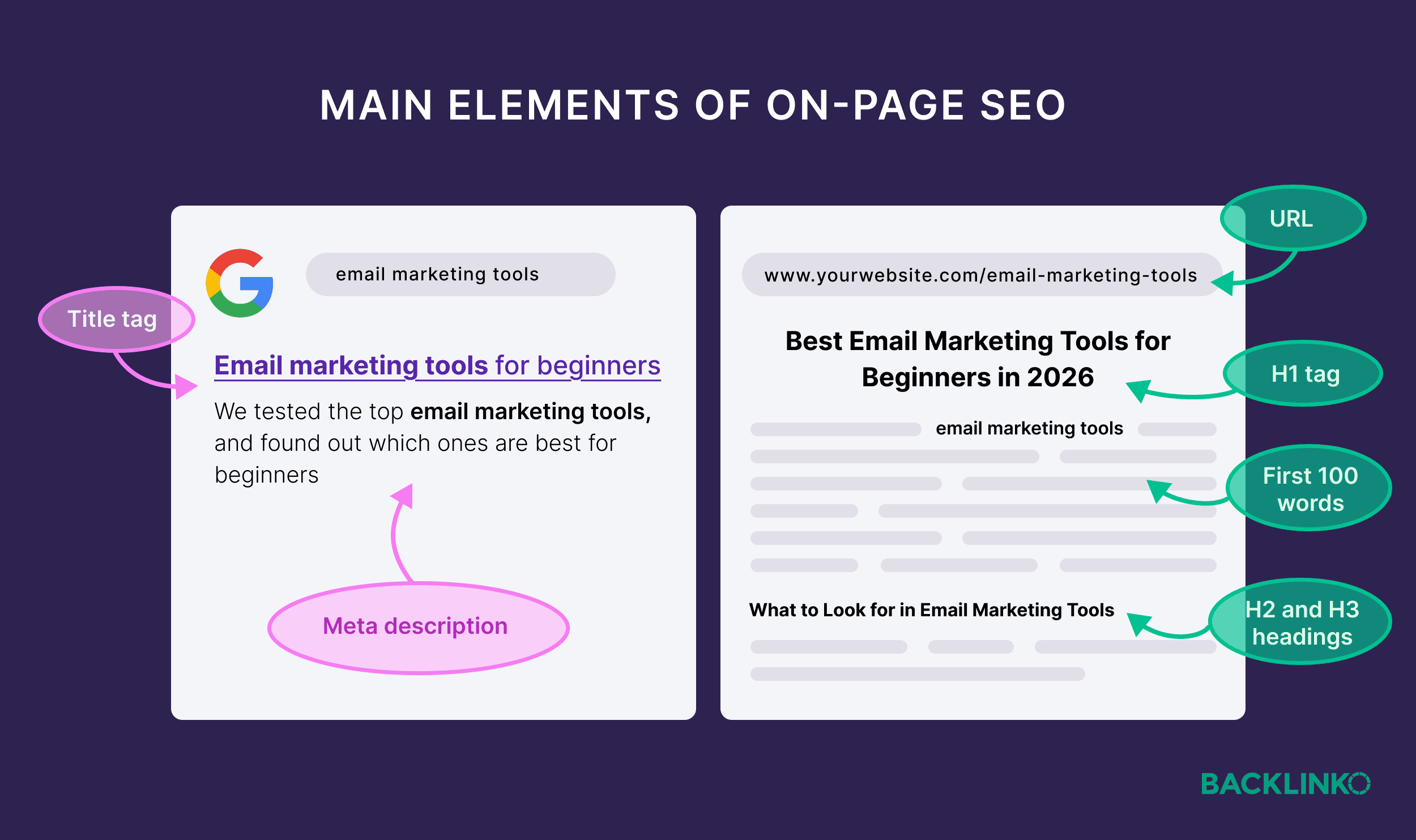
Start with title tags, the headline that appears in search results. Google uses this as a ranking signal, and it’s also key for people searching as they choose what to click on.
Keep your title tags concise, descriptive, and front-loaded with your main keyword (when it makes sense.) Google sometimes rewrites title tags, but it’s still worth optimizing yours.
You’ll also want to optimize your H1, the main heading on the page itself. This is what the reader sees when they land on your page.
It should closely match the title tag, and include your target keyword. Think of it as confirming to Google (and users): yes, this page is about what the title promised.
Many website platforms (like WordPress, Squarespace, and Webflow) automatically make your page title the H1, so this is often handled for you.
Next, include your keyword (naturally) in the first 100 words. This signals relevance from the start, both for search engines and for readers who are scanning to confirm they’re in the right place.
Your meta description is next, and it’s the short snippet of text that can appear below your title in search results (Google may rewrite these too). It doesn’t directly affect rankings, but it can affect whether someone clicks.
Write it like a one-sentence pitch: clear, specific, and relevant to what the searcher actually wants. Aim for around 150 characters — enough to make your case without getting cut off.

Note: I’ll stress again that meta descriptions don’t impact rankings. So you shouldn’t be spending an inordinate amount of time on these. But for most beginners, it’s a pretty quick and easy thing to add to your content as you’re publishing it, and the potential click-through rate benefit usually makes it worth the relatively small amount of effort.
Lastly, your URL should be short and readable. It should also contain your keyword in a natural way, if possible.
A URL like /email-marketing-guide is better than /page?id=4872. Or the opposite extreme: /email-marketing-how-to-do-email-marketing-for-beginners-complete-guide.
Here’s one quick but important note on all this: On-page SEO is not about gaming the system.
There’s no magic trick here that will automatically guarantee your page ranks in Google or appears in AI answers.
On-page optimization helps search engines understand what your page is about. But what actually earns you visibility is whether your content is genuinely useful and relevant to what the person searched for.
Pages that rank well tend to do so because they serve the reader well, not because they’ve checked every on-page SEO box. That’s what we’ll cover next.
Pillar 3: Content
Technical SEO makes you discoverable. On-page SEO makes you understandable.
But content is what actually earns you a search ranking or a recommendation in an AI response.
Here’s why: search engines and AI tools have the same fundamental job: to surface the most useful answer to every query.
The pages that consistently show up are the ones that best address what people are looking for.
No amount of technical or keyword optimization can substitute for that.
So, what makes content useful enough to show up?
It starts with understanding search intent.
Content Foundations: Search Intent
Earlier, we looked at keyword research through the lens of what people are searching for. Search intent is all about why they’re searching for it.
The better your content can satisfy search intent, the better your visibility will be (all else being equal).
But for beginners, this is also where things often go wrong — because search intent isn’t always what it looks like on the surface.
Let’s say you’re doing SEO for an email marketing tool website. You see the keyword “hubspot email marketing” has decent volume and relatively low keyword difficulty. So, you decide to target that keyword with a great comparison page between your tool and theirs.
Just one problem: this doesn’t match the search intent.
Every ranking result is a Hubspot page: their product pages, login pages, help center pages, etc.

Your comparison page will never rank here, even if the content is great. It simply doesn’t match what people are looking for.
There are four basic types of search intent:
- Informational: The searcher wants to learn more about a topic with how-to guides, clear what-is type pages, and other information-based content
- Commercial: The searcher is thinking about buying something, but wants to learn more about it with product reviews, comparison pages, or product-based listicles
- Navigational: The searcher wants to get to a specific page, like a login or pricing page (like in the HubSpot example above)
- Transactional: The searcher wants to buy something, and is looking for a page where they can directly make a purchase

Of course, search intent is more than a label. You need to deeply understand what the searcher is looking for to create the best piece of content for that query — not just whether it’s informational or transactional.
For example, are they looking to buy the best product in the category? Or are they looking for the cheapest option?
Are they looking for a guide they can read? Or do they want to download a checklist or template?
Here are two quick ways to check search intent before you write.
First, look at what’s already ranking. Google the keyword and look at the top five to ten results. Are they blog posts? Product pages? Videos? Short answers or long guides?
That tells you exactly what Google has determined searchers want. Do the same thing in AI tools like ChatGPT and Google’s AI Mode — what kind of content is being cited in their answers?
Next, read the “People also ask” results. These show you the follow-up questions searchers have — which tells you what else your content should cover.
These two methods will get you a chunk of the way there. But for a deeper understanding, check out this full guide to search intent.
Once you understand intent, you can create content that actually satisfies it.
How to Create High-Quality Content
Good content serves the person reading it (before serving the bots).
Google itself acknowledges this:
Google’s automated ranking systems are designed to prioritize helpful, reliable information that’s created to benefit people, and not content that’s created to manipulate search engine rankings.
Here are a few principles of good content that can help you rank higher and appear in more AI answers:
To start, frontload the value. Give people what they came for as quickly as possible. Don’t bury the answer in a long introduction.
For example, our guide to E-E-A-T starts with all the most important information. In the first lines of the article, the reader already knows what this acronym stands for and why it’s important. Plus, they even get a free template to download.

This is great for readers, and they’ll likely stay on the page to read more. And that user behavior signals to Google that this page is a good result for the query.
Plus, well structured sections of content that directly answer a query can help you rank in AI Overviews.
For example, this page explains clearly what SERP features are:

And that article is cited in the AI Overview for a competitive keyword:

Next, structure your content for scanning. As much pride as we take in every word carefully chosen for our pages, we also need to be realistic: very few people read an entire page. Most will scan.
Lean into that behavior with the way you structure your pages: use short paragraphs, clear subheadings, and bullet points (when they’re genuinely useful).
This is why we structure our pages like this:

This page is broken up by scannable H2 and H3 headings, includes visuals that help simplify concepts, and images with examples.
A page that’s scannable and easy to read provides a good experience for the reader. Meaning people will be more likely to stay on the page longer.
And again, that engagement is a signal that search engines like Google pay attention to.
Next, try bringing something new to the table. Unless you’re in an incredibly niche category, your main keywords probably already have dozens (or hundreds) of decent results. To earn visibility, your content needs to offer something others don’t.
This could be:
- Original data
- A more complete answer to the question
- Real examples that aren’t included in other articles
For example, look at Investopedia’s article on the advantages of long-term stock investments:

The advice is backed by real data, gathered by experts and presented in a way that’s easy to understand.

As a result, it ranks in the top 3 in Google and is cited within AI Overviews for a bunch of relevant keywords.
So, answer the question: what would make this better (more useful, more in-depth, more practical) than anything else that’s currently available?
And how does that uniqueness help satisfy search intent?
Further reading: Learn more about adding originality in our guide to information gain.
Lastly, good content demonstrates E-E-A-T. Google uses Experience, Expertise, Authoritativeness, and Trustworthiness as a framework for evaluating content quality.
Okay, I know I mentioned this in the intro in the context of overcomplicating things. But in practice, this just means:
- Cite credible sources
- Show firsthand experience where you have it
- Make it clear who wrote the content, and why they’re qualified to write it
- Keep your information accurate and up to date
Further reading: E-E-A-T in the AI Era: Complete Guide + Free Audit
Pillar 4: Authority
Authority is the collection of signals from outside your own site that tell search engines you’re credible and trustworthy.
Authority comes last in this sequence because it amplifies everything you’ve already built. But it can’t substitute for it. A thousand backlinks won’t save a site with broken technical foundations or content that doesn’t match search intent.
Chris Shirlow has seen this mistake repeatedly across the clients he works with:
I’ve had pages ranking with low authority scores because the content and on-page work was solid. The biggest beginner mistake I see is chasing backlinks before the content gap is even closed.
The good news for beginners: you don’t need to chase thousands of backlinks. You just need to build some backlinks (and mentions) over time, and create content that can naturally continue to pick them up long after publication.
Authority Foundations: Backlinks & Mentions
Backlinks — links from other websites pointing to yours — are one of the foundations of website authority.

Think of each link as a vote of confidence. The more credible sites that vouch for you, the more Google trusts you. (This is a simplification, but it’s still a useful way to think about it.)
The other main aspect of authority is direct mentions of your brand across the web.
AI tools like ChatGPT and Perplexity build their answers from sources they’ve encountered repeatedly across the web. (Mentions also help your authority in search engines too.)
When your brand, expertise, or products are mentioned and cited in multiple credible places, AI systems are more likely to recognize and reference you too.

How to Build Authority
There’s no shortcut to build website authority, but there are approaches that are realistic even if you’re starting from zero.
First, you can write guest posts for relevant publications. This involves finding blogs and publications in your industry that accept contributor pieces. A guest post can earn you a backlink, put your name in front of a new audience, and build your credibility by association.
To find opportunities, try searching Google for your topic + “write for us,” or your topic + “guest post.”

Make a list of relevant websites, then use our free website authority checker to see how authoritative the prospective website is.

Start with smaller, niche publications — they’re easier to pitch and can still carry real value, since they’ll be hyper-relevant to your business.
Further reading: Guest Blogging: The Definitive Guide
The next way to build authority is to do original research and share the data. This works because one of the most reliable ways to earn backlinks is to become the source.
Publish a study, survey, or dataset that others in your industry will want to cite. Then, share that data with relevant people in your network or around your industry.
When you’re the original source of a powerful stat, links follow naturally. We’ve seen this ourselves with our user stats guides for different platforms, which have links from thousands of domains:

Finally, you can also respond to journalist requests. Journalists, bloggers, and content marketers regularly look for expert sources. When you’re quoted in an article as an expert source, you typically earn a backlink from a credible publication.
Twitter/X is a great place to find opportunities like this. Search for #journorequest or #prrequest to find writers actively looking for sources in your area of expertise.


Remember: Building authority takes time. You can do everything right, but you still need to wait for the results. Start small, be consistent, and focus on quality over quantity.
You Have the Basics: Here’s Where to Go Next
When you’re ready to go deeper, here’s what you should tackle next:
- Internal linking: Audit how your pages connect to each other and make sure your most important pages are getting links from elsewhere on your site
- Duplicate content: Identify pages that are too similar and use canonical tags to tell search engines which version to prioritize
- Core Web Vitals: Use Google’s PageSpeed Insights tool to find and fix issues with your page load speed, responsiveness, and visual stability.
- Schema markup: Add structured data to your pages so search engines and AI systems can understand your content at a deeper level and display it in rich results
- Site architecture: Map out how your site is organized and make sure every important page is reachable within a few clicks from your homepage
Use These SEO Basics to Build Discoverability
SEO can look like a mountain from the outside, and the jargon alone can make it feel like a full-time job to learn.
But the truth is that most of what actually moves the needle for a beginner comes down to the four pillars we’ve discussed above.
If you’re ready to execute these four pillars on a brand new website, head to our guide to SEO for new websites.
But if you’re looking to go further in your SEO learning journey, here’s a list of (free and paid) courses that teach SEO and AI search.
Backlinko is owned by Semrush. We’re still obsessed with bringing you world-class SEO insights, backed by hands-on experience. Unless otherwise noted, this content was written by either an employee or paid contractor of Semrush Inc.
