Sponsored
USD307.18
USD 32.28 delivery Thursday, 15 October. Details
Or fastest delivery Thursday, 8 October. Order within 1 hr 40 mins. Details
In stock
USD USD 307.18 () Includes selected options. Includes initial monthly payment and selected options. Details
Price
Subtotal
USD USD 307.18
Subtotal
Initial payment breakdown
Delivery cost, delivery date and order total (including tax) shown at checkout.
Shipper / Seller
Amazon
Amazon
Shipper / Seller
Amazon
Returns
Returnable within 30 days of receipt
Item can be returned in its original condition for a full refund within 30 days of receipt
Payment
Secure transaction
Your transaction is secure
We work hard to protect your security and privacy. Our payment security system encrypts your information during transmission. We don’t share your credit card details with third-party sellers, and we don’t sell your information to others. Learn more
Packaging
Ships in product packaging
black leaf Ships in product packaging

This item has been tested to certify that it can dispatch safely in its original box or bag to avoid unnecessary packaging. Since 2015, we have reduced the weight of outbound packaging per shipment by 43% on average, that’s over 3 million tons of packaging material.

If you still require Amazon packaging for this item, choose “Ship in Amazon packaging” at checkout. Learn more
Gift options
Available at checkout
Available at checkout This item is a gift. Change
At checkout, you can add a custom message, a gift receipt for easy returns and have the item gift-wrapped
Legal warranty
Available
Warranty and Repairs
Get a repair if you experience an item defect under legal warranty. If your item cannot be repaired, get a replacement or refund. The legal warranty against hidden defects also applies. Learn more
Added to

Sorry, there was a problem.

There was an error retrieving your Wish Lists. Please try again.

Sorry, there was a problem.

List unavailable.
Other sellers on Amazon
Sponsored
  • VIDEO
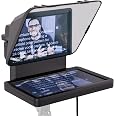
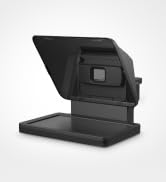
  • Elgato Prompter, Teleprompter with Built-in Screen | Drag-and-drop display, Supports DSLR, webcam, smartphone, Read chat or scripts, Works with Mac, PC, Stream Deck
  • Product Demonstration Video

Elgato Prompter, Teleprompter with Built-in Screen

Drag-and-drop display, Supports DSLR, webcam, smartphone, Read chat or scripts, Works with Mac, PC, Stream Deck
4.2 out of 5 stars (1,363)

USD 307.18
Brief content visible, double tap to read full content.
Full content visible, double tap to read brief content.
Style Name: Prompter
{"desktop_buybox_group_1":[{"displayPrice":"USD 307.18","priceAmount":307.18,"currencySymbol":"USD","integerValue":"307","decimalSeparator":".","fractionalValue":"18","symbolPosition":"left","hasSpace":true,"showFractionalPartIfEmpty":true,"offerListingId":"0Oh5y3JAWRYD9NG763J%2BOgEWPr1ksNVdits%2Fg2LaTvkZJ2atf%2B2xma5c6l8NhlJDNBvVGgLcuKKhaPHulIFfZe6RAdjI%2F2qVsu%2Fh7WUNrXTOrqXLlea0D%2FDUCvuIVkoG","locale":"en-GB","buyingOptionType":"NEW","aapiBuyingOptionIndex":0}]}

Purchase options and add-ons

About this item

  • Built-in display, Drag-and-drop: No extra tablets or smartphone screens required; Move any window or app onto Prompter’s display, just like a monitor
  • Multipurpose: Read Twitch chat or scripts while looking at your camera
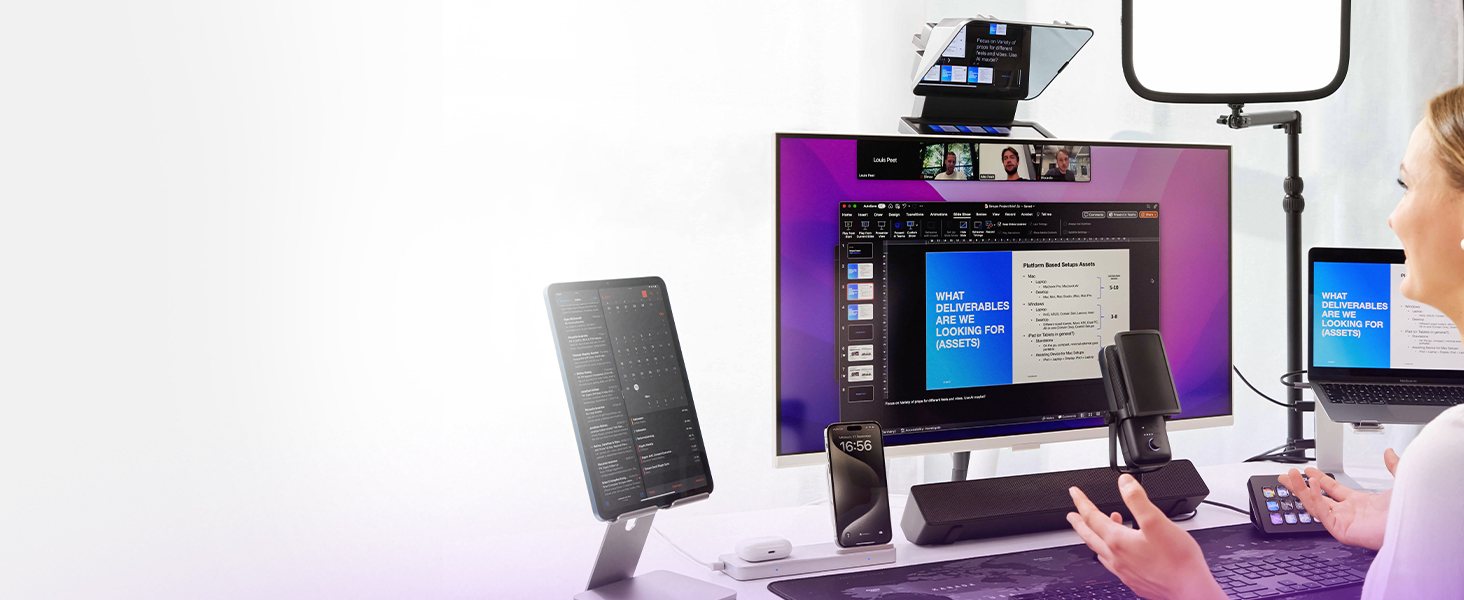
  • Meet face to face: Maintain professional eye contact on Zoom or Teams calls
  • Super compatible, Ultra customizable: Supports more cameras than any other, even the widest lenses, includes Camera Hub app to adjust text and chat appearance. *DisplayLink software required on Mac (free to download)/ *DisplayLink Presenter software required on Android (free to download)
  • Easy setup, Desktop controlled: No complicated installs, just attach your camera and plug in, use your PC or Mac computer — not a third-party mobile app; Works with Stream Deck
Brief content visible, double tap to read full content.
Full content visible, double tap to read brief content.

Top Brand

Elgato

94% positive ratings from 1K+ customers

10K+ recent orders from this brand

Sponsored

Frequently bought together

This item: Elgato Prompter, Teleprompter with Built-in Screen | Drag-and-drop display, Supports DSLR, webcam, smartphone, Read chat or scripts, Works with Mac, PC, Stream Deck
USD307.18
In stock
Sent from and sold by Amazon.
Total price: $00
To see our price, add these items to your basket.
Details
Added to Basket
Choose items to buy together.

From the brand


From the manufacturer

The video showcases the product in use.The video guides you through product setup.The video compares multiple products.The video shows the product being unpacked.

Elgato Prompter Video Setup

Prompter

TECHNICAL SPECIFICATIONS

Weight 690 g | 1.52 lb (without accessories)
Interface USB-C
Display 9" 1024 x 600 px
Step-up rings 49, 52, 55, 58, 62, 67, 72, 77, 82 mm
Smartphone mounting Requires third-party adapter with 1/4” thread mount
Dimensions W 224 x H 219 x D 282 mm / W 8.88 x H 8.62 x D 11.10 in (with universal bracket)
System requirements Windows 11 (64-bit) or newer, Intel or AMD CPU / macOS 13.3 or newer, Intel or Apple CPU / USB 3.0 Type A Android 11 or newer / DisplayLink software required on Mac (free to download) / DisplayLink Presenter software required on Android (free to download)

Product Information

Warranty & Support

Amazon.com Return Policy:Regardless of your statutory right of withdrawal, you enjoy a 30-day right of return for many products. For exceptions and conditions, see Return details.

Feedback

Elgato Prompter, Teleprompter with Built-in Screen | Drag-and-drop display, Supports DSLR, webcam, smartphone, Read chat or scripts, Works with Mac, PC, Stream Deck


Found a lower price? Let us know. Although we can't match every price reported, we'll use your feedback to ensure that our prices remain competitive.

Where did you see a lower price?

Price Availability
/
/
/
/
Please sign in to provide feedback.

What's in the box?

  • Elgato Prompter
  • Brief content visible, double tap to read full content.
    Full content visible, double tap to read brief content.

    Product Videos

    Customer ReviewElgato Prompter & Pedal for Content Creation and moreSee Full Review
    Sponsored

    Customer reviews

    4.2 out of 5 stars
    1,363 global ratings
    Sponsored

    Customers say

    Customers praise the camcorder's build quality and find the display to be of good quality. However, the functionality and ease of use receive mixed feedback, with some saying it works perfectly while others report it doesn't work as expected and find it difficult to use. Moreover, the software receives criticism for being buggy, and the voice sync feature fails to work for many customers. Additionally, customers disagree on whether the product is worth the money.
    AI Generated from the text of customer reviews

    Select to learn more

    8 customers mention build quality, 6 positive, 2 negative
    Customers appreciate the build quality of the teleprompter.
    ...Well made, great build quality and with plenty of attachments for different cameras....Read more
    ...Build quality is good, plastic doesn't feel cheap. Screen has good size if You gonna sit up to 3ft away from it....Read more
    ...Disappointed. Clips are poor quality, very plasticky and cheaply-made. For the price point, it's very poor.Read more
    ...Still getting to grips with the scroll speed. Overall it's a robust piece of equipment and relatively easy to set up and use....Read more
    23 customers mention functionality, 12 positive, 11 negative
    Customers have mixed experiences with the teleprompter's functionality, with some reporting perfect operation while others find it doesn't work as intended.
    Useful tool. Works well and seamlessly with my MacBook....Read more
    ...It may work for approximately 5 minutes before stopping, and it appears that only a complete reboot (not just restarting the app) is necessary to...Read more
    ...The quality is very good as you would expect from Elgato, and it works seamlessly, the unit connects via USB C to USB A on the PC end, this provides...Read more
    ...Sometimes it won't connect and you have to keep restarting your computer and other times the scroll functions don't work properly....Read more
    19 customers mention value for money, 7 positive, 12 negative
    Customers have mixed opinions about the teleprompter's value for money, with some finding it good for the price while others consider it a waste of money.
    Just don't waste your moneyRead more
    ...The Elgato prompter is good value when compared to units requiring a seperate display, initial impressions are good, but the software does take some...Read more
    Do not buy and Don’t believe all the influencers who have been paid to promote this. The voice sync simply does not work. It’s infuriating....Read more
    ...Clips are poor quality, very plasticky and cheaply-made. For the price point, it's very poor.Read more
    12 customers mention ease of use, 7 positive, 5 negative
    Customers have mixed experiences with the teleprompter's ease of use, with some finding it straightforward while others report difficult setup and terrible operation.
    ...got it on amazon at a reduced price, very straightforward and easy to use, it can be used outside even in the sun, you have the options to...Read more
    I'm pretty tech-savvy, but setting this teleprompter up was a bit of a nightmare. PROS: The screen is of pretty good quality...Read more
    ...It was very easy to set up. In the box are a large selection of camera mounting adapters and a generic blackout adapter....Read more
    ...It is buggy to set up on Mac and you have to tinker with settings. What ever you do don't upgrade your Mac to OS 15....Read more
    11 customers mention display, 7 positive, 4 negative
    Customers have mixed opinions about the display of the teleprompter, with some finding it of good quality, while others report issues such as lag and difficulty viewing incoming Zoom streams.
    ...PROS: The screen is of pretty good quality Nice compact design, all-in-one Once you get it to work, it's great. CONS:...Read more
    ...needs to be reduced to such a low level that makes difficult looking at incoming zoom stream. Elgato need to fix this through firmware update....Read more
    ...A very clever feature is that the PC does not count the prompter screen as one of the formal monitors - some graphics cards limit the amount of...Read more
    ...The built-in screen is super clear, and it integrates seamlessly with my DSLR camera, making recording videos so much easier....Read more
    9 customers mention connectivity, 5 positive, 4 negative
    Customers have mixed experiences with the teleprompter's connectivity, with some finding it easy to connect to their desktop and MacBook, while others report compatibility issues, with one customer noting it only works with Elgato cameras.
    ...would expect from Elgato, and it works seamlessly, the unit connects via USB C to USB A on the PC end, this provides power to the unit....Read more
    Would probably have worked great except it only accepts Elgato cameras, so I can't use it. Are they Apple now? Furious because I can't return it....Read more
    ...The built-in screen is super clear, and it integrates seamlessly with my DSLR camera, making recording videos so much easier....Read more
    ...no, it doesnt just work with any phone mount - it is very delicate balance to find one that will fit in the physical frame of this trash....Read more
    13 customers mention software, 3 positive, 10 negative
    Customers report issues with the teleprompter's software, describing it as buggy and unreliable.
    ...display, initial impressions are good, but the software does take some getting used to, the Stream Deck integration is awesome and made it simpler...Read more
    ...The beta software also doesn't work. This is a simple case of what appears to be a software being released too early....Read more
    ...This product is a great idea, but Elegato's software is so unreliable, and their tech support is barely present....Read more
    ...Worked perfectly first time with my Mac, superb quality, great software and so many options for connecting it to any camera you can think of...Read more
    8 customers mention voice sync, 0 positive, 8 negative
    Customers report significant issues with the teleprompter's voice sync feature, with multiple customers noting that it simply does not work.
    ...Also the voice follow feature stopped working on MAc 15. I have checked forums and many others are hacving the same problem....Read more
    ...Voice sync doesn't work properly on any Mac (M1 Max, M3 Max, M4 Max) as display is lagging and it cannot keep up with the audio....Read more
    ...I'm based in the UK. The Voice Sysn is not working and keeps dropping out. My options of support are:...Read more
    Don't buy this if you expect VOICESYNC to work as it DOESN'T!...Read more
    Really elevated my YouTube channel
    5 out of 5 stars
    Really elevated my YouTube channel
    I have struggled to keep on track with my videos narrative for a while, and after checking out some other reviews on the Elgato Prompter I decided it was time to take the plunge. Setup was easy, I am using it with a Sony ZV-E10 it unfortunately needs a different lens to clip the prompter directly to utilise the included accessories, but the shroud does a great job of keeping out external light. The quality is very good as you would expect from Elgato, and it works seamlessly, the unit connects via USB C to USB A on the PC end, this provides power to the unit. The Elgato prompter is good value when compared to units requiring a seperate display, initial impressions are good, but the software does take some getting used to, the Stream Deck integration is awesome and made it simpler to scroll through whilst filming, the AI narrative function I couldn’t get working consistently. Overall, very good initial impressions.
    Thank you for your feedback
    Sorry, there was an error
    Sorry, we couldn't load the review

    Top reviews from the United Kingdom

    • 5 out of 5 stars
      Really elevated my YouTube channel
      Reviewed in the United Kingdom on 20 September 2024
      Brief content visible, double tap to read full content.
      Full content visible, double tap to read brief content.

      I have struggled to keep on track with my videos narrative for a while, and after checking out some other reviews on the Elgato Prompter I decided it was time to take the plunge.

      Setup was easy, I am using it with a Sony ZV-E10 it unfortunately needs a different lens to clip the prompter directly to utilise the included accessories, but the shroud does a great job of keeping out external light.

      The quality is very good as you would expect from Elgato, and it works seamlessly, the unit connects via USB C to USB A on the PC end, this provides power to the unit.

      The Elgato prompter is good value when compared to units requiring a seperate display, initial impressions are good, but the software does take some getting used to, the Stream Deck integration is awesome and made it simpler to scroll through whilst filming, the AI narrative function I couldn’t get working consistently.

      Overall, very good initial impressions.

      Really elevated my YouTube channel
      Really elevated my YouTube channel
      5 out of 5 stars
      Really elevated my YouTube channel
      Reviewed in the United Kingdom on 20 September 2024

      I have struggled to keep on track with my videos narrative for a while, and after checking out some other reviews on the Elgato Prompter I decided it was time to take the plunge.

      Setup was easy, I am using it with a Sony ZV-E10 it unfortunately needs a different lens to clip the prompter directly to utilise the included accessories, but the shroud does a great job of keeping out external light.

      The quality is very good as you would expect from Elgato, and it works seamlessly, the unit connects via USB C to USB A on the PC end, this provides power to the unit.

      The Elgato prompter is good value when compared to units requiring a seperate display, initial impressions are good, but the software does take some getting used to, the Stream Deck integration is awesome and made it simpler to scroll through whilst filming, the AI narrative function I couldn’t get working consistently.

      Overall, very good initial impressions.

      16 people found this helpful
      Sending feedback...
      Thank you for your feedback.
      Sending feedback...
      Thank you. We’ll investigate in the next few days.

      We’ll check if this review meets our community guidelinesOpens in a new tab. If it does not, we will remove it.

    • 5 out of 5 stars
      Good product for the money
      Reviewed in the United Kingdom on 29 May 2026
      Brief content visible, double tap to read full content.
      Full content visible, double tap to read brief content.

      I've been using this teleprompter for a while now and it saved me massive amount of time. It's pricey but You get what You paying for. Easy to connect to Your desktop, versatile as You can use it as a teleprompter or another screen. Build quality is good, plastic doesn't feel cheap. Screen has good size if You gonna sit up to 3ft away from it. If You plan to sit further away You may consider ElgatoXL

      2 people found this helpful
      Sending feedback...
      Thank you for your feedback.
      Sending feedback...
      Thank you. We’ll investigate in the next few days.

      We’ll check if this review meets our community guidelinesOpens in a new tab. If it does not, we will remove it.

    • 5 out of 5 stars
      writing a script on my mac and then copying and pasting into the teleprompter with zero fuss
      Reviewed in the United Kingdom on 4 May 2026
      Brief content visible, double tap to read full content.
      Full content visible, double tap to read brief content.

      Within 20 mins of this device arriving at my door, I had it set up and had fully recorded my first 5 min 'talking-head' video with a script running flawlessly on the screen.

      This teleprompter is perfect if you have an Elgato Facecam as it slots straight in and both the camera and the teleprompter are easily controlled via the Camera Hub.

      An absolute breeze to use!

      One person found this helpful
      Sending feedback...
      Thank you for your feedback.
      Sending feedback...
      Thank you. We’ll investigate in the next few days.

      We’ll check if this review meets our community guidelinesOpens in a new tab. If it does not, we will remove it.

    • 4 out of 5 stars
      Almost perfect.
      Reviewed in the United Kingdom on 3 January 2025
      Brief content visible, double tap to read full content.
      Full content visible, double tap to read brief content.

      I do a lot of video conferences for work using Zoom / Teams / etc.

      The usual problem with video conferences is that there is no eye contact. I'm either looking at the camera so the other person thinks I'm looking them in the eyes, or I'm looking at the monitor to see their eyes but we cannot have both with a regular webcam set up.

      With a teleprompter the camera is mounted behind a piece of glass that acts as a mirror to show the screen that is mounted below.

      I can now look directly at the camera and the image of the other person at the same time. It makes a remarkable difference to how a video conference feels. I can give eye contact and watch for non-verbal communications like facial movement.

      It was very easy to set up. In the box are a large selection of camera mounting adapters and a generic blackout adapter. So it can be used with an expensive DSLR type camera or a simple webcam - that is not included. My existing webcam is a Logitech Stream Cam. That uses the blackout cloth adapter to keep light out of the back. That took about 5 mins to mount and adjust to the middle of the screen.

      The combined prompter / webcam then needs to be mounted in some way. The bottom of the prompter has the usual camera mounting hole so any type of mount can be used from a small tripod to extensive desk clamp mounts. I have a Neewer desk mount extendable pole with a side arm. The prompter is on the side arm. The side arm has a ball-head fitting so the prompter can be adjusted for direction and tilt really easily to suit my sitting position.

      The Prompter then connects to the PC with a single USB-C cable that provides the signal and power.

      A very clever feature is that the PC does not count the prompter screen as one of the formal monitors - some graphics cards limit the amount of monitors they can feed properly, but the prompter does not affect that. I am using two 4K screens with a relatively old RTX2060 GPU which cannot support more than a pair of 4K monitors. The prompter works just fine.

      Elgato's Camera Hub software needs to be installed to control it. Once installed it will recognise the prompter and the settings can be adjusted - either just for video, or for placing a scrolling script on the screen, or both.

      In Zoom I just drag the Zoom window to the prompter screen like it was just another monitor and then maximise to fit the prompter screen. The mouse works as any other monitor. The screen brightness etc is all controllable in the Camera Hub app.

      This is the best bit of ease of use - it is just another screen. No need to do anything different.

      I use it for every video conference now and I'd definitely get another one if I managed to lose it or something.

      The prompter can be controlled with a mouse and the Camera Hub software very easily. For those with an Elgato Stream Deck, it can also be controlled with that.

      Once set up and running it is as hassle-free as it could be. It just sits there until I need it.

      I said it was "almost perfect"...

      The flaws are minor:

      1: The blackout sheet adapter could be a bit longer. Some webcams have cables that exit from the back of their casing and some from the bottom. The ones from the back can cause the blackout sheet to lift letting a bit of light in from the rear which gets in the way of the image. Turning off any light behind the unit solves this, as does carefully re-arranging the blackout when using it. If the blackout sheet was 3-4 inches longer it wouldn't be a problem at all. I might end up sewing an extra bit of cloth to it.

      2: for sharp icons there is a little ghosting / double image on the reflective surface only. The screen itself is crisp. This happens because the mirror glass reflects on both surfaces - both sides of the sheet of glass. It's pretty much impossible to avoid, at least on a modestly priced unit. I only notice it on icons and not on the main image itself. There are some complaints online about this - particularly for people reading scripts on it but for conference without text it's not an issue. Unfortunately physics applies here - light will bounce off a surface and a sheet of glass has 2 so there are 2 reflections. I believe very expensive units use amazingly thin (and fragile) glass to minimise this so the images are closer, and / or use an expensive coating on one side of the glass to reduce the reflections. Either way - not available for something of this price. Maybe one day!

      3: If your webcam has a privacy cover then it cannot be reached once the camera is mounted to the prompter. I just pull the blackout sheet over the front when I'm not conferencing. But there really should be a way to deal with this. The blackout sheet does not quite come down far enough - as per No1 above, a bigger blackout sheet would solve it completely.

      It's an excellent bit of kit. Now that I've used it for a while I'd hate to go back to video conferences without eye contact again.

      10 people found this helpful
      Sending feedback...
      Thank you for your feedback.
      Sending feedback...
      Thank you. We’ll investigate in the next few days.

      We’ll check if this review meets our community guidelinesOpens in a new tab. If it does not, we will remove it.

    • 1 out of 5 stars
      Attractive hardware with completely broken software
      Reviewed in the United Kingdom on 24 September 2025
      Brief content visible, double tap to read full content.
      Full content visible, double tap to read brief content.

      Save yourself a lot of pain by not buying this. This product is a great idea, but Elegato's software is so unreliable, and their tech support is barely present. The teleprompter voice sync is broken and unreliable. It may work for approximately 5 minutes before stopping, and it appears that only a complete reboot (not just restarting the app) is necessary to make it work for another 5 minutes. Elegato products look great, but they fail to invest in high-quality drivers and applications. Nothing makes this more evident than the unreliable software. If you buy this product, you will probably end up paying $100 per year for something that actually works.

      2 people found this helpful
      Sending feedback...
      Thank you for your feedback.
      Sending feedback...
      Thank you. We’ll investigate in the next few days.

      We’ll check if this review meets our community guidelinesOpens in a new tab. If it does not, we will remove it.

    • 5 out of 5 stars
      I feel like a pro now!
      Reviewed in the United Kingdom on 7 March 2026
      Brief content visible, double tap to read full content.
      Full content visible, double tap to read brief content.

      So good! No more struggling with an old iPad. No more flimsy springy clips that fire your iPad off across the room. No more running out of power halfway through a recording. No more fiddling with plastic lense surrounds.

      Honestly… it just does what I want. It’s not perfect. It’s not as portable as an iPad setup. But for a home podcast studio where it’s plugged into my Mac - it’s great. The software could be more intuitive. I don’t use an Elgato camera so I have 2 apps running, one for my camera and the app for the prompter. I love the auto follow feature - the text scrolls as I go and I can override when I go off script.

      The screen and text are bright and clear.

      Plenty of settings to suit. You can place a marker to show the lense placement, you can opt to see your guest or info your casting or yourself if you prefer… I love this.

      It’s a more pricey option but well worth the investment.

      2 people found this helpful
      Sending feedback...
      Thank you for your feedback.
      Sending feedback...
      Thank you. We’ll investigate in the next few days.

      We’ll check if this review meets our community guidelinesOpens in a new tab. If it does not, we will remove it.

    • 5 out of 5 stars
      Amazing piece of technology!
      Reviewed in the United Kingdom on 9 May 2025
      Brief content visible, double tap to read full content.
      Full content visible, double tap to read brief content.

      This Elgato Prompter really is amazing for Vloggers or people creating courses.

      Basically, you connect this to your computer and the computer uses this as a second screen. The prompter has a mirror built into it and so it reflects this backwards second screen in a way that you can see it as if it was the correct way round.

      For most people, this allows you to write scripts and have them broadcast from your laptop to the screen using the Elgato software. However, you are able to just use it as a second screen for things such as Discord if you want to.

      What makes the prompter so good is that your camera goes behind the screen, which servers as a one-way mirror essentially. You see a screen, but your camera behind the screen captures you. This means no more looking off to a second screen or down at your notes. It means far less takes as you can read from a script rather than having to remember lines.

      I really liked how many attachments came with the prompter. Whatever size lens you have, there's a fitting for the prompter to attach to your camera. There are also options for smaller cameras or phones as well, although you may need to pick up a cheap attachment depending.
      Overall, I think this is an excellent way to improve your videos. It's very easy to setup and use as well.

      9 people found this helpful
      Sending feedback...
      Thank you for your feedback.
      Sending feedback...
      Thank you. We’ll investigate in the next few days.

      We’ll check if this review meets our community guidelinesOpens in a new tab. If it does not, we will remove it.

    • 5 out of 5 stars
      Perfect prompter.
      Reviewed in the United Kingdom on 12 September 2025
      Brief content visible, double tap to read full content.
      Full content visible, double tap to read brief content.

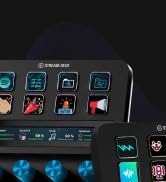
      Totally brilliant. Worked perfectly first time with my Mac, superb quality, great software and so many options for connecting it to any camera you can think of (I'm using a Nikon Z7 with a 24-70 f4 and I just use one of the supplied step-up rings, of which there are many. 100% recommended and worth the premium.

      2 people found this helpful
      Sending feedback...
      Thank you for your feedback.
      Sending feedback...
      Thank you. We’ll investigate in the next few days.

      We’ll check if this review meets our community guidelinesOpens in a new tab. If it does not, we will remove it.

    Top reviews from other countries

      Translated by Amazon
      See original
    • 5 out of 5 stars
      Perfect for reading scrips for Youtube videos!
      Reviewed in the Netherlands on 24 March 2025
      Brief content visible, double tap to read full content.
      Full content visible, double tap to read brief content.

      I got this so i could use it to read my scripts for Youtube. I struggled with memorizing the script when filming, so the Elgato Prompter is perfect for this! I absolutely love the voice sync function, makes reading the text on the screen super easy and natural. It was easy to set up and i also use the Elgato Master Mount for the Prompter and it works great!

      Sending feedback...
      Thank you. We’ll investigate in the next few days.

      We’ll check if this review meets our community guidelinesOpens in a new tab. If it does not, we will remove it.

    • 5 out of 5 stars
      Ottimo
      Reviewed in Italy on 14 August 2025
      Brief content visible, double tap to read full content.
      Full content visible, double tap to read brief content.

      Prodotto indispensabile per chi come fa è un videomaker e produce video parlati. Aiuta tantissimo a non perdere il filo e nel kit ci sono i supporti per ogni tipo di obbiettivo. La qualità video è molto buona e non disturba le riprese ed essendo molto leggero non ha bisogno di staffe aggiuntive. Livello Software l'ultimo aggiornamento su Mac è cresciuto tanto anche se qualche lag a volta compare soprattutto nell'ascolto live. Da considerare che serve Mac o Pc per farlo funzionare anche se sono speranzoso che arrivi il supporto per iPad/iPhone via USB-C. Ottimo.

      Sending feedback...
      Thank you. We’ll investigate in the next few days.

      We’ll check if this review meets our community guidelinesOpens in a new tab. If it does not, we will remove it.

      Translated from Italian by Amazon
      See original
    • 5 out of 5 stars
      Super produit
      Reviewed in France on 6 May 2026
      Brief content visible, double tap to read full content.
      Full content visible, double tap to read brief content.

      Super produit. Connecté à un Streaming Deck c’est parfait. Je l’utilise également comme 3 e écran lors de mes streaming. Seul bémol, le formatage du texte est limité, mais il suffit d’importer un paragraphe tout prêt de Word par exemple.

      En résumé Elgato est une marque sérieuse. On peu déjà le constater lors du déballage. L’installation se fait en quelques secondes et à l’utilisation le prompteur avec la caméra installée dans son emplacement répond totalement aux attentes que l’on peut avoir d’un bon prompteur.

      Sending feedback...
      Thank you. We’ll investigate in the next few days.

      We’ll check if this review meets our community guidelinesOpens in a new tab. If it does not, we will remove it.

      Translated from French by Amazon
      See original
    • 5 out of 5 stars
      Hoy, la mejor opción relación calidad-precio del mercado
      Reviewed in Spain on 1 December 2024
      Brief content visible, double tap to read full content.
      Full content visible, double tap to read brief content.

      Si eres creador de contenido o, simplemente, haces vídeos o das clases a distancia, el Prompter es la manera de mejorar la calidad de mis videos y conectar mejor con mi audiencia. Elgato Prompter ha sido una adición fantástica a mi equipo de grabación, y aquí les cuento mi experiencia:

      Lo que me encanta:

      - Fluidez en la lectura: Leer un guion mientras miro directamente a la cámara siempre ha sido un desafío. Con Elgato Prompter, puedo mantener un contacto visual natural con la audiencia, lo que hace que mis videos se sientan más personales y atractivos.

      - Fácil de usar: La aplicación es muy intuitiva. Simplemente, copio y pego mi guion en la aplicación, ajusto la velocidad de desplazamiento y el tamaño del texto, y listo. Además, puedo controlar el prompter de forma remota con mi teléfono o con Elgato Stream Deck, lo que me da mucha flexibilidad durante la grabación.

      - Compatibilidad: Funciona con mi cámara DSLR, webcam y smartphone. Esto es genial porque puedo usarlo en diferentes situaciones, ya sea grabando videos en mi estudio o haciendo transmisiones en vivo desde mi teléfono.

      - Portabilidad: Es ligero y compacto, fácil de transportar y montar. Lo he llevado conmigo a varias grabaciones en exteriores y no me ha dado ningún problema.

      - Integración con otras herramientas: La integración con Elgato Stream Deck es un plus. Puedo configurar botones para iniciar y detener el prompter, ajustar la velocidad de desplazamiento e incluso controlar otras funciones de mi equipo de grabación.

      Aspectos a mejorar:

      - Reflejos en la pantalla: En ocasiones, he notado algunos reflejos en la pantalla del prompter, especialmente cuando hay mucha luz. Esto puede dificultar un poco la lectura, pero se soluciona ajustando la posición del prompter o la iluminación.

      - Precio: No es precisamente barato, pero creo que la inversión vale la pena si te tomas en serio la creación de contenido.

      Elgato Prompter ha sido una herramienta muy valiosa para mí. Me ha ayudado a mejorar la calidad de mis videos y a conectar mejor con mi audiencia. Si buscas un teleprompter fácil de usar, portátil y compatible con diferentes dispositivos, te lo recomiendo sin dudarlo. Hoy es una de las mejores opciones relación calidad-precio del mercado.

      --

      Si ets creador de contingut o, simplement, fas vídeos o fas classes a distància, el Prompter és la manera de millorar la qualitat dels meus vídeos i connectar millor amb la meva audiència. Elgato Prompter ha estat una addició fantàstica al meu equip d'enregistrament, i aquí els explico la meva experiència:

      El que m'encanta:

      - Fluïdesa a la lectura: Llegir un guió mentre miro directament a la càmera sempre ha estat un desafiament. Amb Elgato Prompter, puc mantenir un contacte visual natural amb l'audiència, cosa que fa que els meus vídeos se sentin més personals i atractius.

      - Fàcil de fer servir: L'aplicació és molt intuïtiva. Simplement, copio i enganxo el meu guió en l'aplicació, ajusto la velocitat de desplaçament i la mida del text, i llest. A més, puc controlar el prompter de forma remota amb el meu telèfon o amb Elgato Stream Deck, cosa que em dóna molta flexibilitat durant l'enregistrament.

      - Compatibilitat: Funciona amb la meva càmera DSLR, webcam i smartphone. Això és genial perquè puc fer-lo servir en diferents situacions, ja sigui gravant vídeos al meu estudi o fent transmissions en viu des del meu telèfon.

      - Portabilitat: És lleuger i compacte, fàcil de transportar i muntar. Ho he portat amb mi a diversos enregistraments a exteriors i no m'ha donat cap problema.

      - Integració amb altres eines: La integració amb Elgato Stream Deck és un plus. Puc configurar botons per iniciar i aturar el prompter, ajustar la velocitat de desplaçament i fins i tot controlar altres funcions del meu equip de gravació.

      Aspectes a millorar:

      - Reflexos a la pantalla: De vegades, he notat alguns reflexos a la pantalla del prompter, especialment quan hi ha molta llum. Això pot dificultar una mica la lectura, però se soluciona ajustant la posició del prompter o la il·luminació.

      - Preu: No és precisament barat, però crec que la inversió val la pena si et prens seriosament la creació de contingut.

      Elgat Prompter ha estat una eina molt valuosa per a mi. M'ha ajudat a millorar la qualitat dels meus vídeos i connectar millor amb la meva audiència. Si busques un teleprompter fàcil dusar, portàtil i compatible amb diferents dispositius, t'ho recomano sense dubtar-ho. Avui és una de les millors opcions relació qualitat-preu del mercat.

      Sending feedback...
      Thank you. We’ll investigate in the next few days.

      We’ll check if this review meets our community guidelinesOpens in a new tab. If it does not, we will remove it.

      Translated from Spanish by Amazon
      See original
    • 5 out of 5 stars
      Money well spend.
      Reviewed in Singapore on 7 June 2025
      Brief content visible, double tap to read full content.
      Full content visible, double tap to read brief content.

      Youtuber and Content Creator on Tiktok Platform, please consider this is to safe your time.

      Sending feedback...
      Thank you. We’ll investigate in the next few days.

      We’ll check if this review meets our community guidelinesOpens in a new tab. If it does not, we will remove it.