Sponsored
Currently unavailable.
We don't know when or if this item will be back in stock.
Added to

Sorry, there was a problem.

There was an error retrieving your Wish Lists. Please try again.

Sorry, there was a problem.

List unavailable.
Sponsored
  • 14 VIDEOS
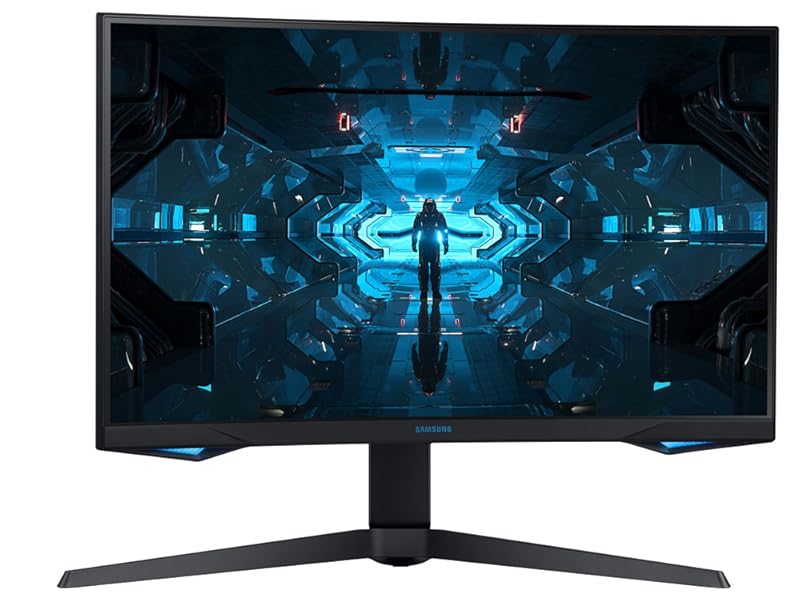
  • SAMSUNG 32” Odyssey G7 Series WQHD (2560x1440) Curved Gaming Monitor, 240Hz, 1ms, HDMI, G-Sync, FreeSync Premium Pro, LC32G75TQSNXZA

SAMSUNG 32” Odyssey G7 Series WQHD (2560x1440) Curved Gaming Monitor, 240Hz, 1ms, HDMI, G-Sync, FreeSync Premium Pro, LC32G75TQSNXZA

4.4 out of 5 stars (5,096)

Currently unavailable.
We don't know when or if this item will be back in stock.
Brief content visible, double tap to read full content.
Full content visible, double tap to read brief content.
Size: 32-inch
Style: QHD, 240Hz

About this item

  • UNMATCHED IMMERSION: Get your head in the game with Odyssey’s 1000R panel, which matches the curvature of the human eye for maximum immersion and minimal eye strain
  • WQHD RESOLUTION: Make your gaming world, more lifelike than ever before. Packing in 1. 7 times the pixel density of Full HD, WQHD resolution boasts incredibly detailed, pin-sharp images. Experience a fuller view with more space to take in all the action
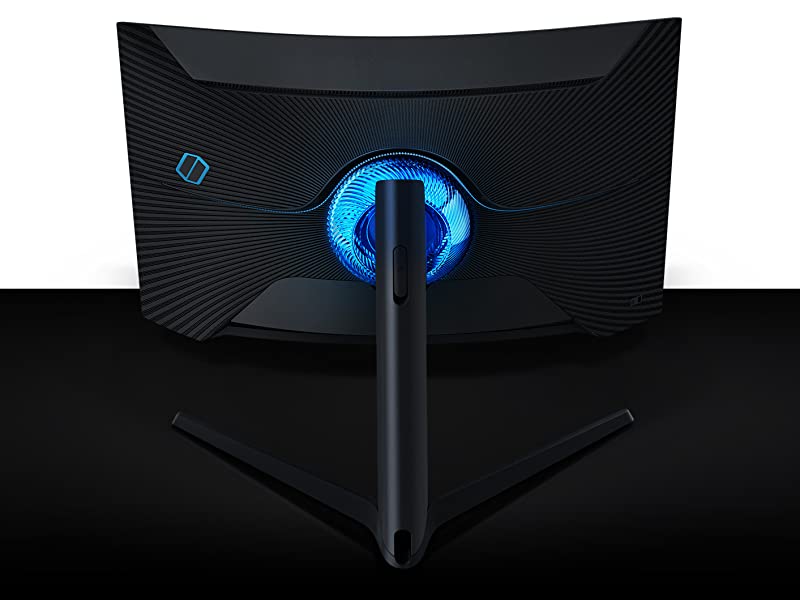
  • INFINITY CORE LIGHTING: Odyssey’s Infinity Core is a striking addition to any desktop, matching world firsts in technology, with stunning visual design
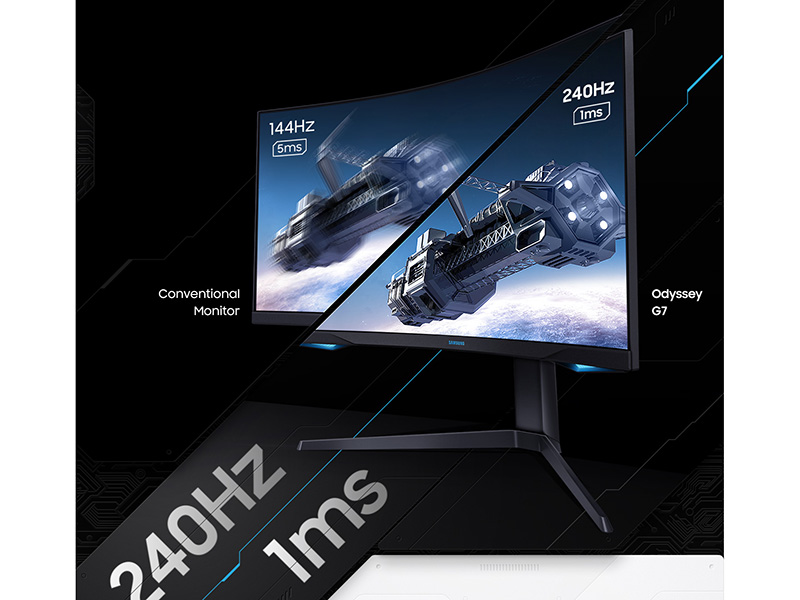
  • RAPID 240hz REFRESH RATE: Topping leaderboards never looked or felt so smooth. With Odyssey’s rapid 240hz refresh rate, you have up to four times as many frames displayed on screen every second compared to a traditional screen
  • LIGHTNING FAST 1MS RESPONSE TIMES: A fraction of a second can be the difference between your destruction, or your enemy’s; With Odyssey’s grey to grey 1ms response time, you can be sure that you’re receiving information as fast as technologically possible
  • NVIDIA G-SYNC & FREESYNC: Dropping frames means dropping chances to put your enemy in the dirt; With G-SYNC and FreeSync Premium Pro support, Odyssey matches every frame from your graphics card, so you’re never caught short from moment to moment
  • CUTTING EDGE QLED TECHNOLOGY: Utilizing Quantum Dot technology, Samsung QLED creates more vivid colors with 125% more color space compared to sRGB, ensuring the highest class of color reproduction
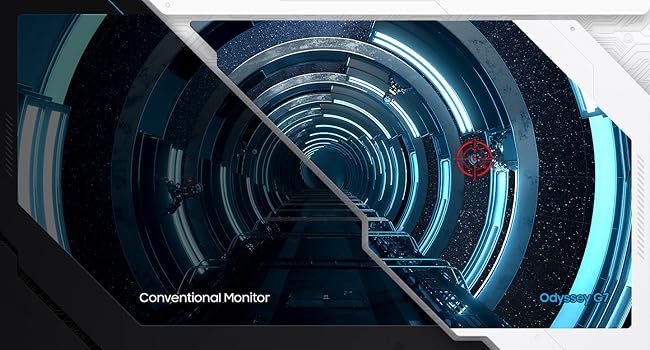
  • FIND HIDDEN DEPTH w/ HDR 600: From damp and dark corridors, to sunlit alien vistas, Odyssey’s HDR 600 brings incredible depth to the worlds you choose to explore, revealing the smallest hidden details so you don’t miss a thing
Sponsored

From the brand


From the manufacturer

Samsung Odyssey G7 Gaming Monitor
Introducing the G7

Samsung’s first QHD 27” and 32” 1000R curved gaming monitors

Bringing the same 240hz refresh rate, 1ms response times, G-Sync and FreeSync Premium Pro support and Infinity Core lighting of the G9 - the G7 is the perfect choice for those who want the future of gaming monitors, in a more traditional size.
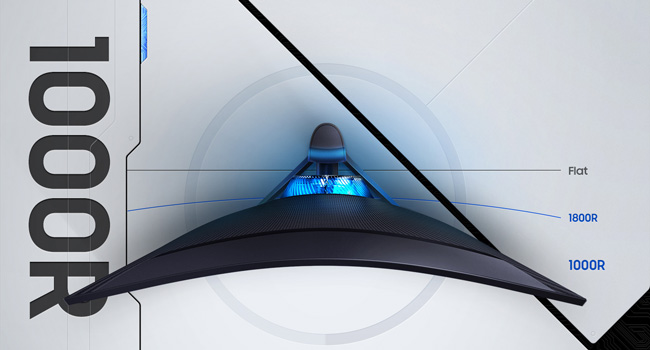
Top-down view of the Samsung G7

Unmatched Immersion

Get your head in the game with Odyssey’s 1000R panel, which matches the curvature of the human eye for maximum immersion and minimal eye strain.
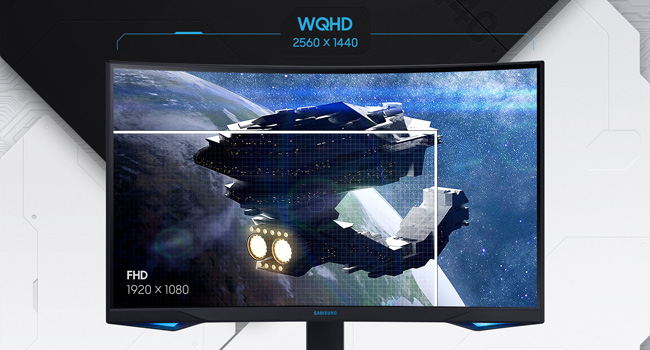
WGHD vs. FHD resolution

WQHD resolution

Make your gaming world, more lifelike than ever before. Packing in 1.7 times the pixel density of Full HD, WQHD resolution boasts incredibly detailed, pin-sharp images. Experience a fuller view with more space to take in all the action.

Illustration of how backlighting works with Quantum Dots

Cutting Edge QLED Technology

From deepest blacks to vivid colors, Samsung QLED ensures pixel perfect picture quality with every frame. Utilizing Quantum Dot technology, Samsung QLED creates more vivid colors with 125% more color space compared to sRGB, ensuring the highest class of color reproduction.

Level of details on a conventional monitor vs. Samsung Odyssey G7

Find Hidden Depth, with HDR 600

From damp and dark corridors, to sunlit alien vistas, Odyssey’s HDR 600 brings incredible depth to the worlds you choose to explore, revealing the smallest hidden details so you don’t miss a thing.

Light

Product information

Warranty & Support

Amazon.com Return Policy:You may return any new computer purchased from Amazon.com that is "dead on arrival," arrives in damaged condition, or is still in unopened boxes, for a full refund within 30 days of purchase. Amazon.com reserves the right to test "dead on arrival" returns and impose a customer fee equal to 15 percent of the product sales price if the customer misrepresents the condition of the product. Any returned computer that is damaged through customer misuse, is missing parts, or is in unsellable condition due to customer tampering will result in the customer being charged a higher restocking fee based on the condition of the product. Amazon.com will not accept returns of any desktop or notebook computer more than 30 days after you receive the shipment. New, used, and refurbished products purchased from Marketplace vendors are subject to the returns policy of the individual vendor.
Product Warranty: For warranty information about this product, please click here. [PDF ]

Feedback

SAMSUNG 32” Odyssey G7 Series WQHD (2560x1440) Curved Gaming Monitor, 240Hz, 1ms, HDMI, G-Sync, FreeSync Premium Pro, LC32G75TQSNXZA


Found a lower price? Let us know. Although we can't match every price reported, we'll use your feedback to ensure that our prices remain competitive.

Where did you see a lower price?

Price Availability
/
/
/
/
Please sign in to provide feedback.

Product Description

Get your head in the game with Samsung 32-inch Odyssey G7. Bringing the same 240Hz refresh rate, 1ms response times, G-Sync and FreeSync Premium Pro support, and Infinity Core lighting of the Odyssey G9 series, the G7 is the perfect choice for those who want the future of gaming monitors, in a more traditional size. Samsung Odyssey’s 1000R curved screen matches the curvature of the human eye for maximum immersion and minimal eye strain. With WQHD resolution, make your gaming world more lifelike than ever before. Packing in 1.7 times the pixel density of Full HD, experience a fuller view with more space to take in all the action alongside incredibly detailed images. NVIDIA G-SYNC and FreeSync Premium Pro support allow this curved gaming monitor to match every frame from your graphics card so that you’re never caught short from moment to moment. With Samsung Odyssey G7’s lightning-fast 1ms response times, you can be sure that you are receiving information as fast as technologically possible. Cutting edge QLED technology ensures pixel-perfect picture quality every time. Utilizing Quantum Dot technology, Samsung QLED creates more vivid colors with 125% more color space compared to sRGB, ensuring the highest class of color reproduction, while HDR 600 brings incredible depths to the worlds you choose to explore.

Product guides and documents

Safety and product resources

Safety documents

What's in the box

  • HDMI port
  • Top Brand: Samsung

    Highly Rated
    100K+ customers rate items from this brand highly
    Trending
    100K+ orders for this brand in past 3 months
    Low Returns
    Customers usually keep items from this brand
    Sponsored

    Customer reviews

    4.4 out of 5 stars
    5,096 global ratings
    Sponsored

    Customers say

    Customers find the monitor's appearance impressive, particularly at native 2k resolution at 240Hz, and appreciate its quality control and performance. The picture quality receives mixed feedback - while some praise the beautiful clarity, others report poor HDR performance. The curve feature gets mixed reactions, with some finding it extremely pleasing while others find it unnatural. The monitor's reliability and value for money are also mixed, with some reporting it works perfectly while others experience issues, and opinions vary on whether it's worth the price.
    AI Generated from the text of customer reviews

    Select to learn more

    579 customers mention quality control, 444 positive, 135 negative
    Customers find the monitor to be of excellent quality and recommend it.
    ...TL;DR great monitor, but motion clarity & backlight strobing is subpar in comparison to Asus. If you find a deal for as low as $500, do not hesitate.Read more
    I ordered this monitor believing that it would be amazing, and for the most part it was but any time a more solid color is on the screen it becomes...Read more
    This monitor was great when I bought it in 2022, now in 2024 my monitor is going to 90% black screen....Read more
    ...Very disappointed to say the least it’s never fun to have to deal with this. Edit: So I sent the monitor in to Samsung for a repair....Read more
    117 customers mention appearance, 104 positive, 13 negative
    Customers praise the monitor's appearance, particularly noting its beautiful visuals at native 2k resolution and 240Hz refresh rate.
    Got this monitor in January, have had no issues, it looks great and runs good but just noticed the screen is coming off of the bezel, as seen in the...Read more
    ...When on beautiful monitor. I wish I would have went with benq, save your hard earned money on this p.o.g.Read more
    So this monitor works great and looks amazing…when its functional everything was fine for about a year then about 15 days after the warranty expires...Read more
    Beautiful BUT ENCOUNTERED PROBLEMSRead more
    290 customers mention reliability, 113 positive, 177 negative
    Customers have mixed experiences with the monitor's reliability, with some reporting it worked perfectly right out of the box and was extremely pleased with its performance, while others mention it completely died on them.
    ...off during gaming sessions, making it incredibly frustrating and unreliable....Read more
    So this monitor works great and looks amazing…when its functional everything was fine for about a year then about 15 days after the warranty expires...Read more
    ...$700 for something that stopped working after a year.Read more
    I bought the monitor 16 months ago and it stopped working. The screen went black and I can't even use the menu to do anything....Read more
    262 customers mention picture quality, 172 positive, 90 negative
    Customers have mixed opinions about the monitor's picture quality, with some praising its beautiful clarity and good HDR, while others report poor HDR performance and issues with dead pixels.
    Most of the time, it's fine, great picture, etc. But sometimes, it will go dark for a second and come back with HDR off and a washed-out picture....Read more
    ...new, it had issues starting up when I turned on my computer and dead pixels. Replaced it promptly for what I actually ordered, a new monitor....Read more
    Love this monitor! The picture quality is great and the refresh rate is so much better for my eyes. I use it for work all day and for any games....Read more
    I finally have a monitor with great picture quality that does not blur or look washed out. The price is a little steep, but it was worth it....Read more
    192 customers mention value for money, 84 positive, 108 negative
    Customers have mixed opinions about the monitor's value for money, with some finding it worth the price while others feel it's not worth the cost.
    ...Not worth the money. I almost always choose Samsung but all my Samsung products seem to arrive malfunctioning or fail now....Read more
    ...I am glad I upgraded and Samsung did a great job on this monitor. Worth every penny. Next going to hook up a PS5 in the fall when it gets released.Read more
    ...Otherwise, I would be even more disgruntled with this expensive but non funtional monitor experience.Read more
    ...If you can get an Oled, get that. But this is for sure worth the money. I have an oled alongside this one, I’ve had the time of my life.Read more
    144 customers mention color, 97 positive, 47 negative
    Customers have mixed opinions about the monitor's color display, with some praising the great colors and beautiful visuals, while others report issues with dark colors appearing lighter and faint horizontal lines appearing over solid colors.
    ...VA panel I know of with little ghosting, reasonably bright HDR with deep blacks, and good response times....Read more
    ...monitor I came from a TN 240hz model and everything is better, the color, the brightness, the actual quality of the picture and the bezels are just...Read more
    Where do I begin? The screen bleed? The dim screen? The washed out colors? The single power button that controls every feature on this thing?...Read more
    The color quality and curvature of the screen lends itself very well for gaming, does a good job of displaying shades of black for shadows in dark...Read more
    122 customers mention curve, 83 positive, 39 negative
    Customers have mixed opinions about the monitor's curve, with some finding it extremely pleasing and creating a cinema-like experience, while others find it unnatural and take time to get used to.
    The curve is great.Blacks are awesome very customizable profile options. Only issue is the screen flickers are pretty annoying. (G-sync)Read more
    Great curved monitor. Try to purchase on sale. Samsung can be pricier than other models but worth it for longevity.Read more
    Random lag. Stuck on 1ms. Curved. Not good not worth the price. I'll stick to my benq zowie with Radeon super resolution.Read more
    I really love the size and curve of this monitor, but I have had to submit for a replacement twice because of dead pixels....Read more
    227 customers mention flickering, 29 positive, 198 negative
    Customers report issues with the monitor's flickering display, including black screens and G-Sync problems. One customer specifically mentions a black bar appearing on the left side of the screen.
    Between the scan lines, flickering, random disconnects, TERRIBLE hdr quality (the worst ive ever seen, shameful to even call it an hdr monitor)....Read more
    ...Pixels everywhere, signal lose, and black screen. Tried different cables and monitors and the issue was 100% the monitor. Had to ask for a refund....Read more
    ...White lines started to appear(see photo) followed by screen flickering. It flickered on and off about 100 times and then stopped working completely.Read more
    ...had a dead pixel on the lower right corner, 4th monitor had a stuck pixel which I fixed few times using a flicker screen technique, but the stuck...Read more
    Bright Monitor, with features your Graphics Card Can't Fully Use, Won't Fully Replace a Series 9 TV
    5 out of 5 stars
    Bright Monitor, with features your Graphics Card Can't Fully Use, Won't Fully Replace a Series 9 TV
    Let me start off with the one thing that stands out more than anything, the brightness and color accuracy, compared to their $500 28" 4K Monitor(Pic 1, Could be less, but that's what I paid for it 5 years ago, when 4K was still new), Red, Green, and Blue, all pop out like they should, not only would it be a suitable upgrade for everything except white on a Series 9 Samsung TV(Pic 3), which still looks much better than a standard monitor, everyone will be happy with this upgrade, but RGB rivaled my TV, even if the white was more washed out(As expected, 1000 Nits, versus 600) Keep in mind, to get the most out of your monitor, you have to use the Display Port, so Streamers may be a little screwed when it comes to HDR features, unless you're using an internal Elgato 4K60 Mk.2. Don't expect to get 1440p at 240hz, unless you own a 3090 dual SLI or you like to play on lower settings, however, if you don't mind playing games at 60HZ with everything cranked up, this monitor will do an amazing job at showing all of the action, still great to future proof as technology improves. It has 1 HDMI Port, 2 Display Ports(Do keep in mind most Graphics cards rely on Display Ports, and most graphics cards only have 1 HDMI, so more is only needed if you run multiple Elgato's in your system), a headphone jack, 2 USB Ports for charging things like speakers, headphones, updating the firmware(Have to use a flash drive), a PC In Port, and a Headphone Jack(Pic 2) If you snagged this monitor at $550 for Black Friday 2020, you got a deal, but even at $750 for the 32", it's worth every penny. Thinking about one day upgrading my older monitor on the right to a 27" just to keep the Odyssey quality going, but I might do that when they announce a new model of the G7. Samsung is known for using top quality products in their screens, and this is no exception.
    Thank you for your feedback
    Sorry, there was an error
    Sorry we couldn't load the review

    Top reviews from the United States

    • 5 out of 5 stars
      Lots of misinformation about this monitor; it's better than reviews lead you to believe
      Reviewed in the United States on November 13, 2021
      Brief content visible, double tap to read full content.
      Full content visible, double tap to read brief content.

      Mine shipped with firmware v1011, the latest as of August 2021. Reviews and information about the monitor suggested that in some instances, earlier firmware may actually perform better in some contexts, so I was a bit nervous about this at first.

      Here's the facts.

      Yes, the monitor has "scanlines" visible during certain test patterns. You've probably seen the links to lagom or a specific page on ASUS's website. This is an issue with pixel inversion, and to some degree, every LCD based monitor is going to have a test pattern of some kind that will result in a visible, unwelcome change to the displayed picture. This problem doesn't show up in real content. It is completely pointless to be upset about these artifacts, unless a significant sum of your time is spent staring at lagom or that one ASUS page specifically.

      What people are talking about much less frequently is that in addition to the "scanlines" you can see in these specific test patterns, there is a lesser "scanline" artifact that can crop up when displaying specific colors, especially larger sections of them. This can become noticeable to an artist that is working on a still image, but is scarcely noticeable in real content. THIS is an artifact of the panel being pushed to the absolute limits of what it's physically capable of. Artifacts like these tend to show themselves when a lot of power is being pushed through the panel - anyone that has used a Valve Index has probably noticed similar "scanlines" in certain situations. Again, hardly noticeable in real content, but I can't say it's entirely invisible like the pixel inversion issue described above.

      With adaptive sync and VRR control on, the pixel response time is fantastic across the entire refresh rate range, and there are no visible sudden shifts in gamma, or "screen flashing" when the framerate changes. To those extremely sensitive to judder, it's been stated that this makes VRR "not as smooth feeling" in a way that nobody can seemingly articulate. I _believe_ what is happening here is that a technique is being used to internally double or triple the refresh rate of the input to the highest possible value while staying under 240hz. This can result in a delay if a new frame is ready to be displayed before the doubled or tripled image is finished being scanned out to the panel. In theory, this can have a maximum judder penalty of 4.166~ms (1 second divided by the refresh rate, 240hz), but in practice, we can assume it's going to be an average of half of that, 2.083~, since there's no way to predict if the new frame is ready near the beginning or end of the scanout for the doubled/tripled refresh. I would say that the judder that VRR control can cause is real, but as someone that isn't particularly sensitive to it, it doesn't bother me. It often melts away and becomes imperceptible amongst other performance issues a game may have that result in engine halts that are longer than the average potential judder period with VRR control on.

      You can't adjust the pixel overdrive setting with adaptive sync ON and VRR control ON, however, it's tuned well so that low refresh rates appear as smooth as they can, without high levels of overshoot or ghosting. Whether they accomplished this with an actual variable overdrive engine (like you can see as standard on any monitor that has a Gsync module) or through internal conversions of the input refresh to the monitor's maximum refresh, i'm not sure. Looks great either way.

      The curve can be weird at times, but disappears in most real content. Notable exceptions to this may be side scrolling or 2d games, where the rigid, straight lines are more easily noticed as being bowed out. I would personally prefer the curve not be there, but it's a small penalty to pay for how good everything else about the monitor is.

      Overall: Top tier monitor for gamers (provided you don't care about backlight strobing modes, in which case, the included function for it on this monitor is garbage and shouldn't be used), but if your primary use case is to do professional image editing, or play 2D games, you may find that certain elements of the panel performance and curve are unsuitable or take too long to get used to in order to feel good about the purchase. For everyone else, it's fine and I considered this a definitive upgrade over prior monitors I've purchased (Viewsonic XG2431, Viewsonic XG270, ASUS PG279Q) for non-strobed gameplay. The added contrast of VA matched with a pixel response time performance that is overall faster than today's fastest IPS panels is fantastic to look at.

      Model purchased: Samsung 27" G7. Don't forget to filter your reviews to the specific model you're wanting information about so you can get a clearer picture of the exact item you're considering, as the reviews on the store page cover every selectable option, including other sizes or models that use different panels entirely.

      115 people found this helpful
      Sending feedback...
      Thank you for your feedback.
      Sending feedback...
      Thanks, we'll investigate in the next few days.

      We'll check if this review meets our community guidelinesOpens in a new tab. If it doesn't, we'll remove it.

    • 5 out of 5 stars
      Outstanding Monitor - Happy I Purchased
      Reviewed in the United States on March 11, 2021
      Brief content visible, double tap to read full content.
      Full content visible, double tap to read brief content.

      Like anyone else here, you're probably doing a ton of research and watching youtube reviews on this monitor. Seems like reviews from summer 2020 there were some issues that firmware have fixed. I purchased in Jan 2021 and updated to the latest firmware and this monitor is perfect.

      PROS

      -240hz is gorgeous and it's obviously why you are on this page looking at this monitor. There isn't a ton of competition in the 240hz 1440p market right now

      -VA panel is done very well by Samsung. VA panels have typically not been executed well by other manufactures, but Samsung has been doing VA panels with their TVs for a long time, so they have all the kinks worked out.

      -Color was great out of the box, minor tweaks made it perfect.

      -Curved screen helps me not "lose sight" of things in the corners and far edges of the screen. 27" is a big monitor, if you are going from a 24 or 25 to a 27, you will probably have a transition period going to 27 and the curve definitely makes a difference.

      -Zero issues with ghosting, the top review on Amazon says he had major issues but I have had zero on this monitor. I have had it on previous monitors, so I know what it is. He may have just gotten a bad monitor or firmware not update. Don't let that dissuade you from this monitor

      -Was on sale when I got this for $599 and used a ton of rewards on it as well. Good deal at the time for me.

      CONS

      -Curve is jarring for some people, it looks goofy, but loved it now almost two months later. Won't know until you try it. Free returns with Amazon, so worth a shot IMO.

      -HDR is supposedly not bright enough for some people? I didn't have that issue but most of my games are not HDR, so this was a non-issue for me.

      -Firmware NEEDS to be updated before using.

      -Price? I don't know, that is obviously relative. Gaming and technology are my main hobbies, I will happily spend money on them.

      -Back panel cover is flimsy, some people broke it by not being careful. I knew that going in, so wasn't an issue.

      -VA isn't IPS? I had no complains with my picture quality or performance whatsoever.

      COMPUTER USED

      i9-10850k @ 5.0

      RTX 3090 Evga XC3

      Corsair Hydro X cooling

      32gb 3600mhz

      All ssds are M.2 NVMe

      GAMES PLAYED

      -CSGO - main game, noticeable difference between 144hz and 240hz, very very smooth.

      -PUBG - game is still clunky as hell, but getting ~200fps makes it feel slightly better lol.

      -CoD Cold War + Warzone - feels buttery smooth running at 240fps consistently at competitively high settings

      ALTERNATIVES (prices as of 3/11/21)

      -Samsung G7 in 32" at $798 - it is the same monitor but just bigger, so the 1440p will be blurrier. My sweet-spot is 27" and want the same size to match my secondary monitor

      -Samsung G9 in 49" at $1400 - this really isn't comparable as it is twice the price and it's unbelievably ultrawide. A very niche product IMO. I have a 34" Ultrawide 1440p monitor at work and I love it, but I cannot imagine something this big. I have a powerful computer and I don't see the point of running like a flight sim on this as my 3090 is no where close to maxing out frame rate.

      -Dell Alienware AW2721D at $767 - this was my only really competitor that I was considering. It basically had all the specs that I wanted, the difference being IPS vs VA and Curved vs Non-curved. The main factor was timing and the Dell was $200 more expensive than the G7 on the time of my purchase, so I went with the G7. I have been a big fan of Dell monitors for a long time (work, gaming and personal use). I was replacing a 1440p 144hz Dell TN panel monitor I got on Amazon warehouse used for a great price many years ago. It is now my secondary monitor.

      -HP Omen X 27" at $609 - TN panel was not in the cards, I wanted to upgrade to either VA or IPS for this price point. People also complained about the VESA mount (requirement for me) and the matte on the screen. I also HATED the look of the bottom bezel area.

      OTHER NOTES

      Two months in, I love this monitor and I have no regrets whatsoever. Sorry if the review is all over the place, hopefully still helpful to some in deciding their next upgrade.

      Turn your g-sync on, read the blurbusters article if necessary on it. If you are gonna spend the money on a nice monitor, use it to the full extent.

      -G-Sync On in Nvidia control panel (both full screen and window mode)

      -V-Sync On in Nvidia control panel

      -V-sync Off in game settings

      -Cap FPS 1-3 fps below monitor max refresh (237 in this case)

      80 people found this helpful
      Sending feedback...
      Thank you for your feedback.
      Sending feedback...
      Thanks, we'll investigate in the next few days.

      We'll check if this review meets our community guidelinesOpens in a new tab. If it doesn't, we'll remove it.

    • 5 out of 5 stars
      This monitor is great
      Reviewed in the United States on June 29, 2022
      Brief content visible, double tap to read full content.
      Full content visible, double tap to read brief content.

      I've been using this for a little over a week now and it's been an awesome experience. The monitor I wanted to replace is an LG 32gk650f. That monitor is pretty nice, really good color and dark blacks with no backlight bleed. The image was perfect if you are looking at a still image, but any motion just smeared like crazy unless there was no black color in the scene. The 144hz refresh was pointless as anything over 75fps looked like I had a motion blur setting cranked. This definitely wasn't a good monitor if you enjoy horror games. It would also flicker on some loading screens when using Gsync.

      This G7 is better in every way. The color is great, the black is black. There is some backlight bleed that is pretty noticeable in dark loading screens if it's something like all black background with a bright loading icon/text, but in game it's completely unnoticeable. It's still way better than IPS glow, because it's not permanent, it's gonna go away when the content on screen changes. That's only with local dimming for HDR enabled anyway. I leave it on because even though it's not HDR10, it still looks really good. With adaptive sync on there is no smearing or blur that I can see at any refresh rate. I don't have any problems with a curved screen, it really didn't feel any different compared to a flat screen and everything looks normal. There is no flickering at all, and no dead/stuck pixels.

      I'm really happy with it, definitely the best monitor I've owned. I don't know if the stand is any good, it never left the box. I use monitor arm mounts so I can push it back farther than is possible with a stand on the desk.

      2 people found this helpful
      Sending feedback...
      Thank you for your feedback.
      Sending feedback...
      Thanks, we'll investigate in the next few days.

      We'll check if this review meets our community guidelinesOpens in a new tab. If it doesn't, we'll remove it.

    • 5 out of 5 stars
      Quality and powerful
      Reviewed in the United States on July 25, 2023
      Brief content visible, double tap to read full content.
      Full content visible, double tap to read brief content.

      This screen is amazing. I should say I am running a 30 series graphics card in my computer and if you do not have something that can handle the full resolution and refresh rate you will not enjoy this monitor to it's full extent.

      I have been using this for quite some time now and can say that it is a very smooth image (with a game that has higher refresh rates) and great picture quality. The larger screen was daunting at first but after playing with it for maybe 2 or 3 weeks you sort of get used to it.

      To cover different parts of the monitor I will start with the fact that the one I got had a minor issue with the button on the bottom of the monitor which apparently happens to a few people. This is like a minor inconvenience because I have to just move the button twice to make it work so it's annoying but once you have the settings where you want you don't need to change it so I guess it's fine. Other than that nothing wrong physically with the monitor.

      The stand is smaller than other monitors I have had (Asus brand) which have huge stands. Nothing against that other than losing desk space but the stand on this Samsung one is smaller and very sturdy. It holds the thing with no issues and gives me more space on my desk.

      The image quality is what you would expect from a decent 2K monitor with a high refresh rate. I don't go into all the little details like some may because if it works and doesn't look bad then why be picky over the tiny little space man who has some image tearing at high refresh rates. Watching movies is satisfying on this because it's a larger screen and you can enjoy them with that nice curve. My only issue with the quality is not much online content is quite there with the resolution yet. Gaming has been so much fun on this compared to my last 27 inch monitor because 32 is crazy when you first get it. But after that adjustment time I don't see how I can go back to the 27 inch monitor and be as immersed in the game.

      Overall if you can snag this monitor on one of it's sales where it's below 600 then it's worth it for sure. I would not have paid over that price for it personally but when it dropped down on sale I had to.

      10 people found this helpful
      Sending feedback...
      Thank you for your feedback.
      Sending feedback...
      Thanks, we'll investigate in the next few days.

      We'll check if this review meets our community guidelinesOpens in a new tab. If it doesn't, we'll remove it.

    • 4 out of 5 stars
      Very nice monitor but with some issues that some may find irritating
      Reviewed in the United States on November 29, 2023
      Brief content visible, double tap to read full content.
      Full content visible, double tap to read brief content.

      To start off, I almost returned this because I thought I received a faulty monitor. Because if the fps doesn't match the refresh rate of the monitor when you're gaming for instance, then the monitor will do some sort of micro flicker. It looks like rapid white flickers in certain areas of the screen depending what game you're playing. Also it seem like my monitor would just crash and leave a grey screen. After doing some research, I had to do something called mpo disable which solved that problem. I still get the flicker time to time, but it's not so bad to the point that I can't deal with it. It happens to VA monitors because the fps of the game and the refresh rate of the screen isn't matched up. I believe if I get a better gpu that can push out more frames would solve most if not all of the flicker issues.

      Overall it's a solid monitor with some issues. If you have top end specs, then maybe you won't have the issues that I had. I'm using an older computer that can't push out the frames to match this monitor. But i wish that would never be an issue regardless. So I wouldn't recommend this at its regular price because of those issues. But if it's on sale then maybe. Personally I won't ever get another VA monitor again. But the screen is clear and watching movies on it is beautiful.

      2 people found this helpful
      Sending feedback...
      Thank you for your feedback.
      Sending feedback...
      Thanks, we'll investigate in the next few days.

      We'll check if this review meets our community guidelinesOpens in a new tab. If it doesn't, we'll remove it.

    • 1 out of 5 stars
      After 3 service attempts I can easily say... Do Not Buy This Monitor
      Reviewed in the United States on August 3, 2021
      Brief content visible, double tap to read full content.
      Full content visible, double tap to read brief content.

      I bought the 32inch version in May thinking it would be the best of the best. Turns out Samsung does NO QA on this product at all, and the process for supporting the monitor and fixing the issue does not exist.

      The common problem for this monitor is that is fails an inversion (pixel-walk) test at its rated setting (240 hertz) and needs to be turned to a lower setting like 144hertz (or lower) to have a normal picture. In the multiple attempts to service this monitor, all of them had this issue. I also ran into one instance of screen flickering.

      The impact of it failing a pixel inversion test is that it will struggles with certain images, For example if there is a blue gradient it will produce CRT like scan lines. This is not the only scenario that will cause this to happen.

      Starting with the first Monitor, It had pixel inversion problems at all refresh rates. I called up Samsung and they said to send it in. They did not provide me with a box, only the shipping label, and I had to pay about $100 (in packaging) to have it shipped via UPS. They received it, and it got damaged in shipping. Samsung wanted $150 to repair it. However after a call to their service department, they waved the repair fee.

      After the first repair it STILL had issues with pixel inversion, at all refresh rates. So I sent it in again. Luckily I kept the box this time. I'm left monitor-less for about 2 weeks, because they didn't have the part to repair it.

      After the second repair, it is able to run at 240 hertz with no pixel inversion... for about 1 week, then it started happening again. I was so drained from the service process that I set it to 144 hertz, and said screw it, I can live with it. Then I started to notice issues with the screen flickering in dark scenes.

      About 1 month later Samsung started blowing up(texting me multiple times and calling twice) my phone saying I needed to send in the monitor. I had not asked for another service... I called to make sure it was legit, and they informed me that they have a replacement for me and I need to send it in so they can ship me a brand new one.

      So I sent it in. Little did I know this would be the worst part. I sent it in July 18th. I receive a message from Samsung on my phone July 19th saying the repair center has received the monitor. But don't hear back from them for a week and a half. I call into their service department, and they tell me they haven't received it yet. I ask them to expedite the issue as I had to move August 1st. They say they will.

      It was now August 2nd, I haven't heard back, and I have moved. I call again, cause I need to update my address... They still don't have it. I politely ask to speak to one of their supervisors. The supervisor calls back several hours later and I tell him the whole ordeal. He informs me that they will just issue a refund... So in the end, I did not receive a working monitor, wasted about $100 dollars of my own money, and dozens of active hours trying to fix this, along with months of not having a monitor.

      This monitor should be recalled. If you check the internet, tons of people are having this issue. If this worked as advertised then this would be a great monitor. As it stands I can NOT recommended this, also I would not recommend Samsung at all after the multiple failed attempts to get this fixed. I can understand some monitors having issues and needing to be serviced, that will happen, but if you do not QA your own repairs, whats the point?

      TLDR: Samsung Failed to provide me with a working monitor after 4 attempts, (between the initial purchase, multiple repairs and replacement) They left me monitor-less for about 2 months total, cost me $100, wasted dozens of hours of my time, and they just gave up on trying to get me a working monitor and issued a refund. DO NOT BUY.

      Update:

      After not hearing back from Samsung for over a week, I called their support again, they informed me that it was going to be a week out for a replacement, which was odd as I was told by the last rep, that I was going to be getting a refund, the Rep lets me know that a refund would take 2-3 weeks starting today. I ask to talk to a higher up and they tell me the same thing. I wanted a refund, so the started the process, they proceed to keep me on the phone for 30 minutes to "generate a ticket number".

      Added screenshots to show issue at 240 Hertz (also a screenshot of it not showing the problem at 144 hertz) that I experienced after all of Samsung's attempts to fix the issue.

      Total Number so far.

      Time to resolution for the issue: Still pending currently 3 months

      Total Time on the phone with Samsung support: 3 Hours 46 minutes

      Attempts to fix/replace: 4

      Money spent on shipping: $80

      After 3 service attempts I can easily say... Do Not Buy This Monitor
      After 3 service attempts I can easily say... Do Not Buy This Monitor

      I bought the 32inch version in May thinking it would be the best of the best. Turns out Samsung does NO QA on this product at all, and the process for supporting the monitor and fixing the issue does not exist.

      The common problem for this monitor is that is fails an inversion (pixel-walk) test at its rated setting (240 hertz) and needs to be turned to a lower setting like 144hertz (or lower) to have a normal picture. In the multiple attempts to service this monitor, all of them had this issue. I also ran into one instance of screen flickering.

      The impact of it failing a pixel inversion test is that it will struggles with certain images, For example if there is a blue gradient it will produce CRT like scan lines. This is not the only scenario that will cause this to happen.

      Starting with the first Monitor, It had pixel inversion problems at all refresh rates. I called up Samsung and they said to send it in. They did not provide me with a box, only the shipping label, and I had to pay about $100 (in packaging) to have it shipped via UPS. They received it, and it got damaged in shipping. Samsung wanted $150 to repair it. However after a call to their service department, they waved the repair fee.

      After the first repair it STILL had issues with pixel inversion, at all refresh rates. So I sent it in again. Luckily I kept the box this time. I'm left monitor-less for about 2 weeks, because they didn't have the part to repair it.

      After the second repair, it is able to run at 240 hertz with no pixel inversion... for about 1 week, then it started happening again. I was so drained from the service process that I set it to 144 hertz, and said screw it, I can live with it. Then I started to notice issues with the screen flickering in dark scenes.

      About 1 month later Samsung started blowing up(texting me multiple times and calling twice) my phone saying I needed to send in the monitor. I had not asked for another service... I called to make sure it was legit, and they informed me that they have a replacement for me and I need to send it in so they can ship me a brand new one.

      So I sent it in. Little did I know this would be the worst part. I sent it in July 18th. I receive a message from Samsung on my phone July 19th saying the repair center has received the monitor. But don't hear back from them for a week and a half. I call into their service department, and they tell me they haven't received it yet. I ask them to expedite the issue as I had to move August 1st. They say they will.

      It was now August 2nd, I haven't heard back, and I have moved. I call again, cause I need to update my address... They still don't have it. I politely ask to speak to one of their supervisors. The supervisor calls back several hours later and I tell him the whole ordeal. He informs me that they will just issue a refund... So in the end, I did not receive a working monitor, wasted about $100 dollars of my own money, and dozens of active hours trying to fix this, along with months of not having a monitor.

      This monitor should be recalled. If you check the internet, tons of people are having this issue. If this worked as advertised then this would be a great monitor. As it stands I can NOT recommended this, also I would not recommend Samsung at all after the multiple failed attempts to get this fixed. I can understand some monitors having issues and needing to be serviced, that will happen, but if you do not QA your own repairs, whats the point?

      TLDR: Samsung Failed to provide me with a working monitor after 4 attempts, (between the initial purchase, multiple repairs and replacement) They left me monitor-less for about 2 months total, cost me $100, wasted dozens of hours of my time, and they just gave up on trying to get me a working monitor and issued a refund. DO NOT BUY.

      Update:

      After not hearing back from Samsung for over a week, I called their support again, they informed me that it was going to be a week out for a replacement, which was odd as I was told by the last rep, that I was going to be getting a refund, the Rep lets me know that a refund would take 2-3 weeks starting today. I ask to talk to a higher up and they tell me the same thing. I wanted a refund, so the started the process, they proceed to keep me on the phone for 30 minutes to "generate a ticket number".

      Added screenshots to show issue at 240 Hertz (also a screenshot of it not showing the problem at 144 hertz) that I experienced after all of Samsung's attempts to fix the issue.

      Total Number so far.

      Time to resolution for the issue: Still pending currently 3 months

      Total Time on the phone with Samsung support: 3 Hours 46 minutes

      Attempts to fix/replace: 4

      Money spent on shipping: $80

      59 people found this helpful
      Sending feedback...
      Thank you for your feedback.
      Sending feedback...
      Thanks, we'll investigate in the next few days.

      We'll check if this review meets our community guidelinesOpens in a new tab. If it doesn't, we'll remove it.

    • 5 out of 5 stars
      Great monitor. Good HDR
      Reviewed in the United States on August 22, 2020
      Brief content visible, double tap to read full content.
      Full content visible, double tap to read brief content.

      I bought this because I needed a monitor as I only had a cheap 4k TV with HDR I bought years ago. I was lucky to buy an open box one for cheaper as the day I was going to buy it, the price rose by $50 for brand new. I mainly play competitive games while also cinematic single player games, other than that I usually just read or watch videos on youtube. So far I am loving this monitor, it has good contrast similar to my TV while also having good HDR. The resolution difference from 4k to 1440p is somewhat noticeable but it's not a big difference to where I wouldn't want a 1440p monitor. I don't have any flickering issue with VRR as I have an AMD gpu, but I do see some light flicker when I have MBR on where it's flickering depending on when whenever I am switching from a dark picture or a lighter picture. It's not noticeable to me unless I'm actually trying to notice it so it's not a problem for me. I choose to have freesync on rather than MBR as I rather have brighter white and darker blacks. You can only choose one or the other. When it comes to color, brightness and contrast I have it adjusted to the way I like using the AMD display software and adjust it using a HDR video on youtube.

      There is some backlight bleed which I knew would be there but it's not too bad where my experiences are ruined. Just like the MBR flickering for me, it's only noticeable when I'm only trying to look for it. I'm not going to just stare at a fully black image the whole time. Luckily my monitor has no dead pixels which I am happy for.

      When it comes to refresh rate, I have never played on anything higher than 60hz my whole life until I got this monitor. Everything feels way smoother, whether it be scrolling up and down on Chrome or playing competitive games. Also I notice that it feels more accurate aiming where I can adjust my aim more easy. My reaction also feels more faster while my score also increased in aimlab. When it comes to the curve, I feel like it helps me aim where I can use my peripheral vision more better in aiming.

      My only cons would be if my GPU crashes, the contrast would be overshooting so much where there would be too much bright whites everywhere. To fix this I just have to restart my PC.

      Sending feedback...
      Thank you for your feedback.
      Sending feedback...
      Thanks, we'll investigate in the next few days.

      We'll check if this review meets our community guidelinesOpens in a new tab. If it doesn't, we'll remove it.

    • 5 out of 5 stars
      I would have to say this is one of the best monitors I have ever owned!
      Reviewed in the United States on August 9, 2020
      Brief content visible, double tap to read full content.
      Full content visible, double tap to read brief content.

      This monitor is fast connected to a Macbook Pro 16 running in both Big Sur and Bootcamp this monitor rocks. Picture quality is amazing. Size is just right. I had a LG 43in monitor for 4 years and it was ok. It was to big for a desktop and would only do 60 hz and a lower frame rate. This display is the perfect site. I was going to get the ultra wide but changed my mind for a couple of reasons. 1. There were have so technical problems with it and it was hard to get. 2. most video games for both the PC and lets say a PS5 are only doing 16x9 so you get black bars on the side of the display. I always play or work in a lower light room so the brightness is bright enough. 3. OLED are back to 43in in size and have a can burn in images on the screen. The QLED is very good. Blacks look black and are fine for game playing and computer work. If I want to watch video, I watch it on my 65in TV in the front room. I really like the curve and it draws your eyes into the monitor but it is not to big so you can see game information that sit on the side very easily without moving your head which you have to do with a wide monitor.

      I am glad I upgraded and Samsung did a great job on this monitor. Worth every penny. Next going to hook up a PS5 in the fall when it gets released.

      3 people found this helpful
      Sending feedback...
      Thank you for your feedback.
      Sending feedback...
      Thanks, we'll investigate in the next few days.

      We'll check if this review meets our community guidelinesOpens in a new tab. If it doesn't, we'll remove it.

    Top reviews from other countries

      Translated by Amazon
      See original
    • 1 out of 5 stars
      Spoiled less than 2 years later- Unit from CHINA
      Reviewed in Singapore on June 27, 2024
      Brief content visible, double tap to read full content.
      Full content visible, double tap to read brief content.

      Bought this monitor near the end of 2022, as of June 2024, its not working anymore. Worse of all, when we tried to get it repaired with Samsung, they said this is not covered by warranty as this unit is from China. It's pretty much a scam since its saying its fulfilled by Amazon US, but the warranty is not covered by US but China.

      Sending feedback...
      Thanks, we'll investigate in the next few days.

      We'll check if this review meets our community guidelinesOpens in a new tab. If it doesn't, we'll remove it.

    • 5 out of 5 stars
      Premium Monitor for a Premium Price
      Reviewed in Canada on February 25, 2021
      Brief content visible, double tap to read full content.
      Full content visible, double tap to read brief content.

      32 inch. Had to get the first replaced due to some dead pixels right in the middle - so can confirm the QC is not great. Samsung's return policy for dead pixels is god awful but thank god Amazon has a great return policy - thank you Amazon!

      HOWEVER I just got the replacement and it is perfect. By far the best monitor I have ever used. In summary:

      - No dead pixels.

      - Almost non-existent light bleed.

      - Almost zero ghosting out of the box.

      - I don't care about GSync so didn't test it. Games I play I cannot hit 240FPS so screen tearing doesn't happen.

      - I do not have a good eye for colors or calibration but it is the best out of box I've see. Vibrant to my eye.

      - Curve is strong but I LOVE it. I always game in the same spot so viewing angles is perfect and as a VR gamer immersion is huge for me and this curve is just fantastic for it. Takes a few days to get used to though. Could see some people thinking it is too much.

      - Cost is a little crazy but given the almost complete lack of flaws I've seen on every other single monitor I've ever owned it is hard to argue with if you have spare cash

      TLDR: This feels, looks and acts like a premium gaming monitor BUT it is crazy expensive. Buy it if you have the money burning a hole in your pocket.

      Sending feedback...
      Thanks, we'll investigate in the next few days.

      We'll check if this review meets our community guidelinesOpens in a new tab. If it doesn't, we'll remove it.

    • 5 out of 5 stars
      Excellent product
      Reviewed in the United Arab Emirates on April 21, 2022
      Brief content visible, double tap to read full content.
      Full content visible, double tap to read brief content.

      We use it at home for gaming. It hi grad screen. Highly recommend it.

      Sending feedback...
      Thanks, we'll investigate in the next few days.

      We'll check if this review meets our community guidelinesOpens in a new tab. If it doesn't, we'll remove it.

    • 5 out of 5 stars
      Perfecto para todo
      Reviewed in Mexico on January 4, 2023
      Brief content visible, double tap to read full content.
      Full content visible, double tap to read brief content.

      Tenia y instalado un monitor VA 2k 144hz, y quise probar con este, se nota la diferencia, la localidad de imagen y monitor es otro nivel, el único "pero" es la diferencia de color, pero esto por el tipo de panel, aunque no es nada malo, por cierto aquí el ghosting no existe 😊

      Actualización: Sigue siendo perfecto! Solo tener en cuenta tener una gráfica pasable para aprovechar el 2k y llegar a los 240hz si se usa para juegos

      Perfecto para todo
      Perfecto para todo
      5 out of 5 stars
      Perfecto para todo
      Reviewed in Mexico on January 4, 2023

      Tenia y instalado un monitor VA 2k 144hz, y quise probar con este, se nota la diferencia, la localidad de imagen y monitor es otro nivel, el único "pero" es la diferencia de color, pero esto por el tipo de panel, aunque no es nada malo, por cierto aquí el ghosting no existe 😊

      Actualización: Sigue siendo perfecto! Solo tener en cuenta tener una gráfica pasable para aprovechar el 2k y llegar a los 240hz si se usa para juegos

      Sending feedback...
      Thanks, we'll investigate in the next few days.

      We'll check if this review meets our community guidelinesOpens in a new tab. If it doesn't, we'll remove it.

      Translated from Spanish by Amazon
      See original
    • 1 out of 5 stars
      super
      Reviewed in Saudi Arabia on March 24, 2024
      Brief content visible, double tap to read full content.
      Full content visible, double tap to read brief content.
      Sending feedback...
      Thanks, we'll investigate in the next few days.

      We'll check if this review meets our community guidelinesOpens in a new tab. If it doesn't, we'll remove it.

    Sponsored